#RSAC
SESSION ID:
James Carder Jessica Hebenstreit
Modern Approach to Incident
Response: Automated Response
Architecture
ANF-T10
Senior Manager, Security Informatics
Mayo Clinic
@secitup
Director, Security Informatics
Mayo Clinic
@carderjames
#RSAC
2
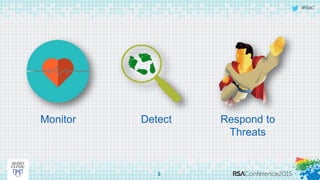
Monitor Detect Respond to
Threats
#RSAC
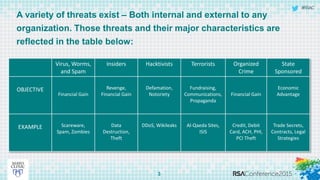
A variety of threats exist – Both internal and external to any
organization. Those threats and their major characteristics are
reflected in the table below:
3
Virus, Worms,
and Spam
Insiders Hacktivists Terrorists Organized
Crime
State
Sponsored
OBJECTIVE
Financial Gain
Revenge,
Financial Gain
Defamation,
Notoriety
Fundraising,
Communications,
Propaganda
Financial Gain
Economic
Advantage
EXAMPLE Scareware,
Spam, Zombies
Data
Destruction,
Theft
DDoS, Wikileaks Al-Qaeda Sites,
ISIS
Credit, Debit
Card, ACH, PHI,
PCI Theft
Trade Secrets,
Contracts, Legal
Strategies
#RSAC
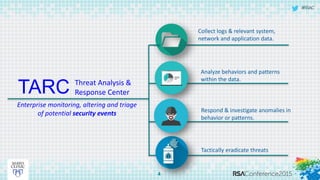
TARC
4
Threat Analysis &
Response Center
Enterprise monitoring, altering and triage
of potential security events
Collect logs & relevant system,
network and application data.
Analyze behaviors and patterns
within the data.
Respond & investigate anomalies in
behavior or patterns.
Tactically eradicate threats
#RSAC
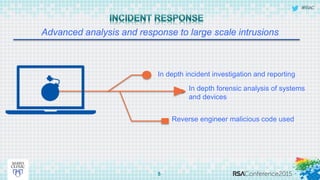
Advanced analysis and response to large scale intrusions
5
In depth incident investigation and reporting
In depth forensic analysis of systems
and devices
Reverse engineer malicious code used
#RSAC
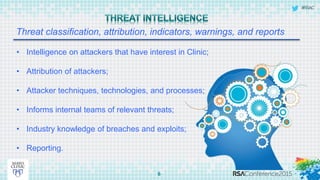
Threat classification, attribution, indicators, warnings, and reports
6
• Intelligence on attackers that have interest in Clinic;
• Attribution of attackers;
• Attacker techniques, technologies, and processes;
• Informs internal teams of relevant threats;
• Industry knowledge of breaches and exploits;
• Reporting.
#RSAC
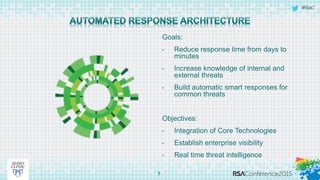
Goals:
• Reduce response time from days to
minutes
• Increase knowledge of internal and
external threats
• Build automatic smart responses for
common threats
Objectives:
• Integration of Core Technologies
• Establish enterprise visibility
• Real time threat intelligence
7
#RSAC
8
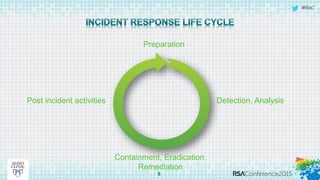
Preparation
Detection, Analysis
Containment, Eradication,
Remediation
Post incident activities
#RSAC
9
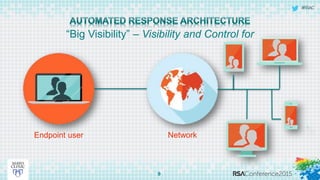
“Big Visibility” – Visibility and Control for
NetworkEndpoint user
#RSAC
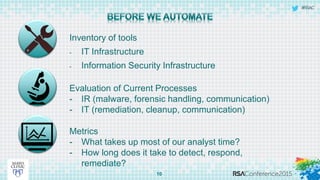
Inventory of tools
- IT Infrastructure
- Information Security Infrastructure
10
Evaluation of Current Processes
- IR (malware, forensic handling, communication)
- IT (remediation, cleanup, communication)
Metrics
- What takes up most of our analyst time?
- How long does it take to detect, respond,
remediate?
#RSAC
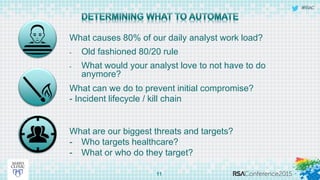
What causes 80% of our daily analyst work load?
- Old fashioned 80/20 rule
- What would your analyst love to not have to do
anymore?
11
What can we do to prevent initial compromise?
- Incident lifecycle / kill chain
What are our biggest threats and targets?
- Who targets healthcare?
- What or who do they target?
#RSAC
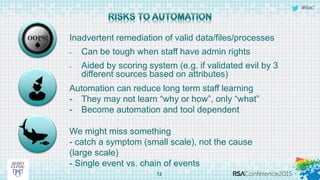
Inadvertent remediation of valid data/files/processes
- Can be tough when staff have admin rights
- Aided by scoring system (e.g. if validated evil by 3
different sources based on attributes)
12
Automation can reduce long term staff learning
- They may not learn “why or how”, only “what”
- Become automation and tool dependent
We might miss something
- catch a symptom (small scale), not the cause
(large scale)
- Single event vs. chain of events
#RSAC
13
USE CASES
#RSAC
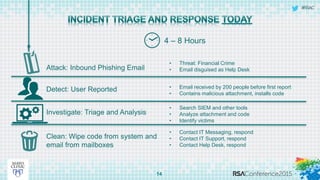
14
4 – 8 Hours
Investigate: Triage and Analysis
Clean: Wipe code from system and
email from mailboxes
Detect: User Reported
Attack: Inbound Phishing Email
• Threat: Financial Crime
• Email disguised as Help Desk
• Email received by 200 people before first report
• Contains malicious attachment, installs code
• Search SIEM and other tools
• Analyze attachment and code
• Identify victims
• Contact IT Messaging, respond
• Contact IT Support, respond
• Contact Help Desk, respond
#RSAC
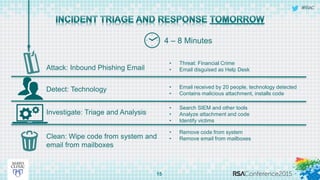
15
4 – 8 Minutes
Investigate: Triage and Analysis
Clean: Wipe code from system and
email from mailboxes
Detect: Technology
Attack: Inbound Phishing Email
• Threat: Financial Crime
• Email disguised as Help Desk
• Email received by 20 people, technology detected
• Contains malicious attachment, installs code
• Search SIEM and other tools
• Analyze attachment and code
• Identify victims
• Remove code from system
• Remove email from mailboxes
#RSAC
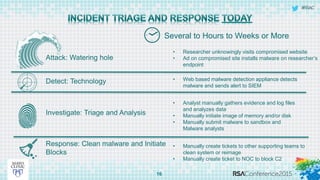
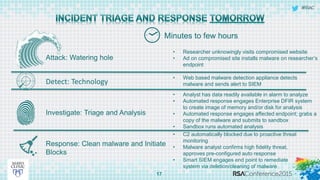
Attack: Watering hole
16
Several to Hours to Weeks or More
Detect: Technology
Investigate: Triage and Analysis
Response: Clean malware and Initiate
Blocks
• Researcher unknowingly visits compromised website
• Ad on compromised site installs malware on researcher’s
endpoint
• Web based malware detection appliance detects
malware and sends alert to SIEM
• Analyst manually gathers evidence and log files
and analyzes data
• Manually initiate image of memory and/or disk
• Manually submit malware to sandbox and
Malware analysts
• Manually create tickets to other supporting teams to
clean system or reimage
• Manually create ticket to NOC to block C2
#RSAC
Attack: Watering hole
17
Minutes to few hours
Detect: Technology
Investigate: Triage and Analysis
Response: Clean malware and Initiate
Blocks
• Researcher unknowingly visits compromised website
• Ad on compromised site installs malware on researcher’s
endpoint
• Web based malware detection appliance detects
malware and sends alert to SIEM
• Analyst has data readily available in alarm to analyze
• Automated response engages Enterprise DFIR system
to create image of memory and/or disk for analysis
• Automated response engages affected endpoint; grabs a
copy of the malware and submits to sandbox
• Sandbox runs automated analysis
• C2 automatically blocked due to proactive threat
monitoring
• Malware analyst confirms high fidelity threat,
approves pre-configured auto response
• Smart SIEM engages end point to remediate
system via deletion/cleaning of malware
#RSAC
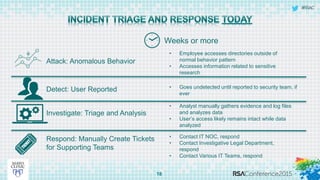
18
Weeks or more
Investigate: Triage and Analysis
Respond: Manually Create Tickets
for Supporting Teams
Detect: User Reported
Attack: Anomalous Behavior
• Employee accesses directories outside of
normal behavior pattern
• Accesses information related to sensitive
research
• Goes undetected until reported to security team, if
ever
• Analyst manually gathers evidence and log files
and analyzes data
• User’s access likely remains intact while data
analyzed
• Contact IT NOC, respond
• Contact Investigative Legal Department,
respond
• Contact Various IT Teams, respond
#RSAC
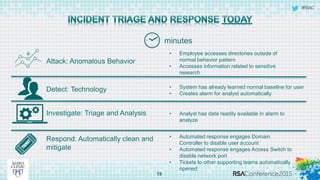
19
minutes
Investigate: Triage and Analysis
Respond: Automatically clean and
mitigate
Detect: Technology
Attack: Anomalous Behavior
• Employee accesses directories outside of
normal behavior pattern
• Accesses information related to sensitive
research
• System has already learned normal baseline for user
• Creates alarm for analyst automatically
• Analyst has data readily available in alarm to
analyze
• Automated response engages Domain
Controller to disable user account
• Automated response engages Access Switch to
disable network port
• Tickets to other supporting teams automatically
opened
#RSAC
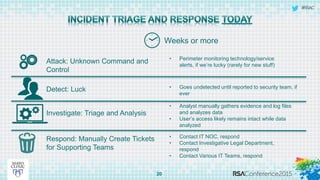
20
Weeks or more
Investigate: Triage and Analysis
Respond: Manually Create Tickets
for Supporting Teams
Detect: Luck
Attack: Unknown Command and
Control
• Perimeter monitoring technology/service
alerts, if we’re lucky (rarely for new stuff)
• Goes undetected until reported to security team, if
ever
• Analyst manually gathers evidence and log files
and analyzes data
• User’s access likely remains intact while data
analyzed
• Contact IT NOC, respond
• Contact Investigative Legal Department,
respond
• Contact Various IT Teams, respond
#RSAC
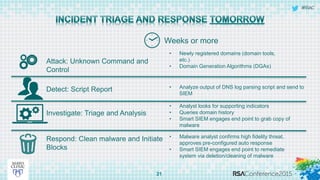
21
Weeks or more
Investigate: Triage and Analysis
Respond: Clean malware and Initiate
Blocks
Detect: Script Report
Attack: Unknown Command and
Control
• Newly registered domains (domain tools,
etc.)
• Domain Generation Algorithms (DGAs)
• Analyze output of DNS log parsing script and send to
SIEM
• Analyst looks for supporting indicators
• Queries domain history
• Smart SIEM engages end point to grab copy of
malware
• Malware analyst confirms high fidelity threat,
approves pre-configured auto response
• Smart SIEM engages end point to remediate
system via deletion/cleaning of malware
#RSAC
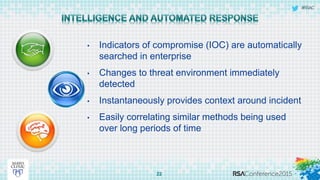
22
• Indicators of compromise (IOC) are automatically
searched in enterprise
• Changes to threat environment immediately
detected
• Instantaneously provides context around incident
• Easily correlating similar methods being used
over long periods of time
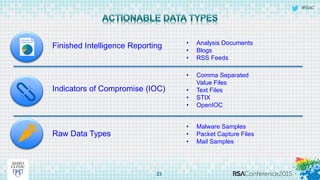
#RSAC
Finished Intelligence Reporting
23
• Analysis Documents
• Blogs
• RSS Feeds
• Comma Separated
Value Files
• Text Files
• STIX
• OpenIOC
• Malware Samples
• Packet Capture Files
• Mail Samples
Indicators of Compromise (IOC)
Raw Data Types
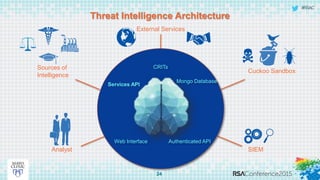
#RSAC
Threat Intelligence Architecture
24
Analyst
Sources of
Intelligence
External Services
Cuckoo Sandbox
CRITs
Services API
Mongo Database
Web Interface Authenticated API
SIEM
#RSAC
Measuring Success
Mean time from:
• Detection to response
• Response to remediation
• Remediation to reporting
25
#RSAC
26
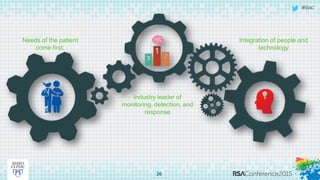
Needs of the patient
come first.
Industry leader of
monitoring, detection, and
response
Integration of people and
technology
#RSAC
 Next week you should:
 Map your technologies to the incident response life cycle
 Create use cases based on law of dual advantage (eliminate pain while finding evil)
 In the first three months following this presentation you should:
 Inventory identities, networks, systems, and applications (get the baseline,
understand normal)
 No really….understand normal
 Pressure your vendors (API integrations)
 Within six months you should:
 Enterprise implementation of your use cases (detection, respond, remediation)
27
Apply What You Have Learned Today
#RSAC
Questions
#RSAC
Thank You!

Implementing An Automated Incident Response Architecture

  • 1.
    #RSAC SESSION ID: James CarderJessica Hebenstreit Modern Approach to Incident Response: Automated Response Architecture ANF-T10 Senior Manager, Security Informatics Mayo Clinic @secitup Director, Security Informatics Mayo Clinic @carderjames
  • 2.
  • 3.
    #RSAC A variety ofthreats exist – Both internal and external to any organization. Those threats and their major characteristics are reflected in the table below: 3 Virus, Worms, and Spam Insiders Hacktivists Terrorists Organized Crime State Sponsored OBJECTIVE Financial Gain Revenge, Financial Gain Defamation, Notoriety Fundraising, Communications, Propaganda Financial Gain Economic Advantage EXAMPLE Scareware, Spam, Zombies Data Destruction, Theft DDoS, Wikileaks Al-Qaeda Sites, ISIS Credit, Debit Card, ACH, PHI, PCI Theft Trade Secrets, Contracts, Legal Strategies
  • 4.
    #RSAC TARC 4 Threat Analysis & ResponseCenter Enterprise monitoring, altering and triage of potential security events Collect logs & relevant system, network and application data. Analyze behaviors and patterns within the data. Respond & investigate anomalies in behavior or patterns. Tactically eradicate threats
  • 5.
    #RSAC Advanced analysis andresponse to large scale intrusions 5 In depth incident investigation and reporting In depth forensic analysis of systems and devices Reverse engineer malicious code used
  • 6.
    #RSAC Threat classification, attribution,indicators, warnings, and reports 6 • Intelligence on attackers that have interest in Clinic; • Attribution of attackers; • Attacker techniques, technologies, and processes; • Informs internal teams of relevant threats; • Industry knowledge of breaches and exploits; • Reporting.
  • 7.
    #RSAC Goals: • Reduce responsetime from days to minutes • Increase knowledge of internal and external threats • Build automatic smart responses for common threats Objectives: • Integration of Core Technologies • Establish enterprise visibility • Real time threat intelligence 7
  • 8.
  • 9.
    #RSAC 9 “Big Visibility” –Visibility and Control for NetworkEndpoint user
  • 10.
    #RSAC Inventory of tools -IT Infrastructure - Information Security Infrastructure 10 Evaluation of Current Processes - IR (malware, forensic handling, communication) - IT (remediation, cleanup, communication) Metrics - What takes up most of our analyst time? - How long does it take to detect, respond, remediate?
  • 11.
    #RSAC What causes 80%of our daily analyst work load? - Old fashioned 80/20 rule - What would your analyst love to not have to do anymore? 11 What can we do to prevent initial compromise? - Incident lifecycle / kill chain What are our biggest threats and targets? - Who targets healthcare? - What or who do they target?
  • 12.
    #RSAC Inadvertent remediation ofvalid data/files/processes - Can be tough when staff have admin rights - Aided by scoring system (e.g. if validated evil by 3 different sources based on attributes) 12 Automation can reduce long term staff learning - They may not learn “why or how”, only “what” - Become automation and tool dependent We might miss something - catch a symptom (small scale), not the cause (large scale) - Single event vs. chain of events
  • 13.
  • 14.
    #RSAC 14 4 – 8Hours Investigate: Triage and Analysis Clean: Wipe code from system and email from mailboxes Detect: User Reported Attack: Inbound Phishing Email • Threat: Financial Crime • Email disguised as Help Desk • Email received by 200 people before first report • Contains malicious attachment, installs code • Search SIEM and other tools • Analyze attachment and code • Identify victims • Contact IT Messaging, respond • Contact IT Support, respond • Contact Help Desk, respond
  • 15.
    #RSAC 15 4 – 8Minutes Investigate: Triage and Analysis Clean: Wipe code from system and email from mailboxes Detect: Technology Attack: Inbound Phishing Email • Threat: Financial Crime • Email disguised as Help Desk • Email received by 20 people, technology detected • Contains malicious attachment, installs code • Search SIEM and other tools • Analyze attachment and code • Identify victims • Remove code from system • Remove email from mailboxes
  • 16.
    #RSAC Attack: Watering hole 16 Severalto Hours to Weeks or More Detect: Technology Investigate: Triage and Analysis Response: Clean malware and Initiate Blocks • Researcher unknowingly visits compromised website • Ad on compromised site installs malware on researcher’s endpoint • Web based malware detection appliance detects malware and sends alert to SIEM • Analyst manually gathers evidence and log files and analyzes data • Manually initiate image of memory and/or disk • Manually submit malware to sandbox and Malware analysts • Manually create tickets to other supporting teams to clean system or reimage • Manually create ticket to NOC to block C2
  • 17.
    #RSAC Attack: Watering hole 17 Minutesto few hours Detect: Technology Investigate: Triage and Analysis Response: Clean malware and Initiate Blocks • Researcher unknowingly visits compromised website • Ad on compromised site installs malware on researcher’s endpoint • Web based malware detection appliance detects malware and sends alert to SIEM • Analyst has data readily available in alarm to analyze • Automated response engages Enterprise DFIR system to create image of memory and/or disk for analysis • Automated response engages affected endpoint; grabs a copy of the malware and submits to sandbox • Sandbox runs automated analysis • C2 automatically blocked due to proactive threat monitoring • Malware analyst confirms high fidelity threat, approves pre-configured auto response • Smart SIEM engages end point to remediate system via deletion/cleaning of malware
  • 18.
    #RSAC 18 Weeks or more Investigate:Triage and Analysis Respond: Manually Create Tickets for Supporting Teams Detect: User Reported Attack: Anomalous Behavior • Employee accesses directories outside of normal behavior pattern • Accesses information related to sensitive research • Goes undetected until reported to security team, if ever • Analyst manually gathers evidence and log files and analyzes data • User’s access likely remains intact while data analyzed • Contact IT NOC, respond • Contact Investigative Legal Department, respond • Contact Various IT Teams, respond
  • 19.
    #RSAC 19 minutes Investigate: Triage andAnalysis Respond: Automatically clean and mitigate Detect: Technology Attack: Anomalous Behavior • Employee accesses directories outside of normal behavior pattern • Accesses information related to sensitive research • System has already learned normal baseline for user • Creates alarm for analyst automatically • Analyst has data readily available in alarm to analyze • Automated response engages Domain Controller to disable user account • Automated response engages Access Switch to disable network port • Tickets to other supporting teams automatically opened
  • 20.
    #RSAC 20 Weeks or more Investigate:Triage and Analysis Respond: Manually Create Tickets for Supporting Teams Detect: Luck Attack: Unknown Command and Control • Perimeter monitoring technology/service alerts, if we’re lucky (rarely for new stuff) • Goes undetected until reported to security team, if ever • Analyst manually gathers evidence and log files and analyzes data • User’s access likely remains intact while data analyzed • Contact IT NOC, respond • Contact Investigative Legal Department, respond • Contact Various IT Teams, respond
  • 21.
    #RSAC 21 Weeks or more Investigate:Triage and Analysis Respond: Clean malware and Initiate Blocks Detect: Script Report Attack: Unknown Command and Control • Newly registered domains (domain tools, etc.) • Domain Generation Algorithms (DGAs) • Analyze output of DNS log parsing script and send to SIEM • Analyst looks for supporting indicators • Queries domain history • Smart SIEM engages end point to grab copy of malware • Malware analyst confirms high fidelity threat, approves pre-configured auto response • Smart SIEM engages end point to remediate system via deletion/cleaning of malware
  • 22.
    #RSAC 22 • Indicators ofcompromise (IOC) are automatically searched in enterprise • Changes to threat environment immediately detected • Instantaneously provides context around incident • Easily correlating similar methods being used over long periods of time
  • 23.
    #RSAC Finished Intelligence Reporting 23 •Analysis Documents • Blogs • RSS Feeds • Comma Separated Value Files • Text Files • STIX • OpenIOC • Malware Samples • Packet Capture Files • Mail Samples Indicators of Compromise (IOC) Raw Data Types
  • 24.
    #RSAC Threat Intelligence Architecture 24 Analyst Sourcesof Intelligence External Services Cuckoo Sandbox CRITs Services API Mongo Database Web Interface Authenticated API SIEM
  • 25.
    #RSAC Measuring Success Mean timefrom: • Detection to response • Response to remediation • Remediation to reporting 25
  • 26.
    #RSAC 26 Needs of thepatient come first. Industry leader of monitoring, detection, and response Integration of people and technology
  • 27.
    #RSAC  Next weekyou should:  Map your technologies to the incident response life cycle  Create use cases based on law of dual advantage (eliminate pain while finding evil)  In the first three months following this presentation you should:  Inventory identities, networks, systems, and applications (get the baseline, understand normal)  No really….understand normal  Pressure your vendors (API integrations)  Within six months you should:  Enterprise implementation of your use cases (detection, respond, remediation) 27 Apply What You Have Learned Today
  • 28.
  • 29.