Internal Storage in
Android
Dr. Gowthami V
• Creating an application that can write data to a file and store it in
internal storage and read data from the file and display it on the main
activity using TextView.
• Saving and loading data on the internal storage is private for an
application that can not be accessed by other applications.
• When the app is uninstalled the data stored in the internal by that
app is removed.
• To read and write in the android internal storage we have two
methods
OpenFileOutput(): used for creating and saving a file. This method returns a FileOutputStream
instance.
• Syntax: OpenFileOutput(String filename,int mode)
• Parameters:
• mode:
• Context.MODE_PRIVATE: If the file exists then it is overridden else a new file is
created.
• Context.MODE_APPEND: if the file exists then the data is appended at the end of the
file.
• Returns:
• FileOutputStream object
OpenFileInput(): Used to read data from a file, this returns an
FileInputStream instance.
• Syntax: OpenFileInput( String filename)
• Returns:
• FileInputStream object
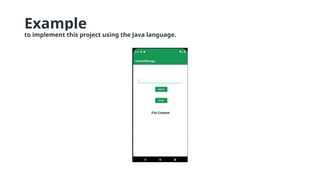
Example
to implement this project using the Java language.
Step by Step
Step 1: Create a New Project
• To create a new project in Android Studio please refer to
How to Create/Start a New Project in Android Studio.
Step 2: Working with the activity_main.xml file
• The activity_main.xml file has the following widgets
1.One EditText for accepting user input
2.Two Buttons one for reading data and the other for writing
3.One TextView to display the content of the file
• Step 3: Working with the MainActivity.java file
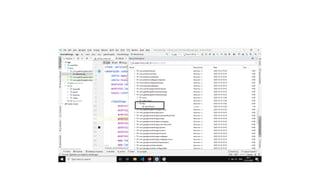
• The file will be creating is DemoFile.txt. this can be found
in Device File Explorer > data > data >
application_package > files
Internal Storage in Mobile Application Development.pptx

Internal Storage in Mobile Application Development.pptx

  • 1.
  • 2.
    • Creating anapplication that can write data to a file and store it in internal storage and read data from the file and display it on the main activity using TextView. • Saving and loading data on the internal storage is private for an application that can not be accessed by other applications. • When the app is uninstalled the data stored in the internal by that app is removed. • To read and write in the android internal storage we have two methods
  • 3.
    OpenFileOutput(): used forcreating and saving a file. This method returns a FileOutputStream instance. • Syntax: OpenFileOutput(String filename,int mode) • Parameters: • mode: • Context.MODE_PRIVATE: If the file exists then it is overridden else a new file is created. • Context.MODE_APPEND: if the file exists then the data is appended at the end of the file. • Returns: • FileOutputStream object
  • 4.
    OpenFileInput(): Used toread data from a file, this returns an FileInputStream instance. • Syntax: OpenFileInput( String filename) • Returns: • FileInputStream object
  • 5.
    Example to implement thisproject using the Java language.
  • 6.
    Step by Step Step1: Create a New Project • To create a new project in Android Studio please refer to How to Create/Start a New Project in Android Studio.
  • 7.
    Step 2: Workingwith the activity_main.xml file • The activity_main.xml file has the following widgets 1.One EditText for accepting user input 2.Two Buttons one for reading data and the other for writing 3.One TextView to display the content of the file
  • 8.
    • Step 3:Working with the MainActivity.java file • The file will be creating is DemoFile.txt. this can be found in Device File Explorer > data > data > application_package > files