Mobile Application Development
Android
Mobile operating system (Mobile OS) is the operating
system that controls a smart phone, tablet, personal
digital assistant (PDA) or other mobile device.
Modern mobile OSs are enabled with touch screen,
cellular, Blue tooth, WiFi, GPS, camera, video camera,
speech recognition, voice recorder, music player, near
field communication, PDA etc.
Introduction
Dr.P.Karthikeyan-IT
 Multitasking system – ability to run multiple
applications simultaneously, respond to asynchronous
events
 Memory protection – secure environment for running
applications without compromising user privacy and
data security
 Power conscious
 Extensible – can run third party applications
 Support for wide variety of communication channels
Characteristics of Mobile Operating System
Dr.P.Karthikeyan-IT
 Symbian
 Blackberry
 iOS
 Windows Mobile
 Palm (Garnet)
 Android etc.
Current Mobile Operating Systems
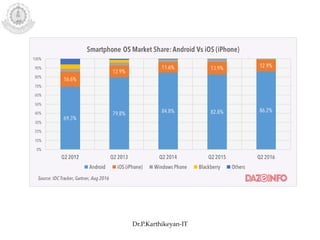
Dr.P.Karthikeyan-IT
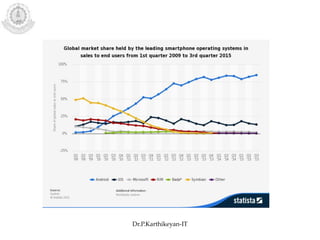
Dr.P.Karthikeyan-IT
Dr.P.Karthikeyan-IT
 Procured and developed by Google, based on Linux OS,
promoted by Open Handset Alliance (OHA)
 Multitasking
 Dalvik VM for running applications
 Java development using Android class libraries
 Limited native development support in C/C++
• GSM/EDGE, CDMA, EV-DO, UMTS, Bluetooth, and Wi-Fi
support
• H.263, H.264 (3GP/MP4), MPEG-4 SP, AMR, AMR-WB
(3GP), AAC, HE-AAC (MP4/3GP), MP3, MIDI, OGG
Vorbis, WAV, JPEG, PNG, GIF, BMP
• Touch-screen, GPS, accelerometer, magnetometer,
accelerated 2D and 3D graphics (OpenGL ES 1.0)
• SQLite for data storage
Android Highlights
Dr.P.Karthikeyan-IT
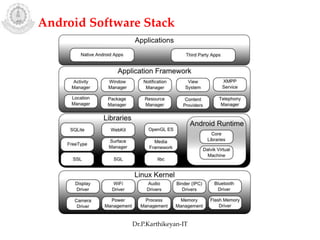
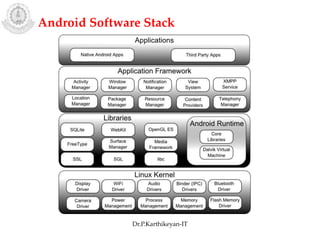
Android Software Stack
Dr.P.Karthikeyan-IT
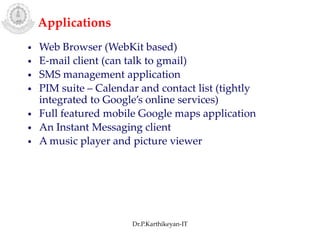
Applications
• Web Browser (WebKit based)
• E-mail client (can talk to gmail)
• SMS management application
• PIM suite – Calendar and contact list (tightly
integrated to Google’s online services)
• Full featured mobile Google maps application
• An Instant Messaging client
• A music player and picture viewer
Dr.P.Karthikeyan-IT
Android Software Stack
Dr.P.Karthikeyan-IT
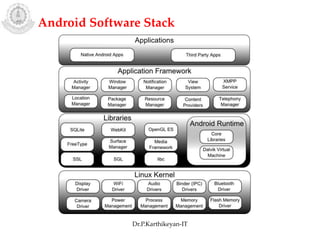
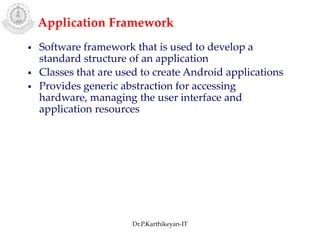
Application Framework
• Software framework that is used to develop a
standard structure of an application
• Classes that are used to create Android applications
• Provides generic abstraction for accessing
hardware, managing the user interface and
application resources
Dr.P.Karthikeyan-IT
Android Software Stack
Dr.P.Karthikeyan-IT
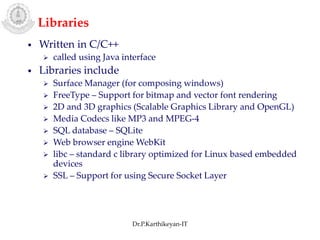
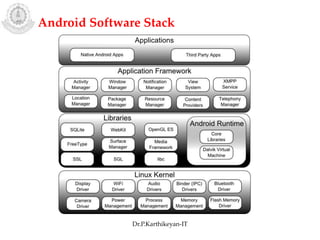
Libraries
• Written in C/C++
 called using Java interface
• Libraries include
 Surface Manager (for composing windows)
 FreeType – Support for bitmap and vector font rendering
 2D and 3D graphics (Scalable Graphics Library and OpenGL)
 Media Codecs like MP3 and MPEG-4
 SQL database – SQLite
 Web browser engine WebKit
 libc – standard c library optimized for Linux based embedded
devices
 SSL – Support for using Secure Socket Layer
Dr.P.Karthikeyan-IT
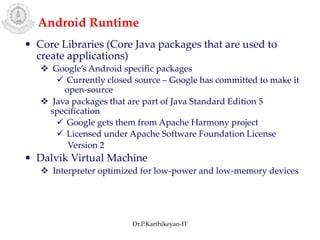
Android Runtime
• Core Libraries (Core Java packages that are used to
create applications)
 Google’s Android specific packages
 Currently closed source – Google has committed to make it
open-source
 Java packages that are part of Java Standard Edition 5
specification
 Google gets them from Apache Harmony project
 Licensed under Apache Software Foundation License
Version 2
• Dalvik Virtual Machine
 Interpreter optimized for low-power and low-memory devices
Dr.P.Karthikeyan-IT
Android Software Stack
Dr.P.Karthikeyan-IT
Dalvik Virtual Machine
• Dalvik is the runtime that runs user-space Android
applications
• Runs Dalvik byte-code instructions (not java byte-code)
• Each Android application runs in its own process, with
its own instance of the Dalvik Virtual Machine
• Dalvik has been written so that a device can run multiple
Virtual Machines efficiently
Dr.P.Karthikeyan-IT
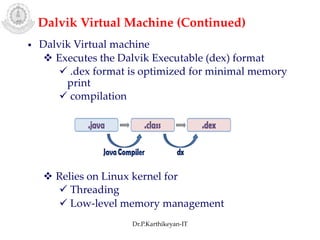
• Dalvik Virtual machine
 Executes the Dalvik Executable (dex) format
 .dex format is optimized for minimal memory
print
 compilation
 Relies on Linux kernel for
 Threading
 Low-level memory management
Dalvik Virtual Machine (Continued)
Dr.P.Karthikeyan-IT
Android Application Development Tools
Java Eclipse
http://www.eclipse.org/downloads/
Android SDK
http://developer.android.com/sdk/index.html
ADT Plug-in for Eclipse
http://developer.android.com/sdk/eclipse-adt.html
(OR)
Android Studio
https://developer.android.com/studio/
Dr.P.Karthikeyan-IT
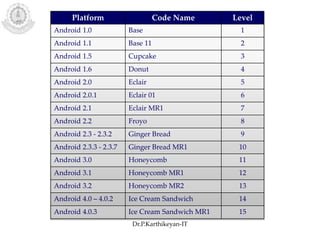
Platform Code Name Level
Android 1.0 Base 1
Android 1.1 Base 11 2
Android 1.5 Cupcake 3
Android 1.6 Donut 4
Android 2.0 Eclair 5
Android 2.0.1 Eclair 01 6
Android 2.1 Eclair MR1 7
Android 2.2 Froyo 8
Android 2.3 - 2.3.2 Ginger Bread 9
Android 2.3.3 - 2.3.7 Ginger Bread MR1 10
Android 3.0 Honeycomb 11
Android 3.1 Honeycomb MR1 12
Android 3.2 Honeycomb MR2 13
Android 4.0 – 4.0.2 Ice Cream Sandwich 14
Android 4.0.3 Ice Cream Sandwich MR1 15
Dr.P.Karthikeyan-IT
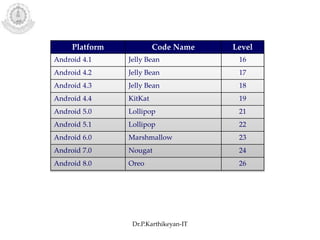
Platform Code Name Level
Android 4.1 Jelly Bean 16
Android 4.2 Jelly Bean 17
Android 4.3 Jelly Bean 18
Android 4.4 KitKat 19
Android 5.0 Lollipop 21
Android 5.1 Lollipop 22
Android 6.0 Marshmallow 23
Android 7.0 Nougat 24
Android 8.0 Oreo 26
Dr.P.Karthikeyan-IT
Dr.P.Karthikeyan-IT
Dr.P.Karthikeyan-IT
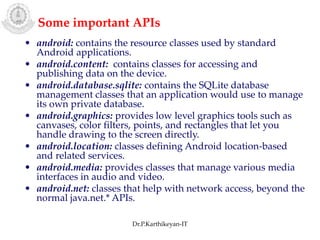
• android: contains the resource classes used by standard
Android applications.
• android.content: contains classes for accessing and
publishing data on the device.
• android.database.sqlite: contains the SQLite database
management classes that an application would use to manage
its own private database.
• android.graphics: provides low level graphics tools such as
canvases, color filters, points, and rectangles that let you
handle drawing to the screen directly.
• android.location: classes defining Android location-based
and related services.
• android.media: provides classes that manage various media
interfaces in audio and video.
• android.net: classes that help with network access, beyond the
normal java.net.* APIs.
Some important APIs
Dr.P.Karthikeyan-IT
• android.telephony: provides APIs for monitoring the basic
phone information, such as the network type and connection
state, plus utilities for manipulating phone number strings.
• android.util: provides common utility methods such as
date/time manipulation, base64 encoders and decoders, string
and number conversion methods, and XML utilities.
• android.view: provides classes that expose basic user
interface classes that handle screen layout and interaction
with the user.
• android.webkit: provides tools for browsing the web.
• android.widget: widget package contains (mostly visual) UI
elements to use on application screen.
Dr.P.Karthikeyan-IT
Thanks
Dr.P.Karthikeyan-IT

Android Introduction

  • 1.
  • 2.
    Mobile operating system(Mobile OS) is the operating system that controls a smart phone, tablet, personal digital assistant (PDA) or other mobile device. Modern mobile OSs are enabled with touch screen, cellular, Blue tooth, WiFi, GPS, camera, video camera, speech recognition, voice recorder, music player, near field communication, PDA etc. Introduction Dr.P.Karthikeyan-IT
  • 3.
     Multitasking system– ability to run multiple applications simultaneously, respond to asynchronous events  Memory protection – secure environment for running applications without compromising user privacy and data security  Power conscious  Extensible – can run third party applications  Support for wide variety of communication channels Characteristics of Mobile Operating System Dr.P.Karthikeyan-IT
  • 4.
     Symbian  Blackberry iOS  Windows Mobile  Palm (Garnet)  Android etc. Current Mobile Operating Systems Dr.P.Karthikeyan-IT
  • 5.
  • 6.
  • 7.
     Procured anddeveloped by Google, based on Linux OS, promoted by Open Handset Alliance (OHA)  Multitasking  Dalvik VM for running applications  Java development using Android class libraries  Limited native development support in C/C++ • GSM/EDGE, CDMA, EV-DO, UMTS, Bluetooth, and Wi-Fi support • H.263, H.264 (3GP/MP4), MPEG-4 SP, AMR, AMR-WB (3GP), AAC, HE-AAC (MP4/3GP), MP3, MIDI, OGG Vorbis, WAV, JPEG, PNG, GIF, BMP • Touch-screen, GPS, accelerometer, magnetometer, accelerated 2D and 3D graphics (OpenGL ES 1.0) • SQLite for data storage Android Highlights Dr.P.Karthikeyan-IT
  • 8.
  • 9.
    Applications • Web Browser(WebKit based) • E-mail client (can talk to gmail) • SMS management application • PIM suite – Calendar and contact list (tightly integrated to Google’s online services) • Full featured mobile Google maps application • An Instant Messaging client • A music player and picture viewer Dr.P.Karthikeyan-IT
  • 10.
  • 11.
    Application Framework • Softwareframework that is used to develop a standard structure of an application • Classes that are used to create Android applications • Provides generic abstraction for accessing hardware, managing the user interface and application resources Dr.P.Karthikeyan-IT
  • 12.
  • 13.
    Libraries • Written inC/C++  called using Java interface • Libraries include  Surface Manager (for composing windows)  FreeType – Support for bitmap and vector font rendering  2D and 3D graphics (Scalable Graphics Library and OpenGL)  Media Codecs like MP3 and MPEG-4  SQL database – SQLite  Web browser engine WebKit  libc – standard c library optimized for Linux based embedded devices  SSL – Support for using Secure Socket Layer Dr.P.Karthikeyan-IT
  • 14.
    Android Runtime • CoreLibraries (Core Java packages that are used to create applications)  Google’s Android specific packages  Currently closed source – Google has committed to make it open-source  Java packages that are part of Java Standard Edition 5 specification  Google gets them from Apache Harmony project  Licensed under Apache Software Foundation License Version 2 • Dalvik Virtual Machine  Interpreter optimized for low-power and low-memory devices Dr.P.Karthikeyan-IT
  • 15.
  • 16.
    Dalvik Virtual Machine •Dalvik is the runtime that runs user-space Android applications • Runs Dalvik byte-code instructions (not java byte-code) • Each Android application runs in its own process, with its own instance of the Dalvik Virtual Machine • Dalvik has been written so that a device can run multiple Virtual Machines efficiently Dr.P.Karthikeyan-IT
  • 17.
    • Dalvik Virtualmachine  Executes the Dalvik Executable (dex) format  .dex format is optimized for minimal memory print  compilation  Relies on Linux kernel for  Threading  Low-level memory management Dalvik Virtual Machine (Continued) Dr.P.Karthikeyan-IT
  • 18.
    Android Application DevelopmentTools Java Eclipse http://www.eclipse.org/downloads/ Android SDK http://developer.android.com/sdk/index.html ADT Plug-in for Eclipse http://developer.android.com/sdk/eclipse-adt.html (OR) Android Studio https://developer.android.com/studio/ Dr.P.Karthikeyan-IT
  • 19.
    Platform Code NameLevel Android 1.0 Base 1 Android 1.1 Base 11 2 Android 1.5 Cupcake 3 Android 1.6 Donut 4 Android 2.0 Eclair 5 Android 2.0.1 Eclair 01 6 Android 2.1 Eclair MR1 7 Android 2.2 Froyo 8 Android 2.3 - 2.3.2 Ginger Bread 9 Android 2.3.3 - 2.3.7 Ginger Bread MR1 10 Android 3.0 Honeycomb 11 Android 3.1 Honeycomb MR1 12 Android 3.2 Honeycomb MR2 13 Android 4.0 – 4.0.2 Ice Cream Sandwich 14 Android 4.0.3 Ice Cream Sandwich MR1 15 Dr.P.Karthikeyan-IT
  • 20.
    Platform Code NameLevel Android 4.1 Jelly Bean 16 Android 4.2 Jelly Bean 17 Android 4.3 Jelly Bean 18 Android 4.4 KitKat 19 Android 5.0 Lollipop 21 Android 5.1 Lollipop 22 Android 6.0 Marshmallow 23 Android 7.0 Nougat 24 Android 8.0 Oreo 26 Dr.P.Karthikeyan-IT
  • 21.
  • 22.
  • 23.
    • android: containsthe resource classes used by standard Android applications. • android.content: contains classes for accessing and publishing data on the device. • android.database.sqlite: contains the SQLite database management classes that an application would use to manage its own private database. • android.graphics: provides low level graphics tools such as canvases, color filters, points, and rectangles that let you handle drawing to the screen directly. • android.location: classes defining Android location-based and related services. • android.media: provides classes that manage various media interfaces in audio and video. • android.net: classes that help with network access, beyond the normal java.net.* APIs. Some important APIs Dr.P.Karthikeyan-IT
  • 24.
    • android.telephony: providesAPIs for monitoring the basic phone information, such as the network type and connection state, plus utilities for manipulating phone number strings. • android.util: provides common utility methods such as date/time manipulation, base64 encoders and decoders, string and number conversion methods, and XML utilities. • android.view: provides classes that expose basic user interface classes that handle screen layout and interaction with the user. • android.webkit: provides tools for browsing the web. • android.widget: widget package contains (mostly visual) UI elements to use on application screen. Dr.P.Karthikeyan-IT
  • 25.