Android Open Accessory
USB device to accessory protocol
What is it?
● USB protocol that allows communication between Android devices and accessories in
accessory mode
● AOAv1 - supported since API 12, with lib since API 10, supports basic communication
● AOAv2 - supported since API 16, adds audio streaming and HID capabilities
● Device is USB host and accessory is USB client
How does it work? Android app
● App declares itself to handle an accessory or accessory family
● App handles specific intents
● UsbAccessory object is attached to that intent in a Bundle
● Once it is obtained, transfer of data between USB device and Android device is possible
How does it work? Accessory
● Accessory sends series of specific USB control commands:
○ Get AOA version - device returns integer, currently 0 for not supported, 1 or 2 if supported
○ Accessory identifies itself by sending its vendor, model, manufacturer URI and serial number, which
should match what Android application declared as supported devices
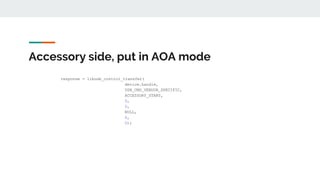
○ If Android device returns valid status on all of those, it sends “go to AOA mode” command
● Android device disconnects from USB and reconnects in AOA mode with static PID and VID
● At this stage, if everything went well, Android OS sends the intent to the application with
UsbAccessory object which is describing the accessory
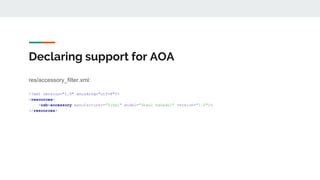
Declaring support for AOA
res/accessory_filter.xml:
<?xml version="1.0" encoding="utf-8"?>
<resources>
<usb-accessory manufacturer="Tikal" model="Shaul haGadol" version="1.0"/>
</resources>
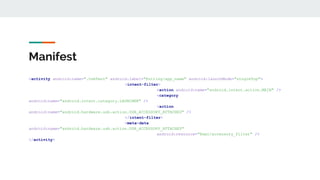
Manifest
<activity android:name=".UsbTest" android:label="@string/app_name" android:launchMode="singleTop">
<intent-filter>
<action android:name="android.intent.action.MAIN" />
<category
android:name="android.intent.category.LAUNCHER" />
<action
android:name="android.hardware.usb.action.USB_ACCESSORY_ATTACHED" />
</intent-filter>
<meta-data
android:name="android.hardware.usb.action.USB_ACCESSORY_ATTACHED"
android:resource="@xml/accessory_filter" />
</activity>
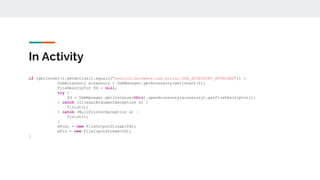
In Activity
if (getIntent().getAction().equals("android.hardware.usb.action.USB_ACCESSORY_ATTACHED")) {
UsbAccessory accessory = UsbManager.getAccessory(getIntent());
FileDescriptor fd = null;
try {
fd = UsbManager.getInstance(this).openAccessory(accessory).getFileDescriptor();
} catch (IllegalArgumentException e) {
finish();
} catch (NullPointerException e) {
finish();
}
mFout = new FileOutputStream(fd);
mFin = new FileInputStream(fd);
}
Accessory side, get AOA version
rc = libusb_control_transfer(handle, //handle
USB_CMD_BLOCK_READ, //bmRequestType
ACCESSORY_GET_PROTOCOL, //bRequest
0, //wValue
0, //wIndex
ioBuffer, //data
2, //wLength
0 //timeout
);
libusb_release_interface(handle, 0);
libusb_close(handle);
int aoaVersion = ioBuffer[1] << 8 | ioBuffer[0];
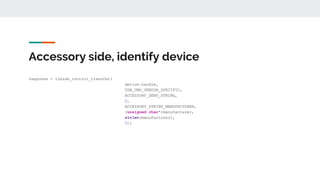
Accessory side, identify device
response = libusb_control_transfer(
device.handle,
USB_CMD_VENDOR_SPECIFIC,
ACCESSORY_SEND_STRING,
0,
ACCESSORY_STRING_MANUFACTURER,
(unsigned char*)manufacturer,
strlen(manufacturer),
0);
Accessory side, put in AOA mode
response = libusb_control_transfer(
device.handle,
USB_CMD_VENDOR_SPECIFIC,
ACCESSORY_START,
0,
0,
NULL,
0,
0);
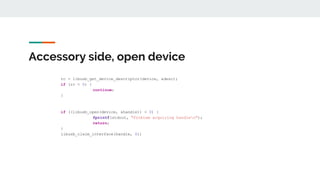
Accessory side, open device
rc = libusb_get_device_descriptor(device, &desc);
if (rc < 0) {
continue;
}
if ((libusb_open(device, &handle)) < 0) {
fprintf(stdout, "Problem acquiring handlen");
return;
}
libusb_claim_interface(handle, 0);
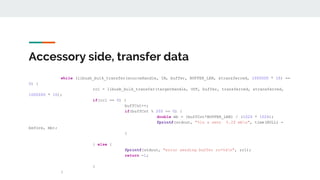
Accessory side, transfer data
while (libusb_bulk_transfer(sourceHandle, IN, buffer, BUFFER_LEN, &transferred, 1000000 * 10) ==
0) {
rc1 = libusb_bulk_transfer(targetHandle, OUT, buffer, transferred, &transferred,
1000000 * 10);
if(rc1 == 0) {
buffCnt++;
if(buffCnt % 200 == 0) {
double mb = (buffCnt*BUFFER_LEN) / (1024 * 1024);
fprintf(stdout, "%lu s sent %.2f mbn", time(NULL) -
before, mb);
}
} else {
fprintf(stdout, "error sending buffer rc=%dn", rc1);
return -1;
}
}
Accessory side, constants
#define USB_ACCESSORY_PRODUCT_ID 0x2D00
#define USB_ACCESSORY_ADB_PRODUCT_ID 0x2D01
#define ACCESSORY_STRING_MANUFACTURER 0
#define ACCESSORY_STRING_MODEL 1
#define ACCESSORY_STRING_DESCRIPTION 2
#define ACCESSORY_STRING_VERSION 3
#define ACCESSORY_STRING_URI 4
#define ACCESSORY_STRING_SERIAL 5
#define ACCESSORY_GET_PROTOCOL 51
#define ACCESSORY_SEND_STRING 52
#define ACCESSORY_START 53
#define USB_CMD_BLOCK_READ 0xc0
#define USB_CMD_VENDOR_SPECIFIC 0x40
Additional info
● https://source.android.com/devices/accessories/protocol
● https://www.youtube.com/watch?v=kReFemy4UmU
● https://opensourceforu.com/2014/11/the-android-open-accessory-protocol-
all-about/
● http://wiki.p2pfoundation.net/Android_Open_Accessory
● http://jjmilburn.github.io/2017/05/08/Android-AOA-Support/

Android Open Accessory

  • 1.
    Android Open Accessory USBdevice to accessory protocol
  • 2.
    What is it? ●USB protocol that allows communication between Android devices and accessories in accessory mode ● AOAv1 - supported since API 12, with lib since API 10, supports basic communication ● AOAv2 - supported since API 16, adds audio streaming and HID capabilities ● Device is USB host and accessory is USB client
  • 3.
    How does itwork? Android app ● App declares itself to handle an accessory or accessory family ● App handles specific intents ● UsbAccessory object is attached to that intent in a Bundle ● Once it is obtained, transfer of data between USB device and Android device is possible
  • 4.
    How does itwork? Accessory ● Accessory sends series of specific USB control commands: ○ Get AOA version - device returns integer, currently 0 for not supported, 1 or 2 if supported ○ Accessory identifies itself by sending its vendor, model, manufacturer URI and serial number, which should match what Android application declared as supported devices ○ If Android device returns valid status on all of those, it sends “go to AOA mode” command ● Android device disconnects from USB and reconnects in AOA mode with static PID and VID ● At this stage, if everything went well, Android OS sends the intent to the application with UsbAccessory object which is describing the accessory
  • 5.
    Declaring support forAOA res/accessory_filter.xml: <?xml version="1.0" encoding="utf-8"?> <resources> <usb-accessory manufacturer="Tikal" model="Shaul haGadol" version="1.0"/> </resources>
  • 6.
    Manifest <activity android:name=".UsbTest" android:label="@string/app_name"android:launchMode="singleTop"> <intent-filter> <action android:name="android.intent.action.MAIN" /> <category android:name="android.intent.category.LAUNCHER" /> <action android:name="android.hardware.usb.action.USB_ACCESSORY_ATTACHED" /> </intent-filter> <meta-data android:name="android.hardware.usb.action.USB_ACCESSORY_ATTACHED" android:resource="@xml/accessory_filter" /> </activity>
  • 7.
    In Activity if (getIntent().getAction().equals("android.hardware.usb.action.USB_ACCESSORY_ATTACHED")){ UsbAccessory accessory = UsbManager.getAccessory(getIntent()); FileDescriptor fd = null; try { fd = UsbManager.getInstance(this).openAccessory(accessory).getFileDescriptor(); } catch (IllegalArgumentException e) { finish(); } catch (NullPointerException e) { finish(); } mFout = new FileOutputStream(fd); mFin = new FileInputStream(fd); }
  • 8.
    Accessory side, getAOA version rc = libusb_control_transfer(handle, //handle USB_CMD_BLOCK_READ, //bmRequestType ACCESSORY_GET_PROTOCOL, //bRequest 0, //wValue 0, //wIndex ioBuffer, //data 2, //wLength 0 //timeout ); libusb_release_interface(handle, 0); libusb_close(handle); int aoaVersion = ioBuffer[1] << 8 | ioBuffer[0];
  • 9.
    Accessory side, identifydevice response = libusb_control_transfer( device.handle, USB_CMD_VENDOR_SPECIFIC, ACCESSORY_SEND_STRING, 0, ACCESSORY_STRING_MANUFACTURER, (unsigned char*)manufacturer, strlen(manufacturer), 0);
  • 10.
    Accessory side, putin AOA mode response = libusb_control_transfer( device.handle, USB_CMD_VENDOR_SPECIFIC, ACCESSORY_START, 0, 0, NULL, 0, 0);
  • 11.
    Accessory side, opendevice rc = libusb_get_device_descriptor(device, &desc); if (rc < 0) { continue; } if ((libusb_open(device, &handle)) < 0) { fprintf(stdout, "Problem acquiring handlen"); return; } libusb_claim_interface(handle, 0);
  • 12.
    Accessory side, transferdata while (libusb_bulk_transfer(sourceHandle, IN, buffer, BUFFER_LEN, &transferred, 1000000 * 10) == 0) { rc1 = libusb_bulk_transfer(targetHandle, OUT, buffer, transferred, &transferred, 1000000 * 10); if(rc1 == 0) { buffCnt++; if(buffCnt % 200 == 0) { double mb = (buffCnt*BUFFER_LEN) / (1024 * 1024); fprintf(stdout, "%lu s sent %.2f mbn", time(NULL) - before, mb); } } else { fprintf(stdout, "error sending buffer rc=%dn", rc1); return -1; } }
  • 13.
    Accessory side, constants #defineUSB_ACCESSORY_PRODUCT_ID 0x2D00 #define USB_ACCESSORY_ADB_PRODUCT_ID 0x2D01 #define ACCESSORY_STRING_MANUFACTURER 0 #define ACCESSORY_STRING_MODEL 1 #define ACCESSORY_STRING_DESCRIPTION 2 #define ACCESSORY_STRING_VERSION 3 #define ACCESSORY_STRING_URI 4 #define ACCESSORY_STRING_SERIAL 5 #define ACCESSORY_GET_PROTOCOL 51 #define ACCESSORY_SEND_STRING 52 #define ACCESSORY_START 53 #define USB_CMD_BLOCK_READ 0xc0 #define USB_CMD_VENDOR_SPECIFIC 0x40
  • 14.
    Additional info ● https://source.android.com/devices/accessories/protocol ●https://www.youtube.com/watch?v=kReFemy4UmU ● https://opensourceforu.com/2014/11/the-android-open-accessory-protocol- all-about/ ● http://wiki.p2pfoundation.net/Android_Open_Accessory ● http://jjmilburn.github.io/2017/05/08/Android-AOA-Support/