Binder
Android IPC
By: Shaul Rosenzweig
What is IPC?
● Framework for the exchange of signals and data across multiple processes
● Used for message passing, synchronization, shared memory, and remote
procedure calls (RPC)
● Enables information sharing, computational speedup, modularity,
convenience, privilege separation, data isolation, stability
● Options: files (fs or memory mapped), Signals, Sockets, Pipes, Semaphores,
Shared Memory, Message passing (queues, message bus)
● Android specific options: Intents, ContentProviders, Messengers, Broadcast
receivers, IBinder, AIDL, all are based on Binder framework
What is Binder?
● An IPC/component system for developing object oriented
OS services
● Not yet another object-oriented kernel
● Instead an object-oriented operating system environment
that works on traditional kernels, like Linux!
● Essential to Android!
● EVERYTHING GOES THROUGH BINDER!!!!
● ...well, nearly everything
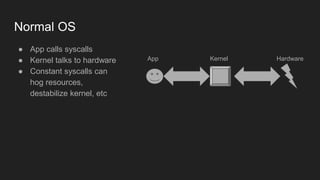
Normal OS
● App calls syscalls
● Kernel talks to hardware
● Constant syscalls can
hog resources,
destabilize kernel, etc
KernelApp Hardware
Android
● App gets Manager
● Manager talks to Service
via binder
● Service calls kernel
● Kernel talks to hardware
● Binder adds security
● System Service manages
kernel resources
(hardware)
● Binder is only kernel
resource directly
available to apps
App
Binder System Service
Kernel
Hardware
Why Binder?
● Android apps and system services run in separate
processes for security, stability, and memory management
reasons, but they need to communicate and share data
● Android implementation of libc does not support System V
IPC, low memory killer would create resource leakage, or
worse
Binder PRO and CON
● PRO: Security (identity of sender and receiver), Object
reference counter, death notifications, automatic
management of thread pools, invoking remote objects as
local, synchronous and asynchronous (oneway), ability to
send file descriptors & shared memory, AIDL, local
execution mode (no marshalling if inside same process)
● CON: no RPC, client server based (not suited for
streaming), not defined by POSIX or any other standard,
single attack surface for nearly everything, limited to 1mb
Binder history
● Started at Be inc, for “next generation BeOS” around 2001
● Acquired by PalmSource, first implementation for Palm Cobalt
● Palm switched to Linux, ported (~ 2005) and open sourced (OpenBinder)
● Used in Android as is initially, totally rewritten (~2008)
● Focused on scalability, stability, flexibility, low-latency/overhead, easy
programming model
● Google hired Dianne Hackborn, key engineer from Be inc times and tech
owner of OpenBinder project, to join Android team just after they acquired
Android inc.
● https://plus.google.com/+DianneHackborn
● http://www.angryredplanet.com/~hackbod/
Going wide...
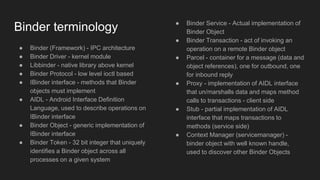
Binder terminology
● Binder (Framework) - IPC architecture
● Binder Driver - kernel module
● Libbinder - native library above kernel
● Binder Protocol - low level ioctl based
● IBinder interface - methods that Binder
objects must implement
● AIDL - Android Interface Definition
Language, used to describe operations on
IBinder interface
● Binder Object - generic implementation of
IBinder interface
● Binder Token - 32 bit integer that uniquely
identifies a Binder object across all
processes on a given system
● Binder Service - Actual implementation of
Binder Object
● Binder Transaction - act of invoking an
operation on a remote Binder object
● Parcel - container for a message (data and
object references), one for outbound, one
for inbound reply
● Proxy - implementation of AIDL interface
that un/marshalls data and maps method
calls to transactions - client side
● Stub - partial implementation of AIDL
interface that maps transactions to
methods (service side)
● Context Manager (servicemanager) -
binder object with well known handle,
used to discover other Binder Objects
Sample well known Binder implementations
● Intents
● Content providers/resolvers
● Messenger
● Broadcast / Broadcast receiver
● System service Managers
● Activity/Service lifecycle calls (ActivityManager)
● AIDL / bound service
Intents
● Framework for asynchronous communication among
components
● They may run in same or across different processes
● Point to Point or publish - subscribe
● Intent represents a message containing description of the
operation to be performed as well as data to be passed
● Implicit intents enable loosely coupled APIs
● Facilitated by system services: ActivityManagerService
and PackageManagerService
Content provider / resolver
● ContentResolvers communicate synchronously with
ContentProviders via a fixed CRUD
(create/read/update/delete) API
● Well suited for database queries
● Content providers and Intents are rather similar
● CONS: lifecycle callbacks on UI thread, not well suited for
low latency, API is loosely defined so prone to runtime
errors, facilitated by ActivityManagerService and
PackageManagerService
Messenger IPC
● Messenger represents a reference to a Handler that can
be sent to a remote process via an Intent
● Messages sent by remote process are delivered via the
messenger to the local handler
● Messages designate operation (Message.what) and data
(Message.getData()), similar to Intents
● Still asynchronous, but lower latency than Intents and
Content providers
● Well suited for callbacks from service to the client
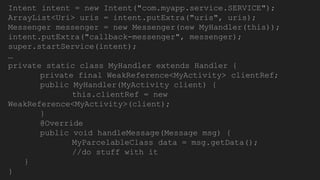
Intent intent = new Intent("com.myapp.service.SERVICE");
ArrayList<Uri> uris = intent.putExtra("uris", uris);
Messenger messenger = new Messenger(new MyHandler(this));
intent.putExtra("callback-messenger", messenger);
super.startService(intent);
…
private static class MyHandler extends Handler {
private final WeakReference<MyActivity> clientRef;
public MyHandler(MyActivity client) {
this.clientRef = new
WeakReference<MyActivity>(client);
}
@Override
public void handleMessage(Message msg) {
MyParcelableClass data = msg.getData();
//do stuff with it
}
}
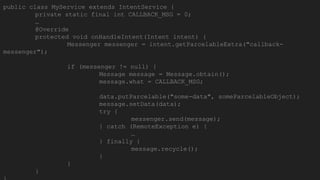
public class MyService extends IntentService {
private static final int CALLBACK_MSG = 0;
…
@Override
protected void onHandleIntent(Intent intent) {
Messenger messenger = intent.getParcelableExtra("callback-
messenger");
if (messenger != null) {
Message message = Message.obtain();
message.what = CALLBACK_MSG;
data.putParcelable("some-data", someParcelableObject);
message.setData(data);
try {
messenger.send(message);
} catch (RemoteException e) {
…
} finally {
message.recycle();
}
}
}
AIDL: Android Interface Definition Language
● Sample: https://github.com/shaulr/FooService
● AIDL allows you to define the programming interface that both the client and
service agree upon in a simple and efficient way
● Similar to simplified Java, with addition of keywords in, out, inout and oneway
● Similar concept to CORBA or COM, without RPC
● Need to import each Serializable and Parcelable object, which also need their
own AIDL files
● AIDL is compiled to Java, where Stub and Proxy sides are implemented
automatically
● Only methods can be exposed via AIDL, not fields, and all are public
● If params are not primitives (primitives are “in” only), they
require a directional flag: “inout” means it will be copied in
both directions, “in”; it will be copied into the service, “out”;
it will be copied back to the client
● If we add modifier “oneway” before method, it will be
asynchronous, callback will come on Binder thread, not on
original calling thread
● Service can throw back to the client only one of the
following exceptions: SecurityException,
BadParcelableException, IllegalArgumentException,
NullPointerException, and IllegalStateException
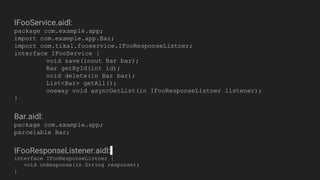
IFooService.aidl:
package com.example.app;
import com.example.app.Bar;
import com.tikal.fooservice.IFooResponseListner;
interface IFooService {
void save(inout Bar bar);
Bar getById(int id);
void delete(in Bar bar);
List<Bar> getAll();
oneway void asyncGetList(in IFooResponseListner listener);
}
Bar.aidl:
package com.example.app;
parcelable Bar;
IFooResponseListener.aidl:
interface IFooResponseListner {
void onResponse(in String response);
}
AIDL types
● null
● Java Primitives and their arrays
● CharSequence and String (as UTF-16)
● FileDescriptor (as dup of original)
● Serializable (not efficient, made for
serialization to storage)
● Map (reconstructed as HashMap)
● Bundle
● List (reconstructed as ArrayList)
● Object[]
● SparseArray and SparseBooleanArray
● IBinder and IInterface (transferred by
globally unique reference, not copied
over, used for callbacks, strong binder)
● Parcelable, for custom types
○ Parcelable can not be serialized to storage,
unlike Serializable
○ You need to implement marshalling and
unmarshalling yourself
○ Mechanism for flattening objects, proxy calls
writeToParcel, stub re-creates the object
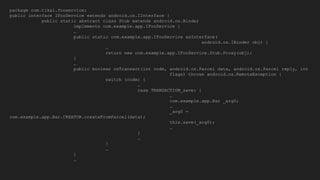
package com.tikal.fooservice;
public interface IFooService extends android.os.IInterface {
public static abstract class Stub extends android.os.Binder
implements com.example.app.IFooService {
…
public static com.example.app.IFooService asInterface(
android.os.IBinder obj) {
…
return new com.example.app.IFooService.Stub.Proxy(obj);
}
…
public boolean onTransact(int code, android.os.Parcel data, android.os.Parcel reply, int
flags) throws android.os.RemoteException {
switch (code) {
…
case TRANSACTION_save: {
…
com.example.app.Bar _arg0;
…
_arg0 =
com.example.app.Bar.CREATOR.createFromParcel(data);
this.save(_arg0);
…
}
…
}
…
}
…
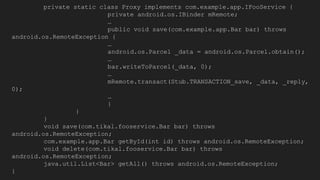
private static class Proxy implements com.example.app.IFooService {
private android.os.IBinder mRemote;
…
public void save(com.example.app.Bar bar) throws
android.os.RemoteException {
…
android.os.Parcel _data = android.os.Parcel.obtain();
…
bar.writeToParcel(_data, 0);
…
mRemote.transact(Stub.TRANSACTION_save, _data, _reply,
0);
…
}
}
}
void save(com.tikal.fooservice.Bar bar) throws
android.os.RemoteException;
com.example.app.Bar getById(int id) throws android.os.RemoteException;
void delete(com.tikal.fooservice.Bar bar) throws
android.os.RemoteException;
java.util.List<Bar> getAll() throws android.os.RemoteException;
}
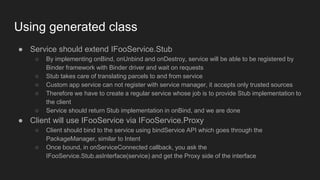
Using generated class
● Service should extend IFooService.Stub
○ By implementing onBind, onUnbind and onDestroy, service will be able to be registered by
Binder framework with Binder driver and wait on requests
○ Stub takes care of translating parcels to and from service
○ Custom app service can not register with service manager, it accepts only trusted sources
○ Therefore we have to create a regular service whose job is to provide Stub implementation to
the client
○ Service should return Stub implementation in onBind, and we are done
● Client will use IFooService via IFooService.Proxy
○ Client should bind to the service using bindService API which goes through the
PackageManager, similar to Intent
○ Once bound, in onServiceConnected callback, you ask the
IFooService.Stub.asInterface(service) and get the Proxy side of the interface
Binder Object mapping
● Binder object reference is virtual memory address if in
same process, or an abstract 32 bit handle if in different
process
● driver maps addresses to and from local addresses
automatically
● driver maintains mapping between local and global
addresses
Sharing memory via Binder
● Binder is limited to passing 1mb of data per transaction, if larger it will throw
TransactionTooLargeException
● If data comes from a file, just pass the FileDescriptor
● If it is in memory, it is possible to send it in chunks, but it will complicate the
design
● Alternatively, send it via JNI, use libbinder’s Parcel::writeBlob and
Parcel::readBlob
● https://android.googlesource.com/platform/frameworks/native/+/jb-
dev/libs/binder/Parcel.cpp
● They are implemented using ashmem and writeFileDescriptor and
readFileDescriptor but this functionality is not exposed to Java
Diving in deep...
Binder driver
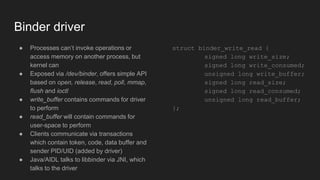
● Processes can’t invoke operations or
access memory on another process, but
kernel can
● Exposed via /dev/binder, offers simple API
based on open, release, read, poll, mmap,
flush and ioctl
● write_buffer contains commands for driver
to perform
● read_buffer will contain commands for
user-space to perform
● Clients communicate via transactions
which contain token, code, data buffer and
sender PID/UID (added by driver)
● Java/AIDL talks to libbinder via JNI, which
talks to the driver
struct binder_write_read {
signed long write_size;
signed long write_consumed;
unsigned long write_buffer;
signed long read_size;
signed long read_consumed;
unsigned long read_buffer;
};
Binder Driver operations
● open establishes connection to binder driver and assigns it a linux file pointer
● release closes the connection
● mmap is needed to map Binder memory
● Main operation is ioctl, higher layers submit commands by ioctl:
○ BINDER_WRITE_READ - most important, submits a series of transmission data
○ BINDER_SET_MAX_THREADS - sets maximum number of threads per process
○ BINDER_SET_CONTEXT_MANAGER - sets the context manager, happens once
○ BINDER_THREAD_EXIT - sent by middleware, if Binder thread exists
○ BINDER_VERSION - returns version number
○ BC_REGISTER_LOOPER, BC_ENTER_LOOPER and BC_EXIT_LOOPER - bookkeeping of
processes binder thread pool
○ BC_INCREFS, BC_RELEASE and BC_DECREFS - reference counting
○ BC_REQUEST_DEATH_NOTIFICIATION, BC_CLEAR_DEATH_NOTIFICATION,
BC_DEAD_ BINDER_DONE - recognize and manage death of nodes
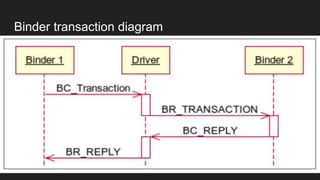
Binder transaction
● BC_TRANSACITON and BC_REPLY cause a transit of data to another
Binder interface
● BC_REPLY is used by middleware to answer a received BC_TRANSACTION
● Binder driver takes care of delivering a reply to waiting thread
● Binder driver copies the transmission data from user memory address space
of the sending process to its kernel space, and then to the destination
process
● This is achieved by kernel functions get_user and put_user
● Source found on AOSP /drivers/staging/android/binder.c and h
Binder transaction diagram
struct binder_transaction_data {
union {
size_t handle;
void *ptr;
} target;
void *cookie;
unsigned int code;
unsigned int flags;
pid_t sender_pid;
uid_t sender_euid;
size_t data_size;
size_t offsets_size;
union {
struct {
const void
*buffer;
const void
*offsets;
} ptr;
uint8_t buf[8];
} data;
};
Putting it all together
● Most clients don’t want to know about IPC, never mind Binder or proxies, they
count on managers to abstract the complexity for them
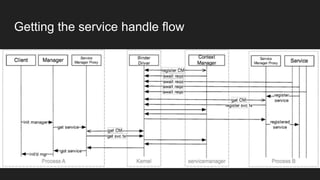
● How do we get the service handle? Ask servicemanager (Binder’s
CONTEXT_MGR) and hope it was already registered with it
● For security and sanity reasons, binder driver will only accept single one-time
CONTEXT_MGR registration, that’s why servicemanager is one of the first
services to start on Android
● To get list of services registered on service manager run adb shell service list
Getting the service handle flow
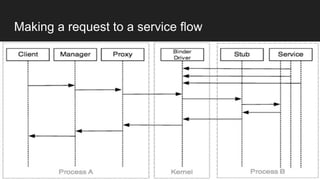
Making a request to a service flow
Caveat: single attack surface to (nearly) everything
● Paper and lecture from BlackHat Europe 2015 by team from CheckPoint
● Gaining root is easy, with root use ptrace to hook ioctl binder calls
● Keylogger: input method talks with app via binder
● Banking app intent hijacker: they caught intent on route and changed amount
and target account number for bank transfer
● Defense: don’t trust binder with sensitive data, and EVERYTHING GOES
THROUGH THE BINDER!!!!
○ Encrypt the sensitive data passed via binder
○ Implement your in-app keyboard for passwords
● Fixed by SeLinux: does not allow ptrace hooks
● https://www.youtube.com/watch?v=O-UHvFjxwZ8
More Binder caveats and gotchas: Binder threads
● Binder is, as we said, limited to 1mb per transaction
● Binder thread pool is limited to 15 per process
● Avoid blocking binder threads
Binder as arbiter of platform security
● Binder driver automatically adds calling process PID and UID, which is the base for most of Android
Platform security, there are exceptions, which use concept of Unix/Linux groups IDs, like
WRITE_EXTERNAL_STORAGE
● Caller PID/UID provides trusted execution environment, by providing callee with identity
● Special user, System User with UID 1000, is always allowed access (not to be confused with linux
root user, which has UID 0)
● Service can get this info via android.os.Binder.getCallingPid() and getCallingUid(), then get package
with PackageManager.getPackageByUid()
● Service needs to call PackageManager.getPackageInfo() with GET_PERMISSIONS flag
● Alternative way: Context.checkCallingOrSelfPermission and enforceCallingPermission
● https://android.googlesource.com/platform/frameworks/base.git/+/android-
4.2.2_r1/services/java/com/android/server/VibratorService.java
Binder logs
● Binder driver reports various stats on active/failed transactions via
/proc/binder/
○ /proc/binder/failed_transaction_log
○ /proc/binder/state
○ /proc/binder/stats
○ /proc/binder/transaction_log
○ /proc/binder/transactions
○ /proc/binder/proc/<pid>
● If debugfs is enabled, replace /proc/binder with /sys/kernel/debug/binder
The End?

Binder: Android IPC

  • 1.
  • 2.
    What is IPC? ●Framework for the exchange of signals and data across multiple processes ● Used for message passing, synchronization, shared memory, and remote procedure calls (RPC) ● Enables information sharing, computational speedup, modularity, convenience, privilege separation, data isolation, stability ● Options: files (fs or memory mapped), Signals, Sockets, Pipes, Semaphores, Shared Memory, Message passing (queues, message bus) ● Android specific options: Intents, ContentProviders, Messengers, Broadcast receivers, IBinder, AIDL, all are based on Binder framework
  • 3.
    What is Binder? ●An IPC/component system for developing object oriented OS services ● Not yet another object-oriented kernel ● Instead an object-oriented operating system environment that works on traditional kernels, like Linux! ● Essential to Android! ● EVERYTHING GOES THROUGH BINDER!!!! ● ...well, nearly everything
  • 4.
    Normal OS ● Appcalls syscalls ● Kernel talks to hardware ● Constant syscalls can hog resources, destabilize kernel, etc KernelApp Hardware
  • 5.
    Android ● App getsManager ● Manager talks to Service via binder ● Service calls kernel ● Kernel talks to hardware ● Binder adds security ● System Service manages kernel resources (hardware) ● Binder is only kernel resource directly available to apps App Binder System Service Kernel Hardware
  • 6.
    Why Binder? ● Androidapps and system services run in separate processes for security, stability, and memory management reasons, but they need to communicate and share data ● Android implementation of libc does not support System V IPC, low memory killer would create resource leakage, or worse
  • 7.
    Binder PRO andCON ● PRO: Security (identity of sender and receiver), Object reference counter, death notifications, automatic management of thread pools, invoking remote objects as local, synchronous and asynchronous (oneway), ability to send file descriptors & shared memory, AIDL, local execution mode (no marshalling if inside same process) ● CON: no RPC, client server based (not suited for streaming), not defined by POSIX or any other standard, single attack surface for nearly everything, limited to 1mb
  • 8.
    Binder history ● Startedat Be inc, for “next generation BeOS” around 2001 ● Acquired by PalmSource, first implementation for Palm Cobalt ● Palm switched to Linux, ported (~ 2005) and open sourced (OpenBinder) ● Used in Android as is initially, totally rewritten (~2008) ● Focused on scalability, stability, flexibility, low-latency/overhead, easy programming model ● Google hired Dianne Hackborn, key engineer from Be inc times and tech owner of OpenBinder project, to join Android team just after they acquired Android inc. ● https://plus.google.com/+DianneHackborn ● http://www.angryredplanet.com/~hackbod/
  • 9.
  • 10.
    Binder terminology ● Binder(Framework) - IPC architecture ● Binder Driver - kernel module ● Libbinder - native library above kernel ● Binder Protocol - low level ioctl based ● IBinder interface - methods that Binder objects must implement ● AIDL - Android Interface Definition Language, used to describe operations on IBinder interface ● Binder Object - generic implementation of IBinder interface ● Binder Token - 32 bit integer that uniquely identifies a Binder object across all processes on a given system ● Binder Service - Actual implementation of Binder Object ● Binder Transaction - act of invoking an operation on a remote Binder object ● Parcel - container for a message (data and object references), one for outbound, one for inbound reply ● Proxy - implementation of AIDL interface that un/marshalls data and maps method calls to transactions - client side ● Stub - partial implementation of AIDL interface that maps transactions to methods (service side) ● Context Manager (servicemanager) - binder object with well known handle, used to discover other Binder Objects
  • 11.
    Sample well knownBinder implementations ● Intents ● Content providers/resolvers ● Messenger ● Broadcast / Broadcast receiver ● System service Managers ● Activity/Service lifecycle calls (ActivityManager) ● AIDL / bound service
  • 12.
    Intents ● Framework forasynchronous communication among components ● They may run in same or across different processes ● Point to Point or publish - subscribe ● Intent represents a message containing description of the operation to be performed as well as data to be passed ● Implicit intents enable loosely coupled APIs ● Facilitated by system services: ActivityManagerService and PackageManagerService
  • 13.
    Content provider /resolver ● ContentResolvers communicate synchronously with ContentProviders via a fixed CRUD (create/read/update/delete) API ● Well suited for database queries ● Content providers and Intents are rather similar ● CONS: lifecycle callbacks on UI thread, not well suited for low latency, API is loosely defined so prone to runtime errors, facilitated by ActivityManagerService and PackageManagerService
  • 14.
    Messenger IPC ● Messengerrepresents a reference to a Handler that can be sent to a remote process via an Intent ● Messages sent by remote process are delivered via the messenger to the local handler ● Messages designate operation (Message.what) and data (Message.getData()), similar to Intents ● Still asynchronous, but lower latency than Intents and Content providers ● Well suited for callbacks from service to the client
  • 15.
    Intent intent =new Intent("com.myapp.service.SERVICE"); ArrayList<Uri> uris = intent.putExtra("uris", uris); Messenger messenger = new Messenger(new MyHandler(this)); intent.putExtra("callback-messenger", messenger); super.startService(intent); … private static class MyHandler extends Handler { private final WeakReference<MyActivity> clientRef; public MyHandler(MyActivity client) { this.clientRef = new WeakReference<MyActivity>(client); } @Override public void handleMessage(Message msg) { MyParcelableClass data = msg.getData(); //do stuff with it } }
  • 16.
    public class MyServiceextends IntentService { private static final int CALLBACK_MSG = 0; … @Override protected void onHandleIntent(Intent intent) { Messenger messenger = intent.getParcelableExtra("callback- messenger"); if (messenger != null) { Message message = Message.obtain(); message.what = CALLBACK_MSG; data.putParcelable("some-data", someParcelableObject); message.setData(data); try { messenger.send(message); } catch (RemoteException e) { … } finally { message.recycle(); } } }
  • 17.
    AIDL: Android InterfaceDefinition Language ● Sample: https://github.com/shaulr/FooService ● AIDL allows you to define the programming interface that both the client and service agree upon in a simple and efficient way ● Similar to simplified Java, with addition of keywords in, out, inout and oneway ● Similar concept to CORBA or COM, without RPC ● Need to import each Serializable and Parcelable object, which also need their own AIDL files ● AIDL is compiled to Java, where Stub and Proxy sides are implemented automatically ● Only methods can be exposed via AIDL, not fields, and all are public
  • 18.
    ● If paramsare not primitives (primitives are “in” only), they require a directional flag: “inout” means it will be copied in both directions, “in”; it will be copied into the service, “out”; it will be copied back to the client ● If we add modifier “oneway” before method, it will be asynchronous, callback will come on Binder thread, not on original calling thread ● Service can throw back to the client only one of the following exceptions: SecurityException, BadParcelableException, IllegalArgumentException, NullPointerException, and IllegalStateException
  • 19.
    IFooService.aidl: package com.example.app; import com.example.app.Bar; importcom.tikal.fooservice.IFooResponseListner; interface IFooService { void save(inout Bar bar); Bar getById(int id); void delete(in Bar bar); List<Bar> getAll(); oneway void asyncGetList(in IFooResponseListner listener); } Bar.aidl: package com.example.app; parcelable Bar; IFooResponseListener.aidl: interface IFooResponseListner { void onResponse(in String response); }
  • 20.
    AIDL types ● null ●Java Primitives and their arrays ● CharSequence and String (as UTF-16) ● FileDescriptor (as dup of original) ● Serializable (not efficient, made for serialization to storage) ● Map (reconstructed as HashMap) ● Bundle ● List (reconstructed as ArrayList) ● Object[] ● SparseArray and SparseBooleanArray ● IBinder and IInterface (transferred by globally unique reference, not copied over, used for callbacks, strong binder) ● Parcelable, for custom types ○ Parcelable can not be serialized to storage, unlike Serializable ○ You need to implement marshalling and unmarshalling yourself ○ Mechanism for flattening objects, proxy calls writeToParcel, stub re-creates the object
  • 21.
    package com.tikal.fooservice; public interfaceIFooService extends android.os.IInterface { public static abstract class Stub extends android.os.Binder implements com.example.app.IFooService { … public static com.example.app.IFooService asInterface( android.os.IBinder obj) { … return new com.example.app.IFooService.Stub.Proxy(obj); } … public boolean onTransact(int code, android.os.Parcel data, android.os.Parcel reply, int flags) throws android.os.RemoteException { switch (code) { … case TRANSACTION_save: { … com.example.app.Bar _arg0; … _arg0 = com.example.app.Bar.CREATOR.createFromParcel(data); this.save(_arg0); … } … } … } …
  • 22.
    private static classProxy implements com.example.app.IFooService { private android.os.IBinder mRemote; … public void save(com.example.app.Bar bar) throws android.os.RemoteException { … android.os.Parcel _data = android.os.Parcel.obtain(); … bar.writeToParcel(_data, 0); … mRemote.transact(Stub.TRANSACTION_save, _data, _reply, 0); … } } } void save(com.tikal.fooservice.Bar bar) throws android.os.RemoteException; com.example.app.Bar getById(int id) throws android.os.RemoteException; void delete(com.tikal.fooservice.Bar bar) throws android.os.RemoteException; java.util.List<Bar> getAll() throws android.os.RemoteException; }
  • 23.
    Using generated class ●Service should extend IFooService.Stub ○ By implementing onBind, onUnbind and onDestroy, service will be able to be registered by Binder framework with Binder driver and wait on requests ○ Stub takes care of translating parcels to and from service ○ Custom app service can not register with service manager, it accepts only trusted sources ○ Therefore we have to create a regular service whose job is to provide Stub implementation to the client ○ Service should return Stub implementation in onBind, and we are done ● Client will use IFooService via IFooService.Proxy ○ Client should bind to the service using bindService API which goes through the PackageManager, similar to Intent ○ Once bound, in onServiceConnected callback, you ask the IFooService.Stub.asInterface(service) and get the Proxy side of the interface
  • 24.
    Binder Object mapping ●Binder object reference is virtual memory address if in same process, or an abstract 32 bit handle if in different process ● driver maps addresses to and from local addresses automatically ● driver maintains mapping between local and global addresses
  • 25.
    Sharing memory viaBinder ● Binder is limited to passing 1mb of data per transaction, if larger it will throw TransactionTooLargeException ● If data comes from a file, just pass the FileDescriptor ● If it is in memory, it is possible to send it in chunks, but it will complicate the design ● Alternatively, send it via JNI, use libbinder’s Parcel::writeBlob and Parcel::readBlob ● https://android.googlesource.com/platform/frameworks/native/+/jb- dev/libs/binder/Parcel.cpp ● They are implemented using ashmem and writeFileDescriptor and readFileDescriptor but this functionality is not exposed to Java
  • 26.
  • 27.
    Binder driver ● Processescan’t invoke operations or access memory on another process, but kernel can ● Exposed via /dev/binder, offers simple API based on open, release, read, poll, mmap, flush and ioctl ● write_buffer contains commands for driver to perform ● read_buffer will contain commands for user-space to perform ● Clients communicate via transactions which contain token, code, data buffer and sender PID/UID (added by driver) ● Java/AIDL talks to libbinder via JNI, which talks to the driver struct binder_write_read { signed long write_size; signed long write_consumed; unsigned long write_buffer; signed long read_size; signed long read_consumed; unsigned long read_buffer; };
  • 28.
    Binder Driver operations ●open establishes connection to binder driver and assigns it a linux file pointer ● release closes the connection ● mmap is needed to map Binder memory ● Main operation is ioctl, higher layers submit commands by ioctl: ○ BINDER_WRITE_READ - most important, submits a series of transmission data ○ BINDER_SET_MAX_THREADS - sets maximum number of threads per process ○ BINDER_SET_CONTEXT_MANAGER - sets the context manager, happens once ○ BINDER_THREAD_EXIT - sent by middleware, if Binder thread exists ○ BINDER_VERSION - returns version number ○ BC_REGISTER_LOOPER, BC_ENTER_LOOPER and BC_EXIT_LOOPER - bookkeeping of processes binder thread pool ○ BC_INCREFS, BC_RELEASE and BC_DECREFS - reference counting ○ BC_REQUEST_DEATH_NOTIFICIATION, BC_CLEAR_DEATH_NOTIFICATION, BC_DEAD_ BINDER_DONE - recognize and manage death of nodes
  • 29.
    Binder transaction ● BC_TRANSACITONand BC_REPLY cause a transit of data to another Binder interface ● BC_REPLY is used by middleware to answer a received BC_TRANSACTION ● Binder driver takes care of delivering a reply to waiting thread ● Binder driver copies the transmission data from user memory address space of the sending process to its kernel space, and then to the destination process ● This is achieved by kernel functions get_user and put_user ● Source found on AOSP /drivers/staging/android/binder.c and h
  • 30.
  • 31.
    struct binder_transaction_data { union{ size_t handle; void *ptr; } target; void *cookie; unsigned int code; unsigned int flags; pid_t sender_pid; uid_t sender_euid; size_t data_size; size_t offsets_size; union { struct { const void *buffer; const void *offsets; } ptr; uint8_t buf[8]; } data; };
  • 32.
    Putting it alltogether ● Most clients don’t want to know about IPC, never mind Binder or proxies, they count on managers to abstract the complexity for them ● How do we get the service handle? Ask servicemanager (Binder’s CONTEXT_MGR) and hope it was already registered with it ● For security and sanity reasons, binder driver will only accept single one-time CONTEXT_MGR registration, that’s why servicemanager is one of the first services to start on Android ● To get list of services registered on service manager run adb shell service list
  • 33.
  • 34.
    Making a requestto a service flow
  • 35.
    Caveat: single attacksurface to (nearly) everything ● Paper and lecture from BlackHat Europe 2015 by team from CheckPoint ● Gaining root is easy, with root use ptrace to hook ioctl binder calls ● Keylogger: input method talks with app via binder ● Banking app intent hijacker: they caught intent on route and changed amount and target account number for bank transfer ● Defense: don’t trust binder with sensitive data, and EVERYTHING GOES THROUGH THE BINDER!!!! ○ Encrypt the sensitive data passed via binder ○ Implement your in-app keyboard for passwords ● Fixed by SeLinux: does not allow ptrace hooks ● https://www.youtube.com/watch?v=O-UHvFjxwZ8
  • 36.
    More Binder caveatsand gotchas: Binder threads ● Binder is, as we said, limited to 1mb per transaction ● Binder thread pool is limited to 15 per process ● Avoid blocking binder threads
  • 37.
    Binder as arbiterof platform security ● Binder driver automatically adds calling process PID and UID, which is the base for most of Android Platform security, there are exceptions, which use concept of Unix/Linux groups IDs, like WRITE_EXTERNAL_STORAGE ● Caller PID/UID provides trusted execution environment, by providing callee with identity ● Special user, System User with UID 1000, is always allowed access (not to be confused with linux root user, which has UID 0) ● Service can get this info via android.os.Binder.getCallingPid() and getCallingUid(), then get package with PackageManager.getPackageByUid() ● Service needs to call PackageManager.getPackageInfo() with GET_PERMISSIONS flag ● Alternative way: Context.checkCallingOrSelfPermission and enforceCallingPermission ● https://android.googlesource.com/platform/frameworks/base.git/+/android- 4.2.2_r1/services/java/com/android/server/VibratorService.java
  • 38.
    Binder logs ● Binderdriver reports various stats on active/failed transactions via /proc/binder/ ○ /proc/binder/failed_transaction_log ○ /proc/binder/state ○ /proc/binder/stats ○ /proc/binder/transaction_log ○ /proc/binder/transactions ○ /proc/binder/proc/<pid> ● If debugfs is enabled, replace /proc/binder with /sys/kernel/debug/binder
  • 39.