Android のUSB support

       まごろく
USB on Android Yesterday
• Android USB device built-in functions
  – USB mass storage
  – Adb
  – USB tethering
• Limitations
  – Most Android devices have no USB host support
  – USB Host in Android 3.0 is very limited
  – No USB APIs
What is an Open Accessory
• Simple USB protocol for communication
  between peripherals and Android devices
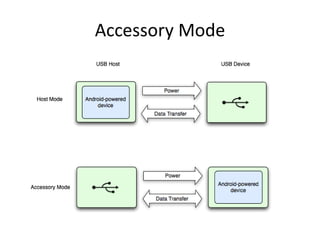
• Accessory is the host, Android is the device
• Bi-directional communication over two bulk
  end points
• protocol for associating Android applications
  with the hardware they support
Accessory Mode
ADK
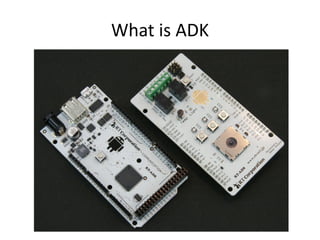
• Android Accessory Board:
  – Based on arduino Mega 2560
  – Maxim MAX3421E host controller
  – Works with arduino tool chain
Google Shield
•   3 RGB LEDs
•   4 buttons (3 channels, 1 capacitive)
•   3 servo channels, 2 relays
•   joystick
•   light & temperature sensors
Requirements for
       Open Accessory Hardware
• USB host
• Must supply 500mA @5V charging power
Open Accessory Handshake
• When a new device connected, the accessory will
  perform these steps:
  – Send "Get Protocol" command to get Accessory
    protocol version. if they fails, the device does not
    support accessories
  – Send manufacture, mode description version, serial
    number and URL strings to identify the accessory to
    the Android Device
  – Send "start" command
  – The Android device should re-enumerate in accessory
    mode and launch an app
USB Accessory Handshake, part2
• You're in Accessory Mode if:
    – vendor ID is 0x18d1 (Google)
    – Product ID is 0x2D00 or 0x2D01
•   Read configuration descriptors
•   Look for first In and first bulk OUT endpoint
•   Set configuration to 1
•   Endpoints are now ready for communication
Open Accessory APIs
• New USB APIs in Android 3.1
• - com.android.hardware.udb.*
• - Use the is your app will require Android 3.1 (API 12) or
  later
• - Supported on Motorola Xoom with android 3.1 update
• Compatibility Library for Gingerbread
• - com.andorid.future.ubs.*
• - Link against com.android.future.usb.accessory.jar
• - Very similar to Android 3.1 API
• - Use this if you want to support Gingerbread and later
• - Supported on Nexus One and Nexus S with 2.3.4 update
Connecting to and Accessory
• Application describes compatible accessories in
  manifest meta-data
• USB Manager matches accessory to compatible
  application(s)
• Asks user if it is OK to use your app with the accessory
  to choose among multiple applications
• Application's Activity is started with
  USB_ACCESSORY_ATTACHED Intent
• Association made permanent if the user selects
  "always use the app for this accessory" in this dialog
• USB_ACCESSORY_DETACHED Intent send when
  accessory disconnected
UsbAccessory class
• Describes the USB accessory base on the strings if
  provides in the handshake
  –   manufacture Name
  –   Model Name
  –   Description (user-visible strings)
  –   URL (web page to visit if no installed support the
      accessory)
• Serial Number (Optional)
• Manufacture, Model and Version are used for
  associating accessories with applications
USB Manager class
• getAccessoryList() return currently attached
  accessories (currently these can only one)
• openAccessory() returns a ParcelFileDescriptor
• hasPermission() to see if you have access to
  the accessory
• requestPermission() to request permission
  from user
What is ADK
arduino
• open-source electronics prototyping platform
• http://www.arduino.cc/
• http://www.circuitsathome.com/arduino_usb
  _host_shield_projects
ATmega2560
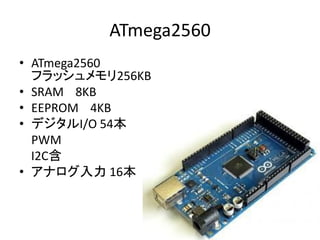
• ATmega2560
  フラッシュメモリ256KB
• SRAM 8KB
• EEPROM 4KB
• デジタルI/O 54本
  PWM
  I2C含
• アナログ入力 16本
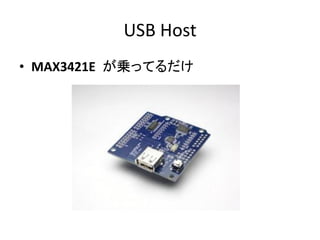
USB Host
• MAX3421E が乗ってるだけ
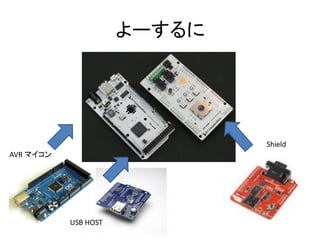
よーするに


                              Shield
AVR マイコン


           USB HOST
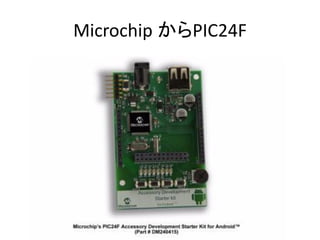
Microchip からPIC24F
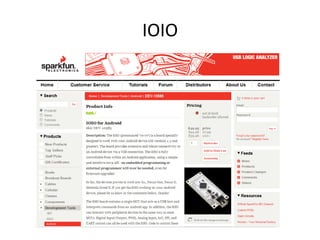
IOIO
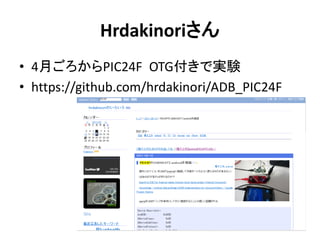
Hrdakinoriさん
• 4月ごろからPIC24F OTG付きで実験
• https://github.com/hrdakinori/ADB_PIC24F
結論
• おもちゃ・遊び場が増えて
• 睡眠時間が減る
• Androidアプリ書けないけどDeviceの
                  prototypingはできます
• PIC24F OTG付き 64Kbyte DIP版入手

         いっしょに遊ぶ人募集

Android のusb support

  • 1.
  • 2.
    USB on AndroidYesterday • Android USB device built-in functions – USB mass storage – Adb – USB tethering • Limitations – Most Android devices have no USB host support – USB Host in Android 3.0 is very limited – No USB APIs
  • 3.
    What is anOpen Accessory • Simple USB protocol for communication between peripherals and Android devices • Accessory is the host, Android is the device • Bi-directional communication over two bulk end points • protocol for associating Android applications with the hardware they support
  • 4.
  • 5.
    ADK • Android AccessoryBoard: – Based on arduino Mega 2560 – Maxim MAX3421E host controller – Works with arduino tool chain
  • 6.
    Google Shield • 3 RGB LEDs • 4 buttons (3 channels, 1 capacitive) • 3 servo channels, 2 relays • joystick • light & temperature sensors
  • 7.
    Requirements for Open Accessory Hardware • USB host • Must supply 500mA @5V charging power
  • 8.
    Open Accessory Handshake •When a new device connected, the accessory will perform these steps: – Send "Get Protocol" command to get Accessory protocol version. if they fails, the device does not support accessories – Send manufacture, mode description version, serial number and URL strings to identify the accessory to the Android Device – Send "start" command – The Android device should re-enumerate in accessory mode and launch an app
  • 9.
    USB Accessory Handshake,part2 • You're in Accessory Mode if: – vendor ID is 0x18d1 (Google) – Product ID is 0x2D00 or 0x2D01 • Read configuration descriptors • Look for first In and first bulk OUT endpoint • Set configuration to 1 • Endpoints are now ready for communication
  • 10.
    Open Accessory APIs •New USB APIs in Android 3.1 • - com.android.hardware.udb.* • - Use the is your app will require Android 3.1 (API 12) or later • - Supported on Motorola Xoom with android 3.1 update • Compatibility Library for Gingerbread • - com.andorid.future.ubs.* • - Link against com.android.future.usb.accessory.jar • - Very similar to Android 3.1 API • - Use this if you want to support Gingerbread and later • - Supported on Nexus One and Nexus S with 2.3.4 update
  • 11.
    Connecting to andAccessory • Application describes compatible accessories in manifest meta-data • USB Manager matches accessory to compatible application(s) • Asks user if it is OK to use your app with the accessory to choose among multiple applications • Application's Activity is started with USB_ACCESSORY_ATTACHED Intent • Association made permanent if the user selects "always use the app for this accessory" in this dialog • USB_ACCESSORY_DETACHED Intent send when accessory disconnected
  • 12.
    UsbAccessory class • Describesthe USB accessory base on the strings if provides in the handshake – manufacture Name – Model Name – Description (user-visible strings) – URL (web page to visit if no installed support the accessory) • Serial Number (Optional) • Manufacture, Model and Version are used for associating accessories with applications
  • 13.
    USB Manager class •getAccessoryList() return currently attached accessories (currently these can only one) • openAccessory() returns a ParcelFileDescriptor • hasPermission() to see if you have access to the accessory • requestPermission() to request permission from user
  • 14.
  • 15.
    arduino • open-source electronicsprototyping platform • http://www.arduino.cc/ • http://www.circuitsathome.com/arduino_usb _host_shield_projects
  • 16.
    ATmega2560 • ATmega2560 フラッシュメモリ256KB • SRAM 8KB • EEPROM 4KB • デジタルI/O 54本 PWM I2C含 • アナログ入力 16本
  • 17.
    USB Host • MAX3421Eが乗ってるだけ
  • 18.
    よーするに Shield AVR マイコン USB HOST
  • 19.
  • 20.
  • 21.
  • 22.
    結論 • おもちゃ・遊び場が増えて • 睡眠時間が減る •Androidアプリ書けないけどDeviceの prototypingはできます • PIC24F OTG付き 64Kbyte DIP版入手 いっしょに遊ぶ人募集