Dealing with Different
          Devices


Objective: Minimal Redundancy
    ●   More code = more cost
        –   More development time initially
        –   Greater odds of bugs
        –   More maintenance over time
    ●   Aim for maximum targets with the least
        feasible code


Step #1: Identify Targets
    ●   Where Is Your App Really Going to be Used?
        –   Outside of US? Small screens popular
        –   Heavily dependent on mobile data? Tablets less
            likely, TVs pretty much out
    ●   Business-Focused Restrictions
        –   Distribution partners (e.g., OEM deals)
        –   Enterprise requirements

                                   
Step #2: High-Level UX Design
    ●   What Are the Major Functions?
        –   E.g., Gmail = labels, conversations, messages,
            composition
    ●   How Are the Functions Delivered?
        –   E.g., Gmail = one per screen on phones,
            combined on tablets
    ●   What Functional Differences Are There?
        –   E.g., something only on tablets
                                   
Step #3: ID Reusable Portions
    ●   Where Are You Combining Things?
        –   Tablet screen = combination of multiple phone
            screens
        –   Only min0r differences in functionality, look and
            feel


Step #4: Apply Fragments
    ●   Fragments in an MVC World
        –   Models = POJOs, database+helper, whatever
        –   Views = widgets
        –   Controller = fragments
        –   Activities = orchestration


Step #4: Apply Fragments
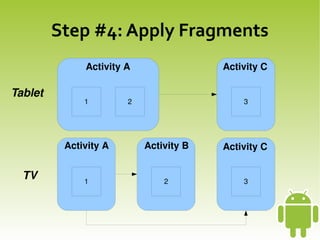
              Activity A                 Activity C

Tablet
              1        2                     3


          Activity A       Activity B    Activity C


    TV        1                   2          3


Step #4: Apply Fragments
    ●   Orchestration via Listeners
        –   Define interface for the event listener
        –   Activity supplies implementation to fragment
        –   Fragment calls listener methods as needed
        –   Activity responds
             ●   Dynamic fragment or reconfigure existing
                 fragment
             ●   Start an activity
                                       
Step #4: Apply Fragments
    ●   Hoped-For Outcomes
        –   Fragments directly usable in all screen sizes
             ●   1 per activity in small/normal screens
             ●   1+ per activity in large/xlarge screens
             ●   Fragment implementations oblivious to where other
                 fragments reside
        –   Views and models unaffected


Step #5: Tactical Considerations
    ●   Use density-independent dimensions
    ●   Use stretchable graphics
        –   ShapeDrawable
        –   Nine-patch PNGs
        –   SVG (via add-on library)


Step #5: Tactical Considerations
    ●   Tell Android where whitespace goes
        –   LinearLayout and android:layout_weight
        –   TableLayout and android:stretchColumns
        –   RelativeLayout and wise choice of rules
             ●   Get graphics designer to design with rules in mind!


Step #5: Tactical Considerations
    ●   Resource Set Strategy
        –   Drawables by Density
             ●   Want image to stay roughly the same size
        –   Layout by Screen Size
             ●   Apply appropriate fragments, sized and positioned
                 as needed
        –   Values by Density (dimensions)
        –   New in 3.2: minimum resolution resource sets
                                       
Step #5: Tactical Considerations
    ●   API Versions and Backwards Compatibility
        –   Class Detection
        –   Reflection
        –   Conditional Class Loading
             ●   Newer API only
             ●   Abstract class and multiple API concrete
                 implementations
        –   Why? For other tablet features
 
             ●   E.g., work with action  bar
Step #6: Testing
    ●   Emulators
    ●   Devices
        –   Owned
        –   Loaned (e.g., user group events, device labs at
            conferences)
        –   DeviceAnywhere and similar services
        –   Controlled beta test release

                                   
Alternative #1: Market Filtering
    ●   Upload Multiple APKs
        –   Each targeting a different device spec
    ●   Apply Market Filters
        –   APKs only delivered to devices on which it
            should work


Alternative #2: Manifest Filtering
    ●   <compatible-screens>
    ●   <supports-screens>
    ●   <uses-configuration>
    ●   <uses-feature>
    ●   <uses-sdk>


Alternative #3: HTML5
    ●   Detect window size or user agent, use
        appropriate formatting
        –   Screen density can be a challenge
    ●   Use PhoneGap to convert into installable APK
    ●   Bonus: cross-platform
    ●   Cons: limited device integration, “non-native”
        feel
                                  

Android: Dealing with Different Devices

  • 1.
  • 2.
    Objective: Minimal Redundancy ● More code = more cost – More development time initially – Greater odds of bugs – More maintenance over time ● Aim for maximum targets with the least feasible code    
  • 3.
    Step #1: IdentifyTargets ● Where Is Your App Really Going to be Used? – Outside of US? Small screens popular – Heavily dependent on mobile data? Tablets less likely, TVs pretty much out ● Business-Focused Restrictions – Distribution partners (e.g., OEM deals) – Enterprise requirements    
  • 4.
    Step #2: High-LevelUX Design ● What Are the Major Functions? – E.g., Gmail = labels, conversations, messages, composition ● How Are the Functions Delivered? – E.g., Gmail = one per screen on phones, combined on tablets ● What Functional Differences Are There? – E.g., something only on tablets    
  • 5.
    Step #3: IDReusable Portions ● Where Are You Combining Things? – Tablet screen = combination of multiple phone screens – Only min0r differences in functionality, look and feel    
  • 6.
    Step #4: ApplyFragments ● Fragments in an MVC World – Models = POJOs, database+helper, whatever – Views = widgets – Controller = fragments – Activities = orchestration    
  • 7.
    Step #4: ApplyFragments Activity A  Activity C Tablet 1 2 3 Activity A Activity B  Activity C TV 1 2 3    
  • 8.
    Step #4: ApplyFragments ● Orchestration via Listeners – Define interface for the event listener – Activity supplies implementation to fragment – Fragment calls listener methods as needed – Activity responds ● Dynamic fragment or reconfigure existing fragment ● Start an activity    
  • 9.
    Step #4: ApplyFragments ● Hoped-For Outcomes – Fragments directly usable in all screen sizes ● 1 per activity in small/normal screens ● 1+ per activity in large/xlarge screens ● Fragment implementations oblivious to where other fragments reside – Views and models unaffected    
  • 10.
    Step #5: TacticalConsiderations ● Use density-independent dimensions ● Use stretchable graphics – ShapeDrawable – Nine-patch PNGs – SVG (via add-on library)    
  • 11.
    Step #5: TacticalConsiderations ● Tell Android where whitespace goes – LinearLayout and android:layout_weight – TableLayout and android:stretchColumns – RelativeLayout and wise choice of rules ● Get graphics designer to design with rules in mind!    
  • 12.
    Step #5: TacticalConsiderations ● Resource Set Strategy – Drawables by Density ● Want image to stay roughly the same size – Layout by Screen Size ● Apply appropriate fragments, sized and positioned as needed – Values by Density (dimensions) – New in 3.2: minimum resolution resource sets    
  • 13.
    Step #5: TacticalConsiderations ● API Versions and Backwards Compatibility – Class Detection – Reflection – Conditional Class Loading ● Newer API only ● Abstract class and multiple API concrete implementations – Why? For other tablet features   ● E.g., work with action  bar
  • 14.
    Step #6: Testing ● Emulators ● Devices – Owned – Loaned (e.g., user group events, device labs at conferences) – DeviceAnywhere and similar services – Controlled beta test release    
  • 15.
    Alternative #1: MarketFiltering ● Upload Multiple APKs – Each targeting a different device spec ● Apply Market Filters – APKs only delivered to devices on which it should work    
  • 16.
    Alternative #2: ManifestFiltering ● <compatible-screens> ● <supports-screens> ● <uses-configuration> ● <uses-feature> ● <uses-sdk>    
  • 17.
    Alternative #3: HTML5 ● Detect window size or user agent, use appropriate formatting – Screen density can be a challenge ● Use PhoneGap to convert into installable APK ● Bonus: cross-platform ● Cons: limited device integration, “non-native” feel