Benigna Mary Shalin, International Journal of Advance Research, Ideas and Innovations in Technology.
© 2017, www.IJARIIT.com All Rights Reserved Page | 155
ISSN: 2454-132X
Impact factor: 4.295
(Volume3, Issue6)
Available online at www.ijariit.com
Android App for Hostel Outpass Form
Mary Shalin Benigna
Department of Computer Science and Engineering
SRM University, Chennai, Tamil Nadu
maryshalin06@gmail.com
Abstract: The prime objective of “Hostel out pass application” is to create a full-fledged Android application which could help
the students to fill an out pass form and get approval from the consent staff and coordinators at one click. The form will be
approved finally by the parent also thus making sure that the student’s activity is brought to parents notice. This helps in avoiding
the problems which occur when carried out manually. It improves the efficiency of the system. It is a customized user-friendly
application for hostel students which provides out pass information. This project offers the user to enter the data through simple
and interactive manner.
Keywords: Hostel Outpass Application, Android application
I.INTRODUCTION
The user is provided with the option of viewing their previous records of outpass forms in the history tab. The student will be
directed to form page where they will have to input the details in the required field regarding the outpass details. Once filled and
submitted the form will be sent to the consent staff and Year Coordinator and parent for approval. If the coordinator does not approve
your form he will have to give certain reasons to it which will be then forwarded to the consent student. If not the approved, the
form will be directed to the student as a final verified form with which the student can go out and use it as an outpass form. Similarly,
the parent is also given a choice of declining the form. In most cases, the parents will not decline but still, this notification remains
as an intimation made to the parents so that they will be aware of their ward’s activities inside the college premises. However, in
case of emergency situations, the students might not be able to contact their parent or wait for their approval due to several reasons,
In that case, our application provides a more distinguished manner of filling up the forms namely: Emergency and Holiday outpass
forms. The emergency outpass form segment enables the user to fill the form at that instance and get it approved only by their
respective class in charge and not wait for their parent's approval. This will lessen the time consumption without taking much of the
student’s time and will be helpful for their need.However, the holiday outpasses forms will have to be submitted priory like say
before 3 days from the date of issue, for the head of the department and the parent to approve because the student will be aware of
the holiday before in hand and thus they can make their necessary arrangements prior to the date.
This application enables the student to fill the form in an easier way than filling it manually. Since everybody uses a smartphone,
creating forms through an app is the most convenient manner of establishing such platforms. Parents are also made aware of their
children’s activities thus the management need not take up the responsibility as a whole in case of emergency situations. This
advancement in technology has proven worthy for all the citizens which enable technologists to come out with such developments
useful to them.
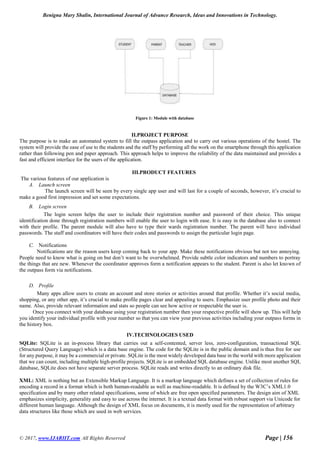
The main modules of this project are:
 Student Module
 HOD module
 Staff module
 Parent module
Each of these modules has various functions that will enable this application to function as a whole in a more user friendly manner.
Benigna Mary Shalin, International Journal of Advance Research, Ideas and Innovations in Technology.
© 2017, www.IJARIIT.com All Rights Reserved Page | 156
Figure 1: Module with database
II.PROJECT PURPOSE
The purpose is to make an automated system to fill the outpass application and to carry out various operations of the hostel. The
system will provide the ease of use to the students and the staff by performing all the work on the smartphone through this application
rather than following pen and paper approach. This approach helps to improve the reliability of the data maintained and provides a
fast and efficient interface for the users of the application.
III.PRODUCT FEATURES
The various features of our application is
A. Launch screen
The launch screen will be seen by every single app user and will last for a couple of seconds, however, it’s crucial to
make a good first impression and set some expectations.
B. Login screen
The login screen helps the user to include their registration number and password of their choice. This unique
identification done through registration numbers will enable the user to login with ease. It is easy in the database also to connect
with their profile. The parent module will also have to type their wards registration number. The parent will have individual
passwords. The staff and coordinators will have their codes and passwords to assign the particular login page.
C. Notifications
Notifications are the reason users keep coming back to your app. Make these notifications obvious but not too annoying.
People need to know what is going on but don’t want to be overwhelmed. Provide subtle color indicators and numbers to portray
the things that are new. Whenever the coordinator approves form a notification appears to the student. Parent is also let known of
the outpass form via notifications.
D. Profile
Many apps allow users to create an account and store stories or activities around that profile. Whether it’s social media,
shopping, or any other app, it’s crucial to make profile pages clear and appealing to users. Emphasize user profile photo and their
name. Also, provide relevant information and stats so people can see how active or respectable the user is.
Once you connect with your database using your registration number then your respective profile will show up. This will help
you identify your individual profile with your number so that you can view your previous activities including your outpass forms in
the history box.
IV.TECHNOLOGIES USED
SQLite: SQLite is an in-process library that carries out a self-contented, server less, zero-configuration, transactional SQL
(Structured Query Language) which is a data base engine. The code for the SQLite is in the public domain and is thus free for use
for any purpose, it may be a commercial or private. SQLite is the most widely developed data base in the world with more application
that we can count, including multiple high-profile projects. SQLite is an embedded SQL database engine. Unlike most another SQL
database, SQLite does not have separate server process. SQLite reads and writes directly to an ordinary disk file.
XML: XML is nothing but an Extensible Markup Language. It is a markup language which defines a set of collection of rules for
encoding a record in a format which is both human-readable as well as machine-readable. It is defined by the W3C’s XML1.0
specification and by many other related specifications, some of which are free open specified parameters. The design aim of XML
emphasizes simplicity, generality and easy to use across the internet. It is a textual data format with robust support via Unicode for
different human language. Although the design of XML focus on documents, it is mostly used for the representation of arbitrary
data structures like those which are used in web services.
Benigna Mary Shalin, International Journal of Advance Research, Ideas and Innovations in Technology.
© 2017, www.IJARIIT.com All Rights Reserved Page | 157
Java: It is a programming language expressly designed for used in the environment of the internet. It was architecture like nearby
C++ language such that having the “look and feel” of the C++ language, but it is more easy to use than C++ and emphasize an
object-oriented programming model. Java can be used to design complete applications that may execute on a single computer or be
distributed among servers and client in the network. It can also be used to construct a tiny application module or applet for use as
part of a web page. Applets make it feasible for a web page user to interact with the page.
Android: Android provides a rich application framework that allows the user to produce the innovative apps and games for mobile
gadgets in java language.
V.METHODOLOGIES USED
Android Studio: Android studio is the official IDE for the Android application development, which is based on Intelli J.
Build-in support for Google Cloud Platform, making it easy to integrate Google Cloud Messaging and Application Engine and much
more.
Android SDK: A software development kit that permits the developers to design applications for the Android platform. The
Android SDK includes sample projects with some source code, development tools, an emulator and required libraries for developing
the Android applications. Applications which are built using the Java programming language and run on Dalvik, a virtual machine
architecture for embedded use which runs on top of a Linux.
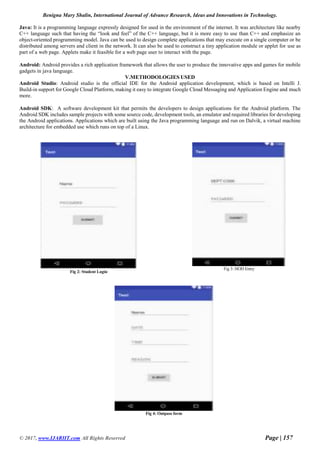
Fig 2: Student Login
Fig 3: HOD Entry
Fig 4: Outpass form
Benigna Mary Shalin, International Journal of Advance Research, Ideas and Innovations in Technology.
© 2017, www.IJARIIT.com All Rights Reserved Page | 158
FUTURE WORK
 The entire project design will be carried out with the large and real database connection and thus will enhance the whole
project.
 Resident attendance: the attendance of the resident will be marked each time the resident enters or leaves the hostel
premises.
 Accounting details except for Hosteller Fee details: All the other accounting details can be maintained in addition to the
fee details.
REFERENCES
[1] Jadhav Snehal Balasaheb, Supekar Bhagyashri Sitaram, Wakode Vrushali Khushalrao, Vasaikar Nikita Ashok,
Mandlik Priyanka Bhausaheb ‘Web Based College Admission System’ in IJEDR -2014
[2] Jianye Liu, Jianka Yu, ‘Research on Development of Android Applications’ in Fourth International
Conference on Intelligent System -2011

Android app for hostel outpass form

  • 1.
    Benigna Mary Shalin,International Journal of Advance Research, Ideas and Innovations in Technology. © 2017, www.IJARIIT.com All Rights Reserved Page | 155 ISSN: 2454-132X Impact factor: 4.295 (Volume3, Issue6) Available online at www.ijariit.com Android App for Hostel Outpass Form Mary Shalin Benigna Department of Computer Science and Engineering SRM University, Chennai, Tamil Nadu maryshalin06@gmail.com Abstract: The prime objective of “Hostel out pass application” is to create a full-fledged Android application which could help the students to fill an out pass form and get approval from the consent staff and coordinators at one click. The form will be approved finally by the parent also thus making sure that the student’s activity is brought to parents notice. This helps in avoiding the problems which occur when carried out manually. It improves the efficiency of the system. It is a customized user-friendly application for hostel students which provides out pass information. This project offers the user to enter the data through simple and interactive manner. Keywords: Hostel Outpass Application, Android application I.INTRODUCTION The user is provided with the option of viewing their previous records of outpass forms in the history tab. The student will be directed to form page where they will have to input the details in the required field regarding the outpass details. Once filled and submitted the form will be sent to the consent staff and Year Coordinator and parent for approval. If the coordinator does not approve your form he will have to give certain reasons to it which will be then forwarded to the consent student. If not the approved, the form will be directed to the student as a final verified form with which the student can go out and use it as an outpass form. Similarly, the parent is also given a choice of declining the form. In most cases, the parents will not decline but still, this notification remains as an intimation made to the parents so that they will be aware of their ward’s activities inside the college premises. However, in case of emergency situations, the students might not be able to contact their parent or wait for their approval due to several reasons, In that case, our application provides a more distinguished manner of filling up the forms namely: Emergency and Holiday outpass forms. The emergency outpass form segment enables the user to fill the form at that instance and get it approved only by their respective class in charge and not wait for their parent's approval. This will lessen the time consumption without taking much of the student’s time and will be helpful for their need.However, the holiday outpasses forms will have to be submitted priory like say before 3 days from the date of issue, for the head of the department and the parent to approve because the student will be aware of the holiday before in hand and thus they can make their necessary arrangements prior to the date. This application enables the student to fill the form in an easier way than filling it manually. Since everybody uses a smartphone, creating forms through an app is the most convenient manner of establishing such platforms. Parents are also made aware of their children’s activities thus the management need not take up the responsibility as a whole in case of emergency situations. This advancement in technology has proven worthy for all the citizens which enable technologists to come out with such developments useful to them. The main modules of this project are:  Student Module  HOD module  Staff module  Parent module Each of these modules has various functions that will enable this application to function as a whole in a more user friendly manner.
  • 2.
    Benigna Mary Shalin,International Journal of Advance Research, Ideas and Innovations in Technology. © 2017, www.IJARIIT.com All Rights Reserved Page | 156 Figure 1: Module with database II.PROJECT PURPOSE The purpose is to make an automated system to fill the outpass application and to carry out various operations of the hostel. The system will provide the ease of use to the students and the staff by performing all the work on the smartphone through this application rather than following pen and paper approach. This approach helps to improve the reliability of the data maintained and provides a fast and efficient interface for the users of the application. III.PRODUCT FEATURES The various features of our application is A. Launch screen The launch screen will be seen by every single app user and will last for a couple of seconds, however, it’s crucial to make a good first impression and set some expectations. B. Login screen The login screen helps the user to include their registration number and password of their choice. This unique identification done through registration numbers will enable the user to login with ease. It is easy in the database also to connect with their profile. The parent module will also have to type their wards registration number. The parent will have individual passwords. The staff and coordinators will have their codes and passwords to assign the particular login page. C. Notifications Notifications are the reason users keep coming back to your app. Make these notifications obvious but not too annoying. People need to know what is going on but don’t want to be overwhelmed. Provide subtle color indicators and numbers to portray the things that are new. Whenever the coordinator approves form a notification appears to the student. Parent is also let known of the outpass form via notifications. D. Profile Many apps allow users to create an account and store stories or activities around that profile. Whether it’s social media, shopping, or any other app, it’s crucial to make profile pages clear and appealing to users. Emphasize user profile photo and their name. Also, provide relevant information and stats so people can see how active or respectable the user is. Once you connect with your database using your registration number then your respective profile will show up. This will help you identify your individual profile with your number so that you can view your previous activities including your outpass forms in the history box. IV.TECHNOLOGIES USED SQLite: SQLite is an in-process library that carries out a self-contented, server less, zero-configuration, transactional SQL (Structured Query Language) which is a data base engine. The code for the SQLite is in the public domain and is thus free for use for any purpose, it may be a commercial or private. SQLite is the most widely developed data base in the world with more application that we can count, including multiple high-profile projects. SQLite is an embedded SQL database engine. Unlike most another SQL database, SQLite does not have separate server process. SQLite reads and writes directly to an ordinary disk file. XML: XML is nothing but an Extensible Markup Language. It is a markup language which defines a set of collection of rules for encoding a record in a format which is both human-readable as well as machine-readable. It is defined by the W3C’s XML1.0 specification and by many other related specifications, some of which are free open specified parameters. The design aim of XML emphasizes simplicity, generality and easy to use across the internet. It is a textual data format with robust support via Unicode for different human language. Although the design of XML focus on documents, it is mostly used for the representation of arbitrary data structures like those which are used in web services.
  • 3.
    Benigna Mary Shalin,International Journal of Advance Research, Ideas and Innovations in Technology. © 2017, www.IJARIIT.com All Rights Reserved Page | 157 Java: It is a programming language expressly designed for used in the environment of the internet. It was architecture like nearby C++ language such that having the “look and feel” of the C++ language, but it is more easy to use than C++ and emphasize an object-oriented programming model. Java can be used to design complete applications that may execute on a single computer or be distributed among servers and client in the network. It can also be used to construct a tiny application module or applet for use as part of a web page. Applets make it feasible for a web page user to interact with the page. Android: Android provides a rich application framework that allows the user to produce the innovative apps and games for mobile gadgets in java language. V.METHODOLOGIES USED Android Studio: Android studio is the official IDE for the Android application development, which is based on Intelli J. Build-in support for Google Cloud Platform, making it easy to integrate Google Cloud Messaging and Application Engine and much more. Android SDK: A software development kit that permits the developers to design applications for the Android platform. The Android SDK includes sample projects with some source code, development tools, an emulator and required libraries for developing the Android applications. Applications which are built using the Java programming language and run on Dalvik, a virtual machine architecture for embedded use which runs on top of a Linux. Fig 2: Student Login Fig 3: HOD Entry Fig 4: Outpass form
  • 4.
    Benigna Mary Shalin,International Journal of Advance Research, Ideas and Innovations in Technology. © 2017, www.IJARIIT.com All Rights Reserved Page | 158 FUTURE WORK  The entire project design will be carried out with the large and real database connection and thus will enhance the whole project.  Resident attendance: the attendance of the resident will be marked each time the resident enters or leaves the hostel premises.  Accounting details except for Hosteller Fee details: All the other accounting details can be maintained in addition to the fee details. REFERENCES [1] Jadhav Snehal Balasaheb, Supekar Bhagyashri Sitaram, Wakode Vrushali Khushalrao, Vasaikar Nikita Ashok, Mandlik Priyanka Bhausaheb ‘Web Based College Admission System’ in IJEDR -2014 [2] Jianye Liu, Jianka Yu, ‘Research on Development of Android Applications’ in Fourth International Conference on Intelligent System -2011