“AIRBORNE INTERNET” 
LOKESH V 
1MS12MCA24 
Presented By : 
ARIJITH 
GHOUSH 
1MS12MCA07
Contents 
 Introduction 
 Networking Technology and Wireless Technology 
 Why AI? 
 Principle & Working 
 Implementation Systems 
 Comparisons b/w Satellite Internet & AI 
 Applications 
 Features & Advantages 
 Conclusion 
 References
Introduction 
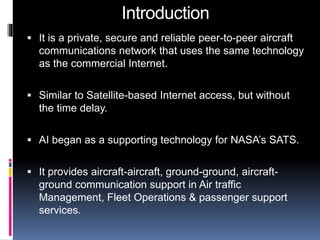
 It is a private, secure and reliable peer-to-peer aircraft 
communications network that uses the same technology 
as the commercial Internet. 
 Similar to Satellite-based Internet access, but without 
the time delay. 
 AI began as a supporting technology for NASA’s SATS. 
 It provides aircraft-aircraft, ground-ground, aircraft-ground 
communication support in Air traffic 
Management, Fleet Operations & passenger support 
services.
Computer and Internet 
 Nature of Computer technology and 
Internet technology has changed a 
lot in the past 10 years and will change a 
lot in the next 10 years 
Most of you in 1991 had not even heard 
of Internet, World-Wide Web, Networks, 
Personal Digital Assistant (PDA), 
Windows NT, Linux 
These are all now part of Computer 
Technology and Internet technology
Networking Technology 
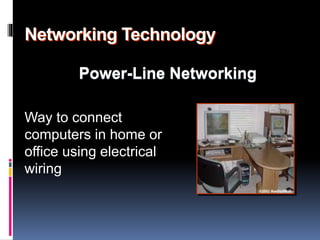
Power-Line Networking 
Way to connect 
computers in home or 
office using electrical 
wiring
Power-Line Networking 
 More convenient than phone lines 
 Connect computer to network through the 
outlet that provides power 
 Data travels through electrical wiring 
 Requires no new wiring and adds no cost to 
electric bill 
 Power-line networking is inexpensive method 
for connecting computers in different places 
in home or office
Bluetooth 
 Bluetooth is new standard being developed 
by a group of electronics manufacturers 
 Will allow any sort of electronic equipment to 
communicate with each other 
 Can be used among computers, keyboard, 
mouse, printer, headphone, cell phone 
 Bluetooth-like radio communications should 
take place of wires or infrared signals for 
connecting devices
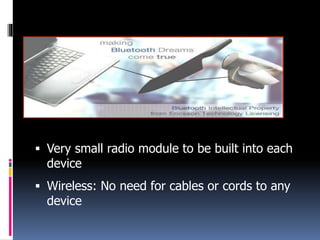
 Very small radio module to be built into each 
device 
 Wireless: No need for cables or cords to any 
device
Wireless Networking 
 Creates network by sending infrared or radio 
signals between computers 
 Better than Power-line networking; some 
computers are not “plugged in” to electrical 
outlet 
 Laptop with wireless network card is 
completely portable throughout home or 
office 
 IrDA (Infrared Direct Access) is standard for 
devices to communicate using infrared light 
pulses
 Infrared devices must be in direct line of sight 
with each other (like TV remote… which uses 
same infrared technology) 
 Infrared is almost always “one to one” 
technology 
 Radio signals better because no line of sight 
requirement and ability to broadcast to 
multiple recipients
WIRELESS TECHNOLOGY SYSTEMS 
 1G TECHNOLOGY 
 2G /2.5G 
TECHNOLOGY 
 3G TECHNOLOGY 
 4G TECHNOLOGY 
 5G TECHNOLOGY
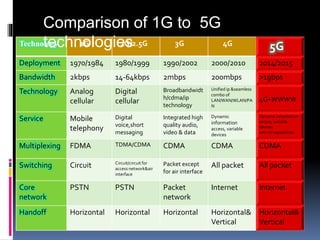
Technology 1G 2G/2.5G 3G 4G 5G 
Deployment 1970/1984 1980/1999 1990/2002 2000/2010 2014/2015 
Bandwidth 2kbps 14-64kbps 2mbps 200mbps >1gbps 
Technology Analog 
cellular 
Digital 
cellular 
Broadbandwidt 
h/cdma/ip 
technology 
Unified ip &seamless 
combo of 
LAN/WAN/WLAN/PA 
N 
4G+WWWW 
Service Mobile 
telephony 
Digital 
voice,short 
messaging 
Integrated high 
quality audio, 
video & data 
Dynamic 
information 
access, variable 
devices 
Dynamic information 
access, variable 
devices 
with AI capabilities 
Multiplexing FDMA TDMA/CDMA CDMA CDMA CDMA 
Switching Circuit Circuit/circuit for 
access network&air 
interface 
Packet except 
for air interface 
All packet All packet 
Core 
network 
PSTN PSTN Packet 
network 
Internet Internet 
Handoff Horizontal Horizontal Horizontal Horizontal& 
Vertical 
Horizontal& 
Vertical 
Comparison of 1G to 5G 
technologies
Airborne Internet 
 Satellite Internet access already 
commonplace 
 Satellites orbit at several hundreds of miles 
above Earth 
 Imagine airplane-like device at 
approximately 60,000 feet 
 Aircraft will be undisturbed by inclement 
weather and will be flying well above 
commercial air traffic
Why Airborne Internet? 
 There are mainly 2 reasons for developing the AI. They 
are: 
1. SATS (Small Aircraft Transportation System) 
2. Need For Higher Bandwidth. 
SATS 
 Controls Traffic in Air. 
 Provides Internet for people in the transit. 
High Bandwidth 
o Around 1 – 5 Mbps for Home Users. 
o Around 5 – 25 Mbps for Business Users. 
o Around 25 – 155 Mbps for Dedicated links.
Principles 
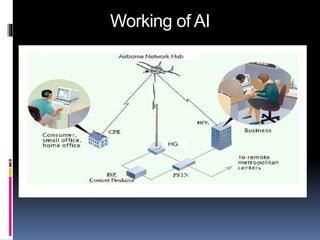
 To establish a robust, reliable, and available digital data 
channel to aircraft. 
 Mobile Routing is an ability of a network user to move 
from one network to another without loosing 
connectivity. 
 It uses the TCP/IP protocol. 
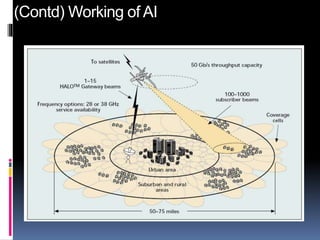
 It uses the network called HALO (High Altitude Long 
Operation).
Working of AI
(Contd) Working of AI
Implementation Systems 
 Three companies are planning to provide Airborne 
Internet by placing aircrafts in fixed patterns over 
hundreds of cities. 
 Angel Technologies – Proteus Plane. 
 Aero Vironment With NASA - Helios aircraft. 
 Sky Station International - Blimps.
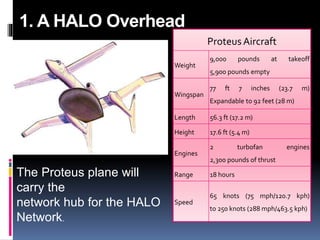
1. A HALO Overhead 
Proteus Aircraft 
Weight 
9,000 pounds at takeoff 
5,900 pounds empty 
Wingspan 
77 ft 7 inches (23.7 m) 
Expandable to 92 feet (28 m) 
Length 56.3 ft (17.2 m) 
Height 17.6 ft (5.4 m) 
Engines 
2 turbofan engines 
2,300 pounds of thrust 
Range 18 hours 
Speed 
65 knots (75 mph/120.7 kph) 
to 250 knots (288 mph/463.5 kph) 
The Proteus plane will 
carry the 
network hub for the HALO 
Network.
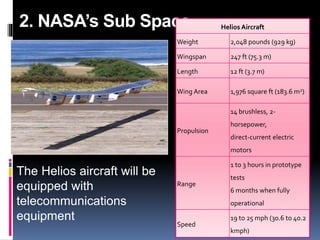
2. NASA’s Sub Space 
The Helios aircraft will be 
equipped with 
telecommunications 
equipment 
Helios Aircraft 
Weight 2,048 pounds (929 kg) 
Wingspan 247 ft (75.3 m) 
Length 12 ft (3.7 m) 
Wing Area 1,976 square ft (183.6 m2) 
Propulsion 
14 brushless, 2- 
horsepower, 
direct-current electric 
motors 
Range 
1 to 3 hours in prototype 
tests 
6 months when fully 
operational 
Speed 
19 to 25 mph (30.6 to 40.2 
kmph)
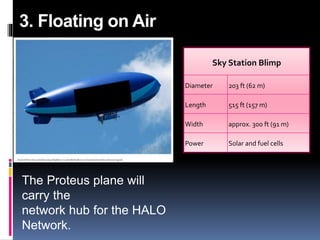
3. Floating on Air 
The Proteus plane will 
carry the 
network hub for the HALO 
Network. 
Sky Station Blimp 
Diameter 203 ft (62 m) 
Length 515 ft (157 m) 
Width approx. 300 ft (91 m) 
Power Solar and fuel cells
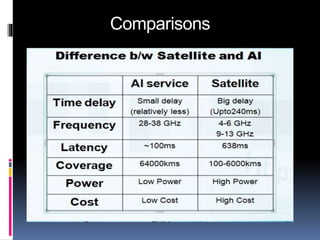
Comparisons
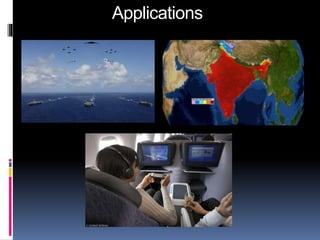
Applications
Advantages & Features 
 Unique feature of these solar-electric air-craft 
that make then appealing platforms for 
telecommunications applications include: 
 Long flight durations up to 6 months or more. 
 Minimal maintenance cost due to few moving 
parts. 
 High levels of redundancy 
 Highly autonomous controls which enable 
one ground operator to control multiple 
aircraft. 
 Use of solar energy to minimize fuel costs.
Conclusion 
Finally Airborne Internet , 
 Very much useful in field of aviation services like aircraft 
monitoring and air traffic management, weather 
information etc. 
 Provides passengers to access the internet at very high 
altitudes(in Transit). 
 This new service will be useful for who live in small 
village(Remote Places).
References 
1. www.airborneinternet.org (Accessed on 25/02/2014) 
2. www.airborneinternet.com (Accessed on 25/02/2014) 
3. airborneinternet.pbwiki.com (Accessed on 3/03/2014) 
4. www.howstuffworks.com/airborne-internet1 (Accessed 
on 12/03/2014) 
5. www.studymafia.com(Accessed on 10/03/2014) 
6. www.google.co.in/airborneinternet(Accessed on 
15/03/2014)
Airborne Internet
Airborne Internet

Airborne Internet

  • 1.
    “AIRBORNE INTERNET” LOKESHV 1MS12MCA24 Presented By : ARIJITH GHOUSH 1MS12MCA07
  • 2.
    Contents  Introduction  Networking Technology and Wireless Technology  Why AI?  Principle & Working  Implementation Systems  Comparisons b/w Satellite Internet & AI  Applications  Features & Advantages  Conclusion  References
  • 3.
    Introduction  Itis a private, secure and reliable peer-to-peer aircraft communications network that uses the same technology as the commercial Internet.  Similar to Satellite-based Internet access, but without the time delay.  AI began as a supporting technology for NASA’s SATS.  It provides aircraft-aircraft, ground-ground, aircraft-ground communication support in Air traffic Management, Fleet Operations & passenger support services.
  • 4.
    Computer and Internet  Nature of Computer technology and Internet technology has changed a lot in the past 10 years and will change a lot in the next 10 years Most of you in 1991 had not even heard of Internet, World-Wide Web, Networks, Personal Digital Assistant (PDA), Windows NT, Linux These are all now part of Computer Technology and Internet technology
  • 5.
    Networking Technology Power-LineNetworking Way to connect computers in home or office using electrical wiring
  • 6.
    Power-Line Networking More convenient than phone lines  Connect computer to network through the outlet that provides power  Data travels through electrical wiring  Requires no new wiring and adds no cost to electric bill  Power-line networking is inexpensive method for connecting computers in different places in home or office
  • 7.
    Bluetooth  Bluetoothis new standard being developed by a group of electronics manufacturers  Will allow any sort of electronic equipment to communicate with each other  Can be used among computers, keyboard, mouse, printer, headphone, cell phone  Bluetooth-like radio communications should take place of wires or infrared signals for connecting devices
  • 8.
     Very smallradio module to be built into each device  Wireless: No need for cables or cords to any device
  • 9.
    Wireless Networking Creates network by sending infrared or radio signals between computers  Better than Power-line networking; some computers are not “plugged in” to electrical outlet  Laptop with wireless network card is completely portable throughout home or office  IrDA (Infrared Direct Access) is standard for devices to communicate using infrared light pulses
  • 10.
     Infrared devicesmust be in direct line of sight with each other (like TV remote… which uses same infrared technology)  Infrared is almost always “one to one” technology  Radio signals better because no line of sight requirement and ability to broadcast to multiple recipients
  • 11.
    WIRELESS TECHNOLOGY SYSTEMS  1G TECHNOLOGY  2G /2.5G TECHNOLOGY  3G TECHNOLOGY  4G TECHNOLOGY  5G TECHNOLOGY
  • 12.
    Technology 1G 2G/2.5G3G 4G 5G Deployment 1970/1984 1980/1999 1990/2002 2000/2010 2014/2015 Bandwidth 2kbps 14-64kbps 2mbps 200mbps >1gbps Technology Analog cellular Digital cellular Broadbandwidt h/cdma/ip technology Unified ip &seamless combo of LAN/WAN/WLAN/PA N 4G+WWWW Service Mobile telephony Digital voice,short messaging Integrated high quality audio, video & data Dynamic information access, variable devices Dynamic information access, variable devices with AI capabilities Multiplexing FDMA TDMA/CDMA CDMA CDMA CDMA Switching Circuit Circuit/circuit for access network&air interface Packet except for air interface All packet All packet Core network PSTN PSTN Packet network Internet Internet Handoff Horizontal Horizontal Horizontal Horizontal& Vertical Horizontal& Vertical Comparison of 1G to 5G technologies
  • 13.
    Airborne Internet Satellite Internet access already commonplace  Satellites orbit at several hundreds of miles above Earth  Imagine airplane-like device at approximately 60,000 feet  Aircraft will be undisturbed by inclement weather and will be flying well above commercial air traffic
  • 14.
    Why Airborne Internet?  There are mainly 2 reasons for developing the AI. They are: 1. SATS (Small Aircraft Transportation System) 2. Need For Higher Bandwidth. SATS  Controls Traffic in Air.  Provides Internet for people in the transit. High Bandwidth o Around 1 – 5 Mbps for Home Users. o Around 5 – 25 Mbps for Business Users. o Around 25 – 155 Mbps for Dedicated links.
  • 15.
    Principles  Toestablish a robust, reliable, and available digital data channel to aircraft.  Mobile Routing is an ability of a network user to move from one network to another without loosing connectivity.  It uses the TCP/IP protocol.  It uses the network called HALO (High Altitude Long Operation).
  • 16.
  • 17.
  • 18.
    Implementation Systems Three companies are planning to provide Airborne Internet by placing aircrafts in fixed patterns over hundreds of cities.  Angel Technologies – Proteus Plane.  Aero Vironment With NASA - Helios aircraft.  Sky Station International - Blimps.
  • 19.
    1. A HALOOverhead Proteus Aircraft Weight 9,000 pounds at takeoff 5,900 pounds empty Wingspan 77 ft 7 inches (23.7 m) Expandable to 92 feet (28 m) Length 56.3 ft (17.2 m) Height 17.6 ft (5.4 m) Engines 2 turbofan engines 2,300 pounds of thrust Range 18 hours Speed 65 knots (75 mph/120.7 kph) to 250 knots (288 mph/463.5 kph) The Proteus plane will carry the network hub for the HALO Network.
  • 20.
    2. NASA’s SubSpace The Helios aircraft will be equipped with telecommunications equipment Helios Aircraft Weight 2,048 pounds (929 kg) Wingspan 247 ft (75.3 m) Length 12 ft (3.7 m) Wing Area 1,976 square ft (183.6 m2) Propulsion 14 brushless, 2- horsepower, direct-current electric motors Range 1 to 3 hours in prototype tests 6 months when fully operational Speed 19 to 25 mph (30.6 to 40.2 kmph)
  • 21.
    3. Floating onAir The Proteus plane will carry the network hub for the HALO Network. Sky Station Blimp Diameter 203 ft (62 m) Length 515 ft (157 m) Width approx. 300 ft (91 m) Power Solar and fuel cells
  • 22.
  • 23.
  • 24.
    Advantages & Features  Unique feature of these solar-electric air-craft that make then appealing platforms for telecommunications applications include:  Long flight durations up to 6 months or more.  Minimal maintenance cost due to few moving parts.  High levels of redundancy  Highly autonomous controls which enable one ground operator to control multiple aircraft.  Use of solar energy to minimize fuel costs.
  • 25.
    Conclusion Finally AirborneInternet ,  Very much useful in field of aviation services like aircraft monitoring and air traffic management, weather information etc.  Provides passengers to access the internet at very high altitudes(in Transit).  This new service will be useful for who live in small village(Remote Places).
  • 26.
    References 1. www.airborneinternet.org(Accessed on 25/02/2014) 2. www.airborneinternet.com (Accessed on 25/02/2014) 3. airborneinternet.pbwiki.com (Accessed on 3/03/2014) 4. www.howstuffworks.com/airborne-internet1 (Accessed on 12/03/2014) 5. www.studymafia.com(Accessed on 10/03/2014) 6. www.google.co.in/airborneinternet(Accessed on 15/03/2014)