1
1. INTRODUCTION
1.1 ABOUT COLLINS AEROSPACE
Collins Aerospace is a subsidiary of United Technologies, which is among the biggest
suppliers of defence and aerospace products. It is in the business of designing, manufacturing
and supplying components for aircrafts including commercial, regional business and defence.
It is also a key supplier for International space programs. Collins has been working together
with Delhi International Airport Ltd. with the objective to create and convey a solution which
fulfils all the requirements and goals of IGIA(Indira Gandhi International Airport) focusing
on its promise to “Passenger Delight”, which has been considered a major step for Delhi
International Airport. The main focus is to work towards reduction of challenges in day to
day operations and making existing systems efficient and maximising the return on
investment.
Collins also provide solutions for passenger processing, handling of baggage as well as
Management of check-ins and checkouts of passengers.
Collins Aerospace encourage a moral, dependable work environment that enables their
people to develop expertly and elevates cooperation and assorted variety to fuel
advancement. It endeavour to fabricate indispensable networks through the devotion of their
time and assets. Furthermore, they are focused on sustainable activities, items and services
any place they work together around the world.
Collins Aerospace India gives administrations, for example, introducing, directing, altering,
fixing, selling, conveying, inquiring about, overhauling and supporting information
management, communications and gadgets for military and business avionics clients. These
administrations bolster a wide scope of business frameworks, for example, flight-deck
electronic items and frameworks, communications, route, observation, display, auto-flight
control and flight management frameworks, in-flight amusement, and aviation related
infrastructure.
2
2. PROJECT DETAILS:
2.1 ABOUT PROJECT:
The key focus of creating this application is to make a platform which is easily accessible to
public users and helps in managing the interns of this organization.
The purpose is to make a user friendly application which aims to manage the trainees for the
reputed organization Collins Aerospace. The name of the project is “Inter Management”. It
manages separate portals dividing the application into 3 broad categories namely:
1. Administrator
2. Student
3. Mentor
2.2 PROJECT FUNCTIONALITY:
The application offers the following functionality:
1. Firstly the students sign up and get themselves registered by entering all the necessary
details.
2. Student can submit the weekly progress report to the mentor directly from the
application and also submit a leave application to the mentor. Also, the student can
get his certificate after the completion of his training period.
3. Admin can login by entering the username and password. Admin assigns the mentor
to the student and can also add a new mentor to his team. Admin can also remove a
student from the internship. Also, there is a search bar through which the
administrator can search the student with required specifications i.e. search by
institute or search by name.
4. The last section is the Mentor where the mentor can log in and manage its assigned
students for training. Mentor can assign projects to the students individually or in a
group. Mentor receives the WPRs(Weekly Progress Reports) and can approve leave
application submitted by the student.
3
2.3 EXISTING SYSTEM
The company managed its interns manually by preparing list of students on a very basic
software like Excel. This turned out to be very tedious and bulky task. It was difficult to
manually enter and manage details of all its interns.
The company required a simple, efficient and easy to use application that could provide a
functionality to manage its interns in such a way that allows user to handle the application
without having much knowledge about the application.
Thus to overcome this difficulty, this application was developed so as to eliminate the need
of manually entering all entries. Here it offers a reliable way to manage the sections like
Administrator, Student and Mentor.
2.4 PROPOSED SYSTEM
To overcome the difficulties mentioned under the existing system, proposed system is
established to manage the trainees without having to enter details manually which increased
human effort and was time consuming.
It is easy to operate the proposed system. Also, in the proposed system accuracy level is more
and is user friendly in comparison to the earlier system. This system also helps in eliminating
the shortcomings of the current system to a very large extent.
Aim of new proposed system:
1. Structural approach - The work is done in planned and organized manner.
2. Accuracy- To achieve a high level of accuracy. All operations would be done
systematically and the data or information will be accurate.
3. Reliability- Secure way to store data.
4. Instant access to information – The main focus of this new proposed system is to have
a fast, responsive and reliable access to the data.
4
2.5 OBJECTIVE
The main objective of the application is to reduce work load of staff and help manage trainee
information in a systematic way. It is less time consuming and reduces human effort. The
objective also includes generation of certificates for the selected candidates once they
complete their internship duration. The scope of the project is very wide. This application is
very reliable and efficient.
The functions the system has can be easily accessed by the user and the system is very user
friendly. Not everyone can access the application without login.
The application provides us with the following benefits:
1. Enhancement: The objective is to make existing system better by increasing its
effectiveness. Trying to change the way of storing data on paper to an instant
accessible application.
2. Accuracy: Provides the user with accurate information.
3. User-Friendly: It is easy to work on the application because it has a very user-
friendly interface which makes it more interactive and more accurate.
2.6 SCOPE
1. This project can be used within the organizations where candidates are applying for
internship and training.
2. Basically this application can be used in recruitment and assessment centres.
3. This application allow students and mentors to remotely access data and manage interns
from anywhere without a need to present on the centre.
5
3. METHODS AND MATERIALS
3.1 SOFTWARE
1. Android Studio 3.1
2. MySQL Workbench 8.0.16
3. Postman 7.2.2
3.2 HARDAppWARE
1. Personal Computer with intel core 15 7th gen
2. 8gb RAM
 Front end-
a. Front-end is what the user can see.
b. Here we focus more on the front-end like design, colors, etc.
 Back End-
a. Back-end is how it works.
b. Programmers focus more on back-end development.
c. In our project we have used ExpressJs Framework which communicates with a
database(RDS) using AWS Lambda to serve up the information that the front-
end presents.
3.3 OVERVIEW OF ANDROID
3.3.1 INTRODUCTION
Android is an operating system launched in 2008 by Open Handset alliance (OHA). It is built
specifically for mobile devices including smartphones, tablets, watches, TVs, vehicle
entertainment systems and computers. Android provides a very flexible and consolidated
approach to develop applications which can be used among variety of different devices with
different versions of android operating system. This allows developers to freely develop
applications without thinking about support to various devices and versions.
Open Handset Alliance is supported by Google and few other organisations. Android is based
on touch based inputs and devices can be operated without need of any physical buttons. This
is done to imitate real world actions which allows the OS to be very user friendly. A virtual
keyboard is also provided to take user inputs.
6
Android Version:
1. Android “1.0, 1.1(Apple pie)
2. Android 1.5(Cupcake)
3. Android 1.6(Donut)
4. Android 2.0(Eclair)
5. Android 2.2.x(Froyo)
6. Android 2.3 - 2.3.2(Gingerbread)
7. Android 3.0.x, 3.1.x, 3.2(HoneyComb)
8. Android 4.0 - 4.0.2, 4.0.3 - 4.0.4((IceCreamSandwich)
9. Android 4.1 - 4.1.1, 4.2 - 4.2.2,4.3(JellyBean)
10. Android 4.4, 4.4W (Kitkat)
11. Android 5.0, 5.1(Lollipop)
12. Android 6.0 (Marshmallow)
13. Android 7.0 (Nougat)
14. Android 8.0” (Oreo)
15. Android 9.0 (Pie)
Android applications are created using languages like Java, Kotlin, C++. The code with all
the resource files is compiled by the Android SDK into an APK(Application Package with
.apk extension). All the contents reside in one APK file of the application and this file is
used by all the Android devices to install the application. There are some security features
for each android application:
1. Android is a multiple -user Linux based operating system which treats every installation
of application as an unique user.
2. As a default opearion, a unique Linux user-id is assigned to each app by the system.
System uses this id for different operations but the id is not known by the app.
Figure 1: Android Version Timeline
7
3. Each application run in isolation with others as each process is assigned with their own
Virtual Machine(VM).
4. Each application run in their “own Linux process. The process begins when any unit of
the application has to be executed and the system ends the process after executing the
task and then retrieves the memory for other processes.
Every application has the ability to access the unit which are required to perform some task.
So the application is restricted to access any other information in the system for which
permission is not granted. There are various methods through which an application can share
data among other apps and can also access to different services of the system:
1. It's conceivable to organize two applications to have a similar Linux client ID, in
which case they can get to one another's records. To monitor framework assets,
applications with a similar client ID can likewise organize to keep running in a same
Linux process and offer the equivalent VM. The applications should likewise be
marked with a similar authentication.
2. An application can demand authorization to get to device information, for example,
the client's contacts, SMS messages, bluetooth, camera, and the mountable storage.
The client needs to unequivocally allow these consents.”
3.3.2 JAVA IN ANDROID APP DEVELOPMENT
Java is an open source programming language made with a simple goal in mind, being able to
run on machines with a variety of different hardware and Operating Systems. Java program
execution process is executed by Java Virtual Machine (JVM). Java code does not directly
compile to machine code but Java compiler converts .java program file to .class file which
contains the byte-code. Now this byte code can be run on any machine with a JVM i.e. Java
Virtual Machine installed in it.
Android uses this property of java to achieve its goal of being a universal operating system
for all kinds of devices.
Java API is provided by Google to get started into android development. Your files can be
compiled into classes using this API. Java is preferred by Android for its development
platform due to various reasons:
1. Java is widely known and used language provided with a huge set of packages and is
supported by open source community.
2. Java provides better security.
8
3. Java is a well-known industry language with most devices compatible with it.
Though the Java API is provided by Google, JVM is not used by Android to execute the class
files. Rather, DVM (Delvik Virtual Machine) is used by Android for the execution process.
The files are then compiled into the DEX(Delvik Executable) format and then bundled
together as APK(Android Package).
The use of DVM makes Android very optimized and power efficient for a large number of
devices and also provides an easy to build platform for programmers.
3.3.3 XML IN ANDROID APPLICATION
Extensible Mark-up Language is a mark-up language like HTML (Hyper Text Mark-up
Language) used to portray information. “XML tags are not predefined in XML. We should
characterize our very own Tags. Xml as itself is well comprehensible both by human and
machine. Additionally, it is versatile and easy to create. In Android” we use xml for
structuring our designs in light of the fact that xml is lightweight language so its usage does
not make out app slower.
3.3.4 USER INTERFACE
The entire idea of creating an User Interface distinguish and use the View Groups and their
objects. Child views are arranged inside a box or container known as View Groups. These
views are treated as different widgets to create a portion of UI. A view group can also be
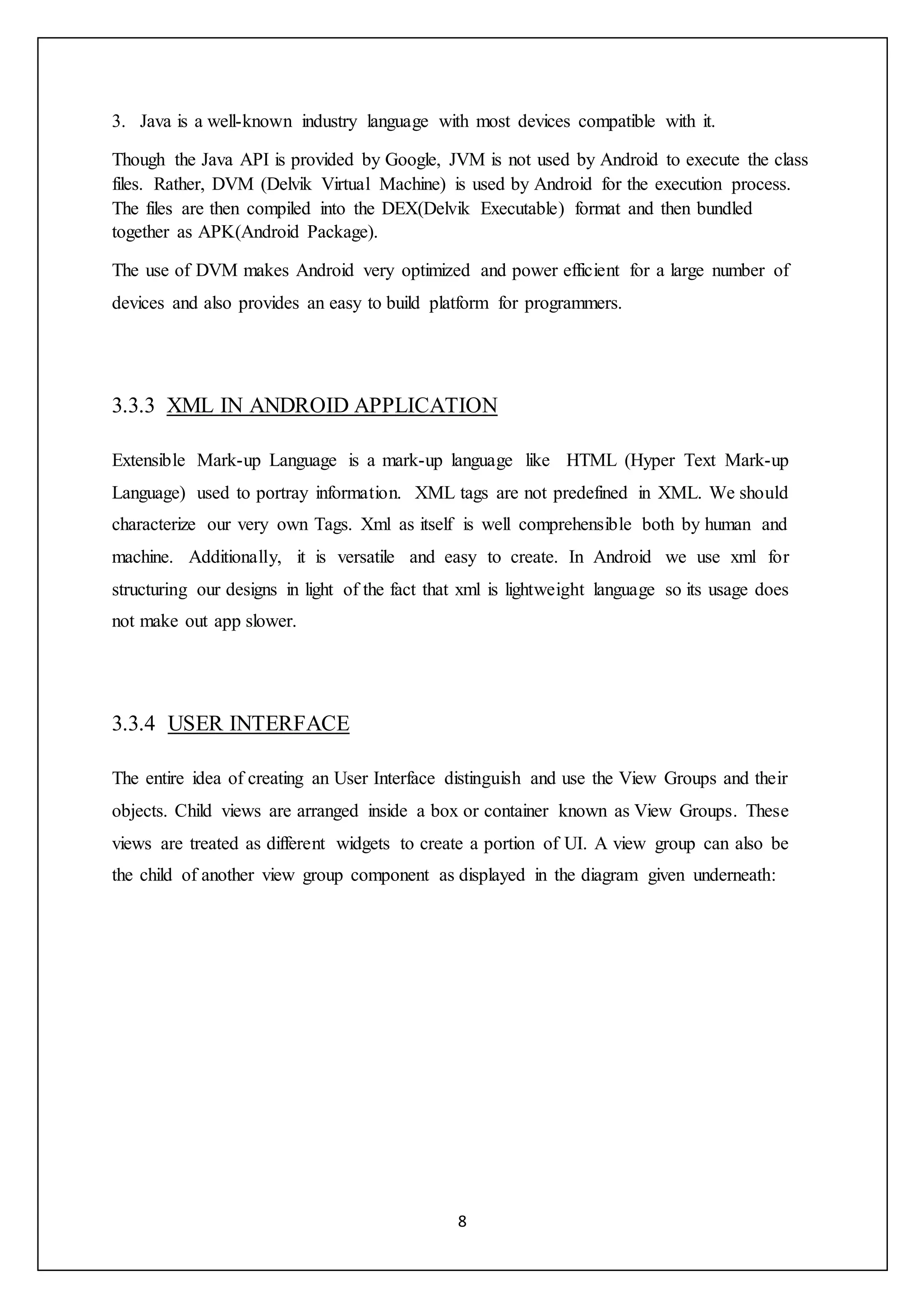
the child of another view group component as displayed in the diagram given underneath:
9
Figure 2 User Interface components
3.3.5 VARIOUS XML FILES USED:
In android, different XML files are used for different purposes. Some of them are:
1. LAYOUT XML FILE: Layout XML Files are utilized to characterize the actual User
interface (UI) of our application. This file holds each and every element and the tools
that are required for our application.These include the TextViews, Buttons and other
User interface components.
This file is held inside of the res folder and inside it another folder "layout" is present
where we can find each and every format document for their particular exercises or
fragments.
Figure 3 Layout XML File
10
2. MANIFEST XML FILE: This xml file is utilized to characterize every one of the
segments (or components) of the application. This file includes all the names of our
application packages, services, receivers, our Activities and all the required permissions
(consents). Like, suppose we have to utilize internet in our application then we have to
characterize Internet permission in this document.
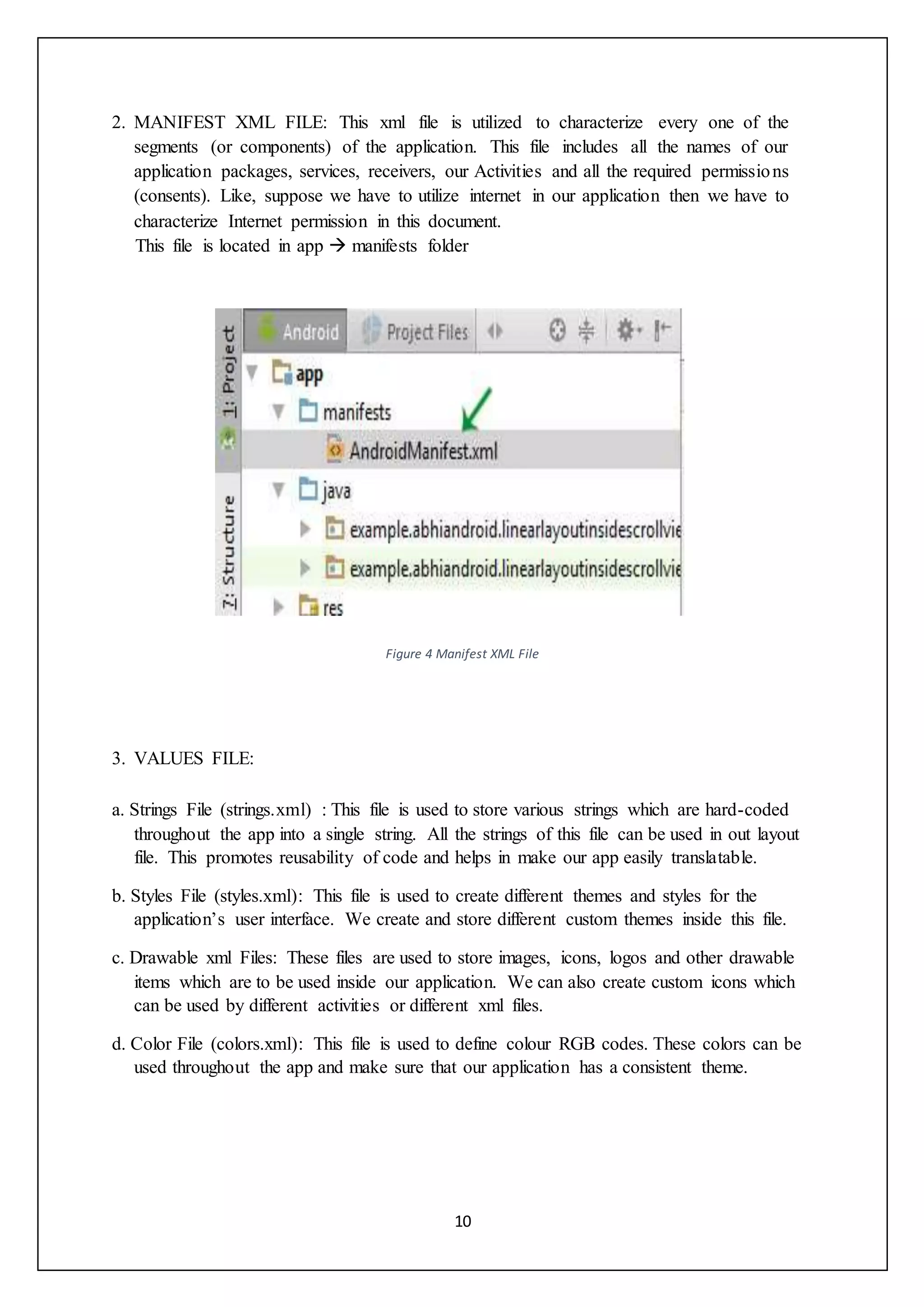
This file is located in app  manifests folder
Figure 4 Manifest XML File
3. VALUES FILE:
a. Strings File (strings.xml) : This file is used to store various strings which are hard-coded
throughout the app into a single string. All the strings of this file can be used in out layout
file. This promotes reusability of code and helps in make our app easily translatable.
b. Styles File (styles.xml): This file is used to create different themes and styles for the
application’s user interface. We create and store different custom themes inside this file.
c. Drawable xml Files: These files are used to store images, icons, logos and other drawable
items which are to be used inside our application. We can also create custom icons which
can be used by different activities or different xml files.
d. Color File (colors.xml): This file is used to define colour RGB codes. These colors can be
used throughout the app and make sure that our application has a consistent theme.
11
3.4 AMAZON WEB SERVICES (AWS):
AWS is a remote computing service. It provide cheap pay-as-you-go based cloud
computing platform with cloud storage service, bandwidth and support for Application
Programming Interfaces (APIs).
AWS was launched in 2006 by Amazon Incorporation. It was build by IT resource
management team of Amazon but later grew into a very innovative and cost efficient
solution for general public as well as other companies.
AWS was launched during very early phase of cloud computing. Prior to the launch
Amazon was using its host servers below 50% of their capacity so Amazon rebuild its
infrastructure to integrate server and storage. AWS uses same infra as other web services of
Amazon.
AWS is built with scalable and virtually unlimited storage capacity, computing power and
bandwidth.
Its services include.
Amazon” Simple Storage Service (Amazon S3)
Amazon CloudFront
Amazon Relational Database Service (Amazon RDS)
Amazon SimpleDB
Amazon Lambda
Amazon RDS : Amazon Relational Database Service is a web based relational database
service in the cloud that is easier to set-up, operate and is scalable. It provides an easily
resizable and cost-effective solution for industry-standard database and manages common
administrator” tasks.
Amazon RDS helps in managing difficult and tedious management tasks of a relational
database:
Figure 5 String File (strings.xml)
12
 When you purchase a server, you will get CPU, memory, storage, and IOPS, all
together in a bundle. But in Amazon RDS so as to scale them independently, these
are split apart. If we require less IOPS or more CPU or to increase storage, we can
easily allocate them.
 Software patching, managing all backups, recovery and also automatic failure
detection is managed by Amazon Relational Database.
 In order to provide a well-managed service experience, Shell access to database
instances are not provided by Amazon RDS, and also the access to certain system
procedures and tables that need advanced privileges is restricted. Also the advanced
privileges are not given to certain restricted procedures and information
 We can also have automated backups performed whenever we feel the need to do it,
or we can also have our backup snapshots created manually. These backups can be
used anytime to restore any data back in the DB. The process of restoring data is
reliable and efficient.
 We can have high accessibility with an primary instance and a secondary instance
that you can bomb over to when issues happen. MySQL, MariaDB, or PostgreSQL
Read Replicas can also be used to build read scaling.
 Any of the database product like MySQL, Oracle, PostresSQL etc. can be used.
 With the security features in our database packages, access to the RDS database can
also be controlled by us. We can make it secure by controlling who all are allowed
to access the database with the help of Amazon Web Services IAM(Identity and
Access Management). We can likewise increase the protection of our database by
placing it in a virtual private cloud.
3.5 DATABASE:
Database helps us to store a number of information in the form of tables. Without databases
the storage of data is not possible and modern day application will not work as expected.
Databases generally consist of a one or more number of tables which may or may not be linked
together. We can use SQL commands to access, update, insert and carry out operation on the
tables.
13
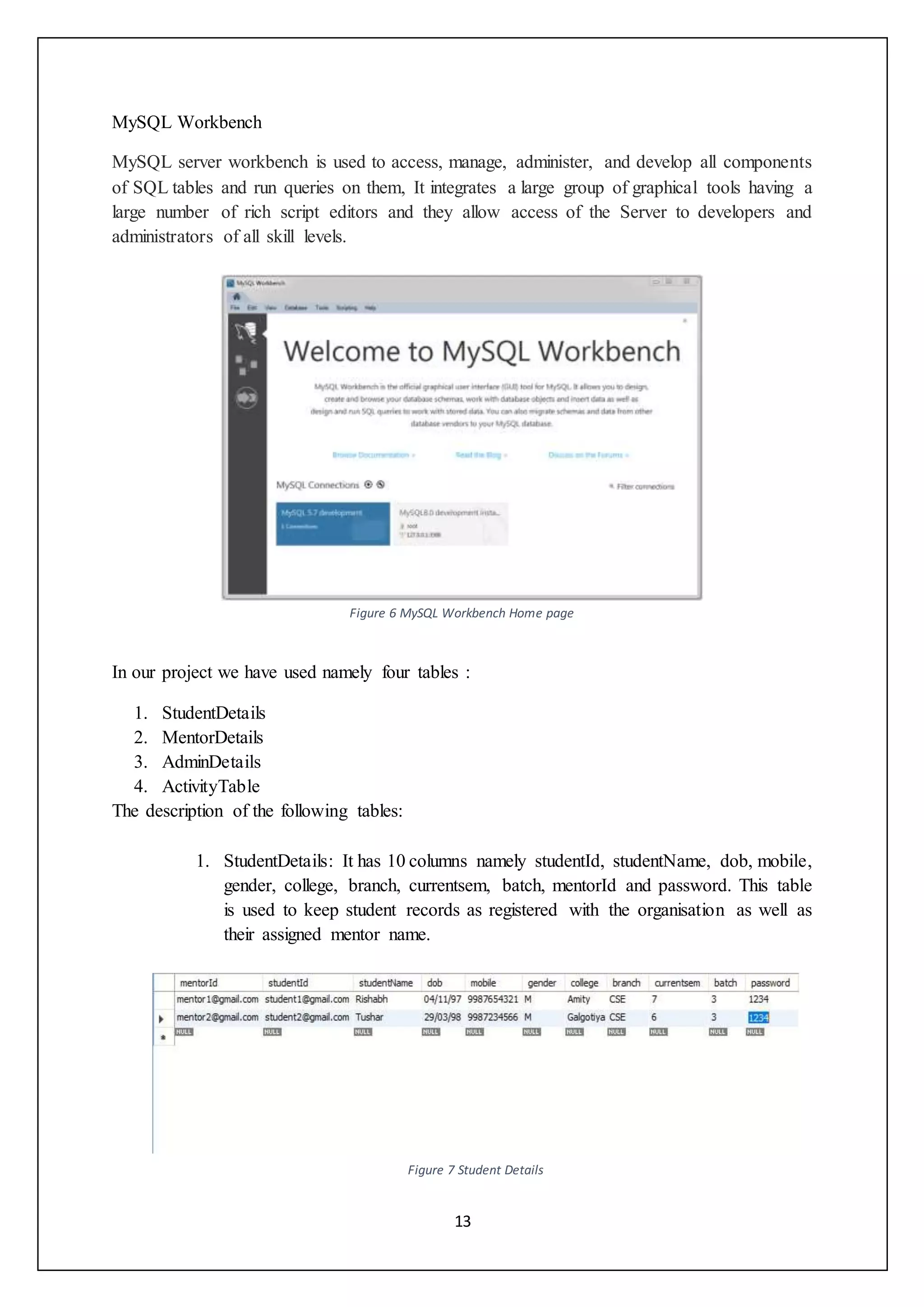
MySQL Workbench
MySQL server workbench is used to access, manage, administer, and develop all components
of SQL tables and run queries on them, It integrates a large group of graphical tools having a
large number of rich script editors and they allow access of the Server to developers and
administrators of all skill levels.
Figure 6 MySQL Workbench Home page
In our project we have used namely four tables :
1. StudentDetails
2. MentorDetails
3. AdminDetails
4. ActivityTable
The description of the following tables:
1. StudentDetails: It has 10 columns namely studentId, studentName, dob, mobile,
gender, college, branch, currentsem, batch, mentorId and password. This table
is used to keep student records as registered with the organisation as well as
their assigned mentor name.
Figure 7 Student Details
14
2. MentorDetails: It has 3 columns, mentorName, mentorId, mentorPassword.
This table is to be filled by admin to maintain the details of the mentors.
Figure 8 Mentor Details
3. AdminDetails: This table has 3 attributes namely adminId, adminName,
adminPassword.
Figure 9 Admin Details
4. ActivityTable:
Figure 10 Activity Table
15
3.6 METHODOLOGY ADOPTED
Some steps have been followed to develop the “Intern Management Application”. The
following steps have been adopted :
Study and Learning: Learning Android Development, Working of AWS RDS and Lambda
and ExpressJs, understanding the concepts of database.
Layout: Researching and designing different layouts, fonts, functions etc. which is best
applicable for our problem and documenting each and every step and layout we created.
Development: Began ““the process to build a mobile application "Intern Management
Application". During this phase” the faculty or the guide monitor the progress of the trainee
by analyzing or checking their work through weekly progress reports and approve their leave
applications.
Implementation: This is the time when the application is tested for whether all the
components are running properly or not."
16
3.7 DESIGN:
Figure 11 Flow Chart / ER Diagram
17
4. MY ROLE IN THE PROJECT:
My role in the project: I have given the work to code the overall layout, building the business
logic of the application with my team also setting up an AWS account with RDS and Lambda,
I was given the responsibility to decide and implement the working and all the functionality of
the app and also to consume the API’s in order to get the app to work in real world situations.
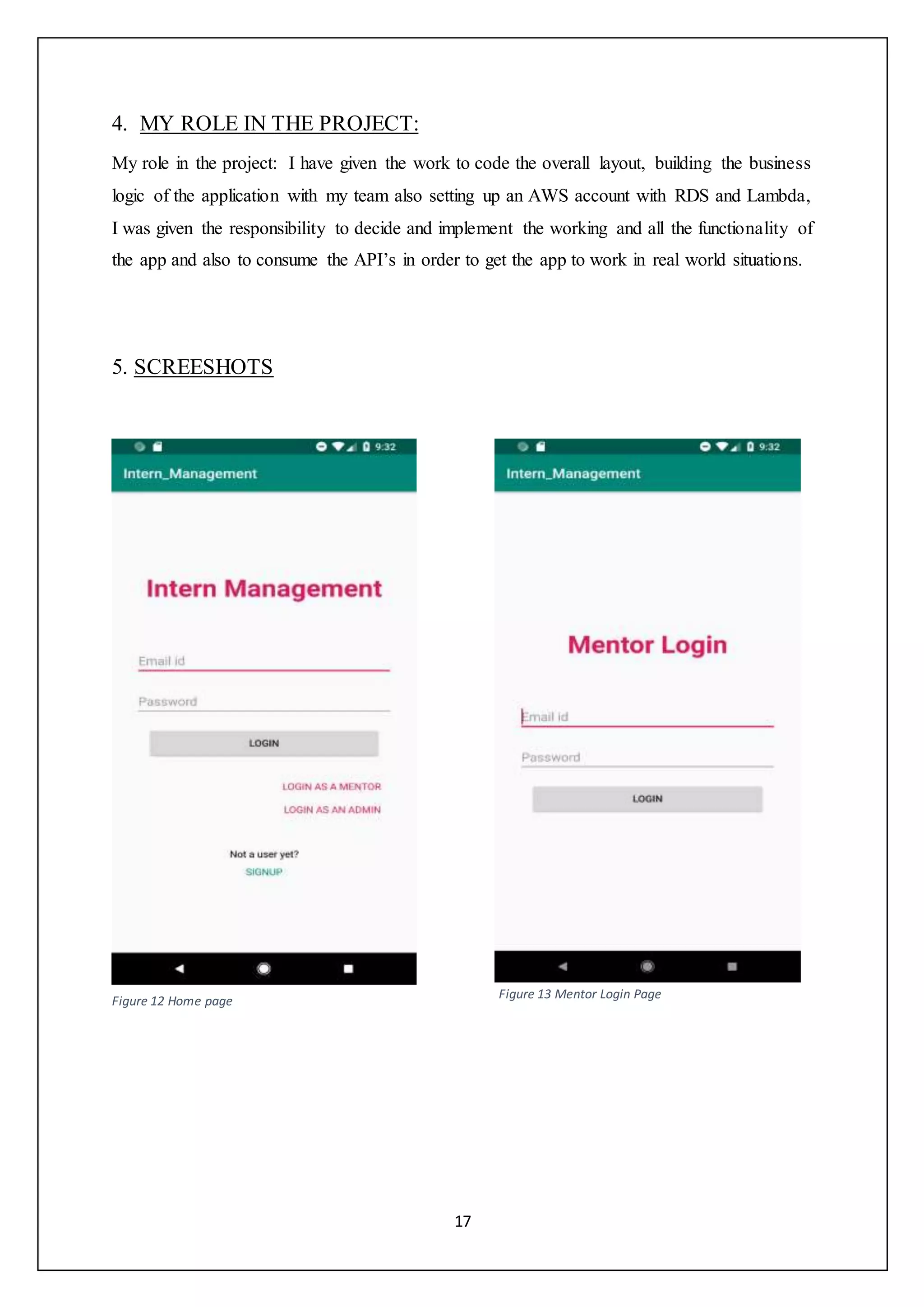
5. SCREESHOTS
Figure 12 Home page
Figure 13 Mentor Login Page
18
Figure 14 Admin login page Figure 15 Student Details
19
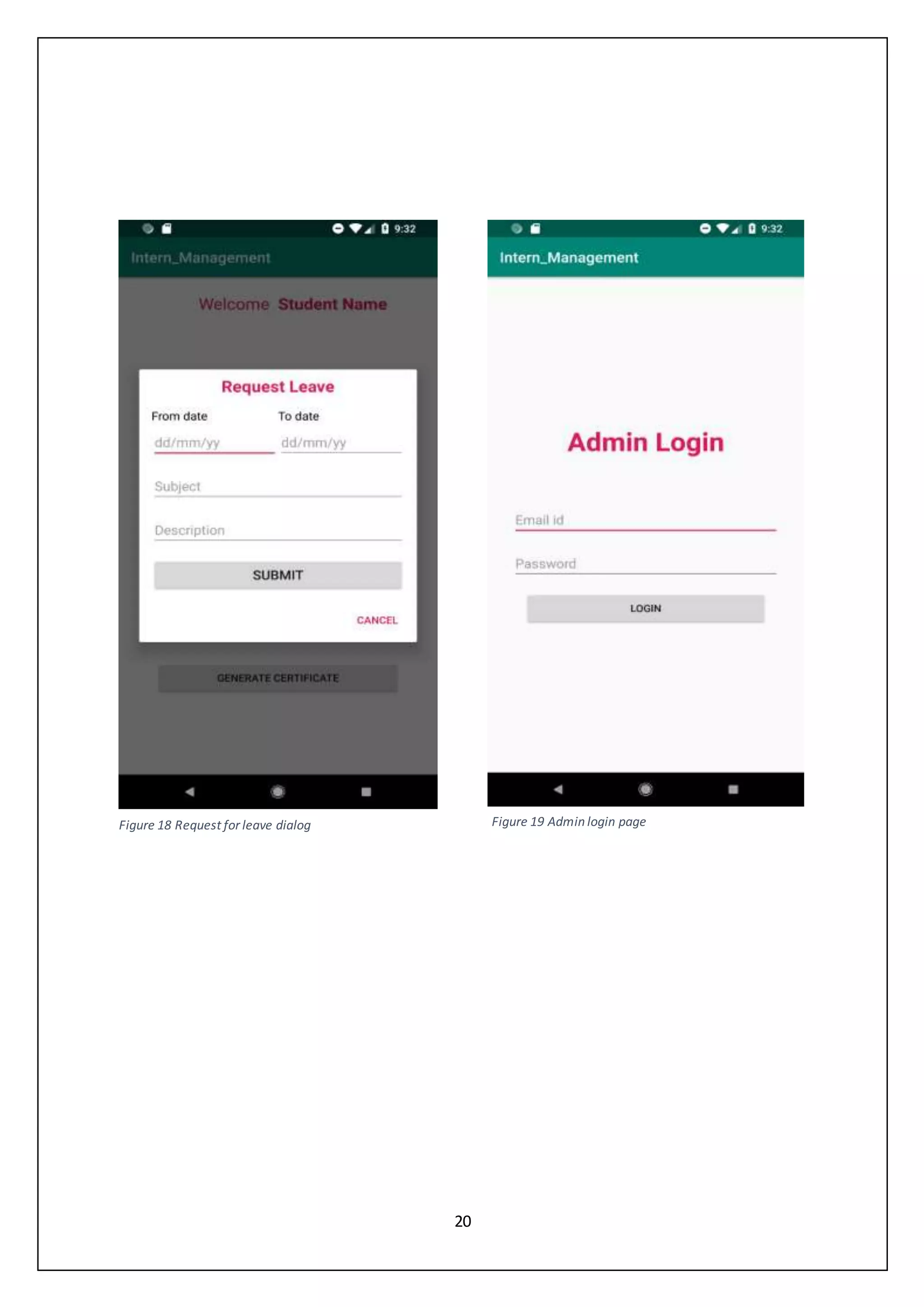
Figure 16 Student home page Figure 17 Student Sign Up page
20
Figure 18 Request for leave dialog Figure 19 Admin login page
21
6. RESULTS AND DISCUSSION
The android application on INTERN MANAGEMENT application is a better idea over the
manual system i.e. existing system. This android application contains the three different
modules i.e. the admin, the student and the mentor. Each user has to first login before the user
can see the other functionality. Every part has different functionality according to the
requirement of each module. MySQL Workbench is the tool by which the admin maintains the
information required and supervises the activities that have been allotted to the trainees. The
admin can also add new Mentors and assign them to students.
22
7. REFERENCES
 Android Developer documentation - https://developer.android.com/guide
 AWS documentation -
https://docs.aws.amazon.com/AmazonRDS/latest/UserGuide/Welcome.ht
ml
 MySQL Workbench - https://dev.mysql.com/doc/workbench/en/wb-
mysql-connections.html

Internship Project Report

  • 1.
    1 1. INTRODUCTION 1.1 ABOUTCOLLINS AEROSPACE Collins Aerospace is a subsidiary of United Technologies, which is among the biggest suppliers of defence and aerospace products. It is in the business of designing, manufacturing and supplying components for aircrafts including commercial, regional business and defence. It is also a key supplier for International space programs. Collins has been working together with Delhi International Airport Ltd. with the objective to create and convey a solution which fulfils all the requirements and goals of IGIA(Indira Gandhi International Airport) focusing on its promise to “Passenger Delight”, which has been considered a major step for Delhi International Airport. The main focus is to work towards reduction of challenges in day to day operations and making existing systems efficient and maximising the return on investment. Collins also provide solutions for passenger processing, handling of baggage as well as Management of check-ins and checkouts of passengers. Collins Aerospace encourage a moral, dependable work environment that enables their people to develop expertly and elevates cooperation and assorted variety to fuel advancement. It endeavour to fabricate indispensable networks through the devotion of their time and assets. Furthermore, they are focused on sustainable activities, items and services any place they work together around the world. Collins Aerospace India gives administrations, for example, introducing, directing, altering, fixing, selling, conveying, inquiring about, overhauling and supporting information management, communications and gadgets for military and business avionics clients. These administrations bolster a wide scope of business frameworks, for example, flight-deck electronic items and frameworks, communications, route, observation, display, auto-flight control and flight management frameworks, in-flight amusement, and aviation related infrastructure.
  • 2.
    2 2. PROJECT DETAILS: 2.1ABOUT PROJECT: The key focus of creating this application is to make a platform which is easily accessible to public users and helps in managing the interns of this organization. The purpose is to make a user friendly application which aims to manage the trainees for the reputed organization Collins Aerospace. The name of the project is “Inter Management”. It manages separate portals dividing the application into 3 broad categories namely: 1. Administrator 2. Student 3. Mentor 2.2 PROJECT FUNCTIONALITY: The application offers the following functionality: 1. Firstly the students sign up and get themselves registered by entering all the necessary details. 2. Student can submit the weekly progress report to the mentor directly from the application and also submit a leave application to the mentor. Also, the student can get his certificate after the completion of his training period. 3. Admin can login by entering the username and password. Admin assigns the mentor to the student and can also add a new mentor to his team. Admin can also remove a student from the internship. Also, there is a search bar through which the administrator can search the student with required specifications i.e. search by institute or search by name. 4. The last section is the Mentor where the mentor can log in and manage its assigned students for training. Mentor can assign projects to the students individually or in a group. Mentor receives the WPRs(Weekly Progress Reports) and can approve leave application submitted by the student.
  • 3.
    3 2.3 EXISTING SYSTEM Thecompany managed its interns manually by preparing list of students on a very basic software like Excel. This turned out to be very tedious and bulky task. It was difficult to manually enter and manage details of all its interns. The company required a simple, efficient and easy to use application that could provide a functionality to manage its interns in such a way that allows user to handle the application without having much knowledge about the application. Thus to overcome this difficulty, this application was developed so as to eliminate the need of manually entering all entries. Here it offers a reliable way to manage the sections like Administrator, Student and Mentor. 2.4 PROPOSED SYSTEM To overcome the difficulties mentioned under the existing system, proposed system is established to manage the trainees without having to enter details manually which increased human effort and was time consuming. It is easy to operate the proposed system. Also, in the proposed system accuracy level is more and is user friendly in comparison to the earlier system. This system also helps in eliminating the shortcomings of the current system to a very large extent. Aim of new proposed system: 1. Structural approach - The work is done in planned and organized manner. 2. Accuracy- To achieve a high level of accuracy. All operations would be done systematically and the data or information will be accurate. 3. Reliability- Secure way to store data. 4. Instant access to information – The main focus of this new proposed system is to have a fast, responsive and reliable access to the data.
  • 4.
    4 2.5 OBJECTIVE The mainobjective of the application is to reduce work load of staff and help manage trainee information in a systematic way. It is less time consuming and reduces human effort. The objective also includes generation of certificates for the selected candidates once they complete their internship duration. The scope of the project is very wide. This application is very reliable and efficient. The functions the system has can be easily accessed by the user and the system is very user friendly. Not everyone can access the application without login. The application provides us with the following benefits: 1. Enhancement: The objective is to make existing system better by increasing its effectiveness. Trying to change the way of storing data on paper to an instant accessible application. 2. Accuracy: Provides the user with accurate information. 3. User-Friendly: It is easy to work on the application because it has a very user- friendly interface which makes it more interactive and more accurate. 2.6 SCOPE 1. This project can be used within the organizations where candidates are applying for internship and training. 2. Basically this application can be used in recruitment and assessment centres. 3. This application allow students and mentors to remotely access data and manage interns from anywhere without a need to present on the centre.
  • 5.
    5 3. METHODS ANDMATERIALS 3.1 SOFTWARE 1. Android Studio 3.1 2. MySQL Workbench 8.0.16 3. Postman 7.2.2 3.2 HARDAppWARE 1. Personal Computer with intel core 15 7th gen 2. 8gb RAM  Front end- a. Front-end is what the user can see. b. Here we focus more on the front-end like design, colors, etc.  Back End- a. Back-end is how it works. b. Programmers focus more on back-end development. c. In our project we have used ExpressJs Framework which communicates with a database(RDS) using AWS Lambda to serve up the information that the front- end presents. 3.3 OVERVIEW OF ANDROID 3.3.1 INTRODUCTION Android is an operating system launched in 2008 by Open Handset alliance (OHA). It is built specifically for mobile devices including smartphones, tablets, watches, TVs, vehicle entertainment systems and computers. Android provides a very flexible and consolidated approach to develop applications which can be used among variety of different devices with different versions of android operating system. This allows developers to freely develop applications without thinking about support to various devices and versions. Open Handset Alliance is supported by Google and few other organisations. Android is based on touch based inputs and devices can be operated without need of any physical buttons. This is done to imitate real world actions which allows the OS to be very user friendly. A virtual keyboard is also provided to take user inputs.
  • 6.
    6 Android Version: 1. Android“1.0, 1.1(Apple pie) 2. Android 1.5(Cupcake) 3. Android 1.6(Donut) 4. Android 2.0(Eclair) 5. Android 2.2.x(Froyo) 6. Android 2.3 - 2.3.2(Gingerbread) 7. Android 3.0.x, 3.1.x, 3.2(HoneyComb) 8. Android 4.0 - 4.0.2, 4.0.3 - 4.0.4((IceCreamSandwich) 9. Android 4.1 - 4.1.1, 4.2 - 4.2.2,4.3(JellyBean) 10. Android 4.4, 4.4W (Kitkat) 11. Android 5.0, 5.1(Lollipop) 12. Android 6.0 (Marshmallow) 13. Android 7.0 (Nougat) 14. Android 8.0” (Oreo) 15. Android 9.0 (Pie) Android applications are created using languages like Java, Kotlin, C++. The code with all the resource files is compiled by the Android SDK into an APK(Application Package with .apk extension). All the contents reside in one APK file of the application and this file is used by all the Android devices to install the application. There are some security features for each android application: 1. Android is a multiple -user Linux based operating system which treats every installation of application as an unique user. 2. As a default opearion, a unique Linux user-id is assigned to each app by the system. System uses this id for different operations but the id is not known by the app. Figure 1: Android Version Timeline
  • 7.
    7 3. Each applicationrun in isolation with others as each process is assigned with their own Virtual Machine(VM). 4. Each application run in their “own Linux process. The process begins when any unit of the application has to be executed and the system ends the process after executing the task and then retrieves the memory for other processes. Every application has the ability to access the unit which are required to perform some task. So the application is restricted to access any other information in the system for which permission is not granted. There are various methods through which an application can share data among other apps and can also access to different services of the system: 1. It's conceivable to organize two applications to have a similar Linux client ID, in which case they can get to one another's records. To monitor framework assets, applications with a similar client ID can likewise organize to keep running in a same Linux process and offer the equivalent VM. The applications should likewise be marked with a similar authentication. 2. An application can demand authorization to get to device information, for example, the client's contacts, SMS messages, bluetooth, camera, and the mountable storage. The client needs to unequivocally allow these consents.” 3.3.2 JAVA IN ANDROID APP DEVELOPMENT Java is an open source programming language made with a simple goal in mind, being able to run on machines with a variety of different hardware and Operating Systems. Java program execution process is executed by Java Virtual Machine (JVM). Java code does not directly compile to machine code but Java compiler converts .java program file to .class file which contains the byte-code. Now this byte code can be run on any machine with a JVM i.e. Java Virtual Machine installed in it. Android uses this property of java to achieve its goal of being a universal operating system for all kinds of devices. Java API is provided by Google to get started into android development. Your files can be compiled into classes using this API. Java is preferred by Android for its development platform due to various reasons: 1. Java is widely known and used language provided with a huge set of packages and is supported by open source community. 2. Java provides better security.
  • 8.
    8 3. Java isa well-known industry language with most devices compatible with it. Though the Java API is provided by Google, JVM is not used by Android to execute the class files. Rather, DVM (Delvik Virtual Machine) is used by Android for the execution process. The files are then compiled into the DEX(Delvik Executable) format and then bundled together as APK(Android Package). The use of DVM makes Android very optimized and power efficient for a large number of devices and also provides an easy to build platform for programmers. 3.3.3 XML IN ANDROID APPLICATION Extensible Mark-up Language is a mark-up language like HTML (Hyper Text Mark-up Language) used to portray information. “XML tags are not predefined in XML. We should characterize our very own Tags. Xml as itself is well comprehensible both by human and machine. Additionally, it is versatile and easy to create. In Android” we use xml for structuring our designs in light of the fact that xml is lightweight language so its usage does not make out app slower. 3.3.4 USER INTERFACE The entire idea of creating an User Interface distinguish and use the View Groups and their objects. Child views are arranged inside a box or container known as View Groups. These views are treated as different widgets to create a portion of UI. A view group can also be the child of another view group component as displayed in the diagram given underneath:
  • 9.
    9 Figure 2 UserInterface components 3.3.5 VARIOUS XML FILES USED: In android, different XML files are used for different purposes. Some of them are: 1. LAYOUT XML FILE: Layout XML Files are utilized to characterize the actual User interface (UI) of our application. This file holds each and every element and the tools that are required for our application.These include the TextViews, Buttons and other User interface components. This file is held inside of the res folder and inside it another folder "layout" is present where we can find each and every format document for their particular exercises or fragments. Figure 3 Layout XML File
  • 10.
    10 2. MANIFEST XMLFILE: This xml file is utilized to characterize every one of the segments (or components) of the application. This file includes all the names of our application packages, services, receivers, our Activities and all the required permissions (consents). Like, suppose we have to utilize internet in our application then we have to characterize Internet permission in this document. This file is located in app  manifests folder Figure 4 Manifest XML File 3. VALUES FILE: a. Strings File (strings.xml) : This file is used to store various strings which are hard-coded throughout the app into a single string. All the strings of this file can be used in out layout file. This promotes reusability of code and helps in make our app easily translatable. b. Styles File (styles.xml): This file is used to create different themes and styles for the application’s user interface. We create and store different custom themes inside this file. c. Drawable xml Files: These files are used to store images, icons, logos and other drawable items which are to be used inside our application. We can also create custom icons which can be used by different activities or different xml files. d. Color File (colors.xml): This file is used to define colour RGB codes. These colors can be used throughout the app and make sure that our application has a consistent theme.
  • 11.
    11 3.4 AMAZON WEBSERVICES (AWS): AWS is a remote computing service. It provide cheap pay-as-you-go based cloud computing platform with cloud storage service, bandwidth and support for Application Programming Interfaces (APIs). AWS was launched in 2006 by Amazon Incorporation. It was build by IT resource management team of Amazon but later grew into a very innovative and cost efficient solution for general public as well as other companies. AWS was launched during very early phase of cloud computing. Prior to the launch Amazon was using its host servers below 50% of their capacity so Amazon rebuild its infrastructure to integrate server and storage. AWS uses same infra as other web services of Amazon. AWS is built with scalable and virtually unlimited storage capacity, computing power and bandwidth. Its services include. Amazon” Simple Storage Service (Amazon S3) Amazon CloudFront Amazon Relational Database Service (Amazon RDS) Amazon SimpleDB Amazon Lambda Amazon RDS : Amazon Relational Database Service is a web based relational database service in the cloud that is easier to set-up, operate and is scalable. It provides an easily resizable and cost-effective solution for industry-standard database and manages common administrator” tasks. Amazon RDS helps in managing difficult and tedious management tasks of a relational database: Figure 5 String File (strings.xml)
  • 12.
    12  When youpurchase a server, you will get CPU, memory, storage, and IOPS, all together in a bundle. But in Amazon RDS so as to scale them independently, these are split apart. If we require less IOPS or more CPU or to increase storage, we can easily allocate them.  Software patching, managing all backups, recovery and also automatic failure detection is managed by Amazon Relational Database.  In order to provide a well-managed service experience, Shell access to database instances are not provided by Amazon RDS, and also the access to certain system procedures and tables that need advanced privileges is restricted. Also the advanced privileges are not given to certain restricted procedures and information  We can also have automated backups performed whenever we feel the need to do it, or we can also have our backup snapshots created manually. These backups can be used anytime to restore any data back in the DB. The process of restoring data is reliable and efficient.  We can have high accessibility with an primary instance and a secondary instance that you can bomb over to when issues happen. MySQL, MariaDB, or PostgreSQL Read Replicas can also be used to build read scaling.  Any of the database product like MySQL, Oracle, PostresSQL etc. can be used.  With the security features in our database packages, access to the RDS database can also be controlled by us. We can make it secure by controlling who all are allowed to access the database with the help of Amazon Web Services IAM(Identity and Access Management). We can likewise increase the protection of our database by placing it in a virtual private cloud. 3.5 DATABASE: Database helps us to store a number of information in the form of tables. Without databases the storage of data is not possible and modern day application will not work as expected. Databases generally consist of a one or more number of tables which may or may not be linked together. We can use SQL commands to access, update, insert and carry out operation on the tables.
  • 13.
    13 MySQL Workbench MySQL serverworkbench is used to access, manage, administer, and develop all components of SQL tables and run queries on them, It integrates a large group of graphical tools having a large number of rich script editors and they allow access of the Server to developers and administrators of all skill levels. Figure 6 MySQL Workbench Home page In our project we have used namely four tables : 1. StudentDetails 2. MentorDetails 3. AdminDetails 4. ActivityTable The description of the following tables: 1. StudentDetails: It has 10 columns namely studentId, studentName, dob, mobile, gender, college, branch, currentsem, batch, mentorId and password. This table is used to keep student records as registered with the organisation as well as their assigned mentor name. Figure 7 Student Details
  • 14.
    14 2. MentorDetails: Ithas 3 columns, mentorName, mentorId, mentorPassword. This table is to be filled by admin to maintain the details of the mentors. Figure 8 Mentor Details 3. AdminDetails: This table has 3 attributes namely adminId, adminName, adminPassword. Figure 9 Admin Details 4. ActivityTable: Figure 10 Activity Table
  • 15.
    15 3.6 METHODOLOGY ADOPTED Somesteps have been followed to develop the “Intern Management Application”. The following steps have been adopted : Study and Learning: Learning Android Development, Working of AWS RDS and Lambda and ExpressJs, understanding the concepts of database. Layout: Researching and designing different layouts, fonts, functions etc. which is best applicable for our problem and documenting each and every step and layout we created. Development: Began ““the process to build a mobile application "Intern Management Application". During this phase” the faculty or the guide monitor the progress of the trainee by analyzing or checking their work through weekly progress reports and approve their leave applications. Implementation: This is the time when the application is tested for whether all the components are running properly or not."
  • 16.
    16 3.7 DESIGN: Figure 11Flow Chart / ER Diagram
  • 17.
    17 4. MY ROLEIN THE PROJECT: My role in the project: I have given the work to code the overall layout, building the business logic of the application with my team also setting up an AWS account with RDS and Lambda, I was given the responsibility to decide and implement the working and all the functionality of the app and also to consume the API’s in order to get the app to work in real world situations. 5. SCREESHOTS Figure 12 Home page Figure 13 Mentor Login Page
  • 18.
    18 Figure 14 Adminlogin page Figure 15 Student Details
  • 19.
    19 Figure 16 Studenthome page Figure 17 Student Sign Up page
  • 20.
    20 Figure 18 Requestfor leave dialog Figure 19 Admin login page
  • 21.
    21 6. RESULTS ANDDISCUSSION The android application on INTERN MANAGEMENT application is a better idea over the manual system i.e. existing system. This android application contains the three different modules i.e. the admin, the student and the mentor. Each user has to first login before the user can see the other functionality. Every part has different functionality according to the requirement of each module. MySQL Workbench is the tool by which the admin maintains the information required and supervises the activities that have been allotted to the trainees. The admin can also add new Mentors and assign them to students.
  • 22.
    22 7. REFERENCES  AndroidDeveloper documentation - https://developer.android.com/guide  AWS documentation - https://docs.aws.amazon.com/AmazonRDS/latest/UserGuide/Welcome.ht ml  MySQL Workbench - https://dev.mysql.com/doc/workbench/en/wb- mysql-connections.html