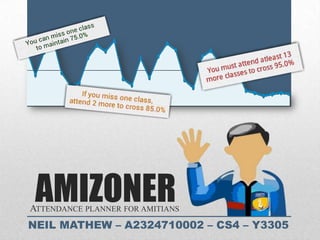
AMIZONER
ATTENDANCE PLANNER FOR AMITIANS
NEIL MATHEW – A2324710002 – CS4 – Y3305
•   Introduction
 •   Motivation       • Results
 •   Objective        • Conclusion
 •   Implementation   • References


Contents
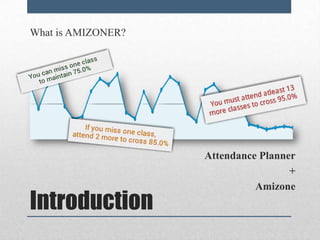
What is AMIZONER?


                    Attendance Planner
                                     +
                              Amizone
Introduction
What makes it different from the official App?


                                             MY COURSES
What makes it different from the official App?


                                             TIMETABLE
What makes it different from the official App?


                                            ATTENDANCE
What makes it different from the official App?


                                                 SYNC
What makes it different from the official App?


                                                 AND MORE
• Amity University has an excellent Student Information Portal and all
  Amity students use the same frequently.

• Attendance monitoring is one of the key issues students are
  concerned with.

• An easy and convenient way to access the Student Portal for updated
  information on attendance was in my mind for sometime.

• Hence, when it was time for the Practical Training project ,
  I instantly thought of making an Attendance Planner for Android
  based Mobile Phones.

• My Guide, Ms. Shanu Sharma, approved of the same.


Motivation
To create an Android Application and perform the following:

• Connecting to an HTTPS site (Amizone) through GPRS/WiFi.

• Opening the relevant html pages using HTTP POST & GET.

• Parsing the student info/course/attendance data logically.

• Creating a local database for offline view.

• Creating a user-friendly interface with proper highlighting using
  XML.


Objective
• Creating an efficient navigation design and making it compatible
  with all Android API versions and devices.

• Connecting the application with my personal server
  (Server-Client Communication) for updates using Google App
  Engine to host the server.

• Deployment and usage analysis using Google Analytics

• Monetization through advertisements using Google Admob


Objective
Technology Implemented:   Development Environment:

   HTTPs POST               Eclipse
   HTML Parsing             Java IDE
   SQLite Storage           SQLite
   Android Development      Corel Draw
   Google App Engine        Android Emulator
   Google Analytics          (all versions including ICS)
   Google Admob


Implementation
The application uses
                  HTTPS POST and HTTPS GET
                  to extract html code of the
                  required page.


                  HTTPS POST requires
                  understanding of two concepts:

                  • A simple HTTP POST
                  • SSL and Trust Managers


Implementation:


HTTPS Post
FOR AMIZONE.NET LOGIN

                        Required Parameters:

                  • Username
                  • Password

                         Hidden Parameters:

                  •    __EVENTTARGET
                  •    __EVENTARGUMENT
                  •    __VIEWSTATE
                  •    __EVENTVALIDATION


Implementation:


HTTPS Post
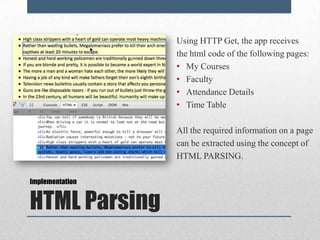
Using HTTP Get, the app receives
                 the html code of the following pages:
                 • My Courses
                 • Faculty
                 • Attendance Details
                 • Time Table

                 All the required information on a page
                 can be extracted using the concept of
                 HTML PARSING.

Implementation


HTML Parsing
As of the now, Five tables have been created to store the details of a
student’s session.

Table I: UserPass | ONLINE |
          This table the login details so that the user need not type in his
          username and password again.

 KEY USERNAME PASSWORD LAST_UPDATE NAME DESIRED_PERCENTAGE


• *The ‘ONLINE’ here means it is directly dependent on the online
  data. (The table is destroyed and recreated during every update.)

Implementation


SQLite Database
Table II: MyCourses | ONLINE |
       This table stores the course information.
       KEY       CNAME        CODE           ATTENDED     CONDUCTED


                                                       Table III: CourseTeacher | ONLINE |
                                             This table stores the faculty assigned to course.
                                               CNAME        TEACHER_NAME


                                                        Table IV: AllTeachers | OFFLINE |
                                                    This table stores the faculty information.
  *The AllTeachers Table
      is never destroyed,       KEY          TEACHER_NAME       CABIN_NO      CONTACT_NO
  only updated since it is
independent of Amizone.
                                                       Table V: AttendanceLogs | ONLINE |
                                         This table stores the attendance logs of all courses.
       KEY            CNAME           DATE         PERIOD       PRESENT          ABSENT
This app has implemented various android concepts:
                           •   Java & XML
                           •   Dynamic Activities,
                           •   Customized Listviews
                           •   Effective Navigation, configuring
                               back button and menu options
                           •   Progress Dialog Bar using AsyncTask
                               Class, a better alternative to threads.
                           •   Connecting to the internet to perform
                               HTTP Post and Get operations.
                           •   Accessing and storing in local databases.
                           •   And many more..
Implementation


Android Development
• In order to control the app, a
                   server side validation page was
                   created using Google App Engine.

                 • Based on the indicators provided
                   on the page, the application can
                   prevent further usage or display a
                   message during the sync.

                 • GAE required a basic idea of
                   python, servers and redirection
                   scripts.

Implementation


Google App Engine
Everyday, at least
                                                        10 users
                                                   install this application


 Everyday, at least
    100 users
 use this application


Results
                        16th July 2012 – 15th August 2012
AMIZONER HAS NATION-WIDE SCOPE
AMONG THE REGIONS,
   DELHI AND UP
TOP THE CHARTS WITH THE
      MOST USERS
AND AMIZONER HAS MANY HAPPY CUSTOMERS


Out of 54 Ratings, 47 have rated this application FIVE STARS
Using Admob, I have learnt how to monetize.


Here, the revenue is based on the impression and clicks of the
          advertisements shown on my application.
• This project provided me with the incentive to learn new
  languages and technologies and to widen my skill set.

• I propose to continue my development activities in
  Android, Java and Python to be part of the ongoing
  Innovations happening in the Industry.

• I hope to continue working under the guidance and
  facilitation of the Amity faculty to perform to the best of
  my abilities.


Conclusion
Online Sources:             Books:
•   http://stackoverflow.com             • The Complete Reference: Java,
•   http://developer.android.com                 By Herbert Schildt
•   http://wowjava.wordpress.com
                                         • The Busy Coder’s Guide to Android
•   http://vogella.com                     Development,
•   http://android-coding.blogspot.in            By Mark L.Murphy
•   http://commonsware.com/android
•   http://coenraets.org/blog/android-   • Java Examples in a NutShell,
    samples/androidtutorial/                     By David Flanagan
•   http://learn-it-stuff.blogspot.in/
                                         • Java 2 Programming,
•   http://androidsnippets.com/
                                                  By David Koosis
•   …


    References
THANK YOU

Amizoner Presentation

  • 1.
    AMIZONER ATTENDANCE PLANNER FORAMITIANS NEIL MATHEW – A2324710002 – CS4 – Y3305
  • 2.
    Introduction • Motivation • Results • Objective • Conclusion • Implementation • References Contents
  • 3.
    What is AMIZONER? Attendance Planner + Amizone Introduction
  • 4.
    What makes itdifferent from the official App? MY COURSES
  • 5.
    What makes itdifferent from the official App? TIMETABLE
  • 6.
    What makes itdifferent from the official App? ATTENDANCE
  • 7.
    What makes itdifferent from the official App? SYNC
  • 8.
    What makes itdifferent from the official App? AND MORE
  • 9.
    • Amity Universityhas an excellent Student Information Portal and all Amity students use the same frequently. • Attendance monitoring is one of the key issues students are concerned with. • An easy and convenient way to access the Student Portal for updated information on attendance was in my mind for sometime. • Hence, when it was time for the Practical Training project , I instantly thought of making an Attendance Planner for Android based Mobile Phones. • My Guide, Ms. Shanu Sharma, approved of the same. Motivation
  • 10.
    To create anAndroid Application and perform the following: • Connecting to an HTTPS site (Amizone) through GPRS/WiFi. • Opening the relevant html pages using HTTP POST & GET. • Parsing the student info/course/attendance data logically. • Creating a local database for offline view. • Creating a user-friendly interface with proper highlighting using XML. Objective
  • 11.
    • Creating anefficient navigation design and making it compatible with all Android API versions and devices. • Connecting the application with my personal server (Server-Client Communication) for updates using Google App Engine to host the server. • Deployment and usage analysis using Google Analytics • Monetization through advertisements using Google Admob Objective
  • 12.
    Technology Implemented: Development Environment:  HTTPs POST  Eclipse  HTML Parsing  Java IDE  SQLite Storage  SQLite  Android Development  Corel Draw  Google App Engine  Android Emulator  Google Analytics (all versions including ICS)  Google Admob Implementation
  • 13.
    The application uses HTTPS POST and HTTPS GET to extract html code of the required page. HTTPS POST requires understanding of two concepts: • A simple HTTP POST • SSL and Trust Managers Implementation: HTTPS Post
  • 14.
    FOR AMIZONE.NET LOGIN Required Parameters: • Username • Password Hidden Parameters: • __EVENTTARGET • __EVENTARGUMENT • __VIEWSTATE • __EVENTVALIDATION Implementation: HTTPS Post
  • 15.
    Using HTTP Get,the app receives the html code of the following pages: • My Courses • Faculty • Attendance Details • Time Table All the required information on a page can be extracted using the concept of HTML PARSING. Implementation HTML Parsing
  • 17.
    As of thenow, Five tables have been created to store the details of a student’s session. Table I: UserPass | ONLINE | This table the login details so that the user need not type in his username and password again. KEY USERNAME PASSWORD LAST_UPDATE NAME DESIRED_PERCENTAGE • *The ‘ONLINE’ here means it is directly dependent on the online data. (The table is destroyed and recreated during every update.) Implementation SQLite Database
  • 18.
    Table II: MyCourses| ONLINE | This table stores the course information. KEY CNAME CODE ATTENDED CONDUCTED Table III: CourseTeacher | ONLINE | This table stores the faculty assigned to course. CNAME TEACHER_NAME Table IV: AllTeachers | OFFLINE | This table stores the faculty information. *The AllTeachers Table is never destroyed, KEY TEACHER_NAME CABIN_NO CONTACT_NO only updated since it is independent of Amizone. Table V: AttendanceLogs | ONLINE | This table stores the attendance logs of all courses. KEY CNAME DATE PERIOD PRESENT ABSENT
  • 19.
    This app hasimplemented various android concepts: • Java & XML • Dynamic Activities, • Customized Listviews • Effective Navigation, configuring back button and menu options • Progress Dialog Bar using AsyncTask Class, a better alternative to threads. • Connecting to the internet to perform HTTP Post and Get operations. • Accessing and storing in local databases. • And many more.. Implementation Android Development
  • 20.
    • In orderto control the app, a server side validation page was created using Google App Engine. • Based on the indicators provided on the page, the application can prevent further usage or display a message during the sync. • GAE required a basic idea of python, servers and redirection scripts. Implementation Google App Engine
  • 21.
    Everyday, at least 10 users install this application Everyday, at least 100 users use this application Results 16th July 2012 – 15th August 2012
  • 22.
  • 23.
    AMONG THE REGIONS, DELHI AND UP TOP THE CHARTS WITH THE MOST USERS
  • 24.
    AND AMIZONER HASMANY HAPPY CUSTOMERS Out of 54 Ratings, 47 have rated this application FIVE STARS
  • 26.
    Using Admob, Ihave learnt how to monetize. Here, the revenue is based on the impression and clicks of the advertisements shown on my application.
  • 27.
    • This projectprovided me with the incentive to learn new languages and technologies and to widen my skill set. • I propose to continue my development activities in Android, Java and Python to be part of the ongoing Innovations happening in the Industry. • I hope to continue working under the guidance and facilitation of the Amity faculty to perform to the best of my abilities. Conclusion
  • 28.
    Online Sources: Books: • http://stackoverflow.com • The Complete Reference: Java, • http://developer.android.com By Herbert Schildt • http://wowjava.wordpress.com • The Busy Coder’s Guide to Android • http://vogella.com Development, • http://android-coding.blogspot.in By Mark L.Murphy • http://commonsware.com/android • http://coenraets.org/blog/android- • Java Examples in a NutShell, samples/androidtutorial/ By David Flanagan • http://learn-it-stuff.blogspot.in/ • Java 2 Programming, • http://androidsnippets.com/ By David Koosis • … References
  • 29.

Editor's Notes

  • #10 TO DO.
  • #11 TO DO
  • #14 The Username and Password is given by the user of the android application. The hidden parameters were browser generated. This created a problem because my application is impersonating a mozilla browser but it required all parameters to be defined before the http post. I found that the values of the hidden parameters were present within the html code. Using a HTTP Get, I retrieved those values and sent them back in the HTTP Post.
  • #16 The HTTP POST is only to pass the username and password to the server so that it will show the student’s information. Once logged in, the app will perform an HTTP Get on three types of pages, my course, faculty, and attendance details. From the HTML code of these pages, it will extract the required information and store them into SQLite Databases.
  • #17 An example can be seen in the extraction of the courses and their attendance information from the MyCourses.aspx page. A html code snippet of the Computer Graphics subject is shown on the screen. From this, I can extract Name of Course, the Attended number of classes, the Conducted number of classes and a unique number for each course. This number can be used to find the URL of each each course’s attendance details page.
  • #18 TO DO.
  • #19 TO DO.
  • #20 TO DO.
  • #22 TO DO.
  • #29 TO DO.
  • #30 TO DO: Fill up the online sources