Amazon VPC
Encored Technologies, Inc.
Jonghan Seo (jhseo@encoredtech.com)
About Amazon VPC
● Virtual Private Cloud
● Virtual network dedicated to an AWS account
● Price
○ No additional charge for VPC itself
VPC
● Logically isolated from other VPCs in AWS
● to ‘configure’ VPC
○ selecting IP address range
○ creating subnets
○ configuring network gateways
○ configuring route tables
○ configuring security settings
Subnet
● a range of IP addresses in VPC
● public/private subnet
○ Internet Gateway (IGW)
○ public subnet
■ routed to IGW
○ private subnet
■ not routed to IGW
■ can send requests to the internet through Network Access
Translation (NAT)
Security
● Security Group
● Network Access Control List (ACL)
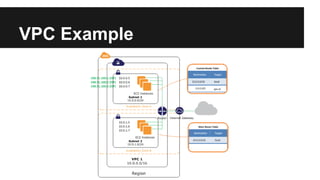
VPC Example
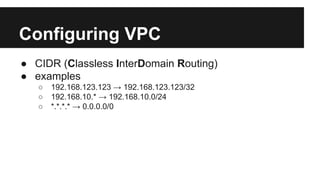
Configuring VPC
● CIDR (Classless InterDomain Routing)
● examples
○ 192.168.123.123 → 192.168.123.123/32
○ 192.168.10.* → 192.168.10.0/24
○ *.*.*.* → 0.0.0.0/0
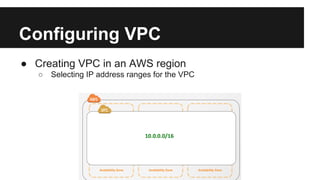
Configuring VPC
● Creating VPC in an AWS region
○ Selecting IP address ranges for the VPC
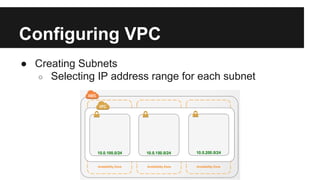
Configuring VPC
● Creating Subnets
○ Selecting IP address range for each subnet
Configuring VPC
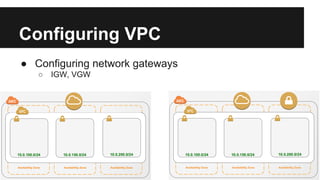
● Configuring network gateways
○ IGW, VGW
Configuring VPC
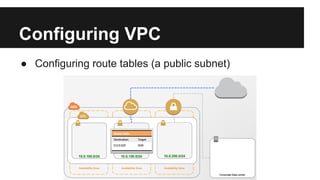
● Configuring route tables (a public subnet)
Configuring VPC
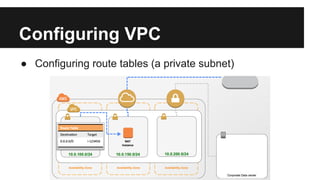
● Configuring route tables (a private subnet)
Configuring VPC
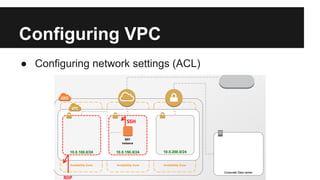
● Configuring network settings (ACL)
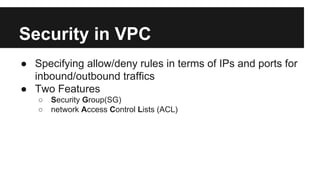
Security in VPC
● Specifying allow/deny rules in terms of IPs and ports for
inbound/outbound traffics
● Two Features
○ Security Group(SG)
○ network Access Control Lists (ACL)
Security in VPC
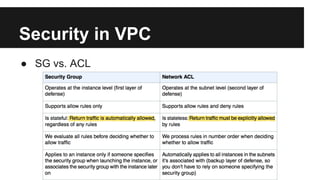
● SG vs. ACL
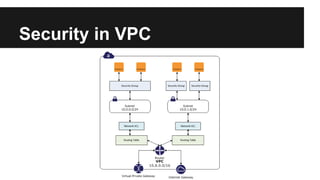
Security in VPC
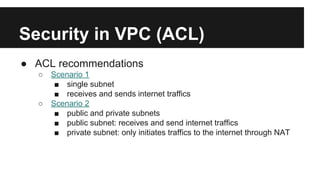
Security in VPC (ACL)
● ACL recommendations
○ Scenario 1
■ single subnet
■ receives and sends internet traffics
○ Scenario 2
■ public and private subnets
■ public subnet: receives and send internet traffics
■ private subnet: only initiates traffics to the internet through NAT
Networking in VPC
● IP address
○ private IP
■ all instances have a primary private IP
■ an instance can have multiple secondary private IP
addresses
○ public IP
■ an instance optionally has a public IP
■ assigned from Amazon’s pool of IPs (not from a amazon
account’s) so it is not persistent.
■ to assign a persistent public IP: EIP(Elastic IP addresses)
Networking in VPC
● Elastic IP Addresses (EIP)
○ a static public IP address
○ can be associated with any instance or network interface for VPC
○ a sort of my pool of public IPs
○ allocating an EIP in VPC → associating an EIP with a running instance
in VPC → disassociating an EIP → releasing an EIP
Networking in VPC
● Elastic Network Interface (ENI)
○ a sort of a (virtual) ethernet card
○ attributes:
■ a primary private IP
■ one or more secondary private IP
■ one EIP per private IP
■ one public IP
■ one or more SG
■ a MAC address
■ a source/destination check flag
■ a description
Networking in VPC
● route table
○ subnet : route table = n : 1
○ main/custom route table
○ http://docs.aws.amazon.
com/AmazonVPC/latest/UserGuide/VPC_Route_Tables.html
Networking in VPC
● Adding an IGW
○ Creating a Subnet
○ Attaching an IGW
○ Creating a Custom Route Table
■ adding a custom route rule
ex) 0.0.0.0/0 igw-b71902dd
■ Associating the route table to the subnet
Networking in VPC
○ Updating the SG rules (default SG for VPC)
■ 80(HTTP) 0.0.0.0/0
■ 443(HTTPS) 0.0.0.0/0
○ Adding EIP to instances
Networking in VPC
● NAT Instance
○ Creating a VPC with two subnets
○ Creating the NATSG security group
○ Launching an instance (AMI: ami-vpc-nat)
■ SG = NATSG
■ selecting Public IP options (assigning EIP after launching)
Networking in VPC
○ Configuring the NATSG
■ http://docs.aws.amazon.
com/AmazonVPC/latest/UserGuide/VPC_NAT_Instance.
html#NATSG
○ Disabling Source/Destination Checks
■ NAT must send/receive traffic when the source or destination is
not itself
■ Disable the SrcDestCheck attribute
○ Updating the route table for the private subnet
■ 0.0.0.0/0 nat-instance-id
AWS VPC - other AWS products
● EC2-VPC
● ElastiCache-VPC
● RDS-VPC
● AS-VPC
● ELB-VPC
● EMR-VPC
● Elastic Beanstalk-VPC

Amazon virtual private cloud (vpc)

  • 1.
    Amazon VPC Encored Technologies,Inc. Jonghan Seo (jhseo@encoredtech.com)
  • 2.
    About Amazon VPC ●Virtual Private Cloud ● Virtual network dedicated to an AWS account ● Price ○ No additional charge for VPC itself
  • 3.
    VPC ● Logically isolatedfrom other VPCs in AWS ● to ‘configure’ VPC ○ selecting IP address range ○ creating subnets ○ configuring network gateways ○ configuring route tables ○ configuring security settings
  • 4.
    Subnet ● a rangeof IP addresses in VPC ● public/private subnet ○ Internet Gateway (IGW) ○ public subnet ■ routed to IGW ○ private subnet ■ not routed to IGW ■ can send requests to the internet through Network Access Translation (NAT)
  • 5.
    Security ● Security Group ●Network Access Control List (ACL)
  • 6.
  • 7.
    Configuring VPC ● CIDR(Classless InterDomain Routing) ● examples ○ 192.168.123.123 → 192.168.123.123/32 ○ 192.168.10.* → 192.168.10.0/24 ○ *.*.*.* → 0.0.0.0/0
  • 8.
    Configuring VPC ● CreatingVPC in an AWS region ○ Selecting IP address ranges for the VPC
  • 9.
    Configuring VPC ● CreatingSubnets ○ Selecting IP address range for each subnet
  • 10.
    Configuring VPC ● Configuringnetwork gateways ○ IGW, VGW
  • 11.
    Configuring VPC ● Configuringroute tables (a public subnet)
  • 12.
    Configuring VPC ● Configuringroute tables (a private subnet)
  • 13.
    Configuring VPC ● Configuringnetwork settings (ACL)
  • 14.
    Security in VPC ●Specifying allow/deny rules in terms of IPs and ports for inbound/outbound traffics ● Two Features ○ Security Group(SG) ○ network Access Control Lists (ACL)
  • 15.
  • 16.
  • 17.
  • 18.
    Security in VPC(ACL) ● ACL recommendations ○ Scenario 1 ■ single subnet ■ receives and sends internet traffics ○ Scenario 2 ■ public and private subnets ■ public subnet: receives and send internet traffics ■ private subnet: only initiates traffics to the internet through NAT
  • 19.
    Networking in VPC ●IP address ○ private IP ■ all instances have a primary private IP ■ an instance can have multiple secondary private IP addresses ○ public IP ■ an instance optionally has a public IP ■ assigned from Amazon’s pool of IPs (not from a amazon account’s) so it is not persistent. ■ to assign a persistent public IP: EIP(Elastic IP addresses)
  • 20.
    Networking in VPC ●Elastic IP Addresses (EIP) ○ a static public IP address ○ can be associated with any instance or network interface for VPC ○ a sort of my pool of public IPs ○ allocating an EIP in VPC → associating an EIP with a running instance in VPC → disassociating an EIP → releasing an EIP
  • 21.
    Networking in VPC ●Elastic Network Interface (ENI) ○ a sort of a (virtual) ethernet card ○ attributes: ■ a primary private IP ■ one or more secondary private IP ■ one EIP per private IP ■ one public IP ■ one or more SG ■ a MAC address ■ a source/destination check flag ■ a description
  • 22.
    Networking in VPC ●route table ○ subnet : route table = n : 1 ○ main/custom route table ○ http://docs.aws.amazon. com/AmazonVPC/latest/UserGuide/VPC_Route_Tables.html
  • 23.
    Networking in VPC ●Adding an IGW ○ Creating a Subnet ○ Attaching an IGW ○ Creating a Custom Route Table ■ adding a custom route rule ex) 0.0.0.0/0 igw-b71902dd ■ Associating the route table to the subnet
  • 24.
    Networking in VPC ○Updating the SG rules (default SG for VPC) ■ 80(HTTP) 0.0.0.0/0 ■ 443(HTTPS) 0.0.0.0/0 ○ Adding EIP to instances
  • 25.
    Networking in VPC ●NAT Instance ○ Creating a VPC with two subnets ○ Creating the NATSG security group ○ Launching an instance (AMI: ami-vpc-nat) ■ SG = NATSG ■ selecting Public IP options (assigning EIP after launching)
  • 26.
    Networking in VPC ○Configuring the NATSG ■ http://docs.aws.amazon. com/AmazonVPC/latest/UserGuide/VPC_NAT_Instance. html#NATSG ○ Disabling Source/Destination Checks ■ NAT must send/receive traffic when the source or destination is not itself ■ Disable the SrcDestCheck attribute ○ Updating the route table for the private subnet ■ 0.0.0.0/0 nat-instance-id
  • 27.
    AWS VPC -other AWS products ● EC2-VPC ● ElastiCache-VPC ● RDS-VPC ● AS-VPC ● ELB-VPC ● EMR-VPC ● Elastic Beanstalk-VPC