Presented By: Rishi Kumar Ray
AWS VPC Flow Logs
Lack of etiquette and manners is a huge turn off.
KnolX Etiquettes
Punctuality
Respect Knolx session timings, you
are requested not to join sessions
after a 5 minutes threshold post
the session start time.
Feedback
Make sure to submit a constructive
feedback for all sessions as it is
very helpful for the presenter.
Silent Mode
Keep your mobile devices in silent
mode, feel free to move out of
session in case you need to attend
an urgent call.
Avoid Disturbance
Avoid unwanted chit chat during
the session.
Our Agenda
01 Introduction
02 Flow Logging levels
03 What is VPC flow logs
04 Use Cases & Limitations
05 Demo
Introduction
What is flow logs ?
Flow Logs feature can be used as a security tool to monitor the traffic that is reaching your EC2
instances. Once enabled, the feature will start collecting IP traffic data to and from your VPC
subnets, data that can be useful to detect and troubleshoot security issues such as overly
restrictive security group rules (when specific traffic is not reaching an EC2 instance) or overly
permissive rules (when an instance is publicly accessible through a specific port).
Flow logging Levels
Amazon Web Service (AWS) Offers flow logging at three separate levels:
Virtual Private Cloud (VPC): Flow logs can be enabled to a particular VPC and can monitor all the
activity within your cloud environment
Subnet: VPCs are often divided into subnets spanning multiple availability zones in a region. A
subnet is a range of IP addresses in your VPC. It can be a private or a public one. Flow Logs can be
created for a specific subnet to monitor all the activity within your subnet.
Elastic Network Interface (ENI): ENIs are virtual network cards you can attach to your EC2
instances. They are used to enable network connectivity for your instances. One can monitor and
capture full flow logs from these interfaces to stay ahead of issues like latency and malicious
activities.
What is VPC Flow logs?
Before going and learning about VPC Flow logs , Let’s first Understand what is a VPC
VPC - A virtual private cloud (VPC) is a secure, isolated private cloud hosted within a
public cloud. VPC customers can run code, store data, host websites, and do anything
else they could do in an ordinary private cloud, but the private cloud is hosted remotely
by a public cloud provider.
Each VPC that you create is logically isolated from other virtual networks in the AWS
cloud and is fully customizable. You can select the IP address range, create subnets,
configure route tables, set up network gateways, define security settings using security
groups, and network access control lists.
Amazon VPC Flow Logs is a feature that enables you to capture and log the information about
the network traffic going to and from the designated network interfaces within your VPC. It can
be used as a centralized, single source of information to monitor different network aspects of
your VPC.
Examples -
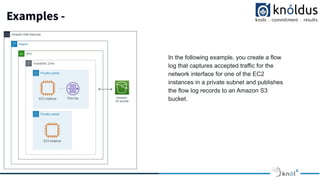
In the following example, you create a flow
log that captures accepted traffic for the
network interface for one of the EC2
instances in a private subnet and publishes
the flow log records to an Amazon S3
bucket.
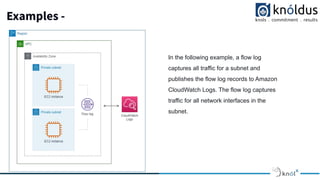
Examples -
In the following example, a flow log
captures all traffic for a subnet and
publishes the flow log records to Amazon
CloudWatch Logs. The flow log captures
traffic for all network interfaces in the
subnet.
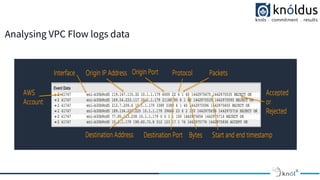
Analysing VPC Flow logs data
Publishing Flow Logs
VPC Flow Logs can be sent to either
1. CloudWatch Logs: To send Flow log data to the CloudWatch log group, a log group must be
created to specify.
2. S3 Bucket: To send Flow log data to Amazon S3, you’d need an existing S3 bucket to specify.
To create a flow log, you specify:
● The resource for which to create the flow log
● The type of traffic to capture (accepted traffic, rejected traffic, or all traffic)
● The destinations to which you want to publish the flow log data
Use Cases of VPC Flow logs
● Network Monitoring: It provides you with real-time visibility into network throughput and
performance
● Network Usage and optimizing network expenses: You can analyze the network usage and
based on the analysis, you can optimize the network traffic expenses.
● Network Forensics: You can find out any compromised IPs by analyzing all the incoming and
outgoing network flows In case of any incidents.
Use Cases of VPC Flow logs
● Performance. Use VPC flow logs to identify latencies, establish performance baselines and, and
tweak applications. VPC flow logs can reveal flow duration and latency, bytes sent which allows you to
identify performance issues quickly and deliver a better user experience.
● Security. By logging all of the traffic from a given interface or an entire subnet, root cause analysis can
reveal critical gaps in security where malicious traffic is moving around your network. Key in on
suspicious traffic and tighten security loopholes using the information from VPC flow logs.
Limitations of the VPC Flow logs
VPC flow logs can’t capture everything. Certain types of traffic are excluded from VPC flow logs. A few
instances where you can’t rely on VPC logging:
● You can’t enable flow logs for VPCs that are peered with your VPC unless the peer VPC is in your
account
● Once a flow log is created, you cannot change its configuration or the flow record format
● Flow Logs also exclude certain types of traffic like DHCP traffic, Mirrored traffic, Traffic generated by a
Windows instance for Amazon windows license activation, DNS activity.
DEMO
Thank You !
Get in touch with us:
Lorem Studio, Lord Building
D4456, LA, USA

AWS VPC Flow logs

  • 1.
    Presented By: RishiKumar Ray AWS VPC Flow Logs
  • 2.
    Lack of etiquetteand manners is a huge turn off. KnolX Etiquettes Punctuality Respect Knolx session timings, you are requested not to join sessions after a 5 minutes threshold post the session start time. Feedback Make sure to submit a constructive feedback for all sessions as it is very helpful for the presenter. Silent Mode Keep your mobile devices in silent mode, feel free to move out of session in case you need to attend an urgent call. Avoid Disturbance Avoid unwanted chit chat during the session.
  • 3.
    Our Agenda 01 Introduction 02Flow Logging levels 03 What is VPC flow logs 04 Use Cases & Limitations 05 Demo
  • 4.
    Introduction What is flowlogs ? Flow Logs feature can be used as a security tool to monitor the traffic that is reaching your EC2 instances. Once enabled, the feature will start collecting IP traffic data to and from your VPC subnets, data that can be useful to detect and troubleshoot security issues such as overly restrictive security group rules (when specific traffic is not reaching an EC2 instance) or overly permissive rules (when an instance is publicly accessible through a specific port).
  • 5.
    Flow logging Levels AmazonWeb Service (AWS) Offers flow logging at three separate levels: Virtual Private Cloud (VPC): Flow logs can be enabled to a particular VPC and can monitor all the activity within your cloud environment Subnet: VPCs are often divided into subnets spanning multiple availability zones in a region. A subnet is a range of IP addresses in your VPC. It can be a private or a public one. Flow Logs can be created for a specific subnet to monitor all the activity within your subnet. Elastic Network Interface (ENI): ENIs are virtual network cards you can attach to your EC2 instances. They are used to enable network connectivity for your instances. One can monitor and capture full flow logs from these interfaces to stay ahead of issues like latency and malicious activities.
  • 6.
    What is VPCFlow logs? Before going and learning about VPC Flow logs , Let’s first Understand what is a VPC VPC - A virtual private cloud (VPC) is a secure, isolated private cloud hosted within a public cloud. VPC customers can run code, store data, host websites, and do anything else they could do in an ordinary private cloud, but the private cloud is hosted remotely by a public cloud provider. Each VPC that you create is logically isolated from other virtual networks in the AWS cloud and is fully customizable. You can select the IP address range, create subnets, configure route tables, set up network gateways, define security settings using security groups, and network access control lists. Amazon VPC Flow Logs is a feature that enables you to capture and log the information about the network traffic going to and from the designated network interfaces within your VPC. It can be used as a centralized, single source of information to monitor different network aspects of your VPC.
  • 7.
    Examples - In thefollowing example, you create a flow log that captures accepted traffic for the network interface for one of the EC2 instances in a private subnet and publishes the flow log records to an Amazon S3 bucket.
  • 8.
    Examples - In thefollowing example, a flow log captures all traffic for a subnet and publishes the flow log records to Amazon CloudWatch Logs. The flow log captures traffic for all network interfaces in the subnet.
  • 9.
  • 10.
    Publishing Flow Logs VPCFlow Logs can be sent to either 1. CloudWatch Logs: To send Flow log data to the CloudWatch log group, a log group must be created to specify. 2. S3 Bucket: To send Flow log data to Amazon S3, you’d need an existing S3 bucket to specify. To create a flow log, you specify: ● The resource for which to create the flow log ● The type of traffic to capture (accepted traffic, rejected traffic, or all traffic) ● The destinations to which you want to publish the flow log data
  • 11.
    Use Cases ofVPC Flow logs ● Network Monitoring: It provides you with real-time visibility into network throughput and performance ● Network Usage and optimizing network expenses: You can analyze the network usage and based on the analysis, you can optimize the network traffic expenses. ● Network Forensics: You can find out any compromised IPs by analyzing all the incoming and outgoing network flows In case of any incidents.
  • 12.
    Use Cases ofVPC Flow logs ● Performance. Use VPC flow logs to identify latencies, establish performance baselines and, and tweak applications. VPC flow logs can reveal flow duration and latency, bytes sent which allows you to identify performance issues quickly and deliver a better user experience. ● Security. By logging all of the traffic from a given interface or an entire subnet, root cause analysis can reveal critical gaps in security where malicious traffic is moving around your network. Key in on suspicious traffic and tighten security loopholes using the information from VPC flow logs.
  • 13.
    Limitations of theVPC Flow logs VPC flow logs can’t capture everything. Certain types of traffic are excluded from VPC flow logs. A few instances where you can’t rely on VPC logging: ● You can’t enable flow logs for VPCs that are peered with your VPC unless the peer VPC is in your account ● Once a flow log is created, you cannot change its configuration or the flow record format ● Flow Logs also exclude certain types of traffic like DHCP traffic, Mirrored traffic, Traffic generated by a Windows instance for Amazon windows license activation, DNS activity.
  • 14.
  • 15.
    Thank You ! Getin touch with us: Lorem Studio, Lord Building D4456, LA, USA