Plan for securing aws infrastructure?
Type of threads are
1. DDos
2. Application Attack:SQL injection,Sensitive data exposure, etc
3. Bad Bot
AWS VPC
A virtual private cloud (VPC) is a virtual network dedicated to your AWS account.
A subnet is a range of IP addresses in your VPC.
To protect the AWS resources in each subnet, you can use multiple layers of security, including
security groups and network access control lists (ACL).
There is also a default VPC that AWS provide but for customized work you can create your own
VPC as per the requirements.
Your default VPC includes an internet gateway, and each default subnet is a public subnet.
Each instance that you launch into a default subnet has a private IPv4 address and a public
IPv4 address. These instances can communicate with the internet through the internet gateway.
An internet gateway enables your instances to connect to the internet through the Amazon
EC2 network edge.
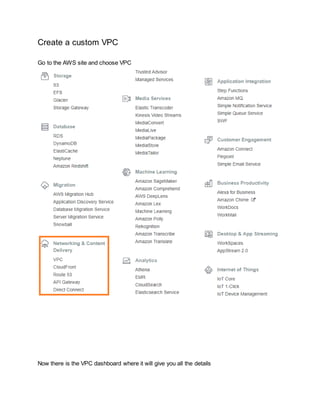
Create a custom VPC
Go to the AWS site and choose VPC
Now there is the VPC dashboard where it will give you all the details
When you click your VPC you always have one default VPC which comes pridefine by AWS but
it is always recommended to create your own costume VPC for that select create VPC
Now give whatever name that to want and how many ip addresses you are willing to occupy and
There are two kind of tendency Default and Dedicated
The dedicated give you great performance but it will cost you more
Default is good for normal usage
And our infotek_VPC is created
It will create default route table and network ACL
Here we can see there is no subnet related to our VPC
So it is time to create one subnet
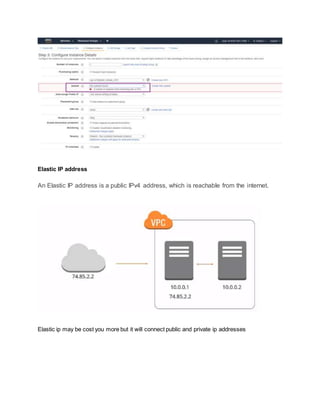
First launch an instance
But here you can see there is an error
Elastic IP address
An Elastic IP address is a public IPv4 address, which is reachable from the internet.
Elastic ip may be cost you more but it will connect public and private ip addresses
Again go to the VPC dashboard and look for Elastic IP
Subnet: range of ip addresses
Subnet diagram
Public and private subnet
Now create some subnets
For this just go to the VPC dashboard again and choose subnet
And click on create subnet and always give meaningful name
InternetGateway
Internet Gateway Requirement
Now again go to the VPC dashboard and create internet gateway
As we can see the status of our internet gateway is detached so let’s now attach it to VPC
Click on attach to VPC
Now again check the status
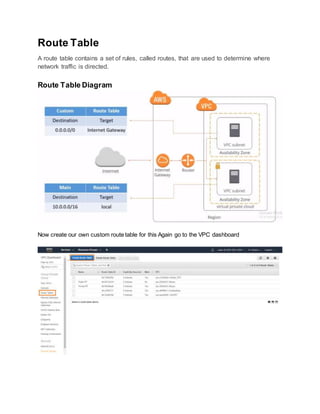
Route Table
A route table contains a set of rules, called routes, that are used to determine where
network traffic is directed.
Route Table Diagram
Now create our own custom route table for this Again go to the VPC dashboard
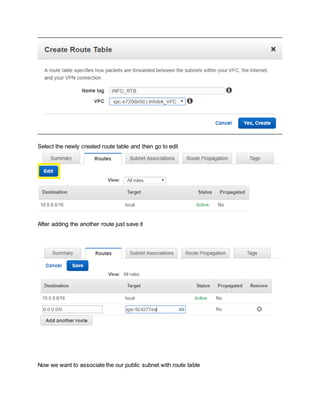
Select the newly created route table and then go to edit
After adding the another route just save it
Now we want to associate the our public subnet with route table
NAT (Network Address Translation)
NAT Device
NAT GATEWAY
You can use a network address translation (NAT) gateway to enable instances in a
private subnet to connect to the internet or other AWS services, but prevent the internet
from initiating a connection with those instances
Now create NAT GATEWAY
After that click on edit route table
Add one more
Click on save and you have created NAT GATEWAY to enable internet access for instance in
private subnet.
Security Group
A security group is act as virtual firewall that controls the traffic for one or more instances
Diagram
Security group rules
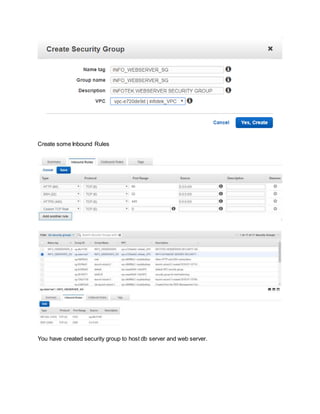
It’s time to create security group for that go to the VPC dashboard
Fill all the details
Create some Inbound Rules
You have created security group to host db server and web server.
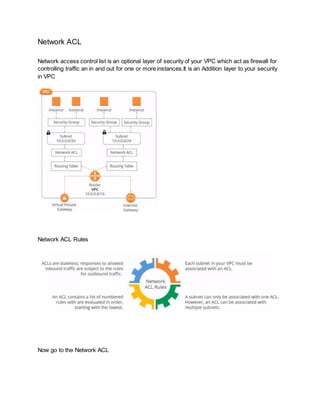
Network ACL
Network access control list is an optional layer of security of your VPC which act as firewall for
controlling traffic an in and out for one or more instances.It is an Addition layer to your security
in VPC
Network ACL Rules
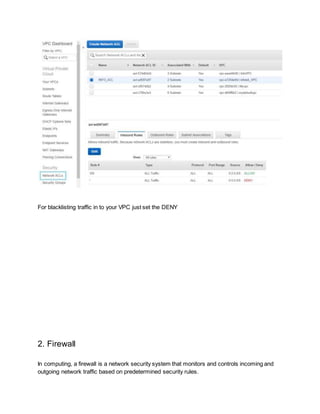
Now go to the Network ACL
For blacklisting traffic in to your VPC just set the DENY
2. Firewall
In computing, a firewall is a network security system that monitors and controls incoming and
outgoing network traffic based on predetermined security rules.
AWS provide WAF(Web Application Firewall) , Shield and AWS Firewall Manager
Shield is specially used to protect from denial of service attacks(DDos)
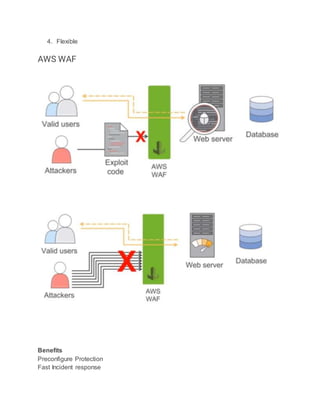
AWS WAF is a web application firewall service that helps protect your web apps from common
exploits that could affect app availability, compromise security, or consume excessive
resources.
AWS Firewall Manager simplifies your AWS WAF administration and maintenance tasks across
multiple accounts and resources.
AWS shield benefits
1. AWS integration
2. Always-on Detection and migration
3. Affordable
4. Flexible
AWS WAF
Benefits
Preconfigure Protection
Fast Incident response
Scale
API for Automation
CloudFormation
Create a new stack
After that you can specify the location of template
Go to the https://aws.amazon.com/waf/preconfiguredrules/
Now go to how to deploy solution
https://docs.aws.amazon.com/solutions/latest/aws-waf-security-
automations/template.html paste this link to the AWS gui
Select the vulnerability that occur more often by just clicking YES or NO
Configure web ACL to guard against very common attacks for our infrastructure
REFERENCES
https://www.youtube.com/watch?v=fpxDGU2KdkA
Internal security
1. Disable root API access key and secret key
2. Enable MFA(Multi Factor Authentication) token everywhere
3. Reduce number of IAM(identity and access Management) users with administrator
privilege
4. Use roles for EC2 instance
5. Least privilege : limit what IAM entities can do with strong/explicit policies
6. Rotate all the key regularly
7. Use IAM roles with STS(temporary security credential to request access) assume role
where possible
8. Use auto scaling to dampen DDos attack
9. Do not allow 0.0.0.0/0 in any EC2/ELB(Elastic Load Balancing) security group unless
you mean it
10. Watch world readable/listable S3 bucket policies.

AWS virtual private clould

  • 1.
    Plan for securingaws infrastructure? Type of threads are 1. DDos 2. Application Attack:SQL injection,Sensitive data exposure, etc 3. Bad Bot AWS VPC A virtual private cloud (VPC) is a virtual network dedicated to your AWS account. A subnet is a range of IP addresses in your VPC. To protect the AWS resources in each subnet, you can use multiple layers of security, including security groups and network access control lists (ACL). There is also a default VPC that AWS provide but for customized work you can create your own VPC as per the requirements. Your default VPC includes an internet gateway, and each default subnet is a public subnet. Each instance that you launch into a default subnet has a private IPv4 address and a public IPv4 address. These instances can communicate with the internet through the internet gateway. An internet gateway enables your instances to connect to the internet through the Amazon EC2 network edge.
  • 2.
    Create a customVPC Go to the AWS site and choose VPC Now there is the VPC dashboard where it will give you all the details
  • 3.
    When you clickyour VPC you always have one default VPC which comes pridefine by AWS but it is always recommended to create your own costume VPC for that select create VPC Now give whatever name that to want and how many ip addresses you are willing to occupy and There are two kind of tendency Default and Dedicated The dedicated give you great performance but it will cost you more Default is good for normal usage
  • 4.
    And our infotek_VPCis created It will create default route table and network ACL Here we can see there is no subnet related to our VPC
  • 5.
    So it istime to create one subnet First launch an instance But here you can see there is an error
  • 6.
    Elastic IP address AnElastic IP address is a public IPv4 address, which is reachable from the internet. Elastic ip may be cost you more but it will connect public and private ip addresses
  • 7.
    Again go tothe VPC dashboard and look for Elastic IP Subnet: range of ip addresses
  • 8.
  • 9.
    Now create somesubnets For this just go to the VPC dashboard again and choose subnet
  • 10.
    And click oncreate subnet and always give meaningful name
  • 11.
  • 12.
    Now again goto the VPC dashboard and create internet gateway As we can see the status of our internet gateway is detached so let’s now attach it to VPC
  • 13.
    Click on attachto VPC Now again check the status
  • 15.
    Route Table A routetable contains a set of rules, called routes, that are used to determine where network traffic is directed. Route Table Diagram Now create our own custom route table for this Again go to the VPC dashboard
  • 16.
    Select the newlycreated route table and then go to edit After adding the another route just save it Now we want to associate the our public subnet with route table
  • 17.
  • 18.
  • 19.
    You can usea network address translation (NAT) gateway to enable instances in a private subnet to connect to the internet or other AWS services, but prevent the internet from initiating a connection with those instances Now create NAT GATEWAY
  • 20.
    After that clickon edit route table Add one more
  • 21.
    Click on saveand you have created NAT GATEWAY to enable internet access for instance in private subnet. Security Group A security group is act as virtual firewall that controls the traffic for one or more instances Diagram Security group rules
  • 22.
    It’s time tocreate security group for that go to the VPC dashboard Fill all the details
  • 23.
    Create some InboundRules You have created security group to host db server and web server.
  • 24.
    Network ACL Network accesscontrol list is an optional layer of security of your VPC which act as firewall for controlling traffic an in and out for one or more instances.It is an Addition layer to your security in VPC Network ACL Rules Now go to the Network ACL
  • 25.
    For blacklisting trafficin to your VPC just set the DENY 2. Firewall In computing, a firewall is a network security system that monitors and controls incoming and outgoing network traffic based on predetermined security rules.
  • 26.
    AWS provide WAF(WebApplication Firewall) , Shield and AWS Firewall Manager Shield is specially used to protect from denial of service attacks(DDos) AWS WAF is a web application firewall service that helps protect your web apps from common exploits that could affect app availability, compromise security, or consume excessive resources. AWS Firewall Manager simplifies your AWS WAF administration and maintenance tasks across multiple accounts and resources. AWS shield benefits 1. AWS integration 2. Always-on Detection and migration 3. Affordable
  • 27.
    4. Flexible AWS WAF Benefits PreconfigureProtection Fast Incident response
  • 28.
    Scale API for Automation CloudFormation Createa new stack After that you can specify the location of template Go to the https://aws.amazon.com/waf/preconfiguredrules/ Now go to how to deploy solution https://docs.aws.amazon.com/solutions/latest/aws-waf-security- automations/template.html paste this link to the AWS gui Select the vulnerability that occur more often by just clicking YES or NO
  • 29.
    Configure web ACLto guard against very common attacks for our infrastructure
  • 31.
    REFERENCES https://www.youtube.com/watch?v=fpxDGU2KdkA Internal security 1. Disableroot API access key and secret key 2. Enable MFA(Multi Factor Authentication) token everywhere
  • 32.
    3. Reduce numberof IAM(identity and access Management) users with administrator privilege 4. Use roles for EC2 instance 5. Least privilege : limit what IAM entities can do with strong/explicit policies 6. Rotate all the key regularly 7. Use IAM roles with STS(temporary security credential to request access) assume role where possible 8. Use auto scaling to dampen DDos attack 9. Do not allow 0.0.0.0/0 in any EC2/ELB(Elastic Load Balancing) security group unless you mean it 10. Watch world readable/listable S3 bucket policies.