Criando o seu Datacenter Virtual:
VPC e Conectividade
Ari Dias Neto, AWS Solutions Architect
Disclaimer:
Do Try This at Home!
All these designs are in use by customers
Design…
then spend a lot of time building and deploying
Build and deploy virtual datacenters as fast as you
design them
version
Route Table Elastic Network
Interface
Amazon VPC Router
Internet
Gateway
Customer
Gateway
Virtual
Private
Gateway
VPN
ConnectionSubnet
Elements of VPC Design
Availability Zone A Availability Zone B
Subnet
Availability Zone A
Subnet
Availability Zone B
VPC CIDR: 10.1.0.0 /16
Plan your VPC IP space before creating it
• Consider future AWS region expansion
• Consider future connectivity to your internal networks
• Consider subnet design
• VPC can be /16 down to /28
• CIDR cannot be modified after creation
• Overlapping IP spaces = future headache
Public Subnet
Private Subnet
Public Subnet
Availability Zone B
Private Subnet
VPC CIDR: 10.1.0.0 /16
Availability Zone A
Public Subnet
Private Subnet
Public Subnet
Availability Zone B
Private Subnet
Instance A
10.1.1.11 /24
Instance C
10.1.3.33 /24
Instance B
10.1.2.22 /24
Instance D
10.1.4.44 /24
VPC CIDR: 10.1.0.0 /16
Availability Zone A
Public Subnet
Availability Zone A
Private Subnet
Public Subnet
Availability Zone B
Private Subnet
Instance A
10.1.1.11 /24
Instance C
10.1.3.33 /24
Instance B
10.1.2.22 /24
Instance D
10.1.4.44 /24
VPC CIDR: 10.1.0.0 /16
.1
.1 .1
.1
Public Subnet
Private Subnet
Public Subnet
Availability Zone B
Private Subnet
Instance A
10.1.1.11 /24
Instance C
10.1.3.33 /24
Instance B
10.1.2.22 /24
Instance D
10.1.4.44 /24
VPC CIDR: 10.1.0.0 /16
Route Table
Destination Target
10.1.0.0/16 local
Availability Zone A
Leave the Main Route Table Alone
Availability Zone B
Public Subnet
Availability Zone A
Private Subnet
Public Subnet
Private Subnet
Instance A
10.1.1.11 /24
Instance C
10.1.3.33 /24
Instance B
10.1.2.22 /24
Instance D
10.1.4.44 /24
VPC CIDR: 10.1.0.0 /16
Route Table
Destination Target
10.1.0.0/16 local
10.1.1.0/24 Instance B
Network ACLs vs. Security Groups
NACLs
• Applied to subnets (1 per)
• Stateless
• Allow & deny (blacklist)
• Rules processed in order
Security groups
• Applied to instance ENI (up
to 5 per)
• Stateful
• Allow only (whitelist)
• Rules evaluated as a whole
• Can reference other
security groups in the same
VPC
VPC Subnet
Elastic network
interface
Security group
Network ACL
VPC Network ACLs: What Are They Good For?
• Enforcing baseline security policy
– Example:
“No TFTP, NetBIOS or SMTP shall egress this
subnet”
• Catchall for holes in instance
security groups
• Segregation of security between
network ops and dev ops
VPC Subnet
Instance
VPC Network ACLs: Best Practices
• Use sparingly, keep it simple
• Avoid ephemeral port range allows
• Create rule #’s with room to grow
• Use IAM to control tightly who can alter or delete NACLs
Pushing this will hurt!
Default network ACL:
Create an IAM VPC Admin Group
Examples of “High Blast Radius” VPC API calls that should be restricted:
AttachInternetGateway
AssociateRouteTable
CreateRoute
DeleteCustomerGateway
DeleteInternetGateway
DeleteNetworkAcl
DeleteNetworkAclEntry
DeleteRoute
DeleteRouteTable
DeleteDhcpOptions
ReplaceNetworkAclAssociation
DisassociateRouteTable
{Support
Resource
Permissions
Example IAM Policy for NACL Admin
{
"Version": "2012-10-17",
"Statement": [
{
"Effect": "Allow",
"Action": [
"ec2:DeleteNetworkAcl",
"ec2:DeleteNetworkAclEntry"
],
"Resource": "arn:aws:ec2:us-west-2:123456789012:network-acl/*",
"Condition": {
"StringEquals": {
"ec2:ResourceTag/Environment": "prod"
},
"Null": {
"aws:MultiFactorAuthAge": "false"
}
}
}
]
}
Public Subnet
Availability Zone A
Private Subnet
Public Subnet
Availability Zone B
Private Subnet
Instance A
10.1.1.11 /24
Instance C
10.1.3.33 /24
Instance B
10.1.2.22 /24
Instance D
10.1.4.44 /24
VPC CIDR: 10.1.0.0 /16
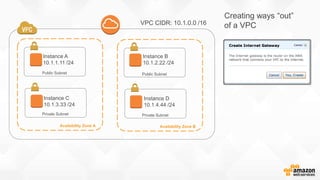
Creating ways “out”
of a VPC
Public Subnet
Availability Zone A
Private Subnet
Public Subnet
Availability Zone B
Private Subnet
Instance A
10.1.1.11 /24
Instance C
10.1.3.33 /24
Instance B
10.1.2.22 /24
Instance D
10.1.4.44 /24
VPC CIDR: 10.1.0.0 /16
Virtual
Private
Gateway
Internet
Gateway
Only 1 IGW and 1 VGW
per VPC
VPN
connection
Customer
data center
Customer
data center
AWS Direct
Connect
Route Table
Destination Target
10.1.0.0/16 local
Internal CIDR VGW
Public Subnet
Availability Zone A
Private Subnet
Public Subnet
Availability Zone B
Private Subnet
Instance A
10.1.1.11 /24
Instance C
10.1.3.33 /24
Instance B
10.1.2.22 /24
Instance D
10.1.4.44 /24
VPC CIDR: 10.1.0.0 /16
Route
Table
Route Table
Destination Target
10.1.0.0/16 local
0.0.0.0/0 IGW
Ways to Assign Public IPs
Elastic IP address (EIP)
• Associated with AWS account and not a specific instance
• 1 public IP to 1 private IP static NAT mapping
• Instance does not “see” an EIP associated to it
• Persists independently of the instance
• Can be assigned while instance is stopped or running
• Can be moved, reassigned to other ENIs
Ways to Assign Public IPs
Automatic dynamic public IP assignment
• Done on instance launch into VPC subnet
• Public IP is dynamic and could change if instance is stopped
and restarted
• Does not count against AWS account EIP limits
• Works only on instances with a single ENI
Public Subnet
Availability Zone A
Private Subnet
Public Subnet
Availability Zone B
Private Subnet
Instance A
Public: 54.200.129.18
Private: 10.1.1.11 /24
Instance C
10.1.3.33 /24
Instance B
10.1.2.22 /24
Instance D
10.1.4.44 /24
Route
Table
Internet
Amazon S3 Amazon Dynamo DB
AWS
region
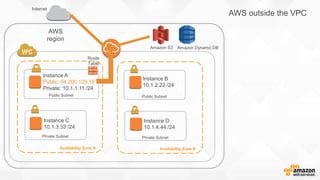
AWS outside the VPC
Examples of AWS outside the VPC
• AWS API endpoints
– Think about which APIs you might be calling from instances within the
VPC
– Good examples: Amazon EC2, AWS CloudFormation, Auto Scaling,
Amazon SWF, Amazon SQS, Amazon SNS
• Regional services
– Amazon S3 (Not anymore)
– Amazon Dynamo DB
• Software and patch repositories
– Amazon Linux repo allows access only from AWS public IP blocks
Public Subnet
Availability Zone A
Private Subnet
Public Subnet
Availability Zone B
Private Subnet
Instance A
Public: 54.200.129.18
Private: 10.1.1.11 /24
Instance C
10.1.3.33 /24
Instance B
10.1.2.22 /24
Instance D
10.1.4.44 /24
Route
Table
Internet
Amazon S3
AWS
region
And what if instance C
in a private subnet
needs to reach outside
the VPC?
It has no route to the
IGW and no public IP.
Amazon Dynamo DB
Public Subnet
Availability Zone A
Private Subnet
Public Subnet
Availability Zone B
Private Subnet
NAT A
Public: 54.200.129.18
Private: 10.1.1.11 /24
Instance C
10.1.3.33 /24
Instance B
10.1.2.22 /24
Instance D
10.1.4.44 /24
Internet
Amazon S3
AWS
region
Deploy an instance that
functions as a
N etwork
A ddress
T ranslat(or)
Route Table
Destination Target
10.1.0.0/16 local
0.0.0.0/0 NAT
instanc
e
Amazon Dynamo DB
What makes up the
Amazon Linux NAT AMI?
• $echo 1 > /proc/sys/net/ipv4/ip_forward
• $echo 0 > /proc/sys/net/ipv4/conf/eth0/send_redirects
• $/sbin/iptables -t nat -A POSTROUTING -o eth0 –s 10.1.0.0/16 -j MASQUERADE
• $/sbin/iptables-save
• $aws ec2 modify-instance-attributes –instance-id i-xxxxxxxx –source-dest-check “{”Value”:false}”
Not much to it:
1. IP forwarding enabled
2. IP NAT Masquerading enabled in iptables for VPC CIDR block
3. Source/destination check is turned off on primary interface
Public Subnet
Availability Zone A
Private Subnet
Public Subnet
Availability Zone B
Private Subnet
NAT A
Public: 54.200.129.18
Private: 10.1.1.11 /24
Instance C
10.1.3.33 /24
Instance B
10.1.2.22 /24
Instance D
10.1.4.44 /24
Internet
Amazon S3
AWS
region
Other private subnets
can share the same
routing table and use
the NAT
But…
Amazon Dynamo DB
Public Subnet
Availability Zone A
Private Subnet
Public Subnet
Availability Zone B
Private Subnet
NAT A
Public: 54.200.129.18
Private: 10.1.1.11 /24
Instance B
10.1.2.22 /24
Internet
Amazon S3
AWS
region
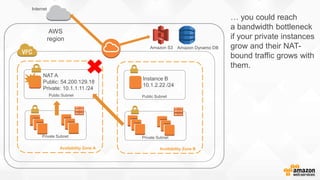
… you could reach
a bandwidth bottleneck
if your private instances
grow and their NAT-
bound traffic grows with
them.
Amazon Dynamo DB
Scalable and Available NAT
Do bandwidth-intensive processes need to be
behind a NAT?
• Separate out application components with bandwidth needs
• Run components from public subnet instances
• Goal is full instance bandwidth out of VPC
• Auto Scaling with Public IP makes this easy
• NAT still in place for remaining private instances
Availability Zone A Availability Zone B
Private Subnet
Internet
Amazon Dynamo DB
AWS
region
Public Subnet Public Subnet
NAT
Customers
Public load balancer
Web
Servers
• Processing app with high
outbound
Direct to Amazon S3
Public ELB Subnet
Private Subnet
Public ELB Subnet
Multi-AZ Auto Scaling group
Auto Scaling group
• Public Elastic Load Balancer
receives incoming customer
HTTP/S requests
• Auto Scaling assigns public
IP to new web servers
• With public IPs, web servers
initiate outbound requests
• NAT device still in place for
private subnets
Auto Scaling Support for
Automatic Public IP Assignment
$aws autoscaling create-launch-configuration --launch-
configuration-name hi-bandwidth-public --image-id ami-xxxxxxxx --
instance-type m1.xlarge --associate-public-ip-address
Sample launch configuration (named “hi-bandwidth-public”):
Availability Zone A
Private Subnet
Availability Zone B
Private Subnet
Internet
Amazon S3
AWS
region
Public Subnet Public Subnet
NAT
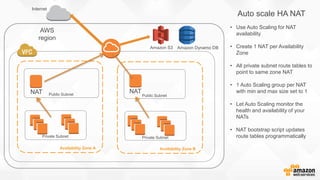
• Use Auto Scaling for NAT
availability
• Create 1 NAT per Availability
Zone
• All private subnet route tables to
point to same zone NAT
• 1 Auto Scaling group per NAT
with min and max size set to 1
• Let Auto Scaling monitor the
health and availability of your
NATs
• NAT bootstrap script updates
route tables programmatically
Auto scale HA NAT
NAT
Amazon Dynamo DB
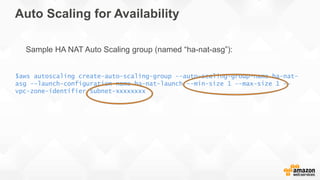
Auto Scaling for Availability
$aws autoscaling create-auto-scaling-group --auto-scaling-group-name ha-nat-
asg --launch-configuration-name ha-nat-launch --min-size 1 --max-size 1 --
vpc-zone-identifier subnet-xxxxxxxx
Sample HA NAT Auto Scaling group (named “ha-nat-asg”):
HA NAT User Data sample:
PRIVATE_SUBNETS="`aws ec2 describe-subnets --query 'Subnets[*].SubnetId’ --filters Name=availability-
zone,Values=$AVAILABILITY_ZONE Name=vpc-id,Values=$VPC_ID Name=state,Values=available
Name=tag:network,Values=private`”
if [ -z "$PRIVATE_SUBNETS" ]; then
die "No private subnets found to modify for HA NAT."
else log "Modifying Route Tables for following private subnets: $PRIVATE_SUBNETS"
fi
for subnet in $PRIVATE_SUBNETS; do
ROUTE_TABLE_ID=`aws ec2 describe-route-tables --query 'RouteTables[*].RouteTableId’ 
--filters Name=association.subnet-id,Values=$subnet`;
if [ "$ROUTE_TABLE_ID" = "$MAIN_RT" ]; then
log "$subnet is associated with the VPC Main Route Table. HA NAT script will NOT edit Main Route
Table.”
elif [ -z "$ROUTE_TABLE_ID" ]; then
log "$subnet is not associated with a Route Table. Skipping this subnet."
else
aws ec2 create-route --route-table-id $ROUTE_TABLE_ID --destination-cidr-block 0.0.0.0/0 
--instance-id $INSTANCE_ID &&
log "$ROUTE_TABLE_ID associated with $subnet modified to point default route to $INSTANCE_ID."
if [ $? -ne 0 ] ; then
aws ec2 replace-route --route-table-id $ROUTE_TABLE_ID --destination-cidr-block 0.0.0.0/0 
--instance-id $INSTANCE_ID
fi
fi
done
Tag Early, Tag Often!
• Tagging strategy should be part of early design
• Project code, cost center, environment, version, team, business unit
• Tag resources right after creation
• Tags supported for resource permissions
• AWS Billing also supports tags
• Tight IAM controls on the creation and editing of tags
IAM EC2 Role for HA NAT Instance
{
"Version": "2012-10-17",
"Statement": [
{
"Effect": "Allow",
"Action": [
"ec2:DescribeInstances",
"ec2:ModifyInstanceAttribute",
"ec2:DescribeSubnets",
"ec2:DescribeRouteTables",
"ec2:CreateRoute",
"ec2:ReplaceRoute"
],
"Resource": "*"
}
]
}
If Design Requirements Keep High Bandwidth
Streams Behind NAT:
• Use the 1 HA NAT per Availability Zone design
• Vertically scale your NAT instance type to one with a High Network
Performance rating
• Keep a close watch on your network metrics
m1.small
Low
m1.large
Moderate
m1.xlarge, c3.2xlarge
High
t1.micro
Very Low
Take Advantage of Enhanced Networking
• Only available in VPC
• Higher PPS, Lower Latency, Lower Jitter
• Supported by C3, C4, R3, D2, and I2 instance types
• Built into Amazon Linux, but supported in many flavors
(including Windows)
http://docs.aws.amazon.com/AWSEC2/latest/UserGuide/enhanced-networking.html
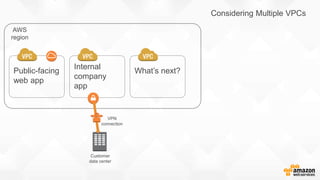
One VPC
Two VPC
AWS
region
Considering Multiple VPCs
Public-facing
web app
Internal
company
app
What’s next?
VPN
connection
Customer
data center
Common Customer Use Cases:
• Application isolation
• Scope of audit containment
• Risk level separation
• Separate production from non-production
• Multi-tenant isolation
• Business unit alignment
Controlling the Border
AWS
region
Internal Application to VPC
Public-facing
web app
Internal
company
app
VPN
connection
Customer
data center
Availability Zone A
Private Subnet Private Subnet
AWS
region
Virtual
Private
Gateway
VPN
connection
Customer
data center
Intranet
App
Intranet
App
Availability Zone B
Internal customers
Internal Application to VPC
Route Table
Destination Target
10.1.0.0/16 local
Corp CIDR VGW
But… the app will leverage this for storing data
Amazon
Dynamo DB
Availability Zone A
Private Subnet Private Subnet
AWS
region
Virtual
Private
Gateway
VPN
connection
Customer
data center
Intranet
App
Intranet
App
Availability Zone B
And you don’t really want to do this:
Internet
Customer border router
Customer VPN
Internet
Dynamo DB
Control IGW Access through a Proxy Layer
• Deploy a proxy control layer between application and IGW
• Restrict all outbound HTTP/S access to only approved URL
destinations like AWS Services
• No route to IGW for private subnets
• Control access to proxy through security groups
• Must configure proxy setting in OS of instances
Availability Zone A
Private Subnet Private Subnet
AWS region
VPN
connection
Customer
data center
Intranet
App
Intranet
App
Availability Zone B
Internal customers
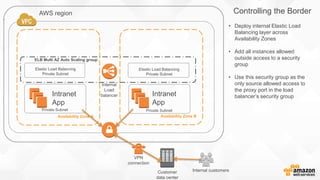
Controlling the Border
Internal
Load
balancer
Elastic Load Balancing
Private Subnet
Elastic Load Balancing
Private Subnet
ELB Multi AZ Auto Scaling group
• Deploy internal Elastic Load
Balancing layer across
Availability Zones
• Add all instances allowed
outside access to a security
group
• Use this security group as the
only source allowed access to
the proxy port in the load
balancer’s security group
Put Elastic Load Balancers in Their Own Subnets
• Elastic Load Balancing is Amazon EC2 in your subnets
• Elastic Load Balancing is using your private addresses
• Separate subnets = separate control
• Distinguish load balancing layer from app layers
Availability Zone A
Private Subnet(s) Private Subnet(s)
AWS region
VPN
connection
Customer
data center
Intranet
App
Intranet
App
Availability Zone B
Internal customers
Controlling the Border
Internal
Load
balancer
Elastic Load Balancing
Private Subnet
Elastic Load Balancing
Private Subnet
• Squid Proxy layer deployed
between internal load balancer
and the IGW border.
Proxy Public Subnet Proxy Public Subnet
Amazon
S3
HTTP/S
Multi AZ Auto Scaling group
• Only proxy subnets have route
to IGW.
• Proxy security group allows
inbound only from Elastic Load
Balancing security group.
• Proxy restricts which URLs may
pass. In this example,
s3.amazonaws.com is allowed.
• Egress NACLs on proxy
subnets enforce HTTP/S only.
Squid.conf Sample Config:
# CIDR AND Destination Domain based Allow
# CIDR Subnet blocks for Internal ELBs
acl int_elb_cidrs src 10.1.3.0/24 10.1.4.0/24
# Destination domain for target S3 bucket
acl s3_v2_endpoints dstdomain $bucket_name.s3.amazonaws.com
# Squid does AND on both ACLs for allow match
http_access allow int_elb_cidrs s3_v2_endpoints
# Deny everything else
http_access deny all
Using Squid Proxy Instances for Web Service Access
in Amazon VPC:
http://aws.amazon.com/articles/5995712515781075
AWS region
Public-facing
web app
Internal
company
app
What’s next?
VPN
connection
Customer data center
AWS region
Public-facing
web app
Internal
company
app #1
HA pair VPN
endpoints
Internal
company
app #2
Internal
company
app #3
Internal
company
app #4
Customer data center
Customer gateways (CGW):
• 1 per VPN tunnel
• 1 public IP per CGW
• AWS provides 2 tunnel
destinations per region
Public-facing
web app
Internal
company
app #2
HA pair VPN
endpointsCustomer data center
Internal
company
app #3
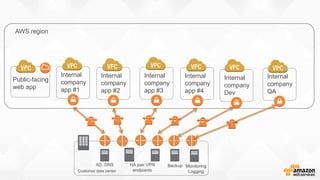
Internal
company
app #4
Internal
company
app #1
Internal
company
Dev
Internal
company
QA
AWS region
BackupAD, DNS Monitoring
Logging
AWS
region
Public-facing
web app
Internal
company
app #1
HA pair VPN
endpoints
Customer data center
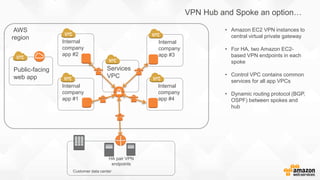
VPN Hub and Spoke an option…
Internal
company
app #2
Internal
company
app #3
Internal
company
app #4
Services
VPC
• Amazon EC2 VPN instances to
central virtual private gateway
• For HA, two Amazon EC2-
based VPN endpoints in each
spoke
• Control VPC contains common
services for all app VPCs
• Dynamic routing protocol (BGP,
OSPF) between spokes and
hub
VPC Peering
10.1.0.0/16
10.0.0.0/16
• VPCs within same Region
Peer
Request
Peer
Accept
• Same or Different Accounts
• IP Space Cannot Overlap
• Only 1 between any 2 VPCs
10.1.0.0/16
10.0.0.0/16 10.0.0.0/16
✔
10.1.0.0/16
10.0.0.0/16
Route Table
Destination Target
10.1.0.0/16 local
10.0.0.0/16 PCX-1
Route Table
Destination Target
10.0.0.0/16 local
10.1.0.0/16 PCX-1
PCX-1
• No IGW or VGW Required
A
B • No SPoF
• No Bandwidth Bottlenecks
10.0.0.0/16 10.0.0.0/16
PCX-1 PCX-2
Subnet 1
10.1.1.0/24
Subnet 2
10.1.2.0/24
10.1.0.0/16
Route Table Subnet 1
Destination Target
10.1.0.0/16 local
10.0.0.0/16 PCX-1
Route Table Subnet 2
Destination Target
10.1.0.0/16 local
10.0.0.0/16 PCX-2
A
B C
10.0.0.0/16 10.0.0.0/16
PCX-1 PCX-2
Subnet 1
10.1.1.0/24
Subnet 2
10.1.2.0/24
10.1.0.0/16
Route Table Subnet 1
Destination Target
10.1.0.0/16 local
10.0.1.11/32 PCX-1
Route Table Subnet 2
Destination Target
10.1.0.0/16 local
10.0.0.0/16 PCX-2
A
B CSubnet 3
Route Table Subnet 3
Destination Target
10.0.0.0/16 local
10.1.1.0/24 PCX-1
10.0.1.11
Route Table Subnet 1
Destination Target
10.1.0.0/16 local
10.0.0.0/16 PCX-1
10.1.0.0/16
10.0.0.0/16 10.0.0.0/16
10.3.0.0/16
172.16.0.0/16
192.168.0.0/16
10.2.0.0/16
172.17.0.0/16
CA
10.1.0.0/16
10.0.0.0/16 10.0.0.0/16
10.3.0.0/16
172.16.0.0/16
192.168.0.0/16
10.2.0.0/16
172.17.0.0/16
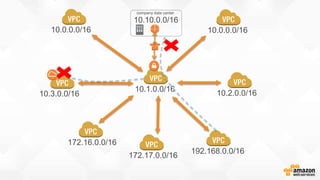
company data center
10.10.0.0/16
10.1.0.0/16
10.0.0.0/16 10.0.0.0/16
10.3.0.0/16
172.16.0.0/16
192.168.0.0/16
10.2.0.0/16
172.17.0.0/16
company data center
10.10.0.0/16
10.0.0.0/16
10.0.0.0/16
10.3.0.0/16
172.16.0.0/16
192.168.1.0/24
10.2.0.0/16
172.17.0.0/16
AWS
region
Public-facing
web app
Internal
company
app #1
HA pair VPN
endpoints
company data center
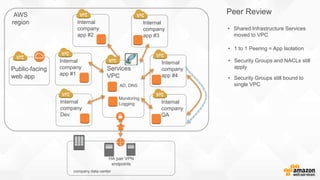
Peer Review
Internal
company
app #2
Internal
company
app #3
Internal
company
app #4
Services
VPC
• Shared Infrastructure Services
moved to VPC
Internal
company
Dev
Internal
company
QA
AD, DNS
Monitoring
Logging
• 1 to 1 Peering = App Isolation
• Security Groups and NACLs still
apply
• Security Groups still bound to
single VPC
Use IAM to Define & Enforce a VPC’s
Operational State
Use EC2 Run Resource Permissions to control:
• What AMI can be launched
• What VPC or subnet can be targeted
• What Security Groups must be in place
• Which VPCs allow Peering
http://docs.aws.amazon.com/AmazonVPC/latest/UserGuide/VPC_IAM.html
For more policy examples:
AWS
region
Public-facing
web app
HA pair VPN
endpoints
Customer data center
AWS
region
Prod QA Dev
Bringing It All Back Home
Customer
data center
AWS Direct Connect
location
AWS Direct Connect Private Virtual
Interface (PVI) connects to VGW on
VPC
• 1 PVI per VPC
• 802.1Q VLAN Tags isolate traffic
across AWS Direct Connect
Private fiber connection
One or multiple
50 – 500 Mbps,
1 Gbps or 10 Gbps pipes
Simplify with AWS Direct Connect
Public-facing
web app
AWS
region
Prod QA Dev
A few bits on AWS Direct Connect…
• Dedicated, private pipes into AWS
• Create private (VPC) or public interfaces to AWS
• Cheaper data-out rates than Internet (data-in still free)
• Consistent network performance compared to Internet
• At least 1 location to each AWS region (even GovCloud!)
• Recommend redundant connections
• Multiple AWS accounts can share a connection
VPC 1
Private Virtual Interface 1
VLAN Tag 101
BGP ASN 7224
BGP Announce 10.1.0.0/16
Interface IP 169.254.251.5/30 10.1.0.0/16
VGW 1
Multiple VPCs Over AWS Direct Connect
Customer
Switch + Router
Customer Interface 0/1.101
VLAN Tag 101
BGP ASN 65001
BGP Announce Customer Internal
Interface IP 169.254.251.6/30
VLAN 101
VLAN 102
VLAN 103
VPC 2
10.2.0.0/16
VGW 2
VPC 3
10.3.0.0/16
VGW 3
Private Virtual Interface 2
VLAN Tag 102
BGP ASN 7224
BGP Announce 10.2.0.0/16
Interface IP 169.254.251.9/30
Customer Interface 0/1.102
VLAN Tag 102
BGP ASN 65002
BGP Announce Customer Internal
Interface IP 169.254.251.10/30
Customer Interface 0/1.103
VLAN Tag 103
BGP ASN 65003
BGP Announce Customer Internal
Interface IP 169.254.251.14/30
Private Virtual Interface 3
VLAN Tag 103
BGP ASN 7224
BGP Announce 10.3.0.0/16
Interface IP 169.254.251.13/30
Route Table
Destination Target
10.1.0.0/16 PVI 1
10.2.0.0/16 PVI 2
10.3.0.0/16 PVI 3
Customer Internal
Network
See What Your VGW Sees
Before: Enable:
After:
Customer routers
Customer internal
network
AWS DX routers
AWS
region
AWS Direct Connect
location
Multiple physical connections:
• Active / Active links via BGP multi-pathing
• Active / Passive also an option
• BGP MEDs or local preference can influence
route
• Bidirectional Forwarding Detection (BFD)
protocol supported
Evolving VPC Design: Recap
• Elements of VPC Design
• Scalable and Available NAT
• One VPC, Two VPC
• Controlling the Border
• Directory and Name Services in the VPC
• VPC Peering
• Bringing It All Back Home
Criando o seu datacenter virtual  vpc e conectividade

Criando o seu datacenter virtual vpc e conectividade

  • 1.
    Criando o seuDatacenter Virtual: VPC e Conectividade Ari Dias Neto, AWS Solutions Architect
  • 2.
    Disclaimer: Do Try Thisat Home! All these designs are in use by customers
  • 3.
    Design… then spend alot of time building and deploying Build and deploy virtual datacenters as fast as you design them version
  • 4.
    Route Table ElasticNetwork Interface Amazon VPC Router Internet Gateway Customer Gateway Virtual Private Gateway VPN ConnectionSubnet Elements of VPC Design
  • 5.
    Availability Zone AAvailability Zone B
  • 6.
  • 7.
    Plan your VPCIP space before creating it • Consider future AWS region expansion • Consider future connectivity to your internal networks • Consider subnet design • VPC can be /16 down to /28 • CIDR cannot be modified after creation • Overlapping IP spaces = future headache
  • 8.
    Public Subnet Private Subnet PublicSubnet Availability Zone B Private Subnet VPC CIDR: 10.1.0.0 /16 Availability Zone A
  • 9.
    Public Subnet Private Subnet PublicSubnet Availability Zone B Private Subnet Instance A 10.1.1.11 /24 Instance C 10.1.3.33 /24 Instance B 10.1.2.22 /24 Instance D 10.1.4.44 /24 VPC CIDR: 10.1.0.0 /16 Availability Zone A
  • 10.
    Public Subnet Availability ZoneA Private Subnet Public Subnet Availability Zone B Private Subnet Instance A 10.1.1.11 /24 Instance C 10.1.3.33 /24 Instance B 10.1.2.22 /24 Instance D 10.1.4.44 /24 VPC CIDR: 10.1.0.0 /16 .1 .1 .1 .1
  • 11.
    Public Subnet Private Subnet PublicSubnet Availability Zone B Private Subnet Instance A 10.1.1.11 /24 Instance C 10.1.3.33 /24 Instance B 10.1.2.22 /24 Instance D 10.1.4.44 /24 VPC CIDR: 10.1.0.0 /16 Route Table Destination Target 10.1.0.0/16 local Availability Zone A
  • 12.
    Leave the MainRoute Table Alone
  • 13.
    Availability Zone B PublicSubnet Availability Zone A Private Subnet Public Subnet Private Subnet Instance A 10.1.1.11 /24 Instance C 10.1.3.33 /24 Instance B 10.1.2.22 /24 Instance D 10.1.4.44 /24 VPC CIDR: 10.1.0.0 /16 Route Table Destination Target 10.1.0.0/16 local 10.1.1.0/24 Instance B
  • 14.
    Network ACLs vs.Security Groups NACLs • Applied to subnets (1 per) • Stateless • Allow & deny (blacklist) • Rules processed in order Security groups • Applied to instance ENI (up to 5 per) • Stateful • Allow only (whitelist) • Rules evaluated as a whole • Can reference other security groups in the same VPC VPC Subnet Elastic network interface Security group Network ACL
  • 15.
    VPC Network ACLs:What Are They Good For? • Enforcing baseline security policy – Example: “No TFTP, NetBIOS or SMTP shall egress this subnet” • Catchall for holes in instance security groups • Segregation of security between network ops and dev ops VPC Subnet Instance
  • 16.
    VPC Network ACLs:Best Practices • Use sparingly, keep it simple • Avoid ephemeral port range allows • Create rule #’s with room to grow • Use IAM to control tightly who can alter or delete NACLs Pushing this will hurt! Default network ACL:
  • 17.
    Create an IAMVPC Admin Group Examples of “High Blast Radius” VPC API calls that should be restricted: AttachInternetGateway AssociateRouteTable CreateRoute DeleteCustomerGateway DeleteInternetGateway DeleteNetworkAcl DeleteNetworkAclEntry DeleteRoute DeleteRouteTable DeleteDhcpOptions ReplaceNetworkAclAssociation DisassociateRouteTable {Support Resource Permissions
  • 18.
    Example IAM Policyfor NACL Admin { "Version": "2012-10-17", "Statement": [ { "Effect": "Allow", "Action": [ "ec2:DeleteNetworkAcl", "ec2:DeleteNetworkAclEntry" ], "Resource": "arn:aws:ec2:us-west-2:123456789012:network-acl/*", "Condition": { "StringEquals": { "ec2:ResourceTag/Environment": "prod" }, "Null": { "aws:MultiFactorAuthAge": "false" } } } ] }
  • 19.
    Public Subnet Availability ZoneA Private Subnet Public Subnet Availability Zone B Private Subnet Instance A 10.1.1.11 /24 Instance C 10.1.3.33 /24 Instance B 10.1.2.22 /24 Instance D 10.1.4.44 /24 VPC CIDR: 10.1.0.0 /16 Creating ways “out” of a VPC
  • 20.
    Public Subnet Availability ZoneA Private Subnet Public Subnet Availability Zone B Private Subnet Instance A 10.1.1.11 /24 Instance C 10.1.3.33 /24 Instance B 10.1.2.22 /24 Instance D 10.1.4.44 /24 VPC CIDR: 10.1.0.0 /16 Virtual Private Gateway Internet Gateway Only 1 IGW and 1 VGW per VPC VPN connection Customer data center Customer data center AWS Direct Connect Route Table Destination Target 10.1.0.0/16 local Internal CIDR VGW
  • 21.
    Public Subnet Availability ZoneA Private Subnet Public Subnet Availability Zone B Private Subnet Instance A 10.1.1.11 /24 Instance C 10.1.3.33 /24 Instance B 10.1.2.22 /24 Instance D 10.1.4.44 /24 VPC CIDR: 10.1.0.0 /16 Route Table Route Table Destination Target 10.1.0.0/16 local 0.0.0.0/0 IGW
  • 22.
    Ways to AssignPublic IPs Elastic IP address (EIP) • Associated with AWS account and not a specific instance • 1 public IP to 1 private IP static NAT mapping • Instance does not “see” an EIP associated to it • Persists independently of the instance • Can be assigned while instance is stopped or running • Can be moved, reassigned to other ENIs
  • 23.
    Ways to AssignPublic IPs Automatic dynamic public IP assignment • Done on instance launch into VPC subnet • Public IP is dynamic and could change if instance is stopped and restarted • Does not count against AWS account EIP limits • Works only on instances with a single ENI
  • 24.
    Public Subnet Availability ZoneA Private Subnet Public Subnet Availability Zone B Private Subnet Instance A Public: 54.200.129.18 Private: 10.1.1.11 /24 Instance C 10.1.3.33 /24 Instance B 10.1.2.22 /24 Instance D 10.1.4.44 /24 Route Table Internet Amazon S3 Amazon Dynamo DB AWS region AWS outside the VPC
  • 25.
    Examples of AWSoutside the VPC • AWS API endpoints – Think about which APIs you might be calling from instances within the VPC – Good examples: Amazon EC2, AWS CloudFormation, Auto Scaling, Amazon SWF, Amazon SQS, Amazon SNS • Regional services – Amazon S3 (Not anymore) – Amazon Dynamo DB • Software and patch repositories – Amazon Linux repo allows access only from AWS public IP blocks
  • 26.
    Public Subnet Availability ZoneA Private Subnet Public Subnet Availability Zone B Private Subnet Instance A Public: 54.200.129.18 Private: 10.1.1.11 /24 Instance C 10.1.3.33 /24 Instance B 10.1.2.22 /24 Instance D 10.1.4.44 /24 Route Table Internet Amazon S3 AWS region And what if instance C in a private subnet needs to reach outside the VPC? It has no route to the IGW and no public IP. Amazon Dynamo DB
  • 27.
    Public Subnet Availability ZoneA Private Subnet Public Subnet Availability Zone B Private Subnet NAT A Public: 54.200.129.18 Private: 10.1.1.11 /24 Instance C 10.1.3.33 /24 Instance B 10.1.2.22 /24 Instance D 10.1.4.44 /24 Internet Amazon S3 AWS region Deploy an instance that functions as a N etwork A ddress T ranslat(or) Route Table Destination Target 10.1.0.0/16 local 0.0.0.0/0 NAT instanc e Amazon Dynamo DB
  • 28.
    What makes upthe Amazon Linux NAT AMI? • $echo 1 > /proc/sys/net/ipv4/ip_forward • $echo 0 > /proc/sys/net/ipv4/conf/eth0/send_redirects • $/sbin/iptables -t nat -A POSTROUTING -o eth0 –s 10.1.0.0/16 -j MASQUERADE • $/sbin/iptables-save • $aws ec2 modify-instance-attributes –instance-id i-xxxxxxxx –source-dest-check “{”Value”:false}” Not much to it: 1. IP forwarding enabled 2. IP NAT Masquerading enabled in iptables for VPC CIDR block 3. Source/destination check is turned off on primary interface
  • 29.
    Public Subnet Availability ZoneA Private Subnet Public Subnet Availability Zone B Private Subnet NAT A Public: 54.200.129.18 Private: 10.1.1.11 /24 Instance C 10.1.3.33 /24 Instance B 10.1.2.22 /24 Instance D 10.1.4.44 /24 Internet Amazon S3 AWS region Other private subnets can share the same routing table and use the NAT But… Amazon Dynamo DB
  • 30.
    Public Subnet Availability ZoneA Private Subnet Public Subnet Availability Zone B Private Subnet NAT A Public: 54.200.129.18 Private: 10.1.1.11 /24 Instance B 10.1.2.22 /24 Internet Amazon S3 AWS region … you could reach a bandwidth bottleneck if your private instances grow and their NAT- bound traffic grows with them. Amazon Dynamo DB
  • 31.
  • 32.
    Do bandwidth-intensive processesneed to be behind a NAT? • Separate out application components with bandwidth needs • Run components from public subnet instances • Goal is full instance bandwidth out of VPC • Auto Scaling with Public IP makes this easy • NAT still in place for remaining private instances
  • 33.
    Availability Zone AAvailability Zone B Private Subnet Internet Amazon Dynamo DB AWS region Public Subnet Public Subnet NAT Customers Public load balancer Web Servers • Processing app with high outbound Direct to Amazon S3 Public ELB Subnet Private Subnet Public ELB Subnet Multi-AZ Auto Scaling group Auto Scaling group • Public Elastic Load Balancer receives incoming customer HTTP/S requests • Auto Scaling assigns public IP to new web servers • With public IPs, web servers initiate outbound requests • NAT device still in place for private subnets
  • 34.
    Auto Scaling Supportfor Automatic Public IP Assignment $aws autoscaling create-launch-configuration --launch- configuration-name hi-bandwidth-public --image-id ami-xxxxxxxx -- instance-type m1.xlarge --associate-public-ip-address Sample launch configuration (named “hi-bandwidth-public”):
  • 35.
    Availability Zone A PrivateSubnet Availability Zone B Private Subnet Internet Amazon S3 AWS region Public Subnet Public Subnet NAT • Use Auto Scaling for NAT availability • Create 1 NAT per Availability Zone • All private subnet route tables to point to same zone NAT • 1 Auto Scaling group per NAT with min and max size set to 1 • Let Auto Scaling monitor the health and availability of your NATs • NAT bootstrap script updates route tables programmatically Auto scale HA NAT NAT Amazon Dynamo DB
  • 36.
    Auto Scaling forAvailability $aws autoscaling create-auto-scaling-group --auto-scaling-group-name ha-nat- asg --launch-configuration-name ha-nat-launch --min-size 1 --max-size 1 -- vpc-zone-identifier subnet-xxxxxxxx Sample HA NAT Auto Scaling group (named “ha-nat-asg”):
  • 37.
    HA NAT UserData sample: PRIVATE_SUBNETS="`aws ec2 describe-subnets --query 'Subnets[*].SubnetId’ --filters Name=availability- zone,Values=$AVAILABILITY_ZONE Name=vpc-id,Values=$VPC_ID Name=state,Values=available Name=tag:network,Values=private`” if [ -z "$PRIVATE_SUBNETS" ]; then die "No private subnets found to modify for HA NAT." else log "Modifying Route Tables for following private subnets: $PRIVATE_SUBNETS" fi for subnet in $PRIVATE_SUBNETS; do ROUTE_TABLE_ID=`aws ec2 describe-route-tables --query 'RouteTables[*].RouteTableId’ --filters Name=association.subnet-id,Values=$subnet`; if [ "$ROUTE_TABLE_ID" = "$MAIN_RT" ]; then log "$subnet is associated with the VPC Main Route Table. HA NAT script will NOT edit Main Route Table.” elif [ -z "$ROUTE_TABLE_ID" ]; then log "$subnet is not associated with a Route Table. Skipping this subnet." else aws ec2 create-route --route-table-id $ROUTE_TABLE_ID --destination-cidr-block 0.0.0.0/0 --instance-id $INSTANCE_ID && log "$ROUTE_TABLE_ID associated with $subnet modified to point default route to $INSTANCE_ID." if [ $? -ne 0 ] ; then aws ec2 replace-route --route-table-id $ROUTE_TABLE_ID --destination-cidr-block 0.0.0.0/0 --instance-id $INSTANCE_ID fi fi done
  • 38.
    Tag Early, TagOften! • Tagging strategy should be part of early design • Project code, cost center, environment, version, team, business unit • Tag resources right after creation • Tags supported for resource permissions • AWS Billing also supports tags • Tight IAM controls on the creation and editing of tags
  • 39.
    IAM EC2 Rolefor HA NAT Instance { "Version": "2012-10-17", "Statement": [ { "Effect": "Allow", "Action": [ "ec2:DescribeInstances", "ec2:ModifyInstanceAttribute", "ec2:DescribeSubnets", "ec2:DescribeRouteTables", "ec2:CreateRoute", "ec2:ReplaceRoute" ], "Resource": "*" } ] }
  • 40.
    If Design RequirementsKeep High Bandwidth Streams Behind NAT: • Use the 1 HA NAT per Availability Zone design • Vertically scale your NAT instance type to one with a High Network Performance rating • Keep a close watch on your network metrics m1.small Low m1.large Moderate m1.xlarge, c3.2xlarge High t1.micro Very Low
  • 41.
    Take Advantage ofEnhanced Networking • Only available in VPC • Higher PPS, Lower Latency, Lower Jitter • Supported by C3, C4, R3, D2, and I2 instance types • Built into Amazon Linux, but supported in many flavors (including Windows) http://docs.aws.amazon.com/AWSEC2/latest/UserGuide/enhanced-networking.html
  • 42.
  • 43.
    AWS region Considering Multiple VPCs Public-facing webapp Internal company app What’s next? VPN connection Customer data center
  • 44.
    Common Customer UseCases: • Application isolation • Scope of audit containment • Risk level separation • Separate production from non-production • Multi-tenant isolation • Business unit alignment
  • 45.
  • 46.
    AWS region Internal Application toVPC Public-facing web app Internal company app VPN connection Customer data center
  • 47.
    Availability Zone A PrivateSubnet Private Subnet AWS region Virtual Private Gateway VPN connection Customer data center Intranet App Intranet App Availability Zone B Internal customers Internal Application to VPC Route Table Destination Target 10.1.0.0/16 local Corp CIDR VGW
  • 48.
    But… the appwill leverage this for storing data Amazon Dynamo DB
  • 49.
    Availability Zone A PrivateSubnet Private Subnet AWS region Virtual Private Gateway VPN connection Customer data center Intranet App Intranet App Availability Zone B And you don’t really want to do this: Internet Customer border router Customer VPN Internet Dynamo DB
  • 50.
    Control IGW Accessthrough a Proxy Layer • Deploy a proxy control layer between application and IGW • Restrict all outbound HTTP/S access to only approved URL destinations like AWS Services • No route to IGW for private subnets • Control access to proxy through security groups • Must configure proxy setting in OS of instances
  • 51.
    Availability Zone A PrivateSubnet Private Subnet AWS region VPN connection Customer data center Intranet App Intranet App Availability Zone B Internal customers Controlling the Border Internal Load balancer Elastic Load Balancing Private Subnet Elastic Load Balancing Private Subnet ELB Multi AZ Auto Scaling group • Deploy internal Elastic Load Balancing layer across Availability Zones • Add all instances allowed outside access to a security group • Use this security group as the only source allowed access to the proxy port in the load balancer’s security group
  • 52.
    Put Elastic LoadBalancers in Their Own Subnets • Elastic Load Balancing is Amazon EC2 in your subnets • Elastic Load Balancing is using your private addresses • Separate subnets = separate control • Distinguish load balancing layer from app layers
  • 53.
    Availability Zone A PrivateSubnet(s) Private Subnet(s) AWS region VPN connection Customer data center Intranet App Intranet App Availability Zone B Internal customers Controlling the Border Internal Load balancer Elastic Load Balancing Private Subnet Elastic Load Balancing Private Subnet • Squid Proxy layer deployed between internal load balancer and the IGW border. Proxy Public Subnet Proxy Public Subnet Amazon S3 HTTP/S Multi AZ Auto Scaling group • Only proxy subnets have route to IGW. • Proxy security group allows inbound only from Elastic Load Balancing security group. • Proxy restricts which URLs may pass. In this example, s3.amazonaws.com is allowed. • Egress NACLs on proxy subnets enforce HTTP/S only.
  • 54.
    Squid.conf Sample Config: #CIDR AND Destination Domain based Allow # CIDR Subnet blocks for Internal ELBs acl int_elb_cidrs src 10.1.3.0/24 10.1.4.0/24 # Destination domain for target S3 bucket acl s3_v2_endpoints dstdomain $bucket_name.s3.amazonaws.com # Squid does AND on both ACLs for allow match http_access allow int_elb_cidrs s3_v2_endpoints # Deny everything else http_access deny all
  • 55.
    Using Squid ProxyInstances for Web Service Access in Amazon VPC: http://aws.amazon.com/articles/5995712515781075
  • 56.
    AWS region Public-facing web app Internal company app What’snext? VPN connection Customer data center
  • 57.
    AWS region Public-facing web app Internal company app#1 HA pair VPN endpoints Internal company app #2 Internal company app #3 Internal company app #4 Customer data center Customer gateways (CGW): • 1 per VPN tunnel • 1 public IP per CGW • AWS provides 2 tunnel destinations per region
  • 58.
    Public-facing web app Internal company app #2 HApair VPN endpointsCustomer data center Internal company app #3 Internal company app #4 Internal company app #1 Internal company Dev Internal company QA AWS region BackupAD, DNS Monitoring Logging
  • 59.
    AWS region Public-facing web app Internal company app #1 HApair VPN endpoints Customer data center VPN Hub and Spoke an option… Internal company app #2 Internal company app #3 Internal company app #4 Services VPC • Amazon EC2 VPN instances to central virtual private gateway • For HA, two Amazon EC2- based VPN endpoints in each spoke • Control VPC contains common services for all app VPCs • Dynamic routing protocol (BGP, OSPF) between spokes and hub
  • 60.
  • 61.
    10.1.0.0/16 10.0.0.0/16 • VPCs withinsame Region Peer Request Peer Accept • Same or Different Accounts • IP Space Cannot Overlap • Only 1 between any 2 VPCs
  • 62.
  • 63.
    10.1.0.0/16 10.0.0.0/16 Route Table Destination Target 10.1.0.0/16local 10.0.0.0/16 PCX-1 Route Table Destination Target 10.0.0.0/16 local 10.1.0.0/16 PCX-1 PCX-1 • No IGW or VGW Required A B • No SPoF • No Bandwidth Bottlenecks
  • 64.
    10.0.0.0/16 10.0.0.0/16 PCX-1 PCX-2 Subnet1 10.1.1.0/24 Subnet 2 10.1.2.0/24 10.1.0.0/16 Route Table Subnet 1 Destination Target 10.1.0.0/16 local 10.0.0.0/16 PCX-1 Route Table Subnet 2 Destination Target 10.1.0.0/16 local 10.0.0.0/16 PCX-2 A B C
  • 65.
    10.0.0.0/16 10.0.0.0/16 PCX-1 PCX-2 Subnet1 10.1.1.0/24 Subnet 2 10.1.2.0/24 10.1.0.0/16 Route Table Subnet 1 Destination Target 10.1.0.0/16 local 10.0.1.11/32 PCX-1 Route Table Subnet 2 Destination Target 10.1.0.0/16 local 10.0.0.0/16 PCX-2 A B CSubnet 3 Route Table Subnet 3 Destination Target 10.0.0.0/16 local 10.1.1.0/24 PCX-1 10.0.1.11 Route Table Subnet 1 Destination Target 10.1.0.0/16 local 10.0.0.0/16 PCX-1
  • 66.
  • 67.
  • 68.
  • 69.
  • 70.
    AWS region Public-facing web app Internal company app #1 HApair VPN endpoints company data center Peer Review Internal company app #2 Internal company app #3 Internal company app #4 Services VPC • Shared Infrastructure Services moved to VPC Internal company Dev Internal company QA AD, DNS Monitoring Logging • 1 to 1 Peering = App Isolation • Security Groups and NACLs still apply • Security Groups still bound to single VPC
  • 71.
    Use IAM toDefine & Enforce a VPC’s Operational State Use EC2 Run Resource Permissions to control: • What AMI can be launched • What VPC or subnet can be targeted • What Security Groups must be in place • Which VPCs allow Peering http://docs.aws.amazon.com/AmazonVPC/latest/UserGuide/VPC_IAM.html For more policy examples:
  • 72.
    AWS region Public-facing web app HA pairVPN endpoints Customer data center AWS region Prod QA Dev
  • 73.
    Bringing It AllBack Home
  • 74.
    Customer data center AWS DirectConnect location AWS Direct Connect Private Virtual Interface (PVI) connects to VGW on VPC • 1 PVI per VPC • 802.1Q VLAN Tags isolate traffic across AWS Direct Connect Private fiber connection One or multiple 50 – 500 Mbps, 1 Gbps or 10 Gbps pipes Simplify with AWS Direct Connect Public-facing web app AWS region Prod QA Dev
  • 75.
    A few bitson AWS Direct Connect… • Dedicated, private pipes into AWS • Create private (VPC) or public interfaces to AWS • Cheaper data-out rates than Internet (data-in still free) • Consistent network performance compared to Internet • At least 1 location to each AWS region (even GovCloud!) • Recommend redundant connections • Multiple AWS accounts can share a connection
  • 76.
    VPC 1 Private VirtualInterface 1 VLAN Tag 101 BGP ASN 7224 BGP Announce 10.1.0.0/16 Interface IP 169.254.251.5/30 10.1.0.0/16 VGW 1 Multiple VPCs Over AWS Direct Connect Customer Switch + Router Customer Interface 0/1.101 VLAN Tag 101 BGP ASN 65001 BGP Announce Customer Internal Interface IP 169.254.251.6/30 VLAN 101 VLAN 102 VLAN 103 VPC 2 10.2.0.0/16 VGW 2 VPC 3 10.3.0.0/16 VGW 3 Private Virtual Interface 2 VLAN Tag 102 BGP ASN 7224 BGP Announce 10.2.0.0/16 Interface IP 169.254.251.9/30 Customer Interface 0/1.102 VLAN Tag 102 BGP ASN 65002 BGP Announce Customer Internal Interface IP 169.254.251.10/30 Customer Interface 0/1.103 VLAN Tag 103 BGP ASN 65003 BGP Announce Customer Internal Interface IP 169.254.251.14/30 Private Virtual Interface 3 VLAN Tag 103 BGP ASN 7224 BGP Announce 10.3.0.0/16 Interface IP 169.254.251.13/30 Route Table Destination Target 10.1.0.0/16 PVI 1 10.2.0.0/16 PVI 2 10.3.0.0/16 PVI 3 Customer Internal Network
  • 77.
    See What YourVGW Sees Before: Enable: After:
  • 78.
    Customer routers Customer internal network AWSDX routers AWS region AWS Direct Connect location Multiple physical connections: • Active / Active links via BGP multi-pathing • Active / Passive also an option • BGP MEDs or local preference can influence route • Bidirectional Forwarding Detection (BFD) protocol supported
  • 79.
    Evolving VPC Design:Recap • Elements of VPC Design • Scalable and Available NAT • One VPC, Two VPC • Controlling the Border • Directory and Name Services in the VPC • VPC Peering • Bringing It All Back Home