High-Velocity Big Data Analytics
April2015
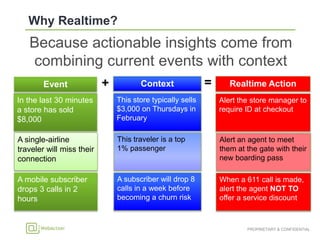
Because actionable insights come from
combining current events with context
In the last 30 minutes
a store has sold
$8,000
This store typically sells
$3,000 on Thursdays in
February
Alert the store manager to
require ID at checkout
A single-airline
traveler will miss their
connection
This traveler is a top
1% passenger
Alert an agent to meet
them at the gate with their
new boarding pass
A mobile subscriber
drops 3 calls in 2
hours
A subscriber will drop 8
calls in a week before
becoming a churn risk
When a 611 call is made,
alert the agent NOT TO
offer a service discount
Context Realtime Action+ =Event
• Reduce the latency to Capture, Analyze, and
ultimately take Action
Business event
Decision
latency
BusinessValue
Time to Action
Action taken
Data analyzed
Data captured
Based on concept developed by Richard Hackathorn, Bolder Technology
Client
Server OLTP
Data Warehouse
Application
Server
Transaction Data
Data Warehouse
Device Data
Industry Data
Social Feeds
Transaction Data
System/ IT Data
Hadoop
ETL
ETL (existing)
Data
Warehouse
Realtime
Applications
Legacy
Applications
Hive
MapReduce
Applications
Users
Hadoop
Device Data
Industry Data
Social Feeds
Transaction Data
System / IT Data
Pig
BatchStreaming
WebAction
Structured and
unstructured data
Distributed,
in-memory, as data
is created
Correlated, enriched,
and filtered real-time
big data records
Deliver
Process
Assimilate
 Data from transactional sources is acquired
via redo or transaction logs
 Structured and non-Structured data
 No Production Impact
 No Application changes
Device Data
Industry Data
Social Feeds
Real-Time
Transaction Data
System/ IT Data
Common File
Format
TYPE EXAMPLE COMPLEXITY
CSV, JSON, XML
Facebook, Twitter
Syslogs, weblogs, event logs
SmartMeter, Medical Device, RFID, Netflow,
iBeacon, CDR
SWIFT, HL7, FIX, ASN
Oracle, DB2, SQLServer, MySQL, HP NonStop
SIMPLE
VERY HIGH
SIMPLE TO MEDIUM
MEDIUM
MEDIUM
HIGH
Structured and
unstructured data
Assimilate
Distributed,
in-memory, as data
is created
Process
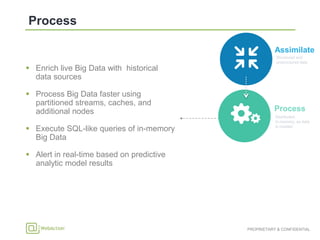
 Enrich live Big Data with historical
data sources
 Process Big Data faster using
partitioned streams, caches, and
additional nodes
 Execute SQL-like queries of in-memory
Big Data
 Alert in real-time based on predictive
analytic model results
Structured and
unstructured data
Assimilate
Structured and
unstructured data
Distributed,
in-memory, as data
is created
Correlated, enriched,
and filtered real-time
big data records
Deliver
Process
Assimilate
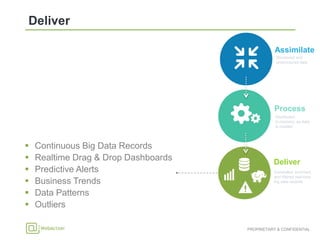
 Continuous Big Data Records
 Realtime Drag & Drop Dashboards
 Predictive Alerts
 Business Trends
 Data Patterns
 Outliers
Device Data
Big Data
Infrastructure
Industry Data
Social Feeds
Transaction Data
Enterprise Apps
& Workflows
Enterprise Data
Warehouse
RDBMS
Stream Analytics Applications
System/ IT Data
HighSpeedDataAcquisition
Command Line Visual Designer
CREATE APPLICATION MultiLogApp;
CREATE FLOW MonitorLogs;
CREATE SOURCE AccessLogSource
USING…
CREATE TYPE AccessLogEntry …
CREATE STREAM AccessStream OF…
CREATE CQ ParseAccessLog …
W >
Results
Persistence
Context
Cache
Distributed
Results
Cache
Distributed Query
Processor
External
Targets &
Alerts
Event
Windows
Node: n
2
1
Drag & Drop
Stream
Dashboards
Component Definition
Source Access external data and provides realtime continuous events into streams
Stream Carries data between components and nodes
Window Provides moving snapshot/collection of events for aggregates and models
Cache External contextual data made available using distributed in-memory grid
CQ
(Continuous Query)
A Continuous Query emits big data records after processing realtime
streaming events (can process data from streams, windows, caches, event
tables, and stores)
WAction Store
(big data records)
Resulting big data records from processing (aggregates, correlates, anomalies,
predictions) - can be in-memory only or persisted to Elasticsearch / database
Target Outputs realtime big data records to external systems
Application A combination of the above components performing business logic
Dashboard A drag and drop realtime view into stores, caches, and streams
• Create Applications
• Add & Navigate through Flows
• Design Data Model
• Drag & Drop Components
• Configure Components
• Deploy Applications
• Start / Stop Applications
• View Alerts
• View Event Flow Rate
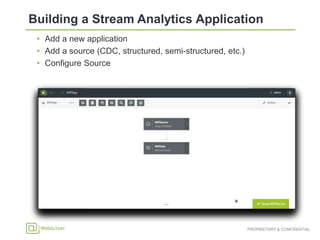
• Add a new application
• Add a source (CDC, structured, semi-structured, etc.)
• Configure Source
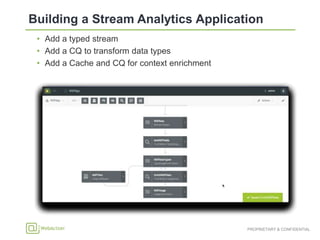
• Add a typed stream
• Add a CQ to transform data types
• Add a Cache and CQ for context enrichment
• Design dashboard
• Create multiple pages / drilldowns
• Define data through queries
• Drag and drop visualizations: Values / Icons / Gauges – Maps – Line Charts –
Scatter / Bubble Plots – Pie / Donut Charts – Bar Charts – Tables – Heat
Maps
• Add a new Dashboard
• Add a Visualization
• Configure Query and Visualization
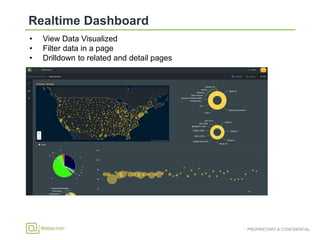
• View Data Visualized
• Filter data in a page
• Drilldown to related and detail pages
• Very high speed data distribution at millions of events/s
• Realtime log / database CDC reading in addition to push sources like
TCP/JMS
• Highly optimized data serialization
• Distribution based on consistent hashing mechanism for streams and
caches
• Bytecode generation for data types and query processing
• Democratic clustering and service management paradigm
• Scaling across multiple nodes with flexible deployment
• Auto failover of application components from one node to another
• Nodes can be added and removed while applications are running
• Recovery ensures no events are missed or processed twice
• Recovery takes window contents into account
• Role based security at the application through component level
• Integrated realtime dashboard visualizations using server push

WebAction-Sami Abkay

  • 1.
    High-Velocity Big DataAnalytics April2015
  • 2.
    Because actionable insightscome from combining current events with context In the last 30 minutes a store has sold $8,000 This store typically sells $3,000 on Thursdays in February Alert the store manager to require ID at checkout A single-airline traveler will miss their connection This traveler is a top 1% passenger Alert an agent to meet them at the gate with their new boarding pass A mobile subscriber drops 3 calls in 2 hours A subscriber will drop 8 calls in a week before becoming a churn risk When a 611 call is made, alert the agent NOT TO offer a service discount Context Realtime Action+ =Event
  • 3.
    • Reduce thelatency to Capture, Analyze, and ultimately take Action Business event Decision latency BusinessValue Time to Action Action taken Data analyzed Data captured Based on concept developed by Richard Hackathorn, Bolder Technology
  • 4.
  • 5.
    Data Warehouse Device Data IndustryData Social Feeds Transaction Data System/ IT Data Hadoop ETL
  • 6.
  • 7.
    Structured and unstructured data Distributed, in-memory,as data is created Correlated, enriched, and filtered real-time big data records Deliver Process Assimilate
  • 8.
     Data fromtransactional sources is acquired via redo or transaction logs  Structured and non-Structured data  No Production Impact  No Application changes Device Data Industry Data Social Feeds Real-Time Transaction Data System/ IT Data Common File Format TYPE EXAMPLE COMPLEXITY CSV, JSON, XML Facebook, Twitter Syslogs, weblogs, event logs SmartMeter, Medical Device, RFID, Netflow, iBeacon, CDR SWIFT, HL7, FIX, ASN Oracle, DB2, SQLServer, MySQL, HP NonStop SIMPLE VERY HIGH SIMPLE TO MEDIUM MEDIUM MEDIUM HIGH Structured and unstructured data Assimilate
  • 9.
    Distributed, in-memory, as data iscreated Process  Enrich live Big Data with historical data sources  Process Big Data faster using partitioned streams, caches, and additional nodes  Execute SQL-like queries of in-memory Big Data  Alert in real-time based on predictive analytic model results Structured and unstructured data Assimilate
  • 10.
    Structured and unstructured data Distributed, in-memory,as data is created Correlated, enriched, and filtered real-time big data records Deliver Process Assimilate  Continuous Big Data Records  Realtime Drag & Drop Dashboards  Predictive Alerts  Business Trends  Data Patterns  Outliers
  • 11.
    Device Data Big Data Infrastructure IndustryData Social Feeds Transaction Data Enterprise Apps & Workflows Enterprise Data Warehouse RDBMS Stream Analytics Applications System/ IT Data HighSpeedDataAcquisition Command Line Visual Designer CREATE APPLICATION MultiLogApp; CREATE FLOW MonitorLogs; CREATE SOURCE AccessLogSource USING… CREATE TYPE AccessLogEntry … CREATE STREAM AccessStream OF… CREATE CQ ParseAccessLog … W > Results Persistence Context Cache Distributed Results Cache Distributed Query Processor External Targets & Alerts Event Windows Node: n 2 1 Drag & Drop Stream Dashboards
  • 12.
    Component Definition Source Accessexternal data and provides realtime continuous events into streams Stream Carries data between components and nodes Window Provides moving snapshot/collection of events for aggregates and models Cache External contextual data made available using distributed in-memory grid CQ (Continuous Query) A Continuous Query emits big data records after processing realtime streaming events (can process data from streams, windows, caches, event tables, and stores) WAction Store (big data records) Resulting big data records from processing (aggregates, correlates, anomalies, predictions) - can be in-memory only or persisted to Elasticsearch / database Target Outputs realtime big data records to external systems Application A combination of the above components performing business logic Dashboard A drag and drop realtime view into stores, caches, and streams
  • 14.
    • Create Applications •Add & Navigate through Flows • Design Data Model • Drag & Drop Components • Configure Components • Deploy Applications • Start / Stop Applications • View Alerts • View Event Flow Rate
  • 15.
    • Add anew application • Add a source (CDC, structured, semi-structured, etc.) • Configure Source
  • 16.
    • Add atyped stream • Add a CQ to transform data types • Add a Cache and CQ for context enrichment
  • 18.
    • Design dashboard •Create multiple pages / drilldowns • Define data through queries • Drag and drop visualizations: Values / Icons / Gauges – Maps – Line Charts – Scatter / Bubble Plots – Pie / Donut Charts – Bar Charts – Tables – Heat Maps
  • 19.
    • Add anew Dashboard • Add a Visualization • Configure Query and Visualization
  • 20.
    • View DataVisualized • Filter data in a page • Drilldown to related and detail pages
  • 21.
    • Very highspeed data distribution at millions of events/s • Realtime log / database CDC reading in addition to push sources like TCP/JMS • Highly optimized data serialization • Distribution based on consistent hashing mechanism for streams and caches • Bytecode generation for data types and query processing • Democratic clustering and service management paradigm • Scaling across multiple nodes with flexible deployment • Auto failover of application components from one node to another • Nodes can be added and removed while applications are running • Recovery ensures no events are missed or processed twice • Recovery takes window contents into account • Role based security at the application through component level • Integrated realtime dashboard visualizations using server push