INTEGRATION DAY
2015
Sam Vanhoutte
Azure Event Hubs, Stream Analytics
& Power BI
Nice to meet you
SamVANHOUTTE
CTO
7 year - BizTalkV-TSP
1st year - Integration MVP
sam.vanhoutte@codit.eu
+32 474 849 993
@SamVanhoutte
be.linkedin.com/in/samvanhoutte/
> 60 Active integration customers
International Focus -
HQ in BEFocused on integration solutions
2000 Belgium
2004 France
2013 Portugal
60 employees
> 50 consultants BizTalk certifiede-news + SoMe
2012 & 2013
Partner of the Year
Award Finalist
Application Integration
The Internet of Things
3
The Internet of EverythingM2M communicationSpecial purpose devicesSmart things
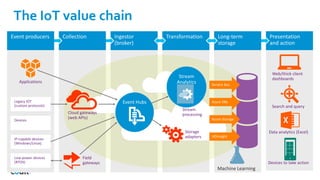
The IoT value chain
Machine Learning
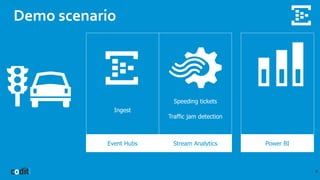
Demo scenario
6
Event Hubs Stream Analytics Power BI
Ingest
Speeding tickets
Traffic jam detection
Power BI tools
7
• Power BI designer
(when no office license)
• PowerQuery >> Get data
• PowerPivot >> Prepare data
• PowerView >> Present data
Event Hubs
an Azure Service Bus service
(collection & ingestion)
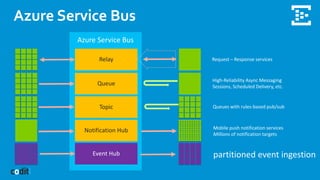
Azure Service Bus
Relay
Queue
Topic
Notification Hub
Event Hub
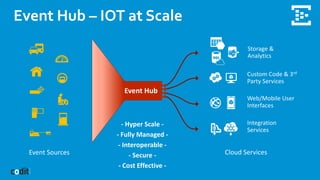
Event Hub – IOT at Scale
Event Sources Cloud Services
Storage &
Analytics
Custom Code & 3rd
Party Services
Web/Mobile User
Interfaces
Integration
Services
Event Hub
- Hyper Scale -
- Fully Managed -
- Interoperable -
- Secure -
- Cost Effective -
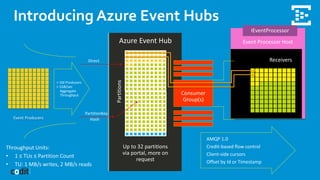
Introducing Azure Event Hubs
Event Producers
Event Hubs
an Azure Service Bus service
Producers
(sending data to Event Hubs)
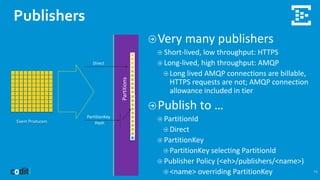
Publishers
15
Event Producers
Very many publishers
Short-lived, low throughput: HTTPS
Long-lived, high throughput: AMQP
Long lived AMQP connections are billable,
HTTPS requests are not; AMQP connection
allowance included in tier
Publish to …
PartitionId
Direct
PartitionKey
PartitionKey selecting PartitionId
Publisher Policy (<eh>/publishers/<name>)
<name> overriding PartitionKey
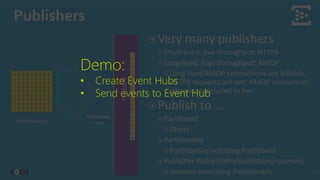
Publishers
16
Event Producers
Very many publishers
Short-lived, low throughput: HTTPS
Long-lived, high throughput: AMQP
Long lived AMQP connections are billable,
HTTPS requests are not; AMQP connection
allowance included in tier
Publish to …
PartitionId
Direct
PartitionKey
PartitionKey selecting PartitionId
Publisher Policy (<eh>/publishers/<name>)
<name> overriding PartitionKey
Demo:
• Create Event Hubs
• Send events to Event Hub
Securing publishers
17
➔ SAS Policies are defined in the portal
➔ Not linked to publishers and limited in numbers
➔ Create Signatures per device
➔ Have a timespan
➔ Are unique to a publisher
➔ Revoking or blacklisting publishers
➔ Manage Rights needed for this
Securing publishers
18
➔ SAS Policies are defined in the portal
➔ Not linked to publishers and limited in numbers
➔ Create Signatures per device
➔ Have a timespan
➔ Are unique to a publisher
➔ Revoking or blacklisting publishers
➔ Manage Rights needed for this
Demo:
• Generating SAS Signatures
• Using Signatures by publishers
• Revoking publishers
Reminder ! Sam, increase your instances
Event Hubs
an Azure Service Bus service
Consumers
(reading data to Event Hubs)
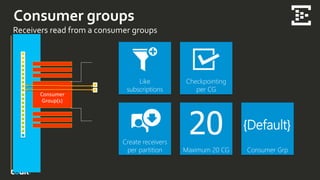
Like
subscriptions
Consumer groups
Receivers read from a consumer groups
Checkpointing
per CG
Create receivers
per partition Maximum 20 CG Consumer Grp
{Default}
Like
subscriptions
Consumers
Partitioned consumer model (not competing consumers!)
Each at their
own pace
ID, Time, [Data]
ID, Time, [Data]
ID, Time, [Data]
ID, Time, [Data]
ID, Time, [Data]
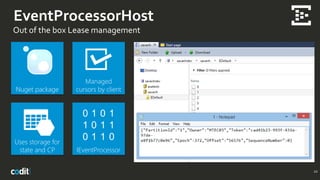
EventProcessorHost
Out of the box Lease management
22
Nuget package
Managed
cursors by client
Uses storage for
state and CP IEventProcessor
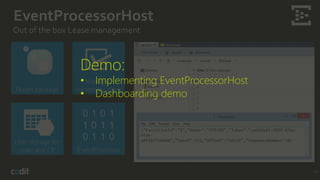
EventProcessorHost
Out of the box Lease management
23
Nuget package
Managed
cursors by client
Uses storage for
state and CP IEventProcessor
Demo:
• Implementing EventProcessorHost
• Dashboarding demo
Securing consumers
24
➔ Using SAS key / values or ACS with SBAZTool
➔ Full SAS support for consumer groups will come
Event Hubs
an Azure Service Bus service
Pricing &
Tips + tricks
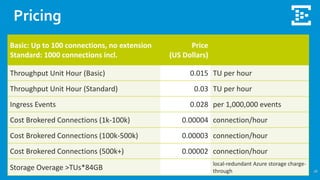
Pricing
26
Basic: Up to 100 connections, no extension
Standard: 1000 connections incl.
Price
(US Dollars)
Throughput Unit Hour (Basic) 0.015 TU per hour
Throughput Unit Hour (Standard) 0.03 TU per hour
Ingress Events 0.028 per 1,000,000 events
Cost Brokered Connections (1k-100k) 0.00004 connection/hour
Cost Brokered Connections (100k-500k) 0.00003 connection/hour
Cost Brokered Connections (500k+) 0.00002 connection/hour
Storage Overage >TUs*84GB
local-redundant Azure storage charge-
through
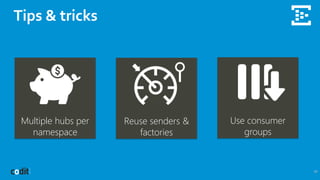
Tips & tricks
27
Multiple hubs per
namespace
Reuse senders &
factories
Use consumer
groups
Azure Stream Analytics
complex event processing
.
Introduction
(set up a basic ASA job)
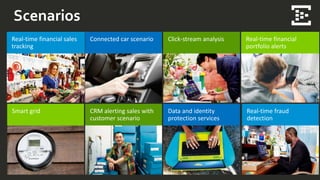
Scenarios
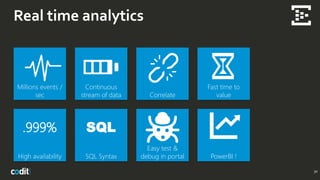
Real time analytics
30
Millions events /
sec
Continuous
stream of data Correlate
Fast time to
value
High availability SQL Syntax
Easy test &
debug in portal PowerBI !
.999% SQL
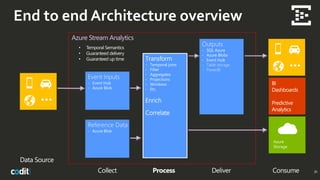
End to end Architecture overview
31
Data Source
Collect Process ConsumeDeliver
Event Inputs
- Event Hub
- Azure Blob
Transform
- Temporal joins
- Filter
- Aggregates
- Projections
- Windows
- Etc.
Enrich
Correlate
Outputs
- SQL Azure
- Azure Blobs
- Event Hub
- Table storage
- PowerBI
Azure
Storage
• Temporal Semantics
• Guaranteed delivery
• Guaranteed up time
Azure Stream Analytics
Reference Data
- Azure Blob
End to end Architecture overview
32
Data Source
Collect Process ConsumeDeliver
Event Inputs
- Event Hub
- Azure Blob
Transform
- Temporal joins
- Filter
- Aggregates
- Projections
- Windows
- Etc.
Enrich
Correlate
Outputs
- SQL Azure
- Azure Blobs
- Event Hub
Azure
Storage
• Temporal Semantics
• Guaranteed delivery
• Guaranteed up time
Azure Stream Analytics
Reference Data
- Azure Blob
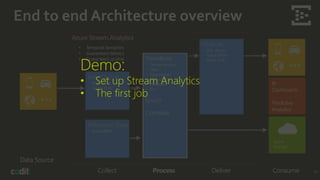
Demo:
• Set up Stream Analytics
• The first job
Azure Stream Analytics
complex event processing
.
Query Syntax
(SQL like a pro)
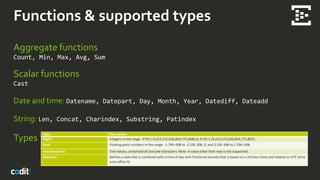
Functions & supported types
Aggregate functions
Count, Min, Max, Avg, Sum
Scalar functions
Cast
Date and time: Datename, Datepart, Day, Month, Year, Datediff, Dateadd
String: Len, Concat, Charindex, Substring, Patindex
Types
Type Description
bigint Integers in the range -2^63 (-9,223,372,036,854,775,808) to 2^63-1 (9,223,372,036,854,775,807).
float Floating point numbers in the range - 1.79E+308 to -2.23E-308, 0, and 2.23E-308 to 1.79E+308.
nvarchar(max) Text values, comprised of Unicode characters. Note: A value other than max is not supported.
datetime Defines a date that is combined with a time of day with fractional seconds that is based on a 24-hour clock and relative to UTC (time
zone offset 0).
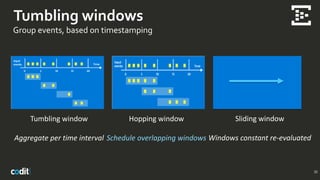
Tumbling windows
Group events, based on timestamping
35
Tumbling window
Aggregate per time interval
Hopping window
Schedule overlapping windows
Sliding window
Windows constant re-evaluated
End to end Architecture overview
36
Data Source
Collect Process ConsumeDeliver
Event Inputs
- Event Hub
- Azure Blob
Transform
- Temporal joins
- Filter
- Aggregates
- Projections
- Windows
- Etc.
Enrich
Correlate
Outputs
- SQL Azure
- Azure Blobs
- Event Hub
Azure
Storage
• Temporal Semantics
• Guaranteed delivery
• Guaranteed up time
Azure Stream Analytics
Reference Data
- Azure Blob
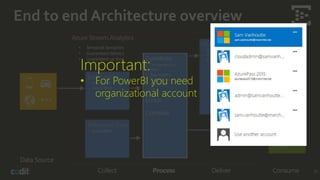
Important:
• For PowerBI you need
organizational account
End to end Architecture overview
37
Data Source
Collect Process ConsumeDeliver
Event Inputs
- Event Hub
- Azure Blob
Transform
- Temporal joins
- Filter
- Aggregates
- Projections
- Windows
- Etc.
Enrich
Correlate
Outputs
- SQL Azure
- Azure Blobs
- Event Hub
Azure
Storage
• Temporal Semantics
• Guaranteed delivery
• Guaranteed up time
Azure Stream Analytics
Reference Data
- Azure Blob
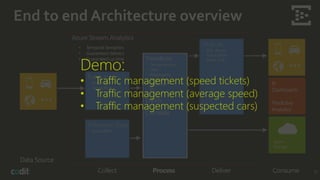
Demo:
• Traffic management (speed tickets)
• Traffic management (average speed)
• Traffic management (suspected cars)
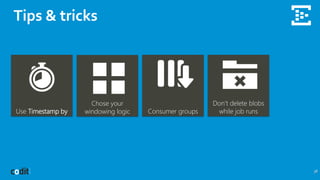
Tips & tricks
38
Use Timestamp by
Chose your
windowing logic Consumer groups
Don’t delete blobs
while job runs

Azure event hubs, Stream Analytics & Power BI (by Sam Vanhoutte)

  • 1.
    INTEGRATION DAY 2015 Sam Vanhoutte AzureEvent Hubs, Stream Analytics & Power BI
  • 2.
    Nice to meetyou SamVANHOUTTE CTO 7 year - BizTalkV-TSP 1st year - Integration MVP sam.vanhoutte@codit.eu +32 474 849 993 @SamVanhoutte be.linkedin.com/in/samvanhoutte/ > 60 Active integration customers International Focus - HQ in BEFocused on integration solutions 2000 Belgium 2004 France 2013 Portugal 60 employees > 50 consultants BizTalk certifiede-news + SoMe 2012 & 2013 Partner of the Year Award Finalist Application Integration
  • 3.
    The Internet ofThings 3 The Internet of EverythingM2M communicationSpecial purpose devicesSmart things
  • 5.
    The IoT valuechain Machine Learning
  • 6.
    Demo scenario 6 Event HubsStream Analytics Power BI Ingest Speeding tickets Traffic jam detection
  • 7.
    Power BI tools 7 •Power BI designer (when no office license) • PowerQuery >> Get data • PowerPivot >> Prepare data • PowerView >> Present data
  • 8.
    Event Hubs an AzureService Bus service (collection & ingestion)
  • 9.
  • 10.
    Event Hub –IOT at Scale Event Sources Cloud Services Storage & Analytics Custom Code & 3rd Party Services Web/Mobile User Interfaces Integration Services Event Hub - Hyper Scale - - Fully Managed - - Interoperable - - Secure - - Cost Effective -
  • 11.
    Introducing Azure EventHubs Event Producers
  • 12.
    Event Hubs an AzureService Bus service Producers (sending data to Event Hubs)
  • 13.
    Publishers 15 Event Producers Very manypublishers Short-lived, low throughput: HTTPS Long-lived, high throughput: AMQP Long lived AMQP connections are billable, HTTPS requests are not; AMQP connection allowance included in tier Publish to … PartitionId Direct PartitionKey PartitionKey selecting PartitionId Publisher Policy (<eh>/publishers/<name>) <name> overriding PartitionKey
  • 14.
    Publishers 16 Event Producers Very manypublishers Short-lived, low throughput: HTTPS Long-lived, high throughput: AMQP Long lived AMQP connections are billable, HTTPS requests are not; AMQP connection allowance included in tier Publish to … PartitionId Direct PartitionKey PartitionKey selecting PartitionId Publisher Policy (<eh>/publishers/<name>) <name> overriding PartitionKey Demo: • Create Event Hubs • Send events to Event Hub
  • 15.
    Securing publishers 17 ➔ SASPolicies are defined in the portal ➔ Not linked to publishers and limited in numbers ➔ Create Signatures per device ➔ Have a timespan ➔ Are unique to a publisher ➔ Revoking or blacklisting publishers ➔ Manage Rights needed for this
  • 16.
    Securing publishers 18 ➔ SASPolicies are defined in the portal ➔ Not linked to publishers and limited in numbers ➔ Create Signatures per device ➔ Have a timespan ➔ Are unique to a publisher ➔ Revoking or blacklisting publishers ➔ Manage Rights needed for this Demo: • Generating SAS Signatures • Using Signatures by publishers • Revoking publishers Reminder ! Sam, increase your instances
  • 17.
    Event Hubs an AzureService Bus service Consumers (reading data to Event Hubs)
  • 18.
    Like subscriptions Consumer groups Receivers readfrom a consumer groups Checkpointing per CG Create receivers per partition Maximum 20 CG Consumer Grp {Default}
  • 19.
    Like subscriptions Consumers Partitioned consumer model(not competing consumers!) Each at their own pace ID, Time, [Data] ID, Time, [Data] ID, Time, [Data] ID, Time, [Data] ID, Time, [Data]
  • 20.
    EventProcessorHost Out of thebox Lease management 22 Nuget package Managed cursors by client Uses storage for state and CP IEventProcessor
  • 21.
    EventProcessorHost Out of thebox Lease management 23 Nuget package Managed cursors by client Uses storage for state and CP IEventProcessor Demo: • Implementing EventProcessorHost • Dashboarding demo
  • 22.
    Securing consumers 24 ➔ UsingSAS key / values or ACS with SBAZTool ➔ Full SAS support for consumer groups will come
  • 23.
    Event Hubs an AzureService Bus service Pricing & Tips + tricks
  • 24.
    Pricing 26 Basic: Up to100 connections, no extension Standard: 1000 connections incl. Price (US Dollars) Throughput Unit Hour (Basic) 0.015 TU per hour Throughput Unit Hour (Standard) 0.03 TU per hour Ingress Events 0.028 per 1,000,000 events Cost Brokered Connections (1k-100k) 0.00004 connection/hour Cost Brokered Connections (100k-500k) 0.00003 connection/hour Cost Brokered Connections (500k+) 0.00002 connection/hour Storage Overage >TUs*84GB local-redundant Azure storage charge- through
  • 25.
    Tips & tricks 27 Multiplehubs per namespace Reuse senders & factories Use consumer groups
  • 26.
    Azure Stream Analytics complexevent processing . Introduction (set up a basic ASA job)
  • 27.
  • 28.
    Real time analytics 30 Millionsevents / sec Continuous stream of data Correlate Fast time to value High availability SQL Syntax Easy test & debug in portal PowerBI ! .999% SQL
  • 29.
    End to endArchitecture overview 31 Data Source Collect Process ConsumeDeliver Event Inputs - Event Hub - Azure Blob Transform - Temporal joins - Filter - Aggregates - Projections - Windows - Etc. Enrich Correlate Outputs - SQL Azure - Azure Blobs - Event Hub - Table storage - PowerBI Azure Storage • Temporal Semantics • Guaranteed delivery • Guaranteed up time Azure Stream Analytics Reference Data - Azure Blob
  • 30.
    End to endArchitecture overview 32 Data Source Collect Process ConsumeDeliver Event Inputs - Event Hub - Azure Blob Transform - Temporal joins - Filter - Aggregates - Projections - Windows - Etc. Enrich Correlate Outputs - SQL Azure - Azure Blobs - Event Hub Azure Storage • Temporal Semantics • Guaranteed delivery • Guaranteed up time Azure Stream Analytics Reference Data - Azure Blob Demo: • Set up Stream Analytics • The first job
  • 31.
    Azure Stream Analytics complexevent processing . Query Syntax (SQL like a pro)
  • 32.
    Functions & supportedtypes Aggregate functions Count, Min, Max, Avg, Sum Scalar functions Cast Date and time: Datename, Datepart, Day, Month, Year, Datediff, Dateadd String: Len, Concat, Charindex, Substring, Patindex Types Type Description bigint Integers in the range -2^63 (-9,223,372,036,854,775,808) to 2^63-1 (9,223,372,036,854,775,807). float Floating point numbers in the range - 1.79E+308 to -2.23E-308, 0, and 2.23E-308 to 1.79E+308. nvarchar(max) Text values, comprised of Unicode characters. Note: A value other than max is not supported. datetime Defines a date that is combined with a time of day with fractional seconds that is based on a 24-hour clock and relative to UTC (time zone offset 0).
  • 33.
    Tumbling windows Group events,based on timestamping 35 Tumbling window Aggregate per time interval Hopping window Schedule overlapping windows Sliding window Windows constant re-evaluated
  • 34.
    End to endArchitecture overview 36 Data Source Collect Process ConsumeDeliver Event Inputs - Event Hub - Azure Blob Transform - Temporal joins - Filter - Aggregates - Projections - Windows - Etc. Enrich Correlate Outputs - SQL Azure - Azure Blobs - Event Hub Azure Storage • Temporal Semantics • Guaranteed delivery • Guaranteed up time Azure Stream Analytics Reference Data - Azure Blob Important: • For PowerBI you need organizational account
  • 35.
    End to endArchitecture overview 37 Data Source Collect Process ConsumeDeliver Event Inputs - Event Hub - Azure Blob Transform - Temporal joins - Filter - Aggregates - Projections - Windows - Etc. Enrich Correlate Outputs - SQL Azure - Azure Blobs - Event Hub Azure Storage • Temporal Semantics • Guaranteed delivery • Guaranteed up time Azure Stream Analytics Reference Data - Azure Blob Demo: • Traffic management (speed tickets) • Traffic management (average speed) • Traffic management (suspected cars)
  • 36.
    Tips & tricks 38 UseTimestamp by Chose your windowing logic Consumer groups Don’t delete blobs while job runs