CONFIDENTIAL
© Copyright 2012. Aruba Networks, Inc.
All rights reserved
1
HIGH DENSITY WIRELESS NETWORKS
VALIDATED REFERENCE DESIGN (VRD)
CONFIDENTIAL
© Copyright 2011. Aruba Networks, Inc.
All rights reserved
Chuck Lukaszewski
Senior Director, Professional Services
chuck@arubanetworks.com
2 2
CONFIDENTIAL
© Copyright 2012. Aruba Networks, Inc.
All rights reserved
Agenda
• Capacity Planning for HD WLANs
• RF Design for HD WLANs
• Optimizing and Configuring ArubaOS
• Case Study #1 – Marina Bay Sands Singapore
• Case Study #2 – Turner Field
CONFIDENTIAL
© Copyright 2012. Aruba Networks, Inc.
All rights reserved
33
CONFIDENTIAL
© Copyright 2012. Aruba Networks, Inc.
All rights reserved
Capacity Planning for
High-Density WLANs
4 4
CONFIDENTIAL
© Copyright 2012. Aruba Networks, Inc.
All rights reserved
Aruba Validated Reference Designs
Aruba High-Density
Wireless Networks for
Auditoriums
SolutionGuide
• Aruba is the thought leader in our
industry. We produce a library of
Validated Reference Designs
• The High Density (HD) WLANs VRD
covers ultra high capacity spaces
such as auditoriums, arenas,
stadiums and convention centers
• The recommendations have been
field proven at dozens of customers
• VRDs are free to download from
Aruba Design Guides web page:
http://www.arubanetworks.com/VRD
5 5
CONFIDENTIAL
© Copyright 2012. Aruba Networks, Inc.
All rights reserved
High Density Area Challenges
• Uncontrolled mix of device types, operating
systems, driver levels, and radio types
• Multiple devices per person – up to three
• Per-user bandwidth needs can easily exceed
what is allowed by WiFi and physics
• Simultaneous data plane spikes during
roomwide events (slide advance, polling)
• Inrush/outrush demand increases load on
network control plane, address space, etc.
• Power save behavior also loads control plane
• Most devices limited to 1x1:1 HT20 operation
6 6
CONFIDENTIAL
© Copyright 2012. Aruba Networks, Inc.
All rights reserved
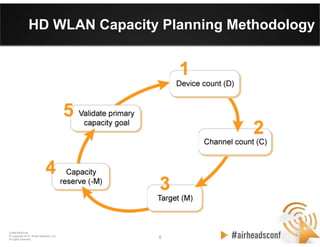
HD WLAN Capacity Planning Methodology
7 7
CONFIDENTIAL
© Copyright 2012. Aruba Networks, Inc.
All rights reserved
Step 1: Determine Device Count
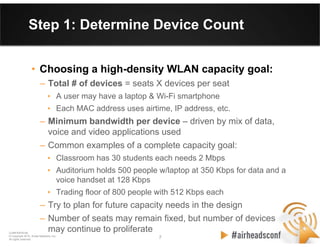
• Choosing a high-density WLAN capacity goal:
– Total # of devices = seats X devices per seat
• A user may have a laptop & Wi-Fi smartphone
• Each MAC address uses airtime, IP address, etc.
– Minimum bandwidth per device – driven by mix of data,
voice and video applications used
– Common examples of a complete capacity goal:
• Classroom has 30 students each needs 2 Mbps
• Auditorium holds 500 people w/laptop at 350 Kbps for data and a
voice handset at 128 Kbps
• Trading floor of 800 people with 512 Kbps each
– Try to plan for future capacity needs in the design
– Number of seats may remain fixed, but number of devices
may continue to proliferate
8 8
CONFIDENTIAL
© Copyright 2012. Aruba Networks, Inc.
All rights reserved
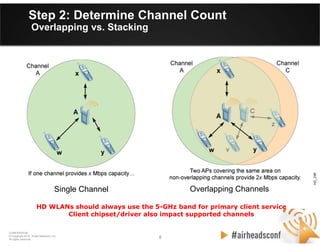
Stacking/Reusing
Channels
Overlapping ChannelsOverlapping ChannelsSingle Channel
Step 2: Determine Channel Count
Overlapping vs. Stacking
HD WLANs should always use the 5-GHz band for primary client service
Client chipset/driver also impact supported channels
9 9
CONFIDENTIAL
© Copyright 2012. Aruba Networks, Inc.
All rights reserved
Step 2: Determine Channel Count
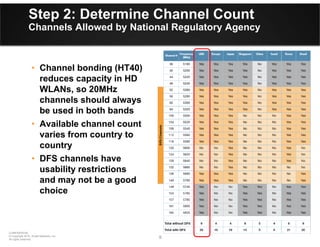
Channels Allowed by National Regulatory Agency
• Channel bonding (HT40)
reduces capacity in HD
WLANs, so 20MHz
channels should always
be used in both bands
• Available channel count
varies from country to
country
• DFS channels have
usability restrictions
and may not be a good
choice
10 10
CONFIDENTIAL
© Copyright 2012. Aruba Networks, Inc.
All rights reserved
Step 2: Determine Channel Count
20 MHz vs. 40 MHz Channels
• High-throughput 40-MHz (HT40) channels
– Reduces number of radio channels by bonding them together
to achieve higher throughput
– Reduced max. number of client devices supported
– HT40 channels not used on the 2.4-GHz band
– Main benefit — ability to burst at the max. PHY
• But, auditoriums must support so many users in a
single room that every possible channel is needed
– Trade-off: Reduce max. burst rate in exchange for a
greater total user capacity
• Therefore, most HD WLANs including auditoriums
should use 20-MHz channel widths, also known as HT20
11 11
CONFIDENTIAL
© Copyright 2012. Aruba Networks, Inc.
All rights reserved
Step 2: Determine Channel Count
To DFS or Not to DFS?
• The DFS 5-GHz band, with up to twenty 20-MHz
channels, can achieve high performance in a 500-
seat auditorium
• Without DFS, the goal can be achieved but with
oversubscribed radios & lower per-client throughput
So why wouldn’t everyone use DFS?
• Three significant exceptions could adversely affect
HD WLAN performance with DFS enabled:
– Proximity to radar sources in the 5250-MHz to 5725-MHz band
– Lack of DFS support on critical client devices
– The Receive Sensitivity Tuning-Based Channel Reuse feature of
ArubaOS is needed
12 12
CONFIDENTIAL
© Copyright 2012. Aruba Networks, Inc.
All rights reserved
Step 3: Choose Concurrent User Target
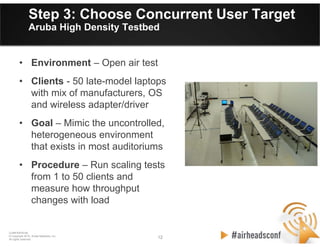
Aruba High Density Testbed
• Environment – Open air test
• Clients - 50 late-model laptops
with mix of manufacturers, OS
and wireless adapter/driver
• Goal – Mimic the uncontrolled,
heterogeneous environment
that exists in most auditoriums
• Procedure – Run scaling tests
from 1 to 50 clients and
measure how throughput
changes with load
13 13
CONFIDENTIAL
© Copyright 2012. Aruba Networks, Inc.
All rights reserved
Step 3: Choose Concurrent User Target
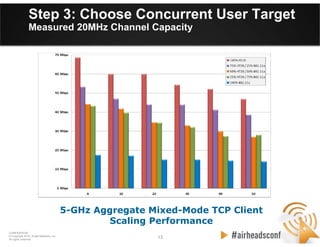
Measured 20MHz Channel Capacity
5-GHz Aggregate Mixed-Mode TCP Client
Scaling Performance
14 14
CONFIDENTIAL
© Copyright 2012. Aruba Networks, Inc.
All rights reserved
Step 3: Choose Concurrent User Target
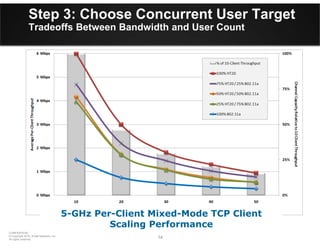
Tradeoffs Between Bandwidth and User Count
5-GHz Per-Client Mixed-Mode TCP Client
Scaling Performance
15 15
CONFIDENTIAL
© Copyright 2012. Aruba Networks, Inc.
All rights reserved
Step 3: Choose Concurrent User Target
Relative Performance of Channel Mixes
5-GHz Per-Client Mixed-Mode TCP Client
Scaling Performance
16 16
CONFIDENTIAL
© Copyright 2012. Aruba Networks, Inc.
All rights reserved
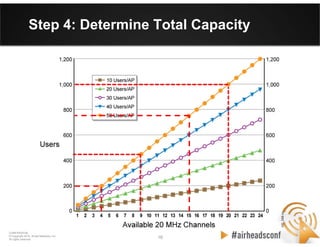
Step 4: Determine Total Capacity
US
40/20 MHz
w/o DFS
US
40/20 MHz
with DFS
EU
40/20 MHz
w/o DFS
EU
40/20 MHz
with DFS
17 17
CONFIDENTIAL
© Copyright 2012. Aruba Networks, Inc.
All rights reserved
Channel Reuse Revisited
Choosing the Lesser Evil
Speed
(fewer APs)
Slots
(more APs)
Signal
(more APs)
18 18
CONFIDENTIAL
© Copyright 2012. Aruba Networks, Inc.
All rights reserved
Step 5: Validate Capacity Goal
• Validate whether the entire HD coverage area will
meet the capacity goal you chose in Step #1.
• It is common for the wireless architect to have to
follow an iterative process and compromise between
channel count, radio loading and minimum per-client
throughput.
• If the capacity prediction in Step #4 falls short of the
capacity goal, repeat the first four steps until you
achieve the best balance to achieve your goal.
• For large auditoriums over 500 seats, you should be
prepared to accept a per-client throughput of 500
Kbps or less, assuming a 50/50 mix of .11n and .11a
stations and nine usable channels.
CONFIDENTIAL
© Copyright 2012. Aruba Networks, Inc.
All rights reserved
1919
CONFIDENTIAL
© Copyright 2012. Aruba Networks, Inc.
All rights reserved
RF Design for
High-Density WLANs
20 20
CONFIDENTIAL
© Copyright 2012. Aruba Networks, Inc.
All rights reserved
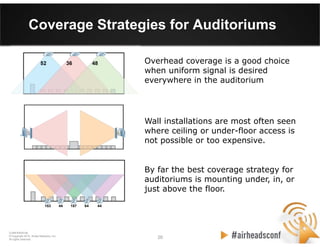
Coverage Strategies for Auditoriums
Overhead coverage is a good choice
when uniform signal is desired
everywhere in the auditorium
By far the best coverage strategy for
auditoriums is mounting under, in, or
just above the floor.
Wall installations are most often seen
where ceiling or under-floor access is
not possible or too expensive.
21 21
CONFIDENTIAL
© Copyright 2012. Aruba Networks, Inc.
All rights reserved
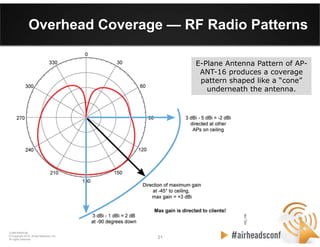
Overhead Coverage — RF Radio Patterns
E-Plane Antenna Pattern of AP-
ANT-16 produces a coverage
pattern shaped like a “cone”
underneath the antenna.
22 22
CONFIDENTIAL
© Copyright 2012. Aruba Networks, Inc.
All rights reserved
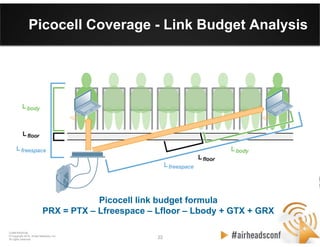
Picocell Coverage - Link Budget Analysis
Picocell link budget formula
PRX = PTX – Lfreespace – Lfloor – Lbody + GTX + GRX
23 23
CONFIDENTIAL
© Copyright 2012. Aruba Networks, Inc.
All rights reserved
• Channel reuse not possible.
• Inconsistent signal levels.
• Increased body attenuation.
• Harder to control CCI/ACI.
• Signal bleed outside area.
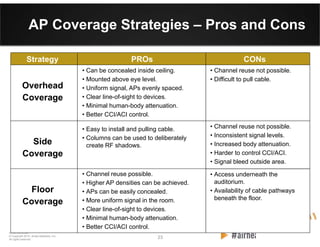
AP Coverage Strategies – Pros and Cons
Overhead
Coverage
• Can be concealed inside ceiling.
• Mounted above eye level.
• Uniform signal, APs evenly spaced.
• Clear line-of-sight to devices.
• Minimal human-body attenuation.
• Better CCI/ACI control.
PROs CONsStrategy
• Channel reuse not possible.
• Difficult to pull cable.
Side
Coverage
• Easy to install and pulling cable.
• Columns can be used to deliberately
create RF shadows.
• Access underneath the
auditorium.
• Availability of cable pathways
beneath the floor.
Floor
Coverage
• Channel reuse possible.
• Higher AP densities can be achieved.
• APs can be easily concealed.
• More uniform signal in the room.
• Clear line-of-sight to devices.
• Minimal human-body attenuation.
• Better CCI/ACI control.
24 24
CONFIDENTIAL
© Copyright 2012. Aruba Networks, Inc.
All rights reserved
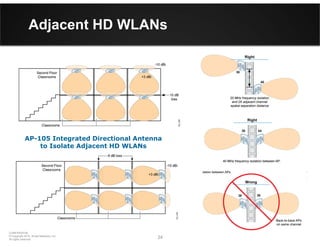
Adjacent HD WLANs
AP-105 Integrated Directional Antenna
to Isolate Adjacent HD WLANs
CONFIDENTIAL
© Copyright 2012. Aruba Networks, Inc.
All rights reserved
2525
CONFIDENTIAL
© Copyright 2012. Aruba Networks, Inc.
All rights reserved
Optimizing & Configuring ArubaOS
for High-Density WLANs
26 26
CONFIDENTIAL
© Copyright 2012. Aruba Networks, Inc.
All rights reserved
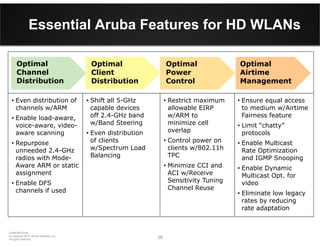
Essential Aruba Features for HD WLANs
• Even distribution of
channels w/ARM
• Enable load-aware,
voice-aware, video-
aware scanning
• Repurpose
unneeded 2.4-GHz
radios with Mode-
Aware ARM or static
assignment
• Enable DFS
channels if used
Optimal
Channel
Distribution
Optimal
Airtime
Management
• Ensure equal access
to medium w/Airtime
Fairness feature
• Limit “chatty”
protocols
• Enable Multicast
Rate Optimization
and IGMP Snooping
• Enable Dynamic
Multicast Opt. for
video
• Eliminate low legacy
rates by reducing
rate adaptation
• Shift all 5-GHz
capable devices
off 2.4-GHz band
w/Band Steering
• Even distribution
of clients
w/Spectrum Load
Balancing
Optimal
Client
Distribution
Optimal
Power
Control
• Restrict maximum
allowable EIRP
w/ARM to
minimize cell
overlap
• Control power on
clients w/802.11h
TPC
• Minimize CCI and
ACI w/Receive
Sensitivity Tuning
Channel Reuse
27 27
CONFIDENTIAL
© Copyright 2012. Aruba Networks, Inc.
All rights reserved
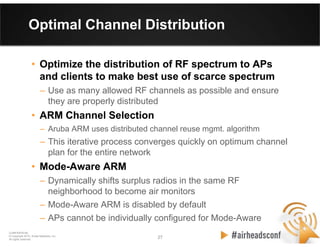
Optimal Channel Distribution
• Optimize the distribution of RF spectrum to APs
and clients to make best use of scarce spectrum
– Use as many allowed RF channels as possible and ensure
they are properly distributed
• ARM Channel Selection
– Aruba ARM uses distributed channel reuse mgmt. algorithm
– This iterative process converges quickly on optimum channel
plan for the entire network
• Mode-Aware ARM
– Dynamically shifts surplus radios in the same RF
neighborhood to become air monitors
– Mode-Aware ARM is disabled by default
– APs cannot be individually configured for Mode-Aware
28 28
CONFIDENTIAL
© Copyright 2012. Aruba Networks, Inc.
All rights reserved
Optimal Client Distribution
• Employ ARM to optimally distribute
clients between frequency bands
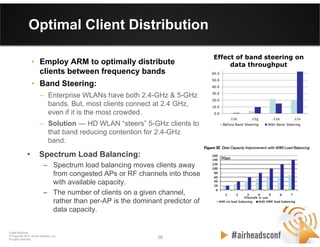
• Band Steering:
– Enterprise WLANs have both 2.4-GHz & 5-GHz
bands. But, most clients connect at 2.4 GHz,
even if it is the most crowded.
– Solution — HD WLAN “steers” 5-GHz clients to
that band reducing contention for 2.4-GHz
band.
0.0
10.0
20.0
30.0
40.0
50.0
60.0
70.0
.11b .11g .11a .11n
Effect of band steering on throughput (Mbps)
Before Band Steering With Band Steering
Effect of band steering on
data throughput
• Spectrum Load Balancing:
– Spectrum load balancing moves clients away
from congested APs or RF channels into those
with available capacity.
– The number of clients on a given channel,
rather than per-AP is the dominant predictor of
data capacity.
29 29
CONFIDENTIAL
© Copyright 2012. Aruba Networks, Inc.
All rights reserved
Optimal Airtime Management
• Ensuring equal access with Airtime Fairness
– Maintain application performance in high-density areas with
scheduled airtime fairness
• Limiting “Chatty” protocols
– Use ACLs and controller settings to restrict traffic
• Enabling Multicast Rate Optimization
– ARM can reduce medium multicast traffic time
• Enabling Dynamic Multicast Optimization for video
– Deliver multicast frames with unicast headers, improving reliability
over the air, QoS, and channel utilization
• Limiting supported data rates:
– 48 and 54 Mbps for 802.11a/g
– 6.5 and 11 Mbps for 802.11b
CONFIDENTIAL
© Copyright 2012. Aruba Networks, Inc.
All rights reserved
3030
CONFIDENTIAL
© Copyright 2012. Aruba Networks, Inc.
All rights reserved
Case Study #1
Marina Bay Sands Singapore
&
Young Presidents Asia Conference
31 31
CONFIDENTIAL
© Copyright 2012. Aruba Networks, Inc.
All rights reserved
Marina Bay Sands Overview
• Huge convention center located in Singapore
• 5 levels of convention halls
• Grand ballroom on level 5
• Can be over 5000 users per level
• No control over client devices—can be any type
of device
• Distribution of 2.4 GHz and 5.0 GHz clients
changes from one event to another
32 32
CONFIDENTIAL
© Copyright 2012. Aruba Networks, Inc.
All rights reserved
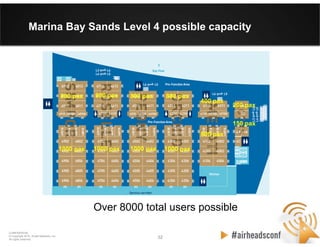
Marina Bay Sands Level 4 possible capacity
800 pax800 pax 800 pax 800 pax
800 pax
1000 pax 1000 pax 1000 pax 1000 pax
400 pax
200 pax
150 pax
Over 8000 total users possible
33 33
CONFIDENTIAL
© Copyright 2012. Aruba Networks, Inc.
All rights reserved
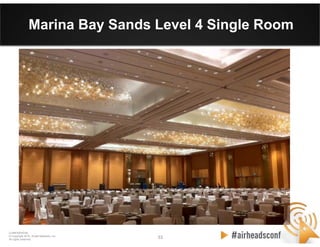
Marina Bay Sands Level 4 Single Room
34 34
CONFIDENTIAL
© Copyright 2012. Aruba Networks, Inc.
All rights reserved
MBS Technical Requirements
• Dynamic configuration required that can be
adapted easily to conference events
• SSID’s offered and areas of coverage changes
from one event to the next
• Might be only 1 AP needed for one event, while
for large events all AP’s must be enabled for
coverage and to support expected client density
• Conference goers may bring in their own AP’s
that interfere with the MBS service
35 35
CONFIDENTIAL
© Copyright 2012. Aruba Networks, Inc.
All rights reserved
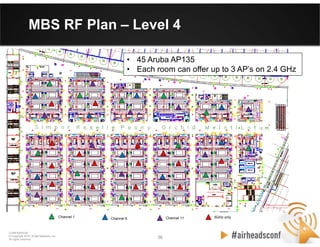
MBS Design - Level 4
• Series of rooms that are largely self contained user spaces
• Channel reuse within each room is not possible
• 2.4 GHz channels are statically set to ensure 3 non-overlapping
channels per room
• 2.4 GHz transmit power is statically set to 15 dBm
• 5.0 GHz channels and transmit power are automatically
configured with ARM—ARM has configured all AP’s to use max
power
• Signal overlap from one room to the next is minimal
• Interference is minimal
• Ceiling placement gives Line of Sight (LOS) to clients and
provide strong coverage
• SNR is strong within each room giving excellent performance
36 36
CONFIDENTIAL
© Copyright 2012. Aruba Networks, Inc.
All rights reserved
Channel 1 Channel 6 Channel 11 5GHz only
MBS RF Plan – Level 4
• 45 Aruba AP135
• Each room can offer up to 3 AP’s on 2.4 GHz
37 37
CONFIDENTIAL
© Copyright 2012. Aruba Networks, Inc.
All rights reserved
MBS Design - Level 5
• Grand ballroom is on level 5
• Client density requires more AP’s while vast open area mean
AP’s hear each other quite well
• To handle user count channel reuse is mandatory
• 2.4 GHz channels are statically configured in grand ballroom and
pre-function foyer to ensure adjacent AP’s are on different
channels
• Interference from Audio-Visual system on 2.4 GHz is significant
in Grand ballroom
• 5.0 GHz channels and transmit power are configured via ARM
• Ceiling placement gives Line of Sight (LOS) to clients and
provide strong coverage
• SNR is strong within each room giving excellent performance
38 38
CONFIDENTIAL
© Copyright 2012. Aruba Networks, Inc.
All rights reserved
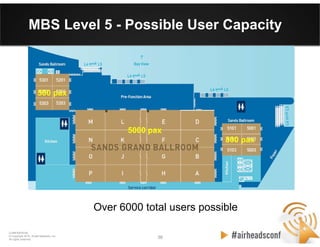
MBS Level 5 - Possible User Capacity
Over 6000 total users possible
5000 pax
500 pax
800 pax
39 39
CONFIDENTIAL
© Copyright 2012. Aruba Networks, Inc.
All rights reserved
MBS Level 5 – RF Design
AP’s hear each other quite well in Grand ballroom making channel reuse difficult
40 40
CONFIDENTIAL
© Copyright 2012. Aruba Networks, Inc.
All rights reserved
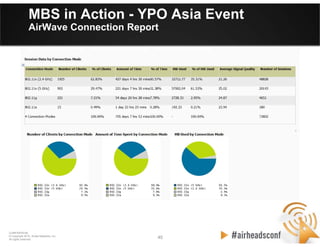
MBS in Action - YPO Asia Event
AirWave Connection Report
41 41
CONFIDENTIAL
© Copyright 2012. Aruba Networks, Inc.
All rights reserved
MBS in Action - YPO Asia Event
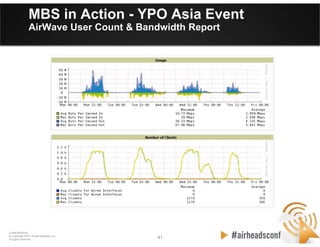
AirWave User Count & Bandwidth Report
42 42
CONFIDENTIAL
© Copyright 2012. Aruba Networks, Inc.
All rights reserved
MBS in Action - YPO Asia Event
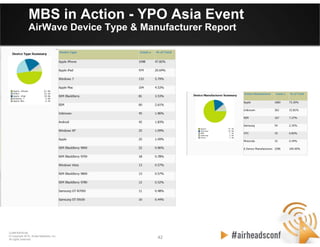
AirWave Device Type & Manufacturer Report
43 43
CONFIDENTIAL
© Copyright 2012. Aruba Networks, Inc.
All rights reserved
MBS in Action - YPO Asia Event
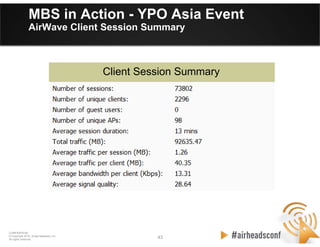
AirWave Client Session Summary
Client Session Summary
44 44
CONFIDENTIAL
© Copyright 2012. Aruba Networks, Inc.
All rights reserved
MBS in Action - YPO Asia Event
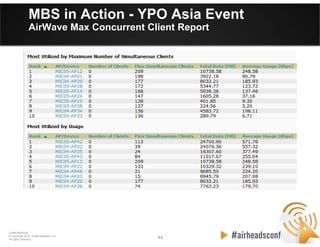
AirWave Max Concurrent Client Report
CONFIDENTIAL
© Copyright 2012. Aruba Networks, Inc.
All rights reserved
4545
CONFIDENTIAL
© Copyright 2012. Aruba Networks, Inc.
All rights reserved
Case Study #2
Turner Field – Atlanta
46 46
CONFIDENTIAL
© Copyright 2012. Aruba Networks, Inc.
All rights reserved
“Up and Out” RF Design
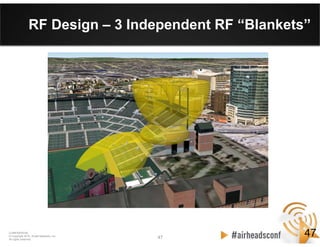
• Three interleaved “blankets” of APs to cover the
lower sections, club level, and upper sections
respectively:
– Lower deck antennas are mounted under the club seats and
aimed “out” to the field
– Upper deck antennas are mounted underneath the floor and
aimed straight “up” through the concrete. In the middle
– A blanket of APs is installed in the club suites above the
ceiling.
• The stadium structure itself is used to minimize
interference between blankets
46
47 47
CONFIDENTIAL
© Copyright 2012. Aruba Networks, Inc.
All rights reserved
RF Design – 3 Independent RF “Blankets”
47
48 48
CONFIDENTIAL
© Copyright 2012. Aruba Networks, Inc.
All rights reserved
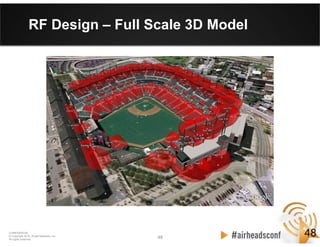
RF Design – Full Scale 3D Model
48
49 49
CONFIDENTIAL
© Copyright 2012. Aruba Networks, Inc.
All rights reserved
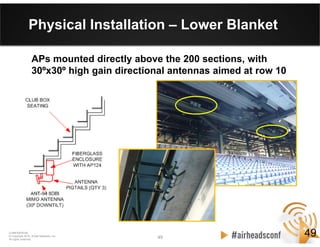
Physical Installation – Lower Blanket
APs mounted directly above the 200 sections, with
30ºx30º high gain directional antennas aimed at row 10
49
50 50
CONFIDENTIAL
© Copyright 2012. Aruba Networks, Inc.
All rights reserved
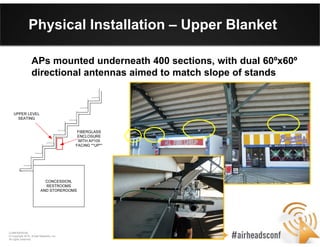
Physical Installation – Upper Blanket
APs mounted underneath 400 sections, with dual 60ºx60º
directional antennas aimed to match slope of stands
51 51
CONFIDENTIAL
© Copyright 2012. Aruba Networks, Inc.
All rights reserved
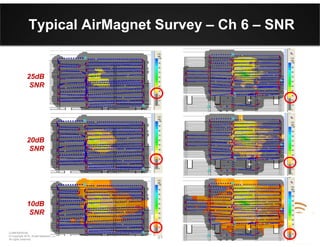
Typical AirMagnet Survey – Ch 6 – SNR
20dB
SNR
25dB
SNR
10dB
SNR
52 52
CONFIDENTIAL
© Copyright 2012. Aruba Networks, Inc.
All rights reserved
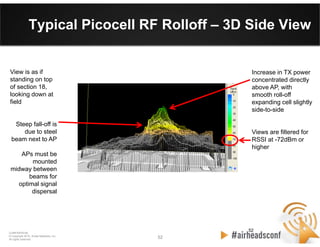
Typical Picocell RF Rolloff – 3D Side View
52
Increase in TX power
concentrated directly
above AP, with
smooth roll-off
expanding cell slightly
side-to-side
Views are filtered for
RSSI at -72dBm or
higher
View is as if
standing on top
of section 18,
looking down at
field
Steep fall-off is
due to steel
beam next to AP
APs must be
mounted
midway between
beams for
optimal signal
dispersal
53 53
CONFIDENTIAL
© Copyright 2012. Aruba Networks, Inc.
All rights reserved
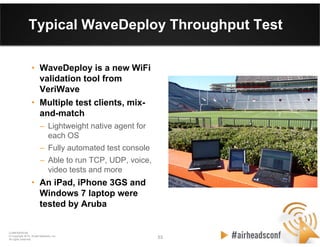
Typical WaveDeploy Throughput Test
• WaveDeploy is a new WiFi
validation tool from
VeriWave
• Multiple test clients, mix-
and-match
– Lightweight native agent for
each OS
– Fully automated test console
– Able to run TCP, UDP, voice,
video tests and more
• An iPad, iPhone 3GS and
Windows 7 laptop were
tested by Aruba
54 54
CONFIDENTIAL
© Copyright 2012. Aruba Networks, Inc.
All rights reserved
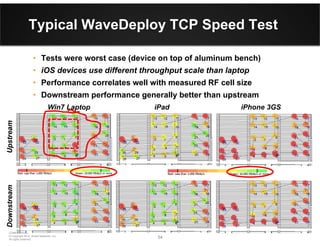
Typical WaveDeploy TCP Speed Test
• Tests were worst case (device on top of aluminum bench)
• iOS devices use different throughput scale than laptop
• Performance correlates well with measured RF cell size
• Downstream performance generally better than upstream
Win7 Laptop iPad iPhone 3GS
UpstreamDownstream
CONFIDENTIAL
© Copyright 2012. Aruba Networks, Inc.
All rights reserved
5555
Thank You

2012 ah vegas wlan design for high density

  • 1.
    CONFIDENTIAL © Copyright 2012.Aruba Networks, Inc. All rights reserved 1 HIGH DENSITY WIRELESS NETWORKS VALIDATED REFERENCE DESIGN (VRD) CONFIDENTIAL © Copyright 2011. Aruba Networks, Inc. All rights reserved Chuck Lukaszewski Senior Director, Professional Services chuck@arubanetworks.com
  • 2.
    2 2 CONFIDENTIAL © Copyright2012. Aruba Networks, Inc. All rights reserved Agenda • Capacity Planning for HD WLANs • RF Design for HD WLANs • Optimizing and Configuring ArubaOS • Case Study #1 – Marina Bay Sands Singapore • Case Study #2 – Turner Field
  • 3.
    CONFIDENTIAL © Copyright 2012.Aruba Networks, Inc. All rights reserved 33 CONFIDENTIAL © Copyright 2012. Aruba Networks, Inc. All rights reserved Capacity Planning for High-Density WLANs
  • 4.
    4 4 CONFIDENTIAL © Copyright2012. Aruba Networks, Inc. All rights reserved Aruba Validated Reference Designs Aruba High-Density Wireless Networks for Auditoriums SolutionGuide • Aruba is the thought leader in our industry. We produce a library of Validated Reference Designs • The High Density (HD) WLANs VRD covers ultra high capacity spaces such as auditoriums, arenas, stadiums and convention centers • The recommendations have been field proven at dozens of customers • VRDs are free to download from Aruba Design Guides web page: http://www.arubanetworks.com/VRD
  • 5.
    5 5 CONFIDENTIAL © Copyright2012. Aruba Networks, Inc. All rights reserved High Density Area Challenges • Uncontrolled mix of device types, operating systems, driver levels, and radio types • Multiple devices per person – up to three • Per-user bandwidth needs can easily exceed what is allowed by WiFi and physics • Simultaneous data plane spikes during roomwide events (slide advance, polling) • Inrush/outrush demand increases load on network control plane, address space, etc. • Power save behavior also loads control plane • Most devices limited to 1x1:1 HT20 operation
  • 6.
    6 6 CONFIDENTIAL © Copyright2012. Aruba Networks, Inc. All rights reserved HD WLAN Capacity Planning Methodology
  • 7.
    7 7 CONFIDENTIAL © Copyright2012. Aruba Networks, Inc. All rights reserved Step 1: Determine Device Count • Choosing a high-density WLAN capacity goal: – Total # of devices = seats X devices per seat • A user may have a laptop & Wi-Fi smartphone • Each MAC address uses airtime, IP address, etc. – Minimum bandwidth per device – driven by mix of data, voice and video applications used – Common examples of a complete capacity goal: • Classroom has 30 students each needs 2 Mbps • Auditorium holds 500 people w/laptop at 350 Kbps for data and a voice handset at 128 Kbps • Trading floor of 800 people with 512 Kbps each – Try to plan for future capacity needs in the design – Number of seats may remain fixed, but number of devices may continue to proliferate
  • 8.
    8 8 CONFIDENTIAL © Copyright2012. Aruba Networks, Inc. All rights reserved Stacking/Reusing Channels Overlapping ChannelsOverlapping ChannelsSingle Channel Step 2: Determine Channel Count Overlapping vs. Stacking HD WLANs should always use the 5-GHz band for primary client service Client chipset/driver also impact supported channels
  • 9.
    9 9 CONFIDENTIAL © Copyright2012. Aruba Networks, Inc. All rights reserved Step 2: Determine Channel Count Channels Allowed by National Regulatory Agency • Channel bonding (HT40) reduces capacity in HD WLANs, so 20MHz channels should always be used in both bands • Available channel count varies from country to country • DFS channels have usability restrictions and may not be a good choice
  • 10.
    10 10 CONFIDENTIAL © Copyright2012. Aruba Networks, Inc. All rights reserved Step 2: Determine Channel Count 20 MHz vs. 40 MHz Channels • High-throughput 40-MHz (HT40) channels – Reduces number of radio channels by bonding them together to achieve higher throughput – Reduced max. number of client devices supported – HT40 channels not used on the 2.4-GHz band – Main benefit — ability to burst at the max. PHY • But, auditoriums must support so many users in a single room that every possible channel is needed – Trade-off: Reduce max. burst rate in exchange for a greater total user capacity • Therefore, most HD WLANs including auditoriums should use 20-MHz channel widths, also known as HT20
  • 11.
    11 11 CONFIDENTIAL © Copyright2012. Aruba Networks, Inc. All rights reserved Step 2: Determine Channel Count To DFS or Not to DFS? • The DFS 5-GHz band, with up to twenty 20-MHz channels, can achieve high performance in a 500- seat auditorium • Without DFS, the goal can be achieved but with oversubscribed radios & lower per-client throughput So why wouldn’t everyone use DFS? • Three significant exceptions could adversely affect HD WLAN performance with DFS enabled: – Proximity to radar sources in the 5250-MHz to 5725-MHz band – Lack of DFS support on critical client devices – The Receive Sensitivity Tuning-Based Channel Reuse feature of ArubaOS is needed
  • 12.
    12 12 CONFIDENTIAL © Copyright2012. Aruba Networks, Inc. All rights reserved Step 3: Choose Concurrent User Target Aruba High Density Testbed • Environment – Open air test • Clients - 50 late-model laptops with mix of manufacturers, OS and wireless adapter/driver • Goal – Mimic the uncontrolled, heterogeneous environment that exists in most auditoriums • Procedure – Run scaling tests from 1 to 50 clients and measure how throughput changes with load
  • 13.
    13 13 CONFIDENTIAL © Copyright2012. Aruba Networks, Inc. All rights reserved Step 3: Choose Concurrent User Target Measured 20MHz Channel Capacity 5-GHz Aggregate Mixed-Mode TCP Client Scaling Performance
  • 14.
    14 14 CONFIDENTIAL © Copyright2012. Aruba Networks, Inc. All rights reserved Step 3: Choose Concurrent User Target Tradeoffs Between Bandwidth and User Count 5-GHz Per-Client Mixed-Mode TCP Client Scaling Performance
  • 15.
    15 15 CONFIDENTIAL © Copyright2012. Aruba Networks, Inc. All rights reserved Step 3: Choose Concurrent User Target Relative Performance of Channel Mixes 5-GHz Per-Client Mixed-Mode TCP Client Scaling Performance
  • 16.
    16 16 CONFIDENTIAL © Copyright2012. Aruba Networks, Inc. All rights reserved Step 4: Determine Total Capacity US 40/20 MHz w/o DFS US 40/20 MHz with DFS EU 40/20 MHz w/o DFS EU 40/20 MHz with DFS
  • 17.
    17 17 CONFIDENTIAL © Copyright2012. Aruba Networks, Inc. All rights reserved Channel Reuse Revisited Choosing the Lesser Evil Speed (fewer APs) Slots (more APs) Signal (more APs)
  • 18.
    18 18 CONFIDENTIAL © Copyright2012. Aruba Networks, Inc. All rights reserved Step 5: Validate Capacity Goal • Validate whether the entire HD coverage area will meet the capacity goal you chose in Step #1. • It is common for the wireless architect to have to follow an iterative process and compromise between channel count, radio loading and minimum per-client throughput. • If the capacity prediction in Step #4 falls short of the capacity goal, repeat the first four steps until you achieve the best balance to achieve your goal. • For large auditoriums over 500 seats, you should be prepared to accept a per-client throughput of 500 Kbps or less, assuming a 50/50 mix of .11n and .11a stations and nine usable channels.
  • 19.
    CONFIDENTIAL © Copyright 2012.Aruba Networks, Inc. All rights reserved 1919 CONFIDENTIAL © Copyright 2012. Aruba Networks, Inc. All rights reserved RF Design for High-Density WLANs
  • 20.
    20 20 CONFIDENTIAL © Copyright2012. Aruba Networks, Inc. All rights reserved Coverage Strategies for Auditoriums Overhead coverage is a good choice when uniform signal is desired everywhere in the auditorium By far the best coverage strategy for auditoriums is mounting under, in, or just above the floor. Wall installations are most often seen where ceiling or under-floor access is not possible or too expensive.
  • 21.
    21 21 CONFIDENTIAL © Copyright2012. Aruba Networks, Inc. All rights reserved Overhead Coverage — RF Radio Patterns E-Plane Antenna Pattern of AP- ANT-16 produces a coverage pattern shaped like a “cone” underneath the antenna.
  • 22.
    22 22 CONFIDENTIAL © Copyright2012. Aruba Networks, Inc. All rights reserved Picocell Coverage - Link Budget Analysis Picocell link budget formula PRX = PTX – Lfreespace – Lfloor – Lbody + GTX + GRX
  • 23.
    23 23 CONFIDENTIAL © Copyright2012. Aruba Networks, Inc. All rights reserved • Channel reuse not possible. • Inconsistent signal levels. • Increased body attenuation. • Harder to control CCI/ACI. • Signal bleed outside area. AP Coverage Strategies – Pros and Cons Overhead Coverage • Can be concealed inside ceiling. • Mounted above eye level. • Uniform signal, APs evenly spaced. • Clear line-of-sight to devices. • Minimal human-body attenuation. • Better CCI/ACI control. PROs CONsStrategy • Channel reuse not possible. • Difficult to pull cable. Side Coverage • Easy to install and pulling cable. • Columns can be used to deliberately create RF shadows. • Access underneath the auditorium. • Availability of cable pathways beneath the floor. Floor Coverage • Channel reuse possible. • Higher AP densities can be achieved. • APs can be easily concealed. • More uniform signal in the room. • Clear line-of-sight to devices. • Minimal human-body attenuation. • Better CCI/ACI control.
  • 24.
    24 24 CONFIDENTIAL © Copyright2012. Aruba Networks, Inc. All rights reserved Adjacent HD WLANs AP-105 Integrated Directional Antenna to Isolate Adjacent HD WLANs
  • 25.
    CONFIDENTIAL © Copyright 2012.Aruba Networks, Inc. All rights reserved 2525 CONFIDENTIAL © Copyright 2012. Aruba Networks, Inc. All rights reserved Optimizing & Configuring ArubaOS for High-Density WLANs
  • 26.
    26 26 CONFIDENTIAL © Copyright2012. Aruba Networks, Inc. All rights reserved Essential Aruba Features for HD WLANs • Even distribution of channels w/ARM • Enable load-aware, voice-aware, video- aware scanning • Repurpose unneeded 2.4-GHz radios with Mode- Aware ARM or static assignment • Enable DFS channels if used Optimal Channel Distribution Optimal Airtime Management • Ensure equal access to medium w/Airtime Fairness feature • Limit “chatty” protocols • Enable Multicast Rate Optimization and IGMP Snooping • Enable Dynamic Multicast Opt. for video • Eliminate low legacy rates by reducing rate adaptation • Shift all 5-GHz capable devices off 2.4-GHz band w/Band Steering • Even distribution of clients w/Spectrum Load Balancing Optimal Client Distribution Optimal Power Control • Restrict maximum allowable EIRP w/ARM to minimize cell overlap • Control power on clients w/802.11h TPC • Minimize CCI and ACI w/Receive Sensitivity Tuning Channel Reuse
  • 27.
    27 27 CONFIDENTIAL © Copyright2012. Aruba Networks, Inc. All rights reserved Optimal Channel Distribution • Optimize the distribution of RF spectrum to APs and clients to make best use of scarce spectrum – Use as many allowed RF channels as possible and ensure they are properly distributed • ARM Channel Selection – Aruba ARM uses distributed channel reuse mgmt. algorithm – This iterative process converges quickly on optimum channel plan for the entire network • Mode-Aware ARM – Dynamically shifts surplus radios in the same RF neighborhood to become air monitors – Mode-Aware ARM is disabled by default – APs cannot be individually configured for Mode-Aware
  • 28.
    28 28 CONFIDENTIAL © Copyright2012. Aruba Networks, Inc. All rights reserved Optimal Client Distribution • Employ ARM to optimally distribute clients between frequency bands • Band Steering: – Enterprise WLANs have both 2.4-GHz & 5-GHz bands. But, most clients connect at 2.4 GHz, even if it is the most crowded. – Solution — HD WLAN “steers” 5-GHz clients to that band reducing contention for 2.4-GHz band. 0.0 10.0 20.0 30.0 40.0 50.0 60.0 70.0 .11b .11g .11a .11n Effect of band steering on throughput (Mbps) Before Band Steering With Band Steering Effect of band steering on data throughput • Spectrum Load Balancing: – Spectrum load balancing moves clients away from congested APs or RF channels into those with available capacity. – The number of clients on a given channel, rather than per-AP is the dominant predictor of data capacity.
  • 29.
    29 29 CONFIDENTIAL © Copyright2012. Aruba Networks, Inc. All rights reserved Optimal Airtime Management • Ensuring equal access with Airtime Fairness – Maintain application performance in high-density areas with scheduled airtime fairness • Limiting “Chatty” protocols – Use ACLs and controller settings to restrict traffic • Enabling Multicast Rate Optimization – ARM can reduce medium multicast traffic time • Enabling Dynamic Multicast Optimization for video – Deliver multicast frames with unicast headers, improving reliability over the air, QoS, and channel utilization • Limiting supported data rates: – 48 and 54 Mbps for 802.11a/g – 6.5 and 11 Mbps for 802.11b
  • 30.
    CONFIDENTIAL © Copyright 2012.Aruba Networks, Inc. All rights reserved 3030 CONFIDENTIAL © Copyright 2012. Aruba Networks, Inc. All rights reserved Case Study #1 Marina Bay Sands Singapore & Young Presidents Asia Conference
  • 31.
    31 31 CONFIDENTIAL © Copyright2012. Aruba Networks, Inc. All rights reserved Marina Bay Sands Overview • Huge convention center located in Singapore • 5 levels of convention halls • Grand ballroom on level 5 • Can be over 5000 users per level • No control over client devices—can be any type of device • Distribution of 2.4 GHz and 5.0 GHz clients changes from one event to another
  • 32.
    32 32 CONFIDENTIAL © Copyright2012. Aruba Networks, Inc. All rights reserved Marina Bay Sands Level 4 possible capacity 800 pax800 pax 800 pax 800 pax 800 pax 1000 pax 1000 pax 1000 pax 1000 pax 400 pax 200 pax 150 pax Over 8000 total users possible
  • 33.
    33 33 CONFIDENTIAL © Copyright2012. Aruba Networks, Inc. All rights reserved Marina Bay Sands Level 4 Single Room
  • 34.
    34 34 CONFIDENTIAL © Copyright2012. Aruba Networks, Inc. All rights reserved MBS Technical Requirements • Dynamic configuration required that can be adapted easily to conference events • SSID’s offered and areas of coverage changes from one event to the next • Might be only 1 AP needed for one event, while for large events all AP’s must be enabled for coverage and to support expected client density • Conference goers may bring in their own AP’s that interfere with the MBS service
  • 35.
    35 35 CONFIDENTIAL © Copyright2012. Aruba Networks, Inc. All rights reserved MBS Design - Level 4 • Series of rooms that are largely self contained user spaces • Channel reuse within each room is not possible • 2.4 GHz channels are statically set to ensure 3 non-overlapping channels per room • 2.4 GHz transmit power is statically set to 15 dBm • 5.0 GHz channels and transmit power are automatically configured with ARM—ARM has configured all AP’s to use max power • Signal overlap from one room to the next is minimal • Interference is minimal • Ceiling placement gives Line of Sight (LOS) to clients and provide strong coverage • SNR is strong within each room giving excellent performance
  • 36.
    36 36 CONFIDENTIAL © Copyright2012. Aruba Networks, Inc. All rights reserved Channel 1 Channel 6 Channel 11 5GHz only MBS RF Plan – Level 4 • 45 Aruba AP135 • Each room can offer up to 3 AP’s on 2.4 GHz
  • 37.
    37 37 CONFIDENTIAL © Copyright2012. Aruba Networks, Inc. All rights reserved MBS Design - Level 5 • Grand ballroom is on level 5 • Client density requires more AP’s while vast open area mean AP’s hear each other quite well • To handle user count channel reuse is mandatory • 2.4 GHz channels are statically configured in grand ballroom and pre-function foyer to ensure adjacent AP’s are on different channels • Interference from Audio-Visual system on 2.4 GHz is significant in Grand ballroom • 5.0 GHz channels and transmit power are configured via ARM • Ceiling placement gives Line of Sight (LOS) to clients and provide strong coverage • SNR is strong within each room giving excellent performance
  • 38.
    38 38 CONFIDENTIAL © Copyright2012. Aruba Networks, Inc. All rights reserved MBS Level 5 - Possible User Capacity Over 6000 total users possible 5000 pax 500 pax 800 pax
  • 39.
    39 39 CONFIDENTIAL © Copyright2012. Aruba Networks, Inc. All rights reserved MBS Level 5 – RF Design AP’s hear each other quite well in Grand ballroom making channel reuse difficult
  • 40.
    40 40 CONFIDENTIAL © Copyright2012. Aruba Networks, Inc. All rights reserved MBS in Action - YPO Asia Event AirWave Connection Report
  • 41.
    41 41 CONFIDENTIAL © Copyright2012. Aruba Networks, Inc. All rights reserved MBS in Action - YPO Asia Event AirWave User Count & Bandwidth Report
  • 42.
    42 42 CONFIDENTIAL © Copyright2012. Aruba Networks, Inc. All rights reserved MBS in Action - YPO Asia Event AirWave Device Type & Manufacturer Report
  • 43.
    43 43 CONFIDENTIAL © Copyright2012. Aruba Networks, Inc. All rights reserved MBS in Action - YPO Asia Event AirWave Client Session Summary Client Session Summary
  • 44.
    44 44 CONFIDENTIAL © Copyright2012. Aruba Networks, Inc. All rights reserved MBS in Action - YPO Asia Event AirWave Max Concurrent Client Report
  • 45.
    CONFIDENTIAL © Copyright 2012.Aruba Networks, Inc. All rights reserved 4545 CONFIDENTIAL © Copyright 2012. Aruba Networks, Inc. All rights reserved Case Study #2 Turner Field – Atlanta
  • 46.
    46 46 CONFIDENTIAL © Copyright2012. Aruba Networks, Inc. All rights reserved “Up and Out” RF Design • Three interleaved “blankets” of APs to cover the lower sections, club level, and upper sections respectively: – Lower deck antennas are mounted under the club seats and aimed “out” to the field – Upper deck antennas are mounted underneath the floor and aimed straight “up” through the concrete. In the middle – A blanket of APs is installed in the club suites above the ceiling. • The stadium structure itself is used to minimize interference between blankets 46
  • 47.
    47 47 CONFIDENTIAL © Copyright2012. Aruba Networks, Inc. All rights reserved RF Design – 3 Independent RF “Blankets” 47
  • 48.
    48 48 CONFIDENTIAL © Copyright2012. Aruba Networks, Inc. All rights reserved RF Design – Full Scale 3D Model 48
  • 49.
    49 49 CONFIDENTIAL © Copyright2012. Aruba Networks, Inc. All rights reserved Physical Installation – Lower Blanket APs mounted directly above the 200 sections, with 30ºx30º high gain directional antennas aimed at row 10 49
  • 50.
    50 50 CONFIDENTIAL © Copyright2012. Aruba Networks, Inc. All rights reserved Physical Installation – Upper Blanket APs mounted underneath 400 sections, with dual 60ºx60º directional antennas aimed to match slope of stands
  • 51.
    51 51 CONFIDENTIAL © Copyright2012. Aruba Networks, Inc. All rights reserved Typical AirMagnet Survey – Ch 6 – SNR 20dB SNR 25dB SNR 10dB SNR
  • 52.
    52 52 CONFIDENTIAL © Copyright2012. Aruba Networks, Inc. All rights reserved Typical Picocell RF Rolloff – 3D Side View 52 Increase in TX power concentrated directly above AP, with smooth roll-off expanding cell slightly side-to-side Views are filtered for RSSI at -72dBm or higher View is as if standing on top of section 18, looking down at field Steep fall-off is due to steel beam next to AP APs must be mounted midway between beams for optimal signal dispersal
  • 53.
    53 53 CONFIDENTIAL © Copyright2012. Aruba Networks, Inc. All rights reserved Typical WaveDeploy Throughput Test • WaveDeploy is a new WiFi validation tool from VeriWave • Multiple test clients, mix- and-match – Lightweight native agent for each OS – Fully automated test console – Able to run TCP, UDP, voice, video tests and more • An iPad, iPhone 3GS and Windows 7 laptop were tested by Aruba
  • 54.
    54 54 CONFIDENTIAL © Copyright2012. Aruba Networks, Inc. All rights reserved Typical WaveDeploy TCP Speed Test • Tests were worst case (device on top of aluminum bench) • iOS devices use different throughput scale than laptop • Performance correlates well with measured RF cell size • Downstream performance generally better than upstream Win7 Laptop iPad iPhone 3GS UpstreamDownstream
  • 55.
    CONFIDENTIAL © Copyright 2012.Aruba Networks, Inc. All rights reserved 5555 Thank You