Lean Webinar Series:
Advanced Lean for Office &
Service
November 9, 2010

Company

LOGO
Webinar Content
How and when to use takt time to balance work.
How to approach the need for load leveling.
How cross-training and co-location is an essential
step in a transformation.
The vital role and responsibilities for process
owners.
How to achieve value stream alignment.
How to translate operational metrics into financial
terms.

© 2010 Karen Martin & Associates

2
Creating a Lean Enterprise

Initial Lean focus


Eliminate muda – Waste

Advanced Lean




Eliminate muri – Overburden (people or
equipment)
Eliminate mura – Uneveness

© 2010 Karen Martin & Associates

3
Your Instructor
 Early career as a scientist; migrated to
quality & operations design and
management in the mid-80’s.
 Launched Karen Martin & Associates in
1993.
 Specialize in Lean transformations in nonmanufacturing environments.
 Co-author of The Kaizen Event Planner;
co-developer of Metrics-Based Process
Mapping: An Excel-Based Solution.
 Instructor in University of California, San
Diego’s Lean Enterprise program.
© 2010 Karen Martin & Associates

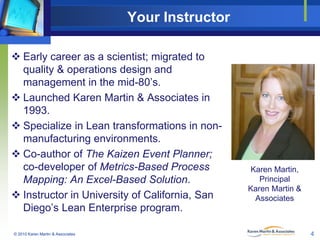
Karen Martin,
Principal
Karen Martin &
Associates

4
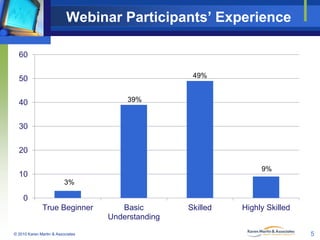
Webinar Participants’ Experience
60
49%

50
39%

40

30
20
9%

10
3%

0
True Beginner

© 2010 Karen Martin & Associates

Basic
Understanding

Skilled

Highly Skilled
5
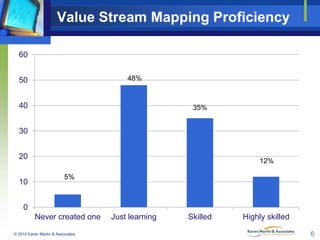
Value Stream Mapping Proficiency
60
48%

50
40

35%

30
20
10

12%
5%

0
Never created one
© 2010 Karen Martin & Associates

Just learning

Skilled

Highly skilled
6
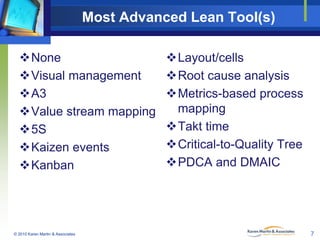
Most Advanced Lean Tool(s)
None
Visual management
A3
Value stream mapping
5S
Kaizen events
Kanban

© 2010 Karen Martin & Associates

Layout/cells
Root cause analysis
Metrics-based process
mapping
Takt time
Critical-to-Quality Tree
PDCA and DMAIC

7
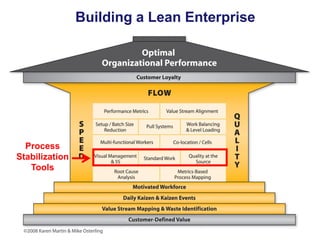
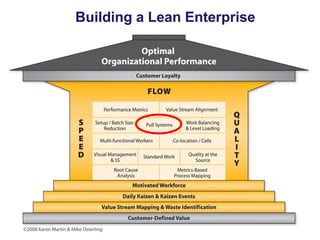
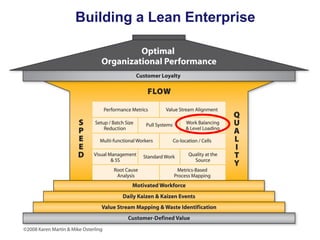
Building a Lean Enterprise

Process
Stabilization
Tools
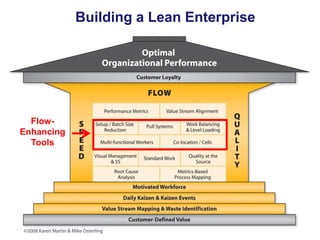
Building a Lean Enterprise

FlowEnhancing
Tools
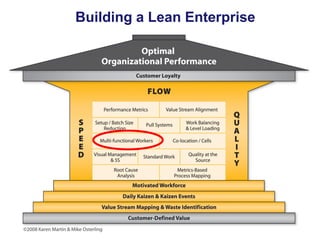
Building a Lean Enterprise
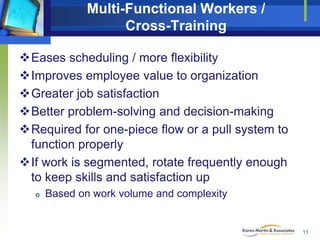
Multi-Functional Workers /
Cross-Training
Eases scheduling / more flexibility
Improves employee value to organization
Greater job satisfaction
Better problem-solving and decision-making
Required for one-piece flow or a pull system to
function properly
If work is segmented, rotate frequently enough
to keep skills and satisfaction up


Based on work volume and complexity

11
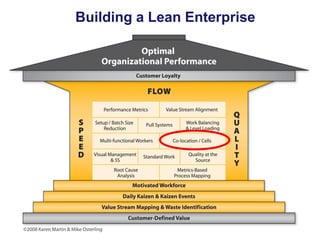
Building a Lean Enterprise
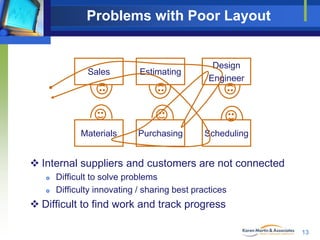
Problems with Poor Layout

Sales

Estimating

Design
Engineer

Materials

Purchasing

Scheduling

 Internal suppliers and customers are not connected



Difficult to solve problems
Difficulty innovating / sharing best practices

 Difficult to find work and track progress
13
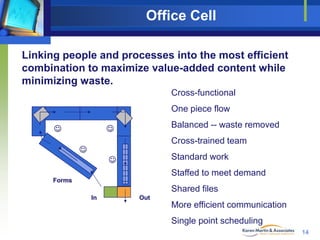
Office Cell
Linking people and processes into the most efficient
combination to maximize value-added content while
minimizing waste.
Cross-functional

One piece flow


Balanced -- waste removed



Cross-trained team



Standard work



Staffed to meet demand
Forms

Shared files
In

Out

More efficient communication
Single point scheduling
14
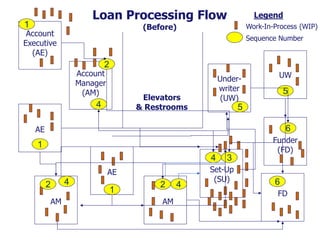
Loan Processing Flow

1

Legend
Work-In-Process (WIP)

(Before)

Account
Executive
(AE)

Sequence Number

2

Account
Manager
(AM)

Underwriter
(UW)

Elevators
& Restrooms

4

UW

5

5

AE

6
Funder
(FD)

1
4
AE

2
AM

4

1

2
AM

4

3

Set-Up
(SU)

6
FD
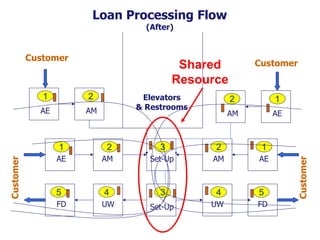
Loan Processing Flow
(After)

Customer

Customer

Shared
Resource

1
AE

Elevators
& Restrooms

2
AM

2

1

AM

AE

2

3

2

1

AE

AM

Set-Up

AM

AE

5

4

3

4

5

FD

UW

Set-Up

UW

FD

Customer

Customer

1
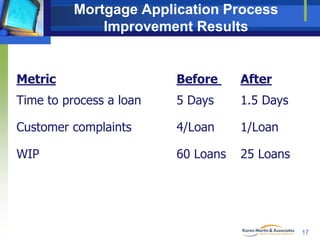
Mortgage Application Process
Improvement Results

Metric

Before

After

Time to process a loan

5 Days

1.5 Days

Customer complaints

4/Loan

1/Loan

WIP

60 Loans

25 Loans

17
Building a Lean Enterprise
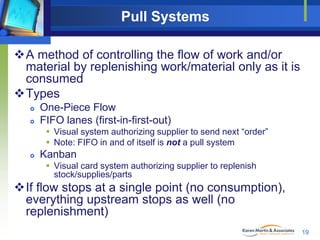
Pull Systems
A method of controlling the flow of work and/or
material by replenishing work/material only as it is
consumed
Types



One-Piece Flow
FIFO lanes (first-in-first-out)
 Visual system authorizing supplier to send next “order”
 Note: FIFO in and of itself is not a pull system



Kanban
 Visual card system authorizing supplier to replenish
stock/supplies/parts

If flow stops at a single point (no consumption),
everything upstream stops as well (no
replenishment)
19
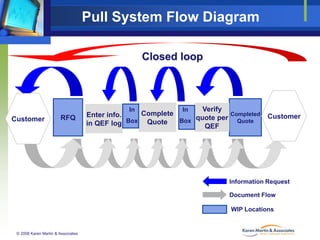
Pull System Flow Diagram
Closed loop

Customer

RFQ

Verify
In
In
Complete
Completed
Enter info.
quote per Quote
Box
in QEF log Box Quote
QEF

Customer

Information Request

Document Flow
WIP Locations

© 2008 Karen Martin & Associates
Pull Systems Concepts
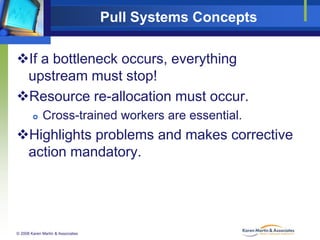
If a bottleneck occurs, everything
upstream must stop!
Resource re-allocation must occur.


Cross-trained workers are essential.

Highlights problems and makes corrective
action mandatory.

© 2008 Karen Martin & Associates
Pull System in Admin Processes
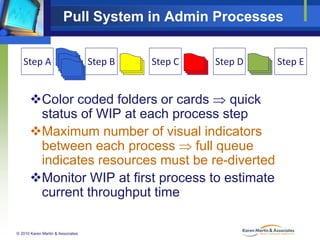
Step A

Step B

Step C

Step D

Color coded folders or cards  quick
status of WIP at each process step
Maximum number of visual indicators
between each process  full queue
indicates resources must be re-diverted
Monitor WIP at first process to estimate
current throughput time
© 2010 Karen Martin & Associates

Step E
Single Bin Kanban System
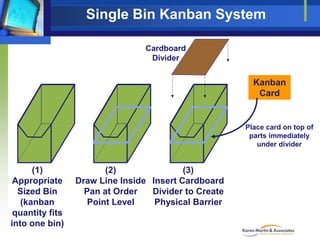
Cardboard
Divider

Kanban
Card

Place card on top of
parts immediately
under divider

(1)
Appropriate
Sized Bin
(kanban
quantity fits
into one bin)

(2)
(3)
Draw Line Inside Insert Cardboard
Pan at Order
Divider to Create
Point Level
Physical Barrier
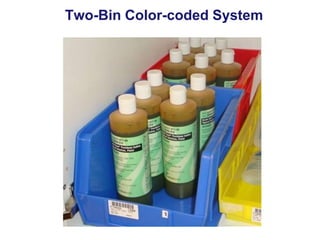
Two-Bin Color-coded System
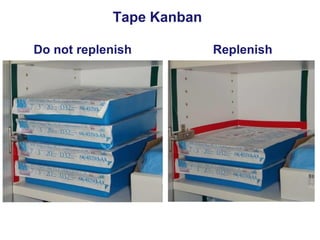
Tape Kanban
Do not replenish

Replenish
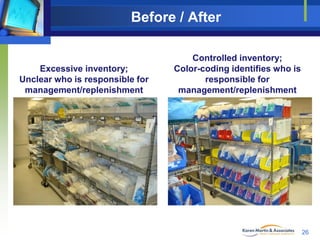
Before / After

Excessive inventory;
Unclear who is responsible for
management/replenishment

Controlled inventory;
Color-coding identifies who is
responsible for
management/replenishment

26
Building a Lean Enterprise
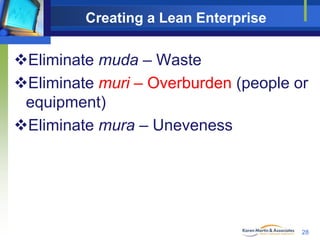
Creating a Lean Enterprise

Eliminate muda – Waste
Eliminate muri – Overburden (people or
equipment)
Eliminate mura – Uneveness

28
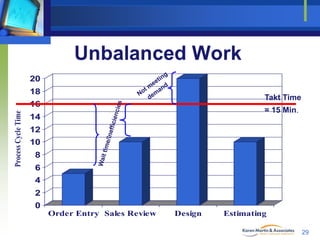
Unbalanced Work
20
18

Takt Time

Process Cycle Time

16

= 15 Min.

14
12
10
8
6
4
2
0
Order Entry Sales Review

Design

Estimating
29
Takt Time Application
German word being “pace” or “drumbeat”
Used for balancing work and reducing
bottlenecks (especially for high volume work)
Best when workers are dedicated to one type of
activity (even if for only a portion of the day)


Tough to use when workers are multi-tasked

Will vary based on heavier or lower demand
periods

30
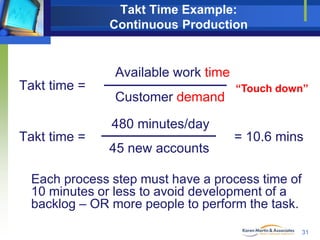
Takt Time Example:
Continuous Production

Available work time
Takt time =

Customer demand

“Touch down”

480 minutes/day
Takt time =

45 new accounts

= 10.6 mins

Each process step must have a process time of
10 minutes or less to avoid development of a
backlog – OR more people to perform the task.
31
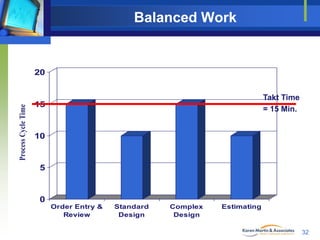
Balanced Work

Process Cycle Time

20
Takt Time
= 15 Min.

15

10

5

0
Order Entry &
Review

Standard
Design

Complex
Design

Estimating

32
Work Balancing Considerations
 Avoid creating excessively narrow scopes of
responsibility.
 “Production line” vs. one-stop-shop






Assess “between work item” mental setup (switching) required –
if redundant mental setup, consider one-stop-shop
Assess “within work item” mental setup (switching) required – if
too much, consider production line
Assess skill requirements – can one person easily do it all?

 Who’s job is it?


Be willing to challenge paradigms

 Segment the work when necessary

© 2010 Karen Martin & Associates

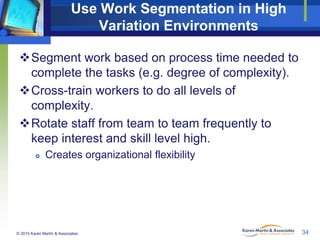
33
Use Work Segmentation in High
Variation Environments
Segment work based on process time needed to
complete the tasks (e.g. degree of complexity).
Cross-train workers to do all levels of
complexity.
Rotate staff from team to team frequently to
keep interest and skill level high.


Creates organizational flexibility

© 2010 Karen Martin & Associates

34
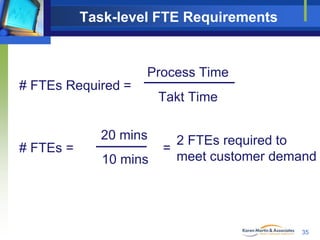
Task-level FTE Requirements

Process Time
# FTEs Required =

20 mins
# FTEs =

10 mins

Takt Time
2 FTEs required to
=
meet customer demand

35
Creating a Lean Enterprise

Eliminate muda – Waste
Eliminate muri – Overburden (people or
equipment)
Eliminate mura – Uneveness

36
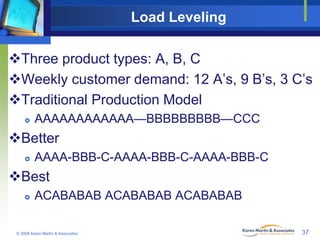
Load Leveling
Three product types: A, B, C
Weekly customer demand: 12 A’s, 9 B’s, 3 C’s
Traditional Production Model


AAAAAAAAAAAA—BBBBBBBBB—CCC

Better


AAAA-BBB-C-AAAA-BBB-C-AAAA-BBB-C

Best


ACABABAB ACABABAB ACABABAB

© 2008 Karen Martin & Associates

37
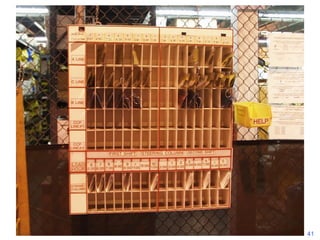
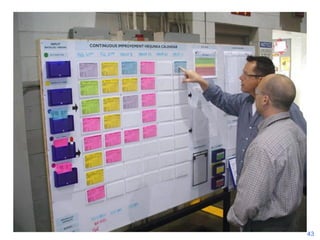
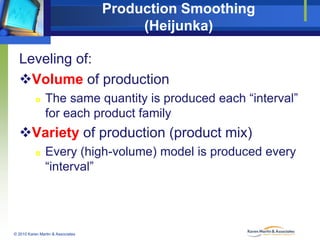
Production Smoothing
(Heijunka)
Leveling of:
Volume of production


The same quantity is produced each “interval”
for each product family

Variety of production (product mix)


Every (high-volume) model is produced every
“interval”

© 2010 Karen Martin & Associates
Load Leveling Tips
 First seek the root cause!
 When external customers are creating unlevel incoming
load




We have much more influence over external customer behavior
than we think.
Incentives:
 Information – e.g. add peak times to ACD phone recordings
 Financial – provide discounts, etc. for making requests during certain
time periods – e.g. sunset dinner specials

 When sales team creates unlevel incoming load


Change commission period/schedule.

 When internal department creates unlevel load, find out
why and apply a countermeasure or incentive that works
for all.
© 2010 Karen Martin & Associates

39
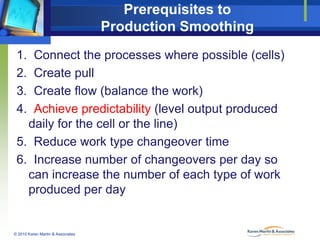
Prerequisites to
Production Smoothing
1.
2.
3.
4.

Connect the processes where possible (cells)
Create pull
Create flow (balance the work)
Achieve predictability (level output produced
daily for the cell or the line)
5. Reduce work type changeover time
6. Increase number of changeovers per day so
can increase the number of each type of work
produced per day

© 2010 Karen Martin & Associates
41
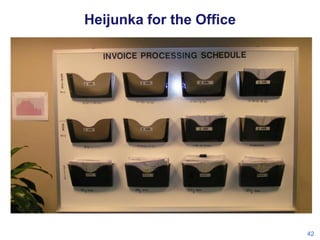
Heijunka for the Office

42
43
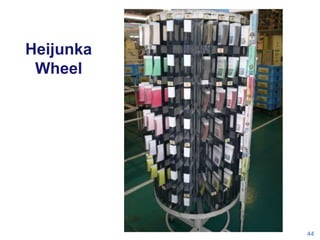
Heijunka
Wheel

44
Lean Management

© 2010 Karen Martin & Associates

45
Process Ownership & Value
Stream Alignment
 Value Stream Champion / Manager




Sole individual responsible for the performance of an entire
value stream across multiple departments or divisions.
Often carry P & L responsibility.

 Process Owner


Sole individual responsible for the performance of a process
across many functions, regardless of the org chart.
 Ongoing monitoring
 Ongoing improvement

 Org chart management



Direct reporting lines for day-to-day operation
Dotted lines to subject matter/policy expertise.

© 2010 Karen Martin & Associates

46
Creating Lean Leaders & Culture
The improvement professional’s primary role is
to sell and teach.


Many leaders aren’t improvement savvy.
 Help them understand the process, the resources required,
etc. – answer Why? Why? Why?



Many individuals have been “burned” by previous
improvement approaches and are fearful in today’s
economy.
 Help them see what’s in it for them.



Most people – from leadership to frontlines – aren’t
proficient problem solvers.
 Teach them to fish.

© 2010 Karen Martin & Associates

47
Looking for Stuff: Time is Money
Organization with 1,500 employees



Earn average of $22 per hour
Work 250 days per year

Each employee spends an average of 10
minutes per day looking or waiting for stuff


Individual impact
 = 41.7 hours wasted time per year
 = 0ver a week of frustrating, unfulfilling, nonproductive time



Organizational impact
 = 62,550 hours of nonproductive time
 30 FTEs worth of wasted resources
 = $1.4 unnecessary direct expense per year

© 2010 Karen Martin & Associates

48
Translating Office/Service
Improvements into Financial Terms
(aka “Monetizing Results”)

© 2010 Karen Martin & Associates

49
Monetizing Results –
Expense Reduction Possibilities
 Payroll



Paid overtime
Attrition (if flat or losing market share)

 In-sourcing previously outsourced services
 Supplies (one-time gain when implementing kanban)
 Software licenses
 Shipping expenses
 Facility-related



Leases
Utilities

 Borrowing expenses (due to improved cash flow)

© 2010 Karen Martin & Associates

50
Monetizing Results –
Cost Avoidance Possibilities
Freed capacity / hiring expenses
Turnover reduction / hiring expenses
Regulatory fines
Not scrapping nonreturnable material/supplies
Not ordering duplicate material/supplies
Not having to borrow money (due to improved
cash flow)

© 2010 Karen Martin & Associates

51
Monetizing Results – Revenue Gains, Revenue
Loss Avoidance, and Profit Gains

Freed capacity




Ability to absorb additional work without additional
labor or equipment
New revenue streams

Revenue gains



Shorter time to market
Sales team fully functional more quickly

Market share gains
Retaining high risk (“jeopardy”) accounts

© 2010 Karen Martin & Associates

52
Monetizing Results –
Revenue Loss Possibilities
Reducing PT in T&M Environments


Overcome by market share gains & new revenue
streams

© 2010 Karen Martin & Associates

53
For Further Questions

7770 Regents Road #635
San Diego, CA 92122
858.677.6799
ksm@ksmartin.com
Free webinars and monthly newsletter:
www.ksmartin.com/subscribe
Connect with us:

54

Advanced Lean Strategies for Office & Service Environments

  • 1.
    Lean Webinar Series: AdvancedLean for Office & Service November 9, 2010 Company LOGO
  • 2.
    Webinar Content How andwhen to use takt time to balance work. How to approach the need for load leveling. How cross-training and co-location is an essential step in a transformation. The vital role and responsibilities for process owners. How to achieve value stream alignment. How to translate operational metrics into financial terms. © 2010 Karen Martin & Associates 2
  • 3.
    Creating a LeanEnterprise Initial Lean focus  Eliminate muda – Waste Advanced Lean   Eliminate muri – Overburden (people or equipment) Eliminate mura – Uneveness © 2010 Karen Martin & Associates 3
  • 4.
    Your Instructor  Earlycareer as a scientist; migrated to quality & operations design and management in the mid-80’s.  Launched Karen Martin & Associates in 1993.  Specialize in Lean transformations in nonmanufacturing environments.  Co-author of The Kaizen Event Planner; co-developer of Metrics-Based Process Mapping: An Excel-Based Solution.  Instructor in University of California, San Diego’s Lean Enterprise program. © 2010 Karen Martin & Associates Karen Martin, Principal Karen Martin & Associates 4
  • 5.
    Webinar Participants’ Experience 60 49% 50 39% 40 30 20 9% 10 3% 0 TrueBeginner © 2010 Karen Martin & Associates Basic Understanding Skilled Highly Skilled 5
  • 6.
    Value Stream MappingProficiency 60 48% 50 40 35% 30 20 10 12% 5% 0 Never created one © 2010 Karen Martin & Associates Just learning Skilled Highly skilled 6
  • 7.
    Most Advanced LeanTool(s) None Visual management A3 Value stream mapping 5S Kaizen events Kanban © 2010 Karen Martin & Associates Layout/cells Root cause analysis Metrics-based process mapping Takt time Critical-to-Quality Tree PDCA and DMAIC 7
  • 8.
    Building a LeanEnterprise Process Stabilization Tools
  • 9.
    Building a LeanEnterprise FlowEnhancing Tools
  • 10.
    Building a LeanEnterprise
  • 11.
    Multi-Functional Workers / Cross-Training Easesscheduling / more flexibility Improves employee value to organization Greater job satisfaction Better problem-solving and decision-making Required for one-piece flow or a pull system to function properly If work is segmented, rotate frequently enough to keep skills and satisfaction up  Based on work volume and complexity 11
  • 12.
    Building a LeanEnterprise
  • 13.
    Problems with PoorLayout Sales Estimating Design Engineer Materials Purchasing Scheduling  Internal suppliers and customers are not connected   Difficult to solve problems Difficulty innovating / sharing best practices  Difficult to find work and track progress 13
  • 14.
    Office Cell Linking peopleand processes into the most efficient combination to maximize value-added content while minimizing waste. Cross-functional One piece flow  Balanced -- waste removed  Cross-trained team  Standard work  Staffed to meet demand Forms Shared files In Out More efficient communication Single point scheduling 14
  • 15.
    Loan Processing Flow 1 Legend Work-In-Process(WIP) (Before) Account Executive (AE) Sequence Number 2 Account Manager (AM) Underwriter (UW) Elevators & Restrooms 4 UW 5 5 AE 6 Funder (FD) 1 4 AE 2 AM 4 1 2 AM 4 3 Set-Up (SU) 6 FD
  • 16.
    Loan Processing Flow (After) Customer Customer Shared Resource 1 AE Elevators &Restrooms 2 AM 2 1 AM AE 2 3 2 1 AE AM Set-Up AM AE 5 4 3 4 5 FD UW Set-Up UW FD Customer Customer 1
  • 17.
    Mortgage Application Process ImprovementResults Metric Before After Time to process a loan 5 Days 1.5 Days Customer complaints 4/Loan 1/Loan WIP 60 Loans 25 Loans 17
  • 18.
    Building a LeanEnterprise
  • 19.
    Pull Systems A methodof controlling the flow of work and/or material by replenishing work/material only as it is consumed Types   One-Piece Flow FIFO lanes (first-in-first-out)  Visual system authorizing supplier to send next “order”  Note: FIFO in and of itself is not a pull system  Kanban  Visual card system authorizing supplier to replenish stock/supplies/parts If flow stops at a single point (no consumption), everything upstream stops as well (no replenishment) 19
  • 20.
    Pull System FlowDiagram Closed loop Customer RFQ Verify In In Complete Completed Enter info. quote per Quote Box in QEF log Box Quote QEF Customer Information Request Document Flow WIP Locations © 2008 Karen Martin & Associates
  • 21.
    Pull Systems Concepts Ifa bottleneck occurs, everything upstream must stop! Resource re-allocation must occur.  Cross-trained workers are essential. Highlights problems and makes corrective action mandatory. © 2008 Karen Martin & Associates
  • 22.
    Pull System inAdmin Processes Step A Step B Step C Step D Color coded folders or cards  quick status of WIP at each process step Maximum number of visual indicators between each process  full queue indicates resources must be re-diverted Monitor WIP at first process to estimate current throughput time © 2010 Karen Martin & Associates Step E
  • 23.
    Single Bin KanbanSystem Cardboard Divider Kanban Card Place card on top of parts immediately under divider (1) Appropriate Sized Bin (kanban quantity fits into one bin) (2) (3) Draw Line Inside Insert Cardboard Pan at Order Divider to Create Point Level Physical Barrier
  • 24.
  • 25.
    Tape Kanban Do notreplenish Replenish
  • 26.
    Before / After Excessiveinventory; Unclear who is responsible for management/replenishment Controlled inventory; Color-coding identifies who is responsible for management/replenishment 26
  • 27.
    Building a LeanEnterprise
  • 28.
    Creating a LeanEnterprise Eliminate muda – Waste Eliminate muri – Overburden (people or equipment) Eliminate mura – Uneveness 28
  • 29.
    Unbalanced Work 20 18 Takt Time ProcessCycle Time 16 = 15 Min. 14 12 10 8 6 4 2 0 Order Entry Sales Review Design Estimating 29
  • 30.
    Takt Time Application Germanword being “pace” or “drumbeat” Used for balancing work and reducing bottlenecks (especially for high volume work) Best when workers are dedicated to one type of activity (even if for only a portion of the day)  Tough to use when workers are multi-tasked Will vary based on heavier or lower demand periods 30
  • 31.
    Takt Time Example: ContinuousProduction Available work time Takt time = Customer demand “Touch down” 480 minutes/day Takt time = 45 new accounts = 10.6 mins Each process step must have a process time of 10 minutes or less to avoid development of a backlog – OR more people to perform the task. 31
  • 32.
    Balanced Work Process CycleTime 20 Takt Time = 15 Min. 15 10 5 0 Order Entry & Review Standard Design Complex Design Estimating 32
  • 33.
    Work Balancing Considerations Avoid creating excessively narrow scopes of responsibility.  “Production line” vs. one-stop-shop    Assess “between work item” mental setup (switching) required – if redundant mental setup, consider one-stop-shop Assess “within work item” mental setup (switching) required – if too much, consider production line Assess skill requirements – can one person easily do it all?  Who’s job is it?  Be willing to challenge paradigms  Segment the work when necessary © 2010 Karen Martin & Associates 33
  • 34.
    Use Work Segmentationin High Variation Environments Segment work based on process time needed to complete the tasks (e.g. degree of complexity). Cross-train workers to do all levels of complexity. Rotate staff from team to team frequently to keep interest and skill level high.  Creates organizational flexibility © 2010 Karen Martin & Associates 34
  • 35.
    Task-level FTE Requirements ProcessTime # FTEs Required = 20 mins # FTEs = 10 mins Takt Time 2 FTEs required to = meet customer demand 35
  • 36.
    Creating a LeanEnterprise Eliminate muda – Waste Eliminate muri – Overburden (people or equipment) Eliminate mura – Uneveness 36
  • 37.
    Load Leveling Three producttypes: A, B, C Weekly customer demand: 12 A’s, 9 B’s, 3 C’s Traditional Production Model  AAAAAAAAAAAA—BBBBBBBBB—CCC Better  AAAA-BBB-C-AAAA-BBB-C-AAAA-BBB-C Best  ACABABAB ACABABAB ACABABAB © 2008 Karen Martin & Associates 37
  • 38.
    Production Smoothing (Heijunka) Leveling of: Volumeof production  The same quantity is produced each “interval” for each product family Variety of production (product mix)  Every (high-volume) model is produced every “interval” © 2010 Karen Martin & Associates
  • 39.
    Load Leveling Tips First seek the root cause!  When external customers are creating unlevel incoming load   We have much more influence over external customer behavior than we think. Incentives:  Information – e.g. add peak times to ACD phone recordings  Financial – provide discounts, etc. for making requests during certain time periods – e.g. sunset dinner specials  When sales team creates unlevel incoming load  Change commission period/schedule.  When internal department creates unlevel load, find out why and apply a countermeasure or incentive that works for all. © 2010 Karen Martin & Associates 39
  • 40.
    Prerequisites to Production Smoothing 1. 2. 3. 4. Connectthe processes where possible (cells) Create pull Create flow (balance the work) Achieve predictability (level output produced daily for the cell or the line) 5. Reduce work type changeover time 6. Increase number of changeovers per day so can increase the number of each type of work produced per day © 2010 Karen Martin & Associates
  • 41.
  • 42.
  • 43.
  • 44.
  • 45.
    Lean Management © 2010Karen Martin & Associates 45
  • 46.
    Process Ownership &Value Stream Alignment  Value Stream Champion / Manager   Sole individual responsible for the performance of an entire value stream across multiple departments or divisions. Often carry P & L responsibility.  Process Owner  Sole individual responsible for the performance of a process across many functions, regardless of the org chart.  Ongoing monitoring  Ongoing improvement  Org chart management   Direct reporting lines for day-to-day operation Dotted lines to subject matter/policy expertise. © 2010 Karen Martin & Associates 46
  • 47.
    Creating Lean Leaders& Culture The improvement professional’s primary role is to sell and teach.  Many leaders aren’t improvement savvy.  Help them understand the process, the resources required, etc. – answer Why? Why? Why?  Many individuals have been “burned” by previous improvement approaches and are fearful in today’s economy.  Help them see what’s in it for them.  Most people – from leadership to frontlines – aren’t proficient problem solvers.  Teach them to fish. © 2010 Karen Martin & Associates 47
  • 48.
    Looking for Stuff:Time is Money Organization with 1,500 employees   Earn average of $22 per hour Work 250 days per year Each employee spends an average of 10 minutes per day looking or waiting for stuff  Individual impact  = 41.7 hours wasted time per year  = 0ver a week of frustrating, unfulfilling, nonproductive time  Organizational impact  = 62,550 hours of nonproductive time  30 FTEs worth of wasted resources  = $1.4 unnecessary direct expense per year © 2010 Karen Martin & Associates 48
  • 49.
    Translating Office/Service Improvements intoFinancial Terms (aka “Monetizing Results”) © 2010 Karen Martin & Associates 49
  • 50.
    Monetizing Results – ExpenseReduction Possibilities  Payroll   Paid overtime Attrition (if flat or losing market share)  In-sourcing previously outsourced services  Supplies (one-time gain when implementing kanban)  Software licenses  Shipping expenses  Facility-related   Leases Utilities  Borrowing expenses (due to improved cash flow) © 2010 Karen Martin & Associates 50
  • 51.
    Monetizing Results – CostAvoidance Possibilities Freed capacity / hiring expenses Turnover reduction / hiring expenses Regulatory fines Not scrapping nonreturnable material/supplies Not ordering duplicate material/supplies Not having to borrow money (due to improved cash flow) © 2010 Karen Martin & Associates 51
  • 52.
    Monetizing Results –Revenue Gains, Revenue Loss Avoidance, and Profit Gains Freed capacity   Ability to absorb additional work without additional labor or equipment New revenue streams Revenue gains   Shorter time to market Sales team fully functional more quickly Market share gains Retaining high risk (“jeopardy”) accounts © 2010 Karen Martin & Associates 52
  • 53.
    Monetizing Results – RevenueLoss Possibilities Reducing PT in T&M Environments  Overcome by market share gains & new revenue streams © 2010 Karen Martin & Associates 53
  • 54.
    For Further Questions 7770Regents Road #635 San Diego, CA 92122 858.677.6799 ksm@ksmartin.com Free webinars and monthly newsletter: www.ksmartin.com/subscribe Connect with us: 54