SAP GL Advance Functions
Select a GL account with open item in Balance sheet, a customer and a vendor.
Using FB50, FB60 and FB70 create entries in previous Calendar month.
Complete the configuration for Open Item, Customer and Vendor account interest calculations,
if any required.
Calculate, verify and post interest in GL account. Document each step from configuration, to
data entry and interest calculations. There will be 3 sets of documents, one for open item, one
for vendor, one for customer.
--- by Guangfu li
Calculating the g/l balance interest
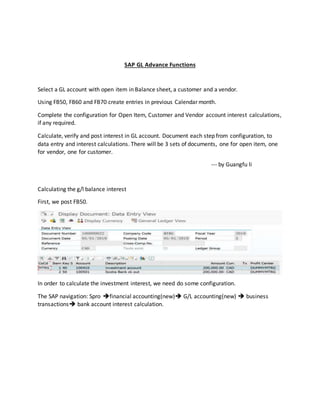
First, we post FB50.
In order to calculate the investment interest, we need do some configuration.
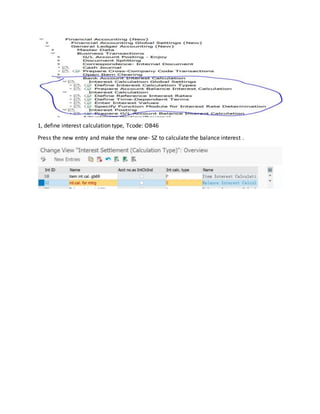
The SAP navigation: Spro financial accounting(new) G/L accounting(new)  business
transactions bank account interest calculation.
1, define interest calculation type, Tcode: OB46
Press the new entry and make the new one- SZ to calculate the balance interest .
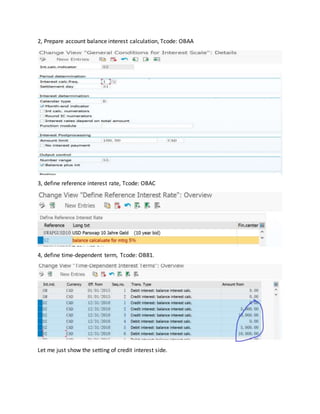
2, Prepare account balance interest calculation, Tcode: OBAA
3, define reference interest rate, Tcode: OBAC
4, define time-dependent term, Tcode: OB81.
Let me just show the setting of credit interest side.
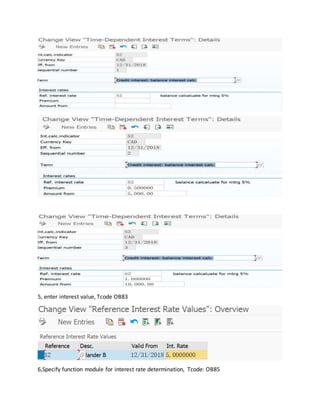
5, enter interest value, Tcode OB83
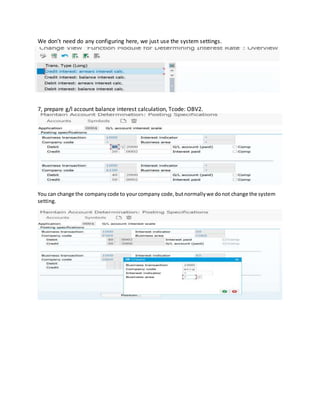
6,Specify function module for interest rate determination, Tcode: OB85
We don’t need do any configuring here, we just use the system settings.
7, prepare g/l account balance interest calculation, Tcode: OBV2.
You can change the companycode to yourcompany code,butnormallywe donot change the system
setting.
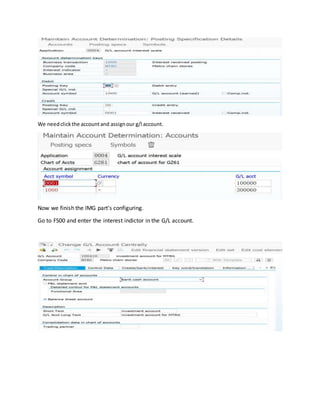
We needclickthe accountand assignour g/l account.
Now we finish the IMG part’s configuring.
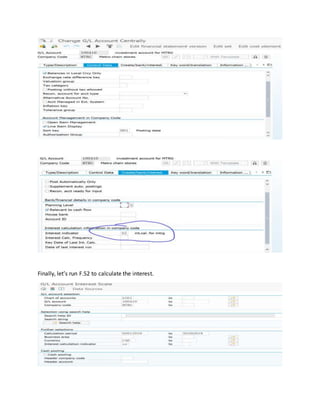
Go to FS00 and enter the interest indictor in the G/L account.
Finally, let’s run F.52 to calculate the interest.
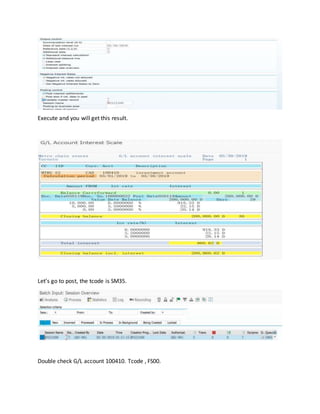
Execute and you will get this result.
Let’s go to post, the tcode is SM35.
Double check G/L account 100410. Tcode , FS00.
And use FB03, check the posting.
Calculate the customer interest.
In customer interest calculating, we usually calculate the line item.
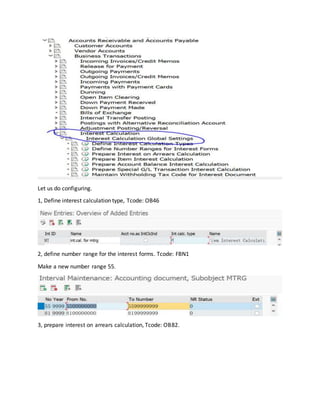
The Sap navigating: Spro Financial accounting accounts receivable and accounts
payablebusiness transaction interest callculation
Let us do configuring.
1, Define interest calculation type, Tcode: OB46
2, define number range for the interest forms. Tcode: FBN1
Make a new number range 55.
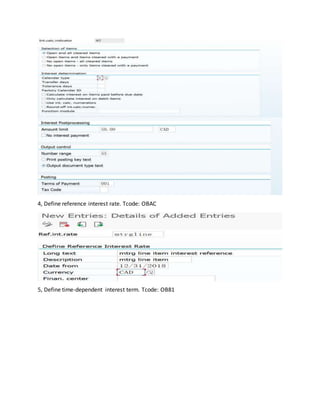
3, prepare interest on arrears calculation, Tcode: OB82.
4, Define reference interest rate. Tcode: OBAC
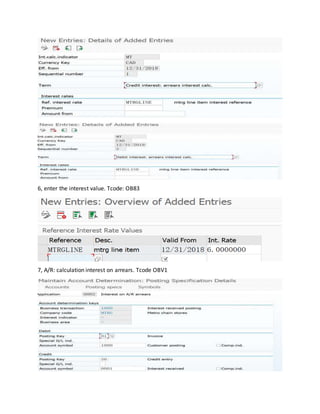
5, Define time-dependent interest term. Tcode: OB81
6, enter the interest value. Tcode: OB83
7, A/R: calculation interest on arrears. Tcode OBV1
8, assign the form for interest calculation. Tcode: OB84
9, FD01 create new customer and assign the interest calculating indicator.
10, FB70, post the invoice.
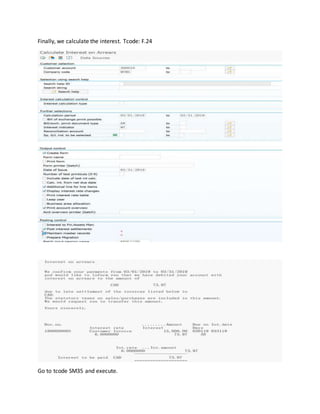
Finally, we calculate the interest. Tcode: F.24
Go to tcode SM35 and execute.
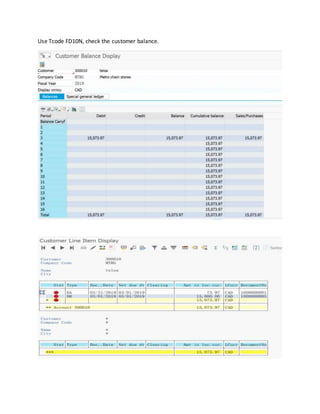
Use Tcode FD10N, check the customer balance.
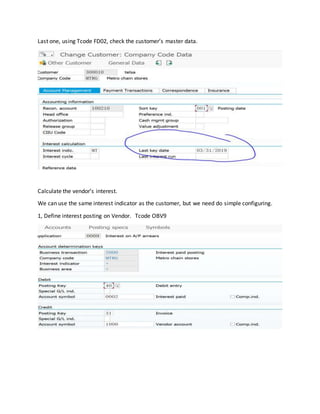
Last one, using Tcode FD02, check the customer’s master data.
Calculate the vendor’s interest.
We can use the same interest indicator as the customer, but we need do simple configuring.
1, Define interest posting on Vendor. Tcode OBV9
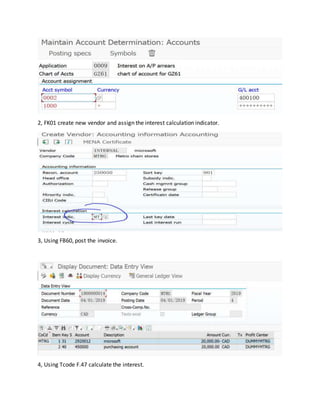
2, FK01 create new vendor and assign the interest calculation indicator.
3, Using FB60, post the invoice.
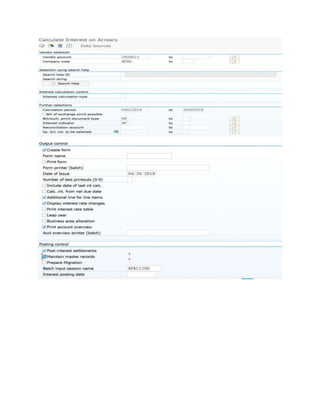
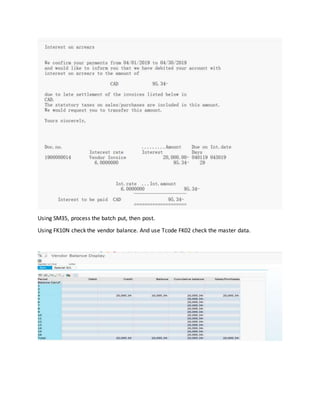
4, Using Tcode F.47 calculate the interest.
Using SM35, process the batch put, then post.
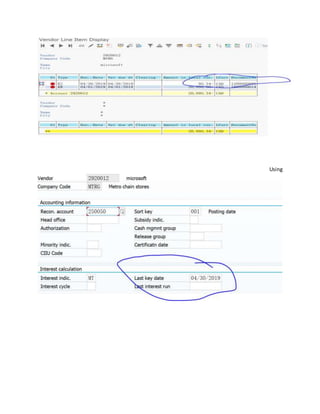
Using FK10N check the vendor balance. And use Tcode FK02 check the master data.
Using
Advanced fi functions  calculating interest

Advanced fi functions calculating interest

  • 1.
    SAP GL AdvanceFunctions Select a GL account with open item in Balance sheet, a customer and a vendor. Using FB50, FB60 and FB70 create entries in previous Calendar month. Complete the configuration for Open Item, Customer and Vendor account interest calculations, if any required. Calculate, verify and post interest in GL account. Document each step from configuration, to data entry and interest calculations. There will be 3 sets of documents, one for open item, one for vendor, one for customer. --- by Guangfu li Calculating the g/l balance interest First, we post FB50. In order to calculate the investment interest, we need do some configuration. The SAP navigation: Spro financial accounting(new) G/L accounting(new)  business transactions bank account interest calculation.
  • 2.
    1, define interestcalculation type, Tcode: OB46 Press the new entry and make the new one- SZ to calculate the balance interest .
  • 3.
    2, Prepare accountbalance interest calculation, Tcode: OBAA 3, define reference interest rate, Tcode: OBAC 4, define time-dependent term, Tcode: OB81. Let me just show the setting of credit interest side.
  • 4.
    5, enter interestvalue, Tcode OB83 6,Specify function module for interest rate determination, Tcode: OB85
  • 5.
    We don’t needdo any configuring here, we just use the system settings. 7, prepare g/l account balance interest calculation, Tcode: OBV2. You can change the companycode to yourcompany code,butnormallywe donot change the system setting.
  • 6.
    We needclickthe accountandassignour g/l account. Now we finish the IMG part’s configuring. Go to FS00 and enter the interest indictor in the G/L account.
  • 7.
    Finally, let’s runF.52 to calculate the interest.
  • 8.
    Execute and youwill get this result. Let’s go to post, the tcode is SM35. Double check G/L account 100410. Tcode , FS00.
  • 9.
    And use FB03,check the posting. Calculate the customer interest. In customer interest calculating, we usually calculate the line item. The Sap navigating: Spro Financial accounting accounts receivable and accounts payablebusiness transaction interest callculation
  • 10.
    Let us doconfiguring. 1, Define interest calculation type, Tcode: OB46 2, define number range for the interest forms. Tcode: FBN1 Make a new number range 55. 3, prepare interest on arrears calculation, Tcode: OB82.
  • 11.
    4, Define referenceinterest rate. Tcode: OBAC 5, Define time-dependent interest term. Tcode: OB81
  • 12.
    6, enter theinterest value. Tcode: OB83 7, A/R: calculation interest on arrears. Tcode OBV1
  • 13.
    8, assign theform for interest calculation. Tcode: OB84 9, FD01 create new customer and assign the interest calculating indicator. 10, FB70, post the invoice.
  • 14.
    Finally, we calculatethe interest. Tcode: F.24 Go to tcode SM35 and execute.
  • 15.
    Use Tcode FD10N,check the customer balance.
  • 16.
    Last one, usingTcode FD02, check the customer’s master data. Calculate the vendor’s interest. We can use the same interest indicator as the customer, but we need do simple configuring. 1, Define interest posting on Vendor. Tcode OBV9
  • 17.
    2, FK01 createnew vendor and assign the interest calculation indicator. 3, Using FB60, post the invoice. 4, Using Tcode F.47 calculate the interest.
  • 19.
    Using SM35, processthe batch put, then post. Using FK10N check the vendor balance. And use Tcode FK02 check the master data.
  • 20.