Project for FI AR
--presented by Guangfu
Task 1
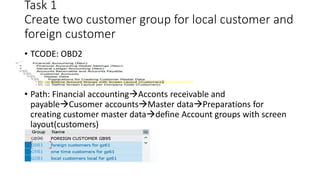
Create two customer group for local customer and
foreign customer
• TCODE: OBD2
• Path: Financial accountingAcconts receivable and
payableCusomer accountsMaster dataPreparations for
creating customer master datadefine Account groups with screen
layout(customers)
Task 2
Make Name, City, Street, Region, Reconciliation account, payment terms, dunning as
required entry in both Group and you are not allowed to make changes in
reconciliation accounts even in change mode, it will be in display mode only.
• Tcode : OBD2
TCODE: OB20
Path: Financial accounting  Acconts receivable and payable  Cusomer
accounts Master data  Preparations for creating customer master data
define screen layout per activity(customers)
Task 3
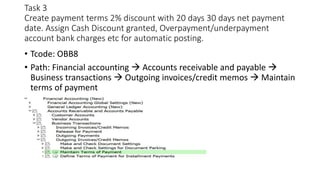
Create payment terms 2% discount with 20 days 30 days net payment
date. Assign Cash Discount granted, Overpayment/underpayment
account bank charges etc for automatic posting.
• Tcode: OBB8
• Path: Financial accounting  Accounts receivable and payable 
Business transactions  Outgoing invoices/credit memos  Maintain
terms of payment
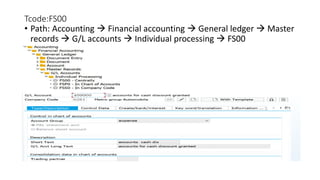
Tcode:FS00
• Path: Accounting  Financial accounting  General ledger  Master
records  G/L accounts  Individual processing  FS00
Assign Cash Discount granted
• Tcode: OBXI
• Path: Financial accounting  Accounts receivable and payable 
Business transactions  Incoming payments  Incoming payments
global settings  Make and check document settings  define
accounts for cash discount grants
Assign Overpayment/underpayment account
• Tcode: OBXL
• Path: Financial accounting  Accounts receivable and payable 
Business transactions  Incoming payments  Incoming payments
global settings  Make and check document settings  define
accounts for overpayments/underpayments
Assign bank charges
• Tcode: OBXK
• Path: Financial accounting  Accounts receivable and payable 
Business transactions  Incoming payments  Incoming payments
global settings  Make and check document settings  define
accounts for bank charges (customers)
Task 4
Down payment from customer f-29 10000
Book customer invoice with fb70, f-22 50000
Book credit memo fb75, f-27 5000
Clear down payment f-39 5000
Receive the payment with f-28 10 cad short
Allow to post difference up to 50 CAD only for both types of customer.
• Tcode: F-29
• Path: Accounting  Financial accounting Accounts receivable 
Document entry  down payment  F-29
Tcode FB70
• Path: Accounting Financial accounting  Accounts receivable 
document entry  FB70
Tcode : FB75
• Path: Accounting Financial accounting  Accounts receivable 
document entry  FB75
Tcode: F-39
• Path: Accounting  Financial accounting Accounts receivable 
Document entry  down payment  F-39
Tcode: OBA3
Path: Spro  Financial accounting  accounts receivable and payable
 business transactions open item clearing clearing differences
define tolerances for customers/vendors
Tcode: F-39
Path: Accounting Financial accounting  Accounts receivable 
document entry  FB75
Task 5
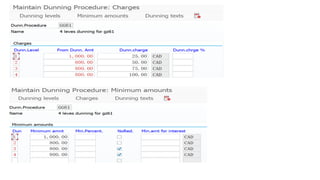
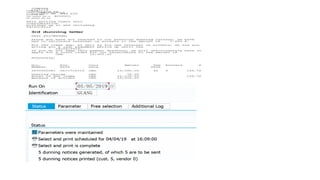
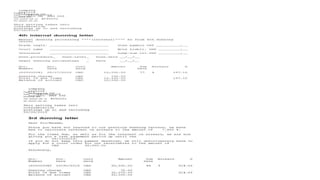
Create dunning program for customer and issue dunning letter to your
customer for timely payment
• Tcode: FBMP
• Path: Financial Accounting Accounts receivable and payable
Business transaction Dunning  Dunning proceduredefine
dunning procedure
Tcode: F150
• Path: Accounting Financial accounting Accounts receivable
Periodic processing F150
Task 6
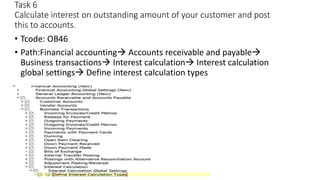
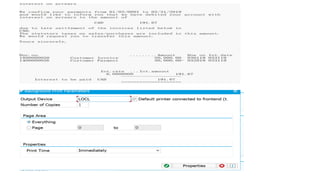
Calculate interest on outstanding amount of your customer and post
this to accounts.
• Tcode: OB46
• Path:Financial accounting Accounts receivable and payable
Business transactions Interest calculation Interest calculation
global settings Define interest calculation types
Tcode: OB82
• Path: Financial accounting Accounts receivable and payable
Business transactions Interest calculation Interest calculation
global settingsPrepare interest onarreas calculation
TCODE: SPRO
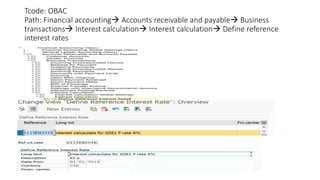
Tcode: OBAC
Path: Financial accounting Accounts receivable and payable Business
transactions Interest calculation Interest calculation Define reference
interest rates
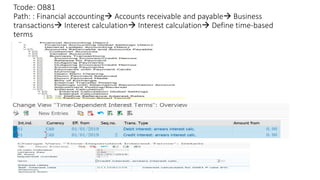
Tcode: OB81
Path: : Financial accounting Accounts receivable and payable Business
transactions Interest calculation Interest calculation Define time-based
terms
Tcode: OB83
Path: Financial accounting Accounts receivable and payable
Business transactions Interest calculation Interest calculation
Enter interest values
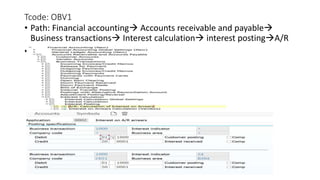
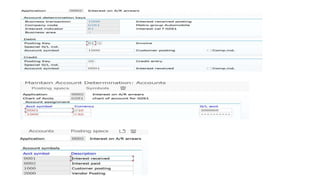
Tcode: OBV1
• Path: Financial accounting Accounts receivable and payable
Business transactions Interest calculation interest postingA/R
•
Tcode: OB84
Path: Financial accounting Accounts receivable and payable
Business transactions Interest calculation print Assign forms for
interest indicators
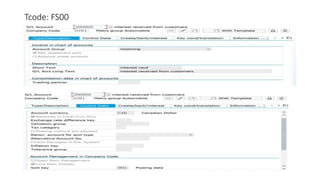
Tcode: FS00
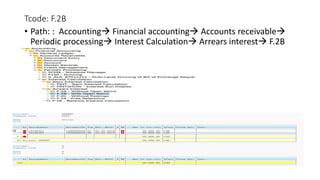
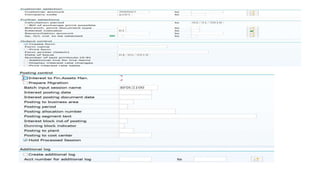
Tcode: F.2B
• Path: : Accounting Financial accounting Accounts receivable
Periodic processing Interest Calculation Arrears interest F.2B
Advance setting for accounting receivable

Advance setting for accounting receivable

  • 1.
    Project for FIAR --presented by Guangfu
  • 2.
    Task 1 Create twocustomer group for local customer and foreign customer • TCODE: OBD2 • Path: Financial accountingAcconts receivable and payableCusomer accountsMaster dataPreparations for creating customer master datadefine Account groups with screen layout(customers)
  • 3.
    Task 2 Make Name,City, Street, Region, Reconciliation account, payment terms, dunning as required entry in both Group and you are not allowed to make changes in reconciliation accounts even in change mode, it will be in display mode only. • Tcode : OBD2
  • 5.
    TCODE: OB20 Path: Financialaccounting  Acconts receivable and payable  Cusomer accounts Master data  Preparations for creating customer master data define screen layout per activity(customers)
  • 6.
    Task 3 Create paymentterms 2% discount with 20 days 30 days net payment date. Assign Cash Discount granted, Overpayment/underpayment account bank charges etc for automatic posting. • Tcode: OBB8 • Path: Financial accounting  Accounts receivable and payable  Business transactions  Outgoing invoices/credit memos  Maintain terms of payment
  • 8.
    Tcode:FS00 • Path: Accounting Financial accounting  General ledger  Master records  G/L accounts  Individual processing  FS00
  • 12.
    Assign Cash Discountgranted • Tcode: OBXI • Path: Financial accounting  Accounts receivable and payable  Business transactions  Incoming payments  Incoming payments global settings  Make and check document settings  define accounts for cash discount grants
  • 13.
    Assign Overpayment/underpayment account •Tcode: OBXL • Path: Financial accounting  Accounts receivable and payable  Business transactions  Incoming payments  Incoming payments global settings  Make and check document settings  define accounts for overpayments/underpayments
  • 14.
    Assign bank charges •Tcode: OBXK • Path: Financial accounting  Accounts receivable and payable  Business transactions  Incoming payments  Incoming payments global settings  Make and check document settings  define accounts for bank charges (customers)
  • 15.
    Task 4 Down paymentfrom customer f-29 10000 Book customer invoice with fb70, f-22 50000 Book credit memo fb75, f-27 5000 Clear down payment f-39 5000 Receive the payment with f-28 10 cad short Allow to post difference up to 50 CAD only for both types of customer. • Tcode: F-29 • Path: Accounting  Financial accounting Accounts receivable  Document entry  down payment  F-29
  • 17.
    Tcode FB70 • Path:Accounting Financial accounting  Accounts receivable  document entry  FB70
  • 18.
    Tcode : FB75 •Path: Accounting Financial accounting  Accounts receivable  document entry  FB75
  • 19.
    Tcode: F-39 • Path:Accounting  Financial accounting Accounts receivable  Document entry  down payment  F-39
  • 21.
    Tcode: OBA3 Path: Spro Financial accounting  accounts receivable and payable  business transactions open item clearing clearing differences define tolerances for customers/vendors
  • 22.
    Tcode: F-39 Path: AccountingFinancial accounting  Accounts receivable  document entry  FB75
  • 23.
    Task 5 Create dunningprogram for customer and issue dunning letter to your customer for timely payment • Tcode: FBMP • Path: Financial Accounting Accounts receivable and payable Business transaction Dunning  Dunning proceduredefine dunning procedure
  • 27.
    Tcode: F150 • Path:Accounting Financial accounting Accounts receivable Periodic processing F150
  • 32.
    Task 6 Calculate intereston outstanding amount of your customer and post this to accounts. • Tcode: OB46 • Path:Financial accounting Accounts receivable and payable Business transactions Interest calculation Interest calculation global settings Define interest calculation types
  • 34.
    Tcode: OB82 • Path:Financial accounting Accounts receivable and payable Business transactions Interest calculation Interest calculation global settingsPrepare interest onarreas calculation
  • 36.
  • 37.
    Tcode: OBAC Path: Financialaccounting Accounts receivable and payable Business transactions Interest calculation Interest calculation Define reference interest rates
  • 38.
    Tcode: OB81 Path: :Financial accounting Accounts receivable and payable Business transactions Interest calculation Interest calculation Define time-based terms
  • 39.
    Tcode: OB83 Path: Financialaccounting Accounts receivable and payable Business transactions Interest calculation Interest calculation Enter interest values
  • 40.
    Tcode: OBV1 • Path:Financial accounting Accounts receivable and payable Business transactions Interest calculation interest postingA/R •
  • 42.
    Tcode: OB84 Path: Financialaccounting Accounts receivable and payable Business transactions Interest calculation print Assign forms for interest indicators
  • 43.
  • 44.
    Tcode: F.2B • Path:: Accounting Financial accounting Accounts receivable Periodic processing Interest Calculation Arrears interest F.2B