StudentName: Guangfu LI Date: Aug14 2019
1 | P a g e
SAP Profit Center Accounting and Profitibility Analysis
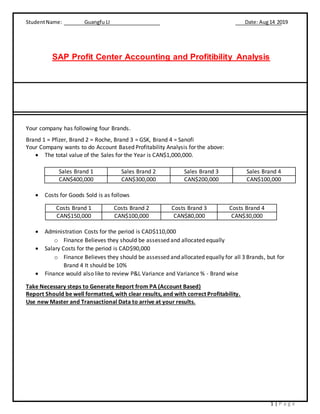
Your company has following four Brands.
Brand 1 = Pfizer, Brand 2 = Roche, Brand 3 = GSK, Brand 4 = Sanofi
Your Company wants to do Account Based Profitability Analysis for the above:
 The total value of the Sales for the Year is CAN$1,000,000.
Sales Brand 1 Sales Brand 2 Sales Brand 3 Sales Brand 4
CAN$400,000 CAN$300,000 CAN$200,000 CAN$100,000
 Costs for Goods Sold is as follows
Costs Brand 1 Costs Brand 2 Costs Brand 3 Costs Brand 4
CAN$150,000 CAN$100,000 CAN$80,000 CAN$30,000
 Administration Costs for the period is CAD$110,000
o Finance Believes they should be assessed and allocated equally
 Salary Costs for the period is CAD$90,000
o Finance Believes they should be assessed and allocated equally for all 3 Brands, but for
Brand 4 It should be 10%
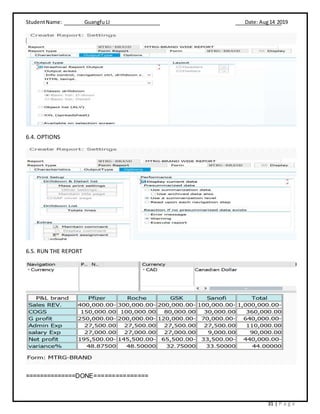
 Finance would also like to review P&L Variance and Variance % - Brand wise
Take Necessary steps to Generate Report from PA (Account Based)
Report Should be well formatted, with clear results, and with correct Profitability.
Use new Master and Transactional Data to arrive at your results.
StudentName: Guangfu LI Date: Aug14 2019
2 | P a g e
Index
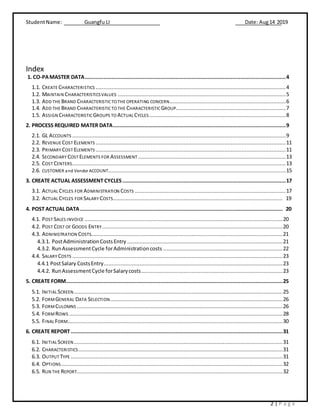
1. CO-PAMASTER DATA................................................................................................................................4
1.1. CREATE CHARACTERISTICS .........................................................................................................................4
1.2. MAINTAIN CHARACTERISTICSVALUES ...........................................................................................................5
1.3. ADD THE BRAND CHARACTERISTICTO THE OPERATING CONCERN..........................................................................6
1.4. ADD THE BRAND CHARACTERISTICTO THE CHARACTERISTIC GROUP......................................................................7
1.5. ASSIGN CHARACTERISTICGROUPS TO ACTUAL CYCLES.......................................................................................8
2. PROCESS REQUIRED MATER DATA..............................................................................................................9
2.1. GL ACCOUNTS ........................................................................................................................................9
2.2. REVENUE COST ELEMENTS .........................................................................................................................11
2.3. PRIMARY COST ELEMENTS .........................................................................................................................11
2.4. SECONDARY COST ELEMENTS FOR ASSESSMENT ..............................................................................................13
2.5. COST CENTERS........................................................................................................................................13
2.6. CUSTOMER and Vendor ACCOUNT.................................................................................................................15
3. CREATE ACTUAL ASSESSMENT CYCLES ........................................................................................................17
3.1. ACTUAL CYCLES FOR ADMINISTRATION COSTS ................................................................................................17
3.2. ACTUAL CYCLES FOR SALARY COSTS............................................................................................................ 19
4. POST ACTUAL DATA................................................................................................................................. 20
4.1. POST SALES INVOICE ..............................................................................................................................20
4.2. POST COST OF GOODS ENTRY...................................................................................................................20
4.3. ADNINISTRATION COSTS..........................................................................................................................21
4.3.1. PostAdministrationCostsEntry ...................................................................................................21
4.3.2. RunAssessmentCycle forAdministrationcosts ............................................................................22
4.4. SALARY COSTS ......................................................................................................................................23
4.4.1 PostSalary CostsEntry..................................................................................................................23
4.4.2. RunAssessmentCycle forSalarycosts..........................................................................................23
5. CREATE FORM..........................................................................................................................................25
5.1. INITIAL SCREEN.....................................................................................................................................25
5.2. FORMGENERAL DATA SELECTION..............................................................................................................26
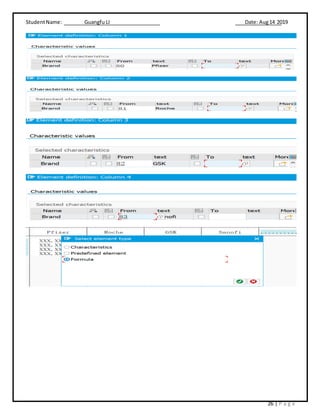
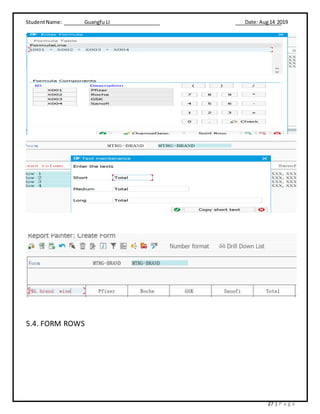
5.3. FORMCULOMNS ...................................................................................................................................26
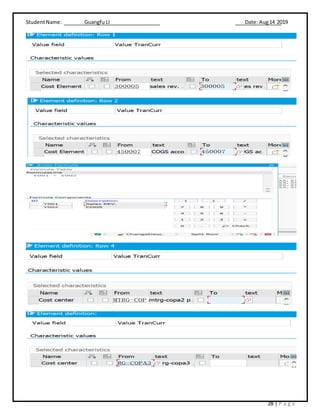
5.4. FORMROWS ........................................................................................................................................28
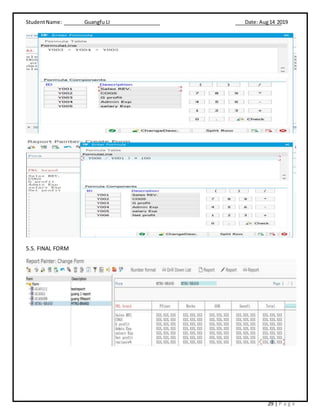
5.5. FINAL FORM.........................................................................................................................................30
6. CREATE REPORT.......................................................................................................................................31
6.1. INITIAL SCREEN.....................................................................................................................................31
6.2. CHARACTERISTICS..................................................................................................................................31
6.3. OUTPUT TYPE .......................................................................................................................................31
6.4. OPTIONS.............................................................................................................................................32
6.5. RUN THE REPORT...................................................................................................................................32
StudentName: Guangfu LI Date: Aug14 2019
3 | P a g e
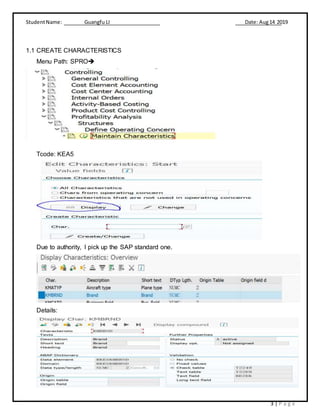
1.1 CREATE CHARACTERISTICS
Menu Path: SPRO
Tcode: KEA5
Due to authority, I pick up the SAP standard one.
Details:
StudentName: Guangfu LI Date: Aug14 2019
4 | P a g e
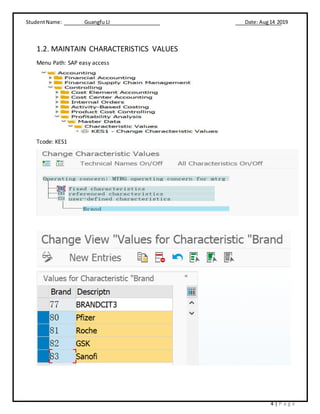
1.2. MAINTAIN CHARACTERISTICS VALUES
Menu Path: SAP easy access
Tcode: KES1
StudentName: Guangfu LI Date: Aug14 2019
5 | P a g e
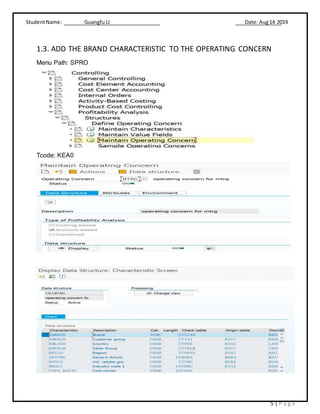
1.3. ADD THE BRAND CHARACTERISTIC TO THE OPERATING CONCERN
Menu Path: SPRO
Tcode: KEA0
StudentName: Guangfu LI Date: Aug14 2019
6 | P a g e
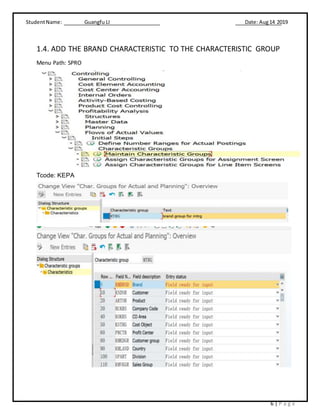
1.4. ADD THE BRAND CHARACTERISTIC TO THE CHARACTERISTIC GROUP
Menu Path: SPRO
Tcode: KEPA
StudentName: Guangfu LI Date: Aug14 2019
7 | P a g e
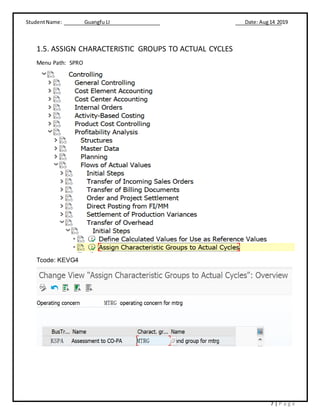
1.5. ASSIGN CHARACTERISTIC GROUPS TO ACTUAL CYCLES
Menu Path: SPRO
Tcode: KEVG4
StudentName: Guangfu LI Date: Aug14 2019
8 | P a g e
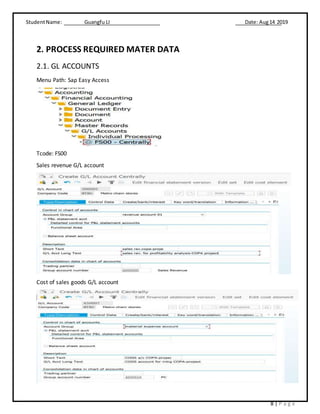
2. PROCESS REQUIRED MATER DATA
2.1. GL ACCOUNTS
Menu Path: Sap Easy Access
Tcode: FS00
Sales revenue G/L account
Cost of sales goods G/L account
StudentName: Guangfu LI Date: Aug14 2019
9 | P a g e
Administration Costs G/L account
Salary costs G/L account
StudentName: Guangfu LI Date: Aug14 2019
10 | P a g e
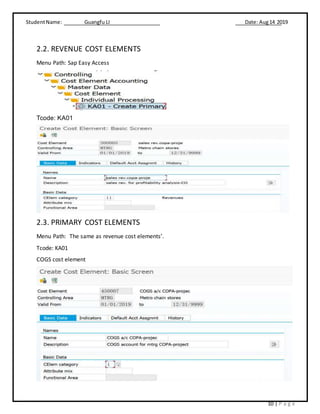
2.2. REVENUE COST ELEMENTS
Menu Path: Sap Easy Access
Tcode: KA01
2.3. PRIMARY COST ELEMENTS
Menu Path: The same as revenue cost elements’.
Tcode: KA01
COGS cost element
StudentName: Guangfu LI Date: Aug14 2019
11 | P a g e
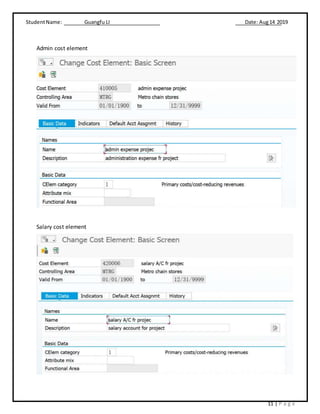
Admin cost element
Salary cost element
StudentName: Guangfu LI Date: Aug14 2019
12 | P a g e
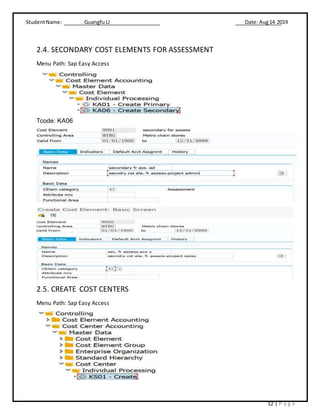
2.4. SECONDARY COST ELEMENTS FOR ASSESSMENT
Menu Path: Sap Easy Access
Tcode: KA06
2.5. CREATE COST CENTERS
Menu Path: Sap Easy Access
StudentName: Guangfu LI Date: Aug14 2019
13 | P a g e
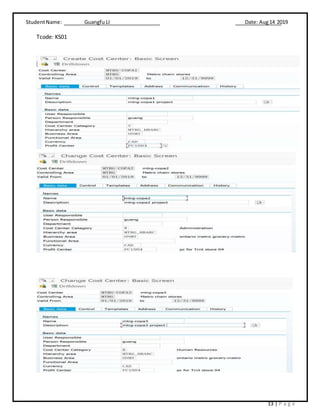
Tcode: KS01
StudentName: Guangfu LI Date: Aug14 2019
14 | P a g e
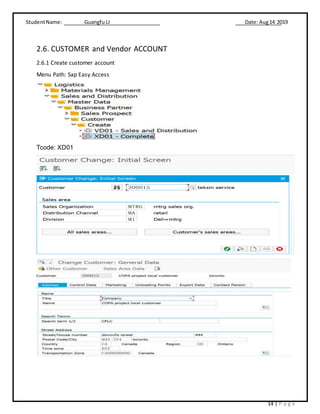
2.6. CUSTOMER and Vendor ACCOUNT
2.6.1 Create customer account
Menu Path: Sap Easy Access
Tcode: XD01
StudentName: Guangfu LI Date: Aug14 2019
15 | P a g e
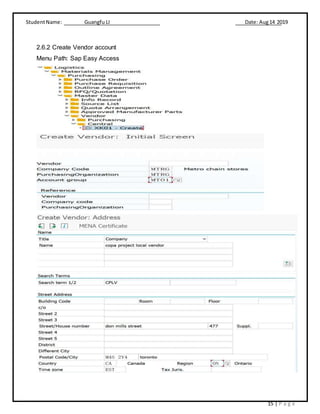
2.6.2 Create Vendor account
Menu Path: Sap Easy Access
StudentName: Guangfu LI Date: Aug14 2019
16 | P a g e
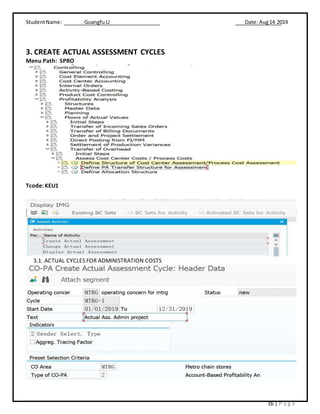
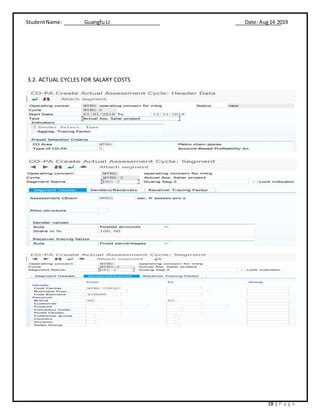
3. CREATE ACTUAL ASSESSMENT CYCLES
Menu Path: SPRO
Tcode: KEU1
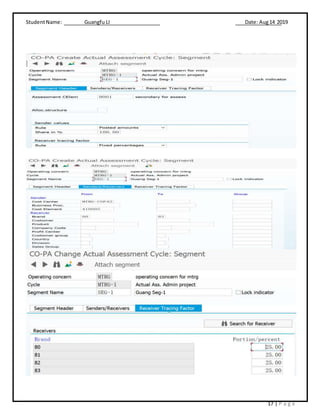
3.1. ACTUAL CYCLES FOR ADMINISTRATION COSTS
StudentName: Guangfu LI Date: Aug14 2019
17 | P a g e
StudentName: Guangfu LI Date: Aug14 2019
18 | P a g e
3.2. ACTUAL CYCLES FOR SALARY COSTS
StudentName: Guangfu LI Date: Aug14 2019
19 | P a g e
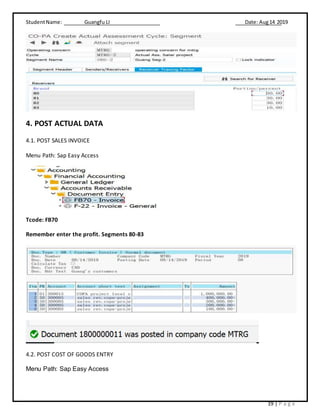
4. POST ACTUAL DATA
4.1. POST SALES INVOICE
Menu Path: Sap Easy Access
Tcode: FB70
Remember enter the profit. Segments 80-83
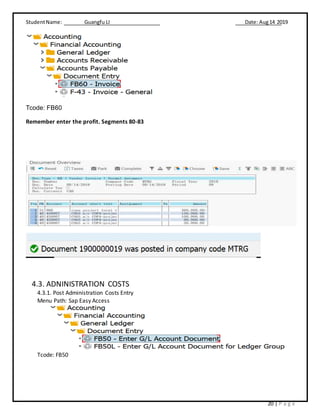
4.2. POST COST OF GOODS ENTRY
Menu Path: Sap Easy Access
StudentName: Guangfu LI Date: Aug14 2019
20 | P a g e
Tcode: FB60
Remember enter the profit. Segments 80-83
4.3. ADNINISTRATION COSTS
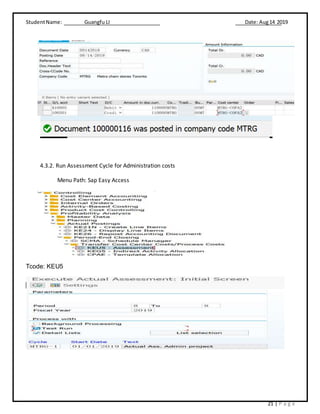
4.3.1. Post Administration Costs Entry
Menu Path: Sap Easy Access
Tcode: FB50
StudentName: Guangfu LI Date: Aug14 2019
21 | P a g e
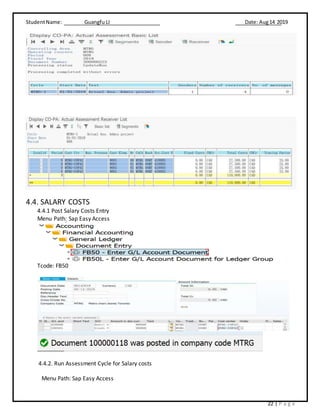
4.3.2. Run Assessment Cycle for Administration costs
Menu Path: Sap Easy Access
Tcode: KEU5
StudentName: Guangfu LI Date: Aug14 2019
22 | P a g e
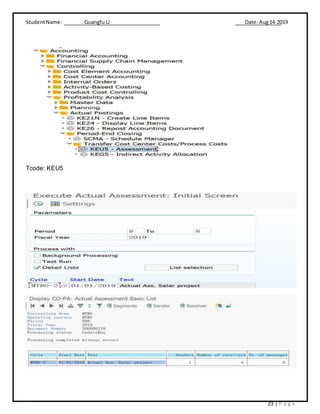
4.4. SALARY COSTS
4.4.1 Post Salary Costs Entry
Menu Path: Sap Easy Access
Tcode: FB50
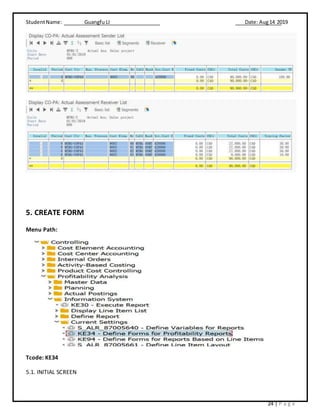
4.4.2. Run Assessment Cycle for Salary costs
Menu Path: Sap Easy Access
StudentName: Guangfu LI Date: Aug14 2019
23 | P a g e
Tcode: KEU5
StudentName: Guangfu LI Date: Aug14 2019
24 | P a g e
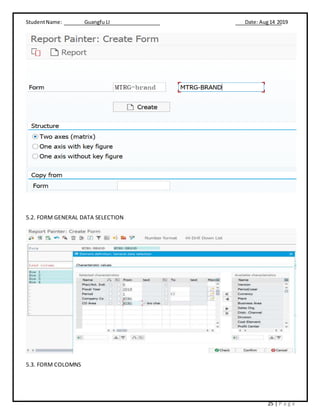
5. CREATE FORM
Menu Path:
Tcode: KE34
5.1. INITIAL SCREEN
StudentName: Guangfu LI Date: Aug14 2019
25 | P a g e
5.2. FORM GENERAL DATA SELECTION
5.3. FORM COLOMNS
StudentName: Guangfu LI Date: Aug14 2019
26 | P a g e
StudentName: Guangfu LI Date: Aug14 2019
27 | P a g e
5.4. FORM ROWS
StudentName: Guangfu LI Date: Aug14 2019
28 | P a g e
StudentName: Guangfu LI Date: Aug14 2019
29 | P a g e
5.5. FINAL FORM
StudentName: Guangfu LI Date: Aug14 2019
30 | P a g e
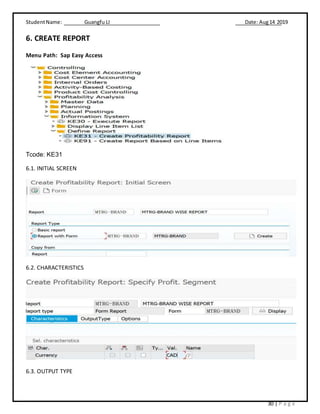
6. CREATE REPORT
Menu Path: Sap Easy Access
Tcode: KE31
6.1. INITIAL SCREEN
6.2. CHARACTERISTICS
6.3. OUTPUT TYPE
StudentName: Guangfu LI Date: Aug14 2019
31 | P a g e
6.4. OPTIONS
6.5. RUN THE REPORT
==============DONE===============

Co pa-pca project-guangfu li

  • 1.
    StudentName: Guangfu LIDate: Aug14 2019 1 | P a g e SAP Profit Center Accounting and Profitibility Analysis Your company has following four Brands. Brand 1 = Pfizer, Brand 2 = Roche, Brand 3 = GSK, Brand 4 = Sanofi Your Company wants to do Account Based Profitability Analysis for the above:  The total value of the Sales for the Year is CAN$1,000,000. Sales Brand 1 Sales Brand 2 Sales Brand 3 Sales Brand 4 CAN$400,000 CAN$300,000 CAN$200,000 CAN$100,000  Costs for Goods Sold is as follows Costs Brand 1 Costs Brand 2 Costs Brand 3 Costs Brand 4 CAN$150,000 CAN$100,000 CAN$80,000 CAN$30,000  Administration Costs for the period is CAD$110,000 o Finance Believes they should be assessed and allocated equally  Salary Costs for the period is CAD$90,000 o Finance Believes they should be assessed and allocated equally for all 3 Brands, but for Brand 4 It should be 10%  Finance would also like to review P&L Variance and Variance % - Brand wise Take Necessary steps to Generate Report from PA (Account Based) Report Should be well formatted, with clear results, and with correct Profitability. Use new Master and Transactional Data to arrive at your results.
  • 2.
    StudentName: Guangfu LIDate: Aug14 2019 2 | P a g e Index 1. CO-PAMASTER DATA................................................................................................................................4 1.1. CREATE CHARACTERISTICS .........................................................................................................................4 1.2. MAINTAIN CHARACTERISTICSVALUES ...........................................................................................................5 1.3. ADD THE BRAND CHARACTERISTICTO THE OPERATING CONCERN..........................................................................6 1.4. ADD THE BRAND CHARACTERISTICTO THE CHARACTERISTIC GROUP......................................................................7 1.5. ASSIGN CHARACTERISTICGROUPS TO ACTUAL CYCLES.......................................................................................8 2. PROCESS REQUIRED MATER DATA..............................................................................................................9 2.1. GL ACCOUNTS ........................................................................................................................................9 2.2. REVENUE COST ELEMENTS .........................................................................................................................11 2.3. PRIMARY COST ELEMENTS .........................................................................................................................11 2.4. SECONDARY COST ELEMENTS FOR ASSESSMENT ..............................................................................................13 2.5. COST CENTERS........................................................................................................................................13 2.6. CUSTOMER and Vendor ACCOUNT.................................................................................................................15 3. CREATE ACTUAL ASSESSMENT CYCLES ........................................................................................................17 3.1. ACTUAL CYCLES FOR ADMINISTRATION COSTS ................................................................................................17 3.2. ACTUAL CYCLES FOR SALARY COSTS............................................................................................................ 19 4. POST ACTUAL DATA................................................................................................................................. 20 4.1. POST SALES INVOICE ..............................................................................................................................20 4.2. POST COST OF GOODS ENTRY...................................................................................................................20 4.3. ADNINISTRATION COSTS..........................................................................................................................21 4.3.1. PostAdministrationCostsEntry ...................................................................................................21 4.3.2. RunAssessmentCycle forAdministrationcosts ............................................................................22 4.4. SALARY COSTS ......................................................................................................................................23 4.4.1 PostSalary CostsEntry..................................................................................................................23 4.4.2. RunAssessmentCycle forSalarycosts..........................................................................................23 5. CREATE FORM..........................................................................................................................................25 5.1. INITIAL SCREEN.....................................................................................................................................25 5.2. FORMGENERAL DATA SELECTION..............................................................................................................26 5.3. FORMCULOMNS ...................................................................................................................................26 5.4. FORMROWS ........................................................................................................................................28 5.5. FINAL FORM.........................................................................................................................................30 6. CREATE REPORT.......................................................................................................................................31 6.1. INITIAL SCREEN.....................................................................................................................................31 6.2. CHARACTERISTICS..................................................................................................................................31 6.3. OUTPUT TYPE .......................................................................................................................................31 6.4. OPTIONS.............................................................................................................................................32 6.5. RUN THE REPORT...................................................................................................................................32
  • 3.
    StudentName: Guangfu LIDate: Aug14 2019 3 | P a g e 1.1 CREATE CHARACTERISTICS Menu Path: SPRO Tcode: KEA5 Due to authority, I pick up the SAP standard one. Details:
  • 4.
    StudentName: Guangfu LIDate: Aug14 2019 4 | P a g e 1.2. MAINTAIN CHARACTERISTICS VALUES Menu Path: SAP easy access Tcode: KES1
  • 5.
    StudentName: Guangfu LIDate: Aug14 2019 5 | P a g e 1.3. ADD THE BRAND CHARACTERISTIC TO THE OPERATING CONCERN Menu Path: SPRO Tcode: KEA0
  • 6.
    StudentName: Guangfu LIDate: Aug14 2019 6 | P a g e 1.4. ADD THE BRAND CHARACTERISTIC TO THE CHARACTERISTIC GROUP Menu Path: SPRO Tcode: KEPA
  • 7.
    StudentName: Guangfu LIDate: Aug14 2019 7 | P a g e 1.5. ASSIGN CHARACTERISTIC GROUPS TO ACTUAL CYCLES Menu Path: SPRO Tcode: KEVG4
  • 8.
    StudentName: Guangfu LIDate: Aug14 2019 8 | P a g e 2. PROCESS REQUIRED MATER DATA 2.1. GL ACCOUNTS Menu Path: Sap Easy Access Tcode: FS00 Sales revenue G/L account Cost of sales goods G/L account
  • 9.
    StudentName: Guangfu LIDate: Aug14 2019 9 | P a g e Administration Costs G/L account Salary costs G/L account
  • 10.
    StudentName: Guangfu LIDate: Aug14 2019 10 | P a g e 2.2. REVENUE COST ELEMENTS Menu Path: Sap Easy Access Tcode: KA01 2.3. PRIMARY COST ELEMENTS Menu Path: The same as revenue cost elements’. Tcode: KA01 COGS cost element
  • 11.
    StudentName: Guangfu LIDate: Aug14 2019 11 | P a g e Admin cost element Salary cost element
  • 12.
    StudentName: Guangfu LIDate: Aug14 2019 12 | P a g e 2.4. SECONDARY COST ELEMENTS FOR ASSESSMENT Menu Path: Sap Easy Access Tcode: KA06 2.5. CREATE COST CENTERS Menu Path: Sap Easy Access
  • 13.
    StudentName: Guangfu LIDate: Aug14 2019 13 | P a g e Tcode: KS01
  • 14.
    StudentName: Guangfu LIDate: Aug14 2019 14 | P a g e 2.6. CUSTOMER and Vendor ACCOUNT 2.6.1 Create customer account Menu Path: Sap Easy Access Tcode: XD01
  • 15.
    StudentName: Guangfu LIDate: Aug14 2019 15 | P a g e 2.6.2 Create Vendor account Menu Path: Sap Easy Access
  • 16.
    StudentName: Guangfu LIDate: Aug14 2019 16 | P a g e 3. CREATE ACTUAL ASSESSMENT CYCLES Menu Path: SPRO Tcode: KEU1 3.1. ACTUAL CYCLES FOR ADMINISTRATION COSTS
  • 17.
    StudentName: Guangfu LIDate: Aug14 2019 17 | P a g e
  • 18.
    StudentName: Guangfu LIDate: Aug14 2019 18 | P a g e 3.2. ACTUAL CYCLES FOR SALARY COSTS
  • 19.
    StudentName: Guangfu LIDate: Aug14 2019 19 | P a g e 4. POST ACTUAL DATA 4.1. POST SALES INVOICE Menu Path: Sap Easy Access Tcode: FB70 Remember enter the profit. Segments 80-83 4.2. POST COST OF GOODS ENTRY Menu Path: Sap Easy Access
  • 20.
    StudentName: Guangfu LIDate: Aug14 2019 20 | P a g e Tcode: FB60 Remember enter the profit. Segments 80-83 4.3. ADNINISTRATION COSTS 4.3.1. Post Administration Costs Entry Menu Path: Sap Easy Access Tcode: FB50
  • 21.
    StudentName: Guangfu LIDate: Aug14 2019 21 | P a g e 4.3.2. Run Assessment Cycle for Administration costs Menu Path: Sap Easy Access Tcode: KEU5
  • 22.
    StudentName: Guangfu LIDate: Aug14 2019 22 | P a g e 4.4. SALARY COSTS 4.4.1 Post Salary Costs Entry Menu Path: Sap Easy Access Tcode: FB50 4.4.2. Run Assessment Cycle for Salary costs Menu Path: Sap Easy Access
  • 23.
    StudentName: Guangfu LIDate: Aug14 2019 23 | P a g e Tcode: KEU5
  • 24.
    StudentName: Guangfu LIDate: Aug14 2019 24 | P a g e 5. CREATE FORM Menu Path: Tcode: KE34 5.1. INITIAL SCREEN
  • 25.
    StudentName: Guangfu LIDate: Aug14 2019 25 | P a g e 5.2. FORM GENERAL DATA SELECTION 5.3. FORM COLOMNS
  • 26.
    StudentName: Guangfu LIDate: Aug14 2019 26 | P a g e
  • 27.
    StudentName: Guangfu LIDate: Aug14 2019 27 | P a g e 5.4. FORM ROWS
  • 28.
    StudentName: Guangfu LIDate: Aug14 2019 28 | P a g e
  • 29.
    StudentName: Guangfu LIDate: Aug14 2019 29 | P a g e 5.5. FINAL FORM
  • 30.
    StudentName: Guangfu LIDate: Aug14 2019 30 | P a g e 6. CREATE REPORT Menu Path: Sap Easy Access Tcode: KE31 6.1. INITIAL SCREEN 6.2. CHARACTERISTICS 6.3. OUTPUT TYPE
  • 31.
    StudentName: Guangfu LIDate: Aug14 2019 31 | P a g e 6.4. OPTIONS 6.5. RUN THE REPORT ==============DONE===============