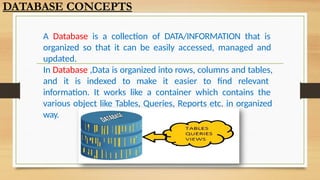
A Database isa collection of DATA/INFORMATION that is
organized so that it can be easily accessed, managed and
updated.
In Database ,Data is organized into rows, columns and tables,
and it is indexed to make it easier to find relevant
information. It works like a container which contains the
various object like Tables, Queries, Reports etc. in organized
way.
DATABASE CONCEPTS
3.
WHY DO WENEED DATABASE
To manage large chunks of data: if size of data increases into thousands of records, it will
simply create a problem to manage . Database can manage large amount of data.
Accuracy: Through validation rule in database ,data accuracy can
be maintained.
Ease of updating data: With the database, we can flexibly update the data according to
our convenience. Moreover , multiple people can also edit data at same time.
Security of data: With databases we have security groups and
privileges to restrict access .
Data integrity: In databases, we can be assured of accuracy and consistency of data due
to the built in integrity checks and access controls .
DATABASE CONCEPTS
4.
Database Management System(DBMS)
A DBMS refers to a software that is responsible for
storing, maintaining and utilizing database in an efficient way.
A Database along with DBMS software is called
Database
System.
Example of DBMS software are Oracle, MS SQL Server,
MS Access, Paradox, DB2 and MySQL etc.
MySQL is open source and freeware DBMS.
DATABASE CONCEPTS
5.
•Advantages of DatabaseSystem
Databases reduces Redundancy
• It removes duplication of data because data are kept at one place and all the application refers to the
centrally maintained database.
Database controls Inconsistency
• When two copies of the same data do not agree to each other, then it is called
• Inconsistency. By controlling redundancy, the inconsistency is also controlled.
Database facilitate Sharing of Data
• Data stored in the database can be shared among several users.
Database ensures Security
• Data are protected against accidental or intentional disclosure to unauthorized
• person or unauthorized modification.
Database maintains Integrity
• It enforces certain integrity rules to insure the validity or correctness of data. For ex. A date can’t be like
31/31/2000.
DATABASE CONCEPTS
6.
Data Model- Wayof data representation
Data model is a model or presentation which shows How data is organized ? or stored
in the database. A data is modeled by one of
the following given
Relational Data Model
In this model data is organized into Relations or Tables (i.e. Rows and Columns). A row in a table
represents a relationship of data to each other and also called a Tuple or Record. A column is called
Attribute or Field.
Network Data Model
In this model, data is represented by collection of records and relationship among data is shown by
Links.
Hierarchical Data Model
In this model, Records are organized as Trees. Records at top level is called Root record and this
may contain multiple directly linked
children records.
Object Oriented Data Model
In this model, records are represented as a objects. The collection of similar types of object is
called class.
DATABASE CONCEPTS
7.
RELATIONAL DATABASE
A relationaldatabase is a collective set of multiple data sets
organized by tables, records and columns. Relational database
establish a well-defined relationship between database
tables. Tables communicate and share information, which
facilitates data searchability, organization and reporting.
A Relational database use Structured Query Language (SQL),
which is a standard user application that provides an easy
programming interface for database interaction.
DATABASE CONCEPTS
RELATIONAL DATABASE TERMS
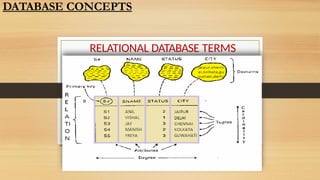
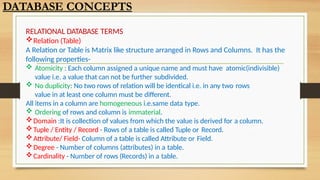
Relation(Table)
A Relation or Table is Matrix like structure arranged in Rows and Columns. It has the
following properties-
Atomicity : Each column assigned a unique name and must have atomic(indivisible)
value i.e. a value that can not be further subdivided.
No duplicity: No two rows of relation will be identical i.e. in any two rows
value in at least one column must be different.
All items in a column are homogeneous i.e.same data type.
Ordering of rows and column is immaterial.
Domain :It is collection of values from which the value is derived for a column.
Tuple / Entity / Record - Rows of a table is called Tuple or Record.
Attribute/ Field- Column of a table is called Attribute or Field.
Degree - Number of columns (attributes) in a table.
Cardinality - Number of rows (Records) in a table.
DATABASE CONCEPTS
10.
KEYS IN ADATABASE
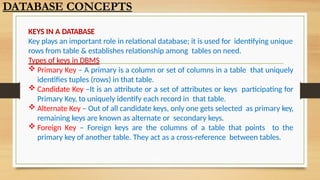
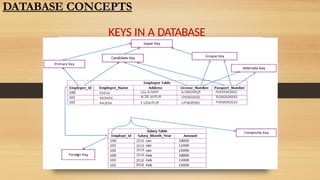
Key plays an important role in relational database; it is used for identifying unique
rows from table & establishes relationship among tables on need.
Types of keys in DBMS
Primary Key – A primary is a column or set of columns in a table that uniquely
identifies tuples (rows) in that table.
Candidate Key –It is an attribute or a set of attributes or keys participating for
Primary Key, to uniquely identify each record in that table.
Alternate Key – Out of all candidate keys, only one gets selected as primary key,
remaining keys are known as alternate or secondary keys.
Foreign Key – Foreign keys are the columns of a table that points to the
primary key of another table. They act as a cross-reference between tables.
DATABASE CONCEPTS
SQL is an
acronym
ofStructured Query Language.
It is a standard language developed and used for accessing and modifying
relational databases.
The SQL language was originally developed at the IBM research laboratory in
San José, in connection with a project developing a prototype for a relational
database management system called System R in the early 70s.
SQL is being used by many database management systems. Some of them
are:
MySQL
Oracle
Microsoft SQL Server
SQL : the Structured Query Language
13.
Advantages of usingSQL
Interactive Language-This language can be used for communicating with the
databases and receive answers to the complex questions in seconds.
Multiple data views-The users can make different views of database structure and
databases for the different users.
Portability-SQL can be used in the program in PCs, servers, laptops, and even
some of the mobile phones and even on different dbms softwares
No coding needed-It is very easy to manage the database systems without any
need to write the substantial amount of code by using the standard SQL.
Well defined standards-Long established are used by the SQL databases that is
being used by ISO and ANSI. There are no standards adhered by the non-SQL
databases.
SQL : the Structured Query Language
14.
most popular opensource
currently
the
software. It
is
a multi-user, multithreaded
MySQL
is
database
database
management system. MySQL is especially
popular on the web. It is one of the parts of the very
popular LAMP platform. Linux, Apache, MySQL and PHP
or WIMP platform Windows,Apache,MySQL and PHP.
MySQL AB was founded by Michael Widenius (Monty),
David Axmark and Allan Larsson in Sweden in year 1995.
SQL : the Structured Query Language
15.
MySQL Features
Open Source& Free of Cost:
It is Open Source and available at free of cost.
Portability:
Small enough in size to instal and run it on any types of Hardware and
OS like Linux,MS Windows or Mac etc.
Security :
Its Databases are secured & protected with password.
Connectivity
Various APIs are developed to connect it with many programming languages.
Query Language
It supports SQL (Structured Query Language) for handling database.
SQL : the Structured Query Language
16.
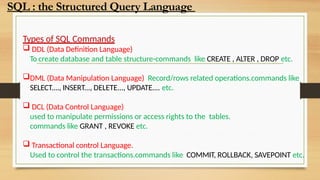
Types of SQLCommands
DDL (Data Definition Language)
To create database and table structure-commands like CREATE , ALTER , DROP etc.
DML (Data Manipulation Language) Record/rows related operations.commands like
SELECT...., INSERT..., DELETE..., UPDATE.... etc.
DCL (Data Control Language)
used to manipulate permissions or access rights to the tables.
commands like GRANT , REVOKE etc.
Transactional control Language.
Used to control the transactions.commands like COMMIT, ROLLBACK, SAVEPOINT etc.
SQL : the Structured Query Language
17.
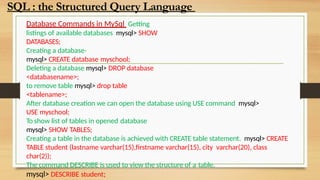
Database Commands inMySql Getting
listings of available databases mysql> SHOW
DATABASES;
Creating a database-
mysql> CREATE database myschool;
Deleting a database mysql> DROP database
<databasename>;
to remove table mysql> drop table
<tablename>;
After database creation we can open the database using USE command mysql>
USE myschool;
To show list of tables in opened database
mysql> SHOW TABLES;
Creating a table in the database is achieved with CREATE table statement. mysql> CREATE
TABLE student (lastname varchar(15),firstname varchar(15), city varchar(20), class
char(2));
The command DESCRIBE is used to view the structure of a table.
mysql> DESCRIBE student;
SQL : the Structured Query Language
18.
Database Commands inMySql
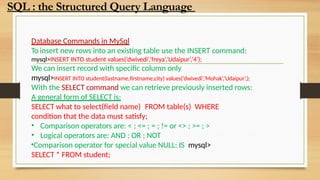
To insert new rows into an existing table use the INSERT command:
mysql>INSERT INTO student values(‘dwivedi’,’freya’,’Udaipur’,’4’);
We can insert record with specific column only
mysql>INSERT INTO student(lastname,firstname,city) values(‘dwivedi’,’Mohak’,’Udaipur’,);
With the SELECT command we can retrieve previously inserted rows:
A general form of SELECT is:
SELECT what to select(field name) FROM table(s) WHERE
condition that the data must satisfy;
• Comparison operators are: < ; <= ; = ; != or <> ; >= ; >
• Logical operators are: AND ; OR ; NOT
•Comparison operator for special value NULL: IS mysql>
SELECT * FROM student;
SQL : the Structured Query Language
19.
Database Commands inMySql
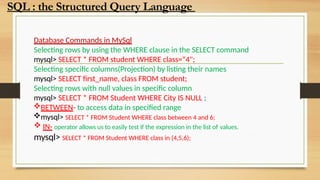
Selecting rows by using the WHERE clause in the SELECT command
mysql> SELECT * FROM student WHERE class=“4";
Selecting specific columns(Projection) by listing their names
mysql> SELECT first_name, class FROM student;
Selecting rows with null values in specific column
mysql> SELECT * FROM Student WHERE City IS NULL ;
BETWEEN- to access data in specified range
mysql> SELECT * FROM Student WHERE class between 4 and 6;
IN- operator allows us to easily test if the expression in the list of values.
mysql> SELECT * FROM Student WHERE class in (4,5,6);
SQL : the Structured Query Language
20.
Database Commands inMySql
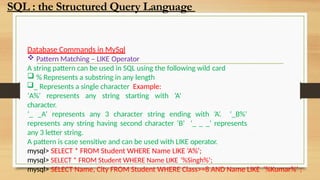
Pattern Matching – LIKE Operator
A string pattern can be used in SQL using the following wild card
% Represents a substring in any length
_ Represents a single character Example:
‘A%’ represents any string starting with ‘A’
character.
‘_ _A’ represents any 3 character string ending with ‘A’. ‘_B%’
represents any string having second character ‘B’ ‘_ _ _’ represents
any 3 letter string.
A pattern is case sensitive and can be used with LIKE operator.
mysql> SELECT * FROM Student WHERE Name LIKE ‘A%’;
mysql> SELECT * FROM Student WHERE Name LIKE ’%Singh%’;
mysql> SELECT Name, City FROM Student WHERE Class>=8 AND Name LIKE ‘%Kumar%’ ;
SQL : the Structured Query Language
21.
Database Commands inMySql
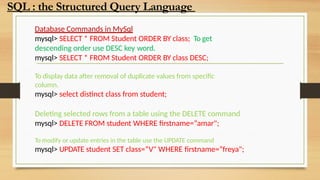
mysql> SELECT * FROM Student ORDER BY class; To get
descending order use DESC key word.
mysql> SELECT * FROM Student ORDER BY class DESC;
To display data after removal of duplicate values from specific
column.
mysql> select distinct class from student;
Deleting selected rows from a table using the DELETE command
mysql> DELETE FROM student WHERE firstname=“amar";
To modify or update entries in the table use the UPDATE command
mysql> UPDATE student SET class=“V" WHERE firstname=“freya";
SQL : the Structured Query Language
22.
Database Commands inMySql
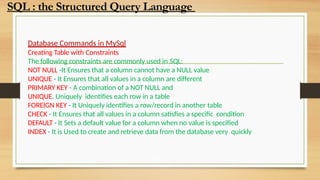
Creating Table with Constraints
The following constraints are commonly used in SQL:
NOT NULL -It Ensures that a column cannot have a NULL value
UNIQUE - It Ensures that all values in a column are different
PRIMARY KEY - A combination of a NOT NULL and
UNIQUE. Uniquely identifies each row in a table
FOREIGN KEY - It Uniquely identifies a row/record in another table
CHECK - It Ensures that all values in a column satisfies a specific condition
DEFAULT - It Sets a default value for a column when no value is specified
INDEX - It is Used to create and retrieve data from the database very quickly
SQL : the Structured Query Language
23.
Database Commands inMySql
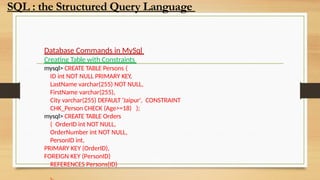
Creating Table with Constraints
mysql> CREATE TABLE Persons (
ID int NOT NULL PRIMARY KEY,
LastName varchar(255) NOT NULL,
FirstName varchar(255),
City varchar(255) DEFAULT ‘Jaipur', CONSTRAINT
CHK_Person CHECK (Age>=18) );
mysql> CREATE TABLE Orders
( OrderID int NOT NULL,
OrderNumber int NOT NULL,
PersonID int,
PRIMARY KEY (OrderID),
FOREIGN KEY (PersonID)
REFERENCES Persons(ID)
SQL : the Structured Query Language
24.
Database Commands inMySql
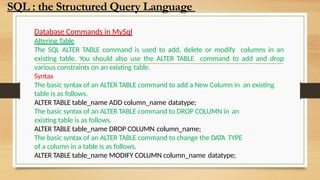
Altering Table
The SQL ALTER TABLE command is used to add, delete or modify columns in an
existing table. You should also use the ALTER TABLE command to add and drop
various constraints on an existing table.
Syntax
The basic syntax of an ALTER TABLE command to add a New Column in an existing
table is as follows.
ALTER TABLE table_name ADD column_name datatype;
The basic syntax of an ALTER TABLE command to DROP COLUMN in an
existing table is as follows.
ALTER TABLE table_name DROP COLUMN column_name;
The basic syntax of an ALTER TABLE command to change the DATA TYPE
of a column in a table is as follows.
ALTER TABLE table_name MODIFY COLUMN column_name datatype;
SQL : the Structured Query Language
26.
Database Commands inMySql
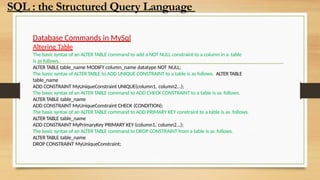
Altering Table
The basic syntax of an ALTER TABLE command to add a NOT NULL constraint to a column in a table
is as follows.
ALTER TABLE table_name MODIFY column_name datatype NOT NULL;
The basic syntax of ALTER TABLE to ADD UNIQUE CONSTRAINT to a table is as follows. ALTER TABLE
table_name
ADD CONSTRAINT MyUniqueConstraint UNIQUE(column1, column2...);
The basic syntax of an ALTER TABLE command to ADD CHECK CONSTRAINT to a table is as follows.
ALTER TABLE table_name
ADD CONSTRAINT MyUniqueConstraint CHECK (CONDITION);
The basic syntax of an ALTER TABLE command to ADD PRIMARY KEY constraint to a table is as follows.
ALTER TABLE table_name
ADD CONSTRAINT MyPrimaryKey PRIMARY KEY (column1, column2...);
The basic syntax of an ALTER TABLE command to DROP CONSTRAINT from a table is as follows.
ALTER TABLE table_name
DROP CONSTRAINT MyUniqueConstraint;
SQL : the Structured Query Language
27.
Database Commands inMySql
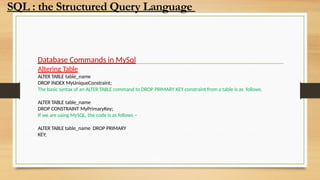
Altering Table
ALTER TABLE table_name
DROP INDEX MyUniqueConstraint;
The basic syntax of an ALTER TABLE command to DROP PRIMARY KEY constraint from a table is as follows.
ALTER TABLE table_name
DROP CONSTRAINT MyPrimaryKey;
If we are using MySQL, the code is as follows −
ALTER TABLE table_name DROP PRIMARY
KEY;
SQL : the Structured Query Language
28.
MySQL Order Byclause is used to sort the table data in either
Ascending order or Descending order. By default, data is not
inserted into Tables in any order unless we have an index.
So, If we want to retrieve the data in any particular order, we have
to sort it by using MySQL Order By statement.
Syntax:-
SELECT Column_Names FROM
Table_Name
ORDER BY {Column1}[ASC | DESC]
{Column2}[ASC | DESC]
SQL : the Structured Query Language
29.
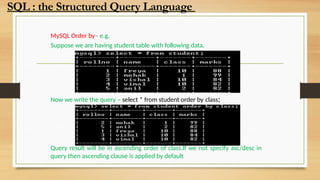
MySQL Order by–e.g.
Suppose we are having student table with following data.
Now we write the query – select * from student order by class;
Query result will be in ascending order of class.If we not specify asc/desc in
query then ascending clause is applied by default
SQL : the Structured Query Language
30.
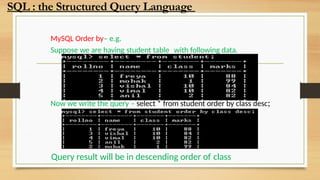
MySQL Order by–e.g.
Suppose we are having student table with following data.
Now we write the query – select * from student order by class desc;
Query result will be in descending order of class
SQL : the Structured Query Language
31.
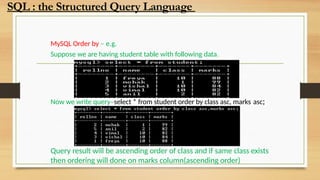
MySQL Order by– e.g.
Suppose we are having student table with following data.
Now we write query–select * from student order by class asc, marks asc;
Query result will be ascending order of class and if same class exists
then ordering will done on marks column(ascending order)
SQL : the Structured Query Language
32.
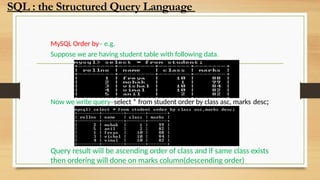
MySQL Order by–e.g.
Suppose we are having student table with following data.
Now we write query–select * from student order by class asc, marks desc;
Query result will be ascending order of class and if same class exists
then ordering will done on marks column(descending order)
SQL : the Structured Query Language
33.
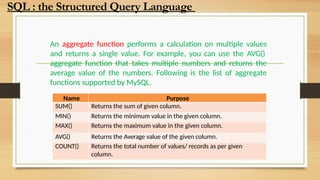
An aggregate functionperforms a calculation on multiple values
and returns a single value. For example, you can use the AVG()
aggregate function that takes multiple numbers and returns the
average value of the numbers. Following is the list of aggregate
functions supported by MySQL.
Name Purpose
SUM() Returns the sum of given column.
MIN() Returns the minimum value in the given column.
MAX() Returns the maximum value in the given column.
AVG() Returns the Average value of the given column.
COUNT() Returns the total number of values/ records as per given
column.
SQL : the Structured Query Language
34.
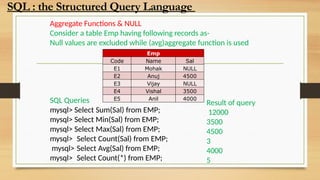
Aggregate Functions &NULL
Consider a table Emp having following records as-
Null values are excluded while (avg)aggregate function is used
SQL Queries
mysql> Select Sum(Sal) from EMP;
mysql> Select Min(Sal) from EMP;
mysql> Select Max(Sal) from EMP;
mysql> Select Count(Sal) from EMP;
mysql> Select Avg(Sal) from EMP;
mysql> Select Count(*) from EMP;
Emp
Code Name Sal
E1 Mohak NULL
E2 Anuj 4500
E3 Vijay NULL
E4 Vishal 3500
E5 Anil 4000
Result of query
12000
3500
4500
3
4000
5
SQL : the Structured Query Language
35.
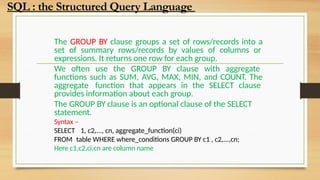
The GROUP BYclause groups a set of rows/records into a
set of summary rows/records by values of columns or
expressions. It returns one row for each group.
We often use the GROUP BY clause with aggregate
functions such as SUM, AVG, MAX, MIN, and COUNT. The
aggregate function that appears in the SELECT clause
provides information about each group.
The GROUP BY clause is an optional clause of the SELECT
statement.
Syntax –
SELECT 1, c2,..., cn, aggregate_function(ci)
FROM table WHERE where_conditions GROUP BY c1 , c2,...,cn;
Here c1,c2,ci,cn are column name
SQL : the Structured Query Language
36.
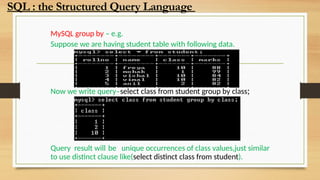
MySQL group by– e.g.
Suppose we are having student table with following data.
Now we write query–select class from student group by class;
Query result will be unique occurrences of class values,just similar
to use distinct clause like(select distinct class from student).
SQL : the Structured Query Language
37.
MySQL GROUP BYwith aggregate functions
The aggregate functions allow us to perform the calculation of a set of rows and return a
single value. The GROUP BY clause is often used with an aggregate function to perform
calculation and return a single value for each subgroup.
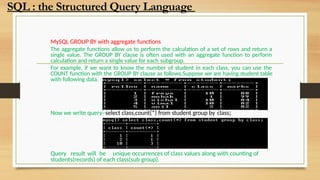
For example, if we want to know the number of student in each class, you can use the
COUNT function with the GROUP BY clause as follows:Suppose we are having student table
with following data.
Now we write query–select class,count(*) from student group by class;
Query result will be unique occurrences of class values along with counting of
students(records) of each class(sub group).
SQL : the Structured Query Language
38.
MySQL GROUP BYwith aggregate functions
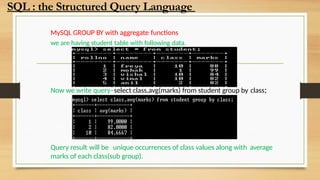
we are having student table with following data.
Now we write query–select class,avg(marks) from student group by class;
Query result will be unique occurrences of class values along with average
marks of each class(sub group).
SQL : the Structured Query Language
39.
The HAVING clauseis used in the SELECT statement to specify
filter conditions for a group of rows or aggregates. The HAVING
clause is often used with the GROUP BY
clause to filter groups based on a specified
condition. To filter the groups returned by
GROUP BY clause, we use a HAVING clause.
WHERE is applied before GROUP BY, HAVING
is applied after (and can filter on aggregates).
SQL : the Structured Query Language
40.
MySQL GROUP BYwith aggregate functions & having clause
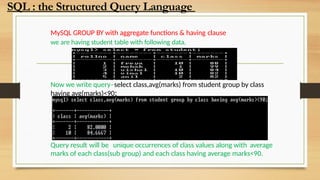
we are having student table with following data.
Now we write query–select class,avg(marks) from student group by class
having avg(marks)<90;
Query result will be unique occurrences of class values along with average
marks of each class(sub group) and each class having average marks<90.
SQL : the Structured Query Language
41.
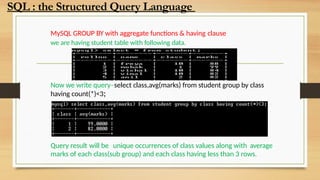
MySQL GROUP BYwith aggregate functions & having clause
we are having student table with following data.
Now we write query–select class,avg(marks) from student group by class
having count(*)<3;
Query result will be unique occurrences of class values along with average
marks of each class(sub group) and each class having less than 3 rows.
SQL : the Structured Query Language
42.
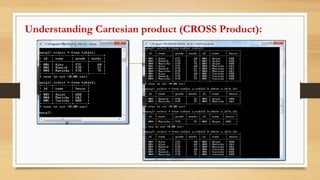
Cartesian product (X)/crossjoint
Cartesian Product is denoted by X symbol.
Lets say we have two relations R1 and R2
then the cartesian product of these two
relations (R1 X R2) would combine each tuple
of first relation R1 with the each tuple of
second relation R2.
SQL : the Structured Query Language
43.
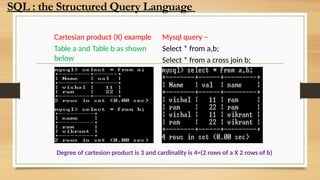
Cartesian product (X)example
Table a and Table b as shown
below
Mysql query –
Select * from a,b;
Select * from a cross join b;
Degree of cartesion product is 3 and cardinality is 4=(2 rows of a X 2 rows of b)
SQL : the Structured Query Language
44.
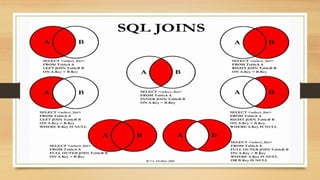
Join – Joinis used to fetch data from two or more tables, which is
joined to appear as single set of data. It is used for combining column
from two or more tables by using values common to both tables.
Types of JOIN
Following are the types of JOIN that we can use in SQL:
• Inner
• Outer
• Left
• Right
SQL : the Structured Query Language
45.
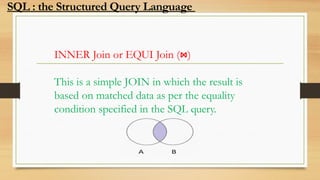
INNER Join orEQUI Join (⋈)
This is a simple JOIN in which the result is
based on matched data as per the equality
condition specified in the SQL query.
SQL : the Structured Query Language
46.
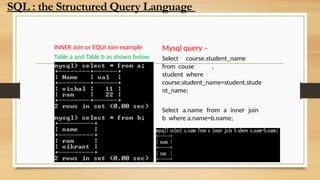
INNER Join orEQUI Join example
Table a and Table b as shown below
Mysql query –
Select course.student_name
from couse ,
student where
course.student_name=student.stude
nt_name;
Select a.name from a inner join
b where a.name=b.name;
SQL : the Structured Query Language
47.
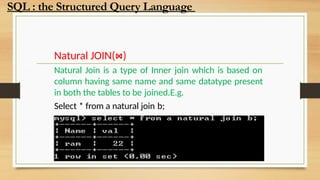
Natural JOIN(⋈)
Natural Joinis a type of Inner join which is based on
column having same name and same datatype present
in both the tables to be joined.E.g.
Select * from a natural join b;
SQL : the Structured Query Language
48.
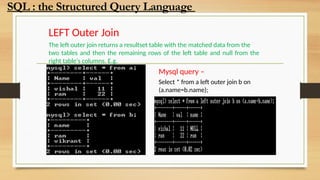
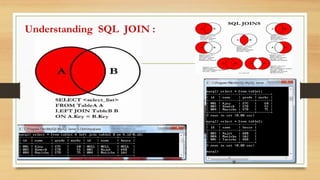
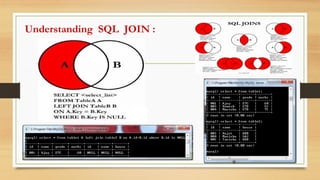
LEFT Outer Join
Theleft outer join returns a resultset table with the matched data from the
two tables and then the remaining rows of the left table and null from the
right table's columns. E.g.
Mysql query –
Select * from a left outer join b on
(a.name=b.name);
SQL : the Structured Query Language
49.
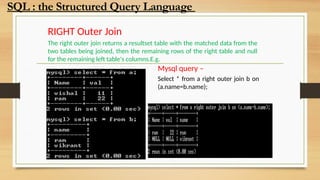
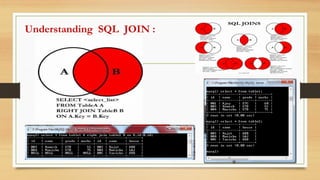
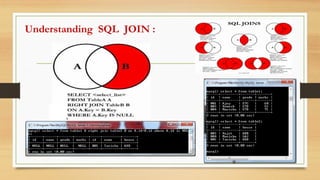
RIGHT Outer Join
Theright outer join returns a resultset table with the matched data from the
two tables being joined, then the remaining rows of the right table and null
for the remaining left table's columns.E.g.
Mysql query –
Select * from a right outer join b on
(a.name=b.name);
SQL : the Structured Query Language
50.
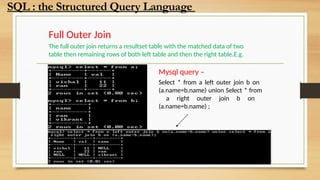
Full Outer Join
Thefull outer join returns a resultset table with the matched data of two
table then remaining rows of both left table and then the right table.E.g.
Mysql query –
Select * from a left outer join b on
(a.name=b.name) union Select * from
a right outer join b on
(a.name=b.name) ;
SQL : the Structured Query Language
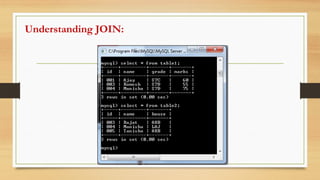
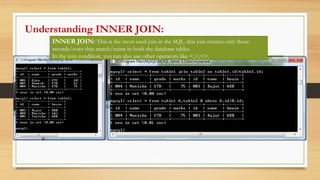
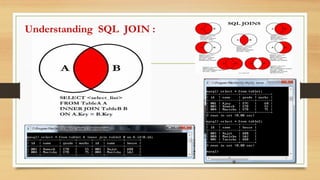
INNER JOIN: Thisis the most used join in the SQL. this join returns only those
records/rows that match/exists in both the database tables.
In the join condition, you can also use other operators like <,>,<>.
Understanding INNER JOIN:
57.
INNER JOIN: Thisis the most used join in the SQL. this join returns only those
records/rows that match/exists in both the database tables.
In the join condition, you can also use other operators like <,>,<>.
Understanding INNER JOIN:
58.
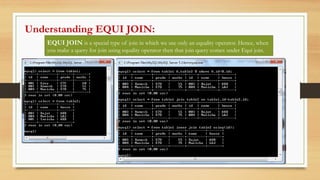
EQUI JOIN isa special type of join in which we use only an equality operator. Hence, when
you make a query for join using equality operator then that join query comes under Equi join.
Understanding EQUI JOIN:
59.
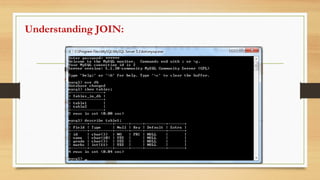
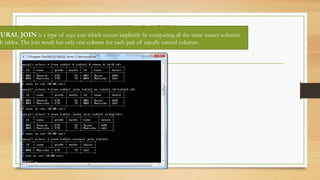
Understanding NATURAL JOIN:
TURALJOIN is a type of equi join which occurs implicitly by comparing all the same names columns
h tables. The join result has only one column for each pair of equally named columns.
![MySQL Order By clause is used to sort the table data in either
Ascending order or Descending order. By default, data is not
inserted into Tables in any order unless we have an index.
So, If we want to retrieve the data in any particular order, we have
to sort it by using MySQL Order By statement.
Syntax:-
SELECT Column_Names FROM
Table_Name
ORDER BY {Column1}[ASC | DESC]
{Column2}[ASC | DESC]
SQL : the Structured Query Language](https://image.slidesharecdn.com/databaseconceptssql-251204132732-a6f6ffa0/85/DATABASE-CONCEPTS-SQL-pptx-class-12-cs-28-320.jpg)




![Getting Started with Apache Spark: Big Data Made Simple [Free Meetup]](https://cdn.slidesharecdn.com/ss_thumbnails/apachesparkgettingstarted-260203175547-8361bcc3-thumbnail.jpg?width=640&height=640&fit=bounds)


