Adopting 3D Touch
Juan Catalan
jcatalan007@gmail.com
Agenda
• What is 3D Touch
• Home Screen Quick actions
• Peek and Pop
• Pressure Sensitivity
What is 3D Touch?
• With the introduction of the iPhone 6s and the iPhone
6s Plus, Apple added 3D Touch, a new dimension to
the multi-touch user interface.
• This new technology senses how deeply users press
the display and provides a new way to interact with
the iPhone.
• In iOS 9, Apple introduced several 3D Touch APIs. In
this session I will explain in a practical way what is 3D
Touch and how you can benefit from it in your app.  
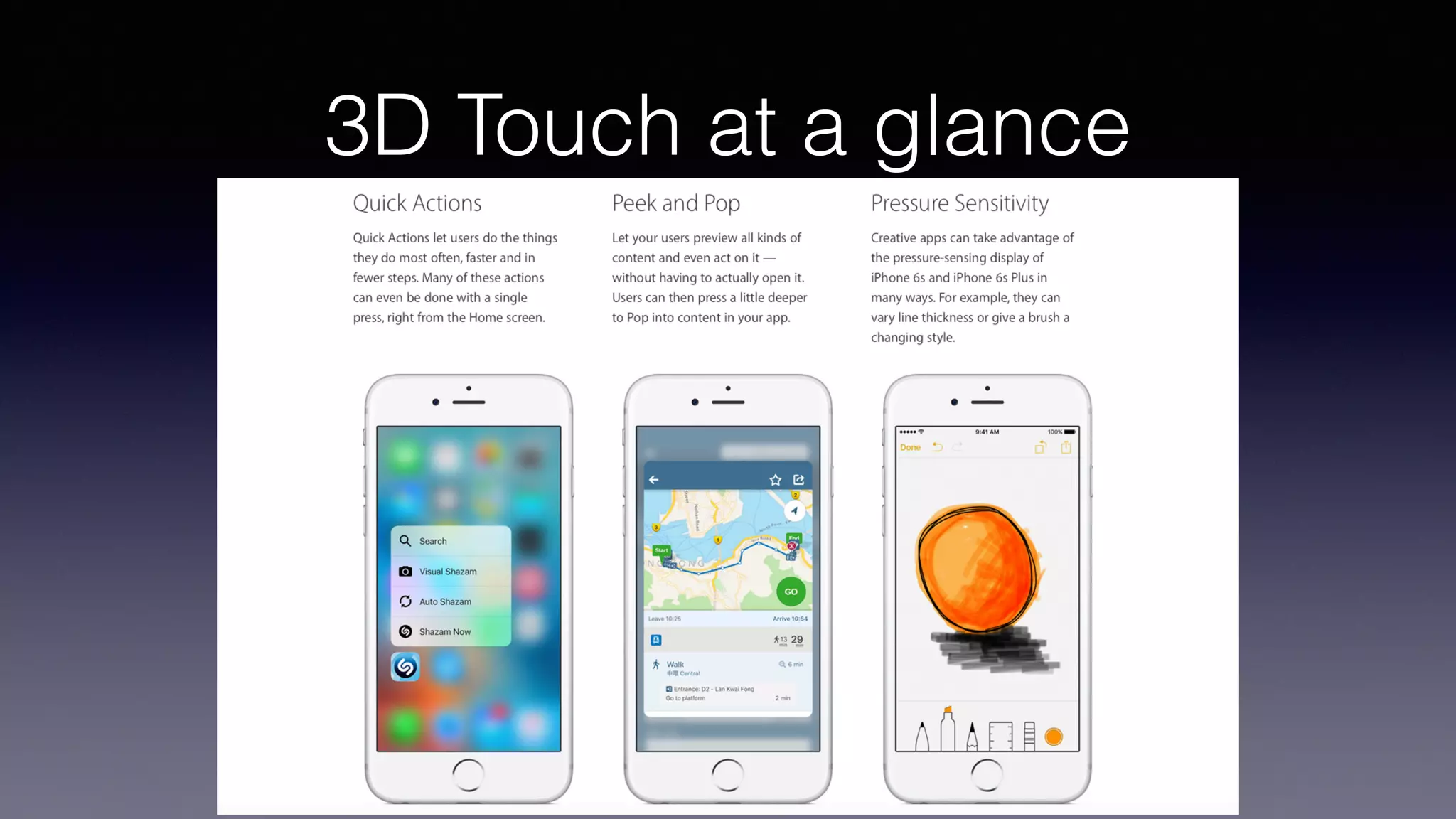
3D Touch at a glance
https://developer.apple.com/ios/3d-touch/
Demo: sample app
Home Screen Quick actions
Static
Defined in app’s info.plist
Available when the app is installed
Dynamic
Created by the app at runtime
Available after the first launch of the app
Shown after any static quick actions (if there is enough space)
Can include a system icon, custom icon, or Address Book contact
Home Screen Quick actions
Static
Defined in app’s info.plist
Available when the app is installed
Home Screen Quick actions
Dynamic: creating and registering
func createDynamicShortcuts() {
let application = UIApplication.shared
let bundleIdentifier = Bundle.main.bundleIdentifier!
var items = [UIMutableApplicationShortcutItem]()
if let (favoriteAsset, indexOfFavorite) = AssetStorage.sharedStorage.mostRecentFavoriteAsset() {
let favoriteShortcut = UIMutableApplicationShortcutItem(
type: "(bundleIdentifier).Favorite",
localizedTitle: favoriteAsset.name,
localizedSubtitle: favoriteAsset.detail,
icon: UIApplicationShortcutIcon(type: .love),
userInfo: ["version": Bundle.main.fullVersionNumber!, "index":indexOfFavorite]
)
items.append(favoriteShortcut)
}
let (recentAsset, indexOfRecent) = AssetStorage.sharedStorage.mostRecentNonFavoriteAsset()
let recentShortcut = UIMutableApplicationShortcutItem(
type: "(bundleIdentifier).Recent",
localizedTitle: recentAsset.name,
localizedSubtitle: recentAsset.detail,
icon: UIApplicationShortcutIcon(type: .task),
userInfo: ["version": Bundle.main.fullVersionNumber!, "index":indexOfRecent]
)
items.append(recentShortcut)
application.shortcutItems = items
}
Home Screen Quick actions
Dynamic: creating and registering
func createDynamicShortcuts() {
let application = UIApplication.shared
let bundleIdentifier = Bundle.main.bundleIdentifier!
var items = [UIMutableApplicationShortcutItem]()
if let (favoriteAsset, indexOfFavorite) = AssetStorage.sharedStorage.mostRecentFavoriteAsset() {
let favoriteShortcut = UIMutableApplicationShortcutItem(
type: "(bundleIdentifier).Favorite",
localizedTitle: favoriteAsset.name,
localizedSubtitle: favoriteAsset.detail,
icon: UIApplicationShortcutIcon(type: .love),
userInfo: ["version": Bundle.main.fullVersionNumber!, "index":indexOfFavorite]
)
items.append(favoriteShortcut)
}
let (recentAsset, indexOfRecent) = AssetStorage.sharedStorage.mostRecentNonFavoriteAsset()
let recentShortcut = UIMutableApplicationShortcutItem(
type: "(bundleIdentifier).Recent",
localizedTitle: recentAsset.name,
localizedSubtitle: recentAsset.detail,
icon: UIApplicationShortcutIcon(type: .task),
userInfo: ["version": Bundle.main.fullVersionNumber!, "index":indexOfRecent]
)
items.append(recentShortcut)
application.shortcutItems = items
}
Handling Quick actions
On app activation
func application(_ application: UIApplication, performActionFor shortcutItem: UIApplicationShortcutItem,
completionHandler: @escaping (Bool) -> Void) {
let handled = handleSortCutItem(shortcutItem)
completionHandler(handled)
}
func handleSortCutItem(_ shortcutItem: UIApplicationShortcutItem) -> Bool {
var vcs = (window!.rootViewController as! UINavigationController).viewControllers
if vcs.count > 1 {
vcs.last!.performSegue(withIdentifier: "UnwindToMainSegue", sender: nil)
vcs = (window!.rootViewController as! UINavigationController).viewControllers
}
let main = vcs.first as! MainTableViewController
switch shortcutItem.type {
case "net.bitcrafters.3DTouchDemo.AddAsset":
main.performSegue(withIdentifier: "NewAssetSegue", sender: nil)
case "net.bitcrafters.3DTouchDemo.Favorite":
main.segueForShortcutToDetail(shortcutItem.userInfo?["index"] as! Int)
case "net.bitcrafters.3DTouchDemo.Recent":
main.segueForShortcutToDetail(shortcutItem.userInfo?["index"] as! Int)
default:
return false
}
return true
}
Handling Quick actions
On app launch
var launchedShortcutItem: UIApplicationShortcutItem?
func application(_ application: UIApplication, didFinishLaunchingWithOptions launchOptions:
[UIApplicationLaunchOptionsKey: Any]?) -> Bool {
// Override point for customization after application launch.
var performAdditionalHandling = true
if let shortcutItem = launchOptions?[UIApplicationLaunchOptionsKey.shortcutItem] as?
UIApplicationShortcutItem {
launchedShortcutItem = shortcutItem
performAdditionalHandling = false
}
createDynamicShortcuts()
return performAdditionalHandling
}
func applicationDidEnterBackground(_ application: UIApplication) {
createDynamicShortcuts()
}
func applicationDidBecomeActive(_ application: UIApplication) {
guard let shortcut = launchedShortcutItem else { return }
let _ = handleSortCutItem(shortcut)
launchedShortcutItem = nil
}
Demo: quick actions
Home Screen Quick actions
Best practices / design considerations
Every app should provide quick actions
Focus on providing quick access to high-value tasks
Make quick actions predictable
Be prepared to handle dynamic quick actions from a previous
version of your app
Don’t add functionality that is only accessible using quick actions
Implement navigation to the desired feature triggered by the shortcut
Update the dynamic shortcuts to have them ready
Peek and Pop
Peek Pop
Preview Commit
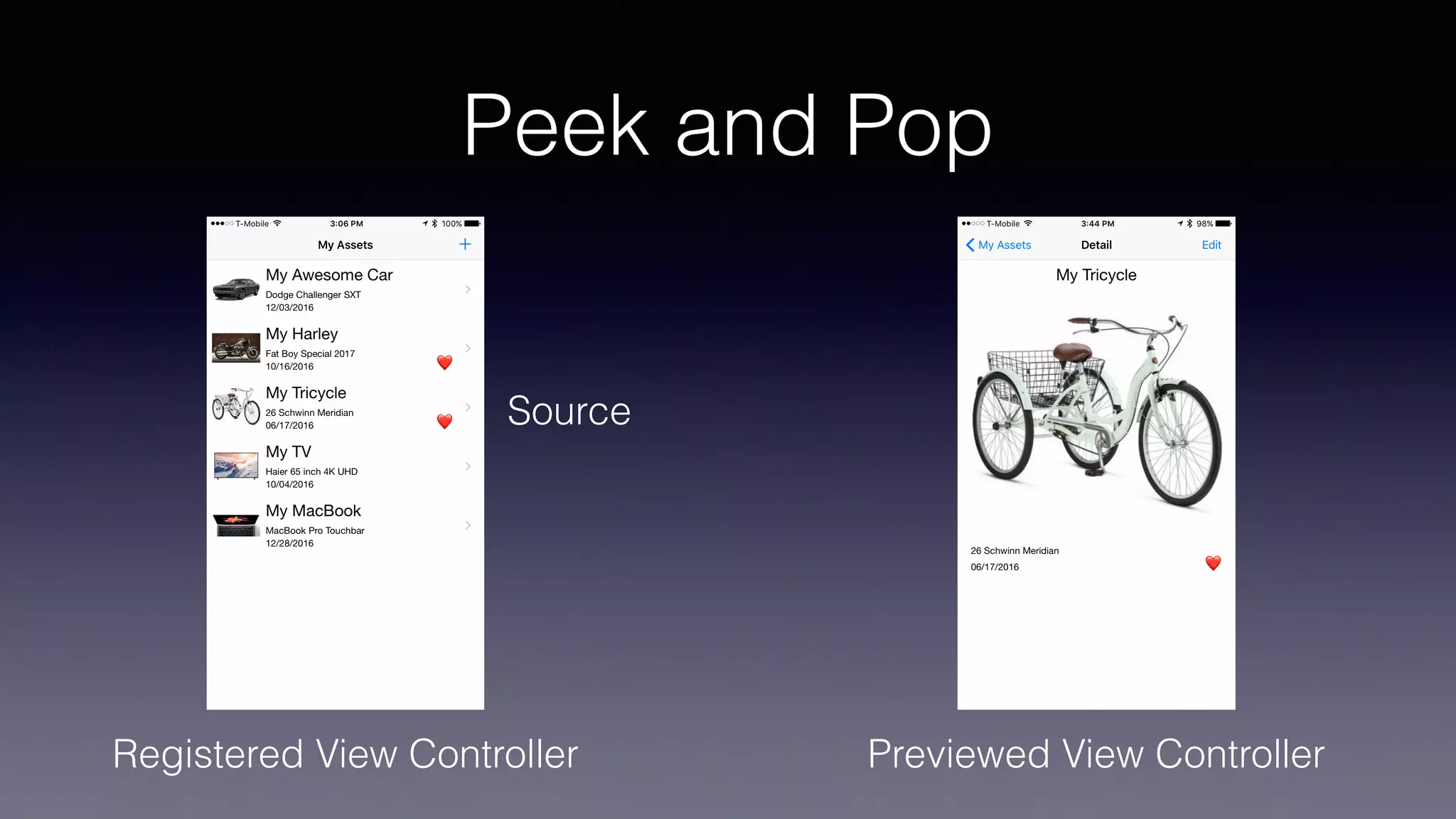
Peek and Pop
Registered View Controller Previewed View Controller
Source
Peek and Pop
Conforming to UIViewControllerPreviewDelegate
override func viewDidLoad() {
super.viewDidLoad()
registerForPreviewing(with: self, sourceView: tableView)
}
…
extension MainTableViewController: UIViewControllerPreviewingDelegate {
func previewingContext(_ previewingContext: UIViewControllerPreviewing, viewControllerForLocation location: CGPoint) ->
UIViewController? {
guard
let indexPath = tableView.indexPathForRow(at: location),
let detailViewController = UIStoryboard(name: "Main", bundle: nil).instantiateViewController(withIdentifier:
"DetailViewController") as? DetailViewController
else {
return nil
}
detailViewController.index = indexPath.row
let cellRect = tableView.rectForRow(at: indexPath)
let sourceRect = previewingContext.sourceView.convert(cellRect, from: tableView)
previewingContext.sourceRect = sourceRect
return detailViewController
}
func previewingContext(_ previewingContext: UIViewControllerPreviewing, commit viewControllerToCommit: UIViewController) {
show(viewControllerToCommit, sender: self)
}
}
Peek and Pop
Registering for previewing
override func viewDidLoad() {
super.viewDidLoad()
registerForPreviewing(with: self, sourceView: tableView)
}
…
extension MainTableViewController: UIViewControllerPreviewingDelegate {
func previewingContext(_ previewingContext: UIViewControllerPreviewing, viewControllerForLocation location: CGPoint) ->
UIViewController? {
guard
let indexPath = tableView.indexPathForRow(at: location),
let detailViewController = UIStoryboard(name: "Main", bundle: nil).instantiateViewController(withIdentifier:
"DetailViewController") as? DetailViewController
else {
return nil
}
detailViewController.index = indexPath.row
let cellRect = tableView.rectForRow(at: indexPath)
let sourceRect = previewingContext.sourceView.convert(cellRect, from: tableView)
previewingContext.sourceRect = sourceRect
return detailViewController
}
func previewingContext(_ previewingContext: UIViewControllerPreviewing, commit viewControllerToCommit: UIViewController) {
show(viewControllerToCommit, sender: self)
}
}
Peek and Pop
Providing a preview view controller
override func viewDidLoad() {
super.viewDidLoad()
registerForPreviewing(with: self, sourceView: tableView)
}
…
extension MainTableViewController: UIViewControllerPreviewingDelegate {
func previewingContext(_ previewingContext: UIViewControllerPreviewing, viewControllerForLocation location: CGPoint) ->
UIViewController? {
guard
let indexPath = tableView.indexPathForRow(at: location),
let detailViewController = UIStoryboard(name: "Main", bundle: nil).instantiateViewController(withIdentifier:
"DetailViewController") as? DetailViewController
else {
return nil
}
detailViewController.index = indexPath.row
let cellRect = tableView.rectForRow(at: indexPath)
let sourceRect = previewingContext.sourceView.convert(cellRect, from: tableView)
previewingContext.sourceRect = sourceRect
return detailViewController
}
func previewingContext(_ previewingContext: UIViewControllerPreviewing, commit viewControllerToCommit: UIViewController) {
show(viewControllerToCommit, sender: self)
}
}
Peek and Pop
Committing a preview view controller
override func viewDidLoad() {
super.viewDidLoad()
registerForPreviewing(with: self, sourceView: tableView)
}
…
extension MainTableViewController: UIViewControllerPreviewingDelegate {
func previewingContext(_ previewingContext: UIViewControllerPreviewing, viewControllerForLocation location: CGPoint) ->
UIViewController? {
guard
let indexPath = tableView.indexPathForRow(at: location),
let detailViewController = UIStoryboard(name: "Main", bundle: nil).instantiateViewController(withIdentifier:
"DetailViewController") as? DetailViewController
else {
return nil
}
detailViewController.index = indexPath.row
let cellRect = tableView.rectForRow(at: indexPath)
let sourceRect = previewingContext.sourceView.convert(cellRect, from: tableView)
previewingContext.sourceRect = sourceRect
return detailViewController
}
func previewingContext(_ previewingContext: UIViewControllerPreviewing, commit viewControllerToCommit: UIViewController) {
show(viewControllerToCommit, sender: self)
}
}
Demo: peek and pop
Peek and Pop
Using the Storyboard
Demo: storyboard peek & pop
Peek and Pop (Preview quick actions)
Source
Peek and Pop
Adding preview quick actions
// MARK: Preview actions, in DetailViewController
override var previewActionItems : [UIPreviewActionItem] {
var favoriteTitle: String
if asset.favorite {
favoriteTitle = "💔 (self.asset.name)"
} else {
favoriteTitle = "❤ (self.asset.name)"
}
let favoriteAction = UIPreviewAction(title: favoriteTitle, style: .default) { (action,
viewController) in
self.asset.favorite = !self.asset.favorite
AssetStorage.sharedStorage.update(self.asset, atIndex: self.index!)
NotificationCenter.default.post(name: DetailViewController.updateUINotification, object:
nil)
}
let deleteAction = UIPreviewAction(title: "Delete (self.asset.name)", style: .destructive)
{ (action, viewController) in
AssetStorage.sharedStorage.delete(assetAtIndex: self.index!)
NotificationCenter.default.post(name: DetailViewController.updateUINotification, object: nil)
}
return [favoriteAction, deleteAction]
}
Demo: peek and pop
Peek and Pop
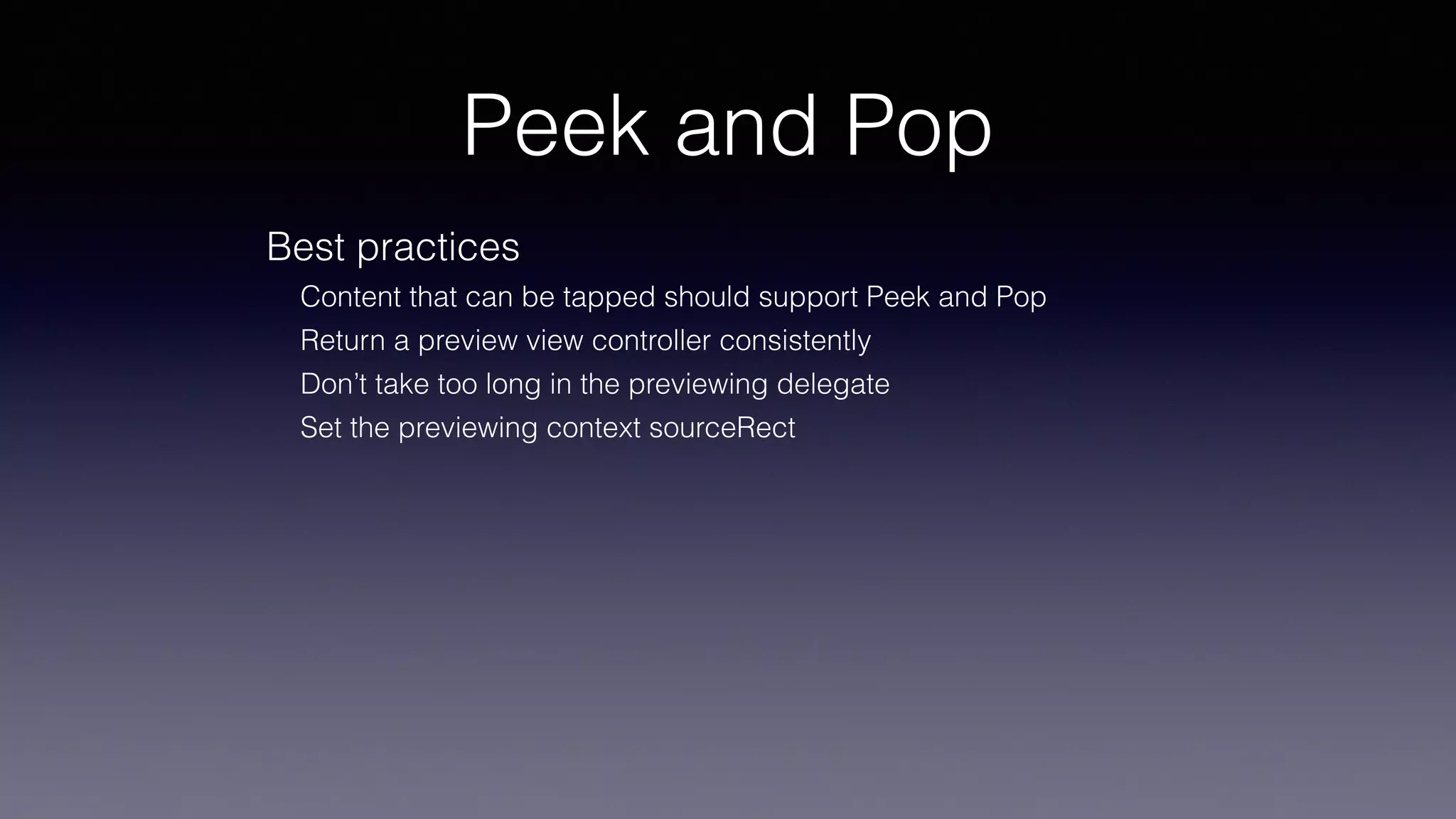
Best practices
Content that can be tapped should support Peek and Pop
Return a preview view controller consistently
Don’t take too long in the previewing delegate
Set the previewing context sourceRect
Low-Level Force API
Normalized access to force data
Properties on UITouch: force and maximumPossibleForce
Available on devices that support 3D Touch or Apple Pencil
Low-Level Force API
Using UITouch
override func touchesMoved(_ touches: Set<UITouch>, with event: UIEvent?) {
if let touch = touches.first {
if #available(iOS 9.0, *) {
if traitCollection.forceTouchCapability == UIForceTouchCapability.available {
if touch.force >= touch.maximumPossibleForce {
forceLabel.text = "385+ grams"
} else {
let force = touch.force/touch.maximumPossibleForce
let grams = force * 385
let roundGrams = Int(grams)
forceLabel.text = "(roundGrams) grams"
}
}
}
}
}
override func touchesEnded(_ touches: Set<UITouch>, with event: UIEvent?) {
forceLabel.text = "0 gram"
}
http://www.appcoda.com/3d-touch-tutorial/
Demo: Low-Level Force API
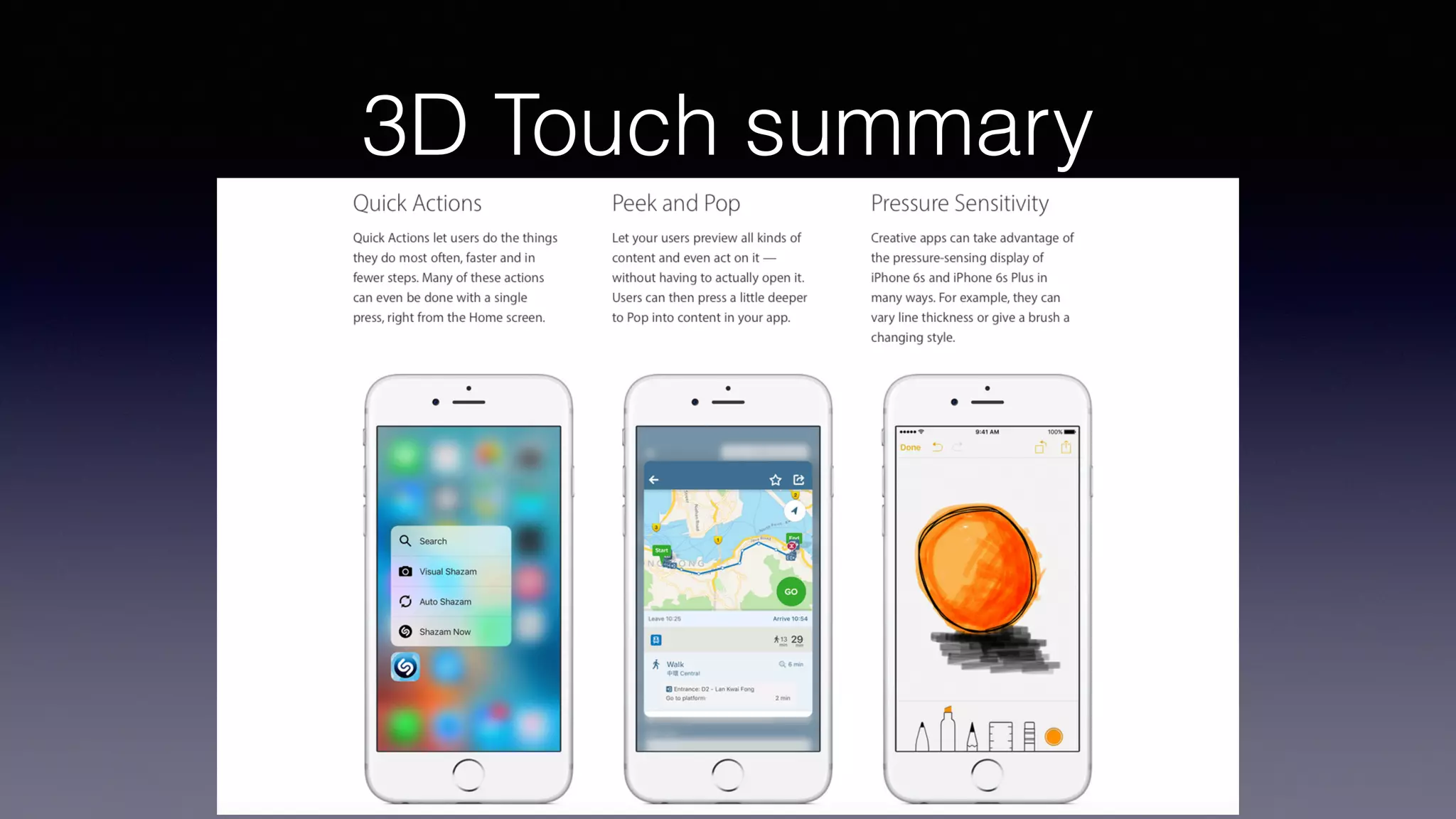
3D Touch summary
https://developer.apple.com/ios/3d-touch/
Reference
https://developer.apple.com/ios/3d-touch/
https://developer.apple.com/library/content/
documentation/UserExperience/Conceptual/
Adopting3DTouchOniPhone/index.html
http://www.appcoda.com/3d-touch-tutorial/
Thanks!
• Source code
https://github.com/jcatalan007/3DTouch-talk
• Slides
https://www.slideshare.net/jcatalan007/
adopting-3d-touch-in-your-apps

Adopting 3D Touch in your apps

  • 1.
    Adopting 3D Touch JuanCatalan jcatalan007@gmail.com
  • 2.
    Agenda • What is3D Touch • Home Screen Quick actions • Peek and Pop • Pressure Sensitivity
  • 3.
    What is 3DTouch? • With the introduction of the iPhone 6s and the iPhone 6s Plus, Apple added 3D Touch, a new dimension to the multi-touch user interface. • This new technology senses how deeply users press the display and provides a new way to interact with the iPhone. • In iOS 9, Apple introduced several 3D Touch APIs. In this session I will explain in a practical way what is 3D Touch and how you can benefit from it in your app.  
  • 4.
    3D Touch ata glance https://developer.apple.com/ios/3d-touch/
  • 5.
  • 6.
  • 7.
    Home Screen Quickactions Static Defined in app’s info.plist Available when the app is installed Dynamic Created by the app at runtime Available after the first launch of the app Shown after any static quick actions (if there is enough space) Can include a system icon, custom icon, or Address Book contact
  • 8.
    Home Screen Quickactions Static Defined in app’s info.plist Available when the app is installed
  • 9.
    Home Screen Quickactions Dynamic: creating and registering func createDynamicShortcuts() { let application = UIApplication.shared let bundleIdentifier = Bundle.main.bundleIdentifier! var items = [UIMutableApplicationShortcutItem]() if let (favoriteAsset, indexOfFavorite) = AssetStorage.sharedStorage.mostRecentFavoriteAsset() { let favoriteShortcut = UIMutableApplicationShortcutItem( type: "(bundleIdentifier).Favorite", localizedTitle: favoriteAsset.name, localizedSubtitle: favoriteAsset.detail, icon: UIApplicationShortcutIcon(type: .love), userInfo: ["version": Bundle.main.fullVersionNumber!, "index":indexOfFavorite] ) items.append(favoriteShortcut) } let (recentAsset, indexOfRecent) = AssetStorage.sharedStorage.mostRecentNonFavoriteAsset() let recentShortcut = UIMutableApplicationShortcutItem( type: "(bundleIdentifier).Recent", localizedTitle: recentAsset.name, localizedSubtitle: recentAsset.detail, icon: UIApplicationShortcutIcon(type: .task), userInfo: ["version": Bundle.main.fullVersionNumber!, "index":indexOfRecent] ) items.append(recentShortcut) application.shortcutItems = items }
  • 10.
    Home Screen Quickactions Dynamic: creating and registering func createDynamicShortcuts() { let application = UIApplication.shared let bundleIdentifier = Bundle.main.bundleIdentifier! var items = [UIMutableApplicationShortcutItem]() if let (favoriteAsset, indexOfFavorite) = AssetStorage.sharedStorage.mostRecentFavoriteAsset() { let favoriteShortcut = UIMutableApplicationShortcutItem( type: "(bundleIdentifier).Favorite", localizedTitle: favoriteAsset.name, localizedSubtitle: favoriteAsset.detail, icon: UIApplicationShortcutIcon(type: .love), userInfo: ["version": Bundle.main.fullVersionNumber!, "index":indexOfFavorite] ) items.append(favoriteShortcut) } let (recentAsset, indexOfRecent) = AssetStorage.sharedStorage.mostRecentNonFavoriteAsset() let recentShortcut = UIMutableApplicationShortcutItem( type: "(bundleIdentifier).Recent", localizedTitle: recentAsset.name, localizedSubtitle: recentAsset.detail, icon: UIApplicationShortcutIcon(type: .task), userInfo: ["version": Bundle.main.fullVersionNumber!, "index":indexOfRecent] ) items.append(recentShortcut) application.shortcutItems = items }
  • 11.
    Handling Quick actions Onapp activation func application(_ application: UIApplication, performActionFor shortcutItem: UIApplicationShortcutItem, completionHandler: @escaping (Bool) -> Void) { let handled = handleSortCutItem(shortcutItem) completionHandler(handled) } func handleSortCutItem(_ shortcutItem: UIApplicationShortcutItem) -> Bool { var vcs = (window!.rootViewController as! UINavigationController).viewControllers if vcs.count > 1 { vcs.last!.performSegue(withIdentifier: "UnwindToMainSegue", sender: nil) vcs = (window!.rootViewController as! UINavigationController).viewControllers } let main = vcs.first as! MainTableViewController switch shortcutItem.type { case "net.bitcrafters.3DTouchDemo.AddAsset": main.performSegue(withIdentifier: "NewAssetSegue", sender: nil) case "net.bitcrafters.3DTouchDemo.Favorite": main.segueForShortcutToDetail(shortcutItem.userInfo?["index"] as! Int) case "net.bitcrafters.3DTouchDemo.Recent": main.segueForShortcutToDetail(shortcutItem.userInfo?["index"] as! Int) default: return false } return true }
  • 12.
    Handling Quick actions Onapp launch var launchedShortcutItem: UIApplicationShortcutItem? func application(_ application: UIApplication, didFinishLaunchingWithOptions launchOptions: [UIApplicationLaunchOptionsKey: Any]?) -> Bool { // Override point for customization after application launch. var performAdditionalHandling = true if let shortcutItem = launchOptions?[UIApplicationLaunchOptionsKey.shortcutItem] as? UIApplicationShortcutItem { launchedShortcutItem = shortcutItem performAdditionalHandling = false } createDynamicShortcuts() return performAdditionalHandling } func applicationDidEnterBackground(_ application: UIApplication) { createDynamicShortcuts() } func applicationDidBecomeActive(_ application: UIApplication) { guard let shortcut = launchedShortcutItem else { return } let _ = handleSortCutItem(shortcut) launchedShortcutItem = nil }
  • 13.
  • 14.
    Home Screen Quickactions Best practices / design considerations Every app should provide quick actions Focus on providing quick access to high-value tasks Make quick actions predictable Be prepared to handle dynamic quick actions from a previous version of your app Don’t add functionality that is only accessible using quick actions Implement navigation to the desired feature triggered by the shortcut Update the dynamic shortcuts to have them ready
  • 15.
    Peek and Pop PeekPop Preview Commit
  • 16.
    Peek and Pop RegisteredView Controller Previewed View Controller Source
  • 17.
    Peek and Pop Conformingto UIViewControllerPreviewDelegate override func viewDidLoad() { super.viewDidLoad() registerForPreviewing(with: self, sourceView: tableView) } … extension MainTableViewController: UIViewControllerPreviewingDelegate { func previewingContext(_ previewingContext: UIViewControllerPreviewing, viewControllerForLocation location: CGPoint) -> UIViewController? { guard let indexPath = tableView.indexPathForRow(at: location), let detailViewController = UIStoryboard(name: "Main", bundle: nil).instantiateViewController(withIdentifier: "DetailViewController") as? DetailViewController else { return nil } detailViewController.index = indexPath.row let cellRect = tableView.rectForRow(at: indexPath) let sourceRect = previewingContext.sourceView.convert(cellRect, from: tableView) previewingContext.sourceRect = sourceRect return detailViewController } func previewingContext(_ previewingContext: UIViewControllerPreviewing, commit viewControllerToCommit: UIViewController) { show(viewControllerToCommit, sender: self) } }
  • 18.
    Peek and Pop Registeringfor previewing override func viewDidLoad() { super.viewDidLoad() registerForPreviewing(with: self, sourceView: tableView) } … extension MainTableViewController: UIViewControllerPreviewingDelegate { func previewingContext(_ previewingContext: UIViewControllerPreviewing, viewControllerForLocation location: CGPoint) -> UIViewController? { guard let indexPath = tableView.indexPathForRow(at: location), let detailViewController = UIStoryboard(name: "Main", bundle: nil).instantiateViewController(withIdentifier: "DetailViewController") as? DetailViewController else { return nil } detailViewController.index = indexPath.row let cellRect = tableView.rectForRow(at: indexPath) let sourceRect = previewingContext.sourceView.convert(cellRect, from: tableView) previewingContext.sourceRect = sourceRect return detailViewController } func previewingContext(_ previewingContext: UIViewControllerPreviewing, commit viewControllerToCommit: UIViewController) { show(viewControllerToCommit, sender: self) } }
  • 19.
    Peek and Pop Providinga preview view controller override func viewDidLoad() { super.viewDidLoad() registerForPreviewing(with: self, sourceView: tableView) } … extension MainTableViewController: UIViewControllerPreviewingDelegate { func previewingContext(_ previewingContext: UIViewControllerPreviewing, viewControllerForLocation location: CGPoint) -> UIViewController? { guard let indexPath = tableView.indexPathForRow(at: location), let detailViewController = UIStoryboard(name: "Main", bundle: nil).instantiateViewController(withIdentifier: "DetailViewController") as? DetailViewController else { return nil } detailViewController.index = indexPath.row let cellRect = tableView.rectForRow(at: indexPath) let sourceRect = previewingContext.sourceView.convert(cellRect, from: tableView) previewingContext.sourceRect = sourceRect return detailViewController } func previewingContext(_ previewingContext: UIViewControllerPreviewing, commit viewControllerToCommit: UIViewController) { show(viewControllerToCommit, sender: self) } }
  • 20.
    Peek and Pop Committinga preview view controller override func viewDidLoad() { super.viewDidLoad() registerForPreviewing(with: self, sourceView: tableView) } … extension MainTableViewController: UIViewControllerPreviewingDelegate { func previewingContext(_ previewingContext: UIViewControllerPreviewing, viewControllerForLocation location: CGPoint) -> UIViewController? { guard let indexPath = tableView.indexPathForRow(at: location), let detailViewController = UIStoryboard(name: "Main", bundle: nil).instantiateViewController(withIdentifier: "DetailViewController") as? DetailViewController else { return nil } detailViewController.index = indexPath.row let cellRect = tableView.rectForRow(at: indexPath) let sourceRect = previewingContext.sourceView.convert(cellRect, from: tableView) previewingContext.sourceRect = sourceRect return detailViewController } func previewingContext(_ previewingContext: UIViewControllerPreviewing, commit viewControllerToCommit: UIViewController) { show(viewControllerToCommit, sender: self) } }
  • 21.
  • 22.
    Peek and Pop Usingthe Storyboard
  • 23.
  • 24.
    Peek and Pop(Preview quick actions) Source
  • 25.
    Peek and Pop Addingpreview quick actions // MARK: Preview actions, in DetailViewController override var previewActionItems : [UIPreviewActionItem] { var favoriteTitle: String if asset.favorite { favoriteTitle = "💔 (self.asset.name)" } else { favoriteTitle = "❤ (self.asset.name)" } let favoriteAction = UIPreviewAction(title: favoriteTitle, style: .default) { (action, viewController) in self.asset.favorite = !self.asset.favorite AssetStorage.sharedStorage.update(self.asset, atIndex: self.index!) NotificationCenter.default.post(name: DetailViewController.updateUINotification, object: nil) } let deleteAction = UIPreviewAction(title: "Delete (self.asset.name)", style: .destructive) { (action, viewController) in AssetStorage.sharedStorage.delete(assetAtIndex: self.index!) NotificationCenter.default.post(name: DetailViewController.updateUINotification, object: nil) } return [favoriteAction, deleteAction] }
  • 26.
  • 27.
    Peek and Pop Bestpractices Content that can be tapped should support Peek and Pop Return a preview view controller consistently Don’t take too long in the previewing delegate Set the previewing context sourceRect
  • 28.
    Low-Level Force API Normalizedaccess to force data Properties on UITouch: force and maximumPossibleForce Available on devices that support 3D Touch or Apple Pencil
  • 29.
    Low-Level Force API UsingUITouch override func touchesMoved(_ touches: Set<UITouch>, with event: UIEvent?) { if let touch = touches.first { if #available(iOS 9.0, *) { if traitCollection.forceTouchCapability == UIForceTouchCapability.available { if touch.force >= touch.maximumPossibleForce { forceLabel.text = "385+ grams" } else { let force = touch.force/touch.maximumPossibleForce let grams = force * 385 let roundGrams = Int(grams) forceLabel.text = "(roundGrams) grams" } } } } } override func touchesEnded(_ touches: Set<UITouch>, with event: UIEvent?) { forceLabel.text = "0 gram" } http://www.appcoda.com/3d-touch-tutorial/
  • 30.
  • 31.
  • 32.
  • 33.
    Thanks! • Source code https://github.com/jcatalan007/3DTouch-talk •Slides https://www.slideshare.net/jcatalan007/ adopting-3d-touch-in-your-apps