TANSTAAFL: using
open source iPhone UI
        code
    Jonathan Saggau (@jonmarimba)
           Sounds Broken inc
Da book
The dude
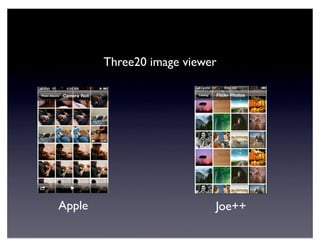
Three20 image viewer


Apple                      Joe++
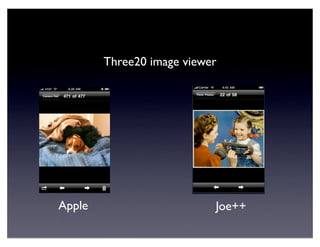
Three20 image viewer


Apple                      Joe++
Demo
or... Julia Child impression
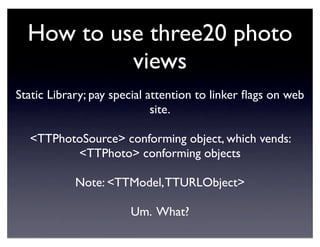
How to use three20 photo
           views
Static Library; pay special attention to linker flags on web
                             site.

  <TTPhotoSource> conforming object, which vends:
         <TTPhoto> conforming objects

            Note: <TTModel, TTURLObject>

                       Um. What?
/**
 * TTModel describes the state of an object that can be loaded from a
remote source.
 *
 * By implementing this protocol, you can communicate to the user the
state of network
 * activity in an object.
 */
@protocol TTModel <NSObject>

/**
 * An array of objects that conform to the TTModelDelegate protocol.
 */
- (NSMutableArray*)delegates;

/**
 * Indicates that the data has been loaded.
 *
 * Default implementation returns YES.
 */
- (BOOL)isLoaded;
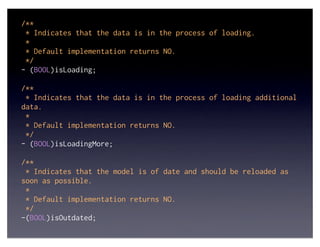
/**
 * Indicates that the data is in the process of loading.
 *
 * Default implementation returns NO.
 */
- (BOOL)isLoading;

/**
 * Indicates that the data is in the process of loading additional
data.
 *
 * Default implementation returns NO.
 */
- (BOOL)isLoadingMore;

/**
 * Indicates that the model is of date and should be reloaded as
soon as possible.
 *
 * Default implementation returns NO.
 */
-(BOOL)isOutdated;
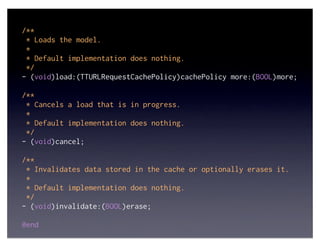
/**
 * Loads the model.
 *
 * Default implementation does nothing.
 */
- (void)load:(TTURLRequestCachePolicy)cachePolicy more:(BOOL)more;

/**
 * Cancels a load that is in progress.
 *
 * Default implementation does nothing.
 */
- (void)cancel;

/**
 * Invalidates data stored in the cache or optionally erases it.
 *
 * Default implementation does nothing.
 */
- (void)invalidate:(BOOL)erase;

@end
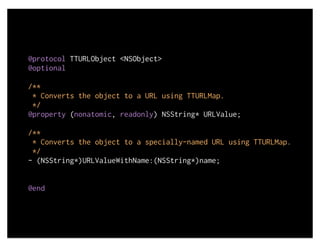
@protocol TTURLObject <NSObject>
@optional

/**
 * Converts the object to a URL using TTURLMap.
 */
@property (nonatomic, readonly) NSString* URLValue;

/**
 * Converts the object to a specially-named URL using TTURLMap.
 */
- (NSString*)URLValueWithName:(NSString*)name;


@end
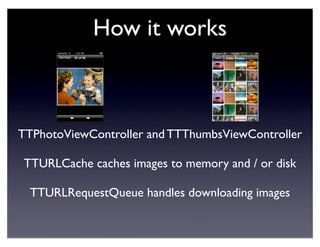
How it works


TTPhotoViewController and TTThumbsViewController

TTURLCache caches images to memory and / or disk

  TTURLRequestQueue handles downloading images
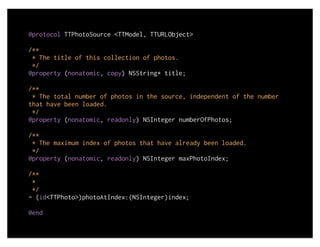
@protocol TTPhotoSource <TTModel, TTURLObject>

/**
 * The title of this collection of photos.
 */
@property (nonatomic, copy) NSString* title;

/**
 * The total number of photos in the source, independent of the number
that have been loaded.
 */
@property (nonatomic, readonly) NSInteger numberOfPhotos;

/**
 * The maximum index of photos that have already been loaded.
 */
@property (nonatomic, readonly) NSInteger maxPhotoIndex;

/**
 *
 */
- (id<TTPhoto>)photoAtIndex:(NSInteger)index;

@end
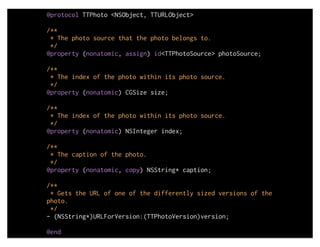
@protocol TTPhoto <NSObject, TTURLObject>

/**
 * The photo source that the photo belongs to.
 */
@property (nonatomic, assign) id<TTPhotoSource> photoSource;

/**
 * The index of the photo within its photo source.
 */
@property (nonatomic) CGSize size;

/**
 * The index of the photo within its photo source.
 */
@property (nonatomic) NSInteger index;

/**
 * The caption of the photo.
 */
@property (nonatomic, copy) NSString* caption;

/**
 * Gets the URL of one of the differently sized versions of the
photo.
 */
- (NSString*)URLForVersion:(TTPhotoVersion)version;

@end
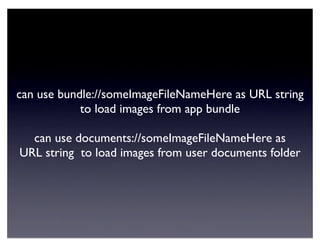
can use bundle://someImageFileNameHere as URL string
            to load images from app bundle

  can use documents://someImageFileNameHere as
URL string to load images from user documents folder
Other cool stuff about three20

URL-based navigation that can persist the path taken to
get to a given view controller and can push that stack of
    views back on when the user re-opens your app.

          Stylesheets to “skin” your app easily.

              Pretty buttons and overlays.

  Decent (visual) error handling for cloud-based apps

  Simpler UITableView programming using TTModel*
Documentation and help

Mailing list: http://groups.google.com/group/three20

           API docs: http://three20.info/

Me! jonathan@jonathansaggau.com @jonmarimba

 (I’m not affiliated with three20, I just use it a lot)
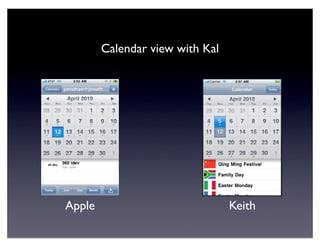
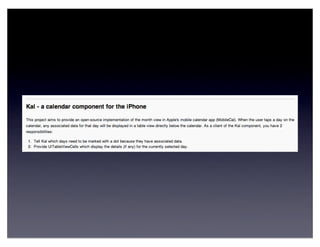
Calendar view with Kal


Apple                            Keith
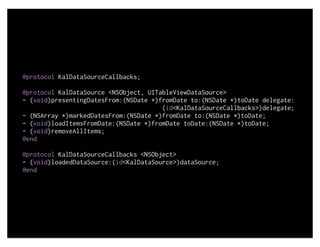
@protocol KalDataSourceCallbacks;

@protocol KalDataSource <NSObject, UITableViewDataSource>
- (void)presentingDatesFrom:(NSDate *)fromDate to:(NSDate *)toDate delegate:
                                       (id<KalDataSourceCallbacks>)delegate;
- (NSArray *)markedDatesFrom:(NSDate *)fromDate to:(NSDate *)toDate;
- (void)loadItemsFromDate:(NSDate *)fromDate toDate:(NSDate *)toDate;
- (void)removeAllItems;
@end

@protocol KalDataSourceCallbacks <NSObject>
- (void)loadedDataSource:(id<KalDataSource>)dataSource;
@end
Coverflow view with OpenFlow


Apple                      Alex
Demo
or... Julia Child impression
How to use it.
@protocol AFOpenFlowViewDataSource <NSObject>

//Tells the data source that will need this image.
//The data source should set the image as soon as it’s ready
- (void)openFlowView:(AFOpenFlowView *)openFlowView requestImageForIndex:(int)index;
- (UIImage *)defaultImage;

@end

//Allows the delegate to update other parts of UI for selection
@protocol AFOpenFlowViewDelegate <NSObject>
@optional
- (void)openFlowView:(AFOpenFlowView *)openFlowView selectionDidChange:(int)index;
@end
How to use it.
BTW: The sample code also has a useful image loading
            subclass of NSOperation.

If you want to change the image for a given index, do
                        this:
	

   [(AFOpenFlowView *)someView setImage:someImage forIndex:someInteger];
How it works
                        CoreAnimation 2.5D++
	

   // Set some perspective
	

   CATransform3D sublayerTransform = CATransform3DIdentity;
	

   sublayerTransform.m34 = -0.01; // 1 / -zDistance where zDistance = 100
	

   [scrollView.layer setSublayerTransform:sublayerTransform];

          Dequeues images much like the UITableView
            (and the TTPhotoview controller, too)
          Draws only those images that are on screen
                      // the magic is here
                      - (void)layoutCover:(AFItemView *)aCover
                            selectedCover:(int)selectedIndex
                                 animated:(Boolean)animated
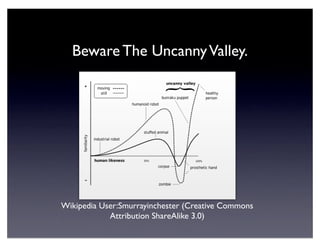
Beware The Uncanny Valley.


Wikipedia User:Smurrayinchester (Creative Commons
            Attribution ShareAlike 3.0)
Coverflow view with OpenFlow


Apple                      Alex
What needs a-changin’
The animation is a little “off” for the rotation (seems like
                  it’s the wrong speed)

 The z position of the flanking photos is not far enough
                          away.

            Feels like there is a lot of friction.

  The reflection under the covers is semi-transparent.
  Apple’s view has the reflected images occlude those
                 behind as in “real life.”
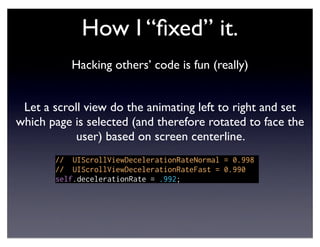
How I “fixed” it.
           Hacking others’ code is fun (really)


 Let a scroll view do the animating left to right and set
which page is selected (and therefore rotated to face the
            user) based on screen centerline.
       // UIScrollViewDecelerationRateNormal = 0.998
       // UIScrollViewDecelerationRateFast = 0.990
       self.decelerationRate = .992;
How I “fixed” it.
      scrolling a UIScrollView sets bounds constantly
               and calls layoutSubviews a lot...
- (void)layoutSubviews
{
    NSLog(@"[%@ %s]", self, _cmd);
    halfScreenWidth = self.bounds.size.width / 2;
    halfScreenHeight = self.bounds.size.height / 2;

    int lowerBound = MAX(-1, selectedCoverView.number - COVER_BUFFER);
    int upperBound = MIN(self.numberOfImages - 1, selectedCoverView.number + COVER_BUFFER);
                                    // 1 / -zDistance where zDistance = 100
    [self layoutCovers:selectedCoverView.number fromCover:lowerBound toCover:upperBound];
    [self setNumberOfImages:numberOfImages]; // resets view bounds and stuff
    CGPoint contentOffset = [self contentOffset];
    int targetCover = (int) roundf(contentOffset.x / COVER_SPACING);
    if (targetCover != selectedCoverView.number) {
        if (targetCover < 0)
             [self setSelectedCover:0];
        else if (targetCover >= self.numberOfImages)
             [self setSelectedCover:self.numberOfImages - 1];
        else
             [self setSelectedCover:targetCover];
    }
}
Hijacking touch events
      I think I stole this from Apple’s sample code

- (SBNotifyingWindow *)appWindow
{
    id appDel = [[UIApplication sharedApplication] delegate];
    if([appDel respondsToSelector:@selector(window)])
    {
        UIWindow *window = [appDel performSelector:@selector(window)];
        if([window isMemberOfClass:[SBNotifyingWindow class]])
        {
            return (SBNotifyingWindow *)window;
        }
    }
    return nil;
}

- (void)setUpInitialState {

    [[self appWindow] addObjectInterestedInTouches:self];
#pragma mark SBNotifyingWindowTouches

-(void)interestingEvent:(UIEvent *)event;
{
    //NSLog(@"%@ %s %@", self, _cmd, event);

    NSSet *touches = [event allTouches];
    UITouch *touch = [touches anyObject];
    UITouchPhase phase = [touch phase];

    if (phase   == UITouchPhaseBegan) {
        [self   touchesBegan:touches withEvent:event];
    }
    if (phase   == UITouchPhaseEnded)
    {
        [self   touchesEnded:touches withEvent:event];
    }
    if (phase   == UITouchPhaseCancelled) {
        [self   touchesCancelled:touches withEvent:event];
    }
    if (phase   == UITouchPhaseMoved) {
        [self   touchesMoved:touches withEvent:event];
    }
}
Coverflow view with OpenFlow


Apple                      Alex
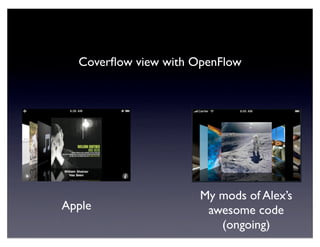
Coverflow view with OpenFlow


                      My mods of Alex’s
Apple                  awesome code
                         (ongoing)
Demo
or... Julia Child impression
To Do


The center view doesn’t quite center after you throw the view
  around. (UIScrollview’s friction stops where it wants to)

Would like to add flipping the front cover to another view and
     add the rest of the UI in Apple’s implementation.

My mods are available on github at:
https://github.com/jonmarimba/OpenFlow
Other implementations


 FlowCover (OpenGL ES)

 Plausible Labs has one, too
(Not free, but very accurate)
Look for gogoDocs Google Docs
        reader for iPhone and iPad. It’s in an
            the app store in your pocket.


jonathan@jonathansaggau.com
http://jonathansaggau.com/blog
       twit: @jonmarimba
Will Code for food.
             Will, um, food for code.


         jonathan@jonathansaggau.com
         http://jonathansaggau.com/blog
                twit: @jonmarimba


Nerds for hire // Hiring nerds
303 TANSTAAFL: Using Open Source iPhone UI Code

303 TANSTAAFL: Using Open Source iPhone UI Code

  • 1.
    TANSTAAFL: using open sourceiPhone UI code Jonathan Saggau (@jonmarimba) Sounds Broken inc
  • 2.
  • 3.
  • 4.
  • 5.
  • 6.
  • 7.
    How to usethree20 photo views Static Library; pay special attention to linker flags on web site. <TTPhotoSource> conforming object, which vends: <TTPhoto> conforming objects Note: <TTModel, TTURLObject> Um. What?
  • 8.
    /** * TTModeldescribes the state of an object that can be loaded from a remote source. * * By implementing this protocol, you can communicate to the user the state of network * activity in an object. */ @protocol TTModel <NSObject> /** * An array of objects that conform to the TTModelDelegate protocol. */ - (NSMutableArray*)delegates; /** * Indicates that the data has been loaded. * * Default implementation returns YES. */ - (BOOL)isLoaded;
  • 9.
    /** * Indicatesthat the data is in the process of loading. * * Default implementation returns NO. */ - (BOOL)isLoading; /** * Indicates that the data is in the process of loading additional data. * * Default implementation returns NO. */ - (BOOL)isLoadingMore; /** * Indicates that the model is of date and should be reloaded as soon as possible. * * Default implementation returns NO. */ -(BOOL)isOutdated;
  • 10.
    /** * Loadsthe model. * * Default implementation does nothing. */ - (void)load:(TTURLRequestCachePolicy)cachePolicy more:(BOOL)more; /** * Cancels a load that is in progress. * * Default implementation does nothing. */ - (void)cancel; /** * Invalidates data stored in the cache or optionally erases it. * * Default implementation does nothing. */ - (void)invalidate:(BOOL)erase; @end
  • 11.
    @protocol TTURLObject <NSObject> @optional /** * Converts the object to a URL using TTURLMap. */ @property (nonatomic, readonly) NSString* URLValue; /** * Converts the object to a specially-named URL using TTURLMap. */ - (NSString*)URLValueWithName:(NSString*)name; @end
  • 12.
    How it works TTPhotoViewControllerand TTThumbsViewController TTURLCache caches images to memory and / or disk TTURLRequestQueue handles downloading images
  • 13.
    @protocol TTPhotoSource <TTModel,TTURLObject> /** * The title of this collection of photos. */ @property (nonatomic, copy) NSString* title; /** * The total number of photos in the source, independent of the number that have been loaded. */ @property (nonatomic, readonly) NSInteger numberOfPhotos; /** * The maximum index of photos that have already been loaded. */ @property (nonatomic, readonly) NSInteger maxPhotoIndex; /** * */ - (id<TTPhoto>)photoAtIndex:(NSInteger)index; @end
  • 14.
    @protocol TTPhoto <NSObject,TTURLObject> /** * The photo source that the photo belongs to. */ @property (nonatomic, assign) id<TTPhotoSource> photoSource; /** * The index of the photo within its photo source. */ @property (nonatomic) CGSize size; /** * The index of the photo within its photo source. */ @property (nonatomic) NSInteger index; /** * The caption of the photo. */ @property (nonatomic, copy) NSString* caption; /** * Gets the URL of one of the differently sized versions of the photo. */ - (NSString*)URLForVersion:(TTPhotoVersion)version; @end
  • 15.
    can use bundle://someImageFileNameHereas URL string to load images from app bundle can use documents://someImageFileNameHere as URL string to load images from user documents folder
  • 16.
    Other cool stuffabout three20 URL-based navigation that can persist the path taken to get to a given view controller and can push that stack of views back on when the user re-opens your app. Stylesheets to “skin” your app easily. Pretty buttons and overlays. Decent (visual) error handling for cloud-based apps Simpler UITableView programming using TTModel*
  • 17.
    Documentation and help Mailinglist: http://groups.google.com/group/three20 API docs: http://three20.info/ Me! jonathan@jonathansaggau.com @jonmarimba (I’m not affiliated with three20, I just use it a lot)
  • 18.
    Calendar view withKal Apple Keith
  • 20.
    @protocol KalDataSourceCallbacks; @protocol KalDataSource<NSObject, UITableViewDataSource> - (void)presentingDatesFrom:(NSDate *)fromDate to:(NSDate *)toDate delegate: (id<KalDataSourceCallbacks>)delegate; - (NSArray *)markedDatesFrom:(NSDate *)fromDate to:(NSDate *)toDate; - (void)loadItemsFromDate:(NSDate *)fromDate toDate:(NSDate *)toDate; - (void)removeAllItems; @end @protocol KalDataSourceCallbacks <NSObject> - (void)loadedDataSource:(id<KalDataSource>)dataSource; @end
  • 21.
    Coverflow view withOpenFlow Apple Alex
  • 22.
  • 23.
    How to useit. @protocol AFOpenFlowViewDataSource <NSObject> //Tells the data source that will need this image. //The data source should set the image as soon as it’s ready - (void)openFlowView:(AFOpenFlowView *)openFlowView requestImageForIndex:(int)index; - (UIImage *)defaultImage; @end //Allows the delegate to update other parts of UI for selection @protocol AFOpenFlowViewDelegate <NSObject> @optional - (void)openFlowView:(AFOpenFlowView *)openFlowView selectionDidChange:(int)index; @end
  • 24.
    How to useit. BTW: The sample code also has a useful image loading subclass of NSOperation. If you want to change the image for a given index, do this: [(AFOpenFlowView *)someView setImage:someImage forIndex:someInteger];
  • 25.
    How it works CoreAnimation 2.5D++ // Set some perspective CATransform3D sublayerTransform = CATransform3DIdentity; sublayerTransform.m34 = -0.01; // 1 / -zDistance where zDistance = 100 [scrollView.layer setSublayerTransform:sublayerTransform]; Dequeues images much like the UITableView (and the TTPhotoview controller, too) Draws only those images that are on screen // the magic is here - (void)layoutCover:(AFItemView *)aCover selectedCover:(int)selectedIndex animated:(Boolean)animated
  • 26.
    Beware The UncannyValley. Wikipedia User:Smurrayinchester (Creative Commons Attribution ShareAlike 3.0)
  • 27.
    Coverflow view withOpenFlow Apple Alex
  • 28.
    What needs a-changin’ Theanimation is a little “off” for the rotation (seems like it’s the wrong speed) The z position of the flanking photos is not far enough away. Feels like there is a lot of friction. The reflection under the covers is semi-transparent. Apple’s view has the reflected images occlude those behind as in “real life.”
  • 29.
    How I “fixed”it. Hacking others’ code is fun (really) Let a scroll view do the animating left to right and set which page is selected (and therefore rotated to face the user) based on screen centerline. // UIScrollViewDecelerationRateNormal = 0.998 // UIScrollViewDecelerationRateFast = 0.990 self.decelerationRate = .992;
  • 30.
    How I “fixed”it. scrolling a UIScrollView sets bounds constantly and calls layoutSubviews a lot... - (void)layoutSubviews { NSLog(@"[%@ %s]", self, _cmd); halfScreenWidth = self.bounds.size.width / 2; halfScreenHeight = self.bounds.size.height / 2; int lowerBound = MAX(-1, selectedCoverView.number - COVER_BUFFER); int upperBound = MIN(self.numberOfImages - 1, selectedCoverView.number + COVER_BUFFER); // 1 / -zDistance where zDistance = 100 [self layoutCovers:selectedCoverView.number fromCover:lowerBound toCover:upperBound]; [self setNumberOfImages:numberOfImages]; // resets view bounds and stuff CGPoint contentOffset = [self contentOffset]; int targetCover = (int) roundf(contentOffset.x / COVER_SPACING); if (targetCover != selectedCoverView.number) { if (targetCover < 0) [self setSelectedCover:0]; else if (targetCover >= self.numberOfImages) [self setSelectedCover:self.numberOfImages - 1]; else [self setSelectedCover:targetCover]; } }
  • 31.
    Hijacking touch events I think I stole this from Apple’s sample code - (SBNotifyingWindow *)appWindow { id appDel = [[UIApplication sharedApplication] delegate]; if([appDel respondsToSelector:@selector(window)]) { UIWindow *window = [appDel performSelector:@selector(window)]; if([window isMemberOfClass:[SBNotifyingWindow class]]) { return (SBNotifyingWindow *)window; } } return nil; } - (void)setUpInitialState { [[self appWindow] addObjectInterestedInTouches:self];
  • 32.
    #pragma mark SBNotifyingWindowTouches -(void)interestingEvent:(UIEvent*)event; { //NSLog(@"%@ %s %@", self, _cmd, event); NSSet *touches = [event allTouches]; UITouch *touch = [touches anyObject]; UITouchPhase phase = [touch phase]; if (phase == UITouchPhaseBegan) { [self touchesBegan:touches withEvent:event]; } if (phase == UITouchPhaseEnded) { [self touchesEnded:touches withEvent:event]; } if (phase == UITouchPhaseCancelled) { [self touchesCancelled:touches withEvent:event]; } if (phase == UITouchPhaseMoved) { [self touchesMoved:touches withEvent:event]; } }
  • 33.
    Coverflow view withOpenFlow Apple Alex
  • 34.
    Coverflow view withOpenFlow My mods of Alex’s Apple awesome code (ongoing)
  • 35.
  • 36.
    To Do The centerview doesn’t quite center after you throw the view around. (UIScrollview’s friction stops where it wants to) Would like to add flipping the front cover to another view and add the rest of the UI in Apple’s implementation.
  • 37.
    My mods areavailable on github at: https://github.com/jonmarimba/OpenFlow
  • 38.
    Other implementations FlowCover(OpenGL ES) Plausible Labs has one, too (Not free, but very accurate)
  • 39.
    Look for gogoDocsGoogle Docs reader for iPhone and iPad. It’s in an the app store in your pocket. jonathan@jonathansaggau.com http://jonathansaggau.com/blog twit: @jonmarimba
  • 40.
    Will Code forfood. Will, um, food for code. jonathan@jonathansaggau.com http://jonathansaggau.com/blog twit: @jonmarimba Nerds for hire // Hiring nerds