Contents
 Introduction
 STL file format
 Advantages and limitations of STL file formats
 New AM file formats
 AMF file format
 Conclusion
 References
Introduction
 A 3D printer file is a way to store information about 3D model.
 All 3D printer files contain the data about the shape of 3D model, their
geometry.
 The 3D printer file formats and tools are tightly coupled.
 There are several file formats that can hold such data. Examples include
STL, OBJ, 3MF, VRML etc.
 STL is the most commonly used 3D printer file format across the globe.
STL file format
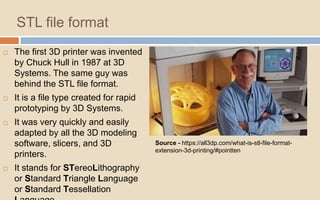
 The first 3D printer was invented
by Chuck Hull in 1987 at 3D
Systems. The same guy was
behind the STL file format.
 It is a file type created for rapid
prototyping by 3D Systems.
 It was very quickly and easily
adapted by all the 3D modeling
software, slicers, and 3D
printers.
 It stands for STereoLithography
or Standard Triangle Language
or Standard Tessellation
Source - https://all3dp.com/what-is-stl-file-format-
extension-3d-printing/#pointten
How does the STL file format store a 3D
model?
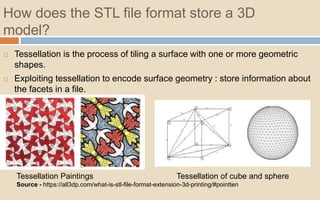
 Tessellation is the process of tiling a surface with one or more geometric
shapes.
 Exploiting tessellation to encode surface geometry : store information about
the facets in a file.
Tessellation Paintings Tessellation of cube and sphere
Source - https://all3dp.com/what-is-stl-file-format-extension-3d-printing/#pointten
How does an STL file store information about
facets?
 ASCII encoding
 Binary encoding
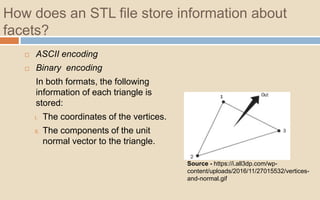
In both formats, the following
information of each triangle is
stored:
I. The coordinates of the vertices.
II. The components of the unit
normal vector to the triangle.
Source - https://i.all3dp.com/wp-
content/uploads/2016/11/27015532/vertices-
and-normal.gif
Continued…
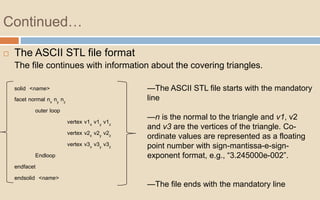
 The ASCII STL file format
The file continues with information about the covering triangles.
solid <name>
facet normal nx ny nz
outer loop
vertex v1x v1y v1z
vertex v2x v2y v2z
vertex v3x v3y v3z
Endloop
endfacet
endsolid <name>
—The ASCII STL file starts with the mandatory
line
—n is the normal to the triangle and v1, v2
and v3 are the vertices of the triangle. Co-
ordinate values are represented as a floating
point number with sign-mantissa-e-sign-
exponent format, e.g., “3.245000e-002”.
—The file ends with the mandatory line
Continued…
 The binary STL file format
If the tessellation involves many small triangles, the ASCII STL file can
become huge. This is why a more compact binary version exists.
UINT8[80] – Header
UINT32 – Number of triangles
foreach triangle
REAL32[3] – Normal vector
REAL32[3] – Vertex 1
REAL32[3] – Vertex 2
REAL32[3] – Vertex 3
UINT16 – Attribute byte count
end
 The binary STL file starts with a 80
character header.
 Each triangle is represented by twelve 32-
bit floating point numbers.
 Just like the ASCII STL file, 3 numbers are
for the 3D Cartesian co-ordinates of the
normal to the triangle.
 The remaining 9 numbers are for the
coordinates of the vertices (three each).
Special rules for the STL format
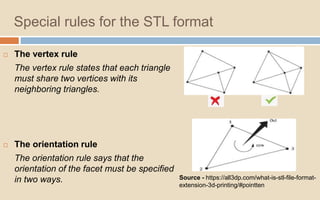
 The vertex rule
The vertex rule states that each triangle
must share two vertices with its
neighboring triangles.
 The orientation rule
The orientation rule says that the
orientation of the facet must be specified
in two ways. Source - https://all3dp.com/what-is-stl-file-format-
extension-3d-printing/#pointten
How is an STL file 3D printed?
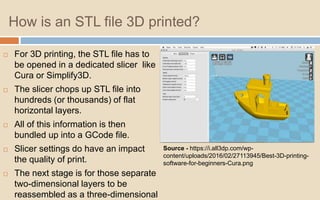
 For 3D printing, the STL file has to
be opened in a dedicated slicer like
Cura or Simplify3D.
 The slicer chops up STL file into
hundreds (or thousands) of flat
horizontal layers.
 All of this information is then
bundled up into a GCode file.
 Slicer settings do have an impact
the quality of print.
 The next stage is for those separate
two-dimensional layers to be
reassembled as a three-dimensional
Source - https://i.all3dp.com/wp-
content/uploads/2016/02/27113945/Best-3D-printing-
software-for-beginners-Cura.png
Optimizing an STL file for best 3D printing
performance
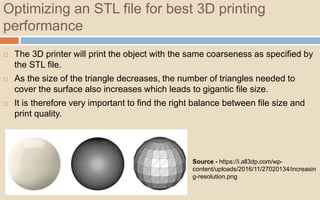
 The 3D printer will print the object with the same coarseness as specified by
the STL file.
 As the size of the triangle decreases, the number of triangles needed to
cover the surface also increases which leads to gigantic file size.
 It is therefore very important to find the right balance between file size and
print quality.
Source - https://i.all3dp.com/wp-
content/uploads/2016/11/27020134/increasin
g-resolution.png
Continued…
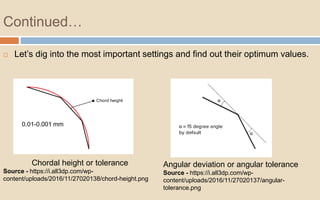
 Let’s dig into the most important settings and find out their optimum values.
Chordal height or tolerance
Source - https://i.all3dp.com/wp-
content/uploads/2016/11/27020138/chord-height.png
Angular deviation or angular tolerance
Source - https://i.all3dp.com/wp-
content/uploads/2016/11/27020137/angular-
tolerance.png
0.01-0.001 mm
STL file format : Advantages
 Simple and old 3D printer file format.
 Flexibility more facets for better resolution.
 Easy to handle and transfer.
 de facto standard for 3D printing.
STL file format : Disadvantages
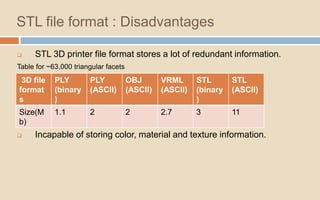
 STL 3D printer file format stores a lot of redundant information.
Table for ~63,000 triangular facets
 Slow and error-prone.
 Incapable of storing color, material and texture information.
3D file
format
s
PLY
(binary
)
PLY
(ASCII)
OBJ
(ASCII)
VRML
(ASCII)
STL
(binary
)
STL
(ASCII)
Size(M
b)
1.1 2 2 2.7 3 11
New file formats
 OBJ file format
 AMF file format
 3MF file format
 VRML file format
AMF file format (.AMF)
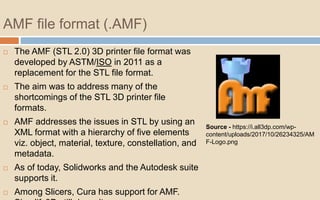
 The AMF (STL 2.0) 3D printer file format was
developed by ASTM/ISO in 2011 as a
replacement for the STL file format.
 The aim was to address many of the
shortcomings of the STL 3D printer file
formats.
 AMF addresses the issues in STL by using an
XML format with a hierarchy of five elements
viz. object, material, texture, constellation, and
metadata.
 As of today, Solidworks and the Autodesk suite
supports it.
 Among Slicers, Cura has support for AMF.
Source - https://i.all3dp.com/wp-
content/uploads/2017/10/26234325/AM
F-Logo.png
AMF 3D printer file format features
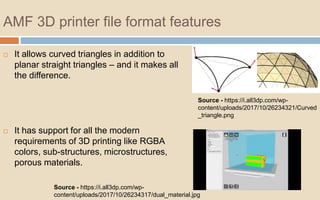
 It allows curved triangles in addition to
planar straight triangles – and it makes all
the difference.
 It has support for all the modern
requirements of 3D printing like RGBA
colors, sub-structures, microstructures,
porous materials.
Source - https://i.all3dp.com/wp-
content/uploads/2017/10/26234321/Curved
_triangle.png
Source - https://i.all3dp.com/wp-
content/uploads/2017/10/26234317/dual_material.jpg
Continued…
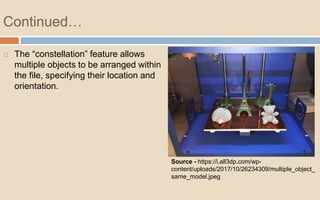
 The “constellation” feature allows
multiple objects to be arranged within
the file, specifying their location and
orientation.
Source - https://i.all3dp.com/wp-
content/uploads/2017/10/26234309/multiple_object_
same_model.jpeg
Basic file structure
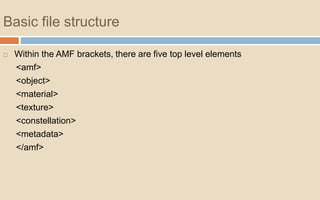
 Within the AMF brackets, there are five top level elements
<amf>
<object>
<material>
<texture>
<constellation>
<metadata>
</amf>
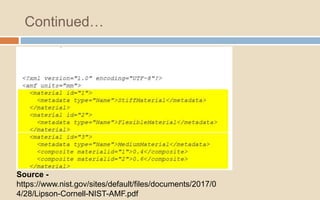
How to write the AMF file format ?
Source -
https://www.nist.gov/sites/default/files/documents/2017/04/28/Lip
son-Cornell-NIST-AMF.pdf
Continued…
Source -
https://www.nist.gov/sites/default/files/documents/2017/0
4/28/Lipson-Cornell-NIST-AMF.pdf
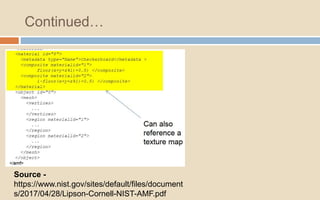
Continued…
Source -
https://www.nist.gov/sites/default/files/document
s/2017/04/28/Lipson-Cornell-NIST-AMF.pdf
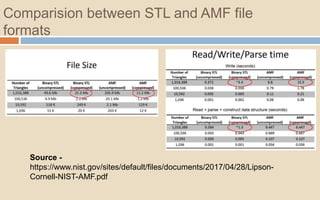
Comparision between STL and AMF file
formats
Source -
https://www.nist.gov/sites/default/files/documents/2017/04/28/Lipson-
Cornell-NIST-AMF.pdf
Conclusion
 At this point of time, STL, OBJ, AMF, and 3MF seem to be the most
important 3D printer file formats.
 They all have their own strengths, weaknesses and have varying levels of
compatibility with 3D printing software and hardware.
 It is imperative to know and understand the key differences between these
formats.
Toolchain
Production efficiency
The quality of prints.
References
 Sculpteo (https://www.sculpteo.com/blog/2018/10/17/top-4-of-the-best-3d-
printer-file-formats/)
 All3dp (https://all3dp.com/3d-printing-file-formats/)
 NIH 3DP Print Exchange (https://3dprint.nih.gov/faqs/1781)
 Wikipedia (https://en.wikipedia.org/wiki/3D_Manufacturing_Format)
 Lipson-Cornell-NIST-AMF
(https://www.nist.gov/sites/default/files/documents/2017/04/28/Lipson-
Cornell-NIST-AMF.pdf)
Thank You !!

Additive manufacturing file formats or 3D file formats

  • 1.
    Contents  Introduction  STLfile format  Advantages and limitations of STL file formats  New AM file formats  AMF file format  Conclusion  References
  • 2.
    Introduction  A 3Dprinter file is a way to store information about 3D model.  All 3D printer files contain the data about the shape of 3D model, their geometry.  The 3D printer file formats and tools are tightly coupled.  There are several file formats that can hold such data. Examples include STL, OBJ, 3MF, VRML etc.  STL is the most commonly used 3D printer file format across the globe.
  • 3.
    STL file format The first 3D printer was invented by Chuck Hull in 1987 at 3D Systems. The same guy was behind the STL file format.  It is a file type created for rapid prototyping by 3D Systems.  It was very quickly and easily adapted by all the 3D modeling software, slicers, and 3D printers.  It stands for STereoLithography or Standard Triangle Language or Standard Tessellation Source - https://all3dp.com/what-is-stl-file-format- extension-3d-printing/#pointten
  • 4.
    How does theSTL file format store a 3D model?  Tessellation is the process of tiling a surface with one or more geometric shapes.  Exploiting tessellation to encode surface geometry : store information about the facets in a file. Tessellation Paintings Tessellation of cube and sphere Source - https://all3dp.com/what-is-stl-file-format-extension-3d-printing/#pointten
  • 5.
    How does anSTL file store information about facets?  ASCII encoding  Binary encoding In both formats, the following information of each triangle is stored: I. The coordinates of the vertices. II. The components of the unit normal vector to the triangle. Source - https://i.all3dp.com/wp- content/uploads/2016/11/27015532/vertices- and-normal.gif
  • 6.
    Continued…  The ASCIISTL file format The file continues with information about the covering triangles. solid <name> facet normal nx ny nz outer loop vertex v1x v1y v1z vertex v2x v2y v2z vertex v3x v3y v3z Endloop endfacet endsolid <name> —The ASCII STL file starts with the mandatory line —n is the normal to the triangle and v1, v2 and v3 are the vertices of the triangle. Co- ordinate values are represented as a floating point number with sign-mantissa-e-sign- exponent format, e.g., “3.245000e-002”. —The file ends with the mandatory line
  • 7.
    Continued…  The binarySTL file format If the tessellation involves many small triangles, the ASCII STL file can become huge. This is why a more compact binary version exists. UINT8[80] – Header UINT32 – Number of triangles foreach triangle REAL32[3] – Normal vector REAL32[3] – Vertex 1 REAL32[3] – Vertex 2 REAL32[3] – Vertex 3 UINT16 – Attribute byte count end  The binary STL file starts with a 80 character header.  Each triangle is represented by twelve 32- bit floating point numbers.  Just like the ASCII STL file, 3 numbers are for the 3D Cartesian co-ordinates of the normal to the triangle.  The remaining 9 numbers are for the coordinates of the vertices (three each).
  • 8.
    Special rules forthe STL format  The vertex rule The vertex rule states that each triangle must share two vertices with its neighboring triangles.  The orientation rule The orientation rule says that the orientation of the facet must be specified in two ways. Source - https://all3dp.com/what-is-stl-file-format- extension-3d-printing/#pointten
  • 9.
    How is anSTL file 3D printed?  For 3D printing, the STL file has to be opened in a dedicated slicer like Cura or Simplify3D.  The slicer chops up STL file into hundreds (or thousands) of flat horizontal layers.  All of this information is then bundled up into a GCode file.  Slicer settings do have an impact the quality of print.  The next stage is for those separate two-dimensional layers to be reassembled as a three-dimensional Source - https://i.all3dp.com/wp- content/uploads/2016/02/27113945/Best-3D-printing- software-for-beginners-Cura.png
  • 10.
    Optimizing an STLfile for best 3D printing performance  The 3D printer will print the object with the same coarseness as specified by the STL file.  As the size of the triangle decreases, the number of triangles needed to cover the surface also increases which leads to gigantic file size.  It is therefore very important to find the right balance between file size and print quality. Source - https://i.all3dp.com/wp- content/uploads/2016/11/27020134/increasin g-resolution.png
  • 11.
    Continued…  Let’s diginto the most important settings and find out their optimum values. Chordal height or tolerance Source - https://i.all3dp.com/wp- content/uploads/2016/11/27020138/chord-height.png Angular deviation or angular tolerance Source - https://i.all3dp.com/wp- content/uploads/2016/11/27020137/angular- tolerance.png 0.01-0.001 mm
  • 12.
    STL file format: Advantages  Simple and old 3D printer file format.  Flexibility more facets for better resolution.  Easy to handle and transfer.  de facto standard for 3D printing.
  • 13.
    STL file format: Disadvantages  STL 3D printer file format stores a lot of redundant information. Table for ~63,000 triangular facets  Slow and error-prone.  Incapable of storing color, material and texture information. 3D file format s PLY (binary ) PLY (ASCII) OBJ (ASCII) VRML (ASCII) STL (binary ) STL (ASCII) Size(M b) 1.1 2 2 2.7 3 11
  • 14.
    New file formats OBJ file format  AMF file format  3MF file format  VRML file format
  • 15.
    AMF file format(.AMF)  The AMF (STL 2.0) 3D printer file format was developed by ASTM/ISO in 2011 as a replacement for the STL file format.  The aim was to address many of the shortcomings of the STL 3D printer file formats.  AMF addresses the issues in STL by using an XML format with a hierarchy of five elements viz. object, material, texture, constellation, and metadata.  As of today, Solidworks and the Autodesk suite supports it.  Among Slicers, Cura has support for AMF. Source - https://i.all3dp.com/wp- content/uploads/2017/10/26234325/AM F-Logo.png
  • 16.
    AMF 3D printerfile format features  It allows curved triangles in addition to planar straight triangles – and it makes all the difference.  It has support for all the modern requirements of 3D printing like RGBA colors, sub-structures, microstructures, porous materials. Source - https://i.all3dp.com/wp- content/uploads/2017/10/26234321/Curved _triangle.png Source - https://i.all3dp.com/wp- content/uploads/2017/10/26234317/dual_material.jpg
  • 17.
    Continued…  The “constellation”feature allows multiple objects to be arranged within the file, specifying their location and orientation. Source - https://i.all3dp.com/wp- content/uploads/2017/10/26234309/multiple_object_ same_model.jpeg
  • 18.
    Basic file structure Within the AMF brackets, there are five top level elements <amf> <object> <material> <texture> <constellation> <metadata> </amf>
  • 19.
    How to writethe AMF file format ? Source - https://www.nist.gov/sites/default/files/documents/2017/04/28/Lip son-Cornell-NIST-AMF.pdf
  • 20.
  • 21.
  • 22.
    Comparision between STLand AMF file formats Source - https://www.nist.gov/sites/default/files/documents/2017/04/28/Lipson- Cornell-NIST-AMF.pdf
  • 23.
    Conclusion  At thispoint of time, STL, OBJ, AMF, and 3MF seem to be the most important 3D printer file formats.  They all have their own strengths, weaknesses and have varying levels of compatibility with 3D printing software and hardware.  It is imperative to know and understand the key differences between these formats. Toolchain Production efficiency The quality of prints.
  • 24.
    References  Sculpteo (https://www.sculpteo.com/blog/2018/10/17/top-4-of-the-best-3d- printer-file-formats/) All3dp (https://all3dp.com/3d-printing-file-formats/)  NIH 3DP Print Exchange (https://3dprint.nih.gov/faqs/1781)  Wikipedia (https://en.wikipedia.org/wiki/3D_Manufacturing_Format)  Lipson-Cornell-NIST-AMF (https://www.nist.gov/sites/default/files/documents/2017/04/28/Lipson- Cornell-NIST-AMF.pdf)
  • 25.