A Post-Processing Pipeline
Wolfgang Engel
Confetti Special Effects Inc., Carlsbad
Paris Master Class
Agenda
• PostFX
– Color Filters
– High-Dynamic Range Rendering
– Light Streaks
– Depth of Field
– Motion Blur
– Miscellaneous Effects Snippets
• References
Basics
• PostFX:
– Image space is cheaper: do 3D stuff in 2D
– Control color, color quality and color range
• Lots of render-target to render-target blits
Gamma control
• Problem: most color manipulation methods
applied in a renderer become physically non-
linear
• RGB color operations do not look right (adds up)
[Brown]
• dynamic lighting
• several light sources
• shadowing
• texture filtering
• alpha blending
• advanced color filters
Gamma control
• Gamma is compression method because 8-bit
per channel is not much precision to
represent color
– Non-linear transfer function to compress color
– Compresses into roughly perceptually uniform
space
-> called sRGB space [Stokes]
• Used everywhere by default for render targets
like the framebuffer and textures
Gamma Control
• We want: renderer without gamma
correction == gamma 1.0
• Art Pipeline is most of the time running
gamma 2.2 everywhere
• ->convert from gamma 2.2 to 1.0 while
fetching textures and color values and back
to gamma 2.2 at the end of the renderer
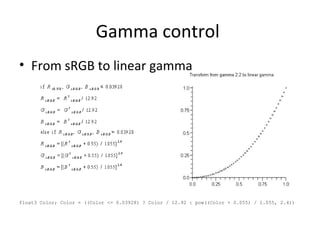
Gamma control
• From sRGB to linear gamma
float3 Color; Color = ((Color <= 0.03928) ? Color / 12.92 : pow((Color + 0.055) / 1.055, 2.4))
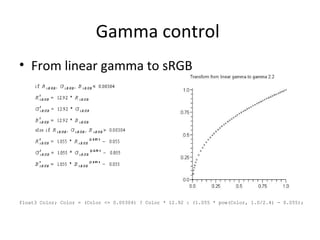
Gamma control
• From linear gamma to sRGB
float3 Color; Color = (Color <= 0.00304) ? Color * 12.92 : (1.055 * pow(Color, 1.0/2.4) - 0.055);
Gamma Control
• Converting to gamma 1.0 [Stokes]
Color = ((Color <= 0.03928) ? Color / 12.92 : pow((Color + 0.055) / 1.055, 2.4))
• Converting to gamma 2.2
Color = (Color <= 0.00304) ? Color * 12.92 : (1.055 * pow(Color, 1.0/2.4) - 0.055);
• Hardware can convert textures and the end
result… but some hardware uses linear
approximations here
• Vertex colors still need to be converted “by
hand”
Color Filters
• Oldest post effects in games -> Call of Duty /
Medal of Honor
• For example:
– Winter scene -> grey-ish tint
– Jungle scene -> greenish / blueish tint
• Color changes based on the area where the
player is
Color Filters: Saturation
• Remove color from image ~= convert to
luminance [ITU1990]
• Y of XYZ color space represents luminace
float Lum = dot(Color,float3(0.2126, 0.7152, 0.0722));
float3 Color = lerp(Lum.xxx, Color, Sat)
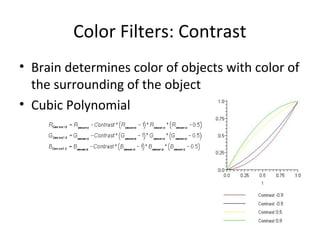
Color Filters: Contrast
• Brain determines color of objects with color of
the surrounding of the object
• Cubic Polynomial
Color Filters: Color Correction
• Simplest color filters just add or multiply RGB
values
float3 Color = Color * ColorCorrect * 2.0 + ColorAdd;
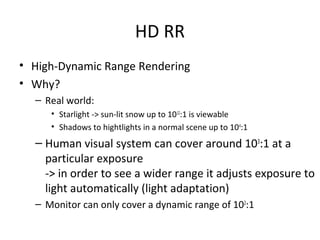
HD RR
• High-Dynamic Range Rendering
• Why?
– Real world:
• Starlight -> sun-lit snow up to 1012
:1 is viewable
• Shadows to hightlights in a normal scene up to 104
:1
– Human visual system can cover around 103
:1 at a
particular exposure
-> in order to see a wider range it adjusts exposure to
light automatically (light adaptation)
– Monitor can only cover a dynamic range of 102
:1
HD RR: Requirements
• High-Dynamic Range Data -> larger than 0..1 and
more deltas than 8:8:8:8
– Textures: how to compress / gamma correct HDR
textures
– Render Targets: how to keep high-dynamic range data
• Tone Mapping -> compresses back to low-dynamic
range for monitor
• Light Adaptation -> similar to human visual system
• Glare == Bloom -> overload optic nerve of eye
• Tone Mapping for the Night -> human visual system
under low lighting conditions
HD RR
• Ansel Adam’s Zone System [Reinhard]
HD RR
• Data with higher range than 0..1
• Storing High-Dynamic Range Data in Textures
– RGBE - 32-bit per pixel
– DXGI_FORMAT_R9G9B9E5_SHAREDEXP - 32-bit per pixel
– DXT1 + quarter L16 – 8-bit per pixel
– DXT1: storing common scale + exponent for each of the color channels in
a texture by utilizing unused space in the DXT header – 4-bit per-pixel
– -> Challenge: gamma control -> calc. exp. without gamma
– DX11 has a HDR texture but without gamma control
• Keeping High-Dynamic Range Data in Render Targets
– 10:10:10:2 (DX9: MS, blending, no filtering)
– 7e3 format XBOX 360: configure value range & precision with color exp.
Bias [Tchou]
– 16:16:16:16 (DX9: some cards: MS+blend others filter+blend)
– DX10: 11:11:10 (MS, source blending, filtering)
HD RR
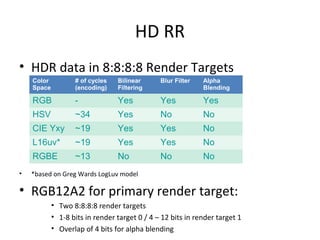
• HDR data in 8:8:8:8 Render Targets
• *based on Greg Wards LogLuv model
• RGB12A2 for primary render target:
• Two 8:8:8:8 render targets
• 1-8 bits in render target 0 / 4 – 12 bits in render target 1
• Overlap of 4 bits for alpha blending
High-Dynamic Range Rendering
Color
Space
# of cycles
(encoding)
Bilinear
Filtering
Blur Filter Alpha
Blending
RGB - Yes Yes Yes
HSV ~34 Yes No No
CIE Yxy ~19 Yes Yes No
L16uv* ~19 Yes Yes No
RGBE ~13 No No No
HD RR
• Tone mapping operator to compress HDR to LDR
– Luminance Transform
– Range Mapping
HD RR
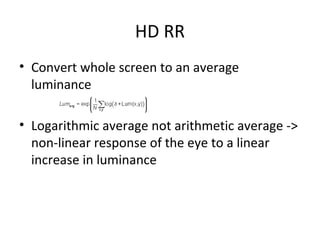
• Convert whole screen to an average
luminance
• Logarithmic average not arithmetic average ->
non-linear response of the eye to a linear
increase in luminance
HD RR
• To convert RGB to Luminance [ITU1990]
• RGB->CIE XYZ->CIE Yxy
• CIE Yxy->CIE XYZ->RGB
HD RR
• Simple Tone Mapping Operator [Reinhard]
• Scaling with MiddleGrey
• Map range from 0..1
HD RR
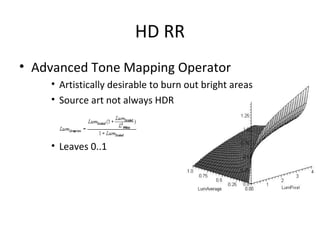
• Advanced Tone Mapping Operator
• Artistically desirable to burn out bright areas
• Source art not always HDR
• Leaves 0..1
HD RR
• Light Adaptation
• Re-use luminance data to mimic light adaptation of the
eye -> cheap
• Temporal changes in lighting conditions
» Day -> Night: Rods ~30 minutes
» Outdoor <-> Indoor: Cones ~few seconds
• Game Scenarios:
» Outdoor <-> Indoor
» Weather Changes
» Tunnel drive
HD RR
• Exponential decay function [Pattanaik]
• Frame-rate independent
• Adapted luminance chases average luminance
– Stable lighting conditions -> the same
• tau interpolates between adaptation rates of
cones and rods
• 0.2 for rods / 0.4 for cones
HD RR
• Luminance History function [Tchou]
• Even out fast luminance changes (flashes etc.)
• Keeps track of the luminance of the last 16 frames
• If the last 16 values >= || < current adapted luminance
-> run light adaptation
• If some of the 16 values are going in different
directions
-> no light adaptation
• Runs only once per frame -> cheap
HD RR
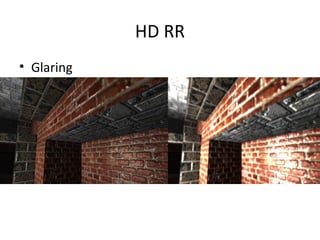
• Glaring
HD RR
• Glaring
– Intense lighting -> optic nerve of the eye
overloads
• Bright pass filter
• Gaussian convolution filter to bloom
HD RR
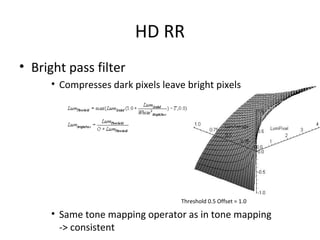
• Bright pass filter
• Compresses dark pixels leave bright pixels
Threshold 0.5 Offset = 1.0
• Same tone mapping operator as in tone mapping
-> consistent
HD RR
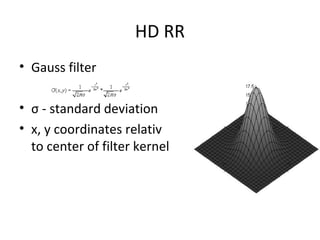
• Gauss filter
• σ - standard deviation
• x, y coordinates relativ
to center of filter kernel
HD RR
• Scotopic View
• Contrast is lower
• Visual acuity is lower
• Blue shift
• Convert RGB to CIE XYZ
• Scotopic Tone Mapping Operator [Shirley]
• Multiply with a grey-bluish color
Depth of Field
Depth of Field
Depth of Field
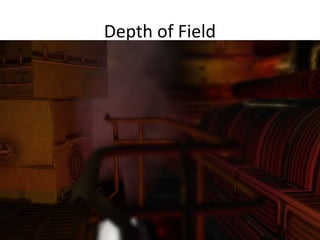
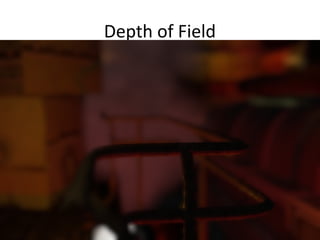
• Range of acceptable sharpness == Depth of
Field see [Scheuermann] and [Gillham]
• Define a near and far blur plane
• Everything in front of the near blur plane and
everything behind the far blur plane is blurred
Depth of Field
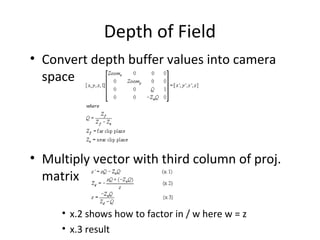
• Convert depth buffer values into camera
space
• Multiply vector with third column of proj.
matrix
• x.2 shows how to factor in / w here w = z
• x.3 result
Depth of Field
• Applying Depth of Field
• Convert to Camera Z == pixel distance from
camera
float PixelCameraZ = (-NearClip * Q) / (Depth - Q);
• Focus + Depth of Field Range [DOFRM]
lerp(OriginalImage, BlurredImage, saturate(Range * abs(Focus - PixelCameraZ)));
-> Auto-Focus effect possible
• Color leaking: change draw order or ignore it
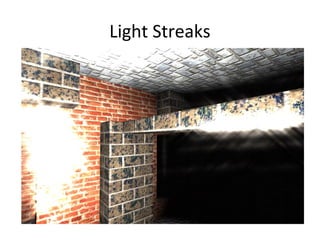
Light Streaks
Light Streaks
• Light scattering through a lens, eye lens or
aperture
-> cracks, scratches, grooves, dust and lens
imperfections cause light to scatter and diffract
• Painting light streaks would be done with a
brush by pressing a bit harder on the common
point and releasing the pressure while moving
the brush away from this point
->Light streak filter “smears” a bright spot into
several directions [Kawase][Oat]
Light Streaks
• Sample Pattern
• Masaki Kawase [Kawase] -> 4-tap == XBOX
Light Streaks
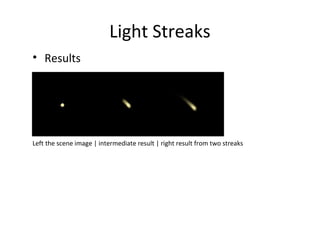
• Results
Left the scene image | intermediate result | right result from two streaks
Light Streaks
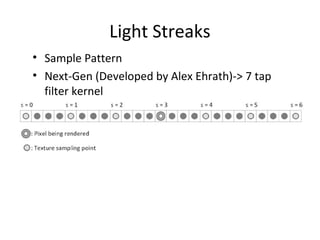
• Sample Pattern
• Next-Gen (Developed by Alex Ehrath)-> 7 tap
filter kernel
Light Streaks
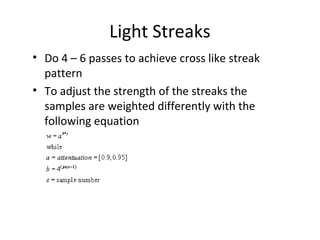
• Do 4 – 6 passes to achieve cross like streak
pattern
• To adjust the strength of the streaks the
samples are weighted differently with the
following equation
Light Streaks
• Direction for the streak is coming from
orientation vector [Oat] like this
• b holds the power value of four or seven – shown on previous slide
• TxSize holds the texel size (1.0f / SizeOfTexture)
Light Streaks
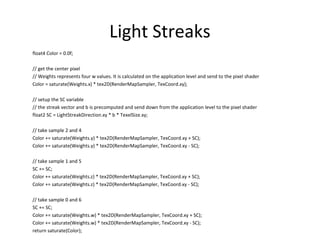
float4 Color = 0.0f;
// get the center pixel
// Weights represents four w values. It is calculated on the application level and send to the pixel shader
Color = saturate(Weights.x) * tex2D(RenderMapSampler, TexCoord.xy);
// setup the SC variable
// the streak vector and b is precomputed and send down from the application level to the pixel shader
float2 SC = LightStreakDirection.xy * b * TexelSize.xy;
// take sample 2 and 4
Color += saturate(Weights.y) * tex2D(RenderMapSampler, TexCoord.xy + SC);
Color += saturate(Weights.y) * tex2D(RenderMapSampler, TexCoord.xy - SC);
// take sample 1 and 5
SC += SC;
Color += saturate(Weights.z) * tex2D(RenderMapSampler, TexCoord.xy + SC);
Color += saturate(Weights.z) * tex2D(RenderMapSampler, TexCoord.xy - SC);
// take sample 0 and 6
SC += SC;
Color += saturate(Weights.w) * tex2D(RenderMapSampler, TexCoord.xy + SC);
Color += saturate(Weights.w) * tex2D(RenderMapSampler, TexCoord.xy - SC);
return saturate(Color);
Light Streaks
• Picking antipodal texture coordinates is for
optimization and coolness 
• A light streak filter probably runs on the same
render target that is used to bloom the scene
Motion Blur
Motion Blur
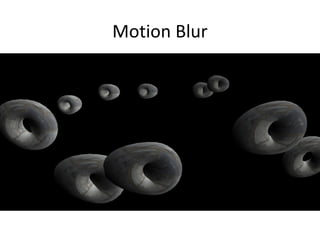
• Mainly two ways to motion blur (… there are much more )
– Geometry Stretching
– Velocity Vector Field
Motion Blur
• Geometry Stretching [Wloka]
• Create a motion vector in view or world-space Vview
• Compare this vector to the normal in view or world-
space
– If similar in direction -> the current position value is
chosen to transform the vertex
– Otherwise the previous position value
Motion Blur
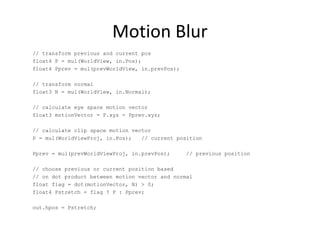
// transform previous and current pos
float4 P = mul(WorldView, in.Pos);
float4 Pprev = mul(prevWorldView, in.prevPos);
// transform normal
float3 N = mul(WorldView, in.Normal);
// calculate eye space motion vector
float3 motionVector = P.xyz - Pprev.xyz;
// calculate clip space motion vector
P = mul(WorldViewProj, in.Pos); // current position
Pprev = mul(prevWorldViewProj, in.prevPos); // previous position
// choose previous or current position based
// on dot product between motion vector and normal
float flag = dot(motionVector, N) > 0;
float4 Pstretch = flag ? P : Pprev;
out.hpos = Pstretch;
Motion Blur
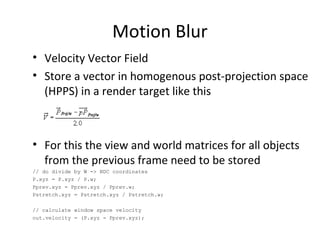
• Velocity Vector Field
• Store a vector in homogenous post-projection space
(HPPS) in a render target like this
• For this the view and world matrices for all objects
from the previous frame need to be stored
// do divide by W -> NDC coordinates
P.xyz = P.xyz / P.w;
Pprev.xyz = Pprev.xyz / Pprev.w;
Pstretch.xyz = Pstretch.xyz / Pstretch.w;
// calculate window space velocity
out.velocity = (P.xyz - Pprev.xyz);
Motion Blur
• Alternatively re-construct the previous position from
the depth buffer
• Shortcoming pixel velocity is calculated per-vertex
and interpolated across primitives -> not very
precise
Motion Blur
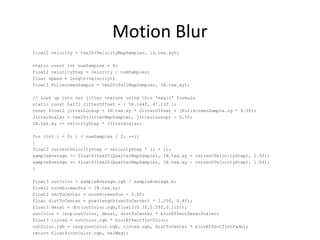
float2 velocity = tex2D(VelocityMapSampler, in.tex.xy);
static const int numSamples = 8;
float2 velocityStep = velocity / numSamples;
float speed = length(velocity);
float3 FullscreenSample = tex2D(FullMapSampler, IN.tex.xy);
// Look up into our jitter texture using this 'magic' formula
static const half2 JitterOffset = { 58.164f, 47.13f };
const float2 jitterLookup = IN.tex.xy * JitterOffset + (FullscreenSample.rg * 8.0f);
JitterScalar = tex2D(JitterMapSampler, jitterLookup) - 0.5f;
IN.tex.xy += velocityStep * JitterScalar;
for (int i = 0; i < numSamples / 2; ++i)
{
float2 currentVelocityStep = velocityStep * (i + 1);
sampleAverage += float4(tex2D(QuarterMapSampler, IN.tex.xy + currentVelocityStep), 1.0f);
sampleAverage += float4(tex2D(QuarterMapSampler, IN.tex.xy - currentVelocityStep), 1.0f);
}
float3 outColor = sampleAverage.rgb / sampleAverage.w;
float2 normScreenPos = IN.tex.xy;
float2 vecToCenter = normScreenPos - 0.5f;
float distToCenter = pow(length(vecToCenter) * 2.25f, 0.8f);
float3 desat = dot(outColor.rgb,float3(0.3f,0.59f,0.11f));
outColor = lerp(outColor, desat, distToCenter * blurEffectDesatScale);
float3 tinted = outColor.rgb * blurEffectTintColor;
outColor.rgb = lerp(outColor.rgb, tinted.rgb, distToCenter * blurEffectTintFade);
return float4(outColor.rgb, velMag);
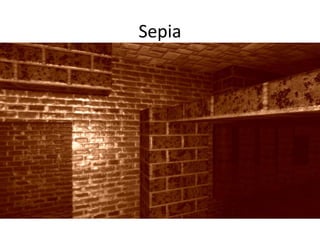
Sepia
• Different than saturation control
• Marwan Ansari [Ansari] developed an efficient way
to convert to Sepia
• Basis is the YIQ color space
• Converting from RGB to YIQ with the matrix M
• Converting from YIQ to RGB is M’s inverse
Sepia
Sepia
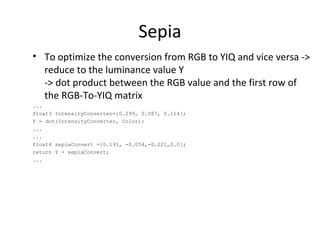
• To optimize the conversion from RGB to YIQ and vice versa ->
reduce to the luminance value Y
-> dot product between the RGB value and the first row of
the RGB-To-YIQ matrix
...
float3 IntensityConverter={0.299, 0.587, 0.114};
Y = dot(IntensityConverter, Color);
...
...
float4 sepiaConvert ={0.191, -0.054,-0.221,0.0};
return Y + sepiaConvert;
...
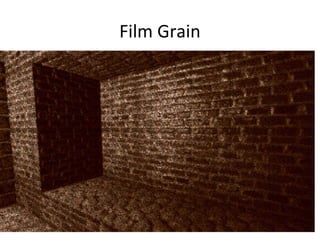
Film Grain
Film Grain
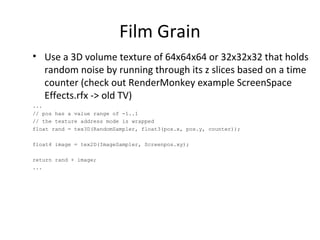
• Use a 3D volume texture of 64x64x64 or 32x32x32 that holds
random noise by running through its z slices based on a time
counter (check out RenderMonkey example ScreenSpace
Effects.rfx -> old TV)
...
// pos has a value range of -1..1
// the texture address mode is wrapped
float rand = tex3D(RandomSampler, float3(pos.x, pos.y, counter));
float4 image = tex2D(ImageSampler, Screenpos.xy);
return rand + image;
...
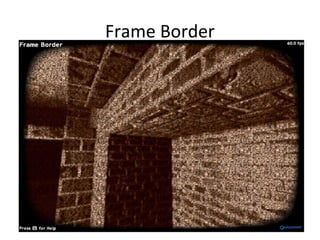
Frame Border
Frame Border
• Applying a power function to the extrema of the
screen + clamp to 0..1 (check out RenderMonkey
example ScreenSpace Effects.rfx -> old TV)
...
float f = (1-pos.x*pos.y) * (1-pos.y*pos.y);
float frame = saturate(frameSharpness * (pow(f, frameShape) - frameLimit));
return frame * (rand + image);
...
• frameSharpness makes the transition between the frame and
the visible scene softer
• frameshape makes the shape of the frame rounder or more
edgy
• framelimit makes the frame bigger or smaller
Median Filter
• Used to remove “salt and pepper noise” from a picture
[Mitchell]
• Can be used to reduce color quality -> cheap camera with
MPEG compression
• Picks the middle value
Median Filter
float FindMedian(float a, float b, float c)
{
float Median;
if(a < b)
{
if(b<c)
Median = b;
else Median = max(a, c);
}
else
{
if(a < c) Median = a;
else Median = max(b, c);
}
return Median;
}
Vectorized:
float3 FindMedian(float3 RGB,float3 RGB2, float3 RGB3)
{
return (RGB < RGB2) ? ((RGB2 < RGB3) ? RGB2 : max(RGB,RGB3) ) : ((RGB < RGB3) ? RGB :
max(RGB2,RGB3));
}
Interlace Effect
• Figure out every second line with frac()
float fraction = frac(UnnormCoord.y * 0.5);
if (fraction)
… // do something with this line
else
… // do something different with every second line
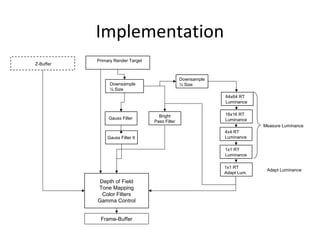
Implementation
Depth of Field
Tone Mapping
Color Filters
Gamma Control
Frame-Buffer
16x16 RT
Luminance
4x4 RT
Luminance
1x1 RT
Luminance
64x64 RT
Luminance
1x1 RT
Adapt Lum.
Measure Luminance
Adapt Luminance
Primary Render Target
Bright
Pass Filter
Z-Buffer
Downsample
½ Size
Downsample
¼ Size
Gauss Filter
Gauss Filter II
References
[Ansari] Marwan Y. Ansari, "Fast Sepia Tone Conversion", Game Programming Gems 4, Charles River Media, pp 461 - 465, ISBN 1-58450-295-9
[Baker] Steve Baker, "Learning to Love your Z-Buffer", http://sjbaker.org/steve/omniv/love_your_z_buffer.html
[Berger] R.W. Berger, “Why Do Images Appear Darker on Some Displays?”, http://www.bberger.net/rwb/gamma.html
[Brown] Simon Brown, “Gamma-Correct Rendering”, http://www.sjbrown.co.uk/?article=gamma
[Caruzzi] Francesco Carucci, "Simulating blending operations on floating point render targets", ShaderX2
- Shader Programming Tips and Tricks with DirectX 9, Wordware Inc., pp 172 - 177, ISBN 1-
55622-988-7
[DOFRM] Depth of Field Effect in RenderMonkey 1.62
[Gilham] David Gilham, "Real-Time Depth-of-Field Implemented with a Post-Processing only Technique", ShaderX5
: Advanced Rendering, Charles River Media / Thomson, pp 163 - 175, ISBN 1-
58450-499-4
[Green] Simon Green, "Stupid OpenGL Shader Tricks", http://developer.nvidia.com/docs/IO/8230/GDC2003_OpenGLShaderTricks.pdf"
[ITU1990] ITU (International Tlecommunication Union), Geneva. ITU-R Recommendation BT.709, Basic Parameter Values for the HDTV Standard for the Studio and for International Programme
Exchange, 1990 (Formerly CCIR Rec. 709).
[Kawase] Masaki Kawase, "Frame Buffer Postprocessing Effects in DOUBLE-S.T.E.A.L (Wreckless)", http://www.daionet.gr.jp/~masa/
[Kawase2] Masumi Nagaya, Masaki Kawase, Interview on WRECKLESS: The Yakuza Missions (Japanese Version Title: "DOUBLE-S.T.E.A.L"), http://spin.s2c.ne.jp/dsteal/wreckless.html
[Krawczyk] Grzegorz Krawczyk, Karol Myszkowski, Hans-Peter Seidel, "Perceptual Effects in Real-time Tone Mapping", Proc. of Spring Conference on Computer Graphics, 2005
[Mitchell] Jason L. Mitchell, Marwan Y. Ansari, Evan Hart, "Advanced Image Processing with DirectX 9 Pixel Shaders", ShaderX2 - Shader Programming Tips and Tricks with DirectX 9, Wordware
Inc., pp 439 - 464, ISBN 1-55622-988-7
[Oat] Chris Oat, "A Steerable Streak Filter", , ShaderX3
: Advanced Rendering With DirectX And OpenGL, Charles River Media, pp 341 - 348, ISBN 1-58450-357-2
[Pattanaik] Sumanta N. Pattanaik, Jack Tumblin, Hector Yee, Donald P. Greenberg, "Time Dependent Visual Adaptation For Fast Realistic Image Display", SIGGRAPH 2000, pp 47-54
[Persson] Emil Persson, "HDR Texturing" in the ATI March 2006 SDK.
[Poynton] Charles Poynton, "The rehabilitation of gamma", http://www.poynton.com/PDFs/Rehabilitation_of_gamma.pdf
[Reinhard] Erik Reinhard, Michael Stark, Peter Shirley, James Ferwerda, "Photographic Tone Reproduction for Digital Images", http://www.cs.utah.edu/~reinhard/cdrom/
[Scheuermann] Thorsten Scheuermann and Natalya Tatarchuk, ShaderX3
: Advanced Rendering With DirectX And OpenGL, Charles River Media, pp 363 - 377, ISBN 1-58450-357-2
[Seetzen] Helge Seetzen, Wolfgang Heidrich, Wolfgang Stuerzlinger, Greg Ward, Lorne Whitehead, Matthew Trentacoste, Abhijeet Ghosh, Andrejs Vorozcovs, "High Dynamic Range Display
Systems",SIGGRAPH 2004, pp 760 - 768
[Shimizu] Clement Shimizu, Amit Shesh, Baoquan Chen, "Hardware Accelerated Motion Blur Generation", EUROGRAPHICS 2003 22:3
[Shirley] Peter Shirley et all., "Fundamentals of Computer Graphics", Second Edition, A.K. Peters pp. 543 - 544, 2005, ISBN 1-56881-269-8
[Spenzer] Greg Spenzer, Peter Shirley, Kurt Zimmerman, Donald P. Greenberg, "Physically-Based Glare Effects for Digital Images", SIGGRAPH 1995, pp. 325 - 334.
[Stokes] Michael Stokes (Hewlett-Packard), Matthew Anderson (Microsoft), Srinivasan Chandrasekar (Microsoft), Ricardo Motta (Hewlett-Packard) “A Standard Default Color Space for the
Internet - sRGB“ http://www.w3.org/Graphics/Color/sRGB.html
[Tchou] Chris Tchou, HDR the Bungie Way, http://msdn2.microsoft.com/en-us/directx/aa937787.aspx
[W3CContrast] W3C Working Draft, 26 April 2000, Technique, Checkpoint 2.2 - Ensure that foreground and background color combinations provide sufficient contrast when viewed by someone
having color deficits or when viewed on a black and white screen, htp://www.w3.org/TR/AERT#color-contrast
[Waliszewski] Arkadiusz Waliszewski, "Floating-point Cube maps", ShaderX2 - Shader Programming Tips and Tricks with DirectX 9, Wordware Inc., pp 319 - 323, ISBN 1-55622-988-7

Paris Master Class 2011 - 05 Post-Processing Pipeline

  • 1.
    A Post-Processing Pipeline WolfgangEngel Confetti Special Effects Inc., Carlsbad Paris Master Class
  • 2.
    Agenda • PostFX – ColorFilters – High-Dynamic Range Rendering – Light Streaks – Depth of Field – Motion Blur – Miscellaneous Effects Snippets • References
  • 3.
    Basics • PostFX: – Imagespace is cheaper: do 3D stuff in 2D – Control color, color quality and color range • Lots of render-target to render-target blits
  • 4.
    Gamma control • Problem:most color manipulation methods applied in a renderer become physically non- linear • RGB color operations do not look right (adds up) [Brown] • dynamic lighting • several light sources • shadowing • texture filtering • alpha blending • advanced color filters
  • 5.
    Gamma control • Gammais compression method because 8-bit per channel is not much precision to represent color – Non-linear transfer function to compress color – Compresses into roughly perceptually uniform space -> called sRGB space [Stokes] • Used everywhere by default for render targets like the framebuffer and textures
  • 6.
    Gamma Control • Wewant: renderer without gamma correction == gamma 1.0 • Art Pipeline is most of the time running gamma 2.2 everywhere • ->convert from gamma 2.2 to 1.0 while fetching textures and color values and back to gamma 2.2 at the end of the renderer
  • 7.
    Gamma control • FromsRGB to linear gamma float3 Color; Color = ((Color <= 0.03928) ? Color / 12.92 : pow((Color + 0.055) / 1.055, 2.4))
  • 8.
    Gamma control • Fromlinear gamma to sRGB float3 Color; Color = (Color <= 0.00304) ? Color * 12.92 : (1.055 * pow(Color, 1.0/2.4) - 0.055);
  • 9.
    Gamma Control • Convertingto gamma 1.0 [Stokes] Color = ((Color <= 0.03928) ? Color / 12.92 : pow((Color + 0.055) / 1.055, 2.4)) • Converting to gamma 2.2 Color = (Color <= 0.00304) ? Color * 12.92 : (1.055 * pow(Color, 1.0/2.4) - 0.055); • Hardware can convert textures and the end result… but some hardware uses linear approximations here • Vertex colors still need to be converted “by hand”
  • 10.
    Color Filters • Oldestpost effects in games -> Call of Duty / Medal of Honor • For example: – Winter scene -> grey-ish tint – Jungle scene -> greenish / blueish tint • Color changes based on the area where the player is
  • 11.
    Color Filters: Saturation •Remove color from image ~= convert to luminance [ITU1990] • Y of XYZ color space represents luminace float Lum = dot(Color,float3(0.2126, 0.7152, 0.0722)); float3 Color = lerp(Lum.xxx, Color, Sat)
  • 12.
    Color Filters: Contrast •Brain determines color of objects with color of the surrounding of the object • Cubic Polynomial
  • 13.
    Color Filters: ColorCorrection • Simplest color filters just add or multiply RGB values float3 Color = Color * ColorCorrect * 2.0 + ColorAdd;
  • 14.
    HD RR • High-DynamicRange Rendering • Why? – Real world: • Starlight -> sun-lit snow up to 1012 :1 is viewable • Shadows to hightlights in a normal scene up to 104 :1 – Human visual system can cover around 103 :1 at a particular exposure -> in order to see a wider range it adjusts exposure to light automatically (light adaptation) – Monitor can only cover a dynamic range of 102 :1
  • 15.
    HD RR: Requirements •High-Dynamic Range Data -> larger than 0..1 and more deltas than 8:8:8:8 – Textures: how to compress / gamma correct HDR textures – Render Targets: how to keep high-dynamic range data • Tone Mapping -> compresses back to low-dynamic range for monitor • Light Adaptation -> similar to human visual system • Glare == Bloom -> overload optic nerve of eye • Tone Mapping for the Night -> human visual system under low lighting conditions
  • 16.
    HD RR • AnselAdam’s Zone System [Reinhard]
  • 17.
    HD RR • Datawith higher range than 0..1 • Storing High-Dynamic Range Data in Textures – RGBE - 32-bit per pixel – DXGI_FORMAT_R9G9B9E5_SHAREDEXP - 32-bit per pixel – DXT1 + quarter L16 – 8-bit per pixel – DXT1: storing common scale + exponent for each of the color channels in a texture by utilizing unused space in the DXT header – 4-bit per-pixel – -> Challenge: gamma control -> calc. exp. without gamma – DX11 has a HDR texture but without gamma control • Keeping High-Dynamic Range Data in Render Targets – 10:10:10:2 (DX9: MS, blending, no filtering) – 7e3 format XBOX 360: configure value range & precision with color exp. Bias [Tchou] – 16:16:16:16 (DX9: some cards: MS+blend others filter+blend) – DX10: 11:11:10 (MS, source blending, filtering)
  • 18.
    HD RR • HDRdata in 8:8:8:8 Render Targets • *based on Greg Wards LogLuv model • RGB12A2 for primary render target: • Two 8:8:8:8 render targets • 1-8 bits in render target 0 / 4 – 12 bits in render target 1 • Overlap of 4 bits for alpha blending High-Dynamic Range Rendering Color Space # of cycles (encoding) Bilinear Filtering Blur Filter Alpha Blending RGB - Yes Yes Yes HSV ~34 Yes No No CIE Yxy ~19 Yes Yes No L16uv* ~19 Yes Yes No RGBE ~13 No No No
  • 19.
    HD RR • Tonemapping operator to compress HDR to LDR – Luminance Transform – Range Mapping
  • 20.
    HD RR • Convertwhole screen to an average luminance • Logarithmic average not arithmetic average -> non-linear response of the eye to a linear increase in luminance
  • 21.
    HD RR • Toconvert RGB to Luminance [ITU1990] • RGB->CIE XYZ->CIE Yxy • CIE Yxy->CIE XYZ->RGB
  • 22.
    HD RR • SimpleTone Mapping Operator [Reinhard] • Scaling with MiddleGrey • Map range from 0..1
  • 23.
    HD RR • AdvancedTone Mapping Operator • Artistically desirable to burn out bright areas • Source art not always HDR • Leaves 0..1
  • 24.
    HD RR • LightAdaptation • Re-use luminance data to mimic light adaptation of the eye -> cheap • Temporal changes in lighting conditions » Day -> Night: Rods ~30 minutes » Outdoor <-> Indoor: Cones ~few seconds • Game Scenarios: » Outdoor <-> Indoor » Weather Changes » Tunnel drive
  • 25.
    HD RR • Exponentialdecay function [Pattanaik] • Frame-rate independent • Adapted luminance chases average luminance – Stable lighting conditions -> the same • tau interpolates between adaptation rates of cones and rods • 0.2 for rods / 0.4 for cones
  • 26.
    HD RR • LuminanceHistory function [Tchou] • Even out fast luminance changes (flashes etc.) • Keeps track of the luminance of the last 16 frames • If the last 16 values >= || < current adapted luminance -> run light adaptation • If some of the 16 values are going in different directions -> no light adaptation • Runs only once per frame -> cheap
  • 27.
  • 28.
    HD RR • Glaring –Intense lighting -> optic nerve of the eye overloads • Bright pass filter • Gaussian convolution filter to bloom
  • 29.
    HD RR • Brightpass filter • Compresses dark pixels leave bright pixels Threshold 0.5 Offset = 1.0 • Same tone mapping operator as in tone mapping -> consistent
  • 30.
    HD RR • Gaussfilter • σ - standard deviation • x, y coordinates relativ to center of filter kernel
  • 31.
    HD RR • ScotopicView • Contrast is lower • Visual acuity is lower • Blue shift • Convert RGB to CIE XYZ • Scotopic Tone Mapping Operator [Shirley] • Multiply with a grey-bluish color
  • 32.
  • 33.
  • 34.
    Depth of Field •Range of acceptable sharpness == Depth of Field see [Scheuermann] and [Gillham] • Define a near and far blur plane • Everything in front of the near blur plane and everything behind the far blur plane is blurred
  • 35.
    Depth of Field •Convert depth buffer values into camera space • Multiply vector with third column of proj. matrix • x.2 shows how to factor in / w here w = z • x.3 result
  • 36.
    Depth of Field •Applying Depth of Field • Convert to Camera Z == pixel distance from camera float PixelCameraZ = (-NearClip * Q) / (Depth - Q); • Focus + Depth of Field Range [DOFRM] lerp(OriginalImage, BlurredImage, saturate(Range * abs(Focus - PixelCameraZ))); -> Auto-Focus effect possible • Color leaking: change draw order or ignore it
  • 37.
  • 38.
    Light Streaks • Lightscattering through a lens, eye lens or aperture -> cracks, scratches, grooves, dust and lens imperfections cause light to scatter and diffract • Painting light streaks would be done with a brush by pressing a bit harder on the common point and releasing the pressure while moving the brush away from this point ->Light streak filter “smears” a bright spot into several directions [Kawase][Oat]
  • 39.
    Light Streaks • SamplePattern • Masaki Kawase [Kawase] -> 4-tap == XBOX
  • 40.
    Light Streaks • Results Leftthe scene image | intermediate result | right result from two streaks
  • 41.
    Light Streaks • SamplePattern • Next-Gen (Developed by Alex Ehrath)-> 7 tap filter kernel
  • 42.
    Light Streaks • Do4 – 6 passes to achieve cross like streak pattern • To adjust the strength of the streaks the samples are weighted differently with the following equation
  • 43.
    Light Streaks • Directionfor the streak is coming from orientation vector [Oat] like this • b holds the power value of four or seven – shown on previous slide • TxSize holds the texel size (1.0f / SizeOfTexture)
  • 44.
    Light Streaks float4 Color= 0.0f; // get the center pixel // Weights represents four w values. It is calculated on the application level and send to the pixel shader Color = saturate(Weights.x) * tex2D(RenderMapSampler, TexCoord.xy); // setup the SC variable // the streak vector and b is precomputed and send down from the application level to the pixel shader float2 SC = LightStreakDirection.xy * b * TexelSize.xy; // take sample 2 and 4 Color += saturate(Weights.y) * tex2D(RenderMapSampler, TexCoord.xy + SC); Color += saturate(Weights.y) * tex2D(RenderMapSampler, TexCoord.xy - SC); // take sample 1 and 5 SC += SC; Color += saturate(Weights.z) * tex2D(RenderMapSampler, TexCoord.xy + SC); Color += saturate(Weights.z) * tex2D(RenderMapSampler, TexCoord.xy - SC); // take sample 0 and 6 SC += SC; Color += saturate(Weights.w) * tex2D(RenderMapSampler, TexCoord.xy + SC); Color += saturate(Weights.w) * tex2D(RenderMapSampler, TexCoord.xy - SC); return saturate(Color);
  • 45.
    Light Streaks • Pickingantipodal texture coordinates is for optimization and coolness  • A light streak filter probably runs on the same render target that is used to bloom the scene
  • 46.
  • 47.
    Motion Blur • Mainlytwo ways to motion blur (… there are much more ) – Geometry Stretching – Velocity Vector Field
  • 48.
    Motion Blur • GeometryStretching [Wloka] • Create a motion vector in view or world-space Vview • Compare this vector to the normal in view or world- space – If similar in direction -> the current position value is chosen to transform the vertex – Otherwise the previous position value
  • 49.
    Motion Blur // transformprevious and current pos float4 P = mul(WorldView, in.Pos); float4 Pprev = mul(prevWorldView, in.prevPos); // transform normal float3 N = mul(WorldView, in.Normal); // calculate eye space motion vector float3 motionVector = P.xyz - Pprev.xyz; // calculate clip space motion vector P = mul(WorldViewProj, in.Pos); // current position Pprev = mul(prevWorldViewProj, in.prevPos); // previous position // choose previous or current position based // on dot product between motion vector and normal float flag = dot(motionVector, N) > 0; float4 Pstretch = flag ? P : Pprev; out.hpos = Pstretch;
  • 50.
    Motion Blur • VelocityVector Field • Store a vector in homogenous post-projection space (HPPS) in a render target like this • For this the view and world matrices for all objects from the previous frame need to be stored // do divide by W -> NDC coordinates P.xyz = P.xyz / P.w; Pprev.xyz = Pprev.xyz / Pprev.w; Pstretch.xyz = Pstretch.xyz / Pstretch.w; // calculate window space velocity out.velocity = (P.xyz - Pprev.xyz);
  • 51.
    Motion Blur • Alternativelyre-construct the previous position from the depth buffer • Shortcoming pixel velocity is calculated per-vertex and interpolated across primitives -> not very precise
  • 52.
    Motion Blur float2 velocity= tex2D(VelocityMapSampler, in.tex.xy); static const int numSamples = 8; float2 velocityStep = velocity / numSamples; float speed = length(velocity); float3 FullscreenSample = tex2D(FullMapSampler, IN.tex.xy); // Look up into our jitter texture using this 'magic' formula static const half2 JitterOffset = { 58.164f, 47.13f }; const float2 jitterLookup = IN.tex.xy * JitterOffset + (FullscreenSample.rg * 8.0f); JitterScalar = tex2D(JitterMapSampler, jitterLookup) - 0.5f; IN.tex.xy += velocityStep * JitterScalar; for (int i = 0; i < numSamples / 2; ++i) { float2 currentVelocityStep = velocityStep * (i + 1); sampleAverage += float4(tex2D(QuarterMapSampler, IN.tex.xy + currentVelocityStep), 1.0f); sampleAverage += float4(tex2D(QuarterMapSampler, IN.tex.xy - currentVelocityStep), 1.0f); } float3 outColor = sampleAverage.rgb / sampleAverage.w; float2 normScreenPos = IN.tex.xy; float2 vecToCenter = normScreenPos - 0.5f; float distToCenter = pow(length(vecToCenter) * 2.25f, 0.8f); float3 desat = dot(outColor.rgb,float3(0.3f,0.59f,0.11f)); outColor = lerp(outColor, desat, distToCenter * blurEffectDesatScale); float3 tinted = outColor.rgb * blurEffectTintColor; outColor.rgb = lerp(outColor.rgb, tinted.rgb, distToCenter * blurEffectTintFade); return float4(outColor.rgb, velMag);
  • 53.
    Sepia • Different thansaturation control • Marwan Ansari [Ansari] developed an efficient way to convert to Sepia • Basis is the YIQ color space • Converting from RGB to YIQ with the matrix M • Converting from YIQ to RGB is M’s inverse
  • 54.
  • 55.
    Sepia • To optimizethe conversion from RGB to YIQ and vice versa -> reduce to the luminance value Y -> dot product between the RGB value and the first row of the RGB-To-YIQ matrix ... float3 IntensityConverter={0.299, 0.587, 0.114}; Y = dot(IntensityConverter, Color); ... ... float4 sepiaConvert ={0.191, -0.054,-0.221,0.0}; return Y + sepiaConvert; ...
  • 56.
  • 57.
    Film Grain • Usea 3D volume texture of 64x64x64 or 32x32x32 that holds random noise by running through its z slices based on a time counter (check out RenderMonkey example ScreenSpace Effects.rfx -> old TV) ... // pos has a value range of -1..1 // the texture address mode is wrapped float rand = tex3D(RandomSampler, float3(pos.x, pos.y, counter)); float4 image = tex2D(ImageSampler, Screenpos.xy); return rand + image; ...
  • 58.
  • 59.
    Frame Border • Applyinga power function to the extrema of the screen + clamp to 0..1 (check out RenderMonkey example ScreenSpace Effects.rfx -> old TV) ... float f = (1-pos.x*pos.y) * (1-pos.y*pos.y); float frame = saturate(frameSharpness * (pow(f, frameShape) - frameLimit)); return frame * (rand + image); ... • frameSharpness makes the transition between the frame and the visible scene softer • frameshape makes the shape of the frame rounder or more edgy • framelimit makes the frame bigger or smaller
  • 60.
    Median Filter • Usedto remove “salt and pepper noise” from a picture [Mitchell] • Can be used to reduce color quality -> cheap camera with MPEG compression • Picks the middle value
  • 61.
    Median Filter float FindMedian(floata, float b, float c) { float Median; if(a < b) { if(b<c) Median = b; else Median = max(a, c); } else { if(a < c) Median = a; else Median = max(b, c); } return Median; } Vectorized: float3 FindMedian(float3 RGB,float3 RGB2, float3 RGB3) { return (RGB < RGB2) ? ((RGB2 < RGB3) ? RGB2 : max(RGB,RGB3) ) : ((RGB < RGB3) ? RGB : max(RGB2,RGB3)); }
  • 62.
    Interlace Effect • Figureout every second line with frac() float fraction = frac(UnnormCoord.y * 0.5); if (fraction) … // do something with this line else … // do something different with every second line
  • 63.
    Implementation Depth of Field ToneMapping Color Filters Gamma Control Frame-Buffer 16x16 RT Luminance 4x4 RT Luminance 1x1 RT Luminance 64x64 RT Luminance 1x1 RT Adapt Lum. Measure Luminance Adapt Luminance Primary Render Target Bright Pass Filter Z-Buffer Downsample ½ Size Downsample ¼ Size Gauss Filter Gauss Filter II
  • 64.
    References [Ansari] Marwan Y.Ansari, "Fast Sepia Tone Conversion", Game Programming Gems 4, Charles River Media, pp 461 - 465, ISBN 1-58450-295-9 [Baker] Steve Baker, "Learning to Love your Z-Buffer", http://sjbaker.org/steve/omniv/love_your_z_buffer.html [Berger] R.W. Berger, “Why Do Images Appear Darker on Some Displays?”, http://www.bberger.net/rwb/gamma.html [Brown] Simon Brown, “Gamma-Correct Rendering”, http://www.sjbrown.co.uk/?article=gamma [Caruzzi] Francesco Carucci, "Simulating blending operations on floating point render targets", ShaderX2 - Shader Programming Tips and Tricks with DirectX 9, Wordware Inc., pp 172 - 177, ISBN 1- 55622-988-7 [DOFRM] Depth of Field Effect in RenderMonkey 1.62 [Gilham] David Gilham, "Real-Time Depth-of-Field Implemented with a Post-Processing only Technique", ShaderX5 : Advanced Rendering, Charles River Media / Thomson, pp 163 - 175, ISBN 1- 58450-499-4 [Green] Simon Green, "Stupid OpenGL Shader Tricks", http://developer.nvidia.com/docs/IO/8230/GDC2003_OpenGLShaderTricks.pdf" [ITU1990] ITU (International Tlecommunication Union), Geneva. ITU-R Recommendation BT.709, Basic Parameter Values for the HDTV Standard for the Studio and for International Programme Exchange, 1990 (Formerly CCIR Rec. 709). [Kawase] Masaki Kawase, "Frame Buffer Postprocessing Effects in DOUBLE-S.T.E.A.L (Wreckless)", http://www.daionet.gr.jp/~masa/ [Kawase2] Masumi Nagaya, Masaki Kawase, Interview on WRECKLESS: The Yakuza Missions (Japanese Version Title: "DOUBLE-S.T.E.A.L"), http://spin.s2c.ne.jp/dsteal/wreckless.html [Krawczyk] Grzegorz Krawczyk, Karol Myszkowski, Hans-Peter Seidel, "Perceptual Effects in Real-time Tone Mapping", Proc. of Spring Conference on Computer Graphics, 2005 [Mitchell] Jason L. Mitchell, Marwan Y. Ansari, Evan Hart, "Advanced Image Processing with DirectX 9 Pixel Shaders", ShaderX2 - Shader Programming Tips and Tricks with DirectX 9, Wordware Inc., pp 439 - 464, ISBN 1-55622-988-7 [Oat] Chris Oat, "A Steerable Streak Filter", , ShaderX3 : Advanced Rendering With DirectX And OpenGL, Charles River Media, pp 341 - 348, ISBN 1-58450-357-2 [Pattanaik] Sumanta N. Pattanaik, Jack Tumblin, Hector Yee, Donald P. Greenberg, "Time Dependent Visual Adaptation For Fast Realistic Image Display", SIGGRAPH 2000, pp 47-54 [Persson] Emil Persson, "HDR Texturing" in the ATI March 2006 SDK. [Poynton] Charles Poynton, "The rehabilitation of gamma", http://www.poynton.com/PDFs/Rehabilitation_of_gamma.pdf [Reinhard] Erik Reinhard, Michael Stark, Peter Shirley, James Ferwerda, "Photographic Tone Reproduction for Digital Images", http://www.cs.utah.edu/~reinhard/cdrom/ [Scheuermann] Thorsten Scheuermann and Natalya Tatarchuk, ShaderX3 : Advanced Rendering With DirectX And OpenGL, Charles River Media, pp 363 - 377, ISBN 1-58450-357-2 [Seetzen] Helge Seetzen, Wolfgang Heidrich, Wolfgang Stuerzlinger, Greg Ward, Lorne Whitehead, Matthew Trentacoste, Abhijeet Ghosh, Andrejs Vorozcovs, "High Dynamic Range Display Systems",SIGGRAPH 2004, pp 760 - 768 [Shimizu] Clement Shimizu, Amit Shesh, Baoquan Chen, "Hardware Accelerated Motion Blur Generation", EUROGRAPHICS 2003 22:3 [Shirley] Peter Shirley et all., "Fundamentals of Computer Graphics", Second Edition, A.K. Peters pp. 543 - 544, 2005, ISBN 1-56881-269-8 [Spenzer] Greg Spenzer, Peter Shirley, Kurt Zimmerman, Donald P. Greenberg, "Physically-Based Glare Effects for Digital Images", SIGGRAPH 1995, pp. 325 - 334. [Stokes] Michael Stokes (Hewlett-Packard), Matthew Anderson (Microsoft), Srinivasan Chandrasekar (Microsoft), Ricardo Motta (Hewlett-Packard) “A Standard Default Color Space for the Internet - sRGB“ http://www.w3.org/Graphics/Color/sRGB.html [Tchou] Chris Tchou, HDR the Bungie Way, http://msdn2.microsoft.com/en-us/directx/aa937787.aspx [W3CContrast] W3C Working Draft, 26 April 2000, Technique, Checkpoint 2.2 - Ensure that foreground and background color combinations provide sufficient contrast when viewed by someone having color deficits or when viewed on a black and white screen, htp://www.w3.org/TR/AERT#color-contrast [Waliszewski] Arkadiusz Waliszewski, "Floating-point Cube maps", ShaderX2 - Shader Programming Tips and Tricks with DirectX 9, Wordware Inc., pp 319 - 323, ISBN 1-55622-988-7

Editor's Notes

  • #13 Equation based on cubic polynomial
  • #14 Equation based on cubic polynomial
  • #23 Average luminance value does change the result that much / does not have much impact Steep – steil Even / flat - flach
  • #32 acuity - Sehschaerfe