Foundations for Graduate Study
         in Business
             Activity 4:
    How to Find What You Need
Overview
• Purpose
  – Become information literate
  – Understand how to use Northcentral University’s
    Library
  – Learn how search databases like an expert
  – Begin to build a database of sources for your
    educational/professional interest.
• Time Required
  – 10 to 15 hours
     • Readings
     • Database search
     • Chart and 1 page reflection paper
Assignment- Readings
              (links in Course Room)
• Northcentral Information Literacy Tutorial
• Northcentral Search like an Expert tutorial
• Harvard Business School Working
  Knowledge – The Thinking that Leads.
• Northcentral Finding a Research Topic.
Graded Assignment
• Conduct a library search for resources
  in your area of professional or research
  interest. Locate:
  – 3 peer-reviewed journal articles,
     • Library Home > Research Help > Research
       Process > Academic and Popular Resources.
  – 1 book chapter, and
  – 1 scholarly resource (website or other
    resource).
     • Library Home > Research Help > Research
       Process > Website Evaluation
Graded Assignment
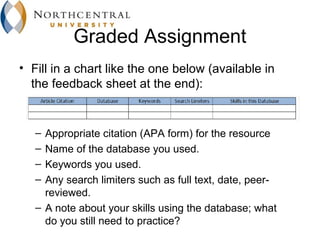
• Fill in a chart like the one below (available in
  the feedback sheet at the end):


   – Appropriate citation (APA form) for the resource
   – Name of the database you used.
   – Keywords you used.
   – Any search limiters such as full text, date, peer-
     reviewed.
   – A note about your skills using the database; what
     do you still need to practice?
Graded Assignment-Continued
• Prepare a 1 page paper on your library search
  and your results
  – How useful was each database for you?
  – What important journals, key scholars, or new
    ideas did you discover from your search?
  – How might a library search spark new ideas? As
    you searched did you find new ideas or new
    directions for your search? Did the direction your
    search take you surprise you?
• Deadline: 11:59:59 AZ time Sunday
  – http://www.worldtimebuddy.com/
Graded Assignment-Continued
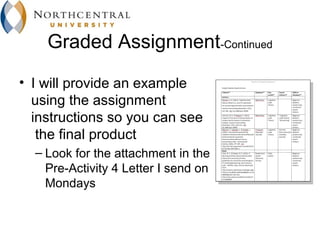
• I will provide an example
  using the assignment
  instructions so you can see
   the final product
  – Look for the attachment in the
    Pre-Activity 4 Letter I send on
    Mondays
Tips
• Spread the work out and give yourself sufficient
  time
• Read the library tutorials and short videos on
  how to do research
  – Library Home > Research Help > Learn the Library! >
    Quick Tutorial Videos>Search Like an Expert
  – Library Home > Research Help > Learn the Library! >
    Learn the Library - Business > Quick Tutorial Videos
    (approx. 5 min.)
Tips - Continued
• Make sure you find each of the following:
  – 3 peer-reviewed journal articles,
     • Library Home > Research Help > Research
       Process > Academic and Popular Resources
  – 1 book chapter, and
  – 1 scholarly resource (website or other
    resource).
     • Library Home > Research Help > Research
       Process > Website Evaluation
Tips - Continued
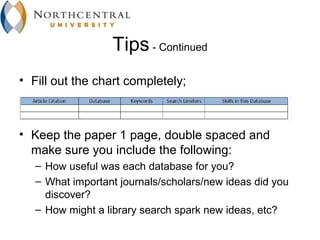
• Fill out the chart completely;


• Keep the paper 1 page, double spaced and
  make sure you include the following:
   – How useful was each database for you?
   – What important journals/scholars/new ideas did you
     discover?
   – How might a library search spark new ideas, etc?
Tips - Continued
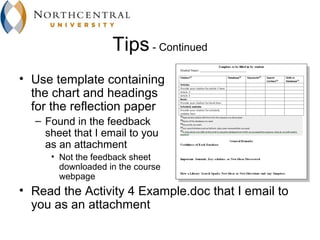
• Use template containing
  the chart and headings
  for the reflection paper
  – Found in the feedback
    sheet that I email to you
    as an attachment
     • Not the feedback sheet
       downloaded in the course
       webpage
• Read the Activity 4 Example.doc that I email to
  you as an attachment
Grading

• Your instructor has 4 days (until Thursday)
  to grade and give you feedback on your
  Foundations work.

Activity 4

  • 1.
    Foundations for GraduateStudy in Business Activity 4: How to Find What You Need
  • 2.
    Overview • Purpose – Become information literate – Understand how to use Northcentral University’s Library – Learn how search databases like an expert – Begin to build a database of sources for your educational/professional interest. • Time Required – 10 to 15 hours • Readings • Database search • Chart and 1 page reflection paper
  • 3.
    Assignment- Readings (links in Course Room) • Northcentral Information Literacy Tutorial • Northcentral Search like an Expert tutorial • Harvard Business School Working Knowledge – The Thinking that Leads. • Northcentral Finding a Research Topic.
  • 4.
    Graded Assignment • Conducta library search for resources in your area of professional or research interest. Locate: – 3 peer-reviewed journal articles, • Library Home > Research Help > Research Process > Academic and Popular Resources. – 1 book chapter, and – 1 scholarly resource (website or other resource). • Library Home > Research Help > Research Process > Website Evaluation
  • 5.
    Graded Assignment • Fillin a chart like the one below (available in the feedback sheet at the end): – Appropriate citation (APA form) for the resource – Name of the database you used. – Keywords you used. – Any search limiters such as full text, date, peer- reviewed. – A note about your skills using the database; what do you still need to practice?
  • 6.
    Graded Assignment-Continued • Preparea 1 page paper on your library search and your results – How useful was each database for you? – What important journals, key scholars, or new ideas did you discover from your search? – How might a library search spark new ideas? As you searched did you find new ideas or new directions for your search? Did the direction your search take you surprise you? • Deadline: 11:59:59 AZ time Sunday – http://www.worldtimebuddy.com/
  • 7.
    Graded Assignment-Continued • Iwill provide an example using the assignment instructions so you can see the final product – Look for the attachment in the Pre-Activity 4 Letter I send on Mondays
  • 8.
    Tips • Spread thework out and give yourself sufficient time • Read the library tutorials and short videos on how to do research – Library Home > Research Help > Learn the Library! > Quick Tutorial Videos>Search Like an Expert – Library Home > Research Help > Learn the Library! > Learn the Library - Business > Quick Tutorial Videos (approx. 5 min.)
  • 9.
    Tips - Continued •Make sure you find each of the following: – 3 peer-reviewed journal articles, • Library Home > Research Help > Research Process > Academic and Popular Resources – 1 book chapter, and – 1 scholarly resource (website or other resource). • Library Home > Research Help > Research Process > Website Evaluation
  • 10.
    Tips - Continued •Fill out the chart completely; • Keep the paper 1 page, double spaced and make sure you include the following: – How useful was each database for you? – What important journals/scholars/new ideas did you discover? – How might a library search spark new ideas, etc?
  • 11.
    Tips - Continued •Use template containing the chart and headings for the reflection paper – Found in the feedback sheet that I email to you as an attachment • Not the feedback sheet downloaded in the course webpage • Read the Activity 4 Example.doc that I email to you as an attachment
  • 12.
    Grading • Your instructorhas 4 days (until Thursday) to grade and give you feedback on your Foundations work.

Editor's Notes

  • #2 Hi this is Dave Johnson in this presentation I'm going to explain Activity 4: How to find what you need.
  • #3 The purpose of this activity is to help you become information literate. You'll understand how to use Northcentral University’s library. You'll learn how to search databases like an expert. And you'll begin to build a database of sources for your educational/professional interest. The time required to complete this activity could range from 10 to 15 hours depending on how much time you spend learning how to use the library databases and how much time you spend searching for sources. You'll need to fill out a chart that records the sources you found and also prepare a one-page reflection paper. Researching and using library databases is a critical skill to develop. In fact, you will be developing this skill the entire time you’re here at Northcentral. So, it's really important that you learn how to use the library databases, and this activity should give you a good start.
  • #4 There are several readings for you to do. There is a tutorial called the Northcentral Information Literacy Tutorial for you to take. There is a video for you to watch called Search Like an Expert. There is website that gives you some contemporary research topics in business. And there is a link at the library which provides a reading that explains how to find a research topic.
  • #5 The graded assignment requires you to conduct a library search for resources in your area of professional interest. You must locate three peer-reviewed journal articles. You can read about what is a peer-reviewed journal compared to a popular source at Library Home > Research Help > Research Process > Academic and Popular Resources. You must locate one book chapter, and one scholarly resource from a scholarly website or other resource. You can read about what constitutes a scholarly website at Library Home > Research Help > Research Process > Website Evaluation
  • #6 Then, you need to fill out a chart that I add at the end of a Feedback Sheet I send to you on Monday as an attachment. In this chart you record the resources you found using the proper APA citation format; the name of the database you used; the keywords that you used; any search limiters you used in your search such as fulltext, date, peer-reviewed; and a note about your skills using the database and whether you still need to practice.
  • #7 Not only will you turn in the chart, but you also need to prepare a one-page doublespaced paper about your search and the results. In this paper-and I would recommend that you just use these questions as headings--you need to provide the following: How useful was each database for you? What the important journals or scholars are new ideas did you discover from your search? And how might a library search spark new ideas? Did you find any new ideas and new directions for your search? Was there a direction that you took that surprised you? The deadline to submit the chart and one-page paper is Sunday midnight Arizona time.
  • #8 I will provide an example using the assignment instructions so you can see what the final product looks like. You can use this as a model and use the overall organization and headings provided. You’ll notice that I provide 3 articles, 1 book, and 1 scholarly website. I cite the resources using APA. Then, I provide a one-page, double spaced reflection paper with the three headings: Usefulness of Each Database, Important Journals, Key scholars, or New Ideas Discovered, How a Library Search Sparks New Ideas or New Directions and Any Surprises. Look for the attachment in the Pre-Activity 4 Letter I send on Mondays.
  • #9 Here are some tips to help you complete this assignment. First of all make sure you spread out the work and give yourself sufficient time to complete it. Then, you're going to want to read the library tutorials and watch the short videos. Below, you can see the navigation to find some helpful videos: You can watch the search like an expert video. Then, there are a number of quick tutorial videos you can find at the library that are each only 5 min. on various search topics. So, you have plenty of videos to watch that show you how to research using the library databases.
  • #10 Now make sure that you find each of the following: three peer-reviewed journals, one book chapter, and then one scholarly resource from our website or some other type resource
  • #11 Make sure that you fill out the chart completely. And then keep your paper to approximately one doublespaced page and make sure that you include the three topics. Again, I encourage you to just use these questions as headings: How useful was each database? What important journals, scholars, new ideas did you discover? And, how might a library search spark new ideas etc.?
  • #12 I provide a template for you to use in the feedback sheet for Activity 4. I email this feedback sheet to you on Monday as an attachment. I write your assignment right in the feedback sheet. The sheet is a document labeled Feedback_Sheet_Activity_4_Foundations_SBTM.doc. In the document at the end you will find a template containing the chart and headings for the reflection paper. Just begin typing in the template and this will serve as your assignment submission. Please note that this feedback sheet is an attachment to the email I send. It is different from the feedback sheet you available from the course webpage. I have altered the feedback sheet from the webpage to insert the template. I will attach an Activity 4 Example.doc in which I do the assignment myself as a model of a finished product. Look at that document to get an idea of what the finished assignment should look like.
  • #13 Once you submit your assignment the instructor has four days (until Thursday) to grade and give you feedback. I'm looking forward to receiving your assignment. Remember, developing the ability to use the library databases to find sources for a topic is a critical skill. This is something you will use throughout the time you spend here at Northcentral. So this activity should be a good start.