Engaging Kids in Research
          with Web 2.0 Tools

                       Connie Champlin
                    cjchamp@mac.com
                          OELMA 2009

PPT at Slideshare
The Landscape of Successful
           Student Learning

 21st Century Learning Skills
 Engaging Web 2.0 Tools
 A Savvy Research Process
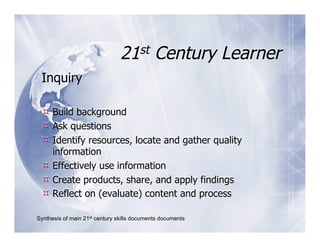
21st Century Learner
 Inquiry

  Build background
  Ask questions
  Identify resources, locate and gather quality
   information
  Effectively use information
  Create products, share, and apply findings
  Reflect on (evaluate) content and process

Synthesis of main 21st century skills documents documents
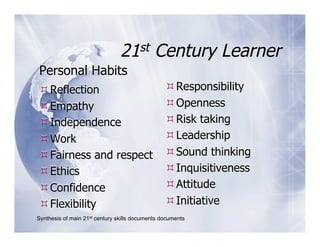
21st         Century Learner
Personal Habits
 Reflection                                      Responsibility
 Empathy                                         Openness
 Independence                                    Risk taking
 Work                                            Leadership
 Fairness and respect                            Sound thinking
 Ethics                                          Inquisitiveness
 Confidence                                      Attitude
 Flexibility                                     Initiative
Synthesis of main 21st century skills documents documents
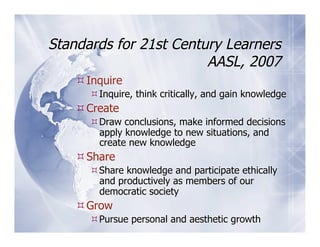
Standards for 21st Century Learners
                        AASL, 2007
     Inquire
       Inquire, think critically, and gain knowledge
     Create
       Draw conclusions, make informed decisions
        apply knowledge to new situations, and
        create new knowledge
     Share
       Share knowledge and participate ethically
        and productively as members of our
        democratic society
     Grow
       Pursue personal and aesthetic growth
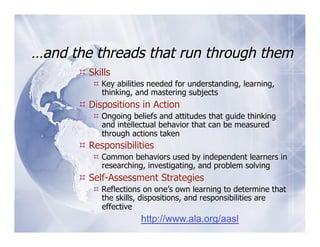
…and the threads that run through them
       Skills
          Key abilities needed for understanding, learning,
           thinking, and mastering subjects
       Dispositions in Action
          Ongoing beliefs and attitudes that guide thinking
           and intellectual behavior that can be measured
           through actions taken
       Responsibilities
          Common behaviors used by independent learners in
           researching, investigating, and problem solving
       Self-Assessment Strategies
          Reflections on one’s own learning to determine that
           the skills, dispositions, and responsibilities are
           effective
                      http://www.ala.org/aasl
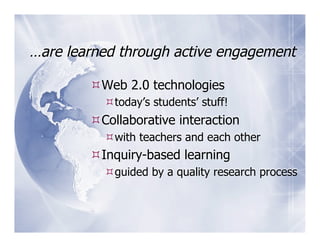
…are learned through active engagement

         Web 2.0 technologies
           today’s students’ stuff!
         Collaborative interaction
           with teachers and each other
         Inquiry-based learning
           guided by a quality research process
Web 2.0 Tools

Jot down, one to a post-it, web 2.0 tools
               you use.

 Which ones do you use in instruction of
 students?
 Which of these are collaborative in
 nature?
Research Process Models
 Which research model did your school
 adopt?
   Handy 5, Big 6, Savvy 7?
 Is it used outside of the library setting?
 How do you assess students’ research
 process skills?
Painless Guide to Research
      Using Web 2.0 Tools
  Brings together. . .
    21st Century Learner learning skills
    & personal habits woven through
    The Research Process
    Using features of Web 2.0 tools that
    have collaborative features.
The Research Process (Savvy 7)

 Each step is introduced and explained
 Each step features a Web 2.0 tool
   With a “Get Started” tutorial
 Each research step includes assessment
 tools and rubrics
   For student, teacher and/or librarian use
   Linked to 21st Century Learner skills &
   habits
In Addition. . .
The “Painless Guide” provides descriptions and weblinks
  to many other research models and Web 2.0
  resources including:

  FLIP IT – Yucht www.aliceinfo.org/flipit

  INFOhio DIALOGUE
       http://www.infohio.org/id/dialogue.html

  Research Cycle – McKenzie
             http://questioning.org/rcycle.html
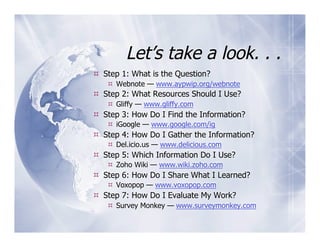
Let’s take a look. . .
  Step 1: What is the Question?
     Webnote — www.aypwip.org/webnote
  Step 2: What Resources Should I Use?
     Gliffy — www.gliffy.com
  Step 3: How Do I Find the Information?
     iGoogle — www.google.com/ig
  Step 4: How Do I Gather the Information?
     Del.icio.us — www.delicious.com
  Step 5: Which Information Do I Use?
     Zoho Wiki — www.wiki.zoho.com
  Step 6: How Do I Share What I Learned?
     Voxopop — www.voxopop.com
  Step 7: How Do I Evaluate My Work?
     Survey Monkey — www.surveymonkey.com
Step 1: What is the Question?
        Webnote —
  www.aypwip.org/webnote
  21st Century Skills: Build background, ask
  questions
  Personal Habits: Inquisitiveness
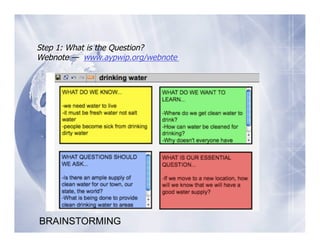
Step 1: What is the Question?
Webnote — www.aypwip.org/webnote


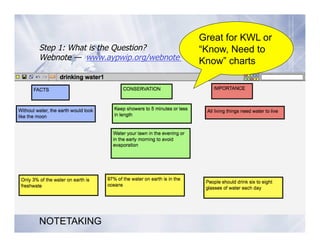
BRAINSTORMING
Great for KWL or
Step 1: What is the Question?      “Know, Need to
Webnote — www.aypwip.org/webnote   Know” charts


NOTETAKING
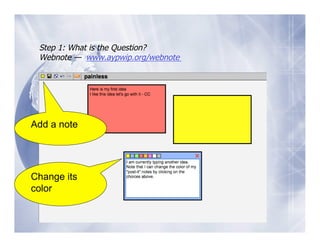
Step 1: What is the Question?
 Webnote — www.aypwip.org/webnote


Add a note


Change its
color
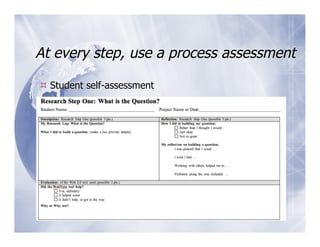
At every step, use a process assessment

 Student self-assessment
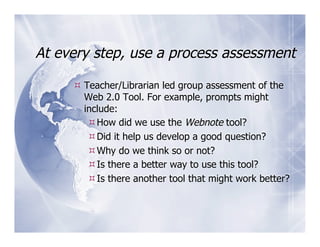
At every step, use a process assessment

      Teacher/Librarian led group assessment of the
       Web 2.0 Tool. For example, prompts might
       include:
         How did we use the Webnote tool?
         Did it help us develop a good question?
         Why do we think so or not?
         Is there a better way to use this tool?
         Is there another tool that might work better?
At every step, use a process assessment

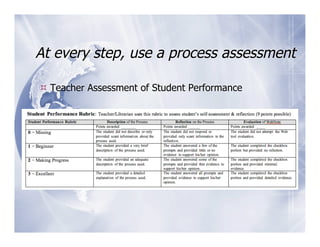
 Teacher Assessment of Student Performance
At every step, use a process assessment

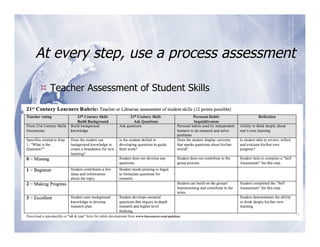
 Teacher Assessment of Student Skills
Step 2: What Resources Should
             I Use?
    Gliffy — www.gliffy.com
  21st Century Skills: Find resources
  Personal Habits: Openness, inquisitiveness
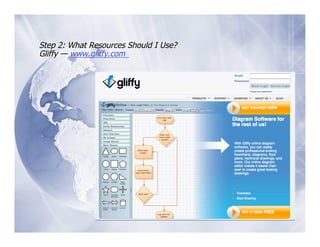
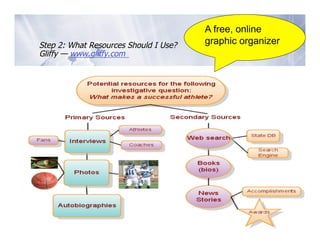
Step 2: What Resources Should I Use?
Gliffy — www.gliffy.com
A free, online
Step 2: What Resources Should I Use?   graphic organizer
Gliffy — www.gliffy.com
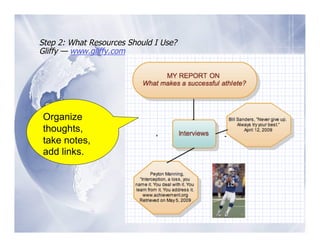
Step 2: What Resources Should I Use?
Gliffy — www.gliffy.com


Organize
thoughts,
take notes,
add links.
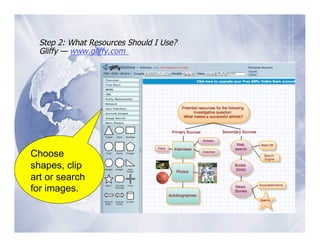
Step 2: What Resources Should I Use?
  Gliffy — www.gliffy.com


Choose
shapes, clip
art or search
for images.
Step 3: How Do I Find the
         Information?
iGoogle— www.google.com/ig
 21st Century Skills: Identify resources,
 locate, and gather quality information
 Personal Habits: Initiative
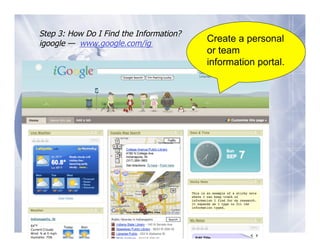
Step 3: How Do I Find the Information?
igoogle — www.google.com/ig
                                         Create a personal
                                         or team
                                         information portal.
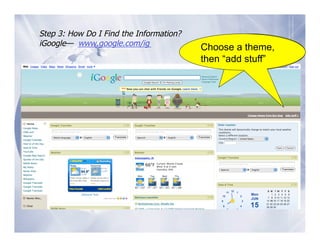
Step 3: How Do I Find the Information?
iGoogle— www.google.com/ig                  Choose a theme, then
                                         Choose a theme,
                                            “add stuff”
                                         then “add stuff”
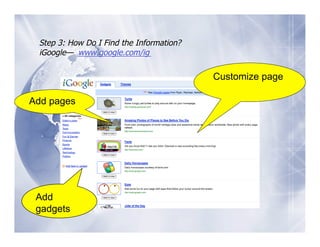
Step 3: How Do I Find the Information?
 iGoogle— www.google.com/ig

                                          Customize page

Add pages


 Add
 gadgets
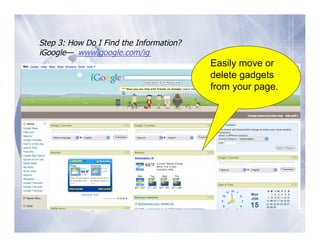
Step 3: How Do I Find the Information?
iGoogle— www.google.com/ig
                                         Easily move or
                                         delete gadgets
                                         from your page.
Step 4: How Do I Gather the
        Information?
        Delicious —
     www.delicious.com
 21st Century Skills: Identify resources,
 locate, and gather quality information
 Personal Habits: Work
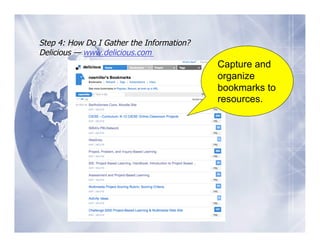
Step 4: How Do I Gather the Information?
Delicious — www.delicious.com
                                           Capture and
                                           organize
                                           bookmarks to
                                           resources.
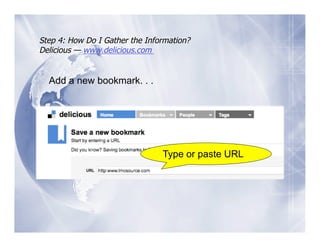
Step 4: How Do I Gather the Information?
Delicious — www.delicious.com


  Add a new bookmark. . .


                                Type or paste URL
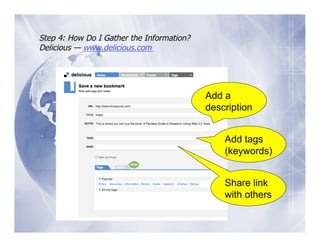
Step 4: How Do I Gather the Information?
Delicious — www.delicious.com


                                           Add a
                                           description


                                               Add tags
                                               (keywords)


                                               Share link
                                               with others
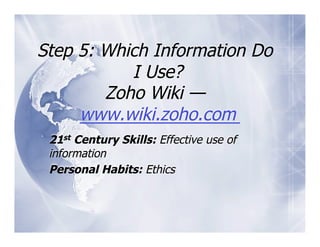
Step 5: Which Information Do
           I Use?
        Zoho Wiki —
     www.wiki.zoho.com
 21st Century Skills: Effective use of
 information
 Personal Habits: Ethics
Step 5: Which Information Do I Use?
Zoho Wiki — www.wiki.zoho.com


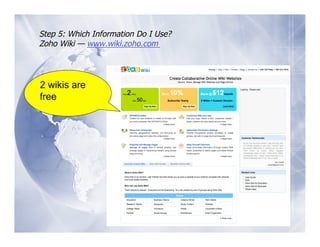
2 wikis are
free
Step 5: Which Information Do I Use?
 Zoho Wiki — www.wiki.zoho.com


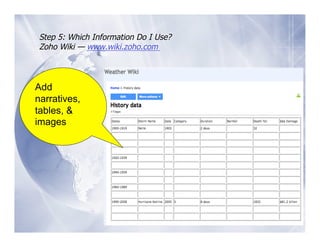
Add
narratives,
tables, &
images
Step 5: Which Information Do I Use?
  Zoho Wiki — www.wiki.zoho.com


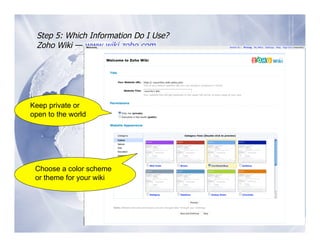
Keep private or
open to the world                       New
page


                                        Navigate


 Choose a color scheme
 or theme for your wiki
                                        History

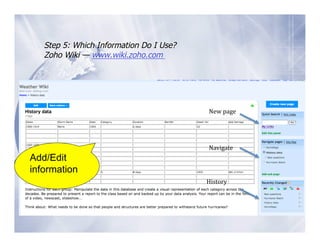
Step 5: Which Information Do I Use?
     Zoho Wiki — www.wiki.zoho.com


                                           New
page


                                           Navigate

Add/Edit
Add

information


information
                                           History

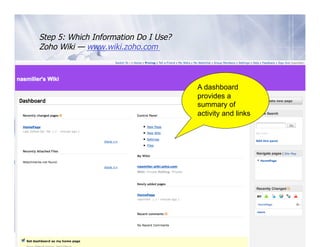
Step 5: Which Information Do I Use?
   Zoho Wiki — www.wiki.zoho.com


                                         A dashboard
                                         provides a
                                         summary of
                                             New
page

                                         activity and links


                                            Navigate


Add

information


                                            History

Step 6: How Do I Share What I
          Learned?
Voxopop — www.voxopop.com

 21st Century Skills: Create products, share
 and apply findings
 Personal Habits: Confidence
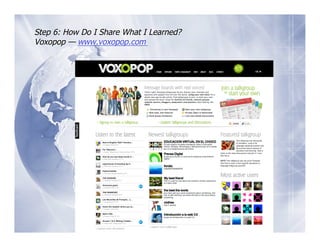
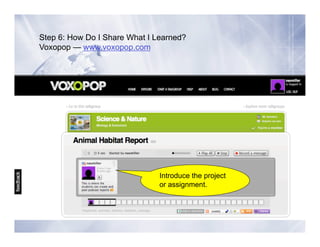
Step 6: How Do I Share What I Learned?
Voxopop — www.voxopop.com
Step 6: How Do I Share What I Learned?
Voxopop — www.voxopop.com


                               Introduce the project
                               or assignment.
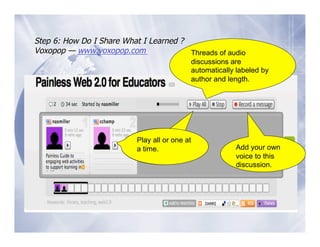
Step 6: How Do I Share What I Learned ?
Voxopop — www.voxopop.com               Threads of audio
                                            discussions are
                                            automatically labeled by
                                            author and length.


                           Play all or one at
                           a time
                             time.                       Add your own
                                                         voice to this
                                                         discussion.
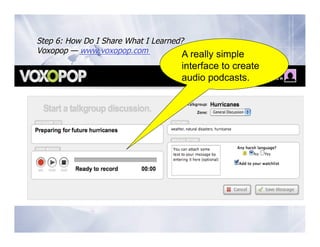
Step 6: How Do I Share What I Learned?
Voxopop — www.voxopop.com             A really simple
                                     interface to create
                                     audio podcasts.
Step 7: How Do I Evaluate My
           Work?
      Survey Monkey —
   www.surveymonkey.com

 21st Century Skills: Reflect on (Evaluate)
 content and process
 Personal Habits: Responsibility
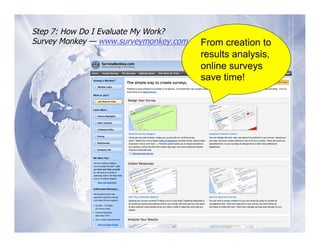
Step 7: How Do I Evaluate My Work?
Survey Monkey — www.surveymonkey.com   From creation to
                                       results analysis,
                                       online surveys
                                       save time!
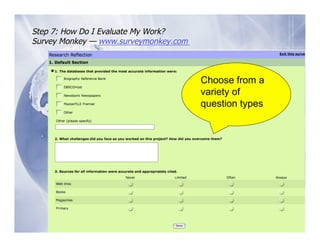
Step 7: How Do I Evaluate My Work?
Survey Monkey — www.surveymonkey.com


                                       Choose from a
                                       variety of
                                       question types
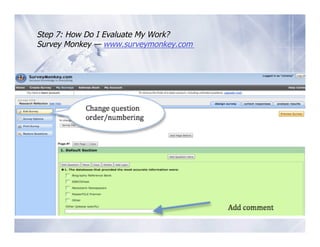
Step 7: How Do I Evaluate My Work?
Survey Monkey — www.surveymonkey.com
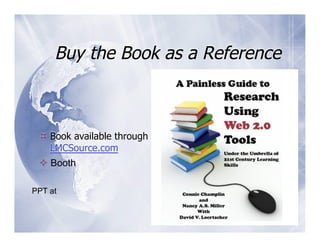
Buy the Book as a Reference


  Book available through
   LMCSource.com
   Booth

PPT at

Engaging Kids In Research With Web 2.0 Tools

  • 1.
    Engaging Kids inResearch with Web 2.0 Tools Connie Champlin cjchamp@mac.com OELMA 2009 PPT at Slideshare
  • 2.
    The Landscape ofSuccessful Student Learning  21st Century Learning Skills  Engaging Web 2.0 Tools  A Savvy Research Process
  • 3.
    21st Century Learner Inquiry  Build background  Ask questions  Identify resources, locate and gather quality information  Effectively use information  Create products, share, and apply findings  Reflect on (evaluate) content and process Synthesis of main 21st century skills documents documents
  • 4.
    21st Century Learner Personal Habits  Reflection  Responsibility  Empathy  Openness  Independence  Risk taking  Work  Leadership  Fairness and respect  Sound thinking  Ethics  Inquisitiveness  Confidence  Attitude  Flexibility  Initiative Synthesis of main 21st century skills documents documents
  • 5.
    Standards for 21stCentury Learners AASL, 2007  Inquire  Inquire, think critically, and gain knowledge  Create  Draw conclusions, make informed decisions apply knowledge to new situations, and create new knowledge  Share  Share knowledge and participate ethically and productively as members of our democratic society  Grow  Pursue personal and aesthetic growth
  • 6.
    …and the threadsthat run through them  Skills  Key abilities needed for understanding, learning, thinking, and mastering subjects  Dispositions in Action  Ongoing beliefs and attitudes that guide thinking and intellectual behavior that can be measured through actions taken  Responsibilities  Common behaviors used by independent learners in researching, investigating, and problem solving  Self-Assessment Strategies  Reflections on one’s own learning to determine that the skills, dispositions, and responsibilities are effective http://www.ala.org/aasl
  • 7.
    …are learned throughactive engagement  Web 2.0 technologies  today’s students’ stuff!  Collaborative interaction  with teachers and each other  Inquiry-based learning  guided by a quality research process
  • 8.
    Web 2.0 Tools Jotdown, one to a post-it, web 2.0 tools you use.  Which ones do you use in instruction of students?  Which of these are collaborative in nature?
  • 9.
    Research Process Models  Whichresearch model did your school adopt?  Handy 5, Big 6, Savvy 7?  Is it used outside of the library setting?  How do you assess students’ research process skills?
  • 10.
    Painless Guide toResearch Using Web 2.0 Tools  Brings together. . .  21st Century Learner learning skills & personal habits woven through  The Research Process  Using features of Web 2.0 tools that have collaborative features.
  • 11.
    The Research Process(Savvy 7)  Each step is introduced and explained  Each step features a Web 2.0 tool  With a “Get Started” tutorial  Each research step includes assessment tools and rubrics  For student, teacher and/or librarian use  Linked to 21st Century Learner skills & habits
  • 12.
    In Addition. .. The “Painless Guide” provides descriptions and weblinks to many other research models and Web 2.0 resources including:   FLIP IT – Yucht www.aliceinfo.org/flipit   INFOhio DIALOGUE http://www.infohio.org/id/dialogue.html   Research Cycle – McKenzie http://questioning.org/rcycle.html
  • 13.
    Let’s take alook. . .   Step 1: What is the Question?   Webnote — www.aypwip.org/webnote   Step 2: What Resources Should I Use?   Gliffy — www.gliffy.com   Step 3: How Do I Find the Information?   iGoogle — www.google.com/ig   Step 4: How Do I Gather the Information?   Del.icio.us — www.delicious.com   Step 5: Which Information Do I Use?   Zoho Wiki — www.wiki.zoho.com   Step 6: How Do I Share What I Learned?   Voxopop — www.voxopop.com   Step 7: How Do I Evaluate My Work?   Survey Monkey — www.surveymonkey.com
  • 14.
    Step 1: Whatis the Question? Webnote — www.aypwip.org/webnote 21st Century Skills: Build background, ask questions Personal Habits: Inquisitiveness
  • 15.
    Step 1: Whatis the Question? Webnote — www.aypwip.org/webnote BRAINSTORMING
  • 16.
    Great for KWLor Step 1: What is the Question? “Know, Need to Webnote — www.aypwip.org/webnote Know” charts NOTETAKING
  • 17.
    Step 1: Whatis the Question? Webnote — www.aypwip.org/webnote Add a note Change its color
  • 18.
    At every step,use a process assessment  Student self-assessment
  • 19.
    At every step,use a process assessment  Teacher/Librarian led group assessment of the Web 2.0 Tool. For example, prompts might include:  How did we use the Webnote tool?  Did it help us develop a good question?  Why do we think so or not?  Is there a better way to use this tool?  Is there another tool that might work better?
  • 20.
    At every step,use a process assessment  Teacher Assessment of Student Performance
  • 21.
    At every step,use a process assessment  Teacher Assessment of Student Skills
  • 22.
    Step 2: WhatResources Should I Use? Gliffy — www.gliffy.com 21st Century Skills: Find resources Personal Habits: Openness, inquisitiveness
  • 23.
    Step 2: WhatResources Should I Use? Gliffy — www.gliffy.com
  • 24.
    A free, online Step2: What Resources Should I Use? graphic organizer Gliffy — www.gliffy.com
  • 25.
    Step 2: WhatResources Should I Use? Gliffy — www.gliffy.com Organize thoughts, take notes, add links.
  • 26.
    Step 2: WhatResources Should I Use? Gliffy — www.gliffy.com Choose shapes, clip art or search for images.
  • 27.
    Step 3: HowDo I Find the Information? iGoogle— www.google.com/ig 21st Century Skills: Identify resources, locate, and gather quality information Personal Habits: Initiative
  • 28.
    Step 3: HowDo I Find the Information? igoogle — www.google.com/ig Create a personal or team information portal.
  • 29.
    Step 3: HowDo I Find the Information? iGoogle— www.google.com/ig Choose a theme, then Choose a theme, “add stuff” then “add stuff”
  • 30.
    Step 3: HowDo I Find the Information? iGoogle— www.google.com/ig Customize page Add pages Add gadgets
  • 31.
    Step 3: HowDo I Find the Information? iGoogle— www.google.com/ig Easily move or delete gadgets from your page.
  • 32.
    Step 4: HowDo I Gather the Information? Delicious — www.delicious.com 21st Century Skills: Identify resources, locate, and gather quality information Personal Habits: Work
  • 33.
    Step 4: HowDo I Gather the Information? Delicious — www.delicious.com Capture and organize bookmarks to resources.
  • 34.
    Step 4: HowDo I Gather the Information? Delicious — www.delicious.com Add a new bookmark. . . Type or paste URL
  • 35.
    Step 4: HowDo I Gather the Information? Delicious — www.delicious.com Add a description Add tags (keywords) Share link with others
  • 36.
    Step 5: WhichInformation Do I Use? Zoho Wiki — www.wiki.zoho.com 21st Century Skills: Effective use of information Personal Habits: Ethics
  • 37.
    Step 5: WhichInformation Do I Use? Zoho Wiki — www.wiki.zoho.com 2 wikis are free
  • 38.
    Step 5: WhichInformation Do I Use? Zoho Wiki — www.wiki.zoho.com Add narratives, tables, & images
  • 39.
    Step 5: WhichInformation Do I Use? Zoho Wiki — www.wiki.zoho.com Keep private or open to the world New
page
 Navigate
 Choose a color scheme or theme for your wiki History

  • 40.
    Step 5: WhichInformation Do I Use? Zoho Wiki — www.wiki.zoho.com New
page
 Navigate
 Add/Edit Add

information

 information History

  • 41.
    Step 5: WhichInformation Do I Use? Zoho Wiki — www.wiki.zoho.com A dashboard provides a summary of New
page
 activity and links Navigate
 Add

information

 History

  • 42.
    Step 6: HowDo I Share What I Learned? Voxopop — www.voxopop.com 21st Century Skills: Create products, share and apply findings Personal Habits: Confidence
  • 43.
    Step 6: HowDo I Share What I Learned? Voxopop — www.voxopop.com
  • 44.
    Step 6: HowDo I Share What I Learned? Voxopop — www.voxopop.com Introduce the project or assignment.
  • 45.
    Step 6: HowDo I Share What I Learned ? Voxopop — www.voxopop.com Threads of audio discussions are automatically labeled by author and length. Play all or one at a time time. Add your own voice to this discussion.
  • 46.
    Step 6: HowDo I Share What I Learned? Voxopop — www.voxopop.com A really simple interface to create audio podcasts.
  • 47.
    Step 7: HowDo I Evaluate My Work? Survey Monkey — www.surveymonkey.com 21st Century Skills: Reflect on (Evaluate) content and process Personal Habits: Responsibility
  • 48.
    Step 7: HowDo I Evaluate My Work? Survey Monkey — www.surveymonkey.com From creation to results analysis, online surveys save time!
  • 49.
    Step 7: HowDo I Evaluate My Work? Survey Monkey — www.surveymonkey.com Choose from a variety of question types
  • 50.
    Step 7: HowDo I Evaluate My Work? Survey Monkey — www.surveymonkey.com
  • 51.
    Buy the Bookas a Reference  Book available through LMCSource.com   Booth PPT at