About Work-Flow SAP Workflow is a tool to automate complex business processes where there is more than one user involved. SAP workflow maps the position in organization because SAP believes that Positions are more stable than the people. Business processes involving the tasks sequence performed by the users (people in the workplace) and ensure that the right work is assigned in the right sequence at the right time to the right person in the workflow.
The SAP workflow can be linked to other software tools such as Microsoft Outlook or Lotus Notes. Using SAP Workflow, each step of a business transaction can be easily monitored throughout the initiation and completion of the business processes. The SAP Workflow enables the process owners to track deadlines, determine the workload as well as provide statistics on the length of time to complete work processes. The key components of the SAP Workflow include the Workflow Definition, Work Items, Events triggers and the Organizational Structure in the workplace.
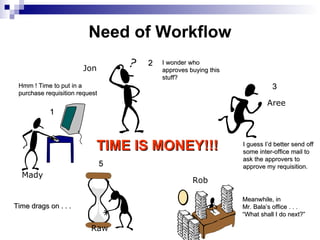
Need of Workflow Jon Aree Mady Raw Rob Hmm ! Time to put in a purchase requisition request 1 3 I guess I’d better send off some inter-office mail to ask the approvers to approve my requisition. 2 I wonder who approves buying this stuff? 5 Time drags on . . . Meanwhile, in  Mr. Bala’s office . . .  “ What shall I do next?” TIME IS MONEY!!!
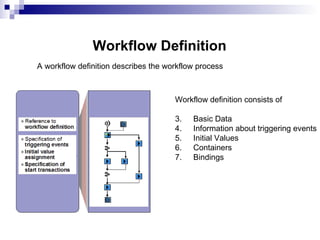
Workflow Definition Workflow definition consists of Basic Data Information about triggering events Initial Values Containers Bindings A workflow definition describes the workflow process
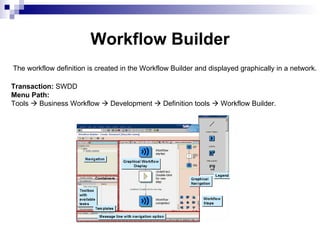
|  Workflow   Builder The workflow definition is created in the Workflow Builder and displayed graphically in a network. Transaction:  SWDD  Menu Path:  Tools    Business Workflow    Development    Definition tools    Workflow Builder.
|  How are Workflows Created in a System Within workflow templates, there is a key with the following structure: - A WS task abbreviation for the workflow template - An 8-digit sequence number From the structure of the 8-digit number, the system knows whether the template is a standard template delivered by SAP or one created by the customer. Customer-defined templates start with the prefix number that was defined in Customizing for the system and client.
|  Working with Workflow
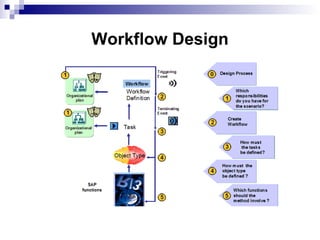
|  Workflow Design
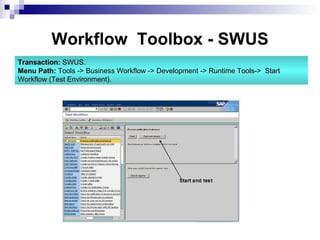
|  Workflow  Toolbox - SWUS Transaction:  SWUS. Menu Path:  Tools -> Business Workflow -> Development -> Runtime Tools->  Start Workflow (Test Environment).
|  Workflow definition steps Workflow definition is made up of individual  steps . When creating a step in a workflow definition, the step type must be specified first.  There are   Steps which refer to  business activities  (activities & user decision) Steps which are used for  internal process control  and monitoring (condition, multiple condition, loop, etc)
|  Business Activities Steps Activity  Can be a single step task with basic business functionality Can be a multi-step task, which reference to a workflow definition User Decision This provides an opportunity for user interaction with the system. The response to this decides the selection of the subsequent step. Document from template PA document is created from a document template using variables in the text that are filled during program execution. Web Activity Selected container elements are posted using http protocol in XML or SOAP message Subworkflow An activity which refers to a workflow rather than a task
|  Condition Branch on the basis of control information from the runtime dependent context of  the workflow.  An attribute of this object can also be accessed for condition evaluation Condition evaluation can be done by Field comparison e.g constants , object attribute,  system fields Multiple condition In contrast to condition, multiple condition makes it possible for the workflow definition to branch in more than two branches. For evaluation of the multiple condition, the value of the basis of comparison is checked at runtime against the comparison values and branched accordingly. Internal process control  Steps
|  Internal process control (contd.) WHILE Loop Steps are processed repeatedly until the conditions contained in the WHILE step no longer apply. Until  Loop Steps are processed repeatedly until the condition contained in the UNTIL step is true. Fork Used for parallel processing branches. Only a part of the parallel processing branches actually has to run to continue the workflow. Dynamic parallel processing is also possible
|  Internal process control (contd.) Send mail Text entered in this step can be used to send a mail to the agent assigned Container operations Used to perform arithmetic operation of value assignment to workflow container elements using constants and data in the workflow container .
|  Internal process control (contd.) Event Creator An event is created when this step in the workflow is reached. Other workflows can be started as a reaction to the event created in this step. This event must be the triggering event of the relevant workflow tasks and/or templates. WAIT for event Used to stop the whole execution of the workflow until the event is created in the system. Used to wait for events for parallel processing
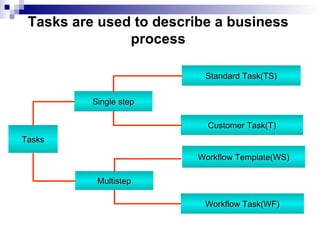
|  Tasks Single step Multistep Standard Task(TS) Customer Task(T) Workflow Template(WS) Workflow Task(WF) Tasks are used to describe a business  process
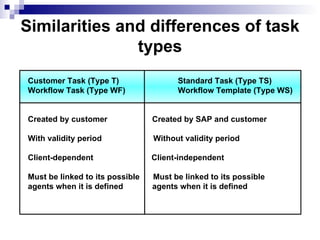
|  Similarities and differences of task types Customer Task (Type T) Standard Task (Type TS) Workflow Task (Type WF) Workflow Template (Type WS) Created by customer  Created by SAP and customer With validity period  Without validity period Client-dependent  Client-independent Must be linked to its possible  Must be linked to its possible agents when it is defined  agents when it is defined
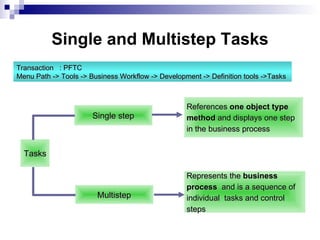
|  Single and Multistep Tasks Tasks Single step Multistep References  one object type  method  and displays one step in the business process  Represents the  business  process   and is a sequence of  individual  tasks and control  steps  Transaction  : PFTC Menu Path -> Tools -> Business Workflow -> Development -> Definition tools ->Tasks
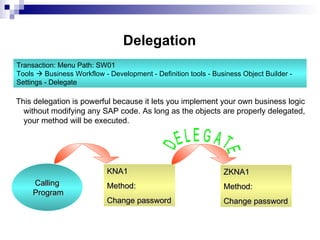
|  Delegation This delegation is powerful because it lets you implement your own business logic without modifying any SAP code. As long as the objects are properly delegated, your method will be executed. Calling Program KNA1 Method:  Change password DELEGATE ZKNA1 Method:  Change password Transaction: Menu Path: SW01 Tools     Business Workflow - Development - Definition tools - Business Object Builder - Settings - Delegate
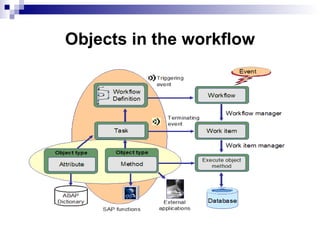
|  Objects in the workflow
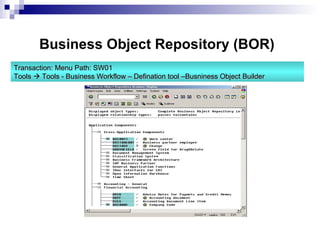
|  Business Object Repository (BOR) Transaction: Menu Path: SW01 Tools     Tools - Business Workflow – Defination tool –Busniness Object Builder

About work flow

  • 1.
    About Work-Flow SAPWorkflow is a tool to automate complex business processes where there is more than one user involved. SAP workflow maps the position in organization because SAP believes that Positions are more stable than the people. Business processes involving the tasks sequence performed by the users (people in the workplace) and ensure that the right work is assigned in the right sequence at the right time to the right person in the workflow.
  • 2.
    The SAP workflowcan be linked to other software tools such as Microsoft Outlook or Lotus Notes. Using SAP Workflow, each step of a business transaction can be easily monitored throughout the initiation and completion of the business processes. The SAP Workflow enables the process owners to track deadlines, determine the workload as well as provide statistics on the length of time to complete work processes. The key components of the SAP Workflow include the Workflow Definition, Work Items, Events triggers and the Organizational Structure in the workplace.
  • 3.
    Need of WorkflowJon Aree Mady Raw Rob Hmm ! Time to put in a purchase requisition request 1 3 I guess I’d better send off some inter-office mail to ask the approvers to approve my requisition. 2 I wonder who approves buying this stuff? 5 Time drags on . . . Meanwhile, in Mr. Bala’s office . . . “ What shall I do next?” TIME IS MONEY!!!
  • 4.
    Workflow Definition Workflowdefinition consists of Basic Data Information about triggering events Initial Values Containers Bindings A workflow definition describes the workflow process
  • 5.
    | Workflow Builder The workflow definition is created in the Workflow Builder and displayed graphically in a network. Transaction: SWDD Menu Path: Tools  Business Workflow  Development  Definition tools  Workflow Builder.
  • 6.
    | Howare Workflows Created in a System Within workflow templates, there is a key with the following structure: - A WS task abbreviation for the workflow template - An 8-digit sequence number From the structure of the 8-digit number, the system knows whether the template is a standard template delivered by SAP or one created by the customer. Customer-defined templates start with the prefix number that was defined in Customizing for the system and client.
  • 7.
    | Workingwith Workflow
  • 8.
    | WorkflowDesign
  • 9.
    | Workflow Toolbox - SWUS Transaction: SWUS. Menu Path: Tools -> Business Workflow -> Development -> Runtime Tools-> Start Workflow (Test Environment).
  • 10.
    | Workflowdefinition steps Workflow definition is made up of individual steps . When creating a step in a workflow definition, the step type must be specified first. There are Steps which refer to business activities (activities & user decision) Steps which are used for internal process control and monitoring (condition, multiple condition, loop, etc)
  • 11.
    | BusinessActivities Steps Activity Can be a single step task with basic business functionality Can be a multi-step task, which reference to a workflow definition User Decision This provides an opportunity for user interaction with the system. The response to this decides the selection of the subsequent step. Document from template PA document is created from a document template using variables in the text that are filled during program execution. Web Activity Selected container elements are posted using http protocol in XML or SOAP message Subworkflow An activity which refers to a workflow rather than a task
  • 12.
    | ConditionBranch on the basis of control information from the runtime dependent context of the workflow. An attribute of this object can also be accessed for condition evaluation Condition evaluation can be done by Field comparison e.g constants , object attribute, system fields Multiple condition In contrast to condition, multiple condition makes it possible for the workflow definition to branch in more than two branches. For evaluation of the multiple condition, the value of the basis of comparison is checked at runtime against the comparison values and branched accordingly. Internal process control Steps
  • 13.
    | Internalprocess control (contd.) WHILE Loop Steps are processed repeatedly until the conditions contained in the WHILE step no longer apply. Until Loop Steps are processed repeatedly until the condition contained in the UNTIL step is true. Fork Used for parallel processing branches. Only a part of the parallel processing branches actually has to run to continue the workflow. Dynamic parallel processing is also possible
  • 14.
    | Internalprocess control (contd.) Send mail Text entered in this step can be used to send a mail to the agent assigned Container operations Used to perform arithmetic operation of value assignment to workflow container elements using constants and data in the workflow container .
  • 15.
    | Internalprocess control (contd.) Event Creator An event is created when this step in the workflow is reached. Other workflows can be started as a reaction to the event created in this step. This event must be the triggering event of the relevant workflow tasks and/or templates. WAIT for event Used to stop the whole execution of the workflow until the event is created in the system. Used to wait for events for parallel processing
  • 16.
    | TasksSingle step Multistep Standard Task(TS) Customer Task(T) Workflow Template(WS) Workflow Task(WF) Tasks are used to describe a business process
  • 17.
    | Similaritiesand differences of task types Customer Task (Type T) Standard Task (Type TS) Workflow Task (Type WF) Workflow Template (Type WS) Created by customer Created by SAP and customer With validity period Without validity period Client-dependent Client-independent Must be linked to its possible Must be linked to its possible agents when it is defined agents when it is defined
  • 18.
    | Singleand Multistep Tasks Tasks Single step Multistep References one object type method and displays one step in the business process Represents the business process and is a sequence of individual tasks and control steps Transaction : PFTC Menu Path -> Tools -> Business Workflow -> Development -> Definition tools ->Tasks
  • 19.
    | DelegationThis delegation is powerful because it lets you implement your own business logic without modifying any SAP code. As long as the objects are properly delegated, your method will be executed. Calling Program KNA1 Method: Change password DELEGATE ZKNA1 Method: Change password Transaction: Menu Path: SW01 Tools  Business Workflow - Development - Definition tools - Business Object Builder - Settings - Delegate
  • 20.
    | Objectsin the workflow
  • 21.
    | BusinessObject Repository (BOR) Transaction: Menu Path: SW01 Tools  Tools - Business Workflow – Defination tool –Busniness Object Builder