- 1/40 -
Instructor : Jaewook Kang
At CSNL-GIST
E-mail: jwkkang@gist.ac.kr
2011, Apr. 8th
A Simple Communication System Design
Lab with MATLAB Simulink
- Lab #4: - Completing our target system
- Channel implementation
- 2/40 -
Next time…Next time…
Place: IC203
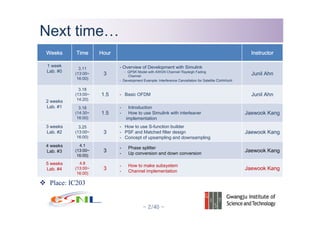
Weeks Time Hour Instructor
1 week
Lab. #0
3.11
(13:00~
16:00)
3
- Overview of Development with Simulink
- QPSK Model with AWGN Channel/ Rayleigh Fading
Channel
- Development Example: Interference Cancellation for Satellite Communi
Junil Ahn
2 weeks
Lab. #1
3.18
(13:00~
14:20)
1.5 - Basic OFDM Junil Ahn
3.18
(14:30~
16:00)
1.5
- Introduction
- How to use Simulink with interleaver
implementation
Jaewook Kang
3 weeks
Lab. #2
3.25
(13:00~
16:00)
3
- How to use S-function builder
- PSF and Matched filter design
- Concept of upsampling and downsampling
Jaewook Kang
4 weeks
Lab. #3
4.1
(13:00~
16:00)
3
- Phase splitter
- Up conversion and down conversion
Jaewook Kang
5 weeks
Lab. #4
4.8
(13:00~
16:00)
3
- How to make subsystem
- Channel implementation
Jaewook Kang
- 3/40 -
Summary of prev. lectureSummary of prev. lecture
Up conversions
By multiplying to BB signals, we can obtain PB signals
We usually use k=4 IF=pi/2
In case of down conversion, only sign of exponent is opposite.
2
( ) ( ) ( )
( ) ( )
2 2
Re[ ( )] cos( ) sin( )
2 2
Im [ ( )] sin( ) cos( )
BB
j n
k
PB BB
s n x n jy n
s n s n e
s t x n y n
k k
ag s n x n y n
k k
π
π π
π π
−
= +
=
= −
= +
2
j t
k
e
π
−
where 2, integerk ≥
- 4/40 -
Summary of prev. lectureSummary of prev. lecture
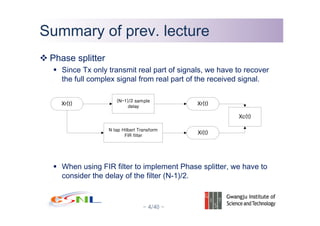
Phase splitter
Since Tx only transmit real part of signals, we have to recover
the full complex signal from real part of the received signal.
When using FIR filter to implement Phase splitter, we have to
consider the delay of the filter (N-1)/2.
- 5/40 -
Summary of prev. lectureSummary of prev. lecture
Hilbert transform
Find imaginary part of Xc(t) from real part only when Xc(t) is complex exponential.
02j f t
Ae π
Re[]
Hilbert TR
+
02j f t
Ae π
Xc Xr
Xi_hat
Xc_hat
X
j
- 6/40 -
Today’s main pointsToday’s main points
Complete to make our target system
Let’s make a channel using simulink
How to use MATLAB function in sumulink
How to use variable from workspace
- 7/40 -
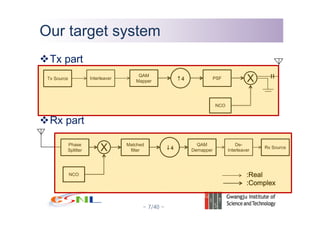
Our target systemOur target system
Tx part
Rx part
Tx Source Interleaver
QAM
Mapper
PSF X
NCO
↑4
Phase
Splitter
Matched
filter
QAM
DemapperX
NCO
↓4
De-
Interleaver
Rx Source
:Real
:Complex
- 8/40 -
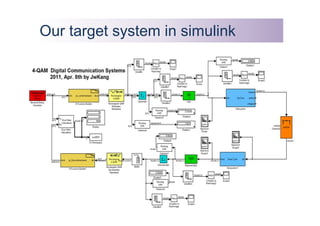
Our target system in simulinkOur target system in simulink
- 9/40 -
Channel ImplementationChannel Implementation
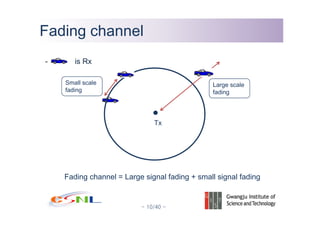
Rcvd signal = Trmtd signal x
( large scale fading) x (small scaling fading )
+AWGN
Today mainly talk about large scale fading.
We are going to use Block Rayleigh/Rician fading for small scale
fading.
- 10/40 -
Fading channelFading channel
Tx
- is Rx
Large scale
fading
Small scale
fading
Fading channel = Large signal fading + small signal fading
- 11/40 -
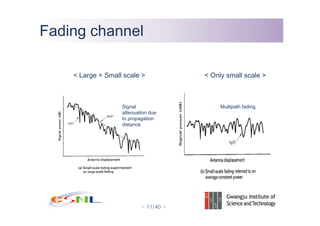
Signal
attenuation due
to propagation
distance
Fading channelFading channel
Multipath fading
< Only small scale >< Large + Small scale >
- 12/40 -
Large scale fadingLarge scale fading
Log-distance path loss model
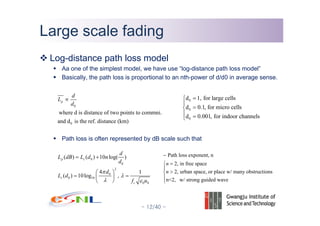
Aa one of the simplest model, we have use “log-distance path loss model”
Basically, the path loss is proportional to an nth-power of d/d0 in average sense.
Path loss is often represented by dB scale such that
0
0
where d is distance of two points to commni.
and d is the ref. distance (km)
p
d
L
d
∝
0
0
2
0
0 10
0 0
( ) ( ) 10 log( )
4 1
( ) 10log ,
p s
s
c
d
L dB L d n
d
d
L d
f u
π
λ
λ ε
= +
⎛ ⎞
= =⎜ ⎟
⎝ ⎠
0
0
0
d 1, for large cells
d 0.1, for micro cells
d 0.001, for indoor channels
=⎧
⎪
=⎨
⎪ =⎩
Path loss exponent, n
2, in free space
2, urban space, or place w/ many obstructions
n<2, w/ strong guided wave
n
n
−
=⎧
⎪
>⎨
⎪
⎩
- 13/40 -
Large scale fadingLarge scale fading
Log-distance path loss model
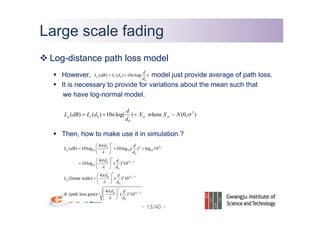
However, model just provide average of path loss.
It is necessary to provide for variations about the mean such that
we have log-normal model.
Then, how to make use it in simulation ?
0
0
( ) ( ) 10 log( )p s
d
L dB L d n
d
= +
2
0
0
( ) ( ) 10 log( ) where ~ (0, )p s
d
L dB L d n X X N
d
σ σ σ= + +
2
0
10 10 10
0
2
10
10
0
2
10
0
2
10
0
4
( ) 10log 10log ( ) log 10
4
10log ( ) 10
4
(linear scale) ( ) 10
4
(path loss gain)= ( ) 10
Xn
p
Xn
Xn
p
Xn
d d
L dB
d
d d
d
d d
L
d
d d
K
d
σ
σ
σ
σ
π
λ
π
λ
π
λ
π
λ
−
−
−
⎛ ⎞
= + +⎜ ⎟
⎝ ⎠
⎛ ⎞
= ⎜ ⎟
⎝ ⎠
⎛ ⎞
= ⎜ ⎟
⎝ ⎠
⎛ ⎞
⎜ ⎟
⎝ ⎠
- 14/40 -
Small scale fadingSmall scale fading
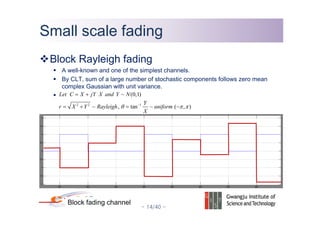
Block Rayleigh fading
A well-known and one of the simplest channels.
By CLT, sum of a large number of stochastic components follows zero mean
complex Gaussian with unit variance.
Block fading channel
2 2 1
~ (0,1)
~ , tan ~ ( , )
Let C X jY X and Y N
Y
r X Y Rayleigh uniform
X
θ π π−
= +
= + = −
- 15/40 -
Small scale fadingSmall scale fading
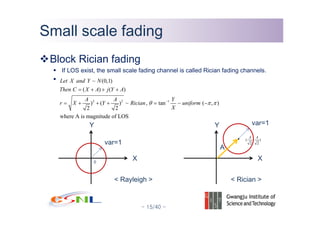
Block Rician fading
If LOS exist, the small scale fading channel is called Rician fading channels.
2 2 1
~ (0,1)
( ) ( )
) ( ) ~ , tan ~ ( , )
2 2
where A is magnitude of LOS
Let X and Y N
Then C X A j Y A
A A Y
r X Y Rician uniform
X
θ π π−
= + + +
= + + + = −
Y
X
var=1
Y
X
var=1
0
( , )
2 2
A A
A
< Rician >< Rayleigh >
- 16/40 -
Channel ImplementationChannel Implementation
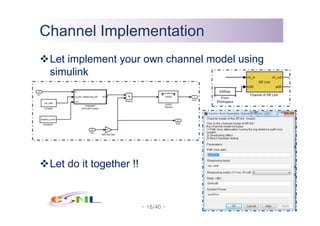
Let implement your own channel model using
simulink
Let do it together !!
- 17/40 -
Channel ImplementationChannel Implementation
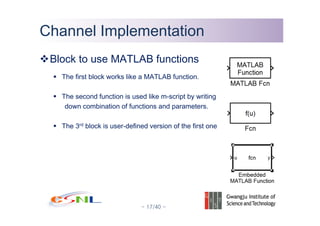
Block to use MATLAB functions
The first block works like a MATLAB function.
The second function is used like m-script by writing
down combination of functions and parameters.
The 3rd block is user-defined version of the first one
- 18/40 -
Channel ImplementationChannel Implementation
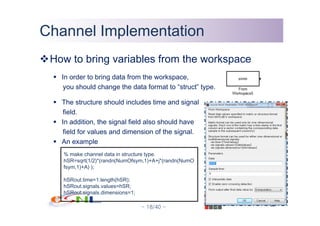
How to bring variables from the workspace
In order to bring data from the workspace,
you should change the data format to “struct” type.
The structure should includes time and signal
field.
In addition, the signal field also should have
field for values and dimension of the signal.
An example
% make channel data in structure type.
hSR=sqrt(1/2)*(randn(NumOfsym,1)+A+j*(randn(NumO
fsym,1)+A) );
hSRout.time=1:length(hSR);
hSRout.signals.values=hSR;
hSRout.signals.dimensions=1;
- 19/40 -
Channel ImplementationChannel Implementation
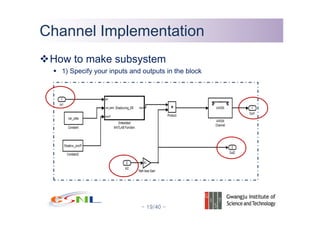
How to make subsystem
1) Specify your inputs and outputs in the block
- 20/40 -
Channel ImplementationChannel Implementation
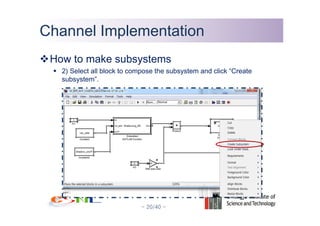
How to make subsystems
2) Select all block to compose the subsystem and click “Create
subsystem”.
- 21/40 -
Channel ImplementationChannel Implementation
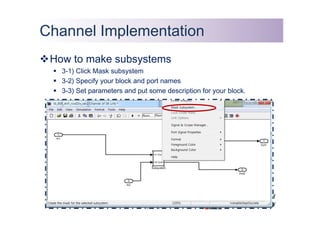
How to make subsystems
3-1) Click Mask subsystem
3-2) Specify your block and port names
3-3) Set parameters and put some description for your block.
- 22/40 -
Wrapping upWrapping up
Try again to make your own channel block and use it in your
simulation.
Retry to make blocks which are not completed in previous class.
Thank you for attending this class.
This is the end of the Simulink education program.
If you have some question while doing your project using simulink,
please bring food with your trouble.

A Simple Communication System Design Lab #4 with MATLAB Simulink

  • 1.
    - 1/40 - Instructor: Jaewook Kang At CSNL-GIST E-mail: jwkkang@gist.ac.kr 2011, Apr. 8th A Simple Communication System Design Lab with MATLAB Simulink - Lab #4: - Completing our target system - Channel implementation
  • 2.
    - 2/40 - Nexttime…Next time… Place: IC203 Weeks Time Hour Instructor 1 week Lab. #0 3.11 (13:00~ 16:00) 3 - Overview of Development with Simulink - QPSK Model with AWGN Channel/ Rayleigh Fading Channel - Development Example: Interference Cancellation for Satellite Communi Junil Ahn 2 weeks Lab. #1 3.18 (13:00~ 14:20) 1.5 - Basic OFDM Junil Ahn 3.18 (14:30~ 16:00) 1.5 - Introduction - How to use Simulink with interleaver implementation Jaewook Kang 3 weeks Lab. #2 3.25 (13:00~ 16:00) 3 - How to use S-function builder - PSF and Matched filter design - Concept of upsampling and downsampling Jaewook Kang 4 weeks Lab. #3 4.1 (13:00~ 16:00) 3 - Phase splitter - Up conversion and down conversion Jaewook Kang 5 weeks Lab. #4 4.8 (13:00~ 16:00) 3 - How to make subsystem - Channel implementation Jaewook Kang
  • 3.
    - 3/40 - Summaryof prev. lectureSummary of prev. lecture Up conversions By multiplying to BB signals, we can obtain PB signals We usually use k=4 IF=pi/2 In case of down conversion, only sign of exponent is opposite. 2 ( ) ( ) ( ) ( ) ( ) 2 2 Re[ ( )] cos( ) sin( ) 2 2 Im [ ( )] sin( ) cos( ) BB j n k PB BB s n x n jy n s n s n e s t x n y n k k ag s n x n y n k k π π π π π − = + = = − = + 2 j t k e π − where 2, integerk ≥
  • 4.
    - 4/40 - Summaryof prev. lectureSummary of prev. lecture Phase splitter Since Tx only transmit real part of signals, we have to recover the full complex signal from real part of the received signal. When using FIR filter to implement Phase splitter, we have to consider the delay of the filter (N-1)/2.
  • 5.
    - 5/40 - Summaryof prev. lectureSummary of prev. lecture Hilbert transform Find imaginary part of Xc(t) from real part only when Xc(t) is complex exponential. 02j f t Ae π Re[] Hilbert TR + 02j f t Ae π Xc Xr Xi_hat Xc_hat X j
  • 6.
    - 6/40 - Today’smain pointsToday’s main points Complete to make our target system Let’s make a channel using simulink How to use MATLAB function in sumulink How to use variable from workspace
  • 7.
    - 7/40 - Ourtarget systemOur target system Tx part Rx part Tx Source Interleaver QAM Mapper PSF X NCO ↑4 Phase Splitter Matched filter QAM DemapperX NCO ↓4 De- Interleaver Rx Source :Real :Complex
  • 8.
    - 8/40 - Ourtarget system in simulinkOur target system in simulink
  • 9.
    - 9/40 - ChannelImplementationChannel Implementation Rcvd signal = Trmtd signal x ( large scale fading) x (small scaling fading ) +AWGN Today mainly talk about large scale fading. We are going to use Block Rayleigh/Rician fading for small scale fading.
  • 10.
    - 10/40 - FadingchannelFading channel Tx - is Rx Large scale fading Small scale fading Fading channel = Large signal fading + small signal fading
  • 11.
    - 11/40 - Signal attenuationdue to propagation distance Fading channelFading channel Multipath fading < Only small scale >< Large + Small scale >
  • 12.
    - 12/40 - Largescale fadingLarge scale fading Log-distance path loss model Aa one of the simplest model, we have use “log-distance path loss model” Basically, the path loss is proportional to an nth-power of d/d0 in average sense. Path loss is often represented by dB scale such that 0 0 where d is distance of two points to commni. and d is the ref. distance (km) p d L d ∝ 0 0 2 0 0 10 0 0 ( ) ( ) 10 log( ) 4 1 ( ) 10log , p s s c d L dB L d n d d L d f u π λ λ ε = + ⎛ ⎞ = =⎜ ⎟ ⎝ ⎠ 0 0 0 d 1, for large cells d 0.1, for micro cells d 0.001, for indoor channels =⎧ ⎪ =⎨ ⎪ =⎩ Path loss exponent, n 2, in free space 2, urban space, or place w/ many obstructions n<2, w/ strong guided wave n n − =⎧ ⎪ >⎨ ⎪ ⎩
  • 13.
    - 13/40 - Largescale fadingLarge scale fading Log-distance path loss model However, model just provide average of path loss. It is necessary to provide for variations about the mean such that we have log-normal model. Then, how to make use it in simulation ? 0 0 ( ) ( ) 10 log( )p s d L dB L d n d = + 2 0 0 ( ) ( ) 10 log( ) where ~ (0, )p s d L dB L d n X X N d σ σ σ= + + 2 0 10 10 10 0 2 10 10 0 2 10 0 2 10 0 4 ( ) 10log 10log ( ) log 10 4 10log ( ) 10 4 (linear scale) ( ) 10 4 (path loss gain)= ( ) 10 Xn p Xn Xn p Xn d d L dB d d d d d d L d d d K d σ σ σ σ π λ π λ π λ π λ − − − ⎛ ⎞ = + +⎜ ⎟ ⎝ ⎠ ⎛ ⎞ = ⎜ ⎟ ⎝ ⎠ ⎛ ⎞ = ⎜ ⎟ ⎝ ⎠ ⎛ ⎞ ⎜ ⎟ ⎝ ⎠
  • 14.
    - 14/40 - Smallscale fadingSmall scale fading Block Rayleigh fading A well-known and one of the simplest channels. By CLT, sum of a large number of stochastic components follows zero mean complex Gaussian with unit variance. Block fading channel 2 2 1 ~ (0,1) ~ , tan ~ ( , ) Let C X jY X and Y N Y r X Y Rayleigh uniform X θ π π− = + = + = −
  • 15.
    - 15/40 - Smallscale fadingSmall scale fading Block Rician fading If LOS exist, the small scale fading channel is called Rician fading channels. 2 2 1 ~ (0,1) ( ) ( ) ) ( ) ~ , tan ~ ( , ) 2 2 where A is magnitude of LOS Let X and Y N Then C X A j Y A A A Y r X Y Rician uniform X θ π π− = + + + = + + + = − Y X var=1 Y X var=1 0 ( , ) 2 2 A A A < Rician >< Rayleigh >
  • 16.
    - 16/40 - ChannelImplementationChannel Implementation Let implement your own channel model using simulink Let do it together !!
  • 17.
    - 17/40 - ChannelImplementationChannel Implementation Block to use MATLAB functions The first block works like a MATLAB function. The second function is used like m-script by writing down combination of functions and parameters. The 3rd block is user-defined version of the first one
  • 18.
    - 18/40 - ChannelImplementationChannel Implementation How to bring variables from the workspace In order to bring data from the workspace, you should change the data format to “struct” type. The structure should includes time and signal field. In addition, the signal field also should have field for values and dimension of the signal. An example % make channel data in structure type. hSR=sqrt(1/2)*(randn(NumOfsym,1)+A+j*(randn(NumO fsym,1)+A) ); hSRout.time=1:length(hSR); hSRout.signals.values=hSR; hSRout.signals.dimensions=1;
  • 19.
    - 19/40 - ChannelImplementationChannel Implementation How to make subsystem 1) Specify your inputs and outputs in the block
  • 20.
    - 20/40 - ChannelImplementationChannel Implementation How to make subsystems 2) Select all block to compose the subsystem and click “Create subsystem”.
  • 21.
    - 21/40 - ChannelImplementationChannel Implementation How to make subsystems 3-1) Click Mask subsystem 3-2) Specify your block and port names 3-3) Set parameters and put some description for your block.
  • 22.
    - 22/40 - WrappingupWrapping up Try again to make your own channel block and use it in your simulation. Retry to make blocks which are not completed in previous class. Thank you for attending this class. This is the end of the Simulink education program. If you have some question while doing your project using simulink, please bring food with your trouble.