A Quick Introduction to E-Forms
Richard Medina, Doculabs
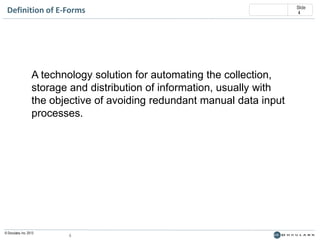
Definition of E-Forms

A technology solution for automating the collection,
storage and distribution of information, usually with
the objective of avoiding redundant manual data input
processes.

© Doculabs, Inc. 2013

4

Slide
4
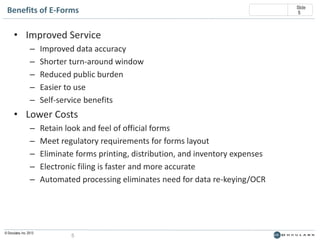
Benefits of E-Forms

• Improved Service
–
–
–
–
–

Improved data accuracy
Shorter turn-around window
Reduced public burden
Easier to use
Self-service benefits

• Lower Costs
–
–
–
–
–

© Doculabs, Inc. 2013

Retain look and feel of official forms
Meet regulatory requirements for forms layout
Eliminate forms printing, distribution, and inventory expenses
Electronic filing is faster and more accurate
Automated processing eliminates need for data re-keying/OCR

5

Slide
5
Slide
6

Types of E-Forms
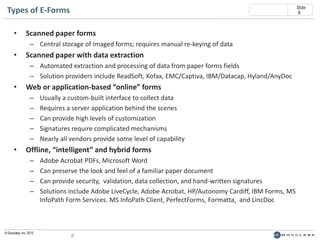
•

Scanned paper forms
– Central storage of imaged forms; requires manual re-keying of data

•

Scanned paper with data extraction
– Automated extraction and processing of data from paper forms fields
– Solution providers include ReadSoft, Kofax, EMC/Captiva, IBM/Datacap, Hyland/AnyDoc

•

Web or application-based “online” forms
–
–
–
–
–

•

Usually a custom-built interface to collect data
Requires a server application behind the scenes
Can provide high levels of customization
Signatures require complicated mechanisms
Nearly all vendors provide some level of capability

Offline, “intelligent” and hybrid forms
–
–
–
–

© Doculabs, Inc. 2013

Adobe Acrobat PDFs, Microsoft Word
Can preserve the look and feel of a familiar paper document
Can provide security, validation, data collection, and hand-written signatures
Solutions include Adobe LiveCycle, Adobe Acrobat, HP/Autonomy Cardiff, IBM Forms, MS
InfoPath Form Services. MS InfoPath Client, PerfectForms, Formatta, and LincDoc

6
Slide
7

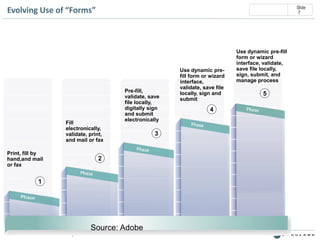
Evolving Use of “Forms”

Fill
electronically,
validate, print,
and mail or fax

Print, fill by
hand,and mail
or fax

Pre-fill,
validate, save
file locally,
digitally sign
and submit
electronically

2

1

© Doculabs, Inc. 2013

Source: Adobe
7

3

Use dynamic prefill form or wizard
interface,
validate, save file
locally, sign and
submit

4

Use dynamic pre-fill
form or wizard
interface, validate,
save file locally,
sign, submit, and
manage process

5
Slide
8

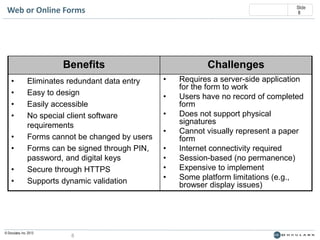
Web or Online Forms

Benefits
•
•
•
•
•
•

•
•

Eliminates redundant data entry
Easy to design
Easily accessible
No special client software
requirements
Forms cannot be changed by users
Forms can be signed through PIN,
password, and digital keys
Secure through HTTPS
Supports dynamic validation

© Doculabs, Inc. 2013

8

Challenges
•
•
•
•
•
•
•
•

Requires a server-side application
for the form to work
Users have no record of completed
form
Does not support physical
signatures
Cannot visually represent a paper
form
Internet connectivity required
Session-based (no permanence)
Expensive to implement
Some platform limitations (e.g.,
browser display issues)
Slide
9

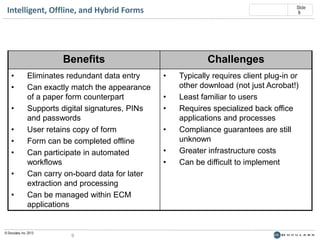
Intelligent, Offline, and Hybrid Forms

Benefits
•
•
•
•
•
•
•
•

Eliminates redundant data entry
Can exactly match the appearance
of a paper form counterpart
Supports digital signatures, PINs
and passwords
User retains copy of form
Form can be completed offline
Can participate in automated
workflows
Can carry on-board data for later
extraction and processing
Can be managed within ECM
applications

© Doculabs, Inc. 2013

9

Challenges
•
•
•
•
•
•

Typically requires client plug-in or
other download (not just Acrobat!)
Least familiar to users
Requires specialized back office
applications and processes
Compliance guarantees are still
unknown
Greater infrastructure costs
Can be difficult to implement
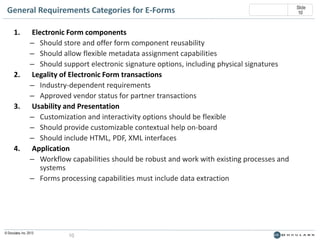
General Requirements Categories for E-Forms
1.

2.

3.

4.

Electronic Form components
– Should store and offer form component reusability
– Should allow flexible metadata assignment capabilities
– Should support electronic signature options, including physical signatures
Legality of Electronic Form transactions
– Industry-dependent requirements
– Approved vendor status for partner transactions
Usability and Presentation
– Customization and interactivity options should be flexible
– Should provide customizable contextual help on-board
– Should include HTML, PDF, XML interfaces
Application
– Workflow capabilities should be robust and work with existing processes and
systems
– Forms processing capabilities must include data extraction

© Doculabs, Inc. 2013

10

Slide
10
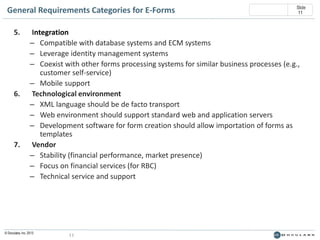
General Requirements Categories for E-Forms
5.

6.

7.

Slide
11

Integration
– Compatible with database systems and ECM systems
– Leverage identity management systems
– Coexist with other forms processing systems for similar business processes (e.g.,
customer self-service)
– Mobile support
Technological environment
– XML language should be de facto transport
– Web environment should support standard web and application servers
– Development software for form creation should allow importation of forms as
templates
Vendor
– Stability (financial performance, market presence)
– Focus on financial services (for RBC)
– Technical service and support

© Doculabs, Inc. 2013

11
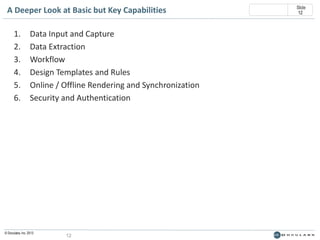
A Deeper Look at Basic but Key Capabilities
1.
2.
3.
4.
5.
6.

Data Input and Capture
Data Extraction
Workflow
Design Templates and Rules
Online / Offline Rendering and Synchronization
Security and Authentication

© Doculabs, Inc. 2013

12

Slide
12
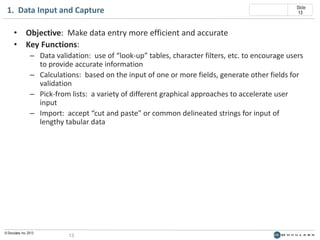
1. Data Input and Capture

Slide
13

• Objective: Make data entry more efficient and accurate
• Key Functions:
– Data validation: use of “look-up” tables, character filters, etc. to encourage users
to provide accurate information
– Calculations: based on the input of one or more fields, generate other fields for
validation
– Pick-from lists: a variety of different graphical approaches to accelerate user
input
– Import: accept “cut and paste” or common delineated strings for input of
lengthy tabular data

© Doculabs, Inc. 2013

13
2. Data Extraction

Slide
14

• Objective: Allow the recipient to quickly pull variable data from the form for
downstream processing
• Key Functions:
–
–
–
–

© Doculabs, Inc. 2013

Format support: XML, text strings, etc.
Error checking: validate the required fields before acceptance
Batch processing: the ability to extract data from a series of forms automatically
File and header packaging: retain the extracted data and the original document
for archival into a repository

14
Slide
15

3. Workflow
• Objective: design, automate and monitor a series of tasks that will be
conducted within or upon receipt of a form
• Key Functions:
– GUI design environment: draw simple flows “Visio Style”, assigning roles,
decision trees, tasks, etc.
– Processing rules: ability to code or input complex processing logic to be
performed within or upon the form
– Activity monitoring: track workflow in progress, report on past activities
– Escalation: based on task incompletion or timing, route the form to another
party

© Doculabs, Inc. 2013

15
4. Design Templates and Rules

Slide
16

• Objective: Lay out forms, including placement of logos, fonts, etc. and
define processing logic required to ensure forms are “complete”
• Key Functions:
–
–
–
–
–

© Doculabs, Inc. 2013

WYSIWYG editing: including previewing in HTML, PDF, etc.
Template library: for reuse of forms or form components previously designed
Revision control: to ensure the latest form is used
Database integration: to dynamically call an external data source
Testing: Provides an environment to test form templates, particularly those with
callable sub-forms or embedded conditional components

16
5. Online / Offline Rendering and Synchronization

Slide
17

• Objective: Ensure consistency in presentation and use when forms are used
online and offline (including mobile use)
• Key Functions:
– Format conversion: for various purposes, including HTML, Text, PDF, etc.
– Registration: to enable a form to notify a server of its state (to pass data or
authenticate)
– Disable: when a form is discovered to be out of date, or under the control of an
inappropriate user, the form is locked
– Reporting: collecting statistics on various forms in use and their status

© Doculabs, Inc. 2013

17
6. Security and Authentication
• Objective: Integrate electronic forms into corporate computing
infrastructure
• Key Functions:
– Proprietary encryption: to ensure only authorized viewing / printing /
forwarding
– LDAP support: directory services connectivity
– Application registration: services for use in web server environments
– Database security: connectivity to data stores

© Doculabs, Inc. 2013

18

Slide
18
Thank You
Richard Medina
312-953-9983 | http://www.richardmedinadoculabs.com/
http://www.linkedin.com/in/richmedinadoculabs

A Quick Introduction to E-Forms

  • 1.
    A Quick Introductionto E-Forms Richard Medina, Doculabs
  • 2.
    Definition of E-Forms Atechnology solution for automating the collection, storage and distribution of information, usually with the objective of avoiding redundant manual data input processes. © Doculabs, Inc. 2013 4 Slide 4
  • 3.
    Benefits of E-Forms •Improved Service – – – – – Improved data accuracy Shorter turn-around window Reduced public burden Easier to use Self-service benefits • Lower Costs – – – – – © Doculabs, Inc. 2013 Retain look and feel of official forms Meet regulatory requirements for forms layout Eliminate forms printing, distribution, and inventory expenses Electronic filing is faster and more accurate Automated processing eliminates need for data re-keying/OCR 5 Slide 5
  • 4.
    Slide 6 Types of E-Forms • Scannedpaper forms – Central storage of imaged forms; requires manual re-keying of data • Scanned paper with data extraction – Automated extraction and processing of data from paper forms fields – Solution providers include ReadSoft, Kofax, EMC/Captiva, IBM/Datacap, Hyland/AnyDoc • Web or application-based “online” forms – – – – – • Usually a custom-built interface to collect data Requires a server application behind the scenes Can provide high levels of customization Signatures require complicated mechanisms Nearly all vendors provide some level of capability Offline, “intelligent” and hybrid forms – – – – © Doculabs, Inc. 2013 Adobe Acrobat PDFs, Microsoft Word Can preserve the look and feel of a familiar paper document Can provide security, validation, data collection, and hand-written signatures Solutions include Adobe LiveCycle, Adobe Acrobat, HP/Autonomy Cardiff, IBM Forms, MS InfoPath Form Services. MS InfoPath Client, PerfectForms, Formatta, and LincDoc 6
  • 5.
    Slide 7 Evolving Use of“Forms” Fill electronically, validate, print, and mail or fax Print, fill by hand,and mail or fax Pre-fill, validate, save file locally, digitally sign and submit electronically 2 1 © Doculabs, Inc. 2013 Source: Adobe 7 3 Use dynamic prefill form or wizard interface, validate, save file locally, sign and submit 4 Use dynamic pre-fill form or wizard interface, validate, save file locally, sign, submit, and manage process 5
  • 6.
    Slide 8 Web or OnlineForms Benefits • • • • • • • • Eliminates redundant data entry Easy to design Easily accessible No special client software requirements Forms cannot be changed by users Forms can be signed through PIN, password, and digital keys Secure through HTTPS Supports dynamic validation © Doculabs, Inc. 2013 8 Challenges • • • • • • • • Requires a server-side application for the form to work Users have no record of completed form Does not support physical signatures Cannot visually represent a paper form Internet connectivity required Session-based (no permanence) Expensive to implement Some platform limitations (e.g., browser display issues)
  • 7.
    Slide 9 Intelligent, Offline, andHybrid Forms Benefits • • • • • • • • Eliminates redundant data entry Can exactly match the appearance of a paper form counterpart Supports digital signatures, PINs and passwords User retains copy of form Form can be completed offline Can participate in automated workflows Can carry on-board data for later extraction and processing Can be managed within ECM applications © Doculabs, Inc. 2013 9 Challenges • • • • • • Typically requires client plug-in or other download (not just Acrobat!) Least familiar to users Requires specialized back office applications and processes Compliance guarantees are still unknown Greater infrastructure costs Can be difficult to implement
  • 8.
    General Requirements Categoriesfor E-Forms 1. 2. 3. 4. Electronic Form components – Should store and offer form component reusability – Should allow flexible metadata assignment capabilities – Should support electronic signature options, including physical signatures Legality of Electronic Form transactions – Industry-dependent requirements – Approved vendor status for partner transactions Usability and Presentation – Customization and interactivity options should be flexible – Should provide customizable contextual help on-board – Should include HTML, PDF, XML interfaces Application – Workflow capabilities should be robust and work with existing processes and systems – Forms processing capabilities must include data extraction © Doculabs, Inc. 2013 10 Slide 10
  • 9.
    General Requirements Categoriesfor E-Forms 5. 6. 7. Slide 11 Integration – Compatible with database systems and ECM systems – Leverage identity management systems – Coexist with other forms processing systems for similar business processes (e.g., customer self-service) – Mobile support Technological environment – XML language should be de facto transport – Web environment should support standard web and application servers – Development software for form creation should allow importation of forms as templates Vendor – Stability (financial performance, market presence) – Focus on financial services (for RBC) – Technical service and support © Doculabs, Inc. 2013 11
  • 10.
    A Deeper Lookat Basic but Key Capabilities 1. 2. 3. 4. 5. 6. Data Input and Capture Data Extraction Workflow Design Templates and Rules Online / Offline Rendering and Synchronization Security and Authentication © Doculabs, Inc. 2013 12 Slide 12
  • 11.
    1. Data Inputand Capture Slide 13 • Objective: Make data entry more efficient and accurate • Key Functions: – Data validation: use of “look-up” tables, character filters, etc. to encourage users to provide accurate information – Calculations: based on the input of one or more fields, generate other fields for validation – Pick-from lists: a variety of different graphical approaches to accelerate user input – Import: accept “cut and paste” or common delineated strings for input of lengthy tabular data © Doculabs, Inc. 2013 13
  • 12.
    2. Data Extraction Slide 14 •Objective: Allow the recipient to quickly pull variable data from the form for downstream processing • Key Functions: – – – – © Doculabs, Inc. 2013 Format support: XML, text strings, etc. Error checking: validate the required fields before acceptance Batch processing: the ability to extract data from a series of forms automatically File and header packaging: retain the extracted data and the original document for archival into a repository 14
  • 13.
    Slide 15 3. Workflow • Objective:design, automate and monitor a series of tasks that will be conducted within or upon receipt of a form • Key Functions: – GUI design environment: draw simple flows “Visio Style”, assigning roles, decision trees, tasks, etc. – Processing rules: ability to code or input complex processing logic to be performed within or upon the form – Activity monitoring: track workflow in progress, report on past activities – Escalation: based on task incompletion or timing, route the form to another party © Doculabs, Inc. 2013 15
  • 14.
    4. Design Templatesand Rules Slide 16 • Objective: Lay out forms, including placement of logos, fonts, etc. and define processing logic required to ensure forms are “complete” • Key Functions: – – – – – © Doculabs, Inc. 2013 WYSIWYG editing: including previewing in HTML, PDF, etc. Template library: for reuse of forms or form components previously designed Revision control: to ensure the latest form is used Database integration: to dynamically call an external data source Testing: Provides an environment to test form templates, particularly those with callable sub-forms or embedded conditional components 16
  • 15.
    5. Online /Offline Rendering and Synchronization Slide 17 • Objective: Ensure consistency in presentation and use when forms are used online and offline (including mobile use) • Key Functions: – Format conversion: for various purposes, including HTML, Text, PDF, etc. – Registration: to enable a form to notify a server of its state (to pass data or authenticate) – Disable: when a form is discovered to be out of date, or under the control of an inappropriate user, the form is locked – Reporting: collecting statistics on various forms in use and their status © Doculabs, Inc. 2013 17
  • 16.
    6. Security andAuthentication • Objective: Integrate electronic forms into corporate computing infrastructure • Key Functions: – Proprietary encryption: to ensure only authorized viewing / printing / forwarding – LDAP support: directory services connectivity – Application registration: services for use in web server environments – Database security: connectivity to data stores © Doculabs, Inc. 2013 18 Slide 18
  • 17.
    Thank You Richard Medina 312-953-9983| http://www.richardmedinadoculabs.com/ http://www.linkedin.com/in/richmedinadoculabs