A Google Event
You Won’t Forget
Mike Felch & Beau Bullock
A journey through red teaming Google Suite
Who We Are
•Mike Felch - @ustayready
•Pentest / Red team at BHIS
•Involved w/ OWASP Orlando and BSides Orlando
•Beau Bullock - @dafthack
•Pentest / Red team at BHIS
•Host of Tradecraft Security Weekly
•Avid OWA enthusiast
Disclaimer: We <3 Google
What We’re Covering
• Brief G Suite Security Overview
• Offense: Real-world Attack Path
• Demo: MailSniper & CredSniper
• Defense: Fighting Back
• Questions / Comments
G Suite Security
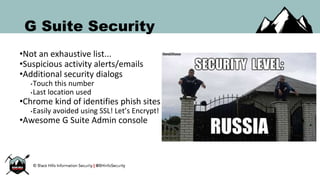
G Suite Security
•Not an exhaustive list...
•Suspicious activity alerts/emails
•Additional security dialogs
•Touch this number
•Last location used
•Chrome kind of identifies phish sites
•Easily avoided using SSL! Let’s Encrypt!
•Awesome G Suite Admin console
G Suite 2FA
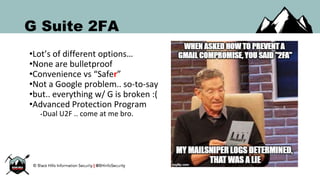
G Suite 2FA
•Lot’s of different options…
•None are bulletproof
•Convenience vs “Safer”
•Not a Google problem.. so-to-say
•but.. everything w/ G is broken :(
•Advanced Protection Program
•Dual U2F .. come at me bro.
G Suite 2FA - SMS
•Username/Password + SMS token
•Super convenient to enroll
•Default 2FA option for most
•Backup option for Google
•Google is moving away from it
•NIST 800-63B is deprecating
•Mobile carrier redirection?!
•Malicious app?!
•Really bad idea
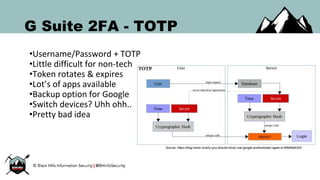
G Suite 2FA - TOTP
•Username/Password + TOTP
•Little difficult for non-tech
•Token rotates & expires
•Lot’s of apps available
•Backup option for Google
•Switch devices? Uhh ohh..
•Pretty bad idea
Source: https://blog.trezor.io/why-you-should-never-use-google-authenticator-again-e166d09d4324
G Suite 2FA - Phone Prompt
•Username/Password + Smart Phone
•Requires Android/iOS
•Weird login? Touch this number
•Suspicious location? Show me more
•Seamless verification process
•Pretty good alternative
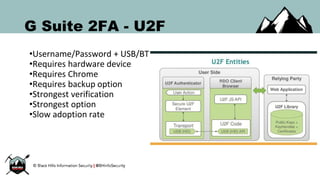
G Suite 2FA - U2F
•Username/Password + USB/BT
•Requires hardware device
•Requires Chrome
•Requires backup option
•Strongest verification
•Strongest option
•Slow adoption rate
Real-world Attack Path
Setting Up
•Quick recon for names/emails
•Create doppelganger Gmail
•Import contacts to resolve profiles
•Setup server environment
•Domain, SSL, Phishing page
•Create fake agenda in GDoc
•Set open sharing permissions
•Redirects users to avoid suspicion
Exploiting Trust
•Needs to look legit
• Needs to trigger a response
• Needs to create urgency
• Needs to go undetected
• Needs to avoid red flags
Don’t email, inject events!
Wait a sec…
Event Injection?
Event Injection
•Silently inject events into calendars
•Creates the urgency via reminders
•Include link to fake agenda
•Mass-exploitation w/o visibility
•Litter calendars for the future
•Remove traces by erasing the event
•Include GoToMeeting
•Don’t forget to record the meeting! :)
•How did we get here???
Event Injection
•One day I got a calendar alert for a
flight that wasn’t mine
•A coworker had sent their flight
details in an email
•Google thought the itinerary was
mine and automatically added to
my calendar
•This was the start of something
very interesting...
Event Injection
•An email isn’t necessary though
•Simply add a Google user to an
event and select to not notify them
•Google will automatically add that
event to their calendar
•This can present a very unique
situation for phishing...
Event Injection & SE
•Here are a few ideas:
•Include a link to a conference call
site but have it pointing to a
credential collection page
•Include a malicious attachment
“agenda”
•Have victims navigate to a fake
Google Auth page and collect creds
(more on that soon…)
Event Injection
•Events get even more fun when
you use the Google API
•It’s possible to make it look like a
user already accepted an invitation
•...they never received and invite
though.
•This bypasses the setting for not
auto-adding events to G-calendar
Personalized Phishing
•Multi-stage process
•Email
•Password
•Two-factor?
• Which one?
• Additional dialogs?
• Can we be done?
•Retrieve 2FA tokens
•Redirect user
•Vanish!
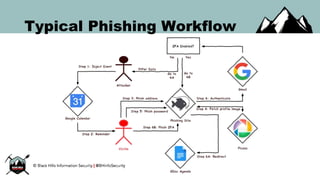
Typical Phishing Workflow
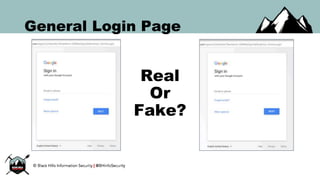
General Login Page
Real
Or
Fake?
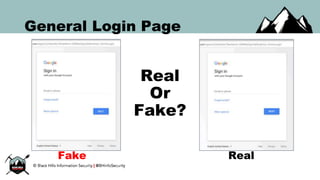
General Login Page
Real
Or
Fake?
Fake Real
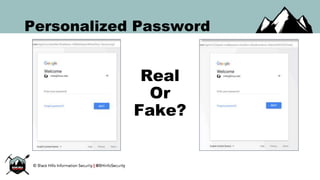
Personalized Password
•Fetch the profile image
•Google Picasa API
•JavaScript XMLHttpRequest()
•Ask nicely for the password
•Behind the scenes, authenticate
•Is 2FA present?
•No? Redirect them to GDoc agenda
•Doh! 2FA is enabled.
•Which type? Extract information.
Personalized Password
Real
Or
Fake?
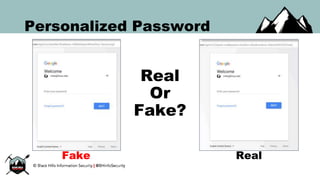
Personalized Password
Real
Or
Fake?
Fake Real
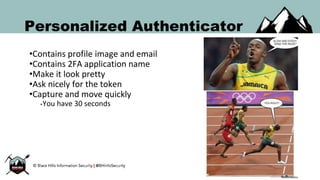
Personalized Authenticator
•Contains profile image and email
•Contains 2FA application name
•Make it look pretty
•Ask nicely for the token
•Capture and move quickly
•You have 30 seconds
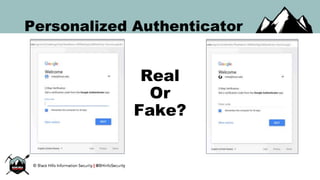
Personalized Authenticator
Real
Or
Fake?
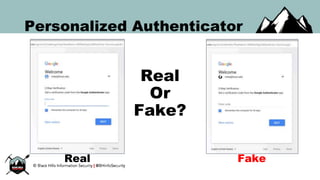
Personalized Authenticator
Real
Or
Fake?
FakeReal
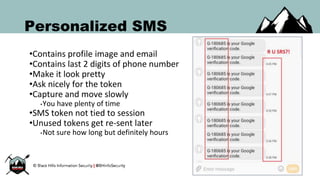
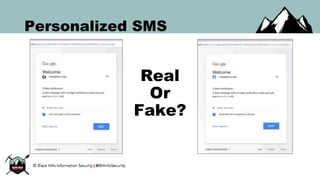
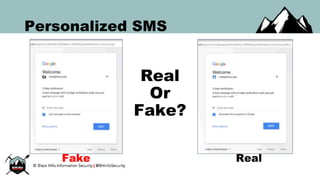
Personalized SMS
•Contains profile image and email
•Contains last 2 digits of phone number
•Make it look pretty
•Ask nicely for the token
•Capture and move slowly
•You have plenty of time
•SMS token not tied to session
•Unused tokens get re-sent later
•Not sure how long but definitely hours
Personalized SMS
Real
Or
Fake?
Personalized SMS
Real
Or
Fake?
Fake Real
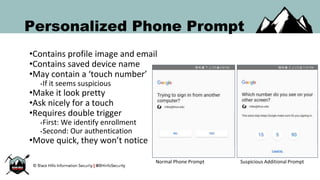
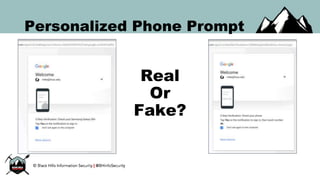
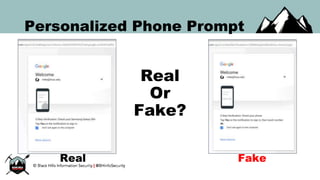
Personalized Phone Prompt
•Contains profile image and email
•Contains saved device name
•May contain a ‘touch number’
•If it seems suspicious
•Make it look pretty
•Ask nicely for a touch
•Requires double trigger
•First: We identify enrollment
•Second: Our authentication
•Move quick, they won’t notice
Normal Phone Prompt Suspicious Additional Prompt
Personalized Phone Prompt
Real
Or
Fake?
Personalized Phone Prompt
Real
Or
Fake?
Real Fake
...and the dreaded U2F
•Contains profile image and email
• Can capture signed message
• Replay w/ SendKeys doesn’t work
•Virtual keyboard lacks KeyCode
•Replay w/ Ducky doesn’t work
•Changed VID/PID
•Modified USB Composite firmware
•Doesn’t conform to FIDO U2F spec
•… for another day
•Instead, let’s force a bypass!
...and the dreaded U2F
•U2F only works w/ Chrome
•Requires backup SMS or TOTP
•What about other browsers?
•Downgrades to backup options :)
•Change our backend user agent
•CriOS or Python-urllib/2.7
•Triggers SMS token
•Redirect to SMS phish page
•Continue as normal :)
Additional 2FA Points
•Might get asked for last location
•GeoIP it from IP during capturing
•Immediately clear red alert bar
•Clear for one, clear for all
•Multiple failed phone prompts
•Disables phone prompt for few hours
•Automatically switches 2FA option
•May also contain attacker location/device
•Pass session from backend to attacker
•Haven’t tried but I also haven’t needed to
Persisting Access
Persisting Access
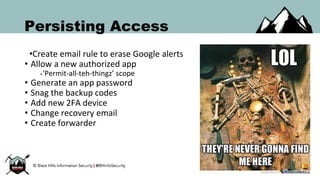
•Create email rule to erase Google alerts
• Allow a new authorized app
•‘Permit-all-teh-thingz’ scope
• Generate an app password
• Snag the backup codes
• Add new 2FA device
• Change recovery email
• Create forwarder
Persisting Access
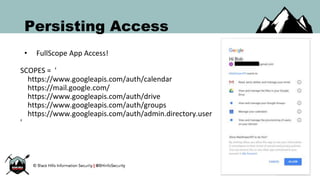
• FullScope App Access!
SCOPES = '
https://www.googleapis.com/auth/calendar
https://mail.google.com/
https://www.googleapis.com/auth/drive
https://www.googleapis.com/auth/groups
https://www.googleapis.com/auth/admin.directory.user
'
Pilfering Data
Pilfering Data
•Search GMail for sensitive data
•Just like how MailSniper works with Exchange you can now search
Gmail for sensitive data as well
•A bonus is that it works with Google’s search operators
•Will soon include Google Drive, Google Groups and export Contacts
Pilfering Data
•Let’s talk about Google’s data export for a moment…
•It literally has everything
•You can export every piece of data Google knows about you including:
•Search history
•Location history
•All G-Drive files
•All Emails
•All Contacts
•and much more....
Pivoting Systems
Pivoting Systems
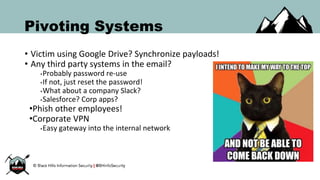
• Victim using Google Drive? Synchronize payloads!
• Any third party systems in the email?
•Probably password re-use
•If not, just reset the password!
•What about a company Slack?
•Salesforce? Corp apps?
•Phish other employees!
•Corporate VPN
•Easy gateway into the internal network
Demo time!
Fighting Back
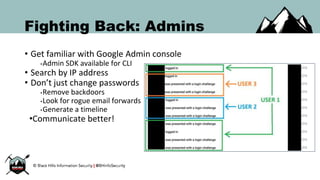
Fighting Back: Admins
• Get familiar with Google Admin console
•Admin SDK available for CLI
• Search by IP address
• Don’t just change passwords
•Remove backdoors
•Look for rogue email forwards
•Generate a timeline
•Communicate better!
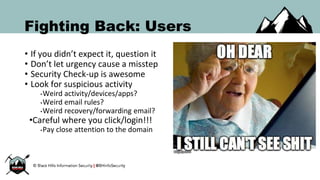
Fighting Back: Users
• If you didn’t expect it, question it
• Don’t let urgency cause a misstep
• Security Check-up is awesome
• Look for suspicious activity
•Weird activity/devices/apps?
•Weird email rules?
•Weird recovery/forwarding email?
•Careful where you click/login!!!
•Pay close attention to the domain
Let’s Recap...
Recap
• SMS/TOTP 2FA is DEAD if tokens aren’t tied to sessions
• U2F is USELESS if SMS/TOTP are default alternative options
•Phishing training should be on BEHAVIOR not specific red flags
•Convenience for the company means convenience for ATTACKERS
If you use G Suite literally anyone can inject an event into your
calendar… and there’s nothing you can do about it. ¯_(ツ)_/¯
Questions to Google
• Do we need the ability to force Event responses for users?
• Can we have the ability to whitelist auto-add events by domain?
• Can we have Phone Prompt AND U2F instead of SMS/TOTP?
• Can we have 2FA tokens tied to sessions?
• Why are the same SMS tokens re-sent instead of cancelling them?
End Slide
• Black Hills Information Security
• http://www.blackhillsinfosec.com/
• MailSniper
•https://github.com/dafthack/MailSniper
•CredSniper
•https://github.com/ustayready/CredSniper
•Questions?

A Google Event You Won't Forget

  • 1.
    A Google Event YouWon’t Forget Mike Felch & Beau Bullock A journey through red teaming Google Suite
  • 2.
    Who We Are •MikeFelch - @ustayready •Pentest / Red team at BHIS •Involved w/ OWASP Orlando and BSides Orlando •Beau Bullock - @dafthack •Pentest / Red team at BHIS •Host of Tradecraft Security Weekly •Avid OWA enthusiast
  • 3.
  • 4.
    What We’re Covering •Brief G Suite Security Overview • Offense: Real-world Attack Path • Demo: MailSniper & CredSniper • Defense: Fighting Back • Questions / Comments
  • 5.
  • 6.
    G Suite Security •Notan exhaustive list... •Suspicious activity alerts/emails •Additional security dialogs •Touch this number •Last location used •Chrome kind of identifies phish sites •Easily avoided using SSL! Let’s Encrypt! •Awesome G Suite Admin console
  • 7.
  • 8.
    G Suite 2FA •Lot’sof different options… •None are bulletproof •Convenience vs “Safer” •Not a Google problem.. so-to-say •but.. everything w/ G is broken :( •Advanced Protection Program •Dual U2F .. come at me bro.
  • 9.
    G Suite 2FA- SMS •Username/Password + SMS token •Super convenient to enroll •Default 2FA option for most •Backup option for Google •Google is moving away from it •NIST 800-63B is deprecating •Mobile carrier redirection?! •Malicious app?! •Really bad idea
  • 10.
    G Suite 2FA- TOTP •Username/Password + TOTP •Little difficult for non-tech •Token rotates & expires •Lot’s of apps available •Backup option for Google •Switch devices? Uhh ohh.. •Pretty bad idea Source: https://blog.trezor.io/why-you-should-never-use-google-authenticator-again-e166d09d4324
  • 11.
    G Suite 2FA- Phone Prompt •Username/Password + Smart Phone •Requires Android/iOS •Weird login? Touch this number •Suspicious location? Show me more •Seamless verification process •Pretty good alternative
  • 12.
    G Suite 2FA- U2F •Username/Password + USB/BT •Requires hardware device •Requires Chrome •Requires backup option •Strongest verification •Strongest option •Slow adoption rate
  • 13.
  • 14.
    Setting Up •Quick reconfor names/emails •Create doppelganger Gmail •Import contacts to resolve profiles •Setup server environment •Domain, SSL, Phishing page •Create fake agenda in GDoc •Set open sharing permissions •Redirects users to avoid suspicion
  • 15.
    Exploiting Trust •Needs tolook legit • Needs to trigger a response • Needs to create urgency • Needs to go undetected • Needs to avoid red flags Don’t email, inject events!
  • 16.
  • 17.
    Event Injection •Silently injectevents into calendars •Creates the urgency via reminders •Include link to fake agenda •Mass-exploitation w/o visibility •Litter calendars for the future •Remove traces by erasing the event •Include GoToMeeting •Don’t forget to record the meeting! :) •How did we get here???
  • 18.
    Event Injection •One dayI got a calendar alert for a flight that wasn’t mine •A coworker had sent their flight details in an email •Google thought the itinerary was mine and automatically added to my calendar •This was the start of something very interesting...
  • 19.
    Event Injection •An emailisn’t necessary though •Simply add a Google user to an event and select to not notify them •Google will automatically add that event to their calendar •This can present a very unique situation for phishing...
  • 20.
    Event Injection &SE •Here are a few ideas: •Include a link to a conference call site but have it pointing to a credential collection page •Include a malicious attachment “agenda” •Have victims navigate to a fake Google Auth page and collect creds (more on that soon…)
  • 21.
    Event Injection •Events geteven more fun when you use the Google API •It’s possible to make it look like a user already accepted an invitation •...they never received and invite though. •This bypasses the setting for not auto-adding events to G-calendar
  • 22.
  • 23.
    Personalized Phishing •Multi-stage process •Email •Password •Two-factor? •Which one? • Additional dialogs? • Can we be done? •Retrieve 2FA tokens •Redirect user •Vanish!
  • 24.
  • 25.
  • 26.
  • 27.
    Personalized Password •Fetch theprofile image •Google Picasa API •JavaScript XMLHttpRequest() •Ask nicely for the password •Behind the scenes, authenticate •Is 2FA present? •No? Redirect them to GDoc agenda •Doh! 2FA is enabled. •Which type? Extract information.
  • 28.
  • 29.
  • 30.
    Personalized Authenticator •Contains profileimage and email •Contains 2FA application name •Make it look pretty •Ask nicely for the token •Capture and move quickly •You have 30 seconds
  • 31.
  • 32.
  • 33.
    Personalized SMS •Contains profileimage and email •Contains last 2 digits of phone number •Make it look pretty •Ask nicely for the token •Capture and move slowly •You have plenty of time •SMS token not tied to session •Unused tokens get re-sent later •Not sure how long but definitely hours
  • 34.
  • 35.
  • 36.
    Personalized Phone Prompt •Containsprofile image and email •Contains saved device name •May contain a ‘touch number’ •If it seems suspicious •Make it look pretty •Ask nicely for a touch •Requires double trigger •First: We identify enrollment •Second: Our authentication •Move quick, they won’t notice Normal Phone Prompt Suspicious Additional Prompt
  • 37.
  • 38.
  • 39.
    ...and the dreadedU2F •Contains profile image and email • Can capture signed message • Replay w/ SendKeys doesn’t work •Virtual keyboard lacks KeyCode •Replay w/ Ducky doesn’t work •Changed VID/PID •Modified USB Composite firmware •Doesn’t conform to FIDO U2F spec •… for another day •Instead, let’s force a bypass!
  • 40.
    ...and the dreadedU2F •U2F only works w/ Chrome •Requires backup SMS or TOTP •What about other browsers? •Downgrades to backup options :) •Change our backend user agent •CriOS or Python-urllib/2.7 •Triggers SMS token •Redirect to SMS phish page •Continue as normal :)
  • 41.
    Additional 2FA Points •Mightget asked for last location •GeoIP it from IP during capturing •Immediately clear red alert bar •Clear for one, clear for all •Multiple failed phone prompts •Disables phone prompt for few hours •Automatically switches 2FA option •May also contain attacker location/device •Pass session from backend to attacker •Haven’t tried but I also haven’t needed to
  • 42.
  • 43.
    Persisting Access •Create emailrule to erase Google alerts • Allow a new authorized app •‘Permit-all-teh-thingz’ scope • Generate an app password • Snag the backup codes • Add new 2FA device • Change recovery email • Create forwarder
  • 44.
    Persisting Access • FullScopeApp Access! SCOPES = ' https://www.googleapis.com/auth/calendar https://mail.google.com/ https://www.googleapis.com/auth/drive https://www.googleapis.com/auth/groups https://www.googleapis.com/auth/admin.directory.user '
  • 45.
  • 46.
    Pilfering Data •Search GMailfor sensitive data •Just like how MailSniper works with Exchange you can now search Gmail for sensitive data as well •A bonus is that it works with Google’s search operators •Will soon include Google Drive, Google Groups and export Contacts
  • 47.
    Pilfering Data •Let’s talkabout Google’s data export for a moment… •It literally has everything •You can export every piece of data Google knows about you including: •Search history •Location history •All G-Drive files •All Emails •All Contacts •and much more....
  • 48.
  • 49.
    Pivoting Systems • Victimusing Google Drive? Synchronize payloads! • Any third party systems in the email? •Probably password re-use •If not, just reset the password! •What about a company Slack? •Salesforce? Corp apps? •Phish other employees! •Corporate VPN •Easy gateway into the internal network
  • 50.
  • 51.
  • 52.
    Fighting Back: Admins •Get familiar with Google Admin console •Admin SDK available for CLI • Search by IP address • Don’t just change passwords •Remove backdoors •Look for rogue email forwards •Generate a timeline •Communicate better!
  • 53.
    Fighting Back: Users •If you didn’t expect it, question it • Don’t let urgency cause a misstep • Security Check-up is awesome • Look for suspicious activity •Weird activity/devices/apps? •Weird email rules? •Weird recovery/forwarding email? •Careful where you click/login!!! •Pay close attention to the domain
  • 54.
  • 55.
    Recap • SMS/TOTP 2FAis DEAD if tokens aren’t tied to sessions • U2F is USELESS if SMS/TOTP are default alternative options •Phishing training should be on BEHAVIOR not specific red flags •Convenience for the company means convenience for ATTACKERS If you use G Suite literally anyone can inject an event into your calendar… and there’s nothing you can do about it. ¯_(ツ)_/¯
  • 56.
    Questions to Google •Do we need the ability to force Event responses for users? • Can we have the ability to whitelist auto-add events by domain? • Can we have Phone Prompt AND U2F instead of SMS/TOTP? • Can we have 2FA tokens tied to sessions? • Why are the same SMS tokens re-sent instead of cancelling them?
  • 57.
    End Slide • BlackHills Information Security • http://www.blackhillsinfosec.com/ • MailSniper •https://github.com/dafthack/MailSniper •CredSniper •https://github.com/ustayready/CredSniper •Questions?