

PENTEST PREPPERS
WHOAMI
• Beau Bullock
• Pentester at Black Hills
Information Security
• OSCP, OSWP, GPEN,
GCIH, GCFA, and GSEC
• Previously an enterprise
defender
• Blogger
• Guitarist/Audio Engineer
• Homebrewer
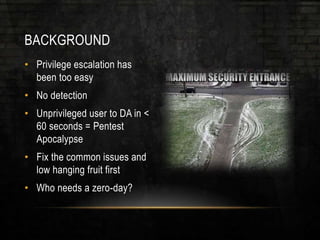
BACKGROUND
• Privilege escalation has
been too easy
• No detection
• Unprivileged user to DA in <
60 seconds = Pentest
Apocalypse
• Fix the common issues and
low hanging fruit first
• Who needs a zero-day?
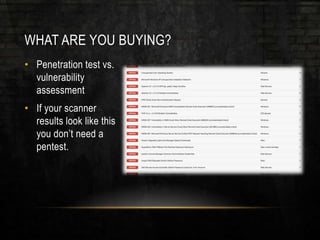
WHAT ARE YOU BUYING?
• Penetration test vs.
vulnerability
assessment
• If your scanner
results look like this
you don’t need a
pentest.
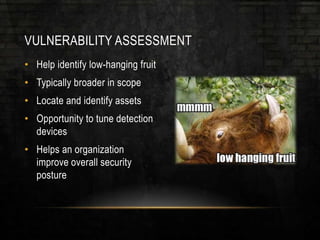
VULNERABILITY ASSESSMENT
• Help identify low-hanging fruit
• Typically broader in scope
• Locate and identify assets
• Opportunity to tune detection
devices
• Helps an organization
improve overall security
posture
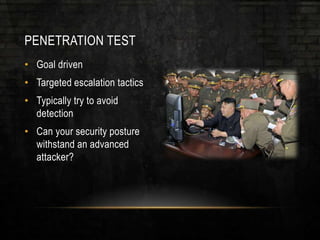
PENETRATION TEST
• Goal driven
• Targeted escalation tactics
• Typically try to avoid
detection
• Can your security posture
withstand an advanced
attacker?
LET’S TALK ABOUT SOME COMMON
ISSUES
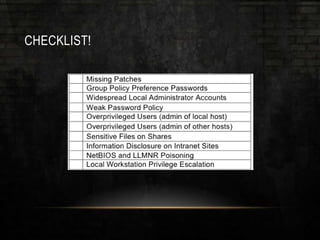
10 COMMON ISSUES
• 1. Missing Patches
• 2. Group Policy Preference Passwords
• 3. Widespread Local Administrator Accounts
• 4. Weak Password Policy
• 5. Overprivileged Users (admin of local host)
• 6. Overprivileged Users (admin of other hosts)
• 7. Sensitive Files on Shares
• 8. Information Disclosure on Intranet Sites
• 9. NetBIOS and LLMNR Poisoning
• 10. Local Workstation Privilege Escalation
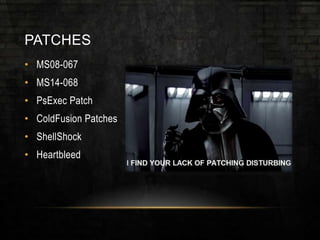
PATCHES
• MS08-067
• MS14-068
• PsExec Patch
• ColdFusion Patches
• ShellShock
• Heartbleed
PATCHES WON’T FIX EVERYTHING
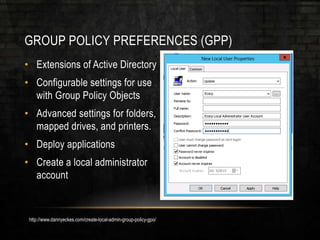
GROUP POLICY PREFERENCES (GPP)
• Extensions of Active Directory
• Configurable settings for use
with Group Policy Objects
• Advanced settings for folders,
mapped drives, and printers.
• Deploy applications
• Create a local administrator
account
http://www.dannyeckes.com/create-local-admin-group-policy-gpo/
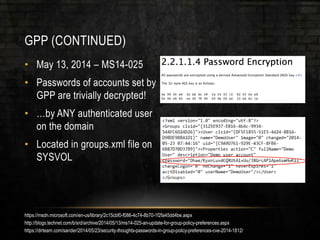
GPP (CONTINUED)
• May 13, 2014 – MS14-025
• Passwords of accounts set by
GPP are trivially decrypted!
• …by ANY authenticated user
on the domain
• Located in groups.xml file on
SYSVOL
https://msdn.microsoft.com/en-us/library/2c15cbf0-f086-4c74-8b70-1f2fa45dd4be.aspx
http://blogs.technet.com/b/srd/archive/2014/05/13/ms14-025-an-update-for-group-policy-preferences.aspx
https://dirteam.com/sander/2014/05/23/security-thoughts-passwords-in-group-policy-preferences-cve-2014-1812/
GPP (WHAT DOES THE PATCH DO?)
• MS14-025 removes the ability
to create local accounts with
GPP
• Doesn’t remove previous
entries!
• You need to manually delete
these accounts
GPP (SUMMARY)
• First thing I check for on an
internal assessment
• Almost always find an admin
password here
• Find it with:
• PowerSploit - Get-GPPPassword
• Metasploit GPP Module
• Or…
C:>findstr /S cpassword %logonserver%sysvol*.xml
https://github.com/mattifestation/PowerSploit/blob/master/Exfiltration/Get-GPPPassword.ps1
http://www.rapid7.com/db/modules/post/windows/gather/credentials/gpp
WIDESPREAD LOCAL ADMINISTRATOR ACCOUNT
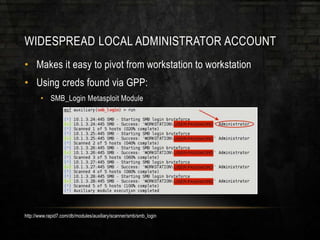
• Makes it easy to pivot from workstation to workstation
• Using creds found via GPP:
• SMB_Login Metasploit Module
http://www.rapid7.com/db/modules/auxiliary/scanner/smb/smb_login
WIDESPREAD LOCAL ADMIN (CONTINUED)
• What’s next?
• Hunt for Domain Admins –
JoeWare NetSess, Veil-PowerView
UserHunter
• PsExec_psh Metasploit Module
• RDP?
• If we don’t have cleartext
creds:
• Pass-the-hash
http://www.joeware.net/freetools/tools/netsess/index.htm
https://www.veil-framework.com/hunting-users-veil-framework/
http://www.rapid7.com/db/modules/exploit/windows/smb/psexec_psh
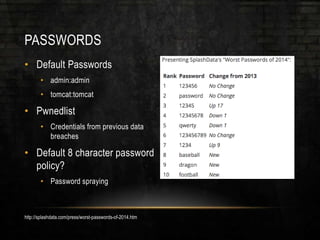
PASSWORDS
• Default Passwords
• admin:admin
• tomcat:tomcat
• Pwnedlist
• Credentials from previous data
breaches
• Default 8 character password
policy?
• Password spraying
http://splashdata.com/press/worst-passwords-of-2014.htm
PASSWORD SPRAYING
• Domain locks out accounts after
a certain number of failed logins
• Can’t brute force a single users
password
• Solution:
• Try a number of passwords
less than the domain lockout
policy against EVERY
account in the domain
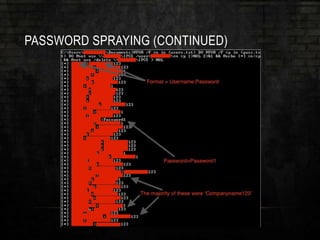
PASSWORD SPRAYING (CONTINUED)
• Lockout Policy = Threshold of
five
• Let’s try three or four passwords
• What passwords do we try?
• Password123
• Companyname123
• Etc.
@FOR /F %n in (users.txt) DO @FOR /F %p in (pass.txt) DO @net use
DOMAINCONTROLLERIPC$ /user:DOMAIN%n %p 1>NUL 2>&1 && @echo [*]
%n:%p && @net use /delete DOMAINCONTROLLERIPC$ > NUL
http://www.lanmaster53.com/
https://github.com/lukebaggett/powerspray
PASSWORD SPRAYING (CONTINUED)
PASSWORDS (CONTINUED)
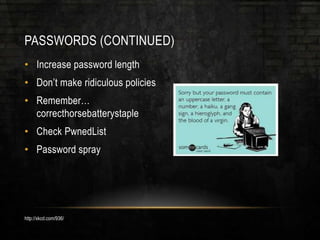
• Increase password length
• Don’t make ridiculous policies
• Remember…
correcthorsebatterystaple
• Check PwnedList
• Password spray
http://xkcd.com/936/
OVERPRIVILEGED USERS
• Are your standard users
already local admins?
• This takes out a major
step of privilege escalation
• Only grant admin access
where necessary, not
globally
OVERPRIVILEGED USERS (OTHER HOSTS)
• Scenario:
• Unprivileged user wants to run
some software on their system
• User calls helpdesk
• Helpdesk attempts to get it
working for the user
• Fails
• Decides adding “Domain Users”
group to the local administrators
group is a good idea
OVERPRIVILEGED USERS (OTHER HOSTS)
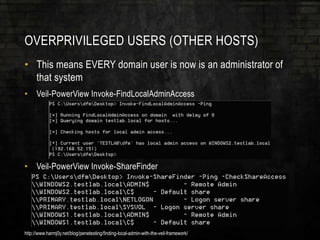
• This means EVERY domain user is now is an administrator of
that system
• Veil-PowerView Invoke-FindLocalAdminAccess
• Veil-PowerView Invoke-ShareFinder
http://www.harmj0y.net/blog/penetesting/finding-local-admin-with-the-veil-framework/
WHAT INFORMATION CAN YOU LEARN FROM
USERS ON THE NETWORK?
FILES ON SHARES
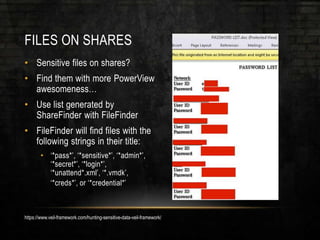
• Sensitive files on shares?
• Find them with more PowerView
awesomeness…
• Use list generated by
ShareFinder with FileFinder
• FileFinder will find files with the
following strings in their title:
• ‘*pass*’, ‘*sensitive*’, ‘*admin*’,
‘*secret*’, ‘*login*’,
‘*unattend*.xml’, ‘*.vmdk’,
‘*creds*’, or ‘*credential*’
https://www.veil-framework.com/hunting-sensitive-data-veil-framework/
INFORMATION DISCLOSURE ON INTRANET
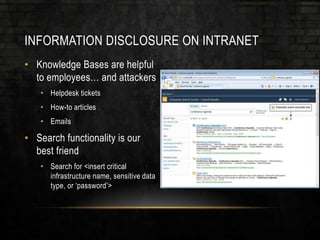
• Knowledge Bases are helpful
to employees… and attackers
• Helpdesk tickets
• How-to articles
• Emails
• Search functionality is our
best friend
• Search for <insert critical
infrastructure name, sensitive data
type, or ‘password’>
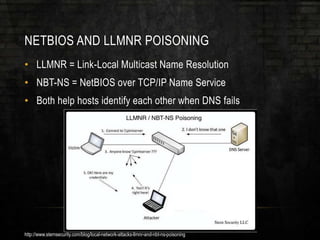
NETBIOS AND LLMNR POISONING
• LLMNR = Link-Local Multicast Name Resolution
• NBT-NS = NetBIOS over TCP/IP Name Service
• Both help hosts identify each other when DNS fails
http://www.sternsecurity.com/blog/local-network-attacks-llmnr-and-nbt-ns-poisoning
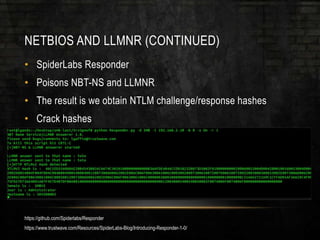
NETBIOS AND LLMNR (CONTINUED)
• SpiderLabs Responder
• Poisons NBT-NS and LLMNR
• The result is we obtain NTLM challenge/response hashes
• Crack hashes
https://github.com/Spiderlabs/Responder
https://www.trustwave.com/Resources/SpiderLabs-Blog/Introducing-Responder-1-0/
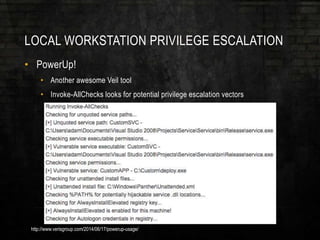
LOCAL WORKSTATION PRIVILEGE ESCALATION
• PowerUp!
• Another awesome Veil tool
• Invoke-AllChecks looks for potential privilege escalation vectors
http://www.verisgroup.com/2014/06/17/powerup-usage/
SUMMARY (10 COMMON ISSUES)
• 1. Missing Patches
• 2. Group Policy Preference Passwords
• 3. Widespread Local Administrator Accounts
• 4. Weak Password Policy
• 5. Overprivileged Users (admin of local host)
• 6. Overprivileged Users (admin of other hosts)
• 7. Sensitive Files on Shares
• 8. Information Disclosure on Intranet Sites
• 9. NetBIOS and LLMNR Poisoning
• 10. Local Workstation Privilege Escalation
NOW TO PREP YOUR PENTEST BUG OUT BAG
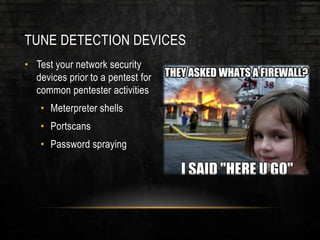
TUNE DETECTION DEVICES
• Test your network security
devices prior to a pentest for
common pentester activities
• Meterpreter shells
• Portscans
• Password spraying
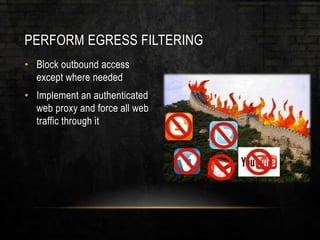
PERFORM EGRESS FILTERING
• Block outbound access
except where needed
• Implement an authenticated
web proxy and force all web
traffic through it
THINGS THAT MAKE OUR JOB HARD
• Application Whitelisting
• Disabling PowerShell
• Network Access Control
• Network segmentation
• Fixing the items mentioned
earlier
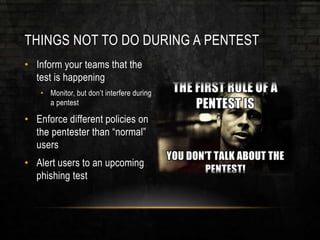
THINGS NOT TO DO DURING A PENTEST
• Inform your teams that the
test is happening
• Monitor, but don’t interfere during
a pentest
• Enforce different policies on
the pentester than “normal”
users
• Alert users to an upcoming
phishing test
PENTEST PREPARATION GUIDE
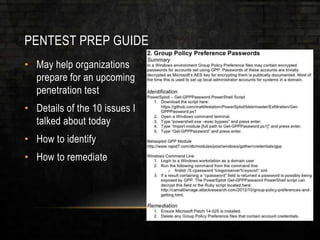
PENTEST PREP GUIDE
• May help organizations
prepare for an upcoming
penetration test
• Details of the 10 issues I
talked about today
• How to identify
• How to remediate
CHECKLIST!
DOWNLOAD HERE
http://bit.ly/1FF33nH
QUESTIONS?
• Contact me
• Personal - beau@dafthack.com
• Work – beau@blackhillsinfosec.com
• Twitter - @dafthack
• Blog – www.dafthack.com

Pentest Apocalypse

  • 1.
  • 2.
    WHOAMI • Beau Bullock •Pentester at Black Hills Information Security • OSCP, OSWP, GPEN, GCIH, GCFA, and GSEC • Previously an enterprise defender • Blogger • Guitarist/Audio Engineer • Homebrewer
  • 3.
    BACKGROUND • Privilege escalationhas been too easy • No detection • Unprivileged user to DA in < 60 seconds = Pentest Apocalypse • Fix the common issues and low hanging fruit first • Who needs a zero-day?
  • 4.
    WHAT ARE YOUBUYING? • Penetration test vs. vulnerability assessment • If your scanner results look like this you don’t need a pentest.
  • 5.
    VULNERABILITY ASSESSMENT • Helpidentify low-hanging fruit • Typically broader in scope • Locate and identify assets • Opportunity to tune detection devices • Helps an organization improve overall security posture
  • 6.
    PENETRATION TEST • Goaldriven • Targeted escalation tactics • Typically try to avoid detection • Can your security posture withstand an advanced attacker?
  • 7.
    LET’S TALK ABOUTSOME COMMON ISSUES
  • 8.
    10 COMMON ISSUES •1. Missing Patches • 2. Group Policy Preference Passwords • 3. Widespread Local Administrator Accounts • 4. Weak Password Policy • 5. Overprivileged Users (admin of local host) • 6. Overprivileged Users (admin of other hosts) • 7. Sensitive Files on Shares • 8. Information Disclosure on Intranet Sites • 9. NetBIOS and LLMNR Poisoning • 10. Local Workstation Privilege Escalation
  • 9.
    PATCHES • MS08-067 • MS14-068 •PsExec Patch • ColdFusion Patches • ShellShock • Heartbleed
  • 10.
  • 11.
    GROUP POLICY PREFERENCES(GPP) • Extensions of Active Directory • Configurable settings for use with Group Policy Objects • Advanced settings for folders, mapped drives, and printers. • Deploy applications • Create a local administrator account http://www.dannyeckes.com/create-local-admin-group-policy-gpo/
  • 12.
    GPP (CONTINUED) • May13, 2014 – MS14-025 • Passwords of accounts set by GPP are trivially decrypted! • …by ANY authenticated user on the domain • Located in groups.xml file on SYSVOL https://msdn.microsoft.com/en-us/library/2c15cbf0-f086-4c74-8b70-1f2fa45dd4be.aspx http://blogs.technet.com/b/srd/archive/2014/05/13/ms14-025-an-update-for-group-policy-preferences.aspx https://dirteam.com/sander/2014/05/23/security-thoughts-passwords-in-group-policy-preferences-cve-2014-1812/
  • 13.
    GPP (WHAT DOESTHE PATCH DO?) • MS14-025 removes the ability to create local accounts with GPP • Doesn’t remove previous entries! • You need to manually delete these accounts
  • 14.
    GPP (SUMMARY) • Firstthing I check for on an internal assessment • Almost always find an admin password here • Find it with: • PowerSploit - Get-GPPPassword • Metasploit GPP Module • Or… C:>findstr /S cpassword %logonserver%sysvol*.xml https://github.com/mattifestation/PowerSploit/blob/master/Exfiltration/Get-GPPPassword.ps1 http://www.rapid7.com/db/modules/post/windows/gather/credentials/gpp
  • 15.
    WIDESPREAD LOCAL ADMINISTRATORACCOUNT • Makes it easy to pivot from workstation to workstation • Using creds found via GPP: • SMB_Login Metasploit Module http://www.rapid7.com/db/modules/auxiliary/scanner/smb/smb_login
  • 16.
    WIDESPREAD LOCAL ADMIN(CONTINUED) • What’s next? • Hunt for Domain Admins – JoeWare NetSess, Veil-PowerView UserHunter • PsExec_psh Metasploit Module • RDP? • If we don’t have cleartext creds: • Pass-the-hash http://www.joeware.net/freetools/tools/netsess/index.htm https://www.veil-framework.com/hunting-users-veil-framework/ http://www.rapid7.com/db/modules/exploit/windows/smb/psexec_psh
  • 17.
    PASSWORDS • Default Passwords •admin:admin • tomcat:tomcat • Pwnedlist • Credentials from previous data breaches • Default 8 character password policy? • Password spraying http://splashdata.com/press/worst-passwords-of-2014.htm
  • 18.
    PASSWORD SPRAYING • Domainlocks out accounts after a certain number of failed logins • Can’t brute force a single users password • Solution: • Try a number of passwords less than the domain lockout policy against EVERY account in the domain
  • 19.
    PASSWORD SPRAYING (CONTINUED) •Lockout Policy = Threshold of five • Let’s try three or four passwords • What passwords do we try? • Password123 • Companyname123 • Etc. @FOR /F %n in (users.txt) DO @FOR /F %p in (pass.txt) DO @net use DOMAINCONTROLLERIPC$ /user:DOMAIN%n %p 1>NUL 2>&1 && @echo [*] %n:%p && @net use /delete DOMAINCONTROLLERIPC$ > NUL http://www.lanmaster53.com/ https://github.com/lukebaggett/powerspray
  • 20.
  • 21.
    PASSWORDS (CONTINUED) • Increasepassword length • Don’t make ridiculous policies • Remember… correcthorsebatterystaple • Check PwnedList • Password spray http://xkcd.com/936/
  • 22.
    OVERPRIVILEGED USERS • Areyour standard users already local admins? • This takes out a major step of privilege escalation • Only grant admin access where necessary, not globally
  • 23.
    OVERPRIVILEGED USERS (OTHERHOSTS) • Scenario: • Unprivileged user wants to run some software on their system • User calls helpdesk • Helpdesk attempts to get it working for the user • Fails • Decides adding “Domain Users” group to the local administrators group is a good idea
  • 24.
    OVERPRIVILEGED USERS (OTHERHOSTS) • This means EVERY domain user is now is an administrator of that system • Veil-PowerView Invoke-FindLocalAdminAccess • Veil-PowerView Invoke-ShareFinder http://www.harmj0y.net/blog/penetesting/finding-local-admin-with-the-veil-framework/
  • 25.
    WHAT INFORMATION CANYOU LEARN FROM USERS ON THE NETWORK?
  • 26.
    FILES ON SHARES •Sensitive files on shares? • Find them with more PowerView awesomeness… • Use list generated by ShareFinder with FileFinder • FileFinder will find files with the following strings in their title: • ‘*pass*’, ‘*sensitive*’, ‘*admin*’, ‘*secret*’, ‘*login*’, ‘*unattend*.xml’, ‘*.vmdk’, ‘*creds*’, or ‘*credential*’ https://www.veil-framework.com/hunting-sensitive-data-veil-framework/
  • 27.
    INFORMATION DISCLOSURE ONINTRANET • Knowledge Bases are helpful to employees… and attackers • Helpdesk tickets • How-to articles • Emails • Search functionality is our best friend • Search for <insert critical infrastructure name, sensitive data type, or ‘password’>
  • 28.
    NETBIOS AND LLMNRPOISONING • LLMNR = Link-Local Multicast Name Resolution • NBT-NS = NetBIOS over TCP/IP Name Service • Both help hosts identify each other when DNS fails http://www.sternsecurity.com/blog/local-network-attacks-llmnr-and-nbt-ns-poisoning
  • 29.
    NETBIOS AND LLMNR(CONTINUED) • SpiderLabs Responder • Poisons NBT-NS and LLMNR • The result is we obtain NTLM challenge/response hashes • Crack hashes https://github.com/Spiderlabs/Responder https://www.trustwave.com/Resources/SpiderLabs-Blog/Introducing-Responder-1-0/
  • 30.
    LOCAL WORKSTATION PRIVILEGEESCALATION • PowerUp! • Another awesome Veil tool • Invoke-AllChecks looks for potential privilege escalation vectors http://www.verisgroup.com/2014/06/17/powerup-usage/
  • 31.
    SUMMARY (10 COMMONISSUES) • 1. Missing Patches • 2. Group Policy Preference Passwords • 3. Widespread Local Administrator Accounts • 4. Weak Password Policy • 5. Overprivileged Users (admin of local host) • 6. Overprivileged Users (admin of other hosts) • 7. Sensitive Files on Shares • 8. Information Disclosure on Intranet Sites • 9. NetBIOS and LLMNR Poisoning • 10. Local Workstation Privilege Escalation
  • 32.
    NOW TO PREPYOUR PENTEST BUG OUT BAG
  • 33.
    TUNE DETECTION DEVICES •Test your network security devices prior to a pentest for common pentester activities • Meterpreter shells • Portscans • Password spraying
  • 34.
    PERFORM EGRESS FILTERING •Block outbound access except where needed • Implement an authenticated web proxy and force all web traffic through it
  • 35.
    THINGS THAT MAKEOUR JOB HARD • Application Whitelisting • Disabling PowerShell • Network Access Control • Network segmentation • Fixing the items mentioned earlier
  • 36.
    THINGS NOT TODO DURING A PENTEST • Inform your teams that the test is happening • Monitor, but don’t interfere during a pentest • Enforce different policies on the pentester than “normal” users • Alert users to an upcoming phishing test
  • 37.
  • 38.
    PENTEST PREP GUIDE •May help organizations prepare for an upcoming penetration test • Details of the 10 issues I talked about today • How to identify • How to remediate
  • 39.
  • 40.
  • 41.
    QUESTIONS? • Contact me •Personal - beau@dafthack.com • Work – beau@blackhillsinfosec.com • Twitter - @dafthack • Blog – www.dafthack.com