Automating Attacks Against Office365
Karl Fosaaen
Introductions
• Who am I?
‒Karl Fosaaen
• What do I do?
‒Wear lots of hats
‒Pen Testing
‒Password Cracking
‒Social Engineering
‒Blogging
‒DEF CON Swag Goon
‒Pinball Repair
Slides Overview
• Office365 Overview
• Attack Overview
‒ Managed Domain Enumeration
‒ User Enumeration and Confirmation
‒ Credential Brute Forcing
‒ User Information Gathering
‒ Pivoting to the Internal Network
• Attack Mitigations
• Questions
Office365 Overview
ADFS Overview
Office365 Overview
• Word/Excel/PPT
• Skype for Business
• Outlook
• SharePoint
• OneDrive
Managed Domain
Enumeration
Managed Domain Enumeration
• Office365 had an Authentication Bypass issue
‒ Insecure SAML assertions
‒ Affected all federated Office365 domains
‒ They called out this method in their blog post
Source:
http://www.economyofmechanism.com/office365-
authbypass.html
Managed Domain Enumeration
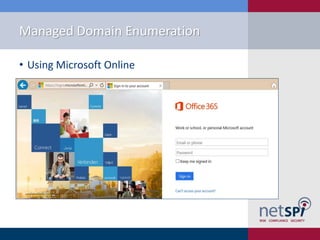
• Using Microsoft Online
Managed Domain Enumeration
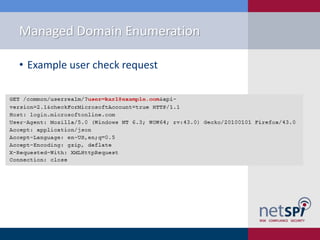
• Example user check request
Managed Domain Enumeration
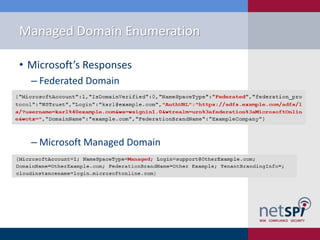
• Microsoft’s Responses
‒ Federated Domain
‒ Microsoft Managed Domain
Managed Domain Enumeration
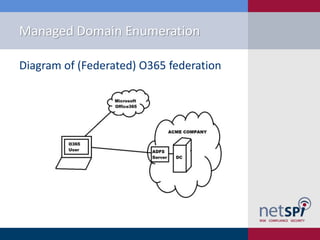
Diagram of (Federated) O365 federation
Managed Domain Enumeration
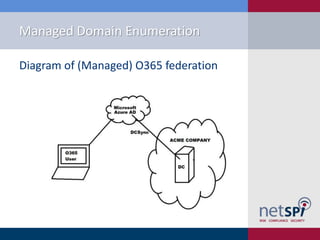
Diagram of (Managed) O365 federation
Managed Domain Enumeration
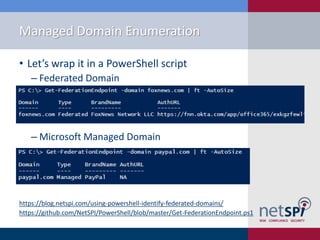
• Let’s wrap it in a PowerShell script
‒ Federated Domain
‒ Microsoft Managed Domain
https://blog.netspi.com/using-powershell-identify-federated-domains/
https://github.com/NetSPI/PowerShell/blob/master/Get-FederationEndpoint.ps1
Managed Domain Enumeration
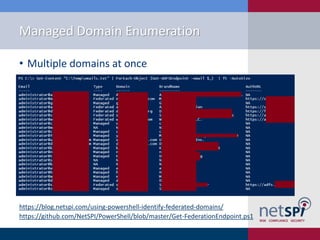
• Multiple domains at once
https://blog.netspi.com/using-powershell-identify-federated-domains/
https://github.com/NetSPI/PowerShell/blob/master/Get-FederationEndpoint.ps1
User Enumeration and
Confirmation
User Enumeration
• We have:
‒ Some Targets/Endpoints
• We need:
‒ Some users to attack
• Enumerate some users for the organization
off of LinkedIn
• Use one of the many recon frameworks
User Confirmation
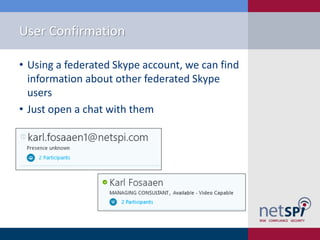
• Using a federated Skype account, we can find
information about other federated Skype
users
• Just open a chat with them
User Confirmation
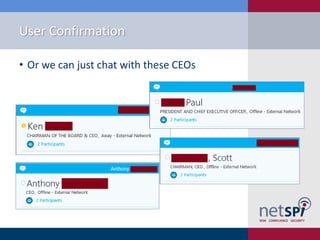
• Or we can just chat with these CEOs
User Confirmation
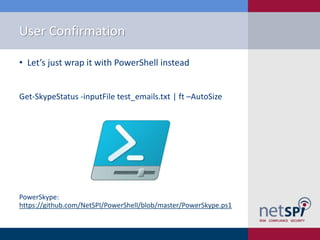
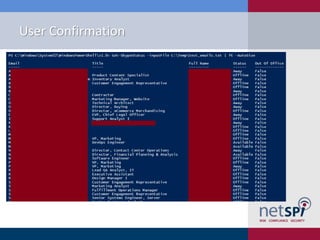
• Let’s just wrap it with PowerShell instead
Get-SkypeStatus -inputFile test_emails.txt | ft –AutoSize
PowerSkype:
https://github.com/NetSPI/PowerShell/blob/master/PowerSkype.ps1
User Confirmation
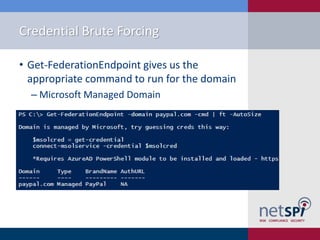
Credential Brute Forcing
• Get-FederationEndpoint gives us the
appropriate command to run for the domain
‒ Microsoft Managed Domain
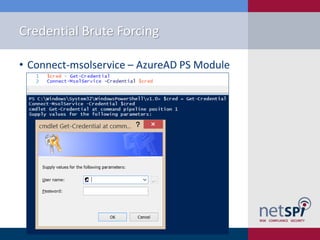
Credential Brute Forcing
• Connect-msolservice – AzureAD PS Module
User Information Gathering
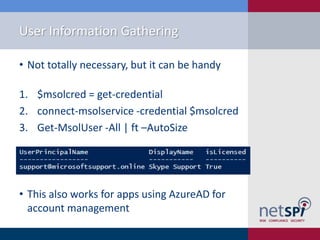
• Not totally necessary, but it can be handy
1. $msolcred = get-credential
2. connect-msolservice -credential $msolcred
3. Get-MsolUser -All | ft –AutoSize
• This also works for apps using AzureAD for
account management
Enumeration of Other Domain Users
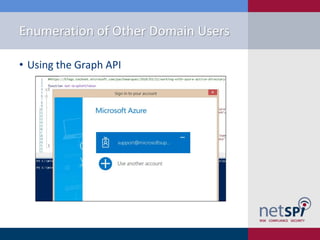
• Using the Graph API
Enumeration of Other Domain Users
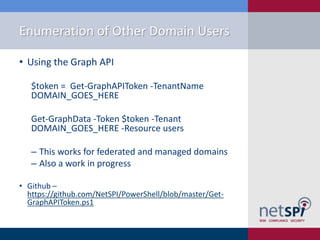
• Using the Graph API
$token = Get-GraphAPIToken -TenantName
DOMAIN_GOES_HERE
Get-GraphData -Token $token -Tenant
DOMAIN_GOES_HERE -Resource users
‒ This works for federated and managed domains
‒ Also a work in progress
• Github –
https://github.com/NetSPI/PowerShell/blob/master/Get-
GraphAPIToken.ps1
Enumeration of Other Domain Users
• If the domain uses Office365, you can
probably connect to its Exchange service
with PowerShell
Enumeration of Other Domain Users
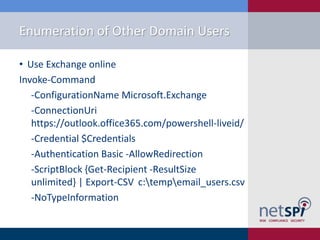
• Use Exchange online
Invoke-Command
-ConfigurationName Microsoft.Exchange
-ConnectionUri
https://outlook.office365.com/powershell-liveid/
-Credential $Credentials
-Authentication Basic -AllowRedirection
-ScriptBlock {Get-Recipient -ResultSize
unlimited} | Export-CSV c:tempemail_users.csv
-NoTypeInformation
Pivoting to the Internal
Network
Pivoting to the Internal Network
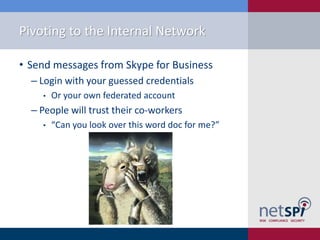
• Send messages from Skype for Business
‒ Login with your guessed credentials
• Or your own federated account
‒ People will trust their co-workers
• “Can you look over this word doc for me?”
Skype Message Phishing
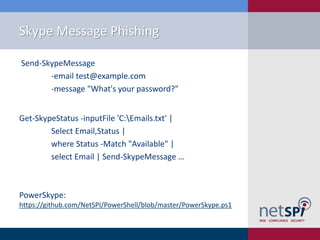
Send-SkypeMessage
-email test@example.com
-message "What's your password?"
Get-SkypeStatus -inputFile 'C:Emails.txt' |
Select Email,Status |
where Status -Match "Available" |
select Email | Send-SkypeMessage …
PowerSkype:
https://github.com/NetSPI/PowerShell/blob/master/PowerSkype.ps1
Pivoting to the Internal Network
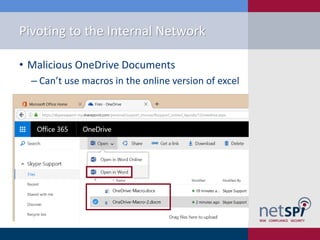
• Malicious OneDrive Documents
‒ Can’t use macros in the online version of excel
Pivoting to the Internal Network
• Malicious SharePoint Documents
‒ Same concept as OneDrive, just a different
platform
‒ Backdoor a document
‒ Edit pages
Pivoting to the Internal Network
• Attacking Email Accounts
‒ If Autodiscover is enabled, adding an account
can be done from anywhere
‒ Email is interesting, but I’d like a shell
‒ “Malicious Outlook Rules”
• Nick Landers – Silent Break Security
‒ “MAPI over HTTP and Mailrule Pwnage”
• Etienne - sensepost
Pivoting to the Internal Network
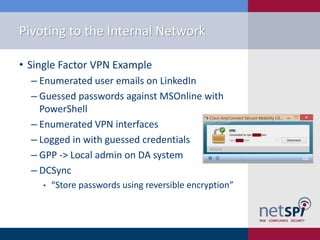
• Single Factor VPN Example
‒ Enumerated user emails on LinkedIn
‒ Guessed passwords against MSOnline with
PowerShell
‒ Enumerated VPN interfaces
‒ Logged in with guessed credentials
‒ GPP -> Local admin on DA system
‒ DCSync
• “Store passwords using reversible encryption”
Pivoting to the Internal Network
• Other Routes
‒ Single Factor Services
• Management Protocols
• RDP
• SSH
• Sharepoint
• Terminal Services – Web Based
• Citrix
• VDI
• Etc.
Attack Mitigations
Attack Mitigations
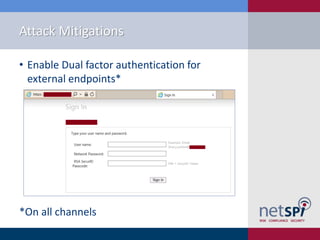
• Enable Dual factor authentication for
external endpoints*
*On all channels
Attack Mitigations
• Limit federation to trusted domains
• Limit exposed services surface area
• Monitor your Federated and Azure endpoints
• Enforce strong password requirements
Questions
Questions?
Karl Fosaaen
@kfosaaen
https://blog.netspi.com
https://github.com/netspi
http://www.slideshare.net/kfosaaen

Automating Attacks Against Office365 - BsidesPDX 2016

  • 1.
    Automating Attacks AgainstOffice365 Karl Fosaaen
  • 2.
    Introductions • Who amI? ‒Karl Fosaaen • What do I do? ‒Wear lots of hats ‒Pen Testing ‒Password Cracking ‒Social Engineering ‒Blogging ‒DEF CON Swag Goon ‒Pinball Repair
  • 3.
    Slides Overview • Office365Overview • Attack Overview ‒ Managed Domain Enumeration ‒ User Enumeration and Confirmation ‒ Credential Brute Forcing ‒ User Information Gathering ‒ Pivoting to the Internal Network • Attack Mitigations • Questions
  • 4.
  • 5.
    ADFS Overview Office365 Overview •Word/Excel/PPT • Skype for Business • Outlook • SharePoint • OneDrive
  • 6.
  • 7.
    Managed Domain Enumeration •Office365 had an Authentication Bypass issue ‒ Insecure SAML assertions ‒ Affected all federated Office365 domains ‒ They called out this method in their blog post Source: http://www.economyofmechanism.com/office365- authbypass.html
  • 8.
    Managed Domain Enumeration •Using Microsoft Online
  • 9.
    Managed Domain Enumeration •Example user check request
  • 10.
    Managed Domain Enumeration •Microsoft’s Responses ‒ Federated Domain ‒ Microsoft Managed Domain
  • 11.
    Managed Domain Enumeration Diagramof (Federated) O365 federation
  • 12.
    Managed Domain Enumeration Diagramof (Managed) O365 federation
  • 13.
    Managed Domain Enumeration •Let’s wrap it in a PowerShell script ‒ Federated Domain ‒ Microsoft Managed Domain https://blog.netspi.com/using-powershell-identify-federated-domains/ https://github.com/NetSPI/PowerShell/blob/master/Get-FederationEndpoint.ps1
  • 14.
    Managed Domain Enumeration •Multiple domains at once https://blog.netspi.com/using-powershell-identify-federated-domains/ https://github.com/NetSPI/PowerShell/blob/master/Get-FederationEndpoint.ps1
  • 15.
  • 16.
    User Enumeration • Wehave: ‒ Some Targets/Endpoints • We need: ‒ Some users to attack • Enumerate some users for the organization off of LinkedIn • Use one of the many recon frameworks
  • 17.
    User Confirmation • Usinga federated Skype account, we can find information about other federated Skype users • Just open a chat with them
  • 18.
    User Confirmation • Orwe can just chat with these CEOs
  • 19.
    User Confirmation • Let’sjust wrap it with PowerShell instead Get-SkypeStatus -inputFile test_emails.txt | ft –AutoSize PowerSkype: https://github.com/NetSPI/PowerShell/blob/master/PowerSkype.ps1
  • 20.
  • 21.
  • 22.
    Credential Brute Forcing •Get-FederationEndpoint gives us the appropriate command to run for the domain ‒ Microsoft Managed Domain
  • 23.
    Credential Brute Forcing •Connect-msolservice – AzureAD PS Module
  • 24.
  • 25.
    User Information Gathering •Not totally necessary, but it can be handy 1. $msolcred = get-credential 2. connect-msolservice -credential $msolcred 3. Get-MsolUser -All | ft –AutoSize • This also works for apps using AzureAD for account management
  • 26.
    Enumeration of OtherDomain Users • Using the Graph API
  • 27.
    Enumeration of OtherDomain Users • Using the Graph API $token = Get-GraphAPIToken -TenantName DOMAIN_GOES_HERE Get-GraphData -Token $token -Tenant DOMAIN_GOES_HERE -Resource users ‒ This works for federated and managed domains ‒ Also a work in progress • Github – https://github.com/NetSPI/PowerShell/blob/master/Get- GraphAPIToken.ps1
  • 28.
    Enumeration of OtherDomain Users • If the domain uses Office365, you can probably connect to its Exchange service with PowerShell
  • 29.
    Enumeration of OtherDomain Users • Use Exchange online Invoke-Command -ConfigurationName Microsoft.Exchange -ConnectionUri https://outlook.office365.com/powershell-liveid/ -Credential $Credentials -Authentication Basic -AllowRedirection -ScriptBlock {Get-Recipient -ResultSize unlimited} | Export-CSV c:tempemail_users.csv -NoTypeInformation
  • 30.
    Pivoting to theInternal Network
  • 31.
    Pivoting to theInternal Network • Send messages from Skype for Business ‒ Login with your guessed credentials • Or your own federated account ‒ People will trust their co-workers • “Can you look over this word doc for me?”
  • 32.
    Skype Message Phishing Send-SkypeMessage -emailtest@example.com -message "What's your password?" Get-SkypeStatus -inputFile 'C:Emails.txt' | Select Email,Status | where Status -Match "Available" | select Email | Send-SkypeMessage … PowerSkype: https://github.com/NetSPI/PowerShell/blob/master/PowerSkype.ps1
  • 33.
    Pivoting to theInternal Network • Malicious OneDrive Documents ‒ Can’t use macros in the online version of excel
  • 34.
    Pivoting to theInternal Network • Malicious SharePoint Documents ‒ Same concept as OneDrive, just a different platform ‒ Backdoor a document ‒ Edit pages
  • 35.
    Pivoting to theInternal Network • Attacking Email Accounts ‒ If Autodiscover is enabled, adding an account can be done from anywhere ‒ Email is interesting, but I’d like a shell ‒ “Malicious Outlook Rules” • Nick Landers – Silent Break Security ‒ “MAPI over HTTP and Mailrule Pwnage” • Etienne - sensepost
  • 36.
    Pivoting to theInternal Network • Single Factor VPN Example ‒ Enumerated user emails on LinkedIn ‒ Guessed passwords against MSOnline with PowerShell ‒ Enumerated VPN interfaces ‒ Logged in with guessed credentials ‒ GPP -> Local admin on DA system ‒ DCSync • “Store passwords using reversible encryption”
  • 37.
    Pivoting to theInternal Network • Other Routes ‒ Single Factor Services • Management Protocols • RDP • SSH • Sharepoint • Terminal Services – Web Based • Citrix • VDI • Etc.
  • 38.
  • 39.
    Attack Mitigations • EnableDual factor authentication for external endpoints* *On all channels
  • 40.
    Attack Mitigations • Limitfederation to trusted domains • Limit exposed services surface area • Monitor your Federated and Azure endpoints • Enforce strong password requirements
  • 41.