A COMPLETE GUIDE TO OSS
A COMPLETE GUIDE TO OSS 1
A Complete Guide to OSS
Rahul Srivastava
2019
A COMPLETE GUIDE TO OSS
A COMPLETE GUIDE TO OSS 2
Preface
Target readers for this book are all the professionals who are working in Telecom OSS domain
or wish to move to OSS domain. Those who already have worked in OSS projects will find this
book easier to understand.
This book has been divided into two sections. Section I has four chapters and after reading these
chapters’ readers will thoroughly understand the Product design, Sales Order creation, Order
Fulfilment process and Enterprise design concepts. If one thinks froman enterprise perspective,
their business journey starts with conceptualizing a Product offering followed by creating the
product, selling thatproductandfinally delivering itto end customer. Icall it Create-Sell-Deliver
journey. In coming sections, we will see what it means in Telecom Enterprise environment.
Section II has two chapters and I have tried to explain the basic networking concepts in first
chapter and the wireline/wireless access technology, complex network architecture and some
basics of network virtualization and automation concepts in the next chapter. For an
accomplished OSS SME both the sections are important and my recommendation would be to
read through all these chapters and build an understanding.
Happy Learning,
Rahul Srivastava
A COMPLETE GUIDE TO OSS
A COMPLETE GUIDE TO OSS 3
Contents
Chapter 1............................................................................................................................. 6
Create Process .................................................................................................................. 6
Understanding Product Model ....................................................................................... 6
Modeling Product entities ........................................................................................... 15
Chapter 2........................................................................................................................... 26
Sell Process.................................................................................................................... 26
Chapter 3........................................................................................................................... 35
Deliver Process............................................................................................................... 35
Order Fulfilment journey ............................................................................................ 35
Products in OM Space ................................................................................................ 51
Chapter 4........................................................................................................................... 56
Enterprise Design............................................................................................................ 56
TeleManagement Forum Frameworx ............................................................................ 56
Chapter 5........................................................................................................................... 66
Network Basics............................................................................................................... 66
Networking Components and Devices........................................................................... 68
Key Network Protocols ............................................................................................... 77
Types of Network Connections..................................................................................... 80
LAN.............................................................................................................................. 82
Ethernet..................................................................................................................... 83
Switch ....................................................................................................................... 84
VLAN........................................................................................................................ 86
WAN ............................................................................................................................. 88
Link aggregation............................................................................................................ 90
Router........................................................................................................................... 90
Access, core and distribution ......................................................................................... 91
Routing different networks............................................................................................ 91
Internet connectivity and internal use.............................................................................. 91
MPLS............................................................................................................................ 92
Components of MPLS.................................................................................................. 92
How an MPLS networkworks....................................................................................... 92
Advantages of MPLS ................................................................................................... 93
Is MPLS Layer 2 or Layer 3?......................................................................................... 94
MPLS Pros and Cons ................................................................................................... 94
MPLS VPN ................................................................................................................ 95
Virtual private network (VPN) ........................................................................................ 96
A COMPLETE GUIDE TO OSS
A COMPLETE GUIDE TO OSS 4
VPN Protocols ............................................................................................................ 96
Remote-access VPN..................................................................................................... 97
Site-to-site VPN.......................................................................................................... 97
Network Topology.......................................................................................................... 98
Chapter 6..........................................................................................................................102
Telecom Networks .........................................................................................................102
Wireless Network.......................................................................................................103
Wireline Network........................................................................................................114
What’s Ahead? ..........................................................................................................139
A COMPLETE GUIDE TO OSS
A COMPLETE GUIDE TO OSS 5
SECTION- I
A Guide to Order Fulfilment
Create, Sell, Deliver
A COMPLETE GUIDE TO OSS
A COMPLETE GUIDE TO OSS 6
Chapter 1
Create Process
Introduction
For any Telecom enterprise which invests huge sum of money in setting up infrastructure, employing
human resources has the ultimate goal to earn revenue and make profit out of their investment. They do
so by offering/selling their product and services to end customer and charging them for it. Before these
products and services could be sold, they need to be Conceptualized, Created, given a name and given
certain features and characteristics which customer might be interested in buying and lastly presented
to outside world as a sellable entity. We are going to call it “Create Process”. In Telecom, it is covered
under Product Lifecycle Management (PLM) process and TMFORUM Information Framework (SID –
GB922) provides blueprint for product modeling.
Three pertinent questions which readers might be interested in knowing in “Create Process” is: What
do we create, where do we create and how do we create?
Theshort andsimple answer is:We createProduct Offerings,wecreateitin EnterpriseProduct Catalog
(Assuming Telecom world has moved to catalog driven ecosystem) and We create it by modeling the
products and services and configuring them in Product Catalog.
Of course the above answer is easier said than done and it requires detailed understanding of Product
modeling, Product entities, design principles etc. We are going to discuss all that in this chapter.
Understanding Product Model
A productOffering represents what is externally presented to the market for market’s use. It is a
sellable entity and attributes defining how every sellable entity can be defined by certain characteristics
called productSpecification. A product represents the subscription of a productOffering by a
customer. Association between Product and product spec allows product specs which were not
marketedas product offerings tobeinstantiated as product. Inother words, aproductOffering represents
how ProductSpecification is sold(packagingrules, prices, alterations, commitments) andaproductSpec
specifies what the marketing operator wants to sell at functional level (capacities, usages, QoS,
characteristics) and represents both tangible (Phone, modem etc.) and non-tangible goods (Anti-virus
software etc.). Product specifications represent unique capabilities with commercial value but only sold
through product offerings. A more technical definition is that product specifications are types of
products. ACFSS represents Service Provider’s know-how of non-tangible goods at functional level.
A RFS represents the technical solution that a service provider can implement for the given CFS.
productSpecification is ‘Made Available As’ ProductOffering.
A COMPLETE GUIDE TO OSS
A COMPLETE GUIDE TO OSS 7
Key Points
Product Offering-
 It is a sellable entity.
 Is identified as ‘What is ordered’
 Gives the marketing view
 Entity Relationship- productSpecification is ‘Made Available As’ ProductOffering
PS-
 Gives the functional view
 Entity Relationship- ProductSpec ‘realizedAs’ CFS
CFSS-
 Services are the functions that customers subscribe to. It is the functional view of a service
that is exposed to customers. It is an abstraction of RFSes
 Is identified as ‘What is configured’
 Gives the functional view
 Entity Relationship- CFS ‘Requires’ RFS
RFSS-
 A resource facing service (RFS) describes how customer facing services are configured.
 Is identified as ‘How it is configured’
 Gives the technical view
 Entity Relationship- RFS ‘Has’ Resource
SID view on Product Offering, CFS, RFS and Resource
A keyelement in SIDis wayit models telecoms products (Product Offerings) andespecially theconcept
of Customer Facing Services (CFS). As discussed earlier, a Product Offering is a sellable entity and it
is externally presented to the outside world. AProduct Offering (Specification) is made up of:
 Customer Facing Services
 Resource Specifications
A COMPLETE GUIDE TO OSS
A COMPLETE GUIDE TO OSS 8
 A Price Plan
CFS
A Customer Facing Service is defined in SID as: “A Customer Facing Service is an abstraction that
defines the characteristics and behavior of a particular Service as seen by the Customer. This means
that a Customer purchases and/or is directly aware of the type of Service and is in direct contrast to a
Resource Facing Service which support Customer Facing Services but are not seen or purchased
directly by the Customer.”
The key point to this definition is the word seen. The Customer (or more precisely the End User Party
Role) perceives the service “Outbound Voice Call”, for example, as nothing more than that. The End
User does not perceive the switching, encryption, error correction, radio frequency hops, base station
transfers, multiplexing and de-multiplexing that may go on in the background.
A Customer Facing Service Specification as an abstract base class, which specifies the properties
(attributes) common to a particular CustomerFacingService used to realize the associated Product(s).
This entity serves as a common basis to build any set of CustomerFacingServices that the service
provider needs.
CFS can be viewed as the properties of a particular related Service that represents a realization of a
Product within an organization’s infrastructure; This is in direct contrast to ResourceFacingServices,
which support the network/infrastructure facing part of the service. CustomerFacingServices are
directly related to Products as well as to ResourceFacingServices. From a pragmatic perspective a
Customer Facing Service represents a functionality at the boundary of the Service Provider
infrastructure in a protocol-agnostic way, it groups a set of Resource Facing Services that together
provide the necessary technical functionality.
ResourceFacingServicesareindirectly related toProducts throughtherelationship betweenProduct and
CustomerFacingServices. This enforces the relationship to Products while keeping Services that are not
directly realized by Products (i.e., ResourceFacingServices) separated from Products.
The Product Offering is thus defined in terms of the Services that an End User perceives, values, and
may be charged for.
An Example
A COMPLETE GUIDE TO OSS
A COMPLETE GUIDE TO OSS 9
Clearly defining a Product Offering, for example “3G Anytime” solely in terms of the services
perceived by the End User will not help when the Product Offering is sold (as a Product Offering
Subscription) to be provisioned in the network or on the Billing System, but that is precisely the
objective of the SID. By allowing an Offering to be defined independently of how it is implemented as
a step in the direction of Service Oriented Architectures Holy Grail – Loosely Coupled Architecture,
where each domain defines what it wants in the way of services, not how the services are to be
implemented or built.
Clearly a Customer FacingServicesuchas “Outbound Voice Call” has to be provisioned in the network
as a range of low level services managed by dedicated hardware such as the MSC. These services are
defined as Resource Facing Services.
So, we can define a Product Offering as a collection of Customer Facing Services, the Specifications of
the Resources required by the Product Offering (and the CFSs) such as the telephone number
(MSISDN), type of SIM, type of Handset etc and the Prices to be charged for the Product Offering and
theCFSs it offers (Note:An “Outbound Voice Call” or “Send Text Message”canbechargedat different
rates in different Product Offerings).
I hope you will agree that this sounds sensible, but what exactly is a CFS? Is a “Voice Call” a CFS, or
is “Making a Voice Call” a separate CFS from “Receiving a Voice Call”. When one tries to list CFSs
it becomes incredibly difficult to actually decide what is and is not a CFS and why.
We needed an objective way of defining what a CFS was and a set of rules to allow us to determine
whether a candidate service was a CFS, and if it wasn’t a CFS, then what actually it was.
Thetrickis tofocus backonthedefinition of CFS, and it comes backtotheword“seen”in the definition
of CFS, or perhaps more precisely “perceived”. If an End User cannot perceive the difference between
two related services, then probably the two services are components of the same CFS. If on the other
hand the End User can tell the difference then, probably (as there are other pragmatic criteria to be
applied) these two services are separate CFSs.
For example – can an End User tell the difference between making a voice call and receiving one? To
me this is a definite “Yes”. The phone rings when a call is made and when answered there is someone
on the other end of the line to talk to. On the other hand, when making a call the line has to be activated
(bypicking upthe receiver, or pushingabuttononthehandset), thenumber dialed andthen after hearing
the ring tone the phone maybe answered.
On the other hand, can an End User tell the difference between making a voice call to a fixed line
number as opposed to a mobile number? In my opinion, these are the same CFS, handled by different
RFSs (todo theswitching). Onecouldarguethat a knowledgeable End User canbyknowingsomething
about the numbering plan in the country, but the call is perceived (heard) in the same way during the
call. It is also possible that a call to a fixed line number terminates on a mobile phone and vice versa
throughcall forwarding, huntinggroups andthelike. Whenit comes topayingfor the call the difference
between fixed and mobile voice calls may also be perceived as they may be charged for differently, but
that is after the event (for Postpay customers at least). So it comes down to perception during the use
of the service, not prior or after the event knowledge that counts.
However, if oneextends this simple rule toa complexservice like “Voice Mail” things becomecomplex
and uncomfortable. Clearly an End User can perceive the difference between “Listen to a Voice Mail
Message” and “Delete a Voice Mail Message”, but then Voice Mail decomposes into about 10 or more
CFSs that are never ‘unbundled’ – one could never imagine selling a Product Offering that allowed
someone to “Delete a Voice Mail Message” but not to “Listen to a Voice Mail Message”. An additional
rule needs to be defined to allow these type of services that are perceived differently to be bundled
together into a pragmatic CFS.
RFS
A COMPLETE GUIDE TO OSS
A COMPLETE GUIDE TO OSS 10
A Resource Facing Service is an abstraction that defines the characteristics and behavior of a service
that is used internally as part of the composition of a Customer Facing Service. Resource Facing
Services are services internal to the service provider and may be composed of other Resource Facing
Services and Resources.
A Resource Facing Service is indirectly part of a Product, but is invisible to the Customer – it exists to
support one or more Customer Facing Services.
The TeleManagement Forum Information Framework (SID) defines Resource Facing Service as an
abstract base class for ResourceFacingServices. AResourceFacingService is an abstraction that defines
the characteristics and behavior of a particular Service that is not directly seen or purchased by the
Customer. ResourceFacingServices are “internal” Services that are required to support
a CustomerFacingService. The Customer obtains CustomerFacingServices via Products, and is not
aware of the ResourceFacingServices which support the CustomerFacingService(s) that is being
obtained directly by the Customer via a Product. CustomerFacingServices are directly related to
Products as well as to ResourceFacingServices. ResourceFacingServices are indirectly related to
Products through the relationship between Product and Resource. This enforces the relationship to
Products while keeping Services that are not directly obtainable via Products (i.e.,
ResourceFacingServices) separated from Products.
Users of the Information Framework’s (SID) Customer and ResourceFacingService (CFS/RFS)
typically consider that one or more ResourceFacingService(s) associated with a
CustomerFacingService specify how the later will be configured within an enterprise’s resource
infrastructure. They also tend to assume that the association between
ResourceFacingServiceSpecifications and one or more ResourceSpecification(s) themselves define the
types of Resources that will be used, in some way, to support a CustomerFacingService.
An Example
Here is an example from the definition of a ResourceFacingService: “A[virtual private network] VPN
is an example of a customer-facing service. This particular type of VPN may require border gateway
protocol (BGP) to support it. Customers don’t purchase the BGP, and hopefully aren’t even aware that
BGP is running. Therefore, BGP is an example of a resource-facing service.”
Now the enigma begins to surface: BGP is a Logical Resource, Protocol Service, v Routing Protocols
business entity. At this juncture, users of the Information Framework wonder why BGP in needed in
boththe Serviceand Resourcedomains. Onesolution is torefer tothe ResourceFacingServiceas aBGP
service, but is this enough?
The enigma grows when Information Framework users try to use the simple association from a
ResourceFacingServiceSpecification to one or more ResourceSpecification(s) to define all aspects of
how a ResourceFacingService, in this case the BGP, is configured. For instance, as the BGP is part of
the configuration of the VPN, what is the sequence of configuring it within the overall VPN? Which
properties of BGP can be selected and which are fixed? What other resources must be configured as
part of configuring the BGP?
There have been discussions going on to get rid of ResourceFacingServices at some time in the future.
A COMPLETE GUIDE TO OSS
A COMPLETE GUIDE TO OSS 11
Notice that the CustomerFacingService and ResourceFacingService have been removed.
ResourceFacingService is represented by ServiceConfiguration. And because CustomerFacingService
is the only subclass of the service, it has been collapsed into Service. Bearing in mind that many
Information Framework users employ CustomerFacingService and ResourceFacingService, here is an
alternative to this rather radical approach.
Notice that it retains the current view shown earlier and enables users to take advantage of the new
Configuration ABEs.
Resource
For physical resources it is pretty obvious because you can see them, hold them in your hand, or put
them in your pocket. The really big resources are usually the Telecom’s Service Provider’s own
equipment, be it a base station, the DP, or the switch, but of course PhysicalResources include things
like the phone, the modem, the mobile, the SIM card, the memory card and the copper pair in the DP
that belong to a Customer’s Product (subscription). Additionally, a physical resource will always be
located somewhere, at an address, a geographic location, or perhaps in a local location (e.g. a room in
a building).
A COMPLETE GUIDE TO OSS
A COMPLETE GUIDE TO OSS 12
A logical resource is therefore something that cannot be touched. Generally, LogicalResources are
numbers, like the phone number, MSISDN, IMSI, IMEI, PIN, PUKetc. Programs, images, and music
files are all LogicalResources too. This realisation is useful in many ways; not least in understanding
how aLogicalResourcecanhave a location. For example, Firefox. TheResouceSpecifcation for Firefox
belongs toMozilla. I have an instanceinstalled on myp.c. ( a PhysicalResource), soaLogicalResource
can be installed in a PhysicalResource. But consider an MSISDN, it is installed in the HLR (a logical
resource itself) which in turn is installed in the Switch. So a LogicalResource must either be installed
in (locatedin) another LogicalResourceor a PhysicalResourceandthePhysicalResourcehas alocation.
Another thing about Resources is that theyhave lifecycles outside a Product (subscription). Lets assume
a home internet product (specification) that could deliver a free modem, or a modem that is rented to
the Customer or be used by a Customer who already owned a modem (as different ProductOfferings)
Thecomplexvalidation rules about what happenedif a Customer subscribes totheProductOffering that
delivers the free modem and then cancels the subscription only to come back later to take out the
ProductOffering that could use the Customer’s own modem.
Consider it from the modem’s point of view. It was born (manufactured) in a factory in Taiwan and
shipped through a number of warehouses and Suppliers until it ended up in a box on a shelf in a
Supplier’s shop together with a CD-ROM that had its driver software, a cable to connect the modem to
the telephone point, another cable to connect the modem to a p.c., an instruction manual and a piece of
paper with an activation code on it. All of these are Resources, and each will have had its own life to
get to this point. The box all these Resources are in represents (as near as damn it) the ProductOffering.
The ProductOffering also includes a number of Services which are (usually) the reason the Customer
purchases the ProductOffering. These services are not to be found in the box, directly, but ultimately
are delivered by software, either running on the Customer’s computer, in the modem, or in the Service
Provider’s network.
One day someone (a Customer) buys the box and takes it home (the new location for the modem). He
follows the instructions and plugs in the modem correctly to the wall socket and his p.c., loads the
software and activates the service throughentering the activation code and establishing a username and
password (again logical resources) with the Service Provider to set up the Product (subscription). Each
of these Resources have a ResourceRoleProductInvolvement (a type of ProductInvolvementRole)
that link and show the role of the Resource in the Product.
The Customer uses the modem and the Services provided by his Product (subscription) for a year or so
and thencancels theProduct (subscription) for somereason. Hecannolonger usetheServices provided
to him by the Product (internet access, email etc) and he gives up the username and password 2.
However, the modem and cables, CD-ROM and even the software on his p.c. are still all at his house,
but not associated with an active Product. One thought may be that the Modem should be associated
with a bundled Product so that when the Internet Product was cancelled the relationship between the
Customer, the Resource and the Service Provider could be maintained, just in case the Customer ever
came back. You could do that, but if you do that then you should also do that for things like Phone
Numbers, MSISDNs and anything else the Customer can purchase from the Service Provider and carry
away.
One can think that Resource still exists; it hasn’t disappeared just because the Product has been
cancelled. Just like the Person playing the role of Customer still exists even after the Product
(subscription) is cancelled and the Party is no longer playing that role. It is no co-incidence that Parties
play PartyRoles that in turn play PartyRoleProductInvolvement (roles) and Resources play
ResourceRoleProductInvolvement.
And now to the difference between a Service and a Resource. In Telecom at least, a Service is provided
by a Resource, and the Services are nowadays delivered by software, or LogicalResources. Service
A COMPLETE GUIDE TO OSS
A COMPLETE GUIDE TO OSS 13
delivered by the telco that may involve Human Resources, like an installation service, but this is not
directly modelled in SID but is considered something covered by the likes of a WorkOrder or
ServiceOrder.
Resource Classification dimension
 Location
 Device
 Hardware
 Firmware and Software
 Device Interface
 Protocol
 Transmission Descriptor
 Address Entity
 Transmission Entity
 vendor
 role
 technology
 layer
Types of Association between PSR
 Inheritance
 Association
 Containment
Product/Service/Resource Domain Relationships
Decomposition example
A COMPLETE GUIDE TO OSS
A COMPLETE GUIDE TO OSS 14
Diagram- Decomposition example for a wireless Product Offering
Diagram- Decomposition example for a wireline Product Offering
A COMPLETE GUIDE TO OSS
A COMPLETE GUIDE TO OSS 15
Modeling Product entities
Having understoodthebasic conceptsof Product,CFS, RFS andResource,wewill movetoPLM design
process. Let us now understand the modeling principles of Product entities also called as Aggregate
Business Entities (ABEs). We will try to understand the entity relation, characteristics and cardinality
in detail. This product realization journey begins withcommercialconceptualization of a Sellable entity
called product by the business team. Then the requirement comes to PLM product modeling experts
who do the functional and technical modeling of that product. While doing so they are supposed to
follow some modeling guidelines and this is what we are going to discuss.
Following are the PLM ABEs -
1. Product/ProductOffering
2. Product/ProductSpecification
3. Product/Product
4. Product/ProductOffering/Product Offering Price
5. Product/ProductOffering/Product Offering Price Rule
6. Product/ProductOffering/Pricing Logic Algorithm
7. Product/Product/Product Price
8. Product/Product Usage
Note: I strongly recommend that all readers after reading this book should also read “GB922- SID
Model” for more detailed understanding on SID modeling. Same can be downloaded from internet.
Entity Group Entity Type
Product offer Bundle
Package
Promotion
Component Component
Component group
Pricing Charge
Chargegroup
Discount
Discount group
Cost
Cost BasedCharge
ChargeBased Discounts
Let us discuss each of these ABEs in detail.
A. Product/ProductSpecification
Products are tangible or non-tangible items which enterprises sell or lease to a customer. AProduct
Spec may be simple (atomic) or composite (Fowler Specification).
A COMPLETE GUIDE TO OSS
A COMPLETE GUIDE TO OSS 16
Key Points to remember
 CFS can’t be seen by the customer. Only product/Product Spec is visible to them.
 A ProductSpecification can’t contain itself but it can reference other
 Atleast one action is allowed for a ProductSpecification (Ex- Create, Update, Delete)
 ProductSpecificationRelationship may be exclusivity, migration, dependency, substitution
etc.
Product Specification entities and relationship
 ProductSpecificationType- Grouping a product specification based on common characteristic
or how specs are marketed. It can be of two types- ProductLine and ProductCategory.
 ProductSpecification- It can be of 2 types- AtomicProductSpecificaton which can’t be broken
further and CompositeProductSpecificaton which consists of multiple atomic PS.
 ProductSpecificationRelationship- Required for bundling or composite specification.
Relationship can be Dependency, Exclusivity, substitution etc.
 AllowedProductAction- AllowedProductAction described by ProductActionType Create,
Update, Delete etc.
 ProductSpecificationCost
Diagram- ProductSpecification Relationship
Product Specification Example
A COMPLETE GUIDE TO OSS
A COMPLETE GUIDE TO OSS 17
Product Characteristics
ProductSpecificationCharacteristic and ProductSpecificationCharacteristicValue represent the
properties of ProductSpecification. It can be grouped into 3 types- Discrete, parameter range, derived.
Characteristics where customer has the option to choose/interchange is modeled as
ConfiguratbleProductSpecificationCharacteristic. Characteristics can be bundled together into
packages by using ProductSpecCharRelationship (Mutually exclusive, inclusive etc). For example,
a number of electrical characteristic can be grouped together using “Electrical properties” characteristic
that represents a composite of the detailed properties such as, power requirement, plug requirement etc.
Product Specification characteristic entities and relationship
 ProdSpecCharUse
 ProdSpecCharValueUse- E.g.-ProductOffering “Silver plan” only allows BW 2 MBPS and 5
MBPS out of values 1,2,5 and 8 MBPS. This can be achieved using ProdSpecCharValueUse.
 ConfigurableProductSpecCharacteristic
A COMPLETE GUIDE TO OSS
A COMPLETE GUIDE TO OSS 18
Diagram- ProductSpecCharacteristic Relationship
Diagram- ProductSpecCharValueUse Relationship
Diagram- ProductSpecification modelingexample
B. Product/ProductOffering
 Product Offering set out in ProductCatalog are ProductSpecifications with additional detail that
enable a contract to be struck for their sale. E.g.- SLA, Shipping Details etc
 ProductOfferingTerm- It defines the condition under which the ProductOffering is made available
to the customers. E.g.- Shipment Term, Service Term, Payment Methods, Bulk Buying, loyalty,
commitment periods.
 ProductOffering which are part of BundledProductOffering should not be individually procurable.
If need be, a separate SimpleProductOffering can be created.
 A BundledProductOffering does not necessarily need to have an association with
ProductSpecification
 ProductOfferingTerm- It is the condition under which a ProductOffering is made available to the
customer.
A COMPLETE GUIDE TO OSS
A COMPLETE GUIDE TO OSS 19
Product Offering entities and relationship
Following are the Product offering entities and their relationships are as shown in the diagram-
 ProductOfferingType – Ex- Simple or Bundled
 ProductOfferingPrice
 MarketSegment
 Place
 MarketStrategy
 SalesChannel
Diagram- ProductOffering entities
C. Product/Product
 SimpleProductOffering instantiated as ProductComponent and BundledProductOffering
instantiated as Product Bundle
 The information which BundledProductOffering/ SimpleProductOffering was used for purchase
is kept in ProductBundle/ProductComponent entity respectively. E.g.- Special Price,
Commitments, discounts and other business information etc.
 Features of a product to which customer subscribes are represented by
ProductCharacteristicValues. E.g.- colour, size, storage etc.
Product entities and relationship
A COMPLETE GUIDE TO OSS
A COMPLETE GUIDE TO OSS 20
Diagram- Product entities
D. Product/ProductOffering/Product Offering Price
 ProductOfferingPrice Depends on ProductSpecCharValueUse
 Pricing component is always applied at ProductSpec level
 Between ProductOffering andProductOfferingPrice,thereexists PolicySet whichgoverns theprice
of a ProductOffering. We use the ‘ProductOfferingPriceGoverenedBy’ relationship.
Types of product offering price
• Recurring charge
• Non- recurring charge
• Event rate
• Standalone recurring rate
• Standalone non‐recurring rate
• Non‐recurring, cost‐based rate
• Recurring, cost‐based rate
Rate Types
• Simple:Rates that inherit from this type detail a specific amount in a decimal field called Rate.
This represents the amount to be charged.
• Threshold: Rates that inherit from this type detail a type of unit‐based pricing whereby the
amount charged varies according to a quantity. The Rate element details how the rate varies as
the quantity changes.
• Tiered: Rates that inherit from this type detail a type of unit‐based pricing whereby the amount
charged varies according to a quantity. The Rate element details how the rate varies as the
quantity changes.
Discount Types
A COMPLETE GUIDE TO OSS
A COMPLETE GUIDE TO OSS 21
• Product event discount rate
• Product non‐event discount rate
• Standalone event discount rate
• Standalone non‐event discount rate
• Promotional discount
• Corporate discount
Product Offering Price entities and relationship
• ProdSpecCharValueUse
• PriceEvent
• GeographicalArea
Diagram- ProductOffering price
A COMPLETE GUIDE TO OSS
A COMPLETE GUIDE TO OSS 22
Diagram- ProductOffering price
E. Product/ProductOffering/Product Offering Price Rule
We need PriceRule model to define price policy for simple product or cross-product. The price of
product offering is governed by policy set. Price of a product offering depends on the following generic
structure. These components trigger evaluation of PolicyRule.
1. Policy event- Time of purchase
2. Policy condition- Type of purchase
3. Policy Action- Action to be taken if condition is found True.
Policy Rule
 Policy rule aggregates atleast one or more PolicyConditions and one or more PolicyActions.
So PolicyConditions and PolicyActions can both use composite pattern.
 How PolicyRule is executed- Rule priority, combine policy conditions
 PolicyGroup construct can aggregate multiple PolicyRule
A COMPLETE GUIDE TO OSS
A COMPLETE GUIDE TO OSS 23
Diagram- ProductOffering PolicyRule
Diagram- ProductOffering priceRule
Diagram- ProductOffering PolicyCondition and PolicyStatement
A COMPLETE GUIDE TO OSS
A COMPLETE GUIDE TO OSS 24
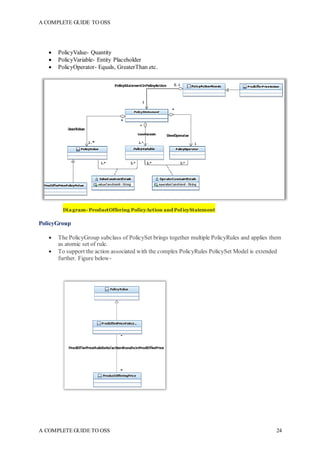
 PolicyValue- Quantity
 PolicyVariable- Entity Placeholder
 PolicyOperator- Equals, GreaterThan etc.
Diagram- ProductOffering PolicyAction and PolicyStatement
PolicyGroup
 The PolicyGroup subclass of PolicySet brings together multiple PolicyRules and applies them
as atomic set of rule.
 To support the action associated with the complex PolicyRules PolicySet Model is extended
further. Figure below-
A COMPLETE GUIDE TO OSS
A COMPLETE GUIDE TO OSS 25
Diagram- ProductOffering PolicyGroup Example
F. Product/ProductOffering/Pricing Logic Algorithm
G. Product/Product/Product Price
H. Product/Product Usage
A COMPLETE GUIDE TO OSS
A COMPLETE GUIDE TO OSS 26
Chapter 2
Sell Process
Introduction
We discussed in the previous chapter about “Create Process”. Now that Telecom enterprise has a
sellable entity called “ProductOffering” on offer for end customers, they would want to sell it.
How a best fit product is offered, how it is selected, how the selected product offering is captured and
what role does contextual awareness plays in selling process, dynamic pricing etc. will be discussed in
this chapter and we are going to call it “Sell Process”.
Again, the three pertinent questions which readers might be interested in knowing in “Sell Process” is:
What do we Sell, where do we Sell and how do we Sell?
The short and simple answer is: We Sell Product Offerings, we sell it on a sales platform (Traditionally
a CRM) and how we sell it is something we will discuss as we progress through this chapter.
Understanding Lead to Cash Flow
Lead to Cash flow typically starts with a marketing plan and ends with revenue. Following is the Lead
to cash flow:
 Organizations launch marketing campaigns in different format to get hold of the leads that can
result in revenues
 Leads can turn into business opportunities.
 Opportunities which successfully result in revenues for the organization become ‘Customer’ or
‘Accounts’ for the organization.
How it works?
• Identify the opportunity.
• Offer the right products.
• Specify the features and pricing that are feasible for the organization.
• Place the order.
• Close the deal.
Understanding CustomerRelationshipManagement (CRM)
A COMPLETE GUIDE TO OSS
A COMPLETE GUIDE TO OSS 27
CRM is short for Customer Relationship Management. It’s a software solution that brings a host of
capabilities together. You can store all your prospects and customers, make calls, send emails, create
reports, schedule appointments, add notes, manage your pipeline etc.
A customer who is for example buying any product or service is touched upon by:
 Marketing- Marketing teams canuseCRM tomeasuretheReturn onInvestment(ROI) ontheir
activities and campaigns. It also gives them insight about whether they are targeting their Ideal
Customer Profiles (ICPs), and the right geography and industry.
 Sales- Sales teams canuseCRMto geta deeper understandingof their prospectsandcustomers,
and manage their sales pipeline better. The CRM also helps automate day-to-day tasks, track
and improve sales productivity, identify industry trends, and enhance sales strategy.
 Services- Customer support teams can use CRM to help improve customer relations and
retention. It gives them insight into the customer’s issues and their past interactions, and
provides the necessary tools to manage activities around customer engagement.
A CRM Software therefore touches these three areas of business and it aims to sustain the revenue
stream and retain the customer.
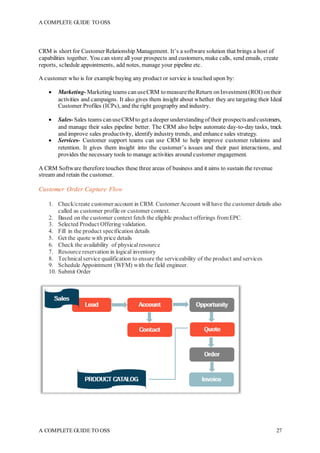
Customer Order Capture Flow
1. Check/create customer account in CRM. Customer Account willhave the customer details also
called as customer profile or customer context.
2. Based on the customer context fetch the eligible product offerings fromEPC.
3. Selected Product Offering validation.
4. Fill in the product specification details
5. Get the quote with price details
6. Check the availability of physicalresource
7. Resource reservation in logical inventory
8. Technicalservice qualification to ensure the serviceability of the product and services
9. Schedule Appointment (WFM) with the field engineer.
10. Submit Order
A COMPLETE GUIDE TO OSS
A COMPLETE GUIDE TO OSS 28
CRM Lifecycle
Customer Acquisition Customer Extension
Customer Retention
Selling Process (Configure,Price, Quote)
CPQ solutions pick up where CRM leaves off, making allof the complex product, pricing, and business
rules centralized, automatic and available in real-time. Sales has everything it needs at its fingertips
when trying to configure and quote a deal. The CPQ process starts with identifying and presenting
products to customers, proceeding to proposaland quotation creation, followed by the generation and
submission of quotes for valid orders.
A COMPLETE GUIDE TO OSS
A COMPLETE GUIDE TO OSS 29
High Level O2F Flow
What is CPQ
Configure, Price, and Quote (CPQ) is a process in the sales life cycle. Every business that sells complex
products has a CPQprocess in one way or another. When a customer is interested in a product, the sales
rep must configure the product to meet the customer’s request. When the product has been finalized,
the sales rep has to price the product and get approvalfor that price. Finally, the sales rep must prepare
a quote or proposal document to present or send to the customer. If a business sells simple products
with set prices, the CPQ process is already done. But enterprise businesses often have thousands of
complex products, ever-changing pricing calculations, large proposal document templates and sales
reps that don’t have the time to worry aboutit all. If a product or pricing expert forgets to respond to an
email, getting a quote to an interested customer can take weeks. Even when the proposalis complete,
what ensures that the configured product is valid and that the pricing calculations are exact? Today’s
enterprise business can’t rely on tribalknowledge and manual data entry to drive the CPQ process; the
digital age requires a fast, automated CPQ process that produces 100% accurate quotes, every time.
CPQ in today’s ecosystem can guide you through the following, catalog-driven, selling process:
• Browse and select best‐fit offers from your portfolio.
• Create accurate offer configurations and pricing in real‐time.
• Produce quotes across your sales channels that are valid and deliverable based on customer
preferences, your business models and your technicalcapabilities and constraints.
• Generate accurate digital orders for submission directly to your automated order-management
platform.
CPQ Process
New customer quotes and orders:
A COMPLETE GUIDE TO OSS
A COMPLETE GUIDE TO OSS 30
• Purchase of products and services
Existing customer:
• Upgrade or downgrade the product and services
• Purchase of additionalproduct and services
• Product and service changes
• Product and service disconnections
The key stages of the CPQ process are following:
 Customer and product portfolio identification to surf, browse, identify and enforce the eligibility
of product offers based on the customer context. Offers can be sourced directly from product
catalog, ensuring that CPQ acts on the latest product specification.
 Product offer selection identifying and including desirable products for eligible customers in the
quotation process.
 Full product offer configuration, pricing and validation of consumer and enterprise offers using
the extensive configuration capability of CPQ. This ensures that by modeling a product
specification in product catalog, associated products are configurable through the CPQ solution.
Users can select and specify the configurable values of products.
 Quote/proposalcreation.
 Quote validation and finalization through a configurable client framework, enabling flexible,
catalog‐driven quote and order processes.
 Customer acceptance using the customer profile and context awareness to ensure the validity of
the quotation.
 Bill of materials (BOM) creation from the decomposed PSR, required by the configured
quotation.
 Order validation and generation to create fully validated digital orders, ready for submission to
order‐management solutions.
 Order submission to an order‐management system for processing.
A COMPLETE GUIDE TO OSS
A COMPLETE GUIDE TO OSS 31
CPQ Solution Design considerations
 Catalog‐Driven CPQ
 Quote Configuration
The quote‐capture framework of CPQ should allow users to configure valid products while enforcing
following Validations:
• Mandatory field enforcement, ensuring the valid collection of key data
• Complex data‐format verification, enabling the custom verification of both free‐form and
option‐based data using REGEX and complex rules to ensure the entry and selection of valid
data.
• Choice‐ and cardinality‐based selection control, ensuring the selection of bestowed and
optional product elements based on structural product specification rules.
• Proactive compatibility rendering, actively responding to user selections to identify
incompatible items and choices to minimize the configuration effort for the user.
• External data consumption (reservation/availability) ability toconsumereal‐timecallouts to
external systems directly within the configuration process. This is key to providing accurate
data entry and capture for products that rely on unique customer items and where a reservation
request may be required.
• Reactive portfolio rules enforcement for portfolio‐based validation, ensuring the selections
made across products are compatible both with one other and any pre‐existing products in the
customer portfolio.
 Dynamic Pricing
CPQ prices the configuration of customer products in real‐time, using all the information gathered in
the quoteand order capturealongwith contextualinformation toderive a customer‐ specific pricewhile
the baseline pricing may be defined in the product catalog
 Quote Validation
Throughout the quoting process, CPQ validates the quotation based on the product configuration,
ensuring that the outcome of the quotation along with the customer product portfolio meets the rules
specified in the product catalog. CPQ operates on several levels of rule specification and validation,
driven by the rule entities specified in Catalog. CPQ identifies relevant options and filters out
incompatibilities based on user selections and displays the product data based on the results.
• The Product Classification and Selection functions include:
• Presenting product data in the UI layer.
• Guiding customers to the types of products available.
• Allowing customers to browse and choose products.
• The Product Configuration service provides a set of server resources that expose and enable the
resolution of the ambiguity in a product specification based on customer responses and selections.
The product configuration capability interrogates the product specification and returns optimized
representations that can manipulate and navigate the configuration of a product to derive a product
candidate from the catalog. Once a product specification is selected, the product configuration
capability supports the selection of available customer choices. The selection of choices helps to
define the product candidate from a product specification. This service also provides import
capabilities
A COMPLETE GUIDE TO OSS
A COMPLETE GUIDE TO OSS 32
• The Cross‐Sell, Up‐Sell and Promotion services provide web service resources that query the
definitions of complex relationships between product specifications based on relationship‐type
meta‐information, such as cross‐sell and up‐sell details.
• Cross‐sell shows other products relevant to the products or options the customer has already
chosen.
• Up‐sell shows additional products in which the customer may be interested that are available at
a higher price, recommending that they swap their choice for another product. These
capabilities enable a CPQfront endtoanalyze andretrieve relevant products for agivenproduct
and relationship type, for example, to evaluate the up‐sell rules and return appropriate products
from the product catalog, also providing input to calculate the product price.
CPQ Rules
A CPQ product should have Rule-based truth-maintenance capability in order to select right product, do
product validation, apply correct pricing and discounts etc.
Following are the types of enforcement rules:
• Cardinality
• Compatibility
• Dependency
• Eligibility
• Availability
• Serviceability
• Pricing
CPQ Integration
Contextual awareness is a key factor in CPQ that enables the formulation of a vital picture of contextually
relevant information impacting a quote and order at any given time. For Example, CPQ may interact with
CMS, CIB DB for customer and installbase information. Through context‐aware integration points, CPQ
can provide the ability to call out in real‐time to operation data services to build a picture of the customer,
including theproducts andservices theymayalreadyhaveandtheability of the networktoprovideservices
to the customer. With this information CPQ can accurately validate and enforce business rules during the
quoteand order captureprocess.Thefollowingfigureshows someof thevariables in contextualawareness.
The context affects the products and services that the customer can purchase. Contextual data impacts
eligibility, helps resolve customer‐specific pricing and controls the resources that a customer can select.
CPQ can query externalsources for key, contextually relevant information, such as:
• Customer account and productdetails.
• Network availability and serviceability details.
• Inventory and reservations availability.
A COMPLETE GUIDE TO OSS
A COMPLETE GUIDE TO OSS 33
Quote-To-Cash
Quote-to-Cash is the vital business process that connects a customer’s interest in a purchase to the
realization of revenue. It includes creating a quote, responding to RFXs, submitting a proposal,
negotiating and managing a contract, fulfilling orders, recognizing revenue, ensuring compliance and
tracking payments – all within visible and controlled workflow. Quote-to-Cash solutions include
Configure-Price-Quote (CPQ), Contract Lifecycle Management (CLM), and Revenue Management
applications.
Quote-to-Cash automates three core applications: Configure Price Quote, Contract Management,
and Revenue Management. Each application flows naturally into the next, creating a seamless QTC
process.
Configure Price Quote (CPQ) empowers salespeople by providing up-to date product and pricing
information. The CPQ application ensures sales people provide prospects with valid and complete
proposals, no matter the complexity of bundling rules or size of product catalog. The application also
enforces the company’s pricing rules to prevent inappropriate discounting. With CPQ, salespeople get
accurate proposals out more quickly and accurately, enabling them to close more deals.
Contract Management enables sales and legal teams to generate, negotiate, store, and comply with
all sales contracts, along with related legal documents such as NDAs. The Contract Management
application ensures that dealterms can be created quickly, following all company policies, and that the
company has totalvisibility to every step of the negotiation process. Once dealdocuments are signed,
Contract Management tools ensure that all the company’s new obligations are tracked correctly.
Revenue Management ensures correct, timely control of all revenue related processes, including
order management, billing, and revenue recognition. With the Revenue Management application, these
criticalback-office functions work in sync with each other and in accordance with the terms of the deal.
Revenue Management reduces the risk of errors in the ongoing customer relationship and makes sure
that the business captures the revenue opportunities, suchas renewals, that otherwise may slip through
the cracks. Revenue Management handles the diversity of business models a growing enterprise may
offer clients:physical goods, professionalservices, subscriptions, usage-base fees, and one-time fees.
A COMPLETE GUIDE TO OSS
A COMPLETE GUIDE TO OSS 34
A COMPLETE GUIDE TO OSS
A COMPLETE GUIDE TO OSS 35
Chapter 3
Deliver Process
Introduction
We discussed in detail about “Create Process” and “SellProcess” in previous chapter. Let us move on
now and understand what happens after the ProductOffering is purchased by the customer and sales
order is submitted through CPQ application.
A general understanding would be that customer should start using the services which he paid for. In
other words, allthe services which he requested for should be fulfilled. Realization of requested service
is covered under “Deliver Process”.
In this chapter we will try to understand the different steps in order fulfilment journey including
provisioning, O2F integration touchpoints etc. in detail.
Order Fulfilment journey
Order fulfilment journey post the sales order is captured and submitted to Order management system
can be broken into 3 layers, COM, SOM and TOM. Each layer is designated with a defined role to play
and I amgoing to explain themin detail. Almost all the Servicefulfilment products whichI haveworked
on follow this product architecture and fulfillment designers while designing the fulfillment journey
should follow this design principle and divide the Processing flow into 3 layers. It can be noted here
that COTS products available in the market have the capability to work in all three roles (COM, SOM
& TOM) as well as individual role.
Let us discuss the details of COM, SOM and TOM layer and try to fit-in the fulfillment journey tasks
in these three layer-
COM
Fulfillment COTS in COM role typically accepts the customer Order, validates it, decomposes PO/PS
into CFS and interacts with a billing system to perform such tasks as synchronizing customer accounts
between the order source system and the billing system, and initiating billing activities in billing
systems. OM in COM role also typically identifies the services that are associated with the products,
bundles, and offers, and sends that data to OM in the SOM role in a service order.
SOM
OM in the SOM role works with service and resource management systems to design services, assign
the resources required to fulfill the services and define how those resources need to be configured to
fulfill the services. This process is called design and assign.
To design and assign services, OM in the SOM role uses the data received in the service order. It sends
that data to a Service Resource Inventory (SRI)/ Physical Network Inventory system to design the
service and assign resources. As part of the service fulfillment you model predefined service
configurations in your SRI/PNI system.
OM in the SOM role processes the service order. In this case, OM uses orchestration again, and OM
decomposes order items into:
A COMPLETE GUIDE TO OSS
A COMPLETE GUIDE TO OSS 36
 An order component that interacts with a service and resource inventory system to design the
service and assign resources. For example, the service might need a localloop, telephone
number, and so on.
 An order component that sends a technicalorder to OM in the TOM role to manage service
activation and shipping.
In the SOM role, orchestration is used to ensure that the service design occurs first. The inventory
system needs to send data about the network resources and the actions required on those resources
back to OM, so OM can include that data when processing activation, shipping, and interactions with
a partner gateway.
TOM
After receiving the required data from the inventory system, the fulfillment SOM instance sends a
technical order to OM in the TOM role. In the TOM role, OM processes the technical order and
orchestrates the activation, shipping, and installation tasks. The systems typically involved in these
activities are WFM, SCM, and network activation systems. Partner gateway (PGW) systems for third
party service providers or trading partners can also be involved at the TOM level.
After completing the tasks in the technical order, OM in the TOM role communicates the order status
to OM in the SOM role, which in turn communicates its order status to OM in the COM role. OM in
the COM role can then complete the original customer order.
By using COM, SOM, and TOM, OM is able to take as input the products, bundles, and offers that the
customer purchases, and resolve those into customer-facing services and ultimately the resource-facing
services that need to be implemented on the network.
OM in the TOM role processes the technical order and decomposes order items into:
 An order component that sends activation requests to the network.
 An order component that sends requests to a shipping system.
An example
A sales order has been created to fulfil a product offering “BroadbandServiceOffer”. OM receives this
Order, does some order level validation and transforms it into customer order. Next, customer order
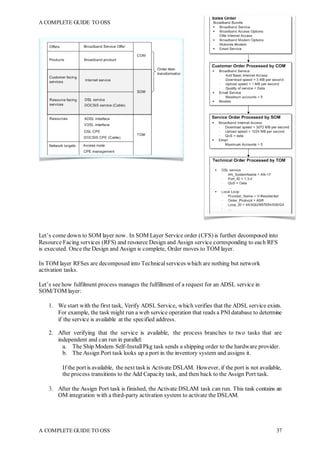
(PO/PS) is decomposed into service order (CFS) and an orchestration plan is selected. Based on the
orchestration plan, execution of fulfilment process starts and Service order is sent to SOM layer. Figure
below shows, layer wise Order decomposition
A COMPLETE GUIDE TO OSS
A COMPLETE GUIDE TO OSS 37
Let’s come down to SOM layer now. In SOM Layer Service order (CFS) is further decomposed into
Resource Facing services (RFS) and resource Design and Assign service corresponding to each RFS
is executed. Once the Design and Assign is complete, Order moves to TOM layer.
In TOM layer RFSes are decomposed into Technical services which are nothing but network
activation tasks.
Let’s see how fulfilment process manages the fulfillment of a request for an ADSL service in
SOM/TOM layer:
1. We start with the first task, Verify ADSL Service, which verifies that the ADSL service exists.
For example, the task might run a web service operation that reads a PNI database to determine
if the service is available at the specified address.
2. After verifying that the service is available, the process branches to two tasks that are
independent and can run in parallel:
a. The Ship Modem Self-Install Pkg task sends a shipping order to the hardware provider.
b. The Assign Port task looks up a port in the inventory system and assigns it.
If the port is available, the next taskis Activate DSLAM. However, if the port is not available,
the process transitions to the Add Capacity task, and then back to the Assign Port task.
3. After the Assign Port task is finished, the Activate DSLAM task can run. This task contains an
OM integration with a third-party activation system to activate the DSLAM.
A COMPLETE GUIDE TO OSS
A COMPLETE GUIDE TO OSS 38
The Assign Port task is dependent on the completion of both the Ship Modem Self-Install Pkg
task and the Activate DSLAM task. Therefore, even if the Ship Modem Self-Install Pkg task
completes, the Activate DSLAM task cannot start until the Assign Port task is finished.
4. When the activation is complete, the next two tasks send the customer survey and require that
an OM user verifies the order to make sure it is complete. After these two tasks are completed,
the order is complete.
Any of the tasks in this process can be configured as automated tasks. For example, the Assign Port
task can be an automated task if there is an integration with the inventory system, and the inventory
system is able to respond to an automation plug-in sender requesting a port number with a response that
assigns the port number for the service.
Order Template
We have progressed wellso far. Now let us understand the Order template i.e. what allinformation
are required to be there in a Customer order.
The metadata that you model in the order template defines the data that the order can include at
runtime. For example, a runtime order can include the following data:
 Information about the order. For example:
A COMPLETE GUIDE TO OSS
A COMPLETE GUIDE TO OSS 39
 The type of order, such as a requestfor a new service or a change to an existing
service.
 Order creation date.
 Expected completion date.
 Sales Order Id
 Product Offering Id
 Information about the customer; for example, name and address.
 Order Line Items and information about the services being requested; for example, upload
speed, download speed, and quality of service.
The data in customer orders, service orders, and technical orders is typically different for each type
of order:
 Customer orders include information about the customer, such as their location, the product
offerings that the customer purchased, and the product requirements, such as download speed.
 Service orders include information about the customer-facing services that need to be
provisioned, including the technicalrequirements suchas bandwidth andquality of service, and
the customer's location.
 Technicalorders includeinformation about theresources andresource-facingservices that need
tobe activated, andthe equipment that needs tothe shippedor installed. Resources andresource
facing services are identified by the physical inventory system from customer-facing services
that OM SOM sends to the physical inventory.
Order Operations
Order Orchestration concepts
We have progressed well so far. Having understood the COM, SOM and TOM process, lets us
understand the Customer Order capture process in CRM/CPQ as wellas order orchestration process in
OM in detail. Here I am going to explain you the new order acquisition flow
A COMPLETE GUIDE TO OSS
A COMPLETE GUIDE TO OSS 40
Diagram- NewAcquisition Order
Generic OM Flow
1. Customer Order Capture
1. Check/create customer account in CRM. Customer Account willhave the customer details
also called as customer profile or customer context.
2. Based on the customer context fetch the eligible product offerings fromEPC.
3. Selected Product Offering validation.
4. Fill in the product specification details
5. Get the quote with price details
6. Check the availability of physicalresource
7. Resource reservation in logical inventory
A COMPLETE GUIDE TO OSS
A COMPLETE GUIDE TO OSS 41
8. Technicalservice qualification to ensure the serviceability of the product and services
9. Schedule Appointment (WFM) with the field engineer.
10. Submit Order
Order Orchestration Flow
2. Assess, Decompose, format, Enrich the Order
The very step once the Sales order is captured and submitted to OM is to assess, validate, format and/or
enrich the order in COM layer. Different order management products have their own way of assessing
and validating the order. I am trying to explain here the productagnostic approach. Also, OM designers
should prefer to keep synchronous communication between Sales platform and OM till assessment
process is completed and Order moves ahead for further execution.
• Commercial validation: Validates the products and services contained on the order for
compatibility. Attribute, Template etc.
• Decomposition:Enriches the order withtheadditional products, services,resources anddataneeded
to fulfill the order using catalog decomposition, inference and mapping rules. customer order
(PO/PS) is decomposed into service order (CFS)
• Formatting and enrichment:Do Metadata level enrichment
• Impact analysis: Determines the products, services and resources currently associated with a
customer portfoliobyaccessingtheserviceprovider's repositoryanduses this informationtoderive
appropriate fulfillment actions.
A COMPLETE GUIDE TO OSS
A COMPLETE GUIDE TO OSS 42
• Fulfillment process selection:Derives the fulfillment process specification for each order, which is
further dynamically optimized during fulfillment.
3. Select the Orchestration plan
Now that customer order has been decomposed into service Order, next big task is to identify the
fulfilment process which should be invoked. Fulfilment process are modeled during design time and
there may be multiple fulfilment processes for different order types and operation. A fulfilment
process is a sequence of tasks and subprocesses that run consecutively or concurrently to fulfill all or
part of an order. It enables you to break down the work required to execute and fulfill an order into
functionaltasks, which can be distributed to various systems and order managers to be completed in a
controlled manner.
In processes, you can control how the tasks are run. For example, you could create a rule that evaluates
data and branches the process appropriately. Any number of processes can be defined in an order
process, consisting of any number or combination of manual and automated tasks. You can also run
subprocesses from a process. Subprocesses are processes that are launched from another process, as
opposed to being launched from an order.
An orchestration plan is based on two main factors: decomposition, which organizes sequence of
execution of the order items, and dependencies, which dictate when the executable order items are
allowed to run. Some services might require that some fulfillment tasks are completed before others.
For example, you need to complete provisioning order items before you can process activation order
items.
Dependencies are relationships in which a condition related to one order item must be satisfied before
another item can be processed successfully. For example, a piece of equipment must be shipped to a
location before the action to install it at that location can be taken. Dependencies can be between order
items in the same order (intra-order dependencies) or between order items in different orders (inter-
order dependencies). Inter-order dependencies are particularly common in situations that involve
amendments or follow-on orders. For example, the order items in a follow-on order for VoIP
provisioning might depend on the execution of the order items in the original order for DSL
provisioning.
A fulfilment process may be selected on the basis of order attributes which come in the order candidate.
1. Basis Order candidate and business rules, select the fulfilment flow
2. Trigger the selected fulfilment flow
4. Execute the Orchestration plan, listen to updates and response
We discussed earlier, every order orchestration plan may have one or more fulfilment processes and
each fulfilment process is a sequence of tasks and subprocesses that run consecutively or concurrently
to fulfill all or part of an order. Now let us understand the fulfilment tasks which are part of an
orchestration plan in detail. Here I am just trying to give you a conceptualview and the fulfilment tasks
which are explained below does not need to be designed in the same order. Also, not all the fulfilment
tasks are needed to be there in every orchestration plan.
 SYNC customer and Initiate Billing (Optional)
 Service Feasibility assessment
In Service feasibility assessment we want to achieve following-
 Whether the given customer location is serviceable for the ordered product.
 If the serviceability is found True, identify the network connectivity shortfall
A COMPLETE GUIDE TO OSS
A COMPLETE GUIDE TO OSS 43
 Depending on the number and type of shortfall, create multiple work orders or ticket of work to
complete network reachability till customer premise and complete the CPE installation.
 Customer Order qualification- Design & Assign Service
If you may recall what we discussed earlier, customer order gets decomposed into Service Order in
COM layer and Service order (CFS) is further decomposed into Resource Facing services (RFS) in
SOM layer. A CFS is a representation of the service that the customer purchased. An RFS is how the
service is implemented on the network. It is important to allocate resources to each RFS before
triggering network activation tasks on network. Design and Assign service ensures this resource
allocation.
By using the design and assign process in a service order, the incoming sales order does not need to
include any information about the existing installed network resources, such as localloops, ports, and
so on. The incoming order needs to describe only the type of service, the desired attributes such as
bandwidth, and any information that affects the choice of resources, such as the customer's location.
The design and assign process completes the transformation from a customer-facing service (CFS) to
a resource-facingservice (RFS).
For example, a customer might purchase a product offering named “Gold Broadband Service”. The
CFS is Broadband Internet Service. How that service is implemented on the network is the RFS, in this
case DSL Service. Therefore, the CFS Broadband Internet Service is resolved to RFS DSL Service.
However, the customer's requirements might be such that DSL is not possible, but a cable broadband
access is possible. In that case, the CFS Broadband Internet Service is resolved to the RFS Cable
Internet Service.
Because the resource-facing services are pre-configured in the PNI/SRI, the PNI/SRI can design the
resource-facing service and assign resources based only on the requirements of the customer-facing
service.
The design and assign process works as follows:
 OM sends the PNI/SRI system a request to design a service and assign resources. The request
specifies thetype of service, for example, broadbandInternet, therequestedservicesattributes,such
as upload and download speed, and relevant data, such as the location of the customer.
 Given the customer requirements, the PNI/SRI system determines which predefined service
configuration is appropriate, and based on that, finds the network resources that are available. For
example, if Broadband Internet Service maps to DSL service, the SRI system knows that the DSL
service design requires a port and a localloop. The PNI/SRI system finds an available local loop at
the customer's location and assigns it to the customer's service.
 The PNI/SRI system returns the resources, resource-facing services, and their associated actions to
OM. The PNI system also changes the status of the resources in the inventory.
 SLA & Milestone
SLA is operator’s commitmenttoits customer over thefulfilmenttimeline. Milestone canbe understood
as an indicator of the Order progress against SLA. An SLA framework calculates the fulfilment
timeline depending on various criteria. We will try and understand them.
SLA calculation framework Design Considerations
 Order priority
A COMPLETE GUIDE TO OSS
A COMPLETE GUIDE TO OSS 44
 Customer location (Rural, Urban etc.)
 WFM appointment
 Appointment and work force management- WFM
We briefly discussed earlier that appointment is scheduled during Order capture. If we look from
enterprise design perspective, ordering system in general do communicate with Work Force
Management system for Appointment management. When a Sales order is captured, an appointment is
taken at the same time if the Order fulfilment requires any physicalinstallation at the customer premise
by the field engineer. Using that appointment, a work order can be created by OM in WFM and it can
also be tracked there. As the work order progresses, its status can be updated in WFM and notified to
OM by creating a notification channelbetween OM and WFM. Also every customer location may not
have the last mile connectivity through operator network infrastructure and the level of connectivity
shortfallmay be different at different customer location and it needs to be evaluated while creating the
Work Order.
Keeping these things in our mind, we need to create a Work Order model. It is used to support the
interaction between the OM and the WFM.
Understanding Work Order Model
A Work Order Model should have following capabilities-
1. Appointment Handling
A Work order modelshould have the capabilities to recreate, reschedule or update the appointment
or appointment details depending on the requirement.
For example- A customer missed the appointment and equipment installation could not be
completed. In such a case work ticket should be closed as completed, however a new appointment
should be recreated and a work ticket would be required to be created to complete the installation.
2. Connectivity shortfall assessment
Every customer order has customer location as one of the request attribute. Based on this location,
OM can query physical network inventory to assess the level of connectivity shortfall and
accordingly a work order or work ticket can be raised in WFM followed by field engineer site visit
and network equipment installation.
3. Work Order Handling
A work order modelshould be able to create, Update or cancela new or existing work ticket in
WFM. Giving an example for each-
Create-
 New order with shortfalls identified and valid appointment is
 Amend Order is received with new appointment ID during Manage Shortfall.
Cancel-
 Cancel work ticket during Inflight Order Cancellation
 During Order rollback
Update-
 Update the work ticket status post ticket completion
4. Work order status notification
A COMPLETE GUIDE TO OSS
A COMPLETE GUIDE TO OSS 45
Once a work order is created in WFM, OM would wait for notifications whenever an event has
occurred on a Work Ticket in WFM. WorkOrder modelwould have a mechanism to listen to Work
ticket notifications sent by WFM.
Types of Notifications are as listed below:
 Work Order Created, Assigned, Started, Pending, Rescheduled, Cancelled, Completed
etc.
Based on the notification received, following actions may be taken by work order model
 Changing of order Sub-status
 Sending notifications to calling system, CRM for example
 Updating of the Appointment Date and time in SRI
 Re-calculation of SLA
 Logistics and Supply chain management- Shipping, delivery, delivery reschedule
At the customer premise, before a network equipment or resource could be shipped and delivered, it is
important to identify what that resource is going to be?
One scenario may be, where a physical device or resource is part of the product offering and selected
during order captureitself. For example, aproductoffering“MobileGoldOffer”maybea bundled offer
with mobile phone as part of the offering and customer may have a choice to choose between multiple
brands, color and configuration.
In another scenario, where order capture process is limited to selecting a Product offering which does
not have any physical device as part of the offering but may require a physicalresource to be installed
at customer premise. In such a case, Identification and allocation of resources is done in SOM layer.
We discussed earlier about Design and Assign process in OM in SOM role where we design RFS and
allocate resources correspondingtothoseRFS. For example, a productoffering“BroadbandGoldOffer”
may have a RFS “DSL Service” which requires DSL modem to be installed at customer premise.
Having understood the resource allocation concepts, let us now understand where to place the shipping
and deliver task in the OM orchestration flow. My recommendation is to have this task in TOM layer.
Reason being, resource allocation is done in SOM layer so, shipping should be done post allocation of
resources i.e. in TOM layer.
In TOM layer a “Ship Modem” task can be created which will send shipping order to the hardware
provider followed by a user task which will wait for a delivery notification till the shipped device is
delivered successfully. User task can be closed manually or through automated notification framework.
Note: OM in the COM role can also interact with workforce management (WFM) and supply chain
management (SCM) systems to ship products to customers. However, shipping tasks may require
knowledge of the services and resources being activated and shipped; for example, the service design
process might determine which type of modem to ship. Therefore, such shipping tasks should typically
be delegated to OM instances running in the SOM or TOM role.
 Provision Order- Deliver Service
As discussed earlier, OM in TOM role processes the technical order and orchestrates the activation,
shipping, and installation tasks. The systems typically involved in these activities are WFM, SCM, and
network activation systems. Technicalorders include information about the resources and resource-
facing services that need to be activated, and the equipment that needs to the shipped or installed.
A COMPLETE GUIDE TO OSS
A COMPLETE GUIDE TO OSS 46
In TOM layer RFSes are decomposed into Technical services which are nothing but network
provisioning tasks and these are executed on the network targets like AAA, HLRs, ELMS, NMS etc.
Provisioning in itself is a big subject but we will have limited discussion here on provisioning. For
correct provisioning design, following design approach should be followed
Design and solution approach-
1. Identify network target – Identify the network elements, ELMS or NMS on which network
services are to be provisioned. Example of Wireless NEs are – HLR, EIR, AUC etc. Wireline
NE examples are- Multiplexers, Layer 2and Layer 3 switches, CMTS,OLT, Aggregation switch
etc.
2. Create the circuit diagram-
Always create circuit diagram before starting the provisioning design for better understanding.
For example- Let’s assume we have to do the service provisioning on a DSL network. Our
approach as Provisioning designer should be to create the circuit diagram first. X-axis, we will
be divided betweenAccess, Aggregation andCore network. Y-axis will be divided betweenOSI
layers. All the network devices and network functions which are to be configured will be placed
in this 2D model.
3. Build the Provisioning commands- Provisioning commands are generally provided by the NE
vendors. As provisioning designer, you need to understand that command i.e. what exactly is
that command doing on network.
4. Define Execution sequence- Once you understand the network command, it is easier to chalk
out the execution sequence. For example- AHLR subscriber profile should be created on HLR
post his SIMauthentication only. So execution Sequence will be “Create AUC profile” followed
by “Create HLR profile”
5. Evaluate Dependency, Exclusions etc. – Evaluate Network Service and attribute level
dependency. For example- Before 3G or 4G service could be provisioned on HLR/HSS, it is
important to provision GPRS bearer service. So 3G Service provisioning is dependent on GPRS
bearer service.
 Error Handling
A COMPLETE GUIDE TO OSS
A COMPLETE GUIDE TO OSS 47
During execution of a fulfilment process, it is quite likely that a fulfilment task fails. What do we do in
suchascenario?OMdesigners needtothink aboutit duringdesign time. Therearetwopossible solution
approach i.e. handle the failure or rollback the order if the failure is irreparable. Let’s discuss both in
detail-
 Fallout Management
If we want to handle the failure; we do it through a fallout management framework. How it works is,
when a task fails in an orchestration flow, a fallout page opens which requires a manual intervention.
Now who should be accessing that fallout page or what should be the options available on the fallout
page or the expiry time of that fallout page should be thought out during design time. In summary
following design consideration need to be taken into account
1. Fallout options- Retry, Cancel, Skip and Rollback may be the standard optionsavailable against
the failed task and order.
2. Fallout work queue- Work Queue stands forthe work group which is going to work on a
particular failure.
3. Fallout expiry time- Time configured for the expiry of a fallout page once opened.
4. Fallout manual input- Option may be given to manually enterany input attribute if need be.
5. Fallout Status- Fallout status may be Pending, InProgress,Closed etc.
 Rollback
There are certain failures for which it is not possible to take forward the order processing. In such cases,
we need to UNDO all the changes which have been done during course of fulfilment process execution
and send a failure response back to the calling system. This process of UNDO changes and sending
failure response is called rollback.
Rollback again may be auto invoked or manually invoked. Let’s take an example. When OM receives
an order, it first validates it. Now, if validation task itself fails there is no point taking the order for
further processing. In such a case, an auto rollback may be invoked.
But, if a provisioning task fails while interacting with network say in TOM layer, we may want to
analyze the failure and then decide whether to rollback the order or not. In such cases, a fallout page
should be opened with an option to rollback.
 Work Group Management and User tasks-
As we know a fulfilment process is a sequence of tasks and subprocesses that run consecutively or
concurrently to fulfill all or part of an order. Most of the fulfilment tasks are automated tasks and do
not require any manual intervention. But there are cases when we want a user action. In such cases, a
user or manualtask is created. It Represents the need for human intervention in the fulfillment process.
Manual tasks are assigned to personnelwho complete the workfor these tasks in OM monitoring client.
Personnel can manage tasks by adding comments to the order, attaching documents, displaying the
history of the order, and manually entering and saving order data required to complete the task.
Manual or User tasks key design considerations
 A user task should be associated with a workgroup. Awork group is the specialized team
authorized to work on a particular type of user tasks.
 User Task Status- Pending,InProgress,Closed
 User Roles and permissions
 Task assignment options- Do, Redo, Undo, Fix
 Configurable attributes- SLA, PONR, Custom States, Reason Codes and validations
 Assign tasks to users based on taskassignment strategy
 Task Hierarchy
 User Group owner
 Escalation in case of SLAviolation
A COMPLETE GUIDE TO OSS
A COMPLETE GUIDE TO OSS 48
 Notification- Milestone, Error, Installation etc.
Notification framework is the main control plane of an order flow and entire order progress and its
successfulcompletion relies on how robust notification framework is. It plays a very criticalrole in the
inter-component communication between OM and external BSS/OSS systems where order progress
depends on responses to/from externalsystems.
There may also be cases like fulfilment task failure or milestone achievement etc where BSS/ OSS
systems are required to be notified for corrective or progressive action. In all such cases notification
framework plays an important role.
Notification canbe sentatOrder level, Order item level, Order milestone level, or fulfilment task failure
level etc.
External systems may be
 WFM
 CRM or order-source system
 SCM (Supply Chain management)
 Billing and other BSS systems
Notification Type may be
 Milestone Notification
 Error Notification (In case of a fulfilment task failure)
 Order completion notification
 Logistics flow notification to/from SCM
 Work Order flow notification to/from WFM
 SLA notification
 Order Status Update
As the order progresses, OM communicates with the originating CRM or order-source system to
provide information about the status of the order. You can track the status of tasks, order items, order
components, and the order itself.
When all order items for an order are complete, OM closes the order and informs the originating system
that all of the fulfillment tasks are complete.
 Billing Event activation
Billing account instantiation and activation through a single task or through 2 tasks is an OM
designer’s prerogative. My recommendation is to take the 2nd design approach. If you may recall,
in the COM layer we had instantiated the billing account. Once the network activation is complete,
it is important to get the billing going. Its time now to activate the account.
Network provisioning happens in TOM layer. Once it is done, controlshould be given back to COM
layer where Billing account is activated.
5. Manage OLM events
During course of an order journey following are the likely possibilities-
 In-flight revision requests
 In-flight cancellation
A COMPLETE GUIDE TO OSS
A COMPLETE GUIDE TO OSS 49
 Error Handling
During design time, OM designers need to modelthe workflow and manage OLM events. For
canceland revision requests, OM generates and executes compensation plans to match a change.
OLM manages order data and status updates and order fallout.
6. Order status update events
After completing the tasks in the technicalorder, OM in the TOM role communicates the order
status to OM in the SOM role, which in turn communicates its order status to OM in the COM
role. OM in the COM role can then complete the original customer order.
A COMPLETE GUIDE TO OSS
A COMPLETE GUIDE TO OSS 50
Diagram- Order Flow example- Acquisition
Modify and Query Operation workflows
An example
Diagram- Order Flow example- Balance check
A COMPLETE GUIDE TO OSS
A COMPLETE GUIDE TO OSS 51
Diagram- Order Flow example- Billing Address change
Diagram- Order Flow example- MSISDN Change
Products in OM Space
Amdocs Order Fulfilment
A COMPLETE GUIDE TO OSS
A COMPLETE GUIDE TO OSS 52
Amdocs Order Management Process
Oracle OSM
A COMPLETE GUIDE TO OSS
A COMPLETE GUIDE TO OSS 53
An Example
We have understood the Order fulfilment process wellenough to design an orchestration flow for a
real life use case.
We will first model the PSR and create COM/SOM/TOM layer orchestration flow. Next we willsee
in detail how these are implemented.
Quad Play Scenario
 Allocate and activate resources to support new customer services e.g. Quad play offering for
$100 per month
 Broadband – e.g. 10 MB/sec per weekday and 20 MB/sec on weekend
 Voice – 1000 domestic minutes plus international calls at 10c per minute
 Wireless – 1000 SMS, 500 domestic voice minutes, and1GBof data. If exceeded, costs are 1c
per SMS or voice minute or MB
 TV – 50 basic channels s and 4 sports channels
Order Capture entities
 Offer customer differentcombination of services
 Voice
 Data
 TV
 Wireless
 With various price plans
A COMPLETE GUIDE TO OSS
A COMPLETE GUIDE TO OSS 54
 Voice minutes
 Data speed
 Data volume
 TV Channels
 Number of SMSs
Order Orchestration
O2F Model (OrderToFulfil)
A COMPLETE GUIDE TO OSS
A COMPLETE GUIDE TO OSS 55
A COMPLETE GUIDE TO OSS
A COMPLETE GUIDE TO OSS 56
Chapter 4
Enterprise Design
Introduction
In this chapter we will try to understand the enterprise design concepts and explain the design
frameworks in detail. Any telecom enterprise IT setup focusses on 3 key things and they are:
• Plan the Business - Strategy
• Manage the Business - Operation
• Run the Business - Supplier/Partner and Enterprise Management
After reading this chapter readers willunderstandtheapplications whicharepartof Strategy, Operation
and Enterprise Management and integration approach of these applications.
TeleManagement Forum Frameworx
TMForumFrameworx is asuite of bestpractices andstandards thatprovides theblueprint for effective,
efficientbusiness operations. Itenables youto assess andoptimize performanceusingaproven, service-
oriented approach to operations and integration. The practical tools available in Frameworx help
improve end-to-end management of services across complex, multi-partner environments. There are 3
types of frameworks- SID, TAM and TOM. We will discuss each one in detail.
What Frameworx can do
 Innovate and reduce time-to-market with streamlined end-to-end service management
 Create, deliver and manage enterprise-grade services across a multi-partner value-chain
 Improve customer experience and retention using proven processes, metrics and maturity
models
 Optimize business processes to deliver highly efficient, automated operations
 Reduce integration costs and risk through standardized interfaces and a common information
model
 Reduce transformation risk by delivering a proven blueprint for agile, efficient business
operations
 Gain independence and confidence in your procurement choices through conformance
certification and procurement guides
 Gain clarity by providing a common, industry-standard language
Information Framework (SID)
 The Information Framework (SID) is a component of Frameworx, the TM Forum’s blueprint
for enabling successful business transformation. It provides standard definitions for all the
information that flows through the enterprise and between service providers and their business
partners. All of Frameworx, including the Information Framework, is created and evolved by
industry leaders and practitioners in TM Forum’s Collaboration project.
 The Information Framework (SID) provides a reference modeland common vocabulary for all
the information required to implement Business Process Framework (eTOM) processes. It
reduces complexity in service and system integration, development and design by providing an
off the shelf information model that can be quickly adopted by all parties.
5 things you can do with the Information Framework
A COMPLETE GUIDE TO OSS
A COMPLETE GUIDE TO OSS 57
1. Reduce integration costs by adopting standards-based information models and using them in
applications and interfaces
2. Savehundreds of designhours bystartingwithamatureframeworkand 1500entities developed
and vetted by subject matter experts
3. Speed time to market by using well-understood integration interfaces based on the Information
Framework, eliminating the need for data translation between systems
4. Avoid wasting precious development time on debates with your team, partners, or vendors by
adopting a widely proven, industry accepted, rich and extensible information model
5. Mandate conformance to the Information Framework and save time and money during vendor
evaluation and procurement
Diagram- SID Framework
Application Framework (TAM)
The Application Framework (TAM) is a sub-component of Frameworx, the TM Forum’s blueprint for
enabling successful business transformation. It provides a common language and means of
identification for buyers and suppliers across allsoftware application areas.
All of Frameworx, including the Application Framework, is created and evolved by industry leaders
and practitioners in TM Forum’s Collaboration project.
What is the Application Framework?
The Application Framework (TAM) provides a systems map which captures how business capabilities
are implemented in deployable, recognizable applications.
A COMPLETE GUIDE TO OSS
A COMPLETE GUIDE TO OSS 58
The Application Framework provides a common language for communities who specify, procure,
design, and sell systems, so that they can understand each other’s viewpoints. It provides logical
groupings of applications, then describes each application’s functionality.
As a result, it is a practical, everyday working guide to define and navigate the elements of the complex
management systems landscape.
5 things you can do with the Application Framework
1. Streamline procurement by using common definitions and language to specify and evaluate
solutions
2. Document and then rationalize your application inventory during transformation projects or
mergers and acquisitions
3. Integrate faster and with lower costs by defining and clearly communicating the functions
provided within each application
4. Reduce custom development costs with modular, standardapplication requirements
5. Increase automation and efficiency with standard, deployable components
Diagram- TAM Framework Level 1 View
Business Process Framework (eTOM)
The Business Process Framework (eTOM) is a criticalcomponent of Frameworx, the TM Forum’s
blueprint for enabling successfulbusiness transformation.
It is a comprehensive, industry-agreed, multi-layered view of the key business processes required to
run an efficient, effective and agile digital enterprise.
All of Frameworx, including the Business Process Framework, is created and evolved by industry
leaders and practitioners in TM Forum’s member driven collaboration community.
What is the Business Process Framework?
A COMPLETE GUIDE TO OSS
A COMPLETE GUIDE TO OSS 59
It is a hierarchicalcatalog of the key business processes required to run a service-focused business. At
the conceptuallevel, the framework has three major areas, reflecting major focuses within typical
enterprises:
 Strategy, Infrastructure and Product
 Operations
 Enterprise Management
6 things you can do with the Business Process Framework
1. Create a common language for use across departments, systems, external partners and
suppliers, reducing cost and risk of system implementation, integration and procurement.
2. Adopt a standard structure, terminology and classification scheme for business processes to
simplify internal operations and maximize opportunities to partner within and across
industries.
3. Apply disciplined and consistentbusiness process developmententerprise-wide, allowingfor
cross-organizationalreuse.
4. Understand, design, develop and manage IT applications in terms of business process
requirements so applications will better meet business needs.
5. Create consistent and high-quality end-to-end process flows, eliminating gaps and
duplications in process flows.
6. Identify opportunities for cost and performance improvement through re-use of existing
processes and systems.
A COMPLETE GUIDE TO OSS
A COMPLETE GUIDE TO OSS 60
Diagram- eTOM Framework Level 1 View
A COMPLETE GUIDE TO OSS
A COMPLETE GUIDE TO OSS 61
A COMPLETE GUIDE TO OSS
A COMPLETE GUIDE TO OSS 62
A COMPLETE GUIDE TO OSS
A COMPLETE GUIDE TO OSS 63
Enterprise Architecture
Few Examples
Diagram- Layered Enterprise Architecture with digital experience snapshot
A COMPLETE GUIDE TO OSS
A COMPLETE GUIDE TO OSS 64
Diagram- SOA Enterprise Architecture
Diagram- Enterprise Integration
A COMPLETE GUIDE TO OSS
A COMPLETE GUIDE TO OSS 65
SECTION- II
A Guide to Telecom Networks
Basics and Advanced
A COMPLETE GUIDE TO OSS
A COMPLETE GUIDE TO OSS 66
Chapter 5
Network Basics
Introduction
This chapter talks about basic networking concepts which are foundation for understanding complex
telecom network architecture. Switches, Routers, LANs, Ethernets, SONETs, OSI protocols,
multiplexing techniques etc. are the building blocks of any telecom network. Unless we understand the
network functions of these devices and protocols, readers will find it difficult to understand the
increasingly complex network design.
After reading this chapter, readers willthoroughly understand allthe networking devices, protocols and
their functionin detail andin thenext chapter wewillsee their role in a connectednetworkenvironment.
Basic Networking Concepts
OSI Model
The Open Systems Interconnection (OSI) Modelis a conceptualand logicallayout that defines network
communicationbetweentelecommunicationor computingsystems. OSI referencemodelis divided into
7 layers and each layer offers a set of protocols and these protocols are used by two communicating
devices for uninterrupted communication.
OSI Reference Model
A COMPLETE GUIDE TO OSS
A COMPLETE GUIDE TO OSS 67
OSI Model Layers and Protocols
Following are some of the important OSI protocols-
 Application layer:DNS, DHCP, FTP, HTTP, IMAP, LDAP, NTP, POP3, RTSP, SMTP, Telnet,
TFTP
 Presentation Layer: JPEG, MIDI, MPEG, TIFF
A COMPLETE GUIDE TO OSS
A COMPLETE GUIDE TO OSS 68
 Session Layer: NetBIOS, NFD, PAP, SCP, SQL, ZIP
 Transport Layer: TCP and UDP
 Network Layer: ICMP, IGMP, IPSEC, IPV6, IPX
 Data-Link layer:ARP, ATM, CDP, FDDI, Frame-Relay, HDLC, PPP, STP, Token-Ring
 Physical Layer: Ethernet, DSL, ISDN, Wi-Fi, Bluetooth, Sonet/SDH
Networking Components and Devices
Introduction
All but the most basic of networks require devices to provide connectivity and functionality.
understanding how these networking devices operate and identifying the functions they perform are
essential skills for any network administrator and are requirements for a Network+ candidate. This
chapter introduces commonly used networking devices. Although it is true that you are not likely to
encounter all the devices mentioned in this chapter on the exam, you can be assured of working with at
least some of them.
Network Devices Summary
Device Description Key Points
Hub Connects devices on an Ethernet
twisted-pair network.
 A hub does not perform any tasks besides signal
regeneration.
 Are used to create network
Switch Connects devices on a twisted-pair
network.
A switch forwards data to its destination by using the
MAC address embedded in each packet.
Hub/Switches are used for local area network and not
used to connect to internet
Repeater Regenerates data signals. The function a repeater provides typically is built in to
other devices such as switches.
Bridge Connects LANs to reduce overall
network traffic.
 A bridge allows data to pass through it or prevents data
from passing through it by reading the MAC address.
 Transfers data only to the intendeddestination. Bridge
uses MAC address.
Router Connects networks.  A router uses the software configured network address
to make forwarding decisions.
 It Is used to connect networks. Router uses IP address.
Gateway Translates from one data format
into another.
Gateways can be hardware or software based. Any device
that translates data formats is called a gateway.
Are used to establish communication between two
devices which do not use the same protocol for
communication
CSU/DSU Translates digital signals used on a
LAN into those used on a WAN
CSU/DSU functionality is sometimes incorporated into
other devices, such as a router with a WAN connection.
Modem Provides serial communication
capabilities across phone lines.
Modems modulate the digital signal into analogat the
sending end and perform the reverse function at the
receiving end.
Network card
Enables systems to connect to the
network.
Network interfaces can be add-in expansion cards,
PCMCIA cards, or built-in interfaces.
Media converter Interconnects older technology
with new.
A media converter is a hardware device that connects
newer Gigabit Ethernet technologies with older
100BaseT networks or older copper standards with fiber.
Firewall Provides controlleddata access
between networks.
Firewalls can be hardware- or software based. They are
an essential part of a network’s security strategy
A COMPLETE GUIDE TO OSS
A COMPLETE GUIDE TO OSS 69
DHCP server Automatically distributes
information.
 DHCP assigns all IP information, includingIP address,
subnet mask, DNS, gateway, and more.
 Assigns the IP address, subnet mask, dns server
address dynamically to a computer
Multilayer switch Functions as a switch or router Operates on Layers 2 and 3 of the OSI model as a switch
and can perform router functionality
Content switch Forwards data by application. Content switches can identify and forward data by its
port andapplication
Load balancer Distributes network load. Load balancing increases redundancy by distributing the
load to multiple servers.
Multifunction devices Combines network services These are hardware devices that combine multiple
network services into a single device reducing cost and
easing administrative difficulty.
DNS server Provides name resolution from
hostnames to IP addresses.
A DNS server answers clients’ requests to translate
hostnames into IP addresses.
Bandwidth shaper Manages network bandwidth. The bandwidth shaper monitors andcontrols bandwidth
usage.
Proxy server Manages client Internet requests. Serves two key network functions increases network
performance by caching, and filters outgoing client
requests.
ATM Asynchronous Transfer Mode a telecommunications concept defined
by ANSI and ITU (formerly CCITT) standards for
carriage of a complete range of user traffic,
including voice, data, and video signals". ATM is a core
protocol used over the SONET/SDH backbone of
the public switched telephone network (PSTN)
and IntegratedServices Digital Network (ISDN), but its
use is declining in favor of all IP
LAN Local Area Network Ethernet, Wi-Fi (Wireless LAN)
VLAN- CVLAN, SVLAN
NIC Network Interface card Converts serial data into parallel data. Every NIC has an
address called MAC Address.
PDN Packet data networks Core network. Examples- Internet, Private corporate
networks, IP multimedia subsystem etc.
IMS IP multimedia subsystem
UNI/NNI User Network Interface/ Network
to network Interface
Networking Devices
Hub, Repeater, Modem, Network Interface Card (NIC), Media converters, Basic switch, Bridge,
Wireless access point, Basic router, Basic firewall, Basic DHCP server, Multilayer switch, Bandwidth
shaper
Hub
At the bottom of the networking food chain, so to speak, are hubs. Hubs are used in networks that use
twisted-pair cabling to connect devices. Hubs also can be joined to create larger networks. Hubs are
simple devices that direct data packets to all devices connected to the hub, regardless of whether the
A COMPLETE GUIDE TO OSS
A COMPLETE GUIDE TO OSS 70
data package is destined for the device. This makes them inefficient devices and can create a
performance bottleneck on busy networks.
In its most basic form, a hub does nothing except provide a pathway for the electricalsignals to travel
along. Such a device is called a passive hub. Far more common nowadays is an active hub, which, as
well as providing a path for the data signals, regenerates the signal before it forwards it to all the
connected devices. In addition, an active hub can buffer data before forwarding it. However, a hub does
not perform any processing on the data it forwards, nor does it perform any error checking.
Multistation Access Unit
In a token ring network, a multistation access unit (MSAU) is used in place of the hub that is used on
an Ethernet network. The MSAU performs the token circulation inside the device, giving the network
a physical star appearance. It functions as a logical ring. The logical ring function is performed from
within the MSAU. Each MSAU has a ring in (RI) port on the device, which is connected to the ring out
(RO) port on another MSAU. The last MSAU in the ring is then connected to the first to complete the
ring. Because token ring networks are few and far between nowadays, it is far more likely that you will
find yourself working with Ethernet hubs and switches.
Switches
Like hubs, switches are the connectivity points of an Ethernet network. Devices connect to switches via
twisted-pair cabling, one cable for each device. The difference between hubs and switches is in how the
devices deal with the data they receive. Whereas a hub forwards the data it receives to all the ports on
the device, a switch forwards it to only the port that connects to the destination device. It does this by
learning the MAC address of the devices attached to it and then by matching the destination MAC
address in the data it receives. By forwarding data to only the connection that should receive it, the
switch can greatly improve network performance. By creating a direct path between two devices and
controlling their communication, the switch can greatly reduce the traffic on the network and therefore
the number of collisions. As you might recall, collisions occur on Ethernet networks when two devices
attempt to transmit at exactly the same time. In addition, the lack of collisions enables switches to
A COMPLETE GUIDE TO OSS
A COMPLETE GUIDE TO OSS 71
communicate with devices in full-duplex mode. In a full-duplex configuration, devices can send data
to and receive data from the switch at the same time. Contrastthis with half-duplex communication, in
which communication can occur in only one direction at a time. Full-duplex transmission speeds are
double that of a standard half-duplex connection. So, a 10Mbps connection becomes 20Mbps, and a
100Mbps connection becomes 200Mbps.
LAN Switches- LAN switches are usually used to connect points on a company’s internalLAN. It is
also known as a data switch or an Ethernet switch.
Bridges
Bridges are used to divide larger networks into smaller sections. Bridges accomplish this by sitting
between two physicalnetwork segments and managing the flow of data between the two. By looking
at the MAC address of the devices connectedto each segment, bridges can elect to forward the data (if
they believe that the destination address is on another interface) or block it from crossing (if they can
verify that it is on the interface from which it came).
When bridges were introduced, the MAC addresses of the devices on the connected networks had to be
entered manually. Today, almost all bridges can build a list of the MAC addresses on an interface by
watching the traffic on the network. Such devices are called learning bridges because of this
functionality.
Types ofBridges
Three types of bridges are used in networks:
Transparent bridge: Derives its name from the fact that the devices on the networkare unaware of its
existence. Atransparent bridge does nothing except block or forward data based on the MAC address.
Source route bridge: Used in token ring networks. The source route bridge derives its name from the
fact that the entire path that the packet is to take through the network is embedded in the packet.
Translational bridge: Used to convert one networking data format to another, such as from token
ring to Ethernet and vice versa.
Routers
A COMPLETE GUIDE TO OSS
A COMPLETE GUIDE TO OSS 72
Ina commonconfiguration, routersareusedtocreatelarger networks byjoining twonetworksegments.
A small office, home office (SOHO) router is used to connect a user to the Internet. A SOHO router
typically serves 1 to 10 users on the system. Arouter can be a dedicated hardware device or a computer
system with more than one networkinterface and the appropriate routing software. Allmodern network
operating systems include the functionality to act as a router. A router derives its name from the fact
that it can route data it receives from one network to another. When a router receives a packet of data,
it reads the packet’s header to determine the destination address. After the router has determined the
address, it looks in its routing table to determine whether it knows how to reach the destination; if it
does, it forwards the packet to the next hop on the route. The next hop might be the finaldestination, or
it might be another router.
Gateways
Any devicethat translates onedata format into another is called a gateway. Someexamples of gateways
include a router that translates data from one network protocol into another, a bridge that converts
between two networking systems, and a software application that converts between two dissimilar
formats. The key point about a gateway is that only the data format is translated, not the data itself. In
A COMPLETE GUIDE TO OSS
A COMPLETE GUIDE TO OSS 73
many cases, the gateway functionality is incorporated into another device. Don’t confuse a gateway
with the term default gateway. The term default gateway refers to a router to which all network
transmissions notdestinedfor the localnetworkaresent. Don’tconfusea gateway withthetermdefault
gateway. The term default gateway refers to a router to which all network transmissions not destined
for the local network are sent.
Network Cards
A network card, also called a network interface card (NIC), is a device that enables a computer to
connect to the network. Network interfaces come as add-in expansion cards or as PCMCIAcards used
in laptop systems. In some cases, rather than having an add-in NIC, the network interface is
embedded into the motherboard.
Wireless Access Points
Wireless access points (APs) areatransmitter and receiver (transceiver) deviceusedtocreatea wireless
LAN (WLAN). APs typically are a separate network device with a built-in antenna, transmitter, and
adapter. APs use the wireless infrastructure network mode to provide a connection point between
WLANs and a wired Ethernet LAN. APs also typically have severalports, giving you a way to expand
the network to support additionalclients.
Depending on the size of the network, one or more APs might be required. Additional APs are used to
allow access to more wireless clients and to expand the range of the wireless network. Each AP is
limited by a transmission range the distance a client can be from an AP and stillget a usable signal. The
actual distance depends on the wireless standard being used and the obstructions and environmental
conditions between the client and the AP.
Modems
A COMPLETE GUIDE TO OSS
A COMPLETE GUIDE TO OSS 74
A modem, short for modulator/demodulator, is a device that converts the digitalsignals generated by a
computer into analog signals that can travelover conventionalphone lines. The modem at the receiving
end converts the signalback into a format that the computer can understand. Modems can be used as a
means to connect to an ISP or as a mechanism for dialing up a LAN. Modems can be internal add-in
expansion cards or integrated with the motherboard, externaldevices that connect to a system’s serial
or USB port, PCMCIA cards designed for use in laptops, or proprietary devices designed for use on
other devices, such as portables and handhelds.
Firewalls
A firewall is a networking device, either hardware- or software-based, that controls access to your
organization’s network. This controlledaccess is designedtoprotectdataand resources fromanoutside
threat. To do this, firewalls typically are placed at a network’s entry/exit points—for example, between
an internal network and the Internet. After it is in place, a firewall can controlaccess into and out of
that point.
As mentioned, firewalls can be implemented through software or through a dedicated hardware device.
Organizations implement software firewalls through network operating systems (NOSs) such as
Linux/UNIX, Windows servers, and Mac OS servers. The firewallis configured on the server to allow
or block certain types of network traffic. In small offices and for regular home use, a firewall is
commonly installed on the local system and is configured to controltraffic. Many third-partyfirewalls
are available.
DHCP Server
Without question, the easiest way to assign TCP/IP information to client systems is to use a Dynamic
Host Configuration Protocol(DHCP) server. On a network running TCP/IP, each computer must have
a unique IP address in order to be recognized and be part of the network. Briefly, a protocolis a method
of communicating between computers.
Computers on a network using TCP/IP require specific network settings to be able to connect to the
network. First among these settings is the IP address. An IP address consists of four octets, or four sets
of 8 bits—for example, 192.168.2.1. Each computer on the network must have one of these numbers in
order to perform network functions through TCP/IP. The number must be unique to the PC and must
be within a certainrangeto allow the PC toconnecttoother systems.Inlarger networks,the assignment
of manual addresses can be a nightmare, especially when IP addressing schemes can be changed and
computers can be moved, retired, or replaced. That’s where DHCP comes in. DHCP assigns IP
A COMPLETE GUIDE TO OSS
A COMPLETE GUIDE TO OSS 75
addresses, eliminating the need to assign IP addresses individually and making the job of network
administrators considerablyeasier. Whena DHCP server is runningon a network, theworkstationboots
up and requests an IP address from the server. The server responds to the request and automatically
assigns an IP address to the computer for a given period of time, known as a lease. The workstation
acknowledges the receipt of the IP address, and the workstation has all the information it needs to
become part of the network. This communication between the server and the workstation happens
completely automatically and is invisible to the computer user.
Repeaters
Data signals weakenas theytravel downaparticular medium. This is knownas attenuation. Toincrease
the distance a signal can travel, you can use repeaters. Repeaters increase the cable’s usable length and
are commonly used with coaxial network configurations. Because coaxialnetworks have fallen out of
favor, and because the functionality of repeaters has been built in to other devices, such as hubs and
switches, repeaters are rarely used as an independent device.
Specialized Network Devices
Any network is composed of many different pieces of hardware. Some, like firewalls and DHCP
servers, are in most networks. Other devices are more specialized and are not found in every network
environment. Following are the specialized networking devices:
Multilayer and content switch
IDS and IPS
Load balancer
Multifunction network devices
DNS server
Bandwidth shaper
Proxy server
CSU/DSU
Multilayer and Content Switches
It used to be that networking devices and the functions they performed were pretty much separate. We
had bridges, routers, hubs, and more, but they were separate devices. Over time, the functions of some
individual network devices became integrated into a single device. This is true of multilayer switches.
A multilayer switch is one that can operate at both Layer 2 and Layer 3 of the OSI model, whichmeans
that the multilayer device can operate as both a switch and a router. Also called a Layer 3 switch, the
multilayer switch is a high-performance device that actually supports the same routing protocols that
routers do. It is a regular switch directing traffic within the LAN; in addition, it can forward packets
between subnets.
Multifunction Network Devices
It used to be that each device on a network (firewall, router, repeater, hub, to name a few) had its own
purpose. Itwasn’tlongbeforethefunctions of theseindividual devices werecombinedinto single units,
creating multifunction network devices. Consider a high-speed cable modem used by home users or
small companies to access the Internet. These are multifunction network devices that have combined
A COMPLETE GUIDE TO OSS
A COMPLETE GUIDE TO OSS 76
functionality, including firewall, DHCP server, wireless access point, switch, and router. Networks are
full of multifunction devices, including switches, routers, servers, and more.
Multifunction devices offer some advantages over multiple independent devices or software packages.
Suppose an organization maintains antivirus, firewall, content filtering, and IDS/IPS software on a
single server or evenseveralservers. This organizationmustpay for thesoftwareoneachof theservers,
the operating system, and the personnelto maintain the systems. Allof this can be simply replaced with
a single multifunction network device.
DNS Server
A Domain Name System (DNS) server performs a relatively basic, but vital, role for many
organizations. Thefunctionof a DNS server is relatively simple in thatit provides nameresolution from
hostnames to IP addresses. The measures to which the server goes to provide a successfulresolution,
however, are not so simple. As well as consulting its own databases for the requested information, a
DNS server contacts other DNS servers as needed to get the necessary information. This process might
involve a large number of queries.
As you may know, each device ona network requires a unique IP address so that it can provide services
to clients. Rather than rely on flawed human memory to remember these addresses, DNS allows us to
use easy-to-remember hostnames, such as comptia.org, to access these hosts. When we type
www.comptia.org into a web browser, our configured DNS server takes the request and searches
through a system of servers to find the correct TCP/IP address that relates to www.google.com. After
the DNS server has ascertained the correct TCP/IP address, that address is returned to the client, which
then contacts the IP address directly. To speed up subsequent requests for the same address, the DNS
server adds the address to its cache. For a workstation to send requests to the DNS server, the TCP/IP
address of the DNS server must be provided to the workstations. This can be done manually, or the
address canbeincluded in the informationsupplied bya DHCP (Dynamic Host Configuration Protocol)
server.
Bandwidth Shaper
The demand for bandwidth on networks has never been higher. Internet and intranet applications
demand a large amount of bandwidth. Administrators have to ensure that despite all these demands,
adequate bandwidth is available for mission-critical applications while few resources are dedicated to
spam or peer to- peer downloads. To do this, you need to monitor network traffic to ensure that data is
flowing as you need it to. The term bandwidth shaping describes the mechanisms used to control
bandwidth usage on the network. With this, administrators can controlwho uses bandwidth, for what
purpose, and whattime of day bandwidth can be used. Bandwidth shaping establishes priorities for data
A COMPLETE GUIDE TO OSS
A COMPLETE GUIDE TO OSS 77
traveling to and from the Internet and within the network. A bandwidth shaper, essentially performs
two key functions— monitoring and shaping. Monitoring includes identifying where bandwidth usage
is high and the time of day. After that information is obtained, administrators can customize or shape
bandwidth usage for the best needs of the network.
Proxy Server
Proxy servers typically are part of a firewall system. In fact, they have become so integrated with
firewalls that the distinction between the two can sometimes be lost.
However, proxy servers perform a unique role in the network environment—a role that is very separate
from that of a firewall. For the purposes of this book, a proxy server is defined as a server that sits
between a client computer and the Internet, looking at the web page requests the client sends. For
example, if a client computer wants to access a web page, the requestis sent to the proxy server rather
than directly to the Internet. The proxy server first determines whether the request is intended for the
Internet or for a web server locally. If the requestis intended for the Internet, the proxyserver sends the
request as if it originated the request. When the Internet web server returns the information, the proxy
server returns the information to the client. Although a delay might be induced by the extra step of
going throughtheproxyserver, theprocessis largely transparenttotheclientthat originated the request.
Because each request a client sends to the Internet is channeled through the proxy server, the proxy
server can provide certain functionality over and above just forwarding requests.
One of thebiggest of theseextrafeatures is that proxyservers cangreatlyimprovenetworkperformance
through a process called caching. When a caching proxy server answers a request for a web page, the
server makes a copy of allor part of that page in its cache. Then, when the page is requested again, the
proxy server answers the request fromthe cache rather than going back to the Internet. For example, if
a client on a network requests the web page www.comptia.org, the proxy server can cache the contents
of that web page. When a second client computer on the networkattempts to access the same site, that
client can grab it from the proxy server cache, and accessing the Internet is unnecessary. This greatly
increases the response time to the client and can significantly reduce the bandwidth needed to fulfill
client requests.
CSUs/DSUs
A Channel Service Unit/Data Service Unit (CSU/DSU) acts as a translator between the LAN data
format and the WAN data format. Such a conversion is necessary because the technologies used on
WAN links aredifferentfromthoseusedonLANs. Someconsider aCSU/DSU a typeof digital modem.
But unlike
a normalmodem, which changes the signalfrom digitalto analog, a CSU/DSU changes the signalfrom
one digital format to another.
A CSU/DSU has physical connections for the LAN equipment, normally via a serial interface, and
another connection for a WAN. Traditionally, the CSU/DSU has been in a box separate from other
networking equipment. However, the increasing use of WAN links means that some router
manufacturers are now including CSU/DSUfunctionality in routers or are providing the expansion
capability to do so.
Key Network Protocols
A COMPLETE GUIDE TO OSS
A COMPLETE GUIDE TO OSS 78
Asynchronous Transfer Mode (ATM)
ATM is a packetswitchingprotocolthatenables encodingof data traffic into smallpredetermined sized
cells. This protocolis based on connection-oriented technology. It operates by establishing between
two end points, a virtual circuit even before exchange of data commences. ATM is the core protocol
used over the synchronous optical network (SONET) backbone of the integrated digital services
network (ISDN). The protocolsuite of ATM sets up a mechanism to route traffic on a data stream that
has fixed 53-bytepackets. Switchingandmultiplexing are alleviated throughusingthefixed-sized cells.
In order for communication to be established, two systems on the network are required to notify every
intermediate switch regarding service demands and traffic parameters. As a cell relay protocol, ATM
renders data link layer services, which runover layer 1 links. Comprising inherent properties of circuit
switched as wellas packet switched networks, ATM is wellsuited for WAN data networking and real-
time media transport.
ATM supports diverseservices throughATMAdaptation Layers (AALs). The AAL transmits the ATM
cells between the ATM layer and a higher layer. It performs an operation called Segmentation and
Reassembly (SAR), an important task. Data is segmented into ATM cells while information received
from the higher layers is relayed. During the process, the AAL reassembles payloads in a format that
can be understood by higher layers. ATM, as an essentialWAN protocol, also plays its major role, that
is, one of informing the network about the type of traffic to be transmitted and the traffic’s performance
requirements. This concept is also interlinked to Quality of Service, a crucialservice for uninterrupted
and “always up” connectivity in businesses.
ATM Layers-
Broadband Access
Broadband or Broadband Internet Access refers to high speed Internet access, and is one of the most
popular of WAN protocols due to its high data transmission rate. Broadband can yield speeds of 256
kbit/s or more. Digital Subscriber Line (DSL) and cable modems are the standard broadband
technologies used in a majority of areas. Newer technologies that have evolved include Very High
Bitrate DSL (VDSL or VHDSL) and fiber-optic cables. DSLis basedonmodem technologyfor Internet
access over copper telephone lines. Multiple DSL users are connected to the high-speed network using
a Digital Subscriber Line Access Multiplexer (DSLAM). Thetelephone companyemploys the DSLAM
to effectuate aggregation of data transmission from available DSL lines and then interconnecting them
to the ATM network. At the transmission end point, a DSLAM forwards data to a DSL connection after
demultiplexing the signals.
The different types of DSL connections (ADSL, HDSL, SDSL, IDSL and VDSL), collectively referred
to as xDSL, establish connectivity between the telephone company andoffice. DigitalSubscriber Lines
useseveralmodulation technologies:DiscreteMultitone Technology(DMT), SimpleLine Code (SLC),
A COMPLETE GUIDE TO OSS
A COMPLETE GUIDE TO OSS 79
Carrierless Amplitude Modulation (CAP), Multiple Virtual Line (MVL), and Discrete Wavelet
Multitone (DWMT).
Integrated Services Digital Network (ISDN), the basic network system of early WAN protocols,
provides digitized phone connectivity and enables high speed transmission of voice, data, video and
graphics across standard communication lines at the same time through bearer channels. ISDN can be
transmittedthroughpacketswitchednetworks,andother types of networks besides telephonenetworks.
ISDN service comprises two basic types, namely basic Rate Interface (BRI) and Primary Rate Interface
(PRI). While BRI contains a total 160 kb/s for use of individual users, PRI offers a totalof 1536 kb/s
and is designed for users who require more capacity, suchas large Enterprises.
Frame Relay
FrameRelay, a WAN protocolbasedonpacketswitchingtechnology, is exclusivelyfor internetworking
Local Area Networks (LANs), that is, transmission of data between LANs and WAN end points. A
cost-efficient method, frame relay is widely used by network providers as an encapsulation method for
voice and data, and used between LANs across a Wide Area Network. The user willhave a private or
leased line to a frame relay node. Frame relay works on the physicaland data link layer, and facilitates
information transfer from one user device to another over multiple switches and routers.
Advancements in other technology have resulted in a steady decline in usage level of frame relay
technology. However, ruralareas that are yet to experience technology such as DSL and cable modem,
continue to use this.
Point-to-Point Protocol
PPP is a data link protocolthatis usedtodirectly connecttwonodes acrossserialcables, telephone line,
trunk line, cellular phone, exclusive radio links, or fiber optic links. Point-to-point protocolis a WAN
protocolwidely used by customers for dial-up access to the Internet. This protocolhelps to establish
connection over synchronous and asynchronous circuits. Encapsulation is an important function of PPP
wherein PPP frames, in order to provide framing and other routines such as detection of transmission
errors, are encapsulated in a lower layer protocol. Point-to-Point Protocol over Ethernet (PPPoE) and
Point-to-PointProtocol over ATM (PPPoA) are the two standard encapsulated PPP forms. They are
employed to perform functions such as those executed by DSL services.
SONET/SDH
Synchronous Optical Networking (SONET) and Synchronous Digital Hierarchy (SDH) are
multiplexing WAN protocols, whichenabletransportof multidigital bit streams acrossthesameoptical
fiber by using Light Emitting Diodes (LEDs) or lasers. SONET is used to convert electricalsignalinto
optical signal so that it can travel longer distances and multiple digital data streams are transferred at
the same time over the optical fibre. SONET and SDH are closely related protocols that are based on
circuit mode communication. SDH ascertains compatibility between optical-fiber based digital
telephone links instead of copper cables. Deployed in a broad way, SONET/SDHenables various ISPs
to share the same optical fiber simultaneously without interrupting each other’s traffic load. They are
physical layer protocols, which offer continuous connections without involving packet mode
communication, and are distinguished as time division multiplexing (TDM) protocols.
SONET Layers-
A COMPLETE GUIDE TO OSS
A COMPLETE GUIDE TO OSS 80
X.25
X.25 is packet-switched network based WAN protocolfor WAN communications. It delineates data
exchange and controlof information within a user appliance, Data Terminal Equipment (DTE) and a
network node, Data Circuit Terminating Equipment (DCE). X.25 comprises physical links such as
packet-switching exchange (PSE) nodes for networking hardware, leased lines, and telephone or ISDN
connections. Its unique functionality is its capacity to work effectively on any type of system that is
connected to the network. X.25, although replaced by superior technology, continues to be in use. It
utilizes a connection-oriented service that enables data packets to be transmitted in an orderly manner.
Types of Network Connections
Computer networks come in many forms:Home networks, business networks, and the Internet are
three common examples. Devices may use any of severaldifferent methods to connect to these (and
other kinds of) networks. Three basic types of network connections exist:
 Point-to-point connections allow one device to directly communicate with exactly one other
device. For example, two phones may pair with each other to exchange contactinformation or
pictures.
 Broadcast/multicast connections allow a device to send one message out to the network and
have copies of that message delivered to multiple recipients
 Multipoint connections allow one device to directly connect and deliver messages to multiple
devices in parallel.
Not all networking technologies support making all types of connections. Ethernet links, for example,
support broadcast, but IPv6 does not. The sections below describe the different connection types
commonly used on networks today.
Fixed Broadband Internet
The term broadband can mean multiple things, but many consumers associate it with the concept of
high-speed Internet service installed at a specific location. Private networks in homes, schools,
businesses and other organizations usually link to the Internet via fixed broadband.
Key technologies: IntegratedServices Digital Network(ISDN) technologysupportssimultaneous voice
and data access over phone lines without requiring the use of a modem. It was the earliest example of
high-speed (relative to available alternatives) Internet access service the consumer market. ISDN failed
to gain widespread popularity due to competition from superior Digital Subscriber Line (DSL) and
cable Internet services. Besides these options that involve cabling, fixed wireless broadband (not to be
A COMPLETE GUIDE TO OSS
A COMPLETE GUIDE TO OSS 81
confused with mobile broadband) services based on microwave radio transmitters. The tower-to-tower
communication on cellular networks also qualifies as a kind of fixed wireless broadband system.
Issues: Fixed broadband installations are attached to one physicallocation and not portable. Due to the
cost of infrastructure, availability of these Internet services is sometimes limited to cities and suburbs
(although fixed wireless systems work reasonably well in rural areas). Competition from mobile
Internet services puts increasing pressure on fixed broadband providers to keep improving their
networks and lowering costs.
Mobile Internet
The term “mobile Internet” refers to severaltypes of Internet service that can be accessed via a wireless
connection from many different locations.
Key technologies: Cellular networks use a wide variety of different communication protocols within
the 3G, 4G and (future) 5G standards families.
Issues:The performance of mobile Internet connections historically been lower than that offered by
fixed broadband services, and its cost has also been higher. With major improvements in both
performance and cost during recent years, mobile Internet has become increasingly affordable and a
viable alternative to fixed broadband.
Virtual Private Network (VPN)
A virtual private network (VPN) consists of the hardware, software, and connections needed to support
protected client-server networkcommunications over public networkinfrastructureviaa method called
tunneling.
Key technologies: Microsoft Windows adopted Point to Point Tunneling Protocol (PPTP) as its
primary VPN solution. Other environments adopted the Internet Protocolsecurity (Ipsec) and Layer 2
Tunneling Protocol(L2TP) standards.
Dial-up networks
Dial-up network connections enable TCP/IP communications over ordinary telephone lines.
Key technologies: Devices on dial-up networks use analog modems that call designated telephone
numbers to make connections and send or receive messages. X.25 protocols are sometimes used to
transfer data from dial-up connections over long distances, such as for credit card processing or cash
machine systems.
Local Area Network (LAN)
People associate computer networking with LANs more than any other type of network connection. A
local network consists of a collection of devices located in close proximity to each other (such as in a
houseor an officebuilding) connectedtosharednetworkequipment(like broadband routers or network
switches) that the devices use to communicate with each other and with outside networks.
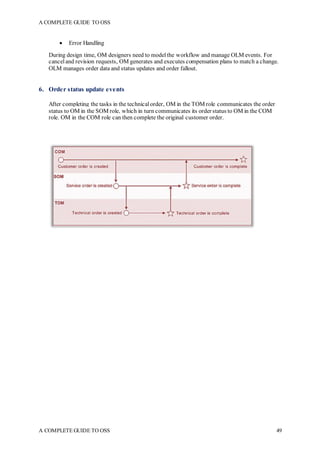
Key technologies: Most modern wired LANs utilize Ethernet while wireless local networks generally
use Wi-Fi. Older wired networks used Ethernet but also some alternatives including Token
Ring and FDDI.
A COMPLETE GUIDE TO OSS
A COMPLETE GUIDE TO OSS 82
Direct networks
Dedicated network connections between two devices (that no other devices can share) are also called
direct connections. Direct networks differ from peer-to-peer networks in that peer networks contain a
larger number of devices among which many point-to-point connections may be made.
Key technologies: Serial port and parallel port cables support basic direct wired connections
traditionally, although these have greatly diminished in usage in favor of newer standards
like USB. Some older laptop computers offered wireless infrared ports for direct connections between
models that supported IrDA specifications. Bluetooth emerged as the primary standard for the wireless
pairing of phones due to its low cost and low power consumptions.
LAN
A local area network (LAN) is a group of computers and associated devices that share a common
communications line or wireless link to a server. Typically, a LAN encompasses computers and
peripherals connected to a server within a distinct geographic area such as an office or a commercial
establishment. Computers and other mobile devices use a LAN connection to share resources such as a
printer or network storage.
Ethernet and Wi-Fi are the two most commontechnologies in use for localarea networks.
A local area network may serve as few as two or three users (for example, in a small-office network) or
severalhundred users in a larger office. LAN networking comprises cables, switches, routers and other
components that let users connectto internalservers, websites and other LANs via wide area networks.
Ethernet and Wi-Fi are the two primary ways to enable LAN connections. Ethernet is a specification
that enables computers to communicate with each other. Wi-Fiuses radio waves to connect computers
to the LAN. Other LAN technologies, including Token Ring, Fiber Distributed Data Interface etc. have
lost favor as Ethernet and Wi-Fi speeds have increased. The rise of virtualization has fueled the
development of virtual LANs, which allows network administrators to logically group network nodes
and partition their networks without the need for major infrastructure changes. Wi-Fistandards (IEEE
802.11a, b, g, n and now ac) define the equivalent of Ethernet for Wireless LANs.)
A COMPLETE GUIDE TO OSS
A COMPLETE GUIDE TO OSS 83
In some situations, a wireless LAN, or Wi-Fi, may be preferable to a wired LAN connection because
of its flexibility and cost. Companies are assessing WLANs as primary means of connectivity as the
number of smartphones, tablets and other mobile devices proliferates.
Ethernet
Ethernet is the most widely installed local area network (LAN) technology. Ethernet is a link
layer protocolin the TCP/IP stack, describing how networked devices can format data for transmission
to other network devices on the same network segment, and how to put that data out on the network
connection. It touches both Layer 1 (the physical layer) and Layer 2 (the data link layer) on the OSI
network protocol model. Ethernet defines two units of transmission, packet and frame. The frame
includes not just the "payload" of data being transmitted but also addressing information identifying the
physical "Media Access Control" (MAC) addresses of both sender and receiver, VLAN tagging
and quality of service information, and error-correction information to detect problems in transmission.
Each frame is wrapped in a packet, which affixes severalbytes of information used in establishing the
connection and marking where the frame starts.
Ethernet frames and packets
When discussing Ethernet data, the terms frame and packet are often used interchangeably. Frames
and packets are the electronic containers that carry our data from point-to-point by navigating LANs
and WANs and, as they both serve similar functions, their differences are often misunderstood.
So what’s the difference?
To simplify matters, imagine frames and packets as envelopes of information that are going to be sent
from one person to another. The key difference between a frame and a packet is how they encapsulate
the information and that depends on where the information is being sent.
Frames explained
Imagine a company with inter-department mail where a person can send documents to another person
within their private/local organization. The contents are placed in an internal envelope and the sender
writes their name and department in the “From” field, then writes the recipient’s name and department
in the “To” field.
When the envelope is sent, the mail room recognizes the internal-use envelope, reads the destination
name and department, uses a directory to translate that information into a physical location
(building/office) and delivers it to the recipient. The envelope never leaves the private/local
organization and all of the movement is handled by local resources familiar with the environment.
An inter-office envelope cannot be sent outside of the company because the envelope does not have a
mailing address. To send the contents to an office outside of the local area, the inter-office envelope
will need to be placed inside a postalenvelope and labeled with a proper postaladdress.
An Ethernetframeworks inasimilar way. Itis a container for datawitha sourceanddestination address
to deliver information, called the payload, between two locations on the same network. Instead of a
name and department, the source and destination address of a frame are the MAC (Media Access
Controller) address of a computer, tablet, IP Phone, IoT device, etc. This is an ID number that is unique
to every Ethernet device in the entire world.
Frames are generated at Layer 2 of the TCP/IP stack by the network interface device with a payload
size that depends on the type of data being transmitted. The frame is sent onto the network where an
Ethernet switch checks the destination address of the frame against a MAC lookup table in its memory.
Thelookup table tells theswitchwhichphysicalport, is associatedwiththedevice whoseMAC address
matches destination address of the frame.
A COMPLETE GUIDE TO OSS
A COMPLETE GUIDE TO OSS 84
The switch will forward the frame to the physical port determined by the lookup table. If the cable is
connected directly to the destination device the transmission is complete. If the cable is connected to
another switch, the next switch willrepeat the lookup and forward process untilthe frame reaches the
intended destination.
Remember - all of this is happening on Layer 2 switches in the LAN. Like inter-department mail, a
frame cannot be sent outside of the local/private network onto the internet because it does not have the
proper address. To send data to a device on a different network or to an internet server, a frame must
be built into a packet.
Posting packets
Much like the example where the inter-department envelope needs to placed inside a postal envelope
to send it to a different office, an Ethernet frame is encapsulated with additional information to create
an IP packet.
Whereas MAC addresses of a network devices are unique and permanent, IP addresses are usually
temporally assigned to a network device and change as the device connects to different networks. For
example, the IP address of a tablet will change each time it is connected to a different Wi-Finetwork.
Packets are created at Layer 3 of the network and allow information to be exchanged between different
LANs, typically via routers. A router interconnects small networks (LANs) together allowing for
information exchange on a much larger scale using IP addresses for packet forwarding instead of MAC
addresses.
Layer 3 packets allow routers to provide inter-network data transmission (Internet) using IP addresses
thatidentify thenetworkandthetemporaryaddress of thedeviceonthenetwork. Onceinsideanetwork,
intra-network (LAN) data forwarding is handled by Layer 2 switches that read the MAC address of the
frame to forward it to the destination device where the Ethernet controller extracts the data payload
completing the process of transferring information between devices on differentnetworks.
Switch
In a local area network (LAN) using Ethernet, a network switch determines where to send each
incoming message frame by looking at the physical device address (also known as the Media Access
Control address or MAC address). Switches maintain tables that match each MAC address to the port
from which the MAC address has been received. If a frame is to be forwarded to a MAC address that
is unknown to the switch infrastructure, it is flooded to allports in the switching domain. Broadcast and
multicast frames are also flooded. This is known as BUM flooding -- broadcast, unknown unicast, and
multicast flooding. This capability makes a switch a Layer 2 or data-link layer device in the Open
Systems Interconnection (OSI) communications model.
Types of networking switches
There are severaltypes of switches in networking in addition to physicaldevices:
 Virtual switches are software-only switches instantiated inside virtual machine (VM) hosting
environments.
 A routing switch connects LANs; in addition to doing MAC-based Layer 2 switching it can also
perform routing functions at OSI Layer 3 (the network layer) directing traffic based on the Internet
Protocol (IP) address in each packet. Also called Layer 3 switch, it combines the functionality of
a switch and a router. It acts as a switch to connect devices that are on the same subnet or virtual
LAN at lightning speeds and has IP routing intelligence built into it to double up as a router.
A COMPLETE GUIDE TO OSS
A COMPLETE GUIDE TO OSS 85
How a network switch works?
Switches, physicaland virtual, comprise the vast majority of network devices in modern data networks.
They provide the wired connections to desktop computers, wireless access points, industrialmachinery
and some internet of things (IoT) devices such as card entry systems. They interconnect the computers
that host virtual machines in data centers, as well as the dedicated physical servers, and much of the
storage infrastructure. They carry vast amounts of traffic in telecommunications provider networks.
A network switch can be deployed in the following ways:
 Edge, or access, switches: These switches manage traffic either coming into or exiting the
network. Devices like computers and access points connect to edge switches.
 Aggregation, or distribution, switches: These switches are placed within an optional middle
layer. Edge switches connect into these and they can send traffic from switch to switch or send it
up to core switches.
 Core switches: These networkswitches comprise the backbone of the network, connecting either
aggregation or edge switches to each other, connecting user or device edge networks to data center
networks and, typically, connectingenterpriseLANs totherouters that connect them totheinternet.
A COMPLETE GUIDE TO OSS
A COMPLETE GUIDE TO OSS 86
Many datacenters adoptaleaf/spine architecture, whicheliminates theaggregation layer. Inthis design,
servers and storage connect to leaf switches (edge switches) and every leaf switch connects into two or
more spine (core) switches. This minimizes the number of hops data has to take getting from source to
destination, and, thereby, minimizes the time spent in transit, or latency.
Some data centers establish a fabric or mesh network design that makes every device appear to be on a
single, large switch. This approach reduces latency to its minimum and is used for highly demanding
applications such as high-performance computing (HPC) in financial services or engineering.
Not all networks use switches. For example, a network may be organized in a token ring or connected
via a bus or a hub or repeater. In these networks, every connected device sees all traffic and reads the
traffic addressed to it. A network can also be established by directly connecting computers to one
another, withoutaseparatelayer of networkdevices;this approachis mostlyof interestin HPC contexts
where sub-5-microsecond latencies are desired and can become quite complex to design, wire and
manage.
VLAN
Virtual Local Area Networks (VLANs) divide a single existing physicalnetwork into multiple logical
networks. Thereby, each VLAN forms its own broadcast domain. It is a concept in which we can divide
the devices logically on layer 2 (data link layer). Generally, layer 3 devices divides broadcast domain
but broadcast domain(Layer 2) canbedivided byswitches usingtheconceptof VLAN. Communication
betweentwodifferentVLANs is only possible througharouter thathas been connectedtobothVLANs.
VLANs behave as if they had been constructed using switches that are independent of each other.
Types of VLANs
In principle, there are two approaches to implementing VLANs:
 as port-based VLANs (untagged)
A COMPLETE GUIDE TO OSS
A COMPLETE GUIDE TO OSS 87
 as tagged VLANs
Port-based VLANs
With regard to port-based VLANs, a single physical switch is simply divided into multiple logical
switches. The following example divides an eight-port physicalswitch (Switch A) into two logical
switches.
Example 1
Although all of the PCs have been connected to one physicalswitch, only the following PCs can
communicate with each other due to the configuration of the VLAN:
 PC A-1 with PC A-2
 PC A-5 with PC A-6
Example 2
Assume that there are also four PCs in the neighboring room. PC B-1 and PC B-2 should be able to
communicate with PC A-1 and PC A-2 in the first room. Likewise, communication between PC B-5
and PC B-6 in Room 2 and PC A-5 and PC A-6 should be possible.
There is another switch in the second room. Two cables willbe required for connecting both VLANs.
 One cable from Switch APort 4 to Switch BPort 4 (for VLAN 1)
 One from Switch APort 8 to Switch BPort 8 (for VLAN 2)
Tagged VLANs
A COMPLETE GUIDE TO OSS
A COMPLETE GUIDE TO OSS 88
With regard to tagged VLANs, multiple VLANs can be used through a single switch port. Tags
containing the respective VLAN identifiers indicating the VLAN to which the frame belongs are
attached to the individual Ethernet frames. If both switches understand the operation of tagged VLANs
in the example above, the reciprocalconnection can be accomplished using one single cable.
VLANS and Subnetting
Subnetting is the practice of logically dividing a network into two or more smaller networks. Subnets
are Layer 3. VLAN is all about logically dividing Broadcast domain. VLANS are Layer 2. Data
communications between VLANs is performed by routers.
VLAN refers to 802.1Q standard, in which you can essentially give each port unique MAC address
table, effectively separating them from each other.VLAN may transport one or more subnet (but does
not have to, it may be transporting something else than IP entirely). Subnet may be configured for
VLAN, but does not have to be, it could be without 802.1Q or over some completely different L2
technology than Ethernet.
WAN
A WAN (wide area network) is a communications network that spans a large geographic area such as
across cities, states, or countries. They can be private to connect parts of a business or they can be more
public to connect smaller networks together.
The easiest way to understand what a WAN is to think of the internet as a whole, which is the world's
largest WAN. The internet is a WAN because, through the use of ISPs, it connects lots of smaller local
area networks (LANs) or metro area networks (MANs).
On a smaller scale, a business may have a WAN that's comprised of cloud services, its headquarters,
and smaller branch offices. The WAN, in this case, would be used to connect all of those sections of
the business together.
No matter what the WAN joins together or how far apart the networks are, the end result is always
intended to allow different smaller networks from different locations to communicate with one another.
WAN protocols are those protocols or technologies, which determine the efficient performance of
WANs. These have a profound impact on business continuity, a key factor for Enterprises.
Technologicalappliances can function efficiently based on the features they support and the protocols
governing the same. WANs (Wide Area Networks) use diverse networking equipment and technology.
They differ from what is used by LocalArea Networks (LANs). Most WAN protocols and technologies
are layer 2 protocols (data link layer). The key WAN protocols that are in use are Asynchronous
Transfer Mode (ATM), Broadband Access, Frame Relay, Point-to-PointProtocol (PPP), Synchronous
Optical Network (SONET), Synchronous Digital Hierarchy (SDH), X.25, and a few other WAN
protocols. It is important to have a deeper understanding about these concepts as they are the links to
enhancing applications over the Internet, and thereby power businesses in the competitive marketplace.
The following is a brief outline of some of the more important protocols.
Types of WAN connections
WAN connections can include wired and wireless technologies. Wired WAN services can
include multiprotocol label switching, Carrier Ethernet and commercial broadband internet
links. Wireless WAN technologies can include cellular data networks like 4G LTE, as well as
public Wi-Fi or satellite networks.
How WANs Are Connected
Since WANs, by definition, cover a larger distance than LANs, it makes sense to connectthe various
parts of the WAN using a virtual private network (VPN). This provides protected communications
between sites, which is necessary given that the data transfers are happening over the internet.
A COMPLETE GUIDE TO OSS
A COMPLETE GUIDE TO OSS 89
Although VPNs provide reasonable levels of security for business uses, a public internet connection
does not always provide the predictable levels of performance that a dedicated WAN link can. This is
why fiber optic cables are used to facilitate communication between the WAN links.
The following communication and networking technologies have been used to implement WANs.
 Asynchronous Transfer Mode
 Cable modem
 Dial-up internet
 Digital subscriber line
 Fiber-optic communication
 Frame Relay
 ISDN
 Leased line
 SD-WAN
 Synchronous opticalnetworking
 X.25
SD-WAN
SD-WAN is redefining the WAN by creating a network that dynamically selects the most efficient
transport service from an array of public Internet connections and MPLS links. It has two main
benefits: cost efficiency and agility.
The SD-WAN aggregates severalWAN connections into one software-defined network (SDN), using
policies, application-aware routing, and dynamic link assessment, to select the optimum connection per
application. Ultimately, the goal is to deliver just the right performance and uptime characteristics by
taking advantage of the inexpensive public Internet.
A COMPLETE GUIDE TO OSS
A COMPLETE GUIDE TO OSS 90
Link aggregation
In computer networking, the term link aggregation applies to various methods of combining
(aggregating) multiple network connections in parallel in order to increase throughput beyond what a
single connection could sustain, and to provide redundancy in case one of the links should fail. A Link
Aggregation Group (LAG) combines a number of physical ports together to make a single high-
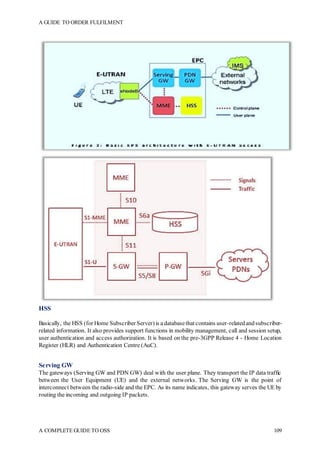
bandwidth data path, so as to implement the traffic load sharing among the member ports in the group
and to enhance the connection reliability. It is also called Trunking, link bundling or NIC teaming.
Network architects can implement aggregation at any of the lowest three layers of the OSI model.
 Examples of aggregation at layer 1 (physical layer) include power line (e.g. IEEE 1901)
and wireless (e.g. IEEE 802.11) network devices that combine multiple frequency bands.
 OSI layer 2 (data link layer, e.g. Ethernet frame in LANs or multi-link PPP in WANs,
Ethernet MAC address) aggregation typically occurs across switch ports, which can be either
physicalports, or virtualones managed by an operating system.
 Aggregation at layer 3 (network layer) in the OSI model can use round-robin scheduling, hash
values computed from fields in the packet header, or a combination of these two methods.
Router
In packet-switched networks such as the internet, a router is a device or, in some cases, software on a
computer, that determines the best way for a packet to be forwarded to its destination.
A router connects networks. Based on its current understanding of the state of the network it is
connected to, a router acts as a dispatcher as it decides which way to send each information packet. A
router is located at any gateway (where one network meets another), including each point-of-
presence on the internet. Arouter is often included as part of a network switch.
How does a router work?
A router may create or maintain a table of the available routes and their conditions and use this
information along with distance and cost algorithms to determine the best route for a given packet.
Typically, a packet may travel through a number of network points with routers before arriving at its
destination. Routing is a function associated with the network layer(Layer 3) in the standard model of
network programming, the Open Systems Interconnection (OSI) model. A Layer 3 switch is a switch
that can perform routing functions.
An edge router is a device located at the boundary of a network that connects to other networks, wide
area networks or the internet. For home and business computer users who have high-speed internet
connections such as cable, satellite or DSL, a router can act as a hardware firewall. Many engineers
believe that the use of a router provides better protection against hacking than a software firewall
because no computer internet protocol addresses are directly exposed to the internet. This makes port
scans (a technique for exploring weaknesses) essentially impossible. In addition, a router does not
A COMPLETE GUIDE TO OSS
A COMPLETE GUIDE TO OSS 91
consume computer resources, which a software firewall does. Commercially manufactured routers are
easy to install and are available for hard-wired or wireless networks.
Access, core and distribution
Access routers, including small office/home office (SOHO) models, are located at home and customer
sites such as branch offices that do not need hierarchical routing of their own. Typically, they are
optimized for low cost.
In enterprises, a core router may provide a collapsed backbone interconnecting the distribution tier
routers from multiple buildings of a campus, or large enterprise locations. They tend to be optimized
for high bandwidth, but lack some of the features of edge routers.
Distribution routers aggregate traffic from multiple access routers, either at the same site, or to collect
the data streams from multiple sites to a major enterprise location. Distribution routers are often
responsible for enforcing quality of service across a wide area network (WAN), so they may have
considerable memory installed, multiple WAN interface connections, and substantial onboard data
processing routines. They may also provide connectivity to groups of file servers or other external
networks.
Routing different networks
Routers are also often distinguished on the basis of the network in which they operate. A router in
a local areanetwork (LAN) of a single organization is called an interior router. Anexterior router directs
packets between hosts in one LAN and hosts in another LAN. A router that is operated in
the Internet backbone is described as exterior router. While routers that connect a LAN with the wide
area network (WAN) are called border routers, or gateway routers.
Internet connectivity and internal use
Routers intended for ISP and major enterprise connectivity usually exchange routing information using
the Border Gateway Protocol (BGP).
Edge router: Also called a provider edge router, is placed at the edge of an ISP network. The router uses
External BGP to EBGP routers in other ISPs, or a large enterprise Autonomous System.
 Subscriber edgerouter:Also called a Customer Edgerouter, is locatedat theedge of thesubscriber's
network, it also uses EBGP to its provider's Autonomous System. It is typically used in an
(enterprise) organization.
 Inter-provider border router: Interconnecting ISPs, is a BGP router that maintains BGP sessions
with other BGP routers in ISP Autonomous Systems.
 Core router: A core router resides within an Autonomous System as a back bone to carry traffic
between edge routers.
 Within an ISP: In the ISP's Autonomous System, a router uses internal BGP to communicate with
other ISP edge routers, other intranet core routers, or the ISP's intranet provider border routers.
 "Internet backbone:" The Internet no longer has a clearly identifiable backbone, unlike its
predecessor networks. The major ISPs' system routers make up what could be considered to be the
current Internet backbone core. ISPs operate all four types of the BGP routers described here. An
ISP "core" router is used to interconnect its edge and border routers. Core routers may also have
specialized functions in virtual private networks based on a combination of BGP and Multi-
Protocol Label Switching protocols.
 Port forwarding: Routers are also used for port forwarding between private Internet-connected
servers.
 Voice/Data/Fax/Video Processing Routers: Commonly referred to as access servers or gateways,
these devices are used to route and process voice, data, video and fax traffic on the Internet. Off
late most long-distance phone calls have been processed as IP traffic (VOIP) through a voice
A COMPLETE GUIDE TO OSS
A COMPLETE GUIDE TO OSS 92
gateway. Use of access server type routers expanded with the advent of the Internet, first with dial-
up access and another resurgence with voice phone service.
 Larger networks commonly use multilayer switches, with layer 3 devices being used to simply
interconnect multiple subnets within the same security zone, and higher layer switches
when filtering, translation, load balancing or other higher level functions are required, especially
between zones.
MPLS
Multiprotocol Label Switching (MPLS) is a protocol-agnostic routing technique designed to speed up
and shape traffic flows across enterprise wide area and service provider networks. MPLS allows most
data packets to be forwarded at Layer 2 -- the switching level -- rather than having to be passed up
to Layer 3 -- the routing level. For this reason, it is often informally described as operating at Layer 2.5.
MPLS forwards datafrom onesourcetoits destination usinglabels rather thanIP addresses. TheMPLS
protocol speeds up and influences traffic flows. In an MPLS network, the very first router to receive a
packet determines the packet's entire route upfront. The identity of that packet is then transported to the
following routers using a label in the packet header. MPLS compresses packets of several network
protocols, which is whyit is known as a multiprotocol.
Components of MPLS
One of the defining features of MPLS is its use of labels -- the L in MPLS. Sandwiched between Layers
2 and 3, a label is a four-byte -- 32-bit -- identifier that conveys the packet's predetermined forwarding
path in an MPLS network. Labels can also contain information related to quality of service (QoS),
indicating a packet's priority level.
The paths, which are called label-switched paths (LSPs), enable service providers to decide ahead of
time the best way for certain types of traffic to flow within a private or public network.
How an MPLS network works
In an MPLS network, each packet gets labeled on entry into the service provider's network by
the ingress router, also known as the label edge router (LER). This is also the router that decides the
LSP the packet will take until it reaches its destination address.
All the subsequent label-switching routers (LSRs) perform packet forwarding based only on those
MPLS labels -- they never look as far as the IP header. Finally, the egress router removes the labels and
forwards the original IP packet toward its final destination.
When an LSR receives a packet, it performs one or more of the following actions:
 Push: Adds a label. This is typically performed by the ingress router.
 Swap: Replaces a label. This is usually performed by LSRs between the ingress and egress routers.
 Pop: Removes a label. This is most often done by the egress router.
This diagram illustrates how a simple MPLS network works.
A COMPLETE GUIDE TO OSS
A COMPLETE GUIDE TO OSS 93
 (1a) Existing routing protocols (open shortest path first (OSPF), intermediate system to
intermediate system (IS-IS)) establish the reachability of the destination networks.
 (1b) Label distribution protocol(LDP) establishes label-to-destination network mappings
 (2) Ingress edge label switching router (LSR) receives a packet, performs layer-3 value-added
services, and labels the packets
 (3) LSR switches the packet using labelswapping
 (4) Egress edge LSR removes the label and delivers the packet
An Example
Figure below shows a simple MPLS network example where the centralserver is sending packets to
two remote hosts.
The Ingress router (LSR1) accepts the packets from the server and selects the best LSP based on their
destination IP Address. It then selects an initial label (local significance) for each packet and then
forwards the packets using MPLS. When Router2 receives the packets, it uses these labels to identify
the LSPs from which it selects the next hops (R3 & R4) and labels (43 & 12). At the end of the path,
the egress routers (R3 & R4) remove the finallabel and send the packet out to the local network.
Advantages of MPLS
Service providers and enterprises can use MPLS to implement QoS by defining LSPs that can meet
specific service-level agreements on traffic latency, jitter, packet loss and downtime. For example, a
network might have three service levels that prioritize different types of traffic -- e.g., one level for
voice, one level for time-sensitive traffic andone level for bestefforttraffic. MPLS also supports traffic
A COMPLETE GUIDE TO OSS
A COMPLETE GUIDE TO OSS 94
separation and the creation of virtualprivate networks (VPNs), virtualprivate LAN services and virtual
leased lines.
One of the most notable benefits of MPLS is that it is not tied to any one protocolor transport medium.
It supports transport over Internet Protocol (IP), Ethernet, Asynchronous Transfer Mode (ATM)
and frame relay; any of these protocols can be used to create an LSP. Generalized Multi-ProtocolLabel
Switching (GMPLS) extends MPLS to manage time-division multiplexing (TDM), lambda
switching and other classes of switching technologies beyond packet switching.
Is MPLS Layer 2 or Layer 3?
There’s beena lot of confusionaboutwhether MPLS is a Layer 2 or Layer 3service. But MPLS doesn’t
fit neatly into the OSI seven-layer hierarchy. Infact, one of the key benefits of MPLS is that it separates
forwarding mechanisms from the underlying data-link service. In other words, MPLS can be used to
create forwarding tables for any underlying protocol.
Specifically, MPLS routers establish a label-switched path (LSP), a pre-determined path to route traffic
in an MPLS network, based on the criteria in the FEC. It is only after an LSP has been established that
MPLS forwarding can occur. LSPs are unidirectional which means that return traffic is sent over a
different LSP.
When an end user sends traffic into the MPLS network, an MPLS label is added by an ingress MPLS
router that sits on the network edge. The MPLS Labelconsists of four sub-parts:
The Label: The label holds all of the information for the MPLS routers to determine where the packet
should be forwarded.
Experimental: Experimental bits are used for Quality of Service (QoS) to set the priority that the
labeled packet should have.
Bottom-of-Stack: The Bottom-of-Stack tells the MPLS Router if it is the last leg of the journey and
there are no more labels to be concerned with. This usually means the router is an egress router.
Time-To-Live: This identifies how many hops the packet can make before it is discarded.
MPLS Pros and Cons
The benefits of MPLS are scalability, performance, better bandwidth utilization, reduced network
congestion and a better end-user experience.
MPLS itself does not provide encryption, but it is a virtual private network and, as such, is partitioned
off from the public Internet. Therefore, MPLS is considered a secure transport mode. And it is not
vulnerable to denial of service attacks, which might impact pure-IP-basednetworks.
On thenegative side, MPLS is a servicethat mustbepurchasedfromacarrier andis far moreexpensive
than sending traffic over the public Internet.
As companies expand into new markets, they may find it difficult to find an MPLS service provider
who can deliver global coverage. Typically, service providers piece together global coverage through
partnerships with other service providers, which can be costly. And MPLS was designed in an era when
branch offices sent traffic back to a main headquarters or data center, not for today’s world where
branch office workers want direct access to the cloud.
A COMPLETE GUIDE TO OSS
A COMPLETE GUIDE TO OSS 95
MPLS VPN
MPLS VPNs combine the power of MPLS and the Border Gateway Protocol(BGP) routing protocol.
MPLS is usedto forwardpacketsover theprovider’s networkbackboneandBGP is usedfor distributing
routes over the backbone.
A MPLS VPN is compromised of the following equipment:
1. Customer Edge (CE) routers. These are placed at the customer site and are usually owned by the
customer. Some service providers also supply the CE equipment for a small rental fee.
2. Provider Edge (PE) routers. Thesearetheprovider’s edgerouterstowhichtheCErouters connect
to. The PE routers are always owned by the service provider
3. Provider (P) routers. These routers are commonly referred to as ‘transit routers’ and are located
in the service provider’s core network
Routing information is passed from the Customer Edge router to the Provider Edge router using either
a routing protocolsuch as BGP or static routes. The Provider Edge router keeps a per-site forwarding
table also known as ‘VPN Routing and Forwarding tables’ or VRFs. At the Provider Edge router, each
VRF serves a particular interface (or set of interfaces) that belongs to each individual VPN. Each
Provider Edge router is configured by the service provider with its own VRF that is unique. Routers
within the MPLS VPN network do not share VRF information directly.
A COMPLETE GUIDE TO OSS
A COMPLETE GUIDE TO OSS 96
The above diagram illustrates a typical MPLS VPN network where VRFs are unique for each VPN
connected to a particular Provider Edge router
What’s important about MPLS VPN services is that there is no boundary to the type of WAN
technology used. This means you can run MPLS over ATM (Also known as MPLS IP VPN over
ADSL), leased lines, Satellite links, wireless links and much more. This flexibility makes MPLS
networks a preferred method of connecting offices between each other. The ISP provides the interface
to which the local network is connected (usually a router with a LAN interface) and all that’s required
is to connect the provided interface to the local network, set the necessary equipment to use the new
gateway (MPLS CE router) and everything magically works!
Internet access is also possible through the MPLS IP VPN service where the service provider (ISP)
typically announces the routes of customers that require direct access to the Internet, without affecting
the performance of their intra site VPN links. For example, this means that it’s possible to have a
1024Kbps MPLS link to your ISP which splits to a 512Kbps MPLS IP VPN link to your remote site
and a further 512Kbps link to the Internet. The ISP completely separates these two virtuallinks, even
though they run through the same interface. The link providing Internet access makes use of Network
Address Translation(NAT) totranslate theprivate networkaddress spacefromthecustomer’snetwork.
In this case, the customer reveals no more information to the Internet than it would with any normal
connection to the Internet.
Virtual private network (VPN)
A virtual private network (VPN) is a technology that creates a safe and encrypted connection over a
less secure network, such as the internet. VPN technology was developed as a way to allow remote
users andbranchoffices tosecurelyaccess corporateapplications andother resources. Toensuresafety,
data travels through secure tunnels and VPN users must use authentication methods -- including
passwords, tokens and other unique identification methods -- to gain access to the VPN
VPN performance can be affected by a variety of factors, among them the speed of users' internet
connections, the types of protocols an internet service provider may use and the type of encryption the
VPN uses. Performance can also be affected by poor quality of service and conditions that are outside
the controlof IT.
Five basic components of VPNs:
 VPN Gateways: A device used to connect an entire network to the VPN
 VPN Client Software:Software for individual PCs that allow them to connect to the VPN
 Authentication Servers: Systems such as certificate authorities and RADIUS servers that
guarantee the identity of VPN Gateways and Clients
 Manage Servers: Systems that provide control, monitoring, alerting and reporting on the VPN
 PhysicalTransport: Any IP or Internet connection
VPN Protocols
There are severaldifferent protocols used to secure and encrypt users and corporate data:
 IP security (IPsec)
 Secure Sockets Layer (SSL) and Transport Layer Security (TLS)
 Point-To-Point Tunneling Protocol(PPTP)
 Layer 2 Tunneling Protocol(L2TP)
 OpenVPN
The most common types of VPNs are remote-access VPNs and site-to-site VPNs.
A COMPLETE GUIDE TO OSS
A COMPLETE GUIDE TO OSS 97
Remote-access VPN
A remote-access VPN uses a public telecommunication infrastructure like the internet to provide
remoteusers secureaccesstotheir organization's network. This is especially importantwhenemployees
are using a public Wi-Fi hotspot or other avenues to use the internet and connect into their corporate
network. A VPN client on the remote user's computer or mobile device connects to a
VPN gateway Server on the organization's network. The gateway typically requires the device to
authenticate its identity. Then, it creates a network link back to the device that allows it to reach internal
network resources -- e.g., file servers, printers and intranets -- as though it was on that network locally.
A remote-access VPN usually relies on either IPsec or Secure Sockets Layer (SSL) to secure the
connection, although SSL VPNs are often focused on supplying secure access to a single application,
rather than to the entire internal network. Some VPNs provide Layer 2 access to the target network;
these require a tunneling protocol like PPTP or L2TP running across the base IPsec connection.
Site-to-site VPN
A site-to-site VPN uses a gateway device to connect the entire network in one location to the network
in another -- usually a small branchconnectingtoadatacenter. End-nodedevices in theremote location
do not need VPN clients because the gateway handles the connection. Most site-to-site VPNs
connecting over the internet use IPsec. It is also common to use carrier MPLS clouds, rather than the
public internet, as the transport for site-to-site VPNs. Here, too, it is possible to have either Layer
3 connectivity (MPLS IP VPN) or Layer 2 (Virtual Private LAN Service, or VPLS) running across the
base transport.
VPNs can also be defined between specific computers, typically servers in separate data centers, when
security requirements for their exchanges exceed what the enterprise networkcan deliver. Increasingly,
enterprises also use VPN connections in either remote-access mode or site-to-site mode to connect --
or connect to -- resources in a public infrastructure-as-a-service environment. Newer hybrid-access
scenarios put the VPN gateway itself in the cloud, with a secure link from the cloud service provider
into the internal network.
A COMPLETE GUIDE TO OSS
A COMPLETE GUIDE TO OSS 98
Layer 2 VPN
Multiprotocol Label Switching (MPLS) Layer 2 VPNs consolidate Layer 2 traffic such as Ethernet,
Frame Relay, asynchronous transfer mode (ATM), High Level Data Link Control(HDLC), and Point-
to-Point Protocol(PPP) over an IP/MPLS network. This support, especially for traditionalFrame Relay
and ATM networks, enables service providers to protect their investments by continuing to provide
existing data and voice services while introducing new services and architectures. Service providers
also benefit from cost savings in converging services and new service revenues from new, innovative
IP services over the newly converged IP/MPLS network.
IP VPN
An IP VPN works in much the same way as VPN, establishing seamless connectivity to a main network
across an ISP. The difference is that an IP VPN utilizes multiprotocol label switching (MPLS)
technology to prioritize internet traffic and avoid public gateway to increase security, making it a layer
2 service. VPNs and IP VPNs are very similar, but the most important difference is the layer of the OSI
Model on which they’re classed.
TypicalVPNs fall under layer 3 and 4, meaning they establish a connection through public internet and
frequently use a public gateway to connect. An IP VPN is considered layer 2, meaning it avoids public
internet by traveling on a private connection to each remote site, so your vital company data remains
secure. Plus, as alayer 2 service, IP VPNuses MPLS capabilities that prioritize your company’s internet
traffic, so criticalapplications like video conferencing and digital voice are guaranteed the bandwidth
they need to perform.
IP VPNs are ideal for medium businesses to large enterprises, where multiple employees and branches
need the ability to connect to the company intranet remotely and securely while handling sensitive
corporate information. IP VPN is also usefulfor internet traffic that needs prioritization to better serve
VoIP, video conferencing, and cloud services.
Layer 3 VPN
MPLS Layer 3 VPNs use a peer-to-peer modelthat uses Border Gateway Protocol(BGP) to distribute
VPN-related information. This highly scalable, peer-to-peer model allows enterprise subscribers to
outsource routing information to service providers, resulting in significant cost savings and a reduction
in operational complexity for enterprises.
IP-based VPNs use the next-generation Virtual Routing/Forwarding instance (VRF)-Lite, called Easy
Virtual Network (EVN). This simplifies Layer 3 network virtualization and allows customers to easily
provide traffic separation and path isolation on a shared network infrastructure, removing the need to
deploy MPLS in the enterprise network. EVN is fully integrated with traditional MPLS-VPN.
Network Topology
Computer network topology refers to the physicalcommunication schemes used by connected devices
on a network. The basic computer network topology types are:
 Bus
 Ring
 Star
 Mesh
 Tree
 Wireless
A COMPLETE GUIDE TO OSS
A COMPLETE GUIDE TO OSS 99
Networks that are more complex can be built as hybrids using two or more of these basic topologies.
Bus Network Topology
Bus Netw ork Topology.
Bus networks share a common connection that extends to alldevices. This networktopology is used in
small networks, and it is simple to understand. Every computer and network device connects to the
same cable, so if the cable fails, the whole network is down, but the cost of setting up the network is
reasonable.
This type of networking is cost effective. However, the connecting cable has a limited length, and the
network is slower than a ring network.
Ring Network Topology
Ring Netw ork Topology
Each device in a ring network is attached to two other devices, and the last device connects to the first
to form a circular network. Each message travels through the ring in one direction—clockwise or
counterclockwise—through the shared link. Ring topology that involves a large number of connected
devices requires repeaters. If the connection cable or one device fails in a ring network, the whole
network fails.
Although ring networks are faster than bus networks, they are more difficult to troubleshoot.
Star Network Topology
Star Netw ork Topology.
A star topology typically uses a network hub or switch and is commonin-home networks. Every device
has its own connection to the hub. The performance of a star network depends on the hub. If the hub
fails, the network is down for allconnected devices. The performance of the attached devices is usually
high becausethereare usually fewer devices connectedinstar topologythatin other types of networks.
A COMPLETE GUIDE TO OSS
A COMPLETE GUIDE TO OSS 100
A star network is easy to set up and easy to troubleshoot. The cost of setup is higher than for bus and
ring network topology, but if one attached device fails, the other connected devices are unaffected.
Mesh Network Topology
Mesh Netw ork Topology.
Mesh network topology provides redundant communication paths between some or all devices in a
partial or full mesh. Infull meshtopology, every device is connectedtoall theother devices. In a partial
mesh topology, some of the connected devices or systems are connected to all the others, but some of
the devices only connect to a few other devices.
Mesh topology is robust and troubleshooting is relatively easy. However, installation and configuration
are more complicated than with the star, ring and bus topologies.
Tree Network Topology
Tree Network Topology.
Treetopologyintegrates the star andbus topologies in a hybrid approachtoimprovenetworkscalability.
The network is setup as a hierarchy, usually with at least three levels. The devices on the bottom level
all connect to one of the devices on the level above it. Eventually, all devices lead to the main hub that
controls the network.
This type of network works wellin companies that have various grouped workstations. The system is
easy to manage and troubleshoot. However, it is relatively costly to set up. If the centralhub fails, then
the network fails.
A COMPLETE GUIDE TO OSS
A COMPLETE GUIDE TO OSS 101
A GUIDE TO ORDER FULFILMENT
A COMPLETE GUIDE TO OSS 102
Chapter 6
Telecom Networks
Introduction
In the previous chapter, we discussed about basics of networking. We also understood the networking
devices, their functions and networking protocols. Moving ahead, we will now understand the
application part of it and see how these devices and protocols play their role in connected network
environment. We will also understand, how network architecture looks like, how it functions, what are
different types of access technologies and lastly how network configurations are done.
At the end of this reading, readers will also be able to understand the virtualized network concepts,
Software controlled routing and network automation concepts.
Access Technology
Wireline
Wireline or wireless access networks refer to the collection of “last-mile” data transmission
technologies that connect businesses andresidences toapublic communications network. Wearegoing
to discuss following Wireline and wireless access technologies-
 DSL
 HFC
 FTTx
Wireless
A GUIDE TO ORDER FULFILMENT
A COMPLETE GUIDE TO OSS 103
 2G/3G
 4G
 5G
 Satellite
Wireless Network
The 3rd Generation Partnership Project (3GPP) is a standards organization which develops
protocols for mobile telephony. Let’s understand the evolution of wireless technology over the years.
2G/ 3G 4G 5G
Frequency Band 1.8 - 2.5 GHz 2 - 8 GHz
3-4 GHz, 26-28 GHz and 38-42 GHz
Bandwidth 5-20 MHz 5-20 MHz
Data rate Up to 2Mbps ( 384 kbps WAN) Up to 20 Mbps or more
Access Wideband CDMA SC-FDMA or OFDM(TDMA)
FEC Turbo-codes Concatenated codes
Switching Circuit/Packet Packet
Understanding 5G
5G is the 5th generation of mobile networks, a significant evolution of today’s 4G LTE networks. 5G
is being designed to meet the very large growth in data and connectivity of today’s modern society, the
internet of things with billions of connected devices, and tomorrow’s innovations.
In addition to delivering faster connections and greater capacity, a very important advantage of 5G is
the fast response time referred to as latency. Latency is the time taken for devices to respond to each
other over the wireless network. 3G networks had a typical response time of 100 milliseconds, 4G is
around 30 milliseconds and 5G will be as low as 1 millisecond.
5G will initially operate in conjunction with existing 4G networks before evolving to fully standalone
networks in subsequent releases and coverage expansions.
A mobile network has two main components, the ‘Radio Access Network’ and the ‘Core Network’.
The Radio Access Network - consists of various types of facilities including small cells, towers, masts
and dedicated in-building and home systems that connect mobile users andwireless devices tothe main
core network.
Small cells will be a major feature of 5G networks particularly at the new millimetre wave (mmWave)
frequencies where the connection range is very short. To provide a continuous connection, smallcells
will be distributed in clusters depending on where users require connection which willcomplement the
macro network that provides wide-area coverage.
5G macro cells will use MIMO (multiple input, multiple output) antennas that have multiple elements
or connections to send and receive more data simultaneously. The benefit to users is that more people
can simultaneously connect to the network and maintain high throughput. MIMO antennas are often
referred to as ‘Massive MIMO’ due to the large number of multiple antenna elements and connections
however the physicalsize is similar to existing 3G and 4G base station antennas.
The Core Network - is the mobile exchange and data network that manages all of the mobile voice,
data and internet connections. For 5G, the ‘core network’ is being redesigned to better integrate with
A GUIDE TO ORDER FULFILMENT
A COMPLETE GUIDE TO OSS 104
the internetand cloud basedservices andalso includes distributed servers acrossthenetworkimproving
response times (reducing latency).
Many of the advanced features of 5G including network function virtualization and network slicing for
different applications and services, willbe managed in the core.
The illustration below shows examples of localcloud servers providing faster content to users (movie
streaming) and low latency applications for vehicle collision avoidance systems.
5G network architecture illustrating 5G and 4G working together, with central and local servers
providing faster content to users and low latency applications.
Network Slicing – enables a smart way to segment the network for a particular industry, business or
application. For example, emergency services could operate on a network slice independently from
other users.
Network Function Virtualization (NFV) - is the ability to instantiate network functions in real time
at any desired location within the operator’s cloud platform. Network functions that used to run on
dedicated hardware for example a firewall and encryption at business premises can now operate on
software on a virtualmachine. NFVis crucialto enable the speed efficiency and agility to support new
business applications and is an important technology for a 5G ready core.
Technology
 Millimeter waves- Frequencies in the range 28GHz and above are called millimeter waves.
Millimeter waves are broadcast at frequencies between 30 and 300 GHZ, compared to the bands
below 6 GHz that were used for mobile devices in the past. They are called millimeter waves
because they vary in length from 1 to 10 mm.
 Small Cell- 5G networks are designed to work in conjunction with 4G networks using a range of
macro cells, small cells and dedicated in-building systems. Small cells are mini base stations
designed for very localized coverage typically from 10 meters to a few hundred meters providing
in-fill for a larger macro network. Small cells are essential for the 5G networks as the mmWave
frequencies have a very short connection range.
 Massive MIMO- MIMO stands for Multiple-input multiple-output. While it involves multiple
technologies, MIMO can essentially be boiled down to this single principle: a wireless network that
allows the transmitting and receiving of more than one data signal simultaneously over the same
radio channel. Standard MIMO networks tend to use two or four antennas. Massive MIMO, on the
other hand, is a MIMO system with an especially high number of antennas. There’s no set figure
for what constitutes a Massive MIMO set-up, but the description tends to be applied to systems
with tens or even hundreds of antennas. For example, Huawei, ZTE, and Facebook have
demonstrated Massive MIMO systems with as many as 96 to 128 antennas.
To avoid signal attenuation due to various obstacles (Heavy rain, UV protection buildings, Trees)
at high frequencies (25-30 GHZ), massive MIMO or beam forming technique is quite useful.
 Beam forming- Beam steering/forming is a technology that allows the Massive MIMO base station
antennas to direct the radio signal to the users and devices rather than in all directions. The beam
steering technology uses advanced signal processing algorithms to determine the best path for the
radio signal to reach the user. This increases efficiency as it reduces interference (unwanted radio
signals).
 Full Duplex- Two-way communication at the same time.
A GUIDE TO ORDER FULFILMENT
A COMPLETE GUIDE TO OSS 105
Utility
 Machine to Machine communication
 Ultra-reliable low latency communication
 Enhanced mobile broadband (eMBB)
Advantage of 5G over 4G
5. Peak data rate
6. Energy saving
7. User Plane latency
8. Mobility
9. capacity
10. Number of connected device
5G Network Architecture
A GUIDE TO ORDER FULFILMENT
A COMPLETE GUIDE TO OSS 106
Understanding 4G LTE
The high-level network architecture of LTE is comprised of following three main components:
 The User Equipment (UE)
 The Evolved UMTS Terrestrial Radio Access Network (E-UTRAN)
 The Evolved Packet Core (EPC)
The evolved packet core communicates with packet data networks in the outside world such as the
internet, private corporate networks or the IP multimedia subsystem. The interfaces between the
different parts of the system are denoted Uu, S1 and SGias shown below. Also, between E-UTRAN
and EPC there is separate user plane (For User data transfer) and the controlplane (For signaling
purpose) to make the scaling independent.
User Equipment
User equipment may be any 4G enabled device with USIM inserted into it.
E-UTRAN
The E-UTRAN handles the radio communications between the mobile and the evolved packet core
and just has one component, the evolved base stations, called eNodeB or eNB. Each eNB is a base
station that controls the mobiles in one or more cells. The base station that is communicating with a
mobile is known as its serving eNB.
A GUIDE TO ORDER FULFILMENT
A COMPLETE GUIDE TO OSS 107
 The eNB sends and receives radio transmissions to all the mobiles using the analogue and digital
signal processing functions of the LTE air interface.
 The eNB controls the low-level operation of all its mobiles, by sending them signaling messages
such as handover commands.
Examples of radio access network types are:
 GERAN: GSM radio access network (2G)
 UTRAN: UMTS radio access network (3G)
 E-UTRAN: The Long Term Evolution (LTE) high speed and low latency radio access
network(4G)
The Evolved Packet Core
The EPC is an evolution of the 3GPP core network architecture.
In GSM, the architecture relies on circuit-switching (CS). This means that circuits are established
between the calling and called parties throughout the telecommunication network (radio, core network
of the mobile operator, fixed network). This circuit-switching mode can be seen as an evolution of the
"twocans andastring". InGSM, all services aretransportedover circuit-switchestelephonyprincipally,
but short messages (SMS) and some data is also seen.
In GPRS, packet-switching (PS) is added to the circuit-switching. With this technology, data is
transported in packets without the establishment of dedicated circuits. This offers more flexibility and
efficiency. In GPRS, the circuits still transport voice and SMS (in most cases). Therefore, the core
network is composed of two domains:circuit and packet.
InUMTS(3G), this dual-domain conceptis kept onthe corenetworkside. Somenetworkelements have
evolved butthe conceptremains very similar. When designing theevolution of the3G system, the3GPP
community decided to use IP (Internet Protocol) as the key protocol to transport all services. It was
therefore agreed that the EPC would not have a circuit-switched domain anymore and that the EPC
should be an evolution of the packet-switched architecture used in GPRS/UMTS.
A GUIDE TO ORDER FULFILMENT
A COMPLETE GUIDE TO OSS 108
This decision had consequences on the architecture itself but also on the way that the services were
provided. Traditional use of circuits to carry voice and short messages needed to be replaced by IP-
based solutions in the long term.
Architecture of the EPC
Itwas decidedtohave a "flat architecture". Theidea is to handle the payload (the datatraffic) efficiently
from performance and costs perspective. Few network nodes are involved in the handling of the traffic
and protocolconversion is avoided.
It was also decided to separate the user data (also known as the user plane) and the signaling (also
known as the control plane) to make the scaling independent. Thanks to this functional split, the
operators can dimension and adapt their network easily.
Figure 2 shows a very basic architecture of the EPS when the User Equipment (UE) is connected to the
EPC over E-UTRAN (LTE access network). The Evolved NodeB(eNodeB) is the base station for LTE
radio. In this figure, the EPC is composed of four network elements: The Serving Gateway (Serving
GW), the PDN Gateway (PDN GW), the MME and the HSS. The EPC is connected to the external
networks, which can include the IP Multimedia Core Network Subsystem (IMS).
A GUIDE TO ORDER FULFILMENT
A COMPLETE GUIDE TO OSS 109
HSS
Basically, the HSS (for Home Subscriber Server) is a databasethatcontains user-relatedandsubscriber-
related information. It also provides support functions in mobility management, call and session setup,
user authentication and access authorization. It is based on the pre-3GPP Release 4 - Home Location
Register (HLR) and Authentication Centre (AuC).
Serving GW
The gateways (Serving GW and PDN GW) deal with the user plane. They transport the IP data traffic
between the User Equipment (UE) and the external networks. The Serving GW is the point of
interconnect between the radio-side and the EPC. As its name indicates, this gateway serves the UE by
routing the incoming and outgoing IP packets.
A GUIDE TO ORDER FULFILMENT
A COMPLETE GUIDE TO OSS 110
Itis theanchor pointfor theintra-LTE mobility (i.e. in caseof handover betweeneNodeBs) andbetween
LTE and other 3GPP accesses. It is logically connected to the other gateway, the PDN GW.
PDN GW
The PDN GW is the point of interconnect between the EPC and the external IP networks. These
networks are called PDN (Packet Data Network), hence the name. The PDN GW routes packets to and
from the PDNs.
The PDN GW also performs various functions such as IP address / IP prefix allocation or policy control
and charging.
3GPP specifies these gateways independently but in practice they may be combined in a single "box"
by network vendors.
MME
The MME (for Mobility Management Entity) deals with the control plane. It handles the signaling
related to mobility and security for E-UTRAN access.
The MME is responsible for the tracking and the paging of UE in idle-mode. It is the termination point
of the Non-Access Stratum(NAS).
Support of multiple access technologies
As seen in figure 2, the UE can reach the EPC using E-UTRAN however this is not the only access
technology supported.
3GPP specified support of multiple access technologies and also the handover between these accesses.
The idea was to bring convergence using a unique core network providing various IP-based services
over multiple access technologies.
Existing 3GPP radio access networks are supported. 3GPP specifications define how the interworking
is achieved between an E-UTRAN (LTE and LTE-Advanced), GERAN (radio access network of
GSM/GPRS) and UTRAN (radio access network of UMTS-based technologies WCDMAand HSPA).
The EPS also allows non-3GPP technologies to interconnect the UE and the EPC. Non-3GPP means
that these accesses were not specified in the 3GPP. These technologies include e.g. WiMAX,
cdma2000, WLAN or fixed networks.
Non-3GPP accesses can be split into two categories:the "trusted" ones and the "untrusted":
 Trusted non-3GPP accesses can interact directly with the EPC.
 Untrusted non-3GPP accesses interwork with the EPC via a network entity called the ePDG (for
Evolved Packet Data Gateway). The main role of the ePDG is to provide security mechanisms
such as IPsec tunneling of connections with the UE over an untrusted non-3GPP access.
3GPP does not specify which non-3GPP technologies should be considered trusted or untrusted.
This decision is made by the operator.
A GUIDE TO ORDER FULFILMENT
A COMPLETE GUIDE TO OSS 111
2G/3G Vs 4G network Architecture
Diagrams below show the Voice and data communication over 2G, 3G and 4G network.
Diagram- Component view
A GUIDE TO ORDER FULFILMENT
A COMPLETE GUIDE TO OSS 112
Diagram- Call/Data Routing view
Diagram- Circuit View
Following table compares various important Network Elements & Signaling protocols used in 2G/3G
and LTE-
A GUIDE TO ORDER FULFILMENT
A COMPLETE GUIDE TO OSS 113
4G VOLTE
VOLTE stands for Voice Over LTE.
A GUIDE TO ORDER FULFILMENT
A COMPLETE GUIDE TO OSS 114
Understanding 3G/2G
2G Postpaid call flow
Data and call flow
Wireline Network
Evolution of wireline technology
PSTN
A GUIDE TO ORDER FULFILMENT
A COMPLETE GUIDE TO OSS 115
The public switched telephone network (PSTN) is the aggregate of the world's circuit-switched
telephone networks that are operated by national, regional, or local telephone operators, providing
infrastructure and services for public telecommunication. The PSTN consists of telephone lines, fiber
optic cables, microwave transmission links, cellular networks, communications satellites, and
undersea telephonecables,all interconnectedbyswitching centers,thusallowing most telephones
to communicate with each other. Originally a network of fixed-line analog telephone systems, the
PSTN is now almost entirely digital in its core network and includes mobile and other networks, as well
as fixed telephones. As a dedicated service, a PSTN line cannot be used for any other purpose while a
call is being made. A PSTN phone number is equivalent to one phone line.
Traditionally also known as plain old telephone service (POTS), PSTN is the phone line most of us
grew up with at home. PSTN is delivered to the premises via twisted copper wire pairs (residential and
business). Although the core network is almost entirely digital these days, the signal is still usually
analogue from the exchange to the end user.
Traditional PSTN Network Hybrid PSTN network
ISDN
Integrated Services Digital Network (ISDN) is a set of communication standards for simultaneous
digital transmission of voice, video, data, and other network services over the traditional circuits of the
public switched telephone network. The key feature of ISDN is that it integrates speech and data on the
A GUIDE TO ORDER FULFILMENT
A COMPLETE GUIDE TO OSS 116
same lines, adding features that were not available in the classic telephone system. ISDN is a circuit-
switched telephone network system, whichalso provides access topacket switched networks, designed
to allow digital transmission of voice and data over ordinary telephone copper wires, resulting in
potentially better voice quality than an analog phone can provide. It offers circuit-switched connections
(for either voice or data), and packet-switched connections (for data), in increments of 64 kilobit/s.
It refers to the ability to deliver a minimum of two simultaneous connections over a single line and can
go up to 30. The ISDN standards define several kinds of access interfaces, such as Basic Rate Interface
(BRI), Primary Rate Interface (PRI), Narrowband ISDN (N-ISDN), and Broadband ISDN (B-ISDN).
Broadband (B-ISDN) is the most advanced form of ISDN and was designed to scale up to hundreds
of Mbps, run over fiber optic cables, and use ATM as its switching technology. Broadband ISDN never
achieved mainstream usage.
VOIP Network
Voice over IP (VoIP) also known as IP telephony is the packet switched network where voice is
transmitted through the internet. The voice signal is converted into a digital signal and it then travels
over the internet and reaches the destination.
VoIP telephones: The two main types of VoIP telephones are hardware-based and software-based. A
hardware-based VoIP phone looks like a traditional hard-wired or cordless telephone. Software-based
IP phones, also known as softphones, are software clients installed on a computer or mobile device.
A GUIDE TO ORDER FULFILMENT
A COMPLETE GUIDE TO OSS 117
VoIP Protocols: SIP (Session Initiation Protocol), H.323 etc.
SIP Trunking:
Session Initiation Protocol, or SIP, is the way we achieve a voice over IP (VoIP) call. It’s an application
layer protocolfor setting up real-time sessions of audio and/or video between two endpoints (phones).
Simply put, SIP is the technology that creates, modifies, and terminates sessions with one or more
parties in an IP network, whether a two-way callor a multi-party conference call.
A SIPtrunk is thevirtualversionof an analog phoneline. Using SIP trunks, aSIP provider canconnect
one, two, or twenty channels to your PBX, allowing you to make local, long distance, and international
calls over the Internet. If youhave an on-premises PBX in your office, a SIP trunkprovider canconnect
toyouand allow youto makeoutboundcalls on your existing system, withoutrestrictionsonthenumber
of concurrent calls.
SIP Trunking Vs VOIP:Simply put, SIP is a protocolthat helps enable VoIP phone systems. So while
the two terms can seem like different services, they actually work to accomplish the same goal - to run
your IP phone system over your internet connection and internaldata network.
Note: Search for yourself- Cloud Telephony service, IPPBX, PBX, VOIP Gateway.
A GUIDE TO ORDER FULFILMENT
A COMPLETE GUIDE TO OSS 118
VOIP IPPBX
Understanding Broadband network
A broadband network is made up of three main parts-
 The core network with links to the Internet – sometimes called the Backbone
 The backhaul or Aggregation which connects the backbone network to the community access
points
 The local loop or Access network – connects the premises to the backhaul delivered within the
community
A GUIDE TO ORDER FULFILMENT
A COMPLETE GUIDE TO OSS 119
Broadband network view
Network Design- Access, Aggregation and Core network
Network Design- Access, Aggregation and Core Network Protocols
A GUIDE TO ORDER FULFILMENT
A COMPLETE GUIDE TO OSS 120
Network Design- Access, Aggregation and Core Network Devices
Broadband Network Diagram- Access, Aggregation and Core Network
A GUIDE TO ORDER FULFILMENT
A COMPLETE GUIDE TO OSS 121
Network Diagram- Multiple Access Technology
Home and Access Network
Home Network
Thehome networkserves as theresidentialsubscribers’ pointof controlfor their broadbandexperience.
The residential subscriber often purchases severalservice offerings that combine into something called
multiplay (or triple play) services. These offerings often include high-speed Internet, voice over IP
(VoIP), Internet Protocoltelevision (IPTV), and video on demand (VoD).
Home network devices include:
 Broadband modem: The line of demarcation onto the broadband network, which terminates as
Ethernet or Coax, Passive Optical Network (PON) Optical Network Terminal / Optical
Network Unit (ONT/ONU), or DSL. This is the cable/DSL/PON modem.
 Residential Customer Premise Equipment (CPE) router: This is the home router, or residential
gateway.
 Wi-Fi Access Point: Residential users utilize either built-in Wi-Fi or a discrete access point to
provide wireless access tohomeclients suchas smartphones, printers,gameconsoles, andother
appliances. The Wi-Fi access function is often integrated into the home CPE routing gateway.
Access Network
The access network is the “last leg” of the telecommunications network, which runs from the service
provider's facility to the home or business.
The home network connects to the access network. Many broadband access technologies exist for
broadband access including digital subscriber line (DSL), cable access, and passive opticalnetworking
(PON). The key function in the access network is the multiplexing and demultiplexing of multiple
subscribers (hundreds or thousands) through the aggregation network and to the broadband edge for
service delivery.
The subscriber accesses the network via an access protocol. Traditionally, Point-to-Point Protocolover
Ethernet (PPPoE) has been employed to permit subscriber access, although the current model leans
A GUIDE TO ORDER FULFILMENT
A COMPLETE GUIDE TO OSS 122
more and more toward Internet Protocolover Ethernet (IPoE), which generally relies on Dynamic Host
Configuration Protocol(DHCP). Both PPPoE and IPoE/DHCP are endorsed by the Broadband Forum.
In the access network, each subscriber has a discrete circuit, or connection, into the broadband network.
At some point, all of these subscribers must converge onto a single service aggregation point (a single
device or a cluster of devices) for transportto and from the services to which they are subscribed. The
traffic must be aggregated onto a single transport while maintaining separation between subscriber
traffic. This is done using virtual LAN (VLAN) aggregation at the access layer. There are a couple of
choices for VLAN design. Service VLAN (S-VLAN) provides a dedicated VLAN for each service. In this
model multiple subscribers share individual VLANs (video subscribers, for instance, would receive
video services from a single IPTV VLAN). Customer VLAN (C-VLAN) uses a dedicated VLAN for each
individual subscriber or household. This is often referred to as the 1:1 model because each VLAN is
associated to a single customer.
A GUIDE TO ORDER FULFILMENT
A COMPLETE GUIDE TO OSS 123
Access network Protocols
 PPPOE
 IPOE
Access network devices
 CMTS
 DSLAM
 WiMAX Base Station
 OLT
Aggregation Network
An aggregation network enables us to efficiently transport traffic by using line multiplexing between
access nodes and edge routers at the edge of core networks. An aggregation network is required to
accommodate busy and unpredictable traffic from numerous access nodes.
The various access nodes are often aggregated into fewer connections for optimal transport to the
broadband edge. Aggregation can be done either by directly connecting access nodes (DSLAM, OLT,
and so on) into the broadband edge or access node can be redundantly connected into an aggregation
node. The aggregation node itself is connected as a full or partial mesh, with multiple connections
existing between each of the aggregation routers. Finally, a ring topology can be employed. In a ring
topology, the aggregation nodes are connected redundantly to each other in a ring, forming a right and
left redundancy path. Some access/aggregation designs employ optical rings and Dense Wavelength
Division Multiplexing (DWDM) technology. In this design, access nodes are aggregated directly onto
optical rings. Ring topology offers the best mix of redundancy and cost optimization. A focus on
simplicity should drive any effective aggregation network design, as this network tier serves only to
aggregate subscribers to the edge network.
A GUIDE TO ORDER FULFILMENT
A COMPLETE GUIDE TO OSS 124
Edge Network
Itis at thebroadbandedge thatmuchof thereferencearchitecture’s functionalityoccurs. Thebroadband
edge is the tier of the network where BNGs are used to perform subscriber management including
session and circuit aggregation, authentication/authorization/accounting (AAA), policy and traffic
management functions, among others. The BNGs also manage addressing and service attachment, and
handle the multiplexing and demultiplexing of traffic to and from the individual subscriber.
Broadband Network Gateways-
An important area of design consideration is the placement of BNGs in the network; they should be
placed in a way that optimizes service activation and attachment. In a centralized BNG model, a BNG
is placedin thepoint of presence(POP),closetothecorenetwork. Adistributedmodelplaces the BNGs
in COs much closer to the subscriber. In a hybrid model, BNGs are placed close to the subscriber and
in the POP, depending on subscriber density and bandwidth requirements fromthe serving office. The
recommended edge architecture is the hybrid model, as it enables the best mix of flexibility and service
impact and can be tailored to fit both the service footprint and the traffic load easier than either the
distributed or centralized models.
A GUIDE TO ORDER FULFILMENT
A COMPLETE GUIDE TO OSS 125
Examples include:
 Connecting wireless base stations to the corresponding base station controllers.
 Connecting DSLAMs to the nearest ATM or Ethernet aggregation node.
 Connecting a large company's site to a metro Ethernet network.
 Connecting a submarine communications cable system landing point (which is usually in a
remote location) with the main terrestrial telecommunications network of the country that the
cable serves.
Aggregation technologies include:
 Free-space optical(FSO)
 Point-to-point microwave radio relay transmission (terrestrialor, in some cases, by satellite)
 Point-to-multipoint microwave-access technologies, such as LMDS, Wi-Fi, WiMAX, etc., can
also function for backhauling purposes
 DSL variants, such as ADSL, VDSL and SHDSL
 PDH and SDH/SONET interfaces, such as (fractional) E1/T1, E3, T3, STM-1/OC-3, etc.
 Ethernet
 VoIP telephony over dedicated and public IP networks
Aggregation network Protocols
 ATM
 Ethernet
 MPLS
Aggregation network devices
 Edge routers
 Core Routers
 Border network gateways
The Core Network
The type of core network or backhaulwillvary between suppliers. Some suppliers willhave a complete
infrastructure with links to the Internet as well as meshing links between node points within the core
A GUIDE TO ORDER FULFILMENT
A COMPLETE GUIDE TO OSS 126
network that provide load balancing, alternate routing and less exposure to a single point of network
failure.
The core may be made up of fibre links, wireless connectivity or a hybrid of both. More than one
connectionbetweenanycorenetworkandtheInternetis preferredandideally theselinks should provide
diversity and be capable of supporting the entire Internet connection requirements for the customer
base.
Thecorenetworkwillalso include themanagementand client authentication equipmentneeded toroute
the internet to the end users and to match the user service profile to the billing and administration
devices.
A core network is a telecommunication network's core part, which offers numerous services to the
customers who are interconnected by the access network.
In general, this term signifies the highly functionalcommunication facilities that interconnect primary
nodes. The core network delivers routes to exchange information among various sub-networks. When
it comes to enterprise networks that serve a single organization, the term backbone is often used instead
of core network, whereas when used with service providers the term core network is prominent.
This term is also known as network core or backbone network.
Thefacilities anddevices usedfor thecoreor backbone networks areusuallyrouters andswitches,with
switches being used more often. The technologies used for the core facilities are mainly network and
data link layer technologies, including asynchronous transfer mode (ATM), IP, synchronous optical
networking (SONET) and dense wavelength division multiplexing (DWDM). For backbone networks
used for enterprises, a 10 Gb Ethernet or gigabit Ethernet technology is also used in many instances.
Core networks usually offer the following features:
 Aggregation:The top degree of aggregation can be seen in a service provider network. Next in
the hierarchywithinthe corenodes is thedistribution networks, followedbytheedge networks.
 Authentication:Determines whether the user demanding a service from a telecom network is
permitted to complete the task within the network.
 Call Control or Switching: Determines the future span of a calldepending on the processing of
call signaling.
 Charging: Deals with the processing and collation of charging the data created by multiple
network nodes.
 Service Invocation: A core network executes the service invocation task for its customers.
Service invocation may occur in line with some precise activity (such as call forwarding) by
the users or unconditionally (such as for callwaiting).
 Gateways: Should be used in core network for accessing other networks. The functionality of
gateways depends on the kind of network to which it is connected.
Physically, one or moreof theselogicalfunctionalities maysimultaneously existin agiven corenetwork
node.
A GUIDE TO ORDER FULFILMENT
A COMPLETE GUIDE TO OSS 127
Core network Protocols
 ATM
 Ethernet
 MPLS
 SONET/SDH
Core network devices
 Edge routers
 Core Routers
 Border network gateways
DSL
Digital Subscriber Line (DSL, originally, digital subscriber loop) is a communication medium, which
is used to transfer Voice, Internet and Video through copper wire (Twisted pair) telecommunication
A GUIDE TO ORDER FULFILMENT
A COMPLETE GUIDE TO OSS 128
line. It uses existing telephone lines to transport high-bandwidth data, suchas multimedia and video to
subscribers. DSL provides dedicated, point-to-point, public network access. This DSL connection is
typically between a network service provider (NSP) central office and the customer site, or on local
loops created either within buildings or campuses.
DSL draws significant attention from implementers and service providers. This is because it delivers
high-bandwidth data rates to dispersed locations with relatively small changes to the existing
telecommunications infrastructure.
DSL service can be delivered simultaneously with wired telephone service on the same telephone line
since DSL uses higher frequency bands for data. On the customer premises, a DSL filter on each non-
DSL outlet blocks any high-frequency interference to enable simultaneous use of the voice and DSL
services.
The bit rate of consumer DSL services typically ranges from 256 kbit/s to over 100 Mbit/s in the
direction to the customer (downstream), depending on DSL technology, line conditions, and service-
level implementation. Bit rates of 1 Gbit/s have been reached.
Modulation Technique- QAM
CPE modem- DSL Modem
DSLAM
A GUIDE TO ORDER FULFILMENT
A COMPLETE GUIDE TO OSS 129
To interconnect multiple DSL users to a high-speed backbone network, the telephone company uses a
Digital Subscriber Line Access Multiplexer ( DSLAM ). Typically, the DSLAM connects to an
asynchronous transfermode( ATM ) networkthatcanaggregatedatatransmissionat gigabit datarates.
At the other end of each transmission, a DSLAM de-multiplexes the signals and forwards them to
appropriate individual DSL connections.
TheDSLAM portwherethesubscriber localloop is connectedconverts analogelectricalsignals to data
traffic (upstream traffic for data upload) and data traffic to analog electrical signals (downstream for
data download).
The DSLAM equipment collects the data from its many modem ports and aggregates their voice and
data traffic into one complex composite "signal" via multiplexing. Depending on its device architecture
and setup, a DSLAM aggregates the DSL lines over its Asynchronous Transfer Mode (ATM), frame
relay, and/or InternetProtocol network,i.e., anIP-DSLAMusingPacketTransfer Mode - Transmission
Convergence (PTM-TC) protocol(s) stack.
The aggregated traffic is then directed to a telco's backbone switch, via an access network (AN), also
called a Network Service Provider (NSP), at up to 10 Gbit/s data rates.
The DSLAM acts like a network switch since its functionality is at Layer 2 of the OSI model.
Therefore, it cannot re-route traffic between multiple IP networks, only between ISP devices and end-
user connection points. The DSLAM traffic is switched to a Broadband Remote Access Server where
the end-user traffic is then routed across the ISP network to the Internet.
Example- DSLAM in DSL network
DSL Types
DSL
Type
Description
Data Rate- Downstream;
Upstream Application
IDSL ISDN Digital
Subscriber Line
128 Kbps Similar to the ISDN BRI service but data only (no
voice on the same line)
HDSL High bit-rate
Digital
Subscriber Line
1.544 Mbps duplex on two
twisted-pair lines;
T1/E1 service between server and phone company
or within a company;
2.048 Mbps duplex on three
twisted-pair lines
WAN, LAN, server access
A GUIDE TO ORDER FULFILMENT
A COMPLETE GUIDE TO OSS 130
SDSL Symmetric DSL 1.544 Mbps duplex (U.S. and
Canada); 2.048 Mbps (Europe) on
a single duplex line downstream
and upstream
Same as for HDSL but requiring only one line of
twisted-pair.
Splits the upstream and downstream frequencies
evenly.
ADSL Asymmetric
Digital
Subscriber Line
1.544 to 6.1 Mbps downstream; Used for Internet andWebaccess, motion video,
video on demand, remote LAN access16 to 640 Kbps upstream
RADSL Rate-Adaptive
DSL
Adapted to the line, 640 Kbps to
2.2 Mbps downstream; 272 Kbps
to 1.088 Mbps upstream
Similar to ADSL
VDSL Very high Digital
Subscriber Line
12.9 to 52.8 Mbps downstream; ATM networks;
1.5 to 2.3 Mbps upstream; Fiber to the Neighborhood
1.6 Mbps to 2.3 Mbps
downstream
DSL Network Design
Example- DSL High level design
Example- DSL network High level view
A GUIDE TO ORDER FULFILMENT
A COMPLETE GUIDE TO OSS 131
Example- DSL network detailed view
HFC
Hybrid fiber-coaxial (HFC) is a telecommunications industry term for a broadband network that
combines optical fiber and coaxial cable. It was initially deployed to deliver television services. Now,
HFC also delivers Internet, video and telephony services. These services are distributed on radio
frequency (RF) modulated optical carriers through an optical fiber to local nodes, where the optical
signal is converted into an electrical signal. That electrical signal is then distributed to customers
through a tree network of coaxialcables, with electrical amplifiers placed as necessary in the network
to maintain signal quality. Hence, these networks are commonly termed hybrid fiber coaxialnetworks.
In a hybrid fiber-coaxial cable system, the television channels are sent from the cable system's
distribution facility, the headend, to local communities through optical fiber subscriber lines. At the
local community, a box called an opticalnode translates the signalfrom a light beam to radio frequency
(RF), and sends it over coaxialcable lines for distribution to subscriber residences. The fiberoptic trunk
lines provide adequate bandwidth to allow future expansion and new bandwidth-intensive services.
CPE Modem- Cable Modem (DOCSIS standard)
Modulation Technique- QAM (Quadrature Aperture Modulation)
DOCSIS: The Data Over Cable Interface Specification (DOCSIS) is an international
telecommunications standard that permits the transmission of internet protocolcommunications over
an existing CATV system. ADOCSIS architecture includes two primary components:a cable modem
located at the customer premises, and a cable modem termination system (CMTS) typically located at
the Cable network operator head end.
DOCSIS 3.1:Released October 2013, it plans to support capacities of at least 10 Gb/s downstream and
1 Gb/s upstream.
CMTS
A GUIDE TO ORDER FULFILMENT
A COMPLETE GUIDE TO OSS 132
A typical CMTS is a device which hosts downstream and upstream ports (in functionality similar to the
DSLAM used in DSL systems). Itcan be thought of as a router with an Ethernet interface on the one
end and a RF interface on the other end. CMTS device consists of a Router, Filter and a HF radio front
end.
HFC Network Design
HFC Network Simple view
A GUIDE TO ORDER FULFILMENT
A COMPLETE GUIDE TO OSS 133
Example- HFC complex network design
FTTx
A GUIDE TO ORDER FULFILMENT
A COMPLETE GUIDE TO OSS 134
Fiber to the x (FTTx) or fiber in the loop is a generic termfor any broadband network architecture using
optical fiber to provide all or part of the local loop used for last mile telecommunications.
Modulation Technique- DWDM (Dense Wavelength Division Multiplexing), TDM.
CPE modem- DSL Modem
Fiber optics uses light signals to transmit data. As this data moves across a fiber, there needs to be a
way to separate it so that it gets to the proper destination.
There are two important types of systems that make fiber-to-the-home broadbandconnections possible.
These are active optical networks and passive optical networks. Each offers ways to separate data
and route it to the proper place, and each has advantages and disadvantages as compared to the other.
A GUIDE TO ORDER FULFILMENT
A COMPLETE GUIDE TO OSS 135
Example- FTTx PON Network Architecture
Optical Distribution Network (ODN)
ODN contains the fibers and splitters, enabling point-to-point or point- to-multipoint connection over
fibre network. ODN are of following types:
Active Optical Network
Active Optical Networks are also referred to as point-to-point network. They make use of switching
equipment like routers and switch aggregator, which are electrically powered for managing signal
distribution and transmitting direct signals to certain subscribers. The switch is capable of opening and
closing a number of different ways which allows it to direct incoming and outgoing signals to the
appropriate places. You can have a dedicated fiber running to your house if you choose an AON.
Passive Optical Network
Passive Optical Network (PON) is a FTTx technology deployed in both domestic and commercial
consumers. It is called a passive network since it does not require a power equipment to amplify or
process signals. A PON implements point-to-multipoint architecture, where a single optical line is
divided into many opticalsplitters to serve multiple customers. It is used in the last mile of the network
connection between an ISP and a user. AON is faster than PON
Ethernet point-to-point
Point-to-Point Protocol over Ethernet (PPPoE) is a common way of delivering triple- and quad-play
(voice, video, data, and mobile) services over both fiber and hybrid fiber-coaxial (HFC) networks.
A GUIDE TO ORDER FULFILMENT
A COMPLETE GUIDE TO OSS 136
Active PPPoE uses dedicated fiber from an operator's central office all the way to the subscribers'
homes, while hybrid networks (often FTTN) use it to transport data via fiber to an intermediate point
to ensure sufficiently high throughput speeds over last mile copper connections.
Architecture
A PON consists of an optical line terminal (OLT) at the service provider's central office (hub) and a
number of opticalnetwork units (ONUs) or opticalnetwork terminals (ONTs), near end users. APON
reduces the amount of fiber and central office equipment required compared with point-to-
point architectures. A passive optical network is a form of fiber-optic access network. The passive
optical network consists of following:
 Optical Line Terminator (OLT)- This is the end office of the service provider.
 Optical Network Terminals(ONT)- This contains the fibers and splitters, enabling point- to-
multipoint connection.
 Optical Network Unit (ONU)- This terminates the PON and provides services for interface
with the customer.
Data Transmission
Data transmission in a PON is a two-way traffic –
 Upstream data transmission − This transmission is from the customer to the ISP. Here, optical
combiners combinecustomerdatais into a single signal, through time division multiplexing (TDM).
 Downstream data transmission − This transmission is fromthe ISP tothe customer. Opticalsplitters
divide the signals and broadcast them to all the premises. Encryption and authentication measures
at the customer end determine who can access the data in the transmitted signal.
Types of PONs
The common kinds of PONs are −
 GPONs (Gigabit-capable PONs):Protocols- Ethernet over ATM/IP or TDM
 EPONs (Ethernet PONs):Protocols- Ethernet
 BPONs (Broadband PONs):Protocols- ATM
 APON (Asynchronous Transfer Mode PONs)
A GUIDE TO ORDER FULFILMENT
A COMPLETE GUIDE TO OSS 137
FTTx network design
FTTx High level network architecture
FTTx Low level network architecture
Examples
A GUIDE TO ORDER FULFILMENT
A COMPLETE GUIDE TO OSS 138
Backhaul implementation in an NG-PON2-based converged access architecture.
ONU = Optical Network Unit, OLT = Optical Line Termination, FTTH/C = Fiber To The Home /
Cabinet, RGW = Residential Gateway, VDSL2 = Very high speed Digital Subscriber Line 2, DSLAM
= Digital Subscriber Line Access Multiplexer, CSG = Cell Site Gateway, SC = Small Cell, RF = Radio
Frequency, CoMP = Coordinate Multi-Point transmission/reception, UAG = Universal Access
Gateway, Eth = Ethernet, MPLS = Multi-Protocol Label Switching, LER = Label Edge Router.
FTTx network architecture for BSNL, India
A GUIDE TO ORDER FULFILMENT
A COMPLETE GUIDE TO OSS 139
What’s Ahead?
Software Defined Network (SDN)
Software-defined networking (SDN) is an architecture that aims to make networks agile and flexible.
Thegoal of SDNis to improvenetworkcontrolbyenabling enterprises andserviceproviders torespond
quickly to changing business requirements. In a software-defined network, a network engineer or
administrator can shape traffic from a centralized controlconsole without having to touch individual
switches inthenetwork. ThecentralizedSDNcontroller directs theswitches todeliver networkservices
wherever they're needed, regardless of the specific connections between a server and devices. This
process is a move away from traditional network architecture, in which individual network devices
make traffic decisions based on their configured routing tables.
SDN architecture
A typical representation of SDN architecture comprises three layers:the application layer, the control
layer and the infrastructure layer. The application layer, not surprisingly, contains the typical network
applications or functions organizations use, which can include intrusion detection systems, load
balancing or firewalls. Wherea traditional networkwoulduseaspecialized appliance, suchas a firewall
or load balancer, a software-defined network replaces the appliance with an application that uses the
controller to manage data plane behavior.
SDN architecture layers
SDNarchitectureseparates thenetworkintothreedistinguishable layers, connectedthroughnorthbound
and southbound APIs. The controllayer represents the centralized SDN controller software that acts as
the brain of the software-defined network. This controller resides on a server and manages policies and
the flow of traffic throughout the network. The infrastructure layer is made up of the physicalswitches
in the network. These three layers communicate using respective northbound and southbound
application programming interfaces (APIs). For example, applications talk to the controller through its
northboundinterface, whilethecontroller andswitches communicateusingsouthboundinterfaces, such
as OpenFlow -- although other protocols exist. There is currently no formalstandardfor the controller's
northbound API to match OpenFlow as a general southbound interface. It is likely the OpenDaylight
controller's northbound API may emerge as a de facto standard over time, given its broad vendor
support.
How SDN works
SDNencompasses severaltypes of technologies, includingfunctionalseparation, network virtualization
and automation through programmability. Originally, SDN technology focused solely on separation of
the network control plane from the data plane. While the control plane makes decisions about how
packets should flow through the network, the data plane actually moves packets from place to place. In
a classic SDNscenario, apacketarrives at a networkswitch, andrules built into the switch's proprietary
firmware tellthe switch where to forward the packet. These packet-handling rules are sent to the switch
from the centralized controller. The switch -- also known as a data plane device -- queries the controller
for guidance as needed, and it provides the controller with information about traffic it handles. The
switch sends every packet going to the same destination along the same path and treats all the packets
the exact same way. Software-defined networking uses an operation mode that is sometimes called
adaptive or dynamic, in which a switch issues a route request to a controller for a packet that does not
have a specific route. This process is separate from adaptive routing, which issues route requests
through routers and algorithms based on the network topology, not through a controller. The
virtualization aspect of SDN comes into play through a virtual overlay, which is a logically separate
network on top of the physical network. Users can implement end-to-end overlays to abstract the
A GUIDE TO ORDER FULFILMENT
A COMPLETE GUIDE TO OSS 140
underlying network and segment network traffic. This micro segmentation is especially useful for
service providers and operators with multi-tenant cloud environments and cloud services, as they can
provision a separate virtual network with specific policies for each tenant.
Benefits of SDN
With SDN, an administrator can change any network switch's rules when necessary -- prioritizing,
deprioritizing or even blocking specific types of packets with a granular level of controland security.
This is especially helpful in a cloud computing multi-tenant architecture, because it enables the
administrator to manage traffic loads in a flexible and more efficient manner. Essentially, this enables
the administrator to use less expensive commodity switches and have more controlover network traffic
flow than ever before. Other benefits of SDN are network management and end-to-end visibility. A
network administrator need only deal with one centralized controller to distribute policies to the
connectedswitches,insteadof configuring multiple individual devices. This capability is also a security
advantagebecausethecontroller canmonitor traffic anddeploysecuritypolicies. If the controller deems
traffic suspicious, for example, it can reroute or drop the packets. SDN also virtualizes hardware and
services that were previously carried out by dedicated hardware, resulting in the touted benefits of a
reduced hardware footprint and lower operational costs. Additionally, software-defined networking
contributedtothe emergenceof software-definedwideareanetwork(SD-WAN) technology. SD-WAN
employs the virtual overlay aspect of SDN technology, abstracting an organization's connectivity links
throughout its WAN and creating a virtual network that can use whichever connection the controller
deems fit to send traffic.
A GUIDE TO ORDER FULFILMENT
A COMPLETE GUIDE TO OSS 141
Network Function Virtualization
Network functions virtualization (NFV) is an initiative to virtualize network services traditionally run
on proprietary, dedicated hardware. With NFV, functions like routing, load balancing and firewalls are
packaged as virtual machines (VMs) on commodity hardware. Individual virtual network functions, or
VNFs, are an essential component of NFVarchitecture. Multiple VNFs can be added to a standard x86
server and then can be monitored and controlled by a hypervisor. NFV's mission to use commodity
hardware is important because network managers no longer need to purchase and manually configure
dedicated hardware devices in order to build a service chain that links certain functions to perform a
desired sequence. Each dedicated device, by comparison, needs to be manually cabled together
accordingly, which is a time-consuming process. Because NFV architecture virtualizes network
functions and eliminates specific hardware, network managers can add, move or change network
functions at the server level in a simplified provisioning process. If a VNF running on a virtual machine
requires more bandwidth, for example, the administrator can move the VM to another physical server
or provision another virtual machine on the original server to handle part of the load. Having this
flexibility allows an IT department to respond in a more agile manner to changing business goals and
network service demands.
Benefits of network functions virtualization
The NFV concept was originally presented by a group of network service providers at the SDN and
OpenFlow World Congress in October 2012. These service providers wanted to simplify and speed up
the process of adding new network functions or applications.
The European Telecommunications Standards Institute (ETSI) Industry Specification Group for
Network Functions Virtualization proceeded to spearhead NFV development and standards. While
NFV can benefit enterprises, service providers have a more immediate use case for it. Many see NFV's
potential to improve scalability and better utilize network resources. If a service provider's customer
A GUIDE TO ORDER FULFILMENT
A COMPLETE GUIDE TO OSS 142
requests a new function, for example, NFVenables the service provider to more easily add that service
in the form of a virtual machine without upgrading or buying new hardware on the customer end. Basic
NFV benefits also include reduced power consumption and increased physical space, since NFV
eliminates most traditional hardwareappliances. NFVcanthen help reduceboth operational and capital
expenditures.
NFV challenges
NFV deployment has seen relatively slow progress due to a lack of standards in NFV management,
automation and orchestration (MANO). MANO provides the framework for provisioning VNFs and
managing NFV infrastructure. It also helps components within NFV infrastructure communicate with
existing operational and billing support systems (OSS/BSS).
Part of the challenge for NFV adoption is the number of standards and open source projects being
conducted to promote NFV development. For example, a short list includes ETSI, Open Platform for
NFV, Open Network Automation Platform, Open Source MANO and MEF -- formerly the Metro
Ethernet Forum.
With so many competing approaches -- all backed by various service providers and operators -- settling
on an approach that offers usable capabilities for the whole industry is problematic. As a result, some
service providers are uncertain which standards will be adopted and are more hesitant to invest in them.
Differences between NFV and SDN
Often confused as being the same, NFV and software-defined networking (SDN) are complementary
technology initiatives. NFV moves services to a virtual environment but doesn't include policies to
automate the environment.
NFV Orchestration
NFV MANO is broken up into three functional blocks:
 NFV Orchestrator: Responsible for on-boarding of new network services (NS) and virtual
network function (VNF) packages; NS lifecycle management; global resource management;
validation and authorization of network functions virtualization infrastructure (NFVI) resource
requests.
A GUIDE TO ORDER FULFILMENT
A COMPLETE GUIDE TO OSS 143
 VNF Manager: Oversees lifecycle management of VNF instances; fills the coordination and
adaptation role for configuration and event reporting between NFV infrastructure (NFVI) and
Element/Network Management Systems.
 Virtualized Infrastructure Manager (VIM): Controls and manages the NFVI compute,
storage, and network resources.
For the NFV MANO architecture to work properly and effectively, it must be integrated with open
application program interfaces (APIs) in the existing systems. The MANO layer works with templates
for standardVNFs andgives users thepower topickandchoosefrom existingNFVI resourcestodeploy
their platform or element.
ONAP (Open Network Automation Platform)
The Open Network Automation Platform (ONAP) is an initiative created by the combination of the
ECOMP (Enhanced Control, Orchestration, Management & Policy) and Open-O (Open Orchestrator)
projects into ONAP, to bring the capabilities for designing, creating, orchestrating and handling of the
full lifecycle management of Virtual Network Functions, Software Defined Networks, and the services
that all of these things entail.
In essence ONAP is the platform above the infrastructure layer that automates the network. ONAP
allows the end users to connect products and services through the infrastructure, and allows
deployments of VNFs and scaling of the network, in a fully automated manner. The high level
architecture of ONAP contains different software subsystems that are part of a design-time
environment, as well as an execution time environment to execute what the designed platforms.
ONAP Implementation Use case (For Bell Canada)
Bell Canada has implemented its first automation use case using the Linux Foundation's Open Network
Automation Platform (ONAP) as part of the telco's Network 3.0 transformation initiative.
With an initial focus on its data center network infrastructure, Bell Canada is working with its network
integration and back-office partner Amdocs to reduce costs and delivery capabilities.
During the process of automating more of its network, the service provider will leverage the ONAP-
based network service orchestration platform to introduce new services faster to its enterprise and
customers. This includes automating its tenant network provisioning on ONAP to automate the
operations of its data centers.
Bell said it is focused on providing its operations teams with tools to automate life cycle management
of both physical and virtual network functions, incident management and service assurance.
Key focuses of Bell’s Network 3.0 transformation initiative are technology, process and people—with
a strong emphasis on advancing the use of DevOps. This involves building a team to support a cross-
organizational DevOps model and creating a culture of Continuous Integration/Continuous
Development.
One specific element that cameout of this approachwas theserviceprovider’s development of software
that serves as the foundation for ONAP Operations Manager (OOM), which helps simplify
deployments, reducefootprint andenable continuous delivery. The softwarehas beencontributed tothe
open source ONAP community to help others embrace ONAP.
A GUIDE TO ORDER FULFILMENT
A COMPLETE GUIDE TO OSS 144
As more parts of the company look to adopt ONAP for their own functions, the development of the
OOM feature enables Bell Canada to allow these groups to independently develop applications that are
relevant to their roles in the service provider. OOM repackages ONAP into containers orchestrated
through Kubernetes, which enables the service provider to deploy applications quickly.

A Complete Guide to OSS

  • 1.
    A COMPLETE GUIDETO OSS A COMPLETE GUIDE TO OSS 1 A Complete Guide to OSS Rahul Srivastava 2019
  • 2.
    A COMPLETE GUIDETO OSS A COMPLETE GUIDE TO OSS 2 Preface Target readers for this book are all the professionals who are working in Telecom OSS domain or wish to move to OSS domain. Those who already have worked in OSS projects will find this book easier to understand. This book has been divided into two sections. Section I has four chapters and after reading these chapters’ readers will thoroughly understand the Product design, Sales Order creation, Order Fulfilment process and Enterprise design concepts. If one thinks froman enterprise perspective, their business journey starts with conceptualizing a Product offering followed by creating the product, selling thatproductandfinally delivering itto end customer. Icall it Create-Sell-Deliver journey. In coming sections, we will see what it means in Telecom Enterprise environment. Section II has two chapters and I have tried to explain the basic networking concepts in first chapter and the wireline/wireless access technology, complex network architecture and some basics of network virtualization and automation concepts in the next chapter. For an accomplished OSS SME both the sections are important and my recommendation would be to read through all these chapters and build an understanding. Happy Learning, Rahul Srivastava
  • 3.
    A COMPLETE GUIDETO OSS A COMPLETE GUIDE TO OSS 3 Contents Chapter 1............................................................................................................................. 6 Create Process .................................................................................................................. 6 Understanding Product Model ....................................................................................... 6 Modeling Product entities ........................................................................................... 15 Chapter 2........................................................................................................................... 26 Sell Process.................................................................................................................... 26 Chapter 3........................................................................................................................... 35 Deliver Process............................................................................................................... 35 Order Fulfilment journey ............................................................................................ 35 Products in OM Space ................................................................................................ 51 Chapter 4........................................................................................................................... 56 Enterprise Design............................................................................................................ 56 TeleManagement Forum Frameworx ............................................................................ 56 Chapter 5........................................................................................................................... 66 Network Basics............................................................................................................... 66 Networking Components and Devices........................................................................... 68 Key Network Protocols ............................................................................................... 77 Types of Network Connections..................................................................................... 80 LAN.............................................................................................................................. 82 Ethernet..................................................................................................................... 83 Switch ....................................................................................................................... 84 VLAN........................................................................................................................ 86 WAN ............................................................................................................................. 88 Link aggregation............................................................................................................ 90 Router........................................................................................................................... 90 Access, core and distribution ......................................................................................... 91 Routing different networks............................................................................................ 91 Internet connectivity and internal use.............................................................................. 91 MPLS............................................................................................................................ 92 Components of MPLS.................................................................................................. 92 How an MPLS networkworks....................................................................................... 92 Advantages of MPLS ................................................................................................... 93 Is MPLS Layer 2 or Layer 3?......................................................................................... 94 MPLS Pros and Cons ................................................................................................... 94 MPLS VPN ................................................................................................................ 95 Virtual private network (VPN) ........................................................................................ 96
  • 4.
    A COMPLETE GUIDETO OSS A COMPLETE GUIDE TO OSS 4 VPN Protocols ............................................................................................................ 96 Remote-access VPN..................................................................................................... 97 Site-to-site VPN.......................................................................................................... 97 Network Topology.......................................................................................................... 98 Chapter 6..........................................................................................................................102 Telecom Networks .........................................................................................................102 Wireless Network.......................................................................................................103 Wireline Network........................................................................................................114 What’s Ahead? ..........................................................................................................139
  • 5.
    A COMPLETE GUIDETO OSS A COMPLETE GUIDE TO OSS 5 SECTION- I A Guide to Order Fulfilment Create, Sell, Deliver
  • 6.
    A COMPLETE GUIDETO OSS A COMPLETE GUIDE TO OSS 6 Chapter 1 Create Process Introduction For any Telecom enterprise which invests huge sum of money in setting up infrastructure, employing human resources has the ultimate goal to earn revenue and make profit out of their investment. They do so by offering/selling their product and services to end customer and charging them for it. Before these products and services could be sold, they need to be Conceptualized, Created, given a name and given certain features and characteristics which customer might be interested in buying and lastly presented to outside world as a sellable entity. We are going to call it “Create Process”. In Telecom, it is covered under Product Lifecycle Management (PLM) process and TMFORUM Information Framework (SID – GB922) provides blueprint for product modeling. Three pertinent questions which readers might be interested in knowing in “Create Process” is: What do we create, where do we create and how do we create? Theshort andsimple answer is:We createProduct Offerings,wecreateitin EnterpriseProduct Catalog (Assuming Telecom world has moved to catalog driven ecosystem) and We create it by modeling the products and services and configuring them in Product Catalog. Of course the above answer is easier said than done and it requires detailed understanding of Product modeling, Product entities, design principles etc. We are going to discuss all that in this chapter. Understanding Product Model A productOffering represents what is externally presented to the market for market’s use. It is a sellable entity and attributes defining how every sellable entity can be defined by certain characteristics called productSpecification. A product represents the subscription of a productOffering by a customer. Association between Product and product spec allows product specs which were not marketedas product offerings tobeinstantiated as product. Inother words, aproductOffering represents how ProductSpecification is sold(packagingrules, prices, alterations, commitments) andaproductSpec specifies what the marketing operator wants to sell at functional level (capacities, usages, QoS, characteristics) and represents both tangible (Phone, modem etc.) and non-tangible goods (Anti-virus software etc.). Product specifications represent unique capabilities with commercial value but only sold through product offerings. A more technical definition is that product specifications are types of products. ACFSS represents Service Provider’s know-how of non-tangible goods at functional level. A RFS represents the technical solution that a service provider can implement for the given CFS. productSpecification is ‘Made Available As’ ProductOffering.
  • 7.
    A COMPLETE GUIDETO OSS A COMPLETE GUIDE TO OSS 7 Key Points Product Offering-  It is a sellable entity.  Is identified as ‘What is ordered’  Gives the marketing view  Entity Relationship- productSpecification is ‘Made Available As’ ProductOffering PS-  Gives the functional view  Entity Relationship- ProductSpec ‘realizedAs’ CFS CFSS-  Services are the functions that customers subscribe to. It is the functional view of a service that is exposed to customers. It is an abstraction of RFSes  Is identified as ‘What is configured’  Gives the functional view  Entity Relationship- CFS ‘Requires’ RFS RFSS-  A resource facing service (RFS) describes how customer facing services are configured.  Is identified as ‘How it is configured’  Gives the technical view  Entity Relationship- RFS ‘Has’ Resource SID view on Product Offering, CFS, RFS and Resource A keyelement in SIDis wayit models telecoms products (Product Offerings) andespecially theconcept of Customer Facing Services (CFS). As discussed earlier, a Product Offering is a sellable entity and it is externally presented to the outside world. AProduct Offering (Specification) is made up of:  Customer Facing Services  Resource Specifications
  • 8.
    A COMPLETE GUIDETO OSS A COMPLETE GUIDE TO OSS 8  A Price Plan CFS A Customer Facing Service is defined in SID as: “A Customer Facing Service is an abstraction that defines the characteristics and behavior of a particular Service as seen by the Customer. This means that a Customer purchases and/or is directly aware of the type of Service and is in direct contrast to a Resource Facing Service which support Customer Facing Services but are not seen or purchased directly by the Customer.” The key point to this definition is the word seen. The Customer (or more precisely the End User Party Role) perceives the service “Outbound Voice Call”, for example, as nothing more than that. The End User does not perceive the switching, encryption, error correction, radio frequency hops, base station transfers, multiplexing and de-multiplexing that may go on in the background. A Customer Facing Service Specification as an abstract base class, which specifies the properties (attributes) common to a particular CustomerFacingService used to realize the associated Product(s). This entity serves as a common basis to build any set of CustomerFacingServices that the service provider needs. CFS can be viewed as the properties of a particular related Service that represents a realization of a Product within an organization’s infrastructure; This is in direct contrast to ResourceFacingServices, which support the network/infrastructure facing part of the service. CustomerFacingServices are directly related to Products as well as to ResourceFacingServices. From a pragmatic perspective a Customer Facing Service represents a functionality at the boundary of the Service Provider infrastructure in a protocol-agnostic way, it groups a set of Resource Facing Services that together provide the necessary technical functionality. ResourceFacingServicesareindirectly related toProducts throughtherelationship betweenProduct and CustomerFacingServices. This enforces the relationship to Products while keeping Services that are not directly realized by Products (i.e., ResourceFacingServices) separated from Products. The Product Offering is thus defined in terms of the Services that an End User perceives, values, and may be charged for. An Example
  • 9.
    A COMPLETE GUIDETO OSS A COMPLETE GUIDE TO OSS 9 Clearly defining a Product Offering, for example “3G Anytime” solely in terms of the services perceived by the End User will not help when the Product Offering is sold (as a Product Offering Subscription) to be provisioned in the network or on the Billing System, but that is precisely the objective of the SID. By allowing an Offering to be defined independently of how it is implemented as a step in the direction of Service Oriented Architectures Holy Grail – Loosely Coupled Architecture, where each domain defines what it wants in the way of services, not how the services are to be implemented or built. Clearly a Customer FacingServicesuchas “Outbound Voice Call” has to be provisioned in the network as a range of low level services managed by dedicated hardware such as the MSC. These services are defined as Resource Facing Services. So, we can define a Product Offering as a collection of Customer Facing Services, the Specifications of the Resources required by the Product Offering (and the CFSs) such as the telephone number (MSISDN), type of SIM, type of Handset etc and the Prices to be charged for the Product Offering and theCFSs it offers (Note:An “Outbound Voice Call” or “Send Text Message”canbechargedat different rates in different Product Offerings). I hope you will agree that this sounds sensible, but what exactly is a CFS? Is a “Voice Call” a CFS, or is “Making a Voice Call” a separate CFS from “Receiving a Voice Call”. When one tries to list CFSs it becomes incredibly difficult to actually decide what is and is not a CFS and why. We needed an objective way of defining what a CFS was and a set of rules to allow us to determine whether a candidate service was a CFS, and if it wasn’t a CFS, then what actually it was. Thetrickis tofocus backonthedefinition of CFS, and it comes backtotheword“seen”in the definition of CFS, or perhaps more precisely “perceived”. If an End User cannot perceive the difference between two related services, then probably the two services are components of the same CFS. If on the other hand the End User can tell the difference then, probably (as there are other pragmatic criteria to be applied) these two services are separate CFSs. For example – can an End User tell the difference between making a voice call and receiving one? To me this is a definite “Yes”. The phone rings when a call is made and when answered there is someone on the other end of the line to talk to. On the other hand, when making a call the line has to be activated (bypicking upthe receiver, or pushingabuttononthehandset), thenumber dialed andthen after hearing the ring tone the phone maybe answered. On the other hand, can an End User tell the difference between making a voice call to a fixed line number as opposed to a mobile number? In my opinion, these are the same CFS, handled by different RFSs (todo theswitching). Onecouldarguethat a knowledgeable End User canbyknowingsomething about the numbering plan in the country, but the call is perceived (heard) in the same way during the call. It is also possible that a call to a fixed line number terminates on a mobile phone and vice versa throughcall forwarding, huntinggroups andthelike. Whenit comes topayingfor the call the difference between fixed and mobile voice calls may also be perceived as they may be charged for differently, but that is after the event (for Postpay customers at least). So it comes down to perception during the use of the service, not prior or after the event knowledge that counts. However, if oneextends this simple rule toa complexservice like “Voice Mail” things becomecomplex and uncomfortable. Clearly an End User can perceive the difference between “Listen to a Voice Mail Message” and “Delete a Voice Mail Message”, but then Voice Mail decomposes into about 10 or more CFSs that are never ‘unbundled’ – one could never imagine selling a Product Offering that allowed someone to “Delete a Voice Mail Message” but not to “Listen to a Voice Mail Message”. An additional rule needs to be defined to allow these type of services that are perceived differently to be bundled together into a pragmatic CFS. RFS
  • 10.
    A COMPLETE GUIDETO OSS A COMPLETE GUIDE TO OSS 10 A Resource Facing Service is an abstraction that defines the characteristics and behavior of a service that is used internally as part of the composition of a Customer Facing Service. Resource Facing Services are services internal to the service provider and may be composed of other Resource Facing Services and Resources. A Resource Facing Service is indirectly part of a Product, but is invisible to the Customer – it exists to support one or more Customer Facing Services. The TeleManagement Forum Information Framework (SID) defines Resource Facing Service as an abstract base class for ResourceFacingServices. AResourceFacingService is an abstraction that defines the characteristics and behavior of a particular Service that is not directly seen or purchased by the Customer. ResourceFacingServices are “internal” Services that are required to support a CustomerFacingService. The Customer obtains CustomerFacingServices via Products, and is not aware of the ResourceFacingServices which support the CustomerFacingService(s) that is being obtained directly by the Customer via a Product. CustomerFacingServices are directly related to Products as well as to ResourceFacingServices. ResourceFacingServices are indirectly related to Products through the relationship between Product and Resource. This enforces the relationship to Products while keeping Services that are not directly obtainable via Products (i.e., ResourceFacingServices) separated from Products. Users of the Information Framework’s (SID) Customer and ResourceFacingService (CFS/RFS) typically consider that one or more ResourceFacingService(s) associated with a CustomerFacingService specify how the later will be configured within an enterprise’s resource infrastructure. They also tend to assume that the association between ResourceFacingServiceSpecifications and one or more ResourceSpecification(s) themselves define the types of Resources that will be used, in some way, to support a CustomerFacingService. An Example Here is an example from the definition of a ResourceFacingService: “A[virtual private network] VPN is an example of a customer-facing service. This particular type of VPN may require border gateway protocol (BGP) to support it. Customers don’t purchase the BGP, and hopefully aren’t even aware that BGP is running. Therefore, BGP is an example of a resource-facing service.” Now the enigma begins to surface: BGP is a Logical Resource, Protocol Service, v Routing Protocols business entity. At this juncture, users of the Information Framework wonder why BGP in needed in boththe Serviceand Resourcedomains. Onesolution is torefer tothe ResourceFacingServiceas aBGP service, but is this enough? The enigma grows when Information Framework users try to use the simple association from a ResourceFacingServiceSpecification to one or more ResourceSpecification(s) to define all aspects of how a ResourceFacingService, in this case the BGP, is configured. For instance, as the BGP is part of the configuration of the VPN, what is the sequence of configuring it within the overall VPN? Which properties of BGP can be selected and which are fixed? What other resources must be configured as part of configuring the BGP? There have been discussions going on to get rid of ResourceFacingServices at some time in the future.
  • 11.
    A COMPLETE GUIDETO OSS A COMPLETE GUIDE TO OSS 11 Notice that the CustomerFacingService and ResourceFacingService have been removed. ResourceFacingService is represented by ServiceConfiguration. And because CustomerFacingService is the only subclass of the service, it has been collapsed into Service. Bearing in mind that many Information Framework users employ CustomerFacingService and ResourceFacingService, here is an alternative to this rather radical approach. Notice that it retains the current view shown earlier and enables users to take advantage of the new Configuration ABEs. Resource For physical resources it is pretty obvious because you can see them, hold them in your hand, or put them in your pocket. The really big resources are usually the Telecom’s Service Provider’s own equipment, be it a base station, the DP, or the switch, but of course PhysicalResources include things like the phone, the modem, the mobile, the SIM card, the memory card and the copper pair in the DP that belong to a Customer’s Product (subscription). Additionally, a physical resource will always be located somewhere, at an address, a geographic location, or perhaps in a local location (e.g. a room in a building).
  • 12.
    A COMPLETE GUIDETO OSS A COMPLETE GUIDE TO OSS 12 A logical resource is therefore something that cannot be touched. Generally, LogicalResources are numbers, like the phone number, MSISDN, IMSI, IMEI, PIN, PUKetc. Programs, images, and music files are all LogicalResources too. This realisation is useful in many ways; not least in understanding how aLogicalResourcecanhave a location. For example, Firefox. TheResouceSpecifcation for Firefox belongs toMozilla. I have an instanceinstalled on myp.c. ( a PhysicalResource), soaLogicalResource can be installed in a PhysicalResource. But consider an MSISDN, it is installed in the HLR (a logical resource itself) which in turn is installed in the Switch. So a LogicalResource must either be installed in (locatedin) another LogicalResourceor a PhysicalResourceandthePhysicalResourcehas alocation. Another thing about Resources is that theyhave lifecycles outside a Product (subscription). Lets assume a home internet product (specification) that could deliver a free modem, or a modem that is rented to the Customer or be used by a Customer who already owned a modem (as different ProductOfferings) Thecomplexvalidation rules about what happenedif a Customer subscribes totheProductOffering that delivers the free modem and then cancels the subscription only to come back later to take out the ProductOffering that could use the Customer’s own modem. Consider it from the modem’s point of view. It was born (manufactured) in a factory in Taiwan and shipped through a number of warehouses and Suppliers until it ended up in a box on a shelf in a Supplier’s shop together with a CD-ROM that had its driver software, a cable to connect the modem to the telephone point, another cable to connect the modem to a p.c., an instruction manual and a piece of paper with an activation code on it. All of these are Resources, and each will have had its own life to get to this point. The box all these Resources are in represents (as near as damn it) the ProductOffering. The ProductOffering also includes a number of Services which are (usually) the reason the Customer purchases the ProductOffering. These services are not to be found in the box, directly, but ultimately are delivered by software, either running on the Customer’s computer, in the modem, or in the Service Provider’s network. One day someone (a Customer) buys the box and takes it home (the new location for the modem). He follows the instructions and plugs in the modem correctly to the wall socket and his p.c., loads the software and activates the service throughentering the activation code and establishing a username and password (again logical resources) with the Service Provider to set up the Product (subscription). Each of these Resources have a ResourceRoleProductInvolvement (a type of ProductInvolvementRole) that link and show the role of the Resource in the Product. The Customer uses the modem and the Services provided by his Product (subscription) for a year or so and thencancels theProduct (subscription) for somereason. Hecannolonger usetheServices provided to him by the Product (internet access, email etc) and he gives up the username and password 2. However, the modem and cables, CD-ROM and even the software on his p.c. are still all at his house, but not associated with an active Product. One thought may be that the Modem should be associated with a bundled Product so that when the Internet Product was cancelled the relationship between the Customer, the Resource and the Service Provider could be maintained, just in case the Customer ever came back. You could do that, but if you do that then you should also do that for things like Phone Numbers, MSISDNs and anything else the Customer can purchase from the Service Provider and carry away. One can think that Resource still exists; it hasn’t disappeared just because the Product has been cancelled. Just like the Person playing the role of Customer still exists even after the Product (subscription) is cancelled and the Party is no longer playing that role. It is no co-incidence that Parties play PartyRoles that in turn play PartyRoleProductInvolvement (roles) and Resources play ResourceRoleProductInvolvement. And now to the difference between a Service and a Resource. In Telecom at least, a Service is provided by a Resource, and the Services are nowadays delivered by software, or LogicalResources. Service
  • 13.
    A COMPLETE GUIDETO OSS A COMPLETE GUIDE TO OSS 13 delivered by the telco that may involve Human Resources, like an installation service, but this is not directly modelled in SID but is considered something covered by the likes of a WorkOrder or ServiceOrder. Resource Classification dimension  Location  Device  Hardware  Firmware and Software  Device Interface  Protocol  Transmission Descriptor  Address Entity  Transmission Entity  vendor  role  technology  layer Types of Association between PSR  Inheritance  Association  Containment Product/Service/Resource Domain Relationships Decomposition example
  • 14.
    A COMPLETE GUIDETO OSS A COMPLETE GUIDE TO OSS 14 Diagram- Decomposition example for a wireless Product Offering Diagram- Decomposition example for a wireline Product Offering
  • 15.
    A COMPLETE GUIDETO OSS A COMPLETE GUIDE TO OSS 15 Modeling Product entities Having understoodthebasic conceptsof Product,CFS, RFS andResource,wewill movetoPLM design process. Let us now understand the modeling principles of Product entities also called as Aggregate Business Entities (ABEs). We will try to understand the entity relation, characteristics and cardinality in detail. This product realization journey begins withcommercialconceptualization of a Sellable entity called product by the business team. Then the requirement comes to PLM product modeling experts who do the functional and technical modeling of that product. While doing so they are supposed to follow some modeling guidelines and this is what we are going to discuss. Following are the PLM ABEs - 1. Product/ProductOffering 2. Product/ProductSpecification 3. Product/Product 4. Product/ProductOffering/Product Offering Price 5. Product/ProductOffering/Product Offering Price Rule 6. Product/ProductOffering/Pricing Logic Algorithm 7. Product/Product/Product Price 8. Product/Product Usage Note: I strongly recommend that all readers after reading this book should also read “GB922- SID Model” for more detailed understanding on SID modeling. Same can be downloaded from internet. Entity Group Entity Type Product offer Bundle Package Promotion Component Component Component group Pricing Charge Chargegroup Discount Discount group Cost Cost BasedCharge ChargeBased Discounts Let us discuss each of these ABEs in detail. A. Product/ProductSpecification Products are tangible or non-tangible items which enterprises sell or lease to a customer. AProduct Spec may be simple (atomic) or composite (Fowler Specification).
  • 16.
    A COMPLETE GUIDETO OSS A COMPLETE GUIDE TO OSS 16 Key Points to remember  CFS can’t be seen by the customer. Only product/Product Spec is visible to them.  A ProductSpecification can’t contain itself but it can reference other  Atleast one action is allowed for a ProductSpecification (Ex- Create, Update, Delete)  ProductSpecificationRelationship may be exclusivity, migration, dependency, substitution etc. Product Specification entities and relationship  ProductSpecificationType- Grouping a product specification based on common characteristic or how specs are marketed. It can be of two types- ProductLine and ProductCategory.  ProductSpecification- It can be of 2 types- AtomicProductSpecificaton which can’t be broken further and CompositeProductSpecificaton which consists of multiple atomic PS.  ProductSpecificationRelationship- Required for bundling or composite specification. Relationship can be Dependency, Exclusivity, substitution etc.  AllowedProductAction- AllowedProductAction described by ProductActionType Create, Update, Delete etc.  ProductSpecificationCost Diagram- ProductSpecification Relationship Product Specification Example
  • 17.
    A COMPLETE GUIDETO OSS A COMPLETE GUIDE TO OSS 17 Product Characteristics ProductSpecificationCharacteristic and ProductSpecificationCharacteristicValue represent the properties of ProductSpecification. It can be grouped into 3 types- Discrete, parameter range, derived. Characteristics where customer has the option to choose/interchange is modeled as ConfiguratbleProductSpecificationCharacteristic. Characteristics can be bundled together into packages by using ProductSpecCharRelationship (Mutually exclusive, inclusive etc). For example, a number of electrical characteristic can be grouped together using “Electrical properties” characteristic that represents a composite of the detailed properties such as, power requirement, plug requirement etc. Product Specification characteristic entities and relationship  ProdSpecCharUse  ProdSpecCharValueUse- E.g.-ProductOffering “Silver plan” only allows BW 2 MBPS and 5 MBPS out of values 1,2,5 and 8 MBPS. This can be achieved using ProdSpecCharValueUse.  ConfigurableProductSpecCharacteristic
  • 18.
    A COMPLETE GUIDETO OSS A COMPLETE GUIDE TO OSS 18 Diagram- ProductSpecCharacteristic Relationship Diagram- ProductSpecCharValueUse Relationship Diagram- ProductSpecification modelingexample B. Product/ProductOffering  Product Offering set out in ProductCatalog are ProductSpecifications with additional detail that enable a contract to be struck for their sale. E.g.- SLA, Shipping Details etc  ProductOfferingTerm- It defines the condition under which the ProductOffering is made available to the customers. E.g.- Shipment Term, Service Term, Payment Methods, Bulk Buying, loyalty, commitment periods.  ProductOffering which are part of BundledProductOffering should not be individually procurable. If need be, a separate SimpleProductOffering can be created.  A BundledProductOffering does not necessarily need to have an association with ProductSpecification  ProductOfferingTerm- It is the condition under which a ProductOffering is made available to the customer.
  • 19.
    A COMPLETE GUIDETO OSS A COMPLETE GUIDE TO OSS 19 Product Offering entities and relationship Following are the Product offering entities and their relationships are as shown in the diagram-  ProductOfferingType – Ex- Simple or Bundled  ProductOfferingPrice  MarketSegment  Place  MarketStrategy  SalesChannel Diagram- ProductOffering entities C. Product/Product  SimpleProductOffering instantiated as ProductComponent and BundledProductOffering instantiated as Product Bundle  The information which BundledProductOffering/ SimpleProductOffering was used for purchase is kept in ProductBundle/ProductComponent entity respectively. E.g.- Special Price, Commitments, discounts and other business information etc.  Features of a product to which customer subscribes are represented by ProductCharacteristicValues. E.g.- colour, size, storage etc. Product entities and relationship
  • 20.
    A COMPLETE GUIDETO OSS A COMPLETE GUIDE TO OSS 20 Diagram- Product entities D. Product/ProductOffering/Product Offering Price  ProductOfferingPrice Depends on ProductSpecCharValueUse  Pricing component is always applied at ProductSpec level  Between ProductOffering andProductOfferingPrice,thereexists PolicySet whichgoverns theprice of a ProductOffering. We use the ‘ProductOfferingPriceGoverenedBy’ relationship. Types of product offering price • Recurring charge • Non- recurring charge • Event rate • Standalone recurring rate • Standalone non‐recurring rate • Non‐recurring, cost‐based rate • Recurring, cost‐based rate Rate Types • Simple:Rates that inherit from this type detail a specific amount in a decimal field called Rate. This represents the amount to be charged. • Threshold: Rates that inherit from this type detail a type of unit‐based pricing whereby the amount charged varies according to a quantity. The Rate element details how the rate varies as the quantity changes. • Tiered: Rates that inherit from this type detail a type of unit‐based pricing whereby the amount charged varies according to a quantity. The Rate element details how the rate varies as the quantity changes. Discount Types
  • 21.
    A COMPLETE GUIDETO OSS A COMPLETE GUIDE TO OSS 21 • Product event discount rate • Product non‐event discount rate • Standalone event discount rate • Standalone non‐event discount rate • Promotional discount • Corporate discount Product Offering Price entities and relationship • ProdSpecCharValueUse • PriceEvent • GeographicalArea Diagram- ProductOffering price
  • 22.
    A COMPLETE GUIDETO OSS A COMPLETE GUIDE TO OSS 22 Diagram- ProductOffering price E. Product/ProductOffering/Product Offering Price Rule We need PriceRule model to define price policy for simple product or cross-product. The price of product offering is governed by policy set. Price of a product offering depends on the following generic structure. These components trigger evaluation of PolicyRule. 1. Policy event- Time of purchase 2. Policy condition- Type of purchase 3. Policy Action- Action to be taken if condition is found True. Policy Rule  Policy rule aggregates atleast one or more PolicyConditions and one or more PolicyActions. So PolicyConditions and PolicyActions can both use composite pattern.  How PolicyRule is executed- Rule priority, combine policy conditions  PolicyGroup construct can aggregate multiple PolicyRule
  • 23.
    A COMPLETE GUIDETO OSS A COMPLETE GUIDE TO OSS 23 Diagram- ProductOffering PolicyRule Diagram- ProductOffering priceRule Diagram- ProductOffering PolicyCondition and PolicyStatement
  • 24.
    A COMPLETE GUIDETO OSS A COMPLETE GUIDE TO OSS 24  PolicyValue- Quantity  PolicyVariable- Entity Placeholder  PolicyOperator- Equals, GreaterThan etc. Diagram- ProductOffering PolicyAction and PolicyStatement PolicyGroup  The PolicyGroup subclass of PolicySet brings together multiple PolicyRules and applies them as atomic set of rule.  To support the action associated with the complex PolicyRules PolicySet Model is extended further. Figure below-
  • 25.
    A COMPLETE GUIDETO OSS A COMPLETE GUIDE TO OSS 25 Diagram- ProductOffering PolicyGroup Example F. Product/ProductOffering/Pricing Logic Algorithm G. Product/Product/Product Price H. Product/Product Usage
  • 26.
    A COMPLETE GUIDETO OSS A COMPLETE GUIDE TO OSS 26 Chapter 2 Sell Process Introduction We discussed in the previous chapter about “Create Process”. Now that Telecom enterprise has a sellable entity called “ProductOffering” on offer for end customers, they would want to sell it. How a best fit product is offered, how it is selected, how the selected product offering is captured and what role does contextual awareness plays in selling process, dynamic pricing etc. will be discussed in this chapter and we are going to call it “Sell Process”. Again, the three pertinent questions which readers might be interested in knowing in “Sell Process” is: What do we Sell, where do we Sell and how do we Sell? The short and simple answer is: We Sell Product Offerings, we sell it on a sales platform (Traditionally a CRM) and how we sell it is something we will discuss as we progress through this chapter. Understanding Lead to Cash Flow Lead to Cash flow typically starts with a marketing plan and ends with revenue. Following is the Lead to cash flow:  Organizations launch marketing campaigns in different format to get hold of the leads that can result in revenues  Leads can turn into business opportunities.  Opportunities which successfully result in revenues for the organization become ‘Customer’ or ‘Accounts’ for the organization. How it works? • Identify the opportunity. • Offer the right products. • Specify the features and pricing that are feasible for the organization. • Place the order. • Close the deal. Understanding CustomerRelationshipManagement (CRM)
  • 27.
    A COMPLETE GUIDETO OSS A COMPLETE GUIDE TO OSS 27 CRM is short for Customer Relationship Management. It’s a software solution that brings a host of capabilities together. You can store all your prospects and customers, make calls, send emails, create reports, schedule appointments, add notes, manage your pipeline etc. A customer who is for example buying any product or service is touched upon by:  Marketing- Marketing teams canuseCRM tomeasuretheReturn onInvestment(ROI) ontheir activities and campaigns. It also gives them insight about whether they are targeting their Ideal Customer Profiles (ICPs), and the right geography and industry.  Sales- Sales teams canuseCRMto geta deeper understandingof their prospectsandcustomers, and manage their sales pipeline better. The CRM also helps automate day-to-day tasks, track and improve sales productivity, identify industry trends, and enhance sales strategy.  Services- Customer support teams can use CRM to help improve customer relations and retention. It gives them insight into the customer’s issues and their past interactions, and provides the necessary tools to manage activities around customer engagement. A CRM Software therefore touches these three areas of business and it aims to sustain the revenue stream and retain the customer. Customer Order Capture Flow 1. Check/create customer account in CRM. Customer Account willhave the customer details also called as customer profile or customer context. 2. Based on the customer context fetch the eligible product offerings fromEPC. 3. Selected Product Offering validation. 4. Fill in the product specification details 5. Get the quote with price details 6. Check the availability of physicalresource 7. Resource reservation in logical inventory 8. Technicalservice qualification to ensure the serviceability of the product and services 9. Schedule Appointment (WFM) with the field engineer. 10. Submit Order
  • 28.
    A COMPLETE GUIDETO OSS A COMPLETE GUIDE TO OSS 28 CRM Lifecycle Customer Acquisition Customer Extension Customer Retention Selling Process (Configure,Price, Quote) CPQ solutions pick up where CRM leaves off, making allof the complex product, pricing, and business rules centralized, automatic and available in real-time. Sales has everything it needs at its fingertips when trying to configure and quote a deal. The CPQ process starts with identifying and presenting products to customers, proceeding to proposaland quotation creation, followed by the generation and submission of quotes for valid orders.
  • 29.
    A COMPLETE GUIDETO OSS A COMPLETE GUIDE TO OSS 29 High Level O2F Flow What is CPQ Configure, Price, and Quote (CPQ) is a process in the sales life cycle. Every business that sells complex products has a CPQprocess in one way or another. When a customer is interested in a product, the sales rep must configure the product to meet the customer’s request. When the product has been finalized, the sales rep has to price the product and get approvalfor that price. Finally, the sales rep must prepare a quote or proposal document to present or send to the customer. If a business sells simple products with set prices, the CPQ process is already done. But enterprise businesses often have thousands of complex products, ever-changing pricing calculations, large proposal document templates and sales reps that don’t have the time to worry aboutit all. If a product or pricing expert forgets to respond to an email, getting a quote to an interested customer can take weeks. Even when the proposalis complete, what ensures that the configured product is valid and that the pricing calculations are exact? Today’s enterprise business can’t rely on tribalknowledge and manual data entry to drive the CPQ process; the digital age requires a fast, automated CPQ process that produces 100% accurate quotes, every time. CPQ in today’s ecosystem can guide you through the following, catalog-driven, selling process: • Browse and select best‐fit offers from your portfolio. • Create accurate offer configurations and pricing in real‐time. • Produce quotes across your sales channels that are valid and deliverable based on customer preferences, your business models and your technicalcapabilities and constraints. • Generate accurate digital orders for submission directly to your automated order-management platform. CPQ Process New customer quotes and orders:
  • 30.
    A COMPLETE GUIDETO OSS A COMPLETE GUIDE TO OSS 30 • Purchase of products and services Existing customer: • Upgrade or downgrade the product and services • Purchase of additionalproduct and services • Product and service changes • Product and service disconnections The key stages of the CPQ process are following:  Customer and product portfolio identification to surf, browse, identify and enforce the eligibility of product offers based on the customer context. Offers can be sourced directly from product catalog, ensuring that CPQ acts on the latest product specification.  Product offer selection identifying and including desirable products for eligible customers in the quotation process.  Full product offer configuration, pricing and validation of consumer and enterprise offers using the extensive configuration capability of CPQ. This ensures that by modeling a product specification in product catalog, associated products are configurable through the CPQ solution. Users can select and specify the configurable values of products.  Quote/proposalcreation.  Quote validation and finalization through a configurable client framework, enabling flexible, catalog‐driven quote and order processes.  Customer acceptance using the customer profile and context awareness to ensure the validity of the quotation.  Bill of materials (BOM) creation from the decomposed PSR, required by the configured quotation.  Order validation and generation to create fully validated digital orders, ready for submission to order‐management solutions.  Order submission to an order‐management system for processing.
  • 31.
    A COMPLETE GUIDETO OSS A COMPLETE GUIDE TO OSS 31 CPQ Solution Design considerations  Catalog‐Driven CPQ  Quote Configuration The quote‐capture framework of CPQ should allow users to configure valid products while enforcing following Validations: • Mandatory field enforcement, ensuring the valid collection of key data • Complex data‐format verification, enabling the custom verification of both free‐form and option‐based data using REGEX and complex rules to ensure the entry and selection of valid data. • Choice‐ and cardinality‐based selection control, ensuring the selection of bestowed and optional product elements based on structural product specification rules. • Proactive compatibility rendering, actively responding to user selections to identify incompatible items and choices to minimize the configuration effort for the user. • External data consumption (reservation/availability) ability toconsumereal‐timecallouts to external systems directly within the configuration process. This is key to providing accurate data entry and capture for products that rely on unique customer items and where a reservation request may be required. • Reactive portfolio rules enforcement for portfolio‐based validation, ensuring the selections made across products are compatible both with one other and any pre‐existing products in the customer portfolio.  Dynamic Pricing CPQ prices the configuration of customer products in real‐time, using all the information gathered in the quoteand order capturealongwith contextualinformation toderive a customer‐ specific pricewhile the baseline pricing may be defined in the product catalog  Quote Validation Throughout the quoting process, CPQ validates the quotation based on the product configuration, ensuring that the outcome of the quotation along with the customer product portfolio meets the rules specified in the product catalog. CPQ operates on several levels of rule specification and validation, driven by the rule entities specified in Catalog. CPQ identifies relevant options and filters out incompatibilities based on user selections and displays the product data based on the results. • The Product Classification and Selection functions include: • Presenting product data in the UI layer. • Guiding customers to the types of products available. • Allowing customers to browse and choose products. • The Product Configuration service provides a set of server resources that expose and enable the resolution of the ambiguity in a product specification based on customer responses and selections. The product configuration capability interrogates the product specification and returns optimized representations that can manipulate and navigate the configuration of a product to derive a product candidate from the catalog. Once a product specification is selected, the product configuration capability supports the selection of available customer choices. The selection of choices helps to define the product candidate from a product specification. This service also provides import capabilities
  • 32.
    A COMPLETE GUIDETO OSS A COMPLETE GUIDE TO OSS 32 • The Cross‐Sell, Up‐Sell and Promotion services provide web service resources that query the definitions of complex relationships between product specifications based on relationship‐type meta‐information, such as cross‐sell and up‐sell details. • Cross‐sell shows other products relevant to the products or options the customer has already chosen. • Up‐sell shows additional products in which the customer may be interested that are available at a higher price, recommending that they swap their choice for another product. These capabilities enable a CPQfront endtoanalyze andretrieve relevant products for agivenproduct and relationship type, for example, to evaluate the up‐sell rules and return appropriate products from the product catalog, also providing input to calculate the product price. CPQ Rules A CPQ product should have Rule-based truth-maintenance capability in order to select right product, do product validation, apply correct pricing and discounts etc. Following are the types of enforcement rules: • Cardinality • Compatibility • Dependency • Eligibility • Availability • Serviceability • Pricing CPQ Integration Contextual awareness is a key factor in CPQ that enables the formulation of a vital picture of contextually relevant information impacting a quote and order at any given time. For Example, CPQ may interact with CMS, CIB DB for customer and installbase information. Through context‐aware integration points, CPQ can provide the ability to call out in real‐time to operation data services to build a picture of the customer, including theproducts andservices theymayalreadyhaveandtheability of the networktoprovideservices to the customer. With this information CPQ can accurately validate and enforce business rules during the quoteand order captureprocess.Thefollowingfigureshows someof thevariables in contextualawareness. The context affects the products and services that the customer can purchase. Contextual data impacts eligibility, helps resolve customer‐specific pricing and controls the resources that a customer can select. CPQ can query externalsources for key, contextually relevant information, such as: • Customer account and productdetails. • Network availability and serviceability details. • Inventory and reservations availability.
  • 33.
    A COMPLETE GUIDETO OSS A COMPLETE GUIDE TO OSS 33 Quote-To-Cash Quote-to-Cash is the vital business process that connects a customer’s interest in a purchase to the realization of revenue. It includes creating a quote, responding to RFXs, submitting a proposal, negotiating and managing a contract, fulfilling orders, recognizing revenue, ensuring compliance and tracking payments – all within visible and controlled workflow. Quote-to-Cash solutions include Configure-Price-Quote (CPQ), Contract Lifecycle Management (CLM), and Revenue Management applications. Quote-to-Cash automates three core applications: Configure Price Quote, Contract Management, and Revenue Management. Each application flows naturally into the next, creating a seamless QTC process. Configure Price Quote (CPQ) empowers salespeople by providing up-to date product and pricing information. The CPQ application ensures sales people provide prospects with valid and complete proposals, no matter the complexity of bundling rules or size of product catalog. The application also enforces the company’s pricing rules to prevent inappropriate discounting. With CPQ, salespeople get accurate proposals out more quickly and accurately, enabling them to close more deals. Contract Management enables sales and legal teams to generate, negotiate, store, and comply with all sales contracts, along with related legal documents such as NDAs. The Contract Management application ensures that dealterms can be created quickly, following all company policies, and that the company has totalvisibility to every step of the negotiation process. Once dealdocuments are signed, Contract Management tools ensure that all the company’s new obligations are tracked correctly. Revenue Management ensures correct, timely control of all revenue related processes, including order management, billing, and revenue recognition. With the Revenue Management application, these criticalback-office functions work in sync with each other and in accordance with the terms of the deal. Revenue Management reduces the risk of errors in the ongoing customer relationship and makes sure that the business captures the revenue opportunities, suchas renewals, that otherwise may slip through the cracks. Revenue Management handles the diversity of business models a growing enterprise may offer clients:physical goods, professionalservices, subscriptions, usage-base fees, and one-time fees.
  • 34.
    A COMPLETE GUIDETO OSS A COMPLETE GUIDE TO OSS 34
  • 35.
    A COMPLETE GUIDETO OSS A COMPLETE GUIDE TO OSS 35 Chapter 3 Deliver Process Introduction We discussed in detail about “Create Process” and “SellProcess” in previous chapter. Let us move on now and understand what happens after the ProductOffering is purchased by the customer and sales order is submitted through CPQ application. A general understanding would be that customer should start using the services which he paid for. In other words, allthe services which he requested for should be fulfilled. Realization of requested service is covered under “Deliver Process”. In this chapter we will try to understand the different steps in order fulfilment journey including provisioning, O2F integration touchpoints etc. in detail. Order Fulfilment journey Order fulfilment journey post the sales order is captured and submitted to Order management system can be broken into 3 layers, COM, SOM and TOM. Each layer is designated with a defined role to play and I amgoing to explain themin detail. Almost all the Servicefulfilment products whichI haveworked on follow this product architecture and fulfillment designers while designing the fulfillment journey should follow this design principle and divide the Processing flow into 3 layers. It can be noted here that COTS products available in the market have the capability to work in all three roles (COM, SOM & TOM) as well as individual role. Let us discuss the details of COM, SOM and TOM layer and try to fit-in the fulfillment journey tasks in these three layer- COM Fulfillment COTS in COM role typically accepts the customer Order, validates it, decomposes PO/PS into CFS and interacts with a billing system to perform such tasks as synchronizing customer accounts between the order source system and the billing system, and initiating billing activities in billing systems. OM in COM role also typically identifies the services that are associated with the products, bundles, and offers, and sends that data to OM in the SOM role in a service order. SOM OM in the SOM role works with service and resource management systems to design services, assign the resources required to fulfill the services and define how those resources need to be configured to fulfill the services. This process is called design and assign. To design and assign services, OM in the SOM role uses the data received in the service order. It sends that data to a Service Resource Inventory (SRI)/ Physical Network Inventory system to design the service and assign resources. As part of the service fulfillment you model predefined service configurations in your SRI/PNI system. OM in the SOM role processes the service order. In this case, OM uses orchestration again, and OM decomposes order items into:
  • 36.
    A COMPLETE GUIDETO OSS A COMPLETE GUIDE TO OSS 36  An order component that interacts with a service and resource inventory system to design the service and assign resources. For example, the service might need a localloop, telephone number, and so on.  An order component that sends a technicalorder to OM in the TOM role to manage service activation and shipping. In the SOM role, orchestration is used to ensure that the service design occurs first. The inventory system needs to send data about the network resources and the actions required on those resources back to OM, so OM can include that data when processing activation, shipping, and interactions with a partner gateway. TOM After receiving the required data from the inventory system, the fulfillment SOM instance sends a technical order to OM in the TOM role. In the TOM role, OM processes the technical order and orchestrates the activation, shipping, and installation tasks. The systems typically involved in these activities are WFM, SCM, and network activation systems. Partner gateway (PGW) systems for third party service providers or trading partners can also be involved at the TOM level. After completing the tasks in the technical order, OM in the TOM role communicates the order status to OM in the SOM role, which in turn communicates its order status to OM in the COM role. OM in the COM role can then complete the original customer order. By using COM, SOM, and TOM, OM is able to take as input the products, bundles, and offers that the customer purchases, and resolve those into customer-facing services and ultimately the resource-facing services that need to be implemented on the network. OM in the TOM role processes the technical order and decomposes order items into:  An order component that sends activation requests to the network.  An order component that sends requests to a shipping system. An example A sales order has been created to fulfil a product offering “BroadbandServiceOffer”. OM receives this Order, does some order level validation and transforms it into customer order. Next, customer order (PO/PS) is decomposed into service order (CFS) and an orchestration plan is selected. Based on the orchestration plan, execution of fulfilment process starts and Service order is sent to SOM layer. Figure below shows, layer wise Order decomposition
  • 37.
    A COMPLETE GUIDETO OSS A COMPLETE GUIDE TO OSS 37 Let’s come down to SOM layer now. In SOM Layer Service order (CFS) is further decomposed into Resource Facing services (RFS) and resource Design and Assign service corresponding to each RFS is executed. Once the Design and Assign is complete, Order moves to TOM layer. In TOM layer RFSes are decomposed into Technical services which are nothing but network activation tasks. Let’s see how fulfilment process manages the fulfillment of a request for an ADSL service in SOM/TOM layer: 1. We start with the first task, Verify ADSL Service, which verifies that the ADSL service exists. For example, the task might run a web service operation that reads a PNI database to determine if the service is available at the specified address. 2. After verifying that the service is available, the process branches to two tasks that are independent and can run in parallel: a. The Ship Modem Self-Install Pkg task sends a shipping order to the hardware provider. b. The Assign Port task looks up a port in the inventory system and assigns it. If the port is available, the next taskis Activate DSLAM. However, if the port is not available, the process transitions to the Add Capacity task, and then back to the Assign Port task. 3. After the Assign Port task is finished, the Activate DSLAM task can run. This task contains an OM integration with a third-party activation system to activate the DSLAM.
  • 38.
    A COMPLETE GUIDETO OSS A COMPLETE GUIDE TO OSS 38 The Assign Port task is dependent on the completion of both the Ship Modem Self-Install Pkg task and the Activate DSLAM task. Therefore, even if the Ship Modem Self-Install Pkg task completes, the Activate DSLAM task cannot start until the Assign Port task is finished. 4. When the activation is complete, the next two tasks send the customer survey and require that an OM user verifies the order to make sure it is complete. After these two tasks are completed, the order is complete. Any of the tasks in this process can be configured as automated tasks. For example, the Assign Port task can be an automated task if there is an integration with the inventory system, and the inventory system is able to respond to an automation plug-in sender requesting a port number with a response that assigns the port number for the service. Order Template We have progressed wellso far. Now let us understand the Order template i.e. what allinformation are required to be there in a Customer order. The metadata that you model in the order template defines the data that the order can include at runtime. For example, a runtime order can include the following data:  Information about the order. For example:
  • 39.
    A COMPLETE GUIDETO OSS A COMPLETE GUIDE TO OSS 39  The type of order, such as a requestfor a new service or a change to an existing service.  Order creation date.  Expected completion date.  Sales Order Id  Product Offering Id  Information about the customer; for example, name and address.  Order Line Items and information about the services being requested; for example, upload speed, download speed, and quality of service. The data in customer orders, service orders, and technical orders is typically different for each type of order:  Customer orders include information about the customer, such as their location, the product offerings that the customer purchased, and the product requirements, such as download speed.  Service orders include information about the customer-facing services that need to be provisioned, including the technicalrequirements suchas bandwidth andquality of service, and the customer's location.  Technicalorders includeinformation about theresources andresource-facingservices that need tobe activated, andthe equipment that needs tothe shippedor installed. Resources andresource facing services are identified by the physical inventory system from customer-facing services that OM SOM sends to the physical inventory. Order Operations Order Orchestration concepts We have progressed well so far. Having understood the COM, SOM and TOM process, lets us understand the Customer Order capture process in CRM/CPQ as wellas order orchestration process in OM in detail. Here I am going to explain you the new order acquisition flow
  • 40.
    A COMPLETE GUIDETO OSS A COMPLETE GUIDE TO OSS 40 Diagram- NewAcquisition Order Generic OM Flow 1. Customer Order Capture 1. Check/create customer account in CRM. Customer Account willhave the customer details also called as customer profile or customer context. 2. Based on the customer context fetch the eligible product offerings fromEPC. 3. Selected Product Offering validation. 4. Fill in the product specification details 5. Get the quote with price details 6. Check the availability of physicalresource 7. Resource reservation in logical inventory
  • 41.
    A COMPLETE GUIDETO OSS A COMPLETE GUIDE TO OSS 41 8. Technicalservice qualification to ensure the serviceability of the product and services 9. Schedule Appointment (WFM) with the field engineer. 10. Submit Order Order Orchestration Flow 2. Assess, Decompose, format, Enrich the Order The very step once the Sales order is captured and submitted to OM is to assess, validate, format and/or enrich the order in COM layer. Different order management products have their own way of assessing and validating the order. I am trying to explain here the productagnostic approach. Also, OM designers should prefer to keep synchronous communication between Sales platform and OM till assessment process is completed and Order moves ahead for further execution. • Commercial validation: Validates the products and services contained on the order for compatibility. Attribute, Template etc. • Decomposition:Enriches the order withtheadditional products, services,resources anddataneeded to fulfill the order using catalog decomposition, inference and mapping rules. customer order (PO/PS) is decomposed into service order (CFS) • Formatting and enrichment:Do Metadata level enrichment • Impact analysis: Determines the products, services and resources currently associated with a customer portfoliobyaccessingtheserviceprovider's repositoryanduses this informationtoderive appropriate fulfillment actions.
  • 42.
    A COMPLETE GUIDETO OSS A COMPLETE GUIDE TO OSS 42 • Fulfillment process selection:Derives the fulfillment process specification for each order, which is further dynamically optimized during fulfillment. 3. Select the Orchestration plan Now that customer order has been decomposed into service Order, next big task is to identify the fulfilment process which should be invoked. Fulfilment process are modeled during design time and there may be multiple fulfilment processes for different order types and operation. A fulfilment process is a sequence of tasks and subprocesses that run consecutively or concurrently to fulfill all or part of an order. It enables you to break down the work required to execute and fulfill an order into functionaltasks, which can be distributed to various systems and order managers to be completed in a controlled manner. In processes, you can control how the tasks are run. For example, you could create a rule that evaluates data and branches the process appropriately. Any number of processes can be defined in an order process, consisting of any number or combination of manual and automated tasks. You can also run subprocesses from a process. Subprocesses are processes that are launched from another process, as opposed to being launched from an order. An orchestration plan is based on two main factors: decomposition, which organizes sequence of execution of the order items, and dependencies, which dictate when the executable order items are allowed to run. Some services might require that some fulfillment tasks are completed before others. For example, you need to complete provisioning order items before you can process activation order items. Dependencies are relationships in which a condition related to one order item must be satisfied before another item can be processed successfully. For example, a piece of equipment must be shipped to a location before the action to install it at that location can be taken. Dependencies can be between order items in the same order (intra-order dependencies) or between order items in different orders (inter- order dependencies). Inter-order dependencies are particularly common in situations that involve amendments or follow-on orders. For example, the order items in a follow-on order for VoIP provisioning might depend on the execution of the order items in the original order for DSL provisioning. A fulfilment process may be selected on the basis of order attributes which come in the order candidate. 1. Basis Order candidate and business rules, select the fulfilment flow 2. Trigger the selected fulfilment flow 4. Execute the Orchestration plan, listen to updates and response We discussed earlier, every order orchestration plan may have one or more fulfilment processes and each fulfilment process is a sequence of tasks and subprocesses that run consecutively or concurrently to fulfill all or part of an order. Now let us understand the fulfilment tasks which are part of an orchestration plan in detail. Here I am just trying to give you a conceptualview and the fulfilment tasks which are explained below does not need to be designed in the same order. Also, not all the fulfilment tasks are needed to be there in every orchestration plan.  SYNC customer and Initiate Billing (Optional)  Service Feasibility assessment In Service feasibility assessment we want to achieve following-  Whether the given customer location is serviceable for the ordered product.  If the serviceability is found True, identify the network connectivity shortfall
  • 43.
    A COMPLETE GUIDETO OSS A COMPLETE GUIDE TO OSS 43  Depending on the number and type of shortfall, create multiple work orders or ticket of work to complete network reachability till customer premise and complete the CPE installation.  Customer Order qualification- Design & Assign Service If you may recall what we discussed earlier, customer order gets decomposed into Service Order in COM layer and Service order (CFS) is further decomposed into Resource Facing services (RFS) in SOM layer. A CFS is a representation of the service that the customer purchased. An RFS is how the service is implemented on the network. It is important to allocate resources to each RFS before triggering network activation tasks on network. Design and Assign service ensures this resource allocation. By using the design and assign process in a service order, the incoming sales order does not need to include any information about the existing installed network resources, such as localloops, ports, and so on. The incoming order needs to describe only the type of service, the desired attributes such as bandwidth, and any information that affects the choice of resources, such as the customer's location. The design and assign process completes the transformation from a customer-facing service (CFS) to a resource-facingservice (RFS). For example, a customer might purchase a product offering named “Gold Broadband Service”. The CFS is Broadband Internet Service. How that service is implemented on the network is the RFS, in this case DSL Service. Therefore, the CFS Broadband Internet Service is resolved to RFS DSL Service. However, the customer's requirements might be such that DSL is not possible, but a cable broadband access is possible. In that case, the CFS Broadband Internet Service is resolved to the RFS Cable Internet Service. Because the resource-facing services are pre-configured in the PNI/SRI, the PNI/SRI can design the resource-facing service and assign resources based only on the requirements of the customer-facing service. The design and assign process works as follows:  OM sends the PNI/SRI system a request to design a service and assign resources. The request specifies thetype of service, for example, broadbandInternet, therequestedservicesattributes,such as upload and download speed, and relevant data, such as the location of the customer.  Given the customer requirements, the PNI/SRI system determines which predefined service configuration is appropriate, and based on that, finds the network resources that are available. For example, if Broadband Internet Service maps to DSL service, the SRI system knows that the DSL service design requires a port and a localloop. The PNI/SRI system finds an available local loop at the customer's location and assigns it to the customer's service.  The PNI/SRI system returns the resources, resource-facing services, and their associated actions to OM. The PNI system also changes the status of the resources in the inventory.  SLA & Milestone SLA is operator’s commitmenttoits customer over thefulfilmenttimeline. Milestone canbe understood as an indicator of the Order progress against SLA. An SLA framework calculates the fulfilment timeline depending on various criteria. We will try and understand them. SLA calculation framework Design Considerations  Order priority
  • 44.
    A COMPLETE GUIDETO OSS A COMPLETE GUIDE TO OSS 44  Customer location (Rural, Urban etc.)  WFM appointment  Appointment and work force management- WFM We briefly discussed earlier that appointment is scheduled during Order capture. If we look from enterprise design perspective, ordering system in general do communicate with Work Force Management system for Appointment management. When a Sales order is captured, an appointment is taken at the same time if the Order fulfilment requires any physicalinstallation at the customer premise by the field engineer. Using that appointment, a work order can be created by OM in WFM and it can also be tracked there. As the work order progresses, its status can be updated in WFM and notified to OM by creating a notification channelbetween OM and WFM. Also every customer location may not have the last mile connectivity through operator network infrastructure and the level of connectivity shortfallmay be different at different customer location and it needs to be evaluated while creating the Work Order. Keeping these things in our mind, we need to create a Work Order model. It is used to support the interaction between the OM and the WFM. Understanding Work Order Model A Work Order Model should have following capabilities- 1. Appointment Handling A Work order modelshould have the capabilities to recreate, reschedule or update the appointment or appointment details depending on the requirement. For example- A customer missed the appointment and equipment installation could not be completed. In such a case work ticket should be closed as completed, however a new appointment should be recreated and a work ticket would be required to be created to complete the installation. 2. Connectivity shortfall assessment Every customer order has customer location as one of the request attribute. Based on this location, OM can query physical network inventory to assess the level of connectivity shortfall and accordingly a work order or work ticket can be raised in WFM followed by field engineer site visit and network equipment installation. 3. Work Order Handling A work order modelshould be able to create, Update or cancela new or existing work ticket in WFM. Giving an example for each- Create-  New order with shortfalls identified and valid appointment is  Amend Order is received with new appointment ID during Manage Shortfall. Cancel-  Cancel work ticket during Inflight Order Cancellation  During Order rollback Update-  Update the work ticket status post ticket completion 4. Work order status notification
  • 45.
    A COMPLETE GUIDETO OSS A COMPLETE GUIDE TO OSS 45 Once a work order is created in WFM, OM would wait for notifications whenever an event has occurred on a Work Ticket in WFM. WorkOrder modelwould have a mechanism to listen to Work ticket notifications sent by WFM. Types of Notifications are as listed below:  Work Order Created, Assigned, Started, Pending, Rescheduled, Cancelled, Completed etc. Based on the notification received, following actions may be taken by work order model  Changing of order Sub-status  Sending notifications to calling system, CRM for example  Updating of the Appointment Date and time in SRI  Re-calculation of SLA  Logistics and Supply chain management- Shipping, delivery, delivery reschedule At the customer premise, before a network equipment or resource could be shipped and delivered, it is important to identify what that resource is going to be? One scenario may be, where a physical device or resource is part of the product offering and selected during order captureitself. For example, aproductoffering“MobileGoldOffer”maybea bundled offer with mobile phone as part of the offering and customer may have a choice to choose between multiple brands, color and configuration. In another scenario, where order capture process is limited to selecting a Product offering which does not have any physical device as part of the offering but may require a physicalresource to be installed at customer premise. In such a case, Identification and allocation of resources is done in SOM layer. We discussed earlier about Design and Assign process in OM in SOM role where we design RFS and allocate resources correspondingtothoseRFS. For example, a productoffering“BroadbandGoldOffer” may have a RFS “DSL Service” which requires DSL modem to be installed at customer premise. Having understood the resource allocation concepts, let us now understand where to place the shipping and deliver task in the OM orchestration flow. My recommendation is to have this task in TOM layer. Reason being, resource allocation is done in SOM layer so, shipping should be done post allocation of resources i.e. in TOM layer. In TOM layer a “Ship Modem” task can be created which will send shipping order to the hardware provider followed by a user task which will wait for a delivery notification till the shipped device is delivered successfully. User task can be closed manually or through automated notification framework. Note: OM in the COM role can also interact with workforce management (WFM) and supply chain management (SCM) systems to ship products to customers. However, shipping tasks may require knowledge of the services and resources being activated and shipped; for example, the service design process might determine which type of modem to ship. Therefore, such shipping tasks should typically be delegated to OM instances running in the SOM or TOM role.  Provision Order- Deliver Service As discussed earlier, OM in TOM role processes the technical order and orchestrates the activation, shipping, and installation tasks. The systems typically involved in these activities are WFM, SCM, and network activation systems. Technicalorders include information about the resources and resource- facing services that need to be activated, and the equipment that needs to the shipped or installed.
  • 46.
    A COMPLETE GUIDETO OSS A COMPLETE GUIDE TO OSS 46 In TOM layer RFSes are decomposed into Technical services which are nothing but network provisioning tasks and these are executed on the network targets like AAA, HLRs, ELMS, NMS etc. Provisioning in itself is a big subject but we will have limited discussion here on provisioning. For correct provisioning design, following design approach should be followed Design and solution approach- 1. Identify network target – Identify the network elements, ELMS or NMS on which network services are to be provisioned. Example of Wireless NEs are – HLR, EIR, AUC etc. Wireline NE examples are- Multiplexers, Layer 2and Layer 3 switches, CMTS,OLT, Aggregation switch etc. 2. Create the circuit diagram- Always create circuit diagram before starting the provisioning design for better understanding. For example- Let’s assume we have to do the service provisioning on a DSL network. Our approach as Provisioning designer should be to create the circuit diagram first. X-axis, we will be divided betweenAccess, Aggregation andCore network. Y-axis will be divided betweenOSI layers. All the network devices and network functions which are to be configured will be placed in this 2D model. 3. Build the Provisioning commands- Provisioning commands are generally provided by the NE vendors. As provisioning designer, you need to understand that command i.e. what exactly is that command doing on network. 4. Define Execution sequence- Once you understand the network command, it is easier to chalk out the execution sequence. For example- AHLR subscriber profile should be created on HLR post his SIMauthentication only. So execution Sequence will be “Create AUC profile” followed by “Create HLR profile” 5. Evaluate Dependency, Exclusions etc. – Evaluate Network Service and attribute level dependency. For example- Before 3G or 4G service could be provisioned on HLR/HSS, it is important to provision GPRS bearer service. So 3G Service provisioning is dependent on GPRS bearer service.  Error Handling
  • 47.
    A COMPLETE GUIDETO OSS A COMPLETE GUIDE TO OSS 47 During execution of a fulfilment process, it is quite likely that a fulfilment task fails. What do we do in suchascenario?OMdesigners needtothink aboutit duringdesign time. Therearetwopossible solution approach i.e. handle the failure or rollback the order if the failure is irreparable. Let’s discuss both in detail-  Fallout Management If we want to handle the failure; we do it through a fallout management framework. How it works is, when a task fails in an orchestration flow, a fallout page opens which requires a manual intervention. Now who should be accessing that fallout page or what should be the options available on the fallout page or the expiry time of that fallout page should be thought out during design time. In summary following design consideration need to be taken into account 1. Fallout options- Retry, Cancel, Skip and Rollback may be the standard optionsavailable against the failed task and order. 2. Fallout work queue- Work Queue stands forthe work group which is going to work on a particular failure. 3. Fallout expiry time- Time configured for the expiry of a fallout page once opened. 4. Fallout manual input- Option may be given to manually enterany input attribute if need be. 5. Fallout Status- Fallout status may be Pending, InProgress,Closed etc.  Rollback There are certain failures for which it is not possible to take forward the order processing. In such cases, we need to UNDO all the changes which have been done during course of fulfilment process execution and send a failure response back to the calling system. This process of UNDO changes and sending failure response is called rollback. Rollback again may be auto invoked or manually invoked. Let’s take an example. When OM receives an order, it first validates it. Now, if validation task itself fails there is no point taking the order for further processing. In such a case, an auto rollback may be invoked. But, if a provisioning task fails while interacting with network say in TOM layer, we may want to analyze the failure and then decide whether to rollback the order or not. In such cases, a fallout page should be opened with an option to rollback.  Work Group Management and User tasks- As we know a fulfilment process is a sequence of tasks and subprocesses that run consecutively or concurrently to fulfill all or part of an order. Most of the fulfilment tasks are automated tasks and do not require any manual intervention. But there are cases when we want a user action. In such cases, a user or manualtask is created. It Represents the need for human intervention in the fulfillment process. Manual tasks are assigned to personnelwho complete the workfor these tasks in OM monitoring client. Personnel can manage tasks by adding comments to the order, attaching documents, displaying the history of the order, and manually entering and saving order data required to complete the task. Manual or User tasks key design considerations  A user task should be associated with a workgroup. Awork group is the specialized team authorized to work on a particular type of user tasks.  User Task Status- Pending,InProgress,Closed  User Roles and permissions  Task assignment options- Do, Redo, Undo, Fix  Configurable attributes- SLA, PONR, Custom States, Reason Codes and validations  Assign tasks to users based on taskassignment strategy  Task Hierarchy  User Group owner  Escalation in case of SLAviolation
  • 48.
    A COMPLETE GUIDETO OSS A COMPLETE GUIDE TO OSS 48  Notification- Milestone, Error, Installation etc. Notification framework is the main control plane of an order flow and entire order progress and its successfulcompletion relies on how robust notification framework is. It plays a very criticalrole in the inter-component communication between OM and external BSS/OSS systems where order progress depends on responses to/from externalsystems. There may also be cases like fulfilment task failure or milestone achievement etc where BSS/ OSS systems are required to be notified for corrective or progressive action. In all such cases notification framework plays an important role. Notification canbe sentatOrder level, Order item level, Order milestone level, or fulfilment task failure level etc. External systems may be  WFM  CRM or order-source system  SCM (Supply Chain management)  Billing and other BSS systems Notification Type may be  Milestone Notification  Error Notification (In case of a fulfilment task failure)  Order completion notification  Logistics flow notification to/from SCM  Work Order flow notification to/from WFM  SLA notification  Order Status Update As the order progresses, OM communicates with the originating CRM or order-source system to provide information about the status of the order. You can track the status of tasks, order items, order components, and the order itself. When all order items for an order are complete, OM closes the order and informs the originating system that all of the fulfillment tasks are complete.  Billing Event activation Billing account instantiation and activation through a single task or through 2 tasks is an OM designer’s prerogative. My recommendation is to take the 2nd design approach. If you may recall, in the COM layer we had instantiated the billing account. Once the network activation is complete, it is important to get the billing going. Its time now to activate the account. Network provisioning happens in TOM layer. Once it is done, controlshould be given back to COM layer where Billing account is activated. 5. Manage OLM events During course of an order journey following are the likely possibilities-  In-flight revision requests  In-flight cancellation
  • 49.
    A COMPLETE GUIDETO OSS A COMPLETE GUIDE TO OSS 49  Error Handling During design time, OM designers need to modelthe workflow and manage OLM events. For canceland revision requests, OM generates and executes compensation plans to match a change. OLM manages order data and status updates and order fallout. 6. Order status update events After completing the tasks in the technicalorder, OM in the TOM role communicates the order status to OM in the SOM role, which in turn communicates its order status to OM in the COM role. OM in the COM role can then complete the original customer order.
  • 50.
    A COMPLETE GUIDETO OSS A COMPLETE GUIDE TO OSS 50 Diagram- Order Flow example- Acquisition Modify and Query Operation workflows An example Diagram- Order Flow example- Balance check
  • 51.
    A COMPLETE GUIDETO OSS A COMPLETE GUIDE TO OSS 51 Diagram- Order Flow example- Billing Address change Diagram- Order Flow example- MSISDN Change Products in OM Space Amdocs Order Fulfilment
  • 52.
    A COMPLETE GUIDETO OSS A COMPLETE GUIDE TO OSS 52 Amdocs Order Management Process Oracle OSM
  • 53.
    A COMPLETE GUIDETO OSS A COMPLETE GUIDE TO OSS 53 An Example We have understood the Order fulfilment process wellenough to design an orchestration flow for a real life use case. We will first model the PSR and create COM/SOM/TOM layer orchestration flow. Next we willsee in detail how these are implemented. Quad Play Scenario  Allocate and activate resources to support new customer services e.g. Quad play offering for $100 per month  Broadband – e.g. 10 MB/sec per weekday and 20 MB/sec on weekend  Voice – 1000 domestic minutes plus international calls at 10c per minute  Wireless – 1000 SMS, 500 domestic voice minutes, and1GBof data. If exceeded, costs are 1c per SMS or voice minute or MB  TV – 50 basic channels s and 4 sports channels Order Capture entities  Offer customer differentcombination of services  Voice  Data  TV  Wireless  With various price plans
  • 54.
    A COMPLETE GUIDETO OSS A COMPLETE GUIDE TO OSS 54  Voice minutes  Data speed  Data volume  TV Channels  Number of SMSs Order Orchestration O2F Model (OrderToFulfil)
  • 55.
    A COMPLETE GUIDETO OSS A COMPLETE GUIDE TO OSS 55
  • 56.
    A COMPLETE GUIDETO OSS A COMPLETE GUIDE TO OSS 56 Chapter 4 Enterprise Design Introduction In this chapter we will try to understand the enterprise design concepts and explain the design frameworks in detail. Any telecom enterprise IT setup focusses on 3 key things and they are: • Plan the Business - Strategy • Manage the Business - Operation • Run the Business - Supplier/Partner and Enterprise Management After reading this chapter readers willunderstandtheapplications whicharepartof Strategy, Operation and Enterprise Management and integration approach of these applications. TeleManagement Forum Frameworx TMForumFrameworx is asuite of bestpractices andstandards thatprovides theblueprint for effective, efficientbusiness operations. Itenables youto assess andoptimize performanceusingaproven, service- oriented approach to operations and integration. The practical tools available in Frameworx help improve end-to-end management of services across complex, multi-partner environments. There are 3 types of frameworks- SID, TAM and TOM. We will discuss each one in detail. What Frameworx can do  Innovate and reduce time-to-market with streamlined end-to-end service management  Create, deliver and manage enterprise-grade services across a multi-partner value-chain  Improve customer experience and retention using proven processes, metrics and maturity models  Optimize business processes to deliver highly efficient, automated operations  Reduce integration costs and risk through standardized interfaces and a common information model  Reduce transformation risk by delivering a proven blueprint for agile, efficient business operations  Gain independence and confidence in your procurement choices through conformance certification and procurement guides  Gain clarity by providing a common, industry-standard language Information Framework (SID)  The Information Framework (SID) is a component of Frameworx, the TM Forum’s blueprint for enabling successful business transformation. It provides standard definitions for all the information that flows through the enterprise and between service providers and their business partners. All of Frameworx, including the Information Framework, is created and evolved by industry leaders and practitioners in TM Forum’s Collaboration project.  The Information Framework (SID) provides a reference modeland common vocabulary for all the information required to implement Business Process Framework (eTOM) processes. It reduces complexity in service and system integration, development and design by providing an off the shelf information model that can be quickly adopted by all parties. 5 things you can do with the Information Framework
  • 57.
    A COMPLETE GUIDETO OSS A COMPLETE GUIDE TO OSS 57 1. Reduce integration costs by adopting standards-based information models and using them in applications and interfaces 2. Savehundreds of designhours bystartingwithamatureframeworkand 1500entities developed and vetted by subject matter experts 3. Speed time to market by using well-understood integration interfaces based on the Information Framework, eliminating the need for data translation between systems 4. Avoid wasting precious development time on debates with your team, partners, or vendors by adopting a widely proven, industry accepted, rich and extensible information model 5. Mandate conformance to the Information Framework and save time and money during vendor evaluation and procurement Diagram- SID Framework Application Framework (TAM) The Application Framework (TAM) is a sub-component of Frameworx, the TM Forum’s blueprint for enabling successful business transformation. It provides a common language and means of identification for buyers and suppliers across allsoftware application areas. All of Frameworx, including the Application Framework, is created and evolved by industry leaders and practitioners in TM Forum’s Collaboration project. What is the Application Framework? The Application Framework (TAM) provides a systems map which captures how business capabilities are implemented in deployable, recognizable applications.
  • 58.
    A COMPLETE GUIDETO OSS A COMPLETE GUIDE TO OSS 58 The Application Framework provides a common language for communities who specify, procure, design, and sell systems, so that they can understand each other’s viewpoints. It provides logical groupings of applications, then describes each application’s functionality. As a result, it is a practical, everyday working guide to define and navigate the elements of the complex management systems landscape. 5 things you can do with the Application Framework 1. Streamline procurement by using common definitions and language to specify and evaluate solutions 2. Document and then rationalize your application inventory during transformation projects or mergers and acquisitions 3. Integrate faster and with lower costs by defining and clearly communicating the functions provided within each application 4. Reduce custom development costs with modular, standardapplication requirements 5. Increase automation and efficiency with standard, deployable components Diagram- TAM Framework Level 1 View Business Process Framework (eTOM) The Business Process Framework (eTOM) is a criticalcomponent of Frameworx, the TM Forum’s blueprint for enabling successfulbusiness transformation. It is a comprehensive, industry-agreed, multi-layered view of the key business processes required to run an efficient, effective and agile digital enterprise. All of Frameworx, including the Business Process Framework, is created and evolved by industry leaders and practitioners in TM Forum’s member driven collaboration community. What is the Business Process Framework?
  • 59.
    A COMPLETE GUIDETO OSS A COMPLETE GUIDE TO OSS 59 It is a hierarchicalcatalog of the key business processes required to run a service-focused business. At the conceptuallevel, the framework has three major areas, reflecting major focuses within typical enterprises:  Strategy, Infrastructure and Product  Operations  Enterprise Management 6 things you can do with the Business Process Framework 1. Create a common language for use across departments, systems, external partners and suppliers, reducing cost and risk of system implementation, integration and procurement. 2. Adopt a standard structure, terminology and classification scheme for business processes to simplify internal operations and maximize opportunities to partner within and across industries. 3. Apply disciplined and consistentbusiness process developmententerprise-wide, allowingfor cross-organizationalreuse. 4. Understand, design, develop and manage IT applications in terms of business process requirements so applications will better meet business needs. 5. Create consistent and high-quality end-to-end process flows, eliminating gaps and duplications in process flows. 6. Identify opportunities for cost and performance improvement through re-use of existing processes and systems.
  • 60.
    A COMPLETE GUIDETO OSS A COMPLETE GUIDE TO OSS 60 Diagram- eTOM Framework Level 1 View
  • 61.
    A COMPLETE GUIDETO OSS A COMPLETE GUIDE TO OSS 61
  • 62.
    A COMPLETE GUIDETO OSS A COMPLETE GUIDE TO OSS 62
  • 63.
    A COMPLETE GUIDETO OSS A COMPLETE GUIDE TO OSS 63 Enterprise Architecture Few Examples Diagram- Layered Enterprise Architecture with digital experience snapshot
  • 64.
    A COMPLETE GUIDETO OSS A COMPLETE GUIDE TO OSS 64 Diagram- SOA Enterprise Architecture Diagram- Enterprise Integration
  • 65.
    A COMPLETE GUIDETO OSS A COMPLETE GUIDE TO OSS 65 SECTION- II A Guide to Telecom Networks Basics and Advanced
  • 66.
    A COMPLETE GUIDETO OSS A COMPLETE GUIDE TO OSS 66 Chapter 5 Network Basics Introduction This chapter talks about basic networking concepts which are foundation for understanding complex telecom network architecture. Switches, Routers, LANs, Ethernets, SONETs, OSI protocols, multiplexing techniques etc. are the building blocks of any telecom network. Unless we understand the network functions of these devices and protocols, readers will find it difficult to understand the increasingly complex network design. After reading this chapter, readers willthoroughly understand allthe networking devices, protocols and their functionin detail andin thenext chapter wewillsee their role in a connectednetworkenvironment. Basic Networking Concepts OSI Model The Open Systems Interconnection (OSI) Modelis a conceptualand logicallayout that defines network communicationbetweentelecommunicationor computingsystems. OSI referencemodelis divided into 7 layers and each layer offers a set of protocols and these protocols are used by two communicating devices for uninterrupted communication. OSI Reference Model
  • 67.
    A COMPLETE GUIDETO OSS A COMPLETE GUIDE TO OSS 67 OSI Model Layers and Protocols Following are some of the important OSI protocols-  Application layer:DNS, DHCP, FTP, HTTP, IMAP, LDAP, NTP, POP3, RTSP, SMTP, Telnet, TFTP  Presentation Layer: JPEG, MIDI, MPEG, TIFF
  • 68.
    A COMPLETE GUIDETO OSS A COMPLETE GUIDE TO OSS 68  Session Layer: NetBIOS, NFD, PAP, SCP, SQL, ZIP  Transport Layer: TCP and UDP  Network Layer: ICMP, IGMP, IPSEC, IPV6, IPX  Data-Link layer:ARP, ATM, CDP, FDDI, Frame-Relay, HDLC, PPP, STP, Token-Ring  Physical Layer: Ethernet, DSL, ISDN, Wi-Fi, Bluetooth, Sonet/SDH Networking Components and Devices Introduction All but the most basic of networks require devices to provide connectivity and functionality. understanding how these networking devices operate and identifying the functions they perform are essential skills for any network administrator and are requirements for a Network+ candidate. This chapter introduces commonly used networking devices. Although it is true that you are not likely to encounter all the devices mentioned in this chapter on the exam, you can be assured of working with at least some of them. Network Devices Summary Device Description Key Points Hub Connects devices on an Ethernet twisted-pair network.  A hub does not perform any tasks besides signal regeneration.  Are used to create network Switch Connects devices on a twisted-pair network. A switch forwards data to its destination by using the MAC address embedded in each packet. Hub/Switches are used for local area network and not used to connect to internet Repeater Regenerates data signals. The function a repeater provides typically is built in to other devices such as switches. Bridge Connects LANs to reduce overall network traffic.  A bridge allows data to pass through it or prevents data from passing through it by reading the MAC address.  Transfers data only to the intendeddestination. Bridge uses MAC address. Router Connects networks.  A router uses the software configured network address to make forwarding decisions.  It Is used to connect networks. Router uses IP address. Gateway Translates from one data format into another. Gateways can be hardware or software based. Any device that translates data formats is called a gateway. Are used to establish communication between two devices which do not use the same protocol for communication CSU/DSU Translates digital signals used on a LAN into those used on a WAN CSU/DSU functionality is sometimes incorporated into other devices, such as a router with a WAN connection. Modem Provides serial communication capabilities across phone lines. Modems modulate the digital signal into analogat the sending end and perform the reverse function at the receiving end. Network card Enables systems to connect to the network. Network interfaces can be add-in expansion cards, PCMCIA cards, or built-in interfaces. Media converter Interconnects older technology with new. A media converter is a hardware device that connects newer Gigabit Ethernet technologies with older 100BaseT networks or older copper standards with fiber. Firewall Provides controlleddata access between networks. Firewalls can be hardware- or software based. They are an essential part of a network’s security strategy
  • 69.
    A COMPLETE GUIDETO OSS A COMPLETE GUIDE TO OSS 69 DHCP server Automatically distributes information.  DHCP assigns all IP information, includingIP address, subnet mask, DNS, gateway, and more.  Assigns the IP address, subnet mask, dns server address dynamically to a computer Multilayer switch Functions as a switch or router Operates on Layers 2 and 3 of the OSI model as a switch and can perform router functionality Content switch Forwards data by application. Content switches can identify and forward data by its port andapplication Load balancer Distributes network load. Load balancing increases redundancy by distributing the load to multiple servers. Multifunction devices Combines network services These are hardware devices that combine multiple network services into a single device reducing cost and easing administrative difficulty. DNS server Provides name resolution from hostnames to IP addresses. A DNS server answers clients’ requests to translate hostnames into IP addresses. Bandwidth shaper Manages network bandwidth. The bandwidth shaper monitors andcontrols bandwidth usage. Proxy server Manages client Internet requests. Serves two key network functions increases network performance by caching, and filters outgoing client requests. ATM Asynchronous Transfer Mode a telecommunications concept defined by ANSI and ITU (formerly CCITT) standards for carriage of a complete range of user traffic, including voice, data, and video signals". ATM is a core protocol used over the SONET/SDH backbone of the public switched telephone network (PSTN) and IntegratedServices Digital Network (ISDN), but its use is declining in favor of all IP LAN Local Area Network Ethernet, Wi-Fi (Wireless LAN) VLAN- CVLAN, SVLAN NIC Network Interface card Converts serial data into parallel data. Every NIC has an address called MAC Address. PDN Packet data networks Core network. Examples- Internet, Private corporate networks, IP multimedia subsystem etc. IMS IP multimedia subsystem UNI/NNI User Network Interface/ Network to network Interface Networking Devices Hub, Repeater, Modem, Network Interface Card (NIC), Media converters, Basic switch, Bridge, Wireless access point, Basic router, Basic firewall, Basic DHCP server, Multilayer switch, Bandwidth shaper Hub At the bottom of the networking food chain, so to speak, are hubs. Hubs are used in networks that use twisted-pair cabling to connect devices. Hubs also can be joined to create larger networks. Hubs are simple devices that direct data packets to all devices connected to the hub, regardless of whether the
  • 70.
    A COMPLETE GUIDETO OSS A COMPLETE GUIDE TO OSS 70 data package is destined for the device. This makes them inefficient devices and can create a performance bottleneck on busy networks. In its most basic form, a hub does nothing except provide a pathway for the electricalsignals to travel along. Such a device is called a passive hub. Far more common nowadays is an active hub, which, as well as providing a path for the data signals, regenerates the signal before it forwards it to all the connected devices. In addition, an active hub can buffer data before forwarding it. However, a hub does not perform any processing on the data it forwards, nor does it perform any error checking. Multistation Access Unit In a token ring network, a multistation access unit (MSAU) is used in place of the hub that is used on an Ethernet network. The MSAU performs the token circulation inside the device, giving the network a physical star appearance. It functions as a logical ring. The logical ring function is performed from within the MSAU. Each MSAU has a ring in (RI) port on the device, which is connected to the ring out (RO) port on another MSAU. The last MSAU in the ring is then connected to the first to complete the ring. Because token ring networks are few and far between nowadays, it is far more likely that you will find yourself working with Ethernet hubs and switches. Switches Like hubs, switches are the connectivity points of an Ethernet network. Devices connect to switches via twisted-pair cabling, one cable for each device. The difference between hubs and switches is in how the devices deal with the data they receive. Whereas a hub forwards the data it receives to all the ports on the device, a switch forwards it to only the port that connects to the destination device. It does this by learning the MAC address of the devices attached to it and then by matching the destination MAC address in the data it receives. By forwarding data to only the connection that should receive it, the switch can greatly improve network performance. By creating a direct path between two devices and controlling their communication, the switch can greatly reduce the traffic on the network and therefore the number of collisions. As you might recall, collisions occur on Ethernet networks when two devices attempt to transmit at exactly the same time. In addition, the lack of collisions enables switches to
  • 71.
    A COMPLETE GUIDETO OSS A COMPLETE GUIDE TO OSS 71 communicate with devices in full-duplex mode. In a full-duplex configuration, devices can send data to and receive data from the switch at the same time. Contrastthis with half-duplex communication, in which communication can occur in only one direction at a time. Full-duplex transmission speeds are double that of a standard half-duplex connection. So, a 10Mbps connection becomes 20Mbps, and a 100Mbps connection becomes 200Mbps. LAN Switches- LAN switches are usually used to connect points on a company’s internalLAN. It is also known as a data switch or an Ethernet switch. Bridges Bridges are used to divide larger networks into smaller sections. Bridges accomplish this by sitting between two physicalnetwork segments and managing the flow of data between the two. By looking at the MAC address of the devices connectedto each segment, bridges can elect to forward the data (if they believe that the destination address is on another interface) or block it from crossing (if they can verify that it is on the interface from which it came). When bridges were introduced, the MAC addresses of the devices on the connected networks had to be entered manually. Today, almost all bridges can build a list of the MAC addresses on an interface by watching the traffic on the network. Such devices are called learning bridges because of this functionality. Types ofBridges Three types of bridges are used in networks: Transparent bridge: Derives its name from the fact that the devices on the networkare unaware of its existence. Atransparent bridge does nothing except block or forward data based on the MAC address. Source route bridge: Used in token ring networks. The source route bridge derives its name from the fact that the entire path that the packet is to take through the network is embedded in the packet. Translational bridge: Used to convert one networking data format to another, such as from token ring to Ethernet and vice versa. Routers
  • 72.
    A COMPLETE GUIDETO OSS A COMPLETE GUIDE TO OSS 72 Ina commonconfiguration, routersareusedtocreatelarger networks byjoining twonetworksegments. A small office, home office (SOHO) router is used to connect a user to the Internet. A SOHO router typically serves 1 to 10 users on the system. Arouter can be a dedicated hardware device or a computer system with more than one networkinterface and the appropriate routing software. Allmodern network operating systems include the functionality to act as a router. A router derives its name from the fact that it can route data it receives from one network to another. When a router receives a packet of data, it reads the packet’s header to determine the destination address. After the router has determined the address, it looks in its routing table to determine whether it knows how to reach the destination; if it does, it forwards the packet to the next hop on the route. The next hop might be the finaldestination, or it might be another router. Gateways Any devicethat translates onedata format into another is called a gateway. Someexamples of gateways include a router that translates data from one network protocol into another, a bridge that converts between two networking systems, and a software application that converts between two dissimilar formats. The key point about a gateway is that only the data format is translated, not the data itself. In
  • 73.
    A COMPLETE GUIDETO OSS A COMPLETE GUIDE TO OSS 73 many cases, the gateway functionality is incorporated into another device. Don’t confuse a gateway with the term default gateway. The term default gateway refers to a router to which all network transmissions notdestinedfor the localnetworkaresent. Don’tconfusea gateway withthetermdefault gateway. The term default gateway refers to a router to which all network transmissions not destined for the local network are sent. Network Cards A network card, also called a network interface card (NIC), is a device that enables a computer to connect to the network. Network interfaces come as add-in expansion cards or as PCMCIAcards used in laptop systems. In some cases, rather than having an add-in NIC, the network interface is embedded into the motherboard. Wireless Access Points Wireless access points (APs) areatransmitter and receiver (transceiver) deviceusedtocreatea wireless LAN (WLAN). APs typically are a separate network device with a built-in antenna, transmitter, and adapter. APs use the wireless infrastructure network mode to provide a connection point between WLANs and a wired Ethernet LAN. APs also typically have severalports, giving you a way to expand the network to support additionalclients. Depending on the size of the network, one or more APs might be required. Additional APs are used to allow access to more wireless clients and to expand the range of the wireless network. Each AP is limited by a transmission range the distance a client can be from an AP and stillget a usable signal. The actual distance depends on the wireless standard being used and the obstructions and environmental conditions between the client and the AP. Modems
  • 74.
    A COMPLETE GUIDETO OSS A COMPLETE GUIDE TO OSS 74 A modem, short for modulator/demodulator, is a device that converts the digitalsignals generated by a computer into analog signals that can travelover conventionalphone lines. The modem at the receiving end converts the signalback into a format that the computer can understand. Modems can be used as a means to connect to an ISP or as a mechanism for dialing up a LAN. Modems can be internal add-in expansion cards or integrated with the motherboard, externaldevices that connect to a system’s serial or USB port, PCMCIA cards designed for use in laptops, or proprietary devices designed for use on other devices, such as portables and handhelds. Firewalls A firewall is a networking device, either hardware- or software-based, that controls access to your organization’s network. This controlledaccess is designedtoprotectdataand resources fromanoutside threat. To do this, firewalls typically are placed at a network’s entry/exit points—for example, between an internal network and the Internet. After it is in place, a firewall can controlaccess into and out of that point. As mentioned, firewalls can be implemented through software or through a dedicated hardware device. Organizations implement software firewalls through network operating systems (NOSs) such as Linux/UNIX, Windows servers, and Mac OS servers. The firewallis configured on the server to allow or block certain types of network traffic. In small offices and for regular home use, a firewall is commonly installed on the local system and is configured to controltraffic. Many third-partyfirewalls are available. DHCP Server Without question, the easiest way to assign TCP/IP information to client systems is to use a Dynamic Host Configuration Protocol(DHCP) server. On a network running TCP/IP, each computer must have a unique IP address in order to be recognized and be part of the network. Briefly, a protocolis a method of communicating between computers. Computers on a network using TCP/IP require specific network settings to be able to connect to the network. First among these settings is the IP address. An IP address consists of four octets, or four sets of 8 bits—for example, 192.168.2.1. Each computer on the network must have one of these numbers in order to perform network functions through TCP/IP. The number must be unique to the PC and must be within a certainrangeto allow the PC toconnecttoother systems.Inlarger networks,the assignment of manual addresses can be a nightmare, especially when IP addressing schemes can be changed and computers can be moved, retired, or replaced. That’s where DHCP comes in. DHCP assigns IP
  • 75.
    A COMPLETE GUIDETO OSS A COMPLETE GUIDE TO OSS 75 addresses, eliminating the need to assign IP addresses individually and making the job of network administrators considerablyeasier. Whena DHCP server is runningon a network, theworkstationboots up and requests an IP address from the server. The server responds to the request and automatically assigns an IP address to the computer for a given period of time, known as a lease. The workstation acknowledges the receipt of the IP address, and the workstation has all the information it needs to become part of the network. This communication between the server and the workstation happens completely automatically and is invisible to the computer user. Repeaters Data signals weakenas theytravel downaparticular medium. This is knownas attenuation. Toincrease the distance a signal can travel, you can use repeaters. Repeaters increase the cable’s usable length and are commonly used with coaxial network configurations. Because coaxialnetworks have fallen out of favor, and because the functionality of repeaters has been built in to other devices, such as hubs and switches, repeaters are rarely used as an independent device. Specialized Network Devices Any network is composed of many different pieces of hardware. Some, like firewalls and DHCP servers, are in most networks. Other devices are more specialized and are not found in every network environment. Following are the specialized networking devices: Multilayer and content switch IDS and IPS Load balancer Multifunction network devices DNS server Bandwidth shaper Proxy server CSU/DSU Multilayer and Content Switches It used to be that networking devices and the functions they performed were pretty much separate. We had bridges, routers, hubs, and more, but they were separate devices. Over time, the functions of some individual network devices became integrated into a single device. This is true of multilayer switches. A multilayer switch is one that can operate at both Layer 2 and Layer 3 of the OSI model, whichmeans that the multilayer device can operate as both a switch and a router. Also called a Layer 3 switch, the multilayer switch is a high-performance device that actually supports the same routing protocols that routers do. It is a regular switch directing traffic within the LAN; in addition, it can forward packets between subnets. Multifunction Network Devices It used to be that each device on a network (firewall, router, repeater, hub, to name a few) had its own purpose. Itwasn’tlongbeforethefunctions of theseindividual devices werecombinedinto single units, creating multifunction network devices. Consider a high-speed cable modem used by home users or small companies to access the Internet. These are multifunction network devices that have combined
  • 76.
    A COMPLETE GUIDETO OSS A COMPLETE GUIDE TO OSS 76 functionality, including firewall, DHCP server, wireless access point, switch, and router. Networks are full of multifunction devices, including switches, routers, servers, and more. Multifunction devices offer some advantages over multiple independent devices or software packages. Suppose an organization maintains antivirus, firewall, content filtering, and IDS/IPS software on a single server or evenseveralservers. This organizationmustpay for thesoftwareoneachof theservers, the operating system, and the personnelto maintain the systems. Allof this can be simply replaced with a single multifunction network device. DNS Server A Domain Name System (DNS) server performs a relatively basic, but vital, role for many organizations. Thefunctionof a DNS server is relatively simple in thatit provides nameresolution from hostnames to IP addresses. The measures to which the server goes to provide a successfulresolution, however, are not so simple. As well as consulting its own databases for the requested information, a DNS server contacts other DNS servers as needed to get the necessary information. This process might involve a large number of queries. As you may know, each device ona network requires a unique IP address so that it can provide services to clients. Rather than rely on flawed human memory to remember these addresses, DNS allows us to use easy-to-remember hostnames, such as comptia.org, to access these hosts. When we type www.comptia.org into a web browser, our configured DNS server takes the request and searches through a system of servers to find the correct TCP/IP address that relates to www.google.com. After the DNS server has ascertained the correct TCP/IP address, that address is returned to the client, which then contacts the IP address directly. To speed up subsequent requests for the same address, the DNS server adds the address to its cache. For a workstation to send requests to the DNS server, the TCP/IP address of the DNS server must be provided to the workstations. This can be done manually, or the address canbeincluded in the informationsupplied bya DHCP (Dynamic Host Configuration Protocol) server. Bandwidth Shaper The demand for bandwidth on networks has never been higher. Internet and intranet applications demand a large amount of bandwidth. Administrators have to ensure that despite all these demands, adequate bandwidth is available for mission-critical applications while few resources are dedicated to spam or peer to- peer downloads. To do this, you need to monitor network traffic to ensure that data is flowing as you need it to. The term bandwidth shaping describes the mechanisms used to control bandwidth usage on the network. With this, administrators can controlwho uses bandwidth, for what purpose, and whattime of day bandwidth can be used. Bandwidth shaping establishes priorities for data
  • 77.
    A COMPLETE GUIDETO OSS A COMPLETE GUIDE TO OSS 77 traveling to and from the Internet and within the network. A bandwidth shaper, essentially performs two key functions— monitoring and shaping. Monitoring includes identifying where bandwidth usage is high and the time of day. After that information is obtained, administrators can customize or shape bandwidth usage for the best needs of the network. Proxy Server Proxy servers typically are part of a firewall system. In fact, they have become so integrated with firewalls that the distinction between the two can sometimes be lost. However, proxy servers perform a unique role in the network environment—a role that is very separate from that of a firewall. For the purposes of this book, a proxy server is defined as a server that sits between a client computer and the Internet, looking at the web page requests the client sends. For example, if a client computer wants to access a web page, the requestis sent to the proxy server rather than directly to the Internet. The proxy server first determines whether the request is intended for the Internet or for a web server locally. If the requestis intended for the Internet, the proxyserver sends the request as if it originated the request. When the Internet web server returns the information, the proxy server returns the information to the client. Although a delay might be induced by the extra step of going throughtheproxyserver, theprocessis largely transparenttotheclientthat originated the request. Because each request a client sends to the Internet is channeled through the proxy server, the proxy server can provide certain functionality over and above just forwarding requests. One of thebiggest of theseextrafeatures is that proxyservers cangreatlyimprovenetworkperformance through a process called caching. When a caching proxy server answers a request for a web page, the server makes a copy of allor part of that page in its cache. Then, when the page is requested again, the proxy server answers the request fromthe cache rather than going back to the Internet. For example, if a client on a network requests the web page www.comptia.org, the proxy server can cache the contents of that web page. When a second client computer on the networkattempts to access the same site, that client can grab it from the proxy server cache, and accessing the Internet is unnecessary. This greatly increases the response time to the client and can significantly reduce the bandwidth needed to fulfill client requests. CSUs/DSUs A Channel Service Unit/Data Service Unit (CSU/DSU) acts as a translator between the LAN data format and the WAN data format. Such a conversion is necessary because the technologies used on WAN links aredifferentfromthoseusedonLANs. Someconsider aCSU/DSU a typeof digital modem. But unlike a normalmodem, which changes the signalfrom digitalto analog, a CSU/DSU changes the signalfrom one digital format to another. A CSU/DSU has physical connections for the LAN equipment, normally via a serial interface, and another connection for a WAN. Traditionally, the CSU/DSU has been in a box separate from other networking equipment. However, the increasing use of WAN links means that some router manufacturers are now including CSU/DSUfunctionality in routers or are providing the expansion capability to do so. Key Network Protocols
  • 78.
    A COMPLETE GUIDETO OSS A COMPLETE GUIDE TO OSS 78 Asynchronous Transfer Mode (ATM) ATM is a packetswitchingprotocolthatenables encodingof data traffic into smallpredetermined sized cells. This protocolis based on connection-oriented technology. It operates by establishing between two end points, a virtual circuit even before exchange of data commences. ATM is the core protocol used over the synchronous optical network (SONET) backbone of the integrated digital services network (ISDN). The protocolsuite of ATM sets up a mechanism to route traffic on a data stream that has fixed 53-bytepackets. Switchingandmultiplexing are alleviated throughusingthefixed-sized cells. In order for communication to be established, two systems on the network are required to notify every intermediate switch regarding service demands and traffic parameters. As a cell relay protocol, ATM renders data link layer services, which runover layer 1 links. Comprising inherent properties of circuit switched as wellas packet switched networks, ATM is wellsuited for WAN data networking and real- time media transport. ATM supports diverseservices throughATMAdaptation Layers (AALs). The AAL transmits the ATM cells between the ATM layer and a higher layer. It performs an operation called Segmentation and Reassembly (SAR), an important task. Data is segmented into ATM cells while information received from the higher layers is relayed. During the process, the AAL reassembles payloads in a format that can be understood by higher layers. ATM, as an essentialWAN protocol, also plays its major role, that is, one of informing the network about the type of traffic to be transmitted and the traffic’s performance requirements. This concept is also interlinked to Quality of Service, a crucialservice for uninterrupted and “always up” connectivity in businesses. ATM Layers- Broadband Access Broadband or Broadband Internet Access refers to high speed Internet access, and is one of the most popular of WAN protocols due to its high data transmission rate. Broadband can yield speeds of 256 kbit/s or more. Digital Subscriber Line (DSL) and cable modems are the standard broadband technologies used in a majority of areas. Newer technologies that have evolved include Very High Bitrate DSL (VDSL or VHDSL) and fiber-optic cables. DSLis basedonmodem technologyfor Internet access over copper telephone lines. Multiple DSL users are connected to the high-speed network using a Digital Subscriber Line Access Multiplexer (DSLAM). Thetelephone companyemploys the DSLAM to effectuate aggregation of data transmission from available DSL lines and then interconnecting them to the ATM network. At the transmission end point, a DSLAM forwards data to a DSL connection after demultiplexing the signals. The different types of DSL connections (ADSL, HDSL, SDSL, IDSL and VDSL), collectively referred to as xDSL, establish connectivity between the telephone company andoffice. DigitalSubscriber Lines useseveralmodulation technologies:DiscreteMultitone Technology(DMT), SimpleLine Code (SLC),
  • 79.
    A COMPLETE GUIDETO OSS A COMPLETE GUIDE TO OSS 79 Carrierless Amplitude Modulation (CAP), Multiple Virtual Line (MVL), and Discrete Wavelet Multitone (DWMT). Integrated Services Digital Network (ISDN), the basic network system of early WAN protocols, provides digitized phone connectivity and enables high speed transmission of voice, data, video and graphics across standard communication lines at the same time through bearer channels. ISDN can be transmittedthroughpacketswitchednetworks,andother types of networks besides telephonenetworks. ISDN service comprises two basic types, namely basic Rate Interface (BRI) and Primary Rate Interface (PRI). While BRI contains a total 160 kb/s for use of individual users, PRI offers a totalof 1536 kb/s and is designed for users who require more capacity, suchas large Enterprises. Frame Relay FrameRelay, a WAN protocolbasedonpacketswitchingtechnology, is exclusivelyfor internetworking Local Area Networks (LANs), that is, transmission of data between LANs and WAN end points. A cost-efficient method, frame relay is widely used by network providers as an encapsulation method for voice and data, and used between LANs across a Wide Area Network. The user willhave a private or leased line to a frame relay node. Frame relay works on the physicaland data link layer, and facilitates information transfer from one user device to another over multiple switches and routers. Advancements in other technology have resulted in a steady decline in usage level of frame relay technology. However, ruralareas that are yet to experience technology such as DSL and cable modem, continue to use this. Point-to-Point Protocol PPP is a data link protocolthatis usedtodirectly connecttwonodes acrossserialcables, telephone line, trunk line, cellular phone, exclusive radio links, or fiber optic links. Point-to-point protocolis a WAN protocolwidely used by customers for dial-up access to the Internet. This protocolhelps to establish connection over synchronous and asynchronous circuits. Encapsulation is an important function of PPP wherein PPP frames, in order to provide framing and other routines such as detection of transmission errors, are encapsulated in a lower layer protocol. Point-to-Point Protocol over Ethernet (PPPoE) and Point-to-PointProtocol over ATM (PPPoA) are the two standard encapsulated PPP forms. They are employed to perform functions such as those executed by DSL services. SONET/SDH Synchronous Optical Networking (SONET) and Synchronous Digital Hierarchy (SDH) are multiplexing WAN protocols, whichenabletransportof multidigital bit streams acrossthesameoptical fiber by using Light Emitting Diodes (LEDs) or lasers. SONET is used to convert electricalsignalinto optical signal so that it can travel longer distances and multiple digital data streams are transferred at the same time over the optical fibre. SONET and SDH are closely related protocols that are based on circuit mode communication. SDH ascertains compatibility between optical-fiber based digital telephone links instead of copper cables. Deployed in a broad way, SONET/SDHenables various ISPs to share the same optical fiber simultaneously without interrupting each other’s traffic load. They are physical layer protocols, which offer continuous connections without involving packet mode communication, and are distinguished as time division multiplexing (TDM) protocols. SONET Layers-
  • 80.
    A COMPLETE GUIDETO OSS A COMPLETE GUIDE TO OSS 80 X.25 X.25 is packet-switched network based WAN protocolfor WAN communications. It delineates data exchange and controlof information within a user appliance, Data Terminal Equipment (DTE) and a network node, Data Circuit Terminating Equipment (DCE). X.25 comprises physical links such as packet-switching exchange (PSE) nodes for networking hardware, leased lines, and telephone or ISDN connections. Its unique functionality is its capacity to work effectively on any type of system that is connected to the network. X.25, although replaced by superior technology, continues to be in use. It utilizes a connection-oriented service that enables data packets to be transmitted in an orderly manner. Types of Network Connections Computer networks come in many forms:Home networks, business networks, and the Internet are three common examples. Devices may use any of severaldifferent methods to connect to these (and other kinds of) networks. Three basic types of network connections exist:  Point-to-point connections allow one device to directly communicate with exactly one other device. For example, two phones may pair with each other to exchange contactinformation or pictures.  Broadcast/multicast connections allow a device to send one message out to the network and have copies of that message delivered to multiple recipients  Multipoint connections allow one device to directly connect and deliver messages to multiple devices in parallel. Not all networking technologies support making all types of connections. Ethernet links, for example, support broadcast, but IPv6 does not. The sections below describe the different connection types commonly used on networks today. Fixed Broadband Internet The term broadband can mean multiple things, but many consumers associate it with the concept of high-speed Internet service installed at a specific location. Private networks in homes, schools, businesses and other organizations usually link to the Internet via fixed broadband. Key technologies: IntegratedServices Digital Network(ISDN) technologysupportssimultaneous voice and data access over phone lines without requiring the use of a modem. It was the earliest example of high-speed (relative to available alternatives) Internet access service the consumer market. ISDN failed to gain widespread popularity due to competition from superior Digital Subscriber Line (DSL) and cable Internet services. Besides these options that involve cabling, fixed wireless broadband (not to be
  • 81.
    A COMPLETE GUIDETO OSS A COMPLETE GUIDE TO OSS 81 confused with mobile broadband) services based on microwave radio transmitters. The tower-to-tower communication on cellular networks also qualifies as a kind of fixed wireless broadband system. Issues: Fixed broadband installations are attached to one physicallocation and not portable. Due to the cost of infrastructure, availability of these Internet services is sometimes limited to cities and suburbs (although fixed wireless systems work reasonably well in rural areas). Competition from mobile Internet services puts increasing pressure on fixed broadband providers to keep improving their networks and lowering costs. Mobile Internet The term “mobile Internet” refers to severaltypes of Internet service that can be accessed via a wireless connection from many different locations. Key technologies: Cellular networks use a wide variety of different communication protocols within the 3G, 4G and (future) 5G standards families. Issues:The performance of mobile Internet connections historically been lower than that offered by fixed broadband services, and its cost has also been higher. With major improvements in both performance and cost during recent years, mobile Internet has become increasingly affordable and a viable alternative to fixed broadband. Virtual Private Network (VPN) A virtual private network (VPN) consists of the hardware, software, and connections needed to support protected client-server networkcommunications over public networkinfrastructureviaa method called tunneling. Key technologies: Microsoft Windows adopted Point to Point Tunneling Protocol (PPTP) as its primary VPN solution. Other environments adopted the Internet Protocolsecurity (Ipsec) and Layer 2 Tunneling Protocol(L2TP) standards. Dial-up networks Dial-up network connections enable TCP/IP communications over ordinary telephone lines. Key technologies: Devices on dial-up networks use analog modems that call designated telephone numbers to make connections and send or receive messages. X.25 protocols are sometimes used to transfer data from dial-up connections over long distances, such as for credit card processing or cash machine systems. Local Area Network (LAN) People associate computer networking with LANs more than any other type of network connection. A local network consists of a collection of devices located in close proximity to each other (such as in a houseor an officebuilding) connectedtosharednetworkequipment(like broadband routers or network switches) that the devices use to communicate with each other and with outside networks. Key technologies: Most modern wired LANs utilize Ethernet while wireless local networks generally use Wi-Fi. Older wired networks used Ethernet but also some alternatives including Token Ring and FDDI.
  • 82.
    A COMPLETE GUIDETO OSS A COMPLETE GUIDE TO OSS 82 Direct networks Dedicated network connections between two devices (that no other devices can share) are also called direct connections. Direct networks differ from peer-to-peer networks in that peer networks contain a larger number of devices among which many point-to-point connections may be made. Key technologies: Serial port and parallel port cables support basic direct wired connections traditionally, although these have greatly diminished in usage in favor of newer standards like USB. Some older laptop computers offered wireless infrared ports for direct connections between models that supported IrDA specifications. Bluetooth emerged as the primary standard for the wireless pairing of phones due to its low cost and low power consumptions. LAN A local area network (LAN) is a group of computers and associated devices that share a common communications line or wireless link to a server. Typically, a LAN encompasses computers and peripherals connected to a server within a distinct geographic area such as an office or a commercial establishment. Computers and other mobile devices use a LAN connection to share resources such as a printer or network storage. Ethernet and Wi-Fi are the two most commontechnologies in use for localarea networks. A local area network may serve as few as two or three users (for example, in a small-office network) or severalhundred users in a larger office. LAN networking comprises cables, switches, routers and other components that let users connectto internalservers, websites and other LANs via wide area networks. Ethernet and Wi-Fi are the two primary ways to enable LAN connections. Ethernet is a specification that enables computers to communicate with each other. Wi-Fiuses radio waves to connect computers to the LAN. Other LAN technologies, including Token Ring, Fiber Distributed Data Interface etc. have lost favor as Ethernet and Wi-Fi speeds have increased. The rise of virtualization has fueled the development of virtual LANs, which allows network administrators to logically group network nodes and partition their networks without the need for major infrastructure changes. Wi-Fistandards (IEEE 802.11a, b, g, n and now ac) define the equivalent of Ethernet for Wireless LANs.)
  • 83.
    A COMPLETE GUIDETO OSS A COMPLETE GUIDE TO OSS 83 In some situations, a wireless LAN, or Wi-Fi, may be preferable to a wired LAN connection because of its flexibility and cost. Companies are assessing WLANs as primary means of connectivity as the number of smartphones, tablets and other mobile devices proliferates. Ethernet Ethernet is the most widely installed local area network (LAN) technology. Ethernet is a link layer protocolin the TCP/IP stack, describing how networked devices can format data for transmission to other network devices on the same network segment, and how to put that data out on the network connection. It touches both Layer 1 (the physical layer) and Layer 2 (the data link layer) on the OSI network protocol model. Ethernet defines two units of transmission, packet and frame. The frame includes not just the "payload" of data being transmitted but also addressing information identifying the physical "Media Access Control" (MAC) addresses of both sender and receiver, VLAN tagging and quality of service information, and error-correction information to detect problems in transmission. Each frame is wrapped in a packet, which affixes severalbytes of information used in establishing the connection and marking where the frame starts. Ethernet frames and packets When discussing Ethernet data, the terms frame and packet are often used interchangeably. Frames and packets are the electronic containers that carry our data from point-to-point by navigating LANs and WANs and, as they both serve similar functions, their differences are often misunderstood. So what’s the difference? To simplify matters, imagine frames and packets as envelopes of information that are going to be sent from one person to another. The key difference between a frame and a packet is how they encapsulate the information and that depends on where the information is being sent. Frames explained Imagine a company with inter-department mail where a person can send documents to another person within their private/local organization. The contents are placed in an internal envelope and the sender writes their name and department in the “From” field, then writes the recipient’s name and department in the “To” field. When the envelope is sent, the mail room recognizes the internal-use envelope, reads the destination name and department, uses a directory to translate that information into a physical location (building/office) and delivers it to the recipient. The envelope never leaves the private/local organization and all of the movement is handled by local resources familiar with the environment. An inter-office envelope cannot be sent outside of the company because the envelope does not have a mailing address. To send the contents to an office outside of the local area, the inter-office envelope will need to be placed inside a postalenvelope and labeled with a proper postaladdress. An Ethernetframeworks inasimilar way. Itis a container for datawitha sourceanddestination address to deliver information, called the payload, between two locations on the same network. Instead of a name and department, the source and destination address of a frame are the MAC (Media Access Controller) address of a computer, tablet, IP Phone, IoT device, etc. This is an ID number that is unique to every Ethernet device in the entire world. Frames are generated at Layer 2 of the TCP/IP stack by the network interface device with a payload size that depends on the type of data being transmitted. The frame is sent onto the network where an Ethernet switch checks the destination address of the frame against a MAC lookup table in its memory. Thelookup table tells theswitchwhichphysicalport, is associatedwiththedevice whoseMAC address matches destination address of the frame.
  • 84.
    A COMPLETE GUIDETO OSS A COMPLETE GUIDE TO OSS 84 The switch will forward the frame to the physical port determined by the lookup table. If the cable is connected directly to the destination device the transmission is complete. If the cable is connected to another switch, the next switch willrepeat the lookup and forward process untilthe frame reaches the intended destination. Remember - all of this is happening on Layer 2 switches in the LAN. Like inter-department mail, a frame cannot be sent outside of the local/private network onto the internet because it does not have the proper address. To send data to a device on a different network or to an internet server, a frame must be built into a packet. Posting packets Much like the example where the inter-department envelope needs to placed inside a postal envelope to send it to a different office, an Ethernet frame is encapsulated with additional information to create an IP packet. Whereas MAC addresses of a network devices are unique and permanent, IP addresses are usually temporally assigned to a network device and change as the device connects to different networks. For example, the IP address of a tablet will change each time it is connected to a different Wi-Finetwork. Packets are created at Layer 3 of the network and allow information to be exchanged between different LANs, typically via routers. A router interconnects small networks (LANs) together allowing for information exchange on a much larger scale using IP addresses for packet forwarding instead of MAC addresses. Layer 3 packets allow routers to provide inter-network data transmission (Internet) using IP addresses thatidentify thenetworkandthetemporaryaddress of thedeviceonthenetwork. Onceinsideanetwork, intra-network (LAN) data forwarding is handled by Layer 2 switches that read the MAC address of the frame to forward it to the destination device where the Ethernet controller extracts the data payload completing the process of transferring information between devices on differentnetworks. Switch In a local area network (LAN) using Ethernet, a network switch determines where to send each incoming message frame by looking at the physical device address (also known as the Media Access Control address or MAC address). Switches maintain tables that match each MAC address to the port from which the MAC address has been received. If a frame is to be forwarded to a MAC address that is unknown to the switch infrastructure, it is flooded to allports in the switching domain. Broadcast and multicast frames are also flooded. This is known as BUM flooding -- broadcast, unknown unicast, and multicast flooding. This capability makes a switch a Layer 2 or data-link layer device in the Open Systems Interconnection (OSI) communications model. Types of networking switches There are severaltypes of switches in networking in addition to physicaldevices:  Virtual switches are software-only switches instantiated inside virtual machine (VM) hosting environments.  A routing switch connects LANs; in addition to doing MAC-based Layer 2 switching it can also perform routing functions at OSI Layer 3 (the network layer) directing traffic based on the Internet Protocol (IP) address in each packet. Also called Layer 3 switch, it combines the functionality of a switch and a router. It acts as a switch to connect devices that are on the same subnet or virtual LAN at lightning speeds and has IP routing intelligence built into it to double up as a router.
  • 85.
    A COMPLETE GUIDETO OSS A COMPLETE GUIDE TO OSS 85 How a network switch works? Switches, physicaland virtual, comprise the vast majority of network devices in modern data networks. They provide the wired connections to desktop computers, wireless access points, industrialmachinery and some internet of things (IoT) devices such as card entry systems. They interconnect the computers that host virtual machines in data centers, as well as the dedicated physical servers, and much of the storage infrastructure. They carry vast amounts of traffic in telecommunications provider networks. A network switch can be deployed in the following ways:  Edge, or access, switches: These switches manage traffic either coming into or exiting the network. Devices like computers and access points connect to edge switches.  Aggregation, or distribution, switches: These switches are placed within an optional middle layer. Edge switches connect into these and they can send traffic from switch to switch or send it up to core switches.  Core switches: These networkswitches comprise the backbone of the network, connecting either aggregation or edge switches to each other, connecting user or device edge networks to data center networks and, typically, connectingenterpriseLANs totherouters that connect them totheinternet.
  • 86.
    A COMPLETE GUIDETO OSS A COMPLETE GUIDE TO OSS 86 Many datacenters adoptaleaf/spine architecture, whicheliminates theaggregation layer. Inthis design, servers and storage connect to leaf switches (edge switches) and every leaf switch connects into two or more spine (core) switches. This minimizes the number of hops data has to take getting from source to destination, and, thereby, minimizes the time spent in transit, or latency. Some data centers establish a fabric or mesh network design that makes every device appear to be on a single, large switch. This approach reduces latency to its minimum and is used for highly demanding applications such as high-performance computing (HPC) in financial services or engineering. Not all networks use switches. For example, a network may be organized in a token ring or connected via a bus or a hub or repeater. In these networks, every connected device sees all traffic and reads the traffic addressed to it. A network can also be established by directly connecting computers to one another, withoutaseparatelayer of networkdevices;this approachis mostlyof interestin HPC contexts where sub-5-microsecond latencies are desired and can become quite complex to design, wire and manage. VLAN Virtual Local Area Networks (VLANs) divide a single existing physicalnetwork into multiple logical networks. Thereby, each VLAN forms its own broadcast domain. It is a concept in which we can divide the devices logically on layer 2 (data link layer). Generally, layer 3 devices divides broadcast domain but broadcast domain(Layer 2) canbedivided byswitches usingtheconceptof VLAN. Communication betweentwodifferentVLANs is only possible througharouter thathas been connectedtobothVLANs. VLANs behave as if they had been constructed using switches that are independent of each other. Types of VLANs In principle, there are two approaches to implementing VLANs:  as port-based VLANs (untagged)
  • 87.
    A COMPLETE GUIDETO OSS A COMPLETE GUIDE TO OSS 87  as tagged VLANs Port-based VLANs With regard to port-based VLANs, a single physical switch is simply divided into multiple logical switches. The following example divides an eight-port physicalswitch (Switch A) into two logical switches. Example 1 Although all of the PCs have been connected to one physicalswitch, only the following PCs can communicate with each other due to the configuration of the VLAN:  PC A-1 with PC A-2  PC A-5 with PC A-6 Example 2 Assume that there are also four PCs in the neighboring room. PC B-1 and PC B-2 should be able to communicate with PC A-1 and PC A-2 in the first room. Likewise, communication between PC B-5 and PC B-6 in Room 2 and PC A-5 and PC A-6 should be possible. There is another switch in the second room. Two cables willbe required for connecting both VLANs.  One cable from Switch APort 4 to Switch BPort 4 (for VLAN 1)  One from Switch APort 8 to Switch BPort 8 (for VLAN 2) Tagged VLANs
  • 88.
    A COMPLETE GUIDETO OSS A COMPLETE GUIDE TO OSS 88 With regard to tagged VLANs, multiple VLANs can be used through a single switch port. Tags containing the respective VLAN identifiers indicating the VLAN to which the frame belongs are attached to the individual Ethernet frames. If both switches understand the operation of tagged VLANs in the example above, the reciprocalconnection can be accomplished using one single cable. VLANS and Subnetting Subnetting is the practice of logically dividing a network into two or more smaller networks. Subnets are Layer 3. VLAN is all about logically dividing Broadcast domain. VLANS are Layer 2. Data communications between VLANs is performed by routers. VLAN refers to 802.1Q standard, in which you can essentially give each port unique MAC address table, effectively separating them from each other.VLAN may transport one or more subnet (but does not have to, it may be transporting something else than IP entirely). Subnet may be configured for VLAN, but does not have to be, it could be without 802.1Q or over some completely different L2 technology than Ethernet. WAN A WAN (wide area network) is a communications network that spans a large geographic area such as across cities, states, or countries. They can be private to connect parts of a business or they can be more public to connect smaller networks together. The easiest way to understand what a WAN is to think of the internet as a whole, which is the world's largest WAN. The internet is a WAN because, through the use of ISPs, it connects lots of smaller local area networks (LANs) or metro area networks (MANs). On a smaller scale, a business may have a WAN that's comprised of cloud services, its headquarters, and smaller branch offices. The WAN, in this case, would be used to connect all of those sections of the business together. No matter what the WAN joins together or how far apart the networks are, the end result is always intended to allow different smaller networks from different locations to communicate with one another. WAN protocols are those protocols or technologies, which determine the efficient performance of WANs. These have a profound impact on business continuity, a key factor for Enterprises. Technologicalappliances can function efficiently based on the features they support and the protocols governing the same. WANs (Wide Area Networks) use diverse networking equipment and technology. They differ from what is used by LocalArea Networks (LANs). Most WAN protocols and technologies are layer 2 protocols (data link layer). The key WAN protocols that are in use are Asynchronous Transfer Mode (ATM), Broadband Access, Frame Relay, Point-to-PointProtocol (PPP), Synchronous Optical Network (SONET), Synchronous Digital Hierarchy (SDH), X.25, and a few other WAN protocols. It is important to have a deeper understanding about these concepts as they are the links to enhancing applications over the Internet, and thereby power businesses in the competitive marketplace. The following is a brief outline of some of the more important protocols. Types of WAN connections WAN connections can include wired and wireless technologies. Wired WAN services can include multiprotocol label switching, Carrier Ethernet and commercial broadband internet links. Wireless WAN technologies can include cellular data networks like 4G LTE, as well as public Wi-Fi or satellite networks. How WANs Are Connected Since WANs, by definition, cover a larger distance than LANs, it makes sense to connectthe various parts of the WAN using a virtual private network (VPN). This provides protected communications between sites, which is necessary given that the data transfers are happening over the internet.
  • 89.
    A COMPLETE GUIDETO OSS A COMPLETE GUIDE TO OSS 89 Although VPNs provide reasonable levels of security for business uses, a public internet connection does not always provide the predictable levels of performance that a dedicated WAN link can. This is why fiber optic cables are used to facilitate communication between the WAN links. The following communication and networking technologies have been used to implement WANs.  Asynchronous Transfer Mode  Cable modem  Dial-up internet  Digital subscriber line  Fiber-optic communication  Frame Relay  ISDN  Leased line  SD-WAN  Synchronous opticalnetworking  X.25 SD-WAN SD-WAN is redefining the WAN by creating a network that dynamically selects the most efficient transport service from an array of public Internet connections and MPLS links. It has two main benefits: cost efficiency and agility. The SD-WAN aggregates severalWAN connections into one software-defined network (SDN), using policies, application-aware routing, and dynamic link assessment, to select the optimum connection per application. Ultimately, the goal is to deliver just the right performance and uptime characteristics by taking advantage of the inexpensive public Internet.
  • 90.
    A COMPLETE GUIDETO OSS A COMPLETE GUIDE TO OSS 90 Link aggregation In computer networking, the term link aggregation applies to various methods of combining (aggregating) multiple network connections in parallel in order to increase throughput beyond what a single connection could sustain, and to provide redundancy in case one of the links should fail. A Link Aggregation Group (LAG) combines a number of physical ports together to make a single high- bandwidth data path, so as to implement the traffic load sharing among the member ports in the group and to enhance the connection reliability. It is also called Trunking, link bundling or NIC teaming. Network architects can implement aggregation at any of the lowest three layers of the OSI model.  Examples of aggregation at layer 1 (physical layer) include power line (e.g. IEEE 1901) and wireless (e.g. IEEE 802.11) network devices that combine multiple frequency bands.  OSI layer 2 (data link layer, e.g. Ethernet frame in LANs or multi-link PPP in WANs, Ethernet MAC address) aggregation typically occurs across switch ports, which can be either physicalports, or virtualones managed by an operating system.  Aggregation at layer 3 (network layer) in the OSI model can use round-robin scheduling, hash values computed from fields in the packet header, or a combination of these two methods. Router In packet-switched networks such as the internet, a router is a device or, in some cases, software on a computer, that determines the best way for a packet to be forwarded to its destination. A router connects networks. Based on its current understanding of the state of the network it is connected to, a router acts as a dispatcher as it decides which way to send each information packet. A router is located at any gateway (where one network meets another), including each point-of- presence on the internet. Arouter is often included as part of a network switch. How does a router work? A router may create or maintain a table of the available routes and their conditions and use this information along with distance and cost algorithms to determine the best route for a given packet. Typically, a packet may travel through a number of network points with routers before arriving at its destination. Routing is a function associated with the network layer(Layer 3) in the standard model of network programming, the Open Systems Interconnection (OSI) model. A Layer 3 switch is a switch that can perform routing functions. An edge router is a device located at the boundary of a network that connects to other networks, wide area networks or the internet. For home and business computer users who have high-speed internet connections such as cable, satellite or DSL, a router can act as a hardware firewall. Many engineers believe that the use of a router provides better protection against hacking than a software firewall because no computer internet protocol addresses are directly exposed to the internet. This makes port scans (a technique for exploring weaknesses) essentially impossible. In addition, a router does not
  • 91.
    A COMPLETE GUIDETO OSS A COMPLETE GUIDE TO OSS 91 consume computer resources, which a software firewall does. Commercially manufactured routers are easy to install and are available for hard-wired or wireless networks. Access, core and distribution Access routers, including small office/home office (SOHO) models, are located at home and customer sites such as branch offices that do not need hierarchical routing of their own. Typically, they are optimized for low cost. In enterprises, a core router may provide a collapsed backbone interconnecting the distribution tier routers from multiple buildings of a campus, or large enterprise locations. They tend to be optimized for high bandwidth, but lack some of the features of edge routers. Distribution routers aggregate traffic from multiple access routers, either at the same site, or to collect the data streams from multiple sites to a major enterprise location. Distribution routers are often responsible for enforcing quality of service across a wide area network (WAN), so they may have considerable memory installed, multiple WAN interface connections, and substantial onboard data processing routines. They may also provide connectivity to groups of file servers or other external networks. Routing different networks Routers are also often distinguished on the basis of the network in which they operate. A router in a local areanetwork (LAN) of a single organization is called an interior router. Anexterior router directs packets between hosts in one LAN and hosts in another LAN. A router that is operated in the Internet backbone is described as exterior router. While routers that connect a LAN with the wide area network (WAN) are called border routers, or gateway routers. Internet connectivity and internal use Routers intended for ISP and major enterprise connectivity usually exchange routing information using the Border Gateway Protocol (BGP). Edge router: Also called a provider edge router, is placed at the edge of an ISP network. The router uses External BGP to EBGP routers in other ISPs, or a large enterprise Autonomous System.  Subscriber edgerouter:Also called a Customer Edgerouter, is locatedat theedge of thesubscriber's network, it also uses EBGP to its provider's Autonomous System. It is typically used in an (enterprise) organization.  Inter-provider border router: Interconnecting ISPs, is a BGP router that maintains BGP sessions with other BGP routers in ISP Autonomous Systems.  Core router: A core router resides within an Autonomous System as a back bone to carry traffic between edge routers.  Within an ISP: In the ISP's Autonomous System, a router uses internal BGP to communicate with other ISP edge routers, other intranet core routers, or the ISP's intranet provider border routers.  "Internet backbone:" The Internet no longer has a clearly identifiable backbone, unlike its predecessor networks. The major ISPs' system routers make up what could be considered to be the current Internet backbone core. ISPs operate all four types of the BGP routers described here. An ISP "core" router is used to interconnect its edge and border routers. Core routers may also have specialized functions in virtual private networks based on a combination of BGP and Multi- Protocol Label Switching protocols.  Port forwarding: Routers are also used for port forwarding between private Internet-connected servers.  Voice/Data/Fax/Video Processing Routers: Commonly referred to as access servers or gateways, these devices are used to route and process voice, data, video and fax traffic on the Internet. Off late most long-distance phone calls have been processed as IP traffic (VOIP) through a voice
  • 92.
    A COMPLETE GUIDETO OSS A COMPLETE GUIDE TO OSS 92 gateway. Use of access server type routers expanded with the advent of the Internet, first with dial- up access and another resurgence with voice phone service.  Larger networks commonly use multilayer switches, with layer 3 devices being used to simply interconnect multiple subnets within the same security zone, and higher layer switches when filtering, translation, load balancing or other higher level functions are required, especially between zones. MPLS Multiprotocol Label Switching (MPLS) is a protocol-agnostic routing technique designed to speed up and shape traffic flows across enterprise wide area and service provider networks. MPLS allows most data packets to be forwarded at Layer 2 -- the switching level -- rather than having to be passed up to Layer 3 -- the routing level. For this reason, it is often informally described as operating at Layer 2.5. MPLS forwards datafrom onesourcetoits destination usinglabels rather thanIP addresses. TheMPLS protocol speeds up and influences traffic flows. In an MPLS network, the very first router to receive a packet determines the packet's entire route upfront. The identity of that packet is then transported to the following routers using a label in the packet header. MPLS compresses packets of several network protocols, which is whyit is known as a multiprotocol. Components of MPLS One of the defining features of MPLS is its use of labels -- the L in MPLS. Sandwiched between Layers 2 and 3, a label is a four-byte -- 32-bit -- identifier that conveys the packet's predetermined forwarding path in an MPLS network. Labels can also contain information related to quality of service (QoS), indicating a packet's priority level. The paths, which are called label-switched paths (LSPs), enable service providers to decide ahead of time the best way for certain types of traffic to flow within a private or public network. How an MPLS network works In an MPLS network, each packet gets labeled on entry into the service provider's network by the ingress router, also known as the label edge router (LER). This is also the router that decides the LSP the packet will take until it reaches its destination address. All the subsequent label-switching routers (LSRs) perform packet forwarding based only on those MPLS labels -- they never look as far as the IP header. Finally, the egress router removes the labels and forwards the original IP packet toward its final destination. When an LSR receives a packet, it performs one or more of the following actions:  Push: Adds a label. This is typically performed by the ingress router.  Swap: Replaces a label. This is usually performed by LSRs between the ingress and egress routers.  Pop: Removes a label. This is most often done by the egress router. This diagram illustrates how a simple MPLS network works.
  • 93.
    A COMPLETE GUIDETO OSS A COMPLETE GUIDE TO OSS 93  (1a) Existing routing protocols (open shortest path first (OSPF), intermediate system to intermediate system (IS-IS)) establish the reachability of the destination networks.  (1b) Label distribution protocol(LDP) establishes label-to-destination network mappings  (2) Ingress edge label switching router (LSR) receives a packet, performs layer-3 value-added services, and labels the packets  (3) LSR switches the packet using labelswapping  (4) Egress edge LSR removes the label and delivers the packet An Example Figure below shows a simple MPLS network example where the centralserver is sending packets to two remote hosts. The Ingress router (LSR1) accepts the packets from the server and selects the best LSP based on their destination IP Address. It then selects an initial label (local significance) for each packet and then forwards the packets using MPLS. When Router2 receives the packets, it uses these labels to identify the LSPs from which it selects the next hops (R3 & R4) and labels (43 & 12). At the end of the path, the egress routers (R3 & R4) remove the finallabel and send the packet out to the local network. Advantages of MPLS Service providers and enterprises can use MPLS to implement QoS by defining LSPs that can meet specific service-level agreements on traffic latency, jitter, packet loss and downtime. For example, a network might have three service levels that prioritize different types of traffic -- e.g., one level for voice, one level for time-sensitive traffic andone level for bestefforttraffic. MPLS also supports traffic
  • 94.
    A COMPLETE GUIDETO OSS A COMPLETE GUIDE TO OSS 94 separation and the creation of virtualprivate networks (VPNs), virtualprivate LAN services and virtual leased lines. One of the most notable benefits of MPLS is that it is not tied to any one protocolor transport medium. It supports transport over Internet Protocol (IP), Ethernet, Asynchronous Transfer Mode (ATM) and frame relay; any of these protocols can be used to create an LSP. Generalized Multi-ProtocolLabel Switching (GMPLS) extends MPLS to manage time-division multiplexing (TDM), lambda switching and other classes of switching technologies beyond packet switching. Is MPLS Layer 2 or Layer 3? There’s beena lot of confusionaboutwhether MPLS is a Layer 2 or Layer 3service. But MPLS doesn’t fit neatly into the OSI seven-layer hierarchy. Infact, one of the key benefits of MPLS is that it separates forwarding mechanisms from the underlying data-link service. In other words, MPLS can be used to create forwarding tables for any underlying protocol. Specifically, MPLS routers establish a label-switched path (LSP), a pre-determined path to route traffic in an MPLS network, based on the criteria in the FEC. It is only after an LSP has been established that MPLS forwarding can occur. LSPs are unidirectional which means that return traffic is sent over a different LSP. When an end user sends traffic into the MPLS network, an MPLS label is added by an ingress MPLS router that sits on the network edge. The MPLS Labelconsists of four sub-parts: The Label: The label holds all of the information for the MPLS routers to determine where the packet should be forwarded. Experimental: Experimental bits are used for Quality of Service (QoS) to set the priority that the labeled packet should have. Bottom-of-Stack: The Bottom-of-Stack tells the MPLS Router if it is the last leg of the journey and there are no more labels to be concerned with. This usually means the router is an egress router. Time-To-Live: This identifies how many hops the packet can make before it is discarded. MPLS Pros and Cons The benefits of MPLS are scalability, performance, better bandwidth utilization, reduced network congestion and a better end-user experience. MPLS itself does not provide encryption, but it is a virtual private network and, as such, is partitioned off from the public Internet. Therefore, MPLS is considered a secure transport mode. And it is not vulnerable to denial of service attacks, which might impact pure-IP-basednetworks. On thenegative side, MPLS is a servicethat mustbepurchasedfromacarrier andis far moreexpensive than sending traffic over the public Internet. As companies expand into new markets, they may find it difficult to find an MPLS service provider who can deliver global coverage. Typically, service providers piece together global coverage through partnerships with other service providers, which can be costly. And MPLS was designed in an era when branch offices sent traffic back to a main headquarters or data center, not for today’s world where branch office workers want direct access to the cloud.
  • 95.
    A COMPLETE GUIDETO OSS A COMPLETE GUIDE TO OSS 95 MPLS VPN MPLS VPNs combine the power of MPLS and the Border Gateway Protocol(BGP) routing protocol. MPLS is usedto forwardpacketsover theprovider’s networkbackboneandBGP is usedfor distributing routes over the backbone. A MPLS VPN is compromised of the following equipment: 1. Customer Edge (CE) routers. These are placed at the customer site and are usually owned by the customer. Some service providers also supply the CE equipment for a small rental fee. 2. Provider Edge (PE) routers. Thesearetheprovider’s edgerouterstowhichtheCErouters connect to. The PE routers are always owned by the service provider 3. Provider (P) routers. These routers are commonly referred to as ‘transit routers’ and are located in the service provider’s core network Routing information is passed from the Customer Edge router to the Provider Edge router using either a routing protocolsuch as BGP or static routes. The Provider Edge router keeps a per-site forwarding table also known as ‘VPN Routing and Forwarding tables’ or VRFs. At the Provider Edge router, each VRF serves a particular interface (or set of interfaces) that belongs to each individual VPN. Each Provider Edge router is configured by the service provider with its own VRF that is unique. Routers within the MPLS VPN network do not share VRF information directly.
  • 96.
    A COMPLETE GUIDETO OSS A COMPLETE GUIDE TO OSS 96 The above diagram illustrates a typical MPLS VPN network where VRFs are unique for each VPN connected to a particular Provider Edge router What’s important about MPLS VPN services is that there is no boundary to the type of WAN technology used. This means you can run MPLS over ATM (Also known as MPLS IP VPN over ADSL), leased lines, Satellite links, wireless links and much more. This flexibility makes MPLS networks a preferred method of connecting offices between each other. The ISP provides the interface to which the local network is connected (usually a router with a LAN interface) and all that’s required is to connect the provided interface to the local network, set the necessary equipment to use the new gateway (MPLS CE router) and everything magically works! Internet access is also possible through the MPLS IP VPN service where the service provider (ISP) typically announces the routes of customers that require direct access to the Internet, without affecting the performance of their intra site VPN links. For example, this means that it’s possible to have a 1024Kbps MPLS link to your ISP which splits to a 512Kbps MPLS IP VPN link to your remote site and a further 512Kbps link to the Internet. The ISP completely separates these two virtuallinks, even though they run through the same interface. The link providing Internet access makes use of Network Address Translation(NAT) totranslate theprivate networkaddress spacefromthecustomer’snetwork. In this case, the customer reveals no more information to the Internet than it would with any normal connection to the Internet. Virtual private network (VPN) A virtual private network (VPN) is a technology that creates a safe and encrypted connection over a less secure network, such as the internet. VPN technology was developed as a way to allow remote users andbranchoffices tosecurelyaccess corporateapplications andother resources. Toensuresafety, data travels through secure tunnels and VPN users must use authentication methods -- including passwords, tokens and other unique identification methods -- to gain access to the VPN VPN performance can be affected by a variety of factors, among them the speed of users' internet connections, the types of protocols an internet service provider may use and the type of encryption the VPN uses. Performance can also be affected by poor quality of service and conditions that are outside the controlof IT. Five basic components of VPNs:  VPN Gateways: A device used to connect an entire network to the VPN  VPN Client Software:Software for individual PCs that allow them to connect to the VPN  Authentication Servers: Systems such as certificate authorities and RADIUS servers that guarantee the identity of VPN Gateways and Clients  Manage Servers: Systems that provide control, monitoring, alerting and reporting on the VPN  PhysicalTransport: Any IP or Internet connection VPN Protocols There are severaldifferent protocols used to secure and encrypt users and corporate data:  IP security (IPsec)  Secure Sockets Layer (SSL) and Transport Layer Security (TLS)  Point-To-Point Tunneling Protocol(PPTP)  Layer 2 Tunneling Protocol(L2TP)  OpenVPN The most common types of VPNs are remote-access VPNs and site-to-site VPNs.
  • 97.
    A COMPLETE GUIDETO OSS A COMPLETE GUIDE TO OSS 97 Remote-access VPN A remote-access VPN uses a public telecommunication infrastructure like the internet to provide remoteusers secureaccesstotheir organization's network. This is especially importantwhenemployees are using a public Wi-Fi hotspot or other avenues to use the internet and connect into their corporate network. A VPN client on the remote user's computer or mobile device connects to a VPN gateway Server on the organization's network. The gateway typically requires the device to authenticate its identity. Then, it creates a network link back to the device that allows it to reach internal network resources -- e.g., file servers, printers and intranets -- as though it was on that network locally. A remote-access VPN usually relies on either IPsec or Secure Sockets Layer (SSL) to secure the connection, although SSL VPNs are often focused on supplying secure access to a single application, rather than to the entire internal network. Some VPNs provide Layer 2 access to the target network; these require a tunneling protocol like PPTP or L2TP running across the base IPsec connection. Site-to-site VPN A site-to-site VPN uses a gateway device to connect the entire network in one location to the network in another -- usually a small branchconnectingtoadatacenter. End-nodedevices in theremote location do not need VPN clients because the gateway handles the connection. Most site-to-site VPNs connecting over the internet use IPsec. It is also common to use carrier MPLS clouds, rather than the public internet, as the transport for site-to-site VPNs. Here, too, it is possible to have either Layer 3 connectivity (MPLS IP VPN) or Layer 2 (Virtual Private LAN Service, or VPLS) running across the base transport. VPNs can also be defined between specific computers, typically servers in separate data centers, when security requirements for their exchanges exceed what the enterprise networkcan deliver. Increasingly, enterprises also use VPN connections in either remote-access mode or site-to-site mode to connect -- or connect to -- resources in a public infrastructure-as-a-service environment. Newer hybrid-access scenarios put the VPN gateway itself in the cloud, with a secure link from the cloud service provider into the internal network.
  • 98.
    A COMPLETE GUIDETO OSS A COMPLETE GUIDE TO OSS 98 Layer 2 VPN Multiprotocol Label Switching (MPLS) Layer 2 VPNs consolidate Layer 2 traffic such as Ethernet, Frame Relay, asynchronous transfer mode (ATM), High Level Data Link Control(HDLC), and Point- to-Point Protocol(PPP) over an IP/MPLS network. This support, especially for traditionalFrame Relay and ATM networks, enables service providers to protect their investments by continuing to provide existing data and voice services while introducing new services and architectures. Service providers also benefit from cost savings in converging services and new service revenues from new, innovative IP services over the newly converged IP/MPLS network. IP VPN An IP VPN works in much the same way as VPN, establishing seamless connectivity to a main network across an ISP. The difference is that an IP VPN utilizes multiprotocol label switching (MPLS) technology to prioritize internet traffic and avoid public gateway to increase security, making it a layer 2 service. VPNs and IP VPNs are very similar, but the most important difference is the layer of the OSI Model on which they’re classed. TypicalVPNs fall under layer 3 and 4, meaning they establish a connection through public internet and frequently use a public gateway to connect. An IP VPN is considered layer 2, meaning it avoids public internet by traveling on a private connection to each remote site, so your vital company data remains secure. Plus, as alayer 2 service, IP VPNuses MPLS capabilities that prioritize your company’s internet traffic, so criticalapplications like video conferencing and digital voice are guaranteed the bandwidth they need to perform. IP VPNs are ideal for medium businesses to large enterprises, where multiple employees and branches need the ability to connect to the company intranet remotely and securely while handling sensitive corporate information. IP VPN is also usefulfor internet traffic that needs prioritization to better serve VoIP, video conferencing, and cloud services. Layer 3 VPN MPLS Layer 3 VPNs use a peer-to-peer modelthat uses Border Gateway Protocol(BGP) to distribute VPN-related information. This highly scalable, peer-to-peer model allows enterprise subscribers to outsource routing information to service providers, resulting in significant cost savings and a reduction in operational complexity for enterprises. IP-based VPNs use the next-generation Virtual Routing/Forwarding instance (VRF)-Lite, called Easy Virtual Network (EVN). This simplifies Layer 3 network virtualization and allows customers to easily provide traffic separation and path isolation on a shared network infrastructure, removing the need to deploy MPLS in the enterprise network. EVN is fully integrated with traditional MPLS-VPN. Network Topology Computer network topology refers to the physicalcommunication schemes used by connected devices on a network. The basic computer network topology types are:  Bus  Ring  Star  Mesh  Tree  Wireless
  • 99.
    A COMPLETE GUIDETO OSS A COMPLETE GUIDE TO OSS 99 Networks that are more complex can be built as hybrids using two or more of these basic topologies. Bus Network Topology Bus Netw ork Topology. Bus networks share a common connection that extends to alldevices. This networktopology is used in small networks, and it is simple to understand. Every computer and network device connects to the same cable, so if the cable fails, the whole network is down, but the cost of setting up the network is reasonable. This type of networking is cost effective. However, the connecting cable has a limited length, and the network is slower than a ring network. Ring Network Topology Ring Netw ork Topology Each device in a ring network is attached to two other devices, and the last device connects to the first to form a circular network. Each message travels through the ring in one direction—clockwise or counterclockwise—through the shared link. Ring topology that involves a large number of connected devices requires repeaters. If the connection cable or one device fails in a ring network, the whole network fails. Although ring networks are faster than bus networks, they are more difficult to troubleshoot. Star Network Topology Star Netw ork Topology. A star topology typically uses a network hub or switch and is commonin-home networks. Every device has its own connection to the hub. The performance of a star network depends on the hub. If the hub fails, the network is down for allconnected devices. The performance of the attached devices is usually high becausethereare usually fewer devices connectedinstar topologythatin other types of networks.
  • 100.
    A COMPLETE GUIDETO OSS A COMPLETE GUIDE TO OSS 100 A star network is easy to set up and easy to troubleshoot. The cost of setup is higher than for bus and ring network topology, but if one attached device fails, the other connected devices are unaffected. Mesh Network Topology Mesh Netw ork Topology. Mesh network topology provides redundant communication paths between some or all devices in a partial or full mesh. Infull meshtopology, every device is connectedtoall theother devices. In a partial mesh topology, some of the connected devices or systems are connected to all the others, but some of the devices only connect to a few other devices. Mesh topology is robust and troubleshooting is relatively easy. However, installation and configuration are more complicated than with the star, ring and bus topologies. Tree Network Topology Tree Network Topology. Treetopologyintegrates the star andbus topologies in a hybrid approachtoimprovenetworkscalability. The network is setup as a hierarchy, usually with at least three levels. The devices on the bottom level all connect to one of the devices on the level above it. Eventually, all devices lead to the main hub that controls the network. This type of network works wellin companies that have various grouped workstations. The system is easy to manage and troubleshoot. However, it is relatively costly to set up. If the centralhub fails, then the network fails.
  • 101.
    A COMPLETE GUIDETO OSS A COMPLETE GUIDE TO OSS 101
  • 102.
    A GUIDE TOORDER FULFILMENT A COMPLETE GUIDE TO OSS 102 Chapter 6 Telecom Networks Introduction In the previous chapter, we discussed about basics of networking. We also understood the networking devices, their functions and networking protocols. Moving ahead, we will now understand the application part of it and see how these devices and protocols play their role in connected network environment. We will also understand, how network architecture looks like, how it functions, what are different types of access technologies and lastly how network configurations are done. At the end of this reading, readers will also be able to understand the virtualized network concepts, Software controlled routing and network automation concepts. Access Technology Wireline Wireline or wireless access networks refer to the collection of “last-mile” data transmission technologies that connect businesses andresidences toapublic communications network. Wearegoing to discuss following Wireline and wireless access technologies-  DSL  HFC  FTTx Wireless
  • 103.
    A GUIDE TOORDER FULFILMENT A COMPLETE GUIDE TO OSS 103  2G/3G  4G  5G  Satellite Wireless Network The 3rd Generation Partnership Project (3GPP) is a standards organization which develops protocols for mobile telephony. Let’s understand the evolution of wireless technology over the years. 2G/ 3G 4G 5G Frequency Band 1.8 - 2.5 GHz 2 - 8 GHz 3-4 GHz, 26-28 GHz and 38-42 GHz Bandwidth 5-20 MHz 5-20 MHz Data rate Up to 2Mbps ( 384 kbps WAN) Up to 20 Mbps or more Access Wideband CDMA SC-FDMA or OFDM(TDMA) FEC Turbo-codes Concatenated codes Switching Circuit/Packet Packet Understanding 5G 5G is the 5th generation of mobile networks, a significant evolution of today’s 4G LTE networks. 5G is being designed to meet the very large growth in data and connectivity of today’s modern society, the internet of things with billions of connected devices, and tomorrow’s innovations. In addition to delivering faster connections and greater capacity, a very important advantage of 5G is the fast response time referred to as latency. Latency is the time taken for devices to respond to each other over the wireless network. 3G networks had a typical response time of 100 milliseconds, 4G is around 30 milliseconds and 5G will be as low as 1 millisecond. 5G will initially operate in conjunction with existing 4G networks before evolving to fully standalone networks in subsequent releases and coverage expansions. A mobile network has two main components, the ‘Radio Access Network’ and the ‘Core Network’. The Radio Access Network - consists of various types of facilities including small cells, towers, masts and dedicated in-building and home systems that connect mobile users andwireless devices tothe main core network. Small cells will be a major feature of 5G networks particularly at the new millimetre wave (mmWave) frequencies where the connection range is very short. To provide a continuous connection, smallcells will be distributed in clusters depending on where users require connection which willcomplement the macro network that provides wide-area coverage. 5G macro cells will use MIMO (multiple input, multiple output) antennas that have multiple elements or connections to send and receive more data simultaneously. The benefit to users is that more people can simultaneously connect to the network and maintain high throughput. MIMO antennas are often referred to as ‘Massive MIMO’ due to the large number of multiple antenna elements and connections however the physicalsize is similar to existing 3G and 4G base station antennas. The Core Network - is the mobile exchange and data network that manages all of the mobile voice, data and internet connections. For 5G, the ‘core network’ is being redesigned to better integrate with
  • 104.
    A GUIDE TOORDER FULFILMENT A COMPLETE GUIDE TO OSS 104 the internetand cloud basedservices andalso includes distributed servers acrossthenetworkimproving response times (reducing latency). Many of the advanced features of 5G including network function virtualization and network slicing for different applications and services, willbe managed in the core. The illustration below shows examples of localcloud servers providing faster content to users (movie streaming) and low latency applications for vehicle collision avoidance systems. 5G network architecture illustrating 5G and 4G working together, with central and local servers providing faster content to users and low latency applications. Network Slicing – enables a smart way to segment the network for a particular industry, business or application. For example, emergency services could operate on a network slice independently from other users. Network Function Virtualization (NFV) - is the ability to instantiate network functions in real time at any desired location within the operator’s cloud platform. Network functions that used to run on dedicated hardware for example a firewall and encryption at business premises can now operate on software on a virtualmachine. NFVis crucialto enable the speed efficiency and agility to support new business applications and is an important technology for a 5G ready core. Technology  Millimeter waves- Frequencies in the range 28GHz and above are called millimeter waves. Millimeter waves are broadcast at frequencies between 30 and 300 GHZ, compared to the bands below 6 GHz that were used for mobile devices in the past. They are called millimeter waves because they vary in length from 1 to 10 mm.  Small Cell- 5G networks are designed to work in conjunction with 4G networks using a range of macro cells, small cells and dedicated in-building systems. Small cells are mini base stations designed for very localized coverage typically from 10 meters to a few hundred meters providing in-fill for a larger macro network. Small cells are essential for the 5G networks as the mmWave frequencies have a very short connection range.  Massive MIMO- MIMO stands for Multiple-input multiple-output. While it involves multiple technologies, MIMO can essentially be boiled down to this single principle: a wireless network that allows the transmitting and receiving of more than one data signal simultaneously over the same radio channel. Standard MIMO networks tend to use two or four antennas. Massive MIMO, on the other hand, is a MIMO system with an especially high number of antennas. There’s no set figure for what constitutes a Massive MIMO set-up, but the description tends to be applied to systems with tens or even hundreds of antennas. For example, Huawei, ZTE, and Facebook have demonstrated Massive MIMO systems with as many as 96 to 128 antennas. To avoid signal attenuation due to various obstacles (Heavy rain, UV protection buildings, Trees) at high frequencies (25-30 GHZ), massive MIMO or beam forming technique is quite useful.  Beam forming- Beam steering/forming is a technology that allows the Massive MIMO base station antennas to direct the radio signal to the users and devices rather than in all directions. The beam steering technology uses advanced signal processing algorithms to determine the best path for the radio signal to reach the user. This increases efficiency as it reduces interference (unwanted radio signals).  Full Duplex- Two-way communication at the same time.
  • 105.
    A GUIDE TOORDER FULFILMENT A COMPLETE GUIDE TO OSS 105 Utility  Machine to Machine communication  Ultra-reliable low latency communication  Enhanced mobile broadband (eMBB) Advantage of 5G over 4G 5. Peak data rate 6. Energy saving 7. User Plane latency 8. Mobility 9. capacity 10. Number of connected device 5G Network Architecture
  • 106.
    A GUIDE TOORDER FULFILMENT A COMPLETE GUIDE TO OSS 106 Understanding 4G LTE The high-level network architecture of LTE is comprised of following three main components:  The User Equipment (UE)  The Evolved UMTS Terrestrial Radio Access Network (E-UTRAN)  The Evolved Packet Core (EPC) The evolved packet core communicates with packet data networks in the outside world such as the internet, private corporate networks or the IP multimedia subsystem. The interfaces between the different parts of the system are denoted Uu, S1 and SGias shown below. Also, between E-UTRAN and EPC there is separate user plane (For User data transfer) and the controlplane (For signaling purpose) to make the scaling independent. User Equipment User equipment may be any 4G enabled device with USIM inserted into it. E-UTRAN The E-UTRAN handles the radio communications between the mobile and the evolved packet core and just has one component, the evolved base stations, called eNodeB or eNB. Each eNB is a base station that controls the mobiles in one or more cells. The base station that is communicating with a mobile is known as its serving eNB.
  • 107.
    A GUIDE TOORDER FULFILMENT A COMPLETE GUIDE TO OSS 107  The eNB sends and receives radio transmissions to all the mobiles using the analogue and digital signal processing functions of the LTE air interface.  The eNB controls the low-level operation of all its mobiles, by sending them signaling messages such as handover commands. Examples of radio access network types are:  GERAN: GSM radio access network (2G)  UTRAN: UMTS radio access network (3G)  E-UTRAN: The Long Term Evolution (LTE) high speed and low latency radio access network(4G) The Evolved Packet Core The EPC is an evolution of the 3GPP core network architecture. In GSM, the architecture relies on circuit-switching (CS). This means that circuits are established between the calling and called parties throughout the telecommunication network (radio, core network of the mobile operator, fixed network). This circuit-switching mode can be seen as an evolution of the "twocans andastring". InGSM, all services aretransportedover circuit-switchestelephonyprincipally, but short messages (SMS) and some data is also seen. In GPRS, packet-switching (PS) is added to the circuit-switching. With this technology, data is transported in packets without the establishment of dedicated circuits. This offers more flexibility and efficiency. In GPRS, the circuits still transport voice and SMS (in most cases). Therefore, the core network is composed of two domains:circuit and packet. InUMTS(3G), this dual-domain conceptis kept onthe corenetworkside. Somenetworkelements have evolved butthe conceptremains very similar. When designing theevolution of the3G system, the3GPP community decided to use IP (Internet Protocol) as the key protocol to transport all services. It was therefore agreed that the EPC would not have a circuit-switched domain anymore and that the EPC should be an evolution of the packet-switched architecture used in GPRS/UMTS.
  • 108.
    A GUIDE TOORDER FULFILMENT A COMPLETE GUIDE TO OSS 108 This decision had consequences on the architecture itself but also on the way that the services were provided. Traditional use of circuits to carry voice and short messages needed to be replaced by IP- based solutions in the long term. Architecture of the EPC Itwas decidedtohave a "flat architecture". Theidea is to handle the payload (the datatraffic) efficiently from performance and costs perspective. Few network nodes are involved in the handling of the traffic and protocolconversion is avoided. It was also decided to separate the user data (also known as the user plane) and the signaling (also known as the control plane) to make the scaling independent. Thanks to this functional split, the operators can dimension and adapt their network easily. Figure 2 shows a very basic architecture of the EPS when the User Equipment (UE) is connected to the EPC over E-UTRAN (LTE access network). The Evolved NodeB(eNodeB) is the base station for LTE radio. In this figure, the EPC is composed of four network elements: The Serving Gateway (Serving GW), the PDN Gateway (PDN GW), the MME and the HSS. The EPC is connected to the external networks, which can include the IP Multimedia Core Network Subsystem (IMS).
  • 109.
    A GUIDE TOORDER FULFILMENT A COMPLETE GUIDE TO OSS 109 HSS Basically, the HSS (for Home Subscriber Server) is a databasethatcontains user-relatedandsubscriber- related information. It also provides support functions in mobility management, call and session setup, user authentication and access authorization. It is based on the pre-3GPP Release 4 - Home Location Register (HLR) and Authentication Centre (AuC). Serving GW The gateways (Serving GW and PDN GW) deal with the user plane. They transport the IP data traffic between the User Equipment (UE) and the external networks. The Serving GW is the point of interconnect between the radio-side and the EPC. As its name indicates, this gateway serves the UE by routing the incoming and outgoing IP packets.
  • 110.
    A GUIDE TOORDER FULFILMENT A COMPLETE GUIDE TO OSS 110 Itis theanchor pointfor theintra-LTE mobility (i.e. in caseof handover betweeneNodeBs) andbetween LTE and other 3GPP accesses. It is logically connected to the other gateway, the PDN GW. PDN GW The PDN GW is the point of interconnect between the EPC and the external IP networks. These networks are called PDN (Packet Data Network), hence the name. The PDN GW routes packets to and from the PDNs. The PDN GW also performs various functions such as IP address / IP prefix allocation or policy control and charging. 3GPP specifies these gateways independently but in practice they may be combined in a single "box" by network vendors. MME The MME (for Mobility Management Entity) deals with the control plane. It handles the signaling related to mobility and security for E-UTRAN access. The MME is responsible for the tracking and the paging of UE in idle-mode. It is the termination point of the Non-Access Stratum(NAS). Support of multiple access technologies As seen in figure 2, the UE can reach the EPC using E-UTRAN however this is not the only access technology supported. 3GPP specified support of multiple access technologies and also the handover between these accesses. The idea was to bring convergence using a unique core network providing various IP-based services over multiple access technologies. Existing 3GPP radio access networks are supported. 3GPP specifications define how the interworking is achieved between an E-UTRAN (LTE and LTE-Advanced), GERAN (radio access network of GSM/GPRS) and UTRAN (radio access network of UMTS-based technologies WCDMAand HSPA). The EPS also allows non-3GPP technologies to interconnect the UE and the EPC. Non-3GPP means that these accesses were not specified in the 3GPP. These technologies include e.g. WiMAX, cdma2000, WLAN or fixed networks. Non-3GPP accesses can be split into two categories:the "trusted" ones and the "untrusted":  Trusted non-3GPP accesses can interact directly with the EPC.  Untrusted non-3GPP accesses interwork with the EPC via a network entity called the ePDG (for Evolved Packet Data Gateway). The main role of the ePDG is to provide security mechanisms such as IPsec tunneling of connections with the UE over an untrusted non-3GPP access. 3GPP does not specify which non-3GPP technologies should be considered trusted or untrusted. This decision is made by the operator.
  • 111.
    A GUIDE TOORDER FULFILMENT A COMPLETE GUIDE TO OSS 111 2G/3G Vs 4G network Architecture Diagrams below show the Voice and data communication over 2G, 3G and 4G network. Diagram- Component view
  • 112.
    A GUIDE TOORDER FULFILMENT A COMPLETE GUIDE TO OSS 112 Diagram- Call/Data Routing view Diagram- Circuit View Following table compares various important Network Elements & Signaling protocols used in 2G/3G and LTE-
  • 113.
    A GUIDE TOORDER FULFILMENT A COMPLETE GUIDE TO OSS 113 4G VOLTE VOLTE stands for Voice Over LTE.
  • 114.
    A GUIDE TOORDER FULFILMENT A COMPLETE GUIDE TO OSS 114 Understanding 3G/2G 2G Postpaid call flow Data and call flow Wireline Network Evolution of wireline technology PSTN
  • 115.
    A GUIDE TOORDER FULFILMENT A COMPLETE GUIDE TO OSS 115 The public switched telephone network (PSTN) is the aggregate of the world's circuit-switched telephone networks that are operated by national, regional, or local telephone operators, providing infrastructure and services for public telecommunication. The PSTN consists of telephone lines, fiber optic cables, microwave transmission links, cellular networks, communications satellites, and undersea telephonecables,all interconnectedbyswitching centers,thusallowing most telephones to communicate with each other. Originally a network of fixed-line analog telephone systems, the PSTN is now almost entirely digital in its core network and includes mobile and other networks, as well as fixed telephones. As a dedicated service, a PSTN line cannot be used for any other purpose while a call is being made. A PSTN phone number is equivalent to one phone line. Traditionally also known as plain old telephone service (POTS), PSTN is the phone line most of us grew up with at home. PSTN is delivered to the premises via twisted copper wire pairs (residential and business). Although the core network is almost entirely digital these days, the signal is still usually analogue from the exchange to the end user. Traditional PSTN Network Hybrid PSTN network ISDN Integrated Services Digital Network (ISDN) is a set of communication standards for simultaneous digital transmission of voice, video, data, and other network services over the traditional circuits of the public switched telephone network. The key feature of ISDN is that it integrates speech and data on the
  • 116.
    A GUIDE TOORDER FULFILMENT A COMPLETE GUIDE TO OSS 116 same lines, adding features that were not available in the classic telephone system. ISDN is a circuit- switched telephone network system, whichalso provides access topacket switched networks, designed to allow digital transmission of voice and data over ordinary telephone copper wires, resulting in potentially better voice quality than an analog phone can provide. It offers circuit-switched connections (for either voice or data), and packet-switched connections (for data), in increments of 64 kilobit/s. It refers to the ability to deliver a minimum of two simultaneous connections over a single line and can go up to 30. The ISDN standards define several kinds of access interfaces, such as Basic Rate Interface (BRI), Primary Rate Interface (PRI), Narrowband ISDN (N-ISDN), and Broadband ISDN (B-ISDN). Broadband (B-ISDN) is the most advanced form of ISDN and was designed to scale up to hundreds of Mbps, run over fiber optic cables, and use ATM as its switching technology. Broadband ISDN never achieved mainstream usage. VOIP Network Voice over IP (VoIP) also known as IP telephony is the packet switched network where voice is transmitted through the internet. The voice signal is converted into a digital signal and it then travels over the internet and reaches the destination. VoIP telephones: The two main types of VoIP telephones are hardware-based and software-based. A hardware-based VoIP phone looks like a traditional hard-wired or cordless telephone. Software-based IP phones, also known as softphones, are software clients installed on a computer or mobile device.
  • 117.
    A GUIDE TOORDER FULFILMENT A COMPLETE GUIDE TO OSS 117 VoIP Protocols: SIP (Session Initiation Protocol), H.323 etc. SIP Trunking: Session Initiation Protocol, or SIP, is the way we achieve a voice over IP (VoIP) call. It’s an application layer protocolfor setting up real-time sessions of audio and/or video between two endpoints (phones). Simply put, SIP is the technology that creates, modifies, and terminates sessions with one or more parties in an IP network, whether a two-way callor a multi-party conference call. A SIPtrunk is thevirtualversionof an analog phoneline. Using SIP trunks, aSIP provider canconnect one, two, or twenty channels to your PBX, allowing you to make local, long distance, and international calls over the Internet. If youhave an on-premises PBX in your office, a SIP trunkprovider canconnect toyouand allow youto makeoutboundcalls on your existing system, withoutrestrictionsonthenumber of concurrent calls. SIP Trunking Vs VOIP:Simply put, SIP is a protocolthat helps enable VoIP phone systems. So while the two terms can seem like different services, they actually work to accomplish the same goal - to run your IP phone system over your internet connection and internaldata network. Note: Search for yourself- Cloud Telephony service, IPPBX, PBX, VOIP Gateway.
  • 118.
    A GUIDE TOORDER FULFILMENT A COMPLETE GUIDE TO OSS 118 VOIP IPPBX Understanding Broadband network A broadband network is made up of three main parts-  The core network with links to the Internet – sometimes called the Backbone  The backhaul or Aggregation which connects the backbone network to the community access points  The local loop or Access network – connects the premises to the backhaul delivered within the community
  • 119.
    A GUIDE TOORDER FULFILMENT A COMPLETE GUIDE TO OSS 119 Broadband network view Network Design- Access, Aggregation and Core network Network Design- Access, Aggregation and Core Network Protocols
  • 120.
    A GUIDE TOORDER FULFILMENT A COMPLETE GUIDE TO OSS 120 Network Design- Access, Aggregation and Core Network Devices Network Design- Access, Aggregation and Core Network Devices Broadband Network Diagram- Access, Aggregation and Core Network
  • 121.
    A GUIDE TOORDER FULFILMENT A COMPLETE GUIDE TO OSS 121 Network Diagram- Multiple Access Technology Home and Access Network Home Network Thehome networkserves as theresidentialsubscribers’ pointof controlfor their broadbandexperience. The residential subscriber often purchases severalservice offerings that combine into something called multiplay (or triple play) services. These offerings often include high-speed Internet, voice over IP (VoIP), Internet Protocoltelevision (IPTV), and video on demand (VoD). Home network devices include:  Broadband modem: The line of demarcation onto the broadband network, which terminates as Ethernet or Coax, Passive Optical Network (PON) Optical Network Terminal / Optical Network Unit (ONT/ONU), or DSL. This is the cable/DSL/PON modem.  Residential Customer Premise Equipment (CPE) router: This is the home router, or residential gateway.  Wi-Fi Access Point: Residential users utilize either built-in Wi-Fi or a discrete access point to provide wireless access tohomeclients suchas smartphones, printers,gameconsoles, andother appliances. The Wi-Fi access function is often integrated into the home CPE routing gateway. Access Network The access network is the “last leg” of the telecommunications network, which runs from the service provider's facility to the home or business. The home network connects to the access network. Many broadband access technologies exist for broadband access including digital subscriber line (DSL), cable access, and passive opticalnetworking (PON). The key function in the access network is the multiplexing and demultiplexing of multiple subscribers (hundreds or thousands) through the aggregation network and to the broadband edge for service delivery. The subscriber accesses the network via an access protocol. Traditionally, Point-to-Point Protocolover Ethernet (PPPoE) has been employed to permit subscriber access, although the current model leans
  • 122.
    A GUIDE TOORDER FULFILMENT A COMPLETE GUIDE TO OSS 122 more and more toward Internet Protocolover Ethernet (IPoE), which generally relies on Dynamic Host Configuration Protocol(DHCP). Both PPPoE and IPoE/DHCP are endorsed by the Broadband Forum. In the access network, each subscriber has a discrete circuit, or connection, into the broadband network. At some point, all of these subscribers must converge onto a single service aggregation point (a single device or a cluster of devices) for transportto and from the services to which they are subscribed. The traffic must be aggregated onto a single transport while maintaining separation between subscriber traffic. This is done using virtual LAN (VLAN) aggregation at the access layer. There are a couple of choices for VLAN design. Service VLAN (S-VLAN) provides a dedicated VLAN for each service. In this model multiple subscribers share individual VLANs (video subscribers, for instance, would receive video services from a single IPTV VLAN). Customer VLAN (C-VLAN) uses a dedicated VLAN for each individual subscriber or household. This is often referred to as the 1:1 model because each VLAN is associated to a single customer.
  • 123.
    A GUIDE TOORDER FULFILMENT A COMPLETE GUIDE TO OSS 123 Access network Protocols  PPPOE  IPOE Access network devices  CMTS  DSLAM  WiMAX Base Station  OLT Aggregation Network An aggregation network enables us to efficiently transport traffic by using line multiplexing between access nodes and edge routers at the edge of core networks. An aggregation network is required to accommodate busy and unpredictable traffic from numerous access nodes. The various access nodes are often aggregated into fewer connections for optimal transport to the broadband edge. Aggregation can be done either by directly connecting access nodes (DSLAM, OLT, and so on) into the broadband edge or access node can be redundantly connected into an aggregation node. The aggregation node itself is connected as a full or partial mesh, with multiple connections existing between each of the aggregation routers. Finally, a ring topology can be employed. In a ring topology, the aggregation nodes are connected redundantly to each other in a ring, forming a right and left redundancy path. Some access/aggregation designs employ optical rings and Dense Wavelength Division Multiplexing (DWDM) technology. In this design, access nodes are aggregated directly onto optical rings. Ring topology offers the best mix of redundancy and cost optimization. A focus on simplicity should drive any effective aggregation network design, as this network tier serves only to aggregate subscribers to the edge network.
  • 124.
    A GUIDE TOORDER FULFILMENT A COMPLETE GUIDE TO OSS 124 Edge Network Itis at thebroadbandedge thatmuchof thereferencearchitecture’s functionalityoccurs. Thebroadband edge is the tier of the network where BNGs are used to perform subscriber management including session and circuit aggregation, authentication/authorization/accounting (AAA), policy and traffic management functions, among others. The BNGs also manage addressing and service attachment, and handle the multiplexing and demultiplexing of traffic to and from the individual subscriber. Broadband Network Gateways- An important area of design consideration is the placement of BNGs in the network; they should be placed in a way that optimizes service activation and attachment. In a centralized BNG model, a BNG is placedin thepoint of presence(POP),closetothecorenetwork. Adistributedmodelplaces the BNGs in COs much closer to the subscriber. In a hybrid model, BNGs are placed close to the subscriber and in the POP, depending on subscriber density and bandwidth requirements fromthe serving office. The recommended edge architecture is the hybrid model, as it enables the best mix of flexibility and service impact and can be tailored to fit both the service footprint and the traffic load easier than either the distributed or centralized models.
  • 125.
    A GUIDE TOORDER FULFILMENT A COMPLETE GUIDE TO OSS 125 Examples include:  Connecting wireless base stations to the corresponding base station controllers.  Connecting DSLAMs to the nearest ATM or Ethernet aggregation node.  Connecting a large company's site to a metro Ethernet network.  Connecting a submarine communications cable system landing point (which is usually in a remote location) with the main terrestrial telecommunications network of the country that the cable serves. Aggregation technologies include:  Free-space optical(FSO)  Point-to-point microwave radio relay transmission (terrestrialor, in some cases, by satellite)  Point-to-multipoint microwave-access technologies, such as LMDS, Wi-Fi, WiMAX, etc., can also function for backhauling purposes  DSL variants, such as ADSL, VDSL and SHDSL  PDH and SDH/SONET interfaces, such as (fractional) E1/T1, E3, T3, STM-1/OC-3, etc.  Ethernet  VoIP telephony over dedicated and public IP networks Aggregation network Protocols  ATM  Ethernet  MPLS Aggregation network devices  Edge routers  Core Routers  Border network gateways The Core Network The type of core network or backhaulwillvary between suppliers. Some suppliers willhave a complete infrastructure with links to the Internet as well as meshing links between node points within the core
  • 126.
    A GUIDE TOORDER FULFILMENT A COMPLETE GUIDE TO OSS 126 network that provide load balancing, alternate routing and less exposure to a single point of network failure. The core may be made up of fibre links, wireless connectivity or a hybrid of both. More than one connectionbetweenanycorenetworkandtheInternetis preferredandideally theselinks should provide diversity and be capable of supporting the entire Internet connection requirements for the customer base. Thecorenetworkwillalso include themanagementand client authentication equipmentneeded toroute the internet to the end users and to match the user service profile to the billing and administration devices. A core network is a telecommunication network's core part, which offers numerous services to the customers who are interconnected by the access network. In general, this term signifies the highly functionalcommunication facilities that interconnect primary nodes. The core network delivers routes to exchange information among various sub-networks. When it comes to enterprise networks that serve a single organization, the term backbone is often used instead of core network, whereas when used with service providers the term core network is prominent. This term is also known as network core or backbone network. Thefacilities anddevices usedfor thecoreor backbone networks areusuallyrouters andswitches,with switches being used more often. The technologies used for the core facilities are mainly network and data link layer technologies, including asynchronous transfer mode (ATM), IP, synchronous optical networking (SONET) and dense wavelength division multiplexing (DWDM). For backbone networks used for enterprises, a 10 Gb Ethernet or gigabit Ethernet technology is also used in many instances. Core networks usually offer the following features:  Aggregation:The top degree of aggregation can be seen in a service provider network. Next in the hierarchywithinthe corenodes is thedistribution networks, followedbytheedge networks.  Authentication:Determines whether the user demanding a service from a telecom network is permitted to complete the task within the network.  Call Control or Switching: Determines the future span of a calldepending on the processing of call signaling.  Charging: Deals with the processing and collation of charging the data created by multiple network nodes.  Service Invocation: A core network executes the service invocation task for its customers. Service invocation may occur in line with some precise activity (such as call forwarding) by the users or unconditionally (such as for callwaiting).  Gateways: Should be used in core network for accessing other networks. The functionality of gateways depends on the kind of network to which it is connected. Physically, one or moreof theselogicalfunctionalities maysimultaneously existin agiven corenetwork node.
  • 127.
    A GUIDE TOORDER FULFILMENT A COMPLETE GUIDE TO OSS 127 Core network Protocols  ATM  Ethernet  MPLS  SONET/SDH Core network devices  Edge routers  Core Routers  Border network gateways DSL Digital Subscriber Line (DSL, originally, digital subscriber loop) is a communication medium, which is used to transfer Voice, Internet and Video through copper wire (Twisted pair) telecommunication
  • 128.
    A GUIDE TOORDER FULFILMENT A COMPLETE GUIDE TO OSS 128 line. It uses existing telephone lines to transport high-bandwidth data, suchas multimedia and video to subscribers. DSL provides dedicated, point-to-point, public network access. This DSL connection is typically between a network service provider (NSP) central office and the customer site, or on local loops created either within buildings or campuses. DSL draws significant attention from implementers and service providers. This is because it delivers high-bandwidth data rates to dispersed locations with relatively small changes to the existing telecommunications infrastructure. DSL service can be delivered simultaneously with wired telephone service on the same telephone line since DSL uses higher frequency bands for data. On the customer premises, a DSL filter on each non- DSL outlet blocks any high-frequency interference to enable simultaneous use of the voice and DSL services. The bit rate of consumer DSL services typically ranges from 256 kbit/s to over 100 Mbit/s in the direction to the customer (downstream), depending on DSL technology, line conditions, and service- level implementation. Bit rates of 1 Gbit/s have been reached. Modulation Technique- QAM CPE modem- DSL Modem DSLAM
  • 129.
    A GUIDE TOORDER FULFILMENT A COMPLETE GUIDE TO OSS 129 To interconnect multiple DSL users to a high-speed backbone network, the telephone company uses a Digital Subscriber Line Access Multiplexer ( DSLAM ). Typically, the DSLAM connects to an asynchronous transfermode( ATM ) networkthatcanaggregatedatatransmissionat gigabit datarates. At the other end of each transmission, a DSLAM de-multiplexes the signals and forwards them to appropriate individual DSL connections. TheDSLAM portwherethesubscriber localloop is connectedconverts analogelectricalsignals to data traffic (upstream traffic for data upload) and data traffic to analog electrical signals (downstream for data download). The DSLAM equipment collects the data from its many modem ports and aggregates their voice and data traffic into one complex composite "signal" via multiplexing. Depending on its device architecture and setup, a DSLAM aggregates the DSL lines over its Asynchronous Transfer Mode (ATM), frame relay, and/or InternetProtocol network,i.e., anIP-DSLAMusingPacketTransfer Mode - Transmission Convergence (PTM-TC) protocol(s) stack. The aggregated traffic is then directed to a telco's backbone switch, via an access network (AN), also called a Network Service Provider (NSP), at up to 10 Gbit/s data rates. The DSLAM acts like a network switch since its functionality is at Layer 2 of the OSI model. Therefore, it cannot re-route traffic between multiple IP networks, only between ISP devices and end- user connection points. The DSLAM traffic is switched to a Broadband Remote Access Server where the end-user traffic is then routed across the ISP network to the Internet. Example- DSLAM in DSL network DSL Types DSL Type Description Data Rate- Downstream; Upstream Application IDSL ISDN Digital Subscriber Line 128 Kbps Similar to the ISDN BRI service but data only (no voice on the same line) HDSL High bit-rate Digital Subscriber Line 1.544 Mbps duplex on two twisted-pair lines; T1/E1 service between server and phone company or within a company; 2.048 Mbps duplex on three twisted-pair lines WAN, LAN, server access
  • 130.
    A GUIDE TOORDER FULFILMENT A COMPLETE GUIDE TO OSS 130 SDSL Symmetric DSL 1.544 Mbps duplex (U.S. and Canada); 2.048 Mbps (Europe) on a single duplex line downstream and upstream Same as for HDSL but requiring only one line of twisted-pair. Splits the upstream and downstream frequencies evenly. ADSL Asymmetric Digital Subscriber Line 1.544 to 6.1 Mbps downstream; Used for Internet andWebaccess, motion video, video on demand, remote LAN access16 to 640 Kbps upstream RADSL Rate-Adaptive DSL Adapted to the line, 640 Kbps to 2.2 Mbps downstream; 272 Kbps to 1.088 Mbps upstream Similar to ADSL VDSL Very high Digital Subscriber Line 12.9 to 52.8 Mbps downstream; ATM networks; 1.5 to 2.3 Mbps upstream; Fiber to the Neighborhood 1.6 Mbps to 2.3 Mbps downstream DSL Network Design Example- DSL High level design Example- DSL network High level view
  • 131.
    A GUIDE TOORDER FULFILMENT A COMPLETE GUIDE TO OSS 131 Example- DSL network detailed view HFC Hybrid fiber-coaxial (HFC) is a telecommunications industry term for a broadband network that combines optical fiber and coaxial cable. It was initially deployed to deliver television services. Now, HFC also delivers Internet, video and telephony services. These services are distributed on radio frequency (RF) modulated optical carriers through an optical fiber to local nodes, where the optical signal is converted into an electrical signal. That electrical signal is then distributed to customers through a tree network of coaxialcables, with electrical amplifiers placed as necessary in the network to maintain signal quality. Hence, these networks are commonly termed hybrid fiber coaxialnetworks. In a hybrid fiber-coaxial cable system, the television channels are sent from the cable system's distribution facility, the headend, to local communities through optical fiber subscriber lines. At the local community, a box called an opticalnode translates the signalfrom a light beam to radio frequency (RF), and sends it over coaxialcable lines for distribution to subscriber residences. The fiberoptic trunk lines provide adequate bandwidth to allow future expansion and new bandwidth-intensive services. CPE Modem- Cable Modem (DOCSIS standard) Modulation Technique- QAM (Quadrature Aperture Modulation) DOCSIS: The Data Over Cable Interface Specification (DOCSIS) is an international telecommunications standard that permits the transmission of internet protocolcommunications over an existing CATV system. ADOCSIS architecture includes two primary components:a cable modem located at the customer premises, and a cable modem termination system (CMTS) typically located at the Cable network operator head end. DOCSIS 3.1:Released October 2013, it plans to support capacities of at least 10 Gb/s downstream and 1 Gb/s upstream. CMTS
  • 132.
    A GUIDE TOORDER FULFILMENT A COMPLETE GUIDE TO OSS 132 A typical CMTS is a device which hosts downstream and upstream ports (in functionality similar to the DSLAM used in DSL systems). Itcan be thought of as a router with an Ethernet interface on the one end and a RF interface on the other end. CMTS device consists of a Router, Filter and a HF radio front end. HFC Network Design HFC Network Simple view HFC Network Simple view
  • 133.
    A GUIDE TOORDER FULFILMENT A COMPLETE GUIDE TO OSS 133 Example- HFC complex network design Example- HFC complex network design FTTx
  • 134.
    A GUIDE TOORDER FULFILMENT A COMPLETE GUIDE TO OSS 134 Fiber to the x (FTTx) or fiber in the loop is a generic termfor any broadband network architecture using optical fiber to provide all or part of the local loop used for last mile telecommunications. Modulation Technique- DWDM (Dense Wavelength Division Multiplexing), TDM. CPE modem- DSL Modem Fiber optics uses light signals to transmit data. As this data moves across a fiber, there needs to be a way to separate it so that it gets to the proper destination. There are two important types of systems that make fiber-to-the-home broadbandconnections possible. These are active optical networks and passive optical networks. Each offers ways to separate data and route it to the proper place, and each has advantages and disadvantages as compared to the other.
  • 135.
    A GUIDE TOORDER FULFILMENT A COMPLETE GUIDE TO OSS 135 Example- FTTx PON Network Architecture Optical Distribution Network (ODN) ODN contains the fibers and splitters, enabling point-to-point or point- to-multipoint connection over fibre network. ODN are of following types: Active Optical Network Active Optical Networks are also referred to as point-to-point network. They make use of switching equipment like routers and switch aggregator, which are electrically powered for managing signal distribution and transmitting direct signals to certain subscribers. The switch is capable of opening and closing a number of different ways which allows it to direct incoming and outgoing signals to the appropriate places. You can have a dedicated fiber running to your house if you choose an AON. Passive Optical Network Passive Optical Network (PON) is a FTTx technology deployed in both domestic and commercial consumers. It is called a passive network since it does not require a power equipment to amplify or process signals. A PON implements point-to-multipoint architecture, where a single optical line is divided into many opticalsplitters to serve multiple customers. It is used in the last mile of the network connection between an ISP and a user. AON is faster than PON Ethernet point-to-point Point-to-Point Protocol over Ethernet (PPPoE) is a common way of delivering triple- and quad-play (voice, video, data, and mobile) services over both fiber and hybrid fiber-coaxial (HFC) networks.
  • 136.
    A GUIDE TOORDER FULFILMENT A COMPLETE GUIDE TO OSS 136 Active PPPoE uses dedicated fiber from an operator's central office all the way to the subscribers' homes, while hybrid networks (often FTTN) use it to transport data via fiber to an intermediate point to ensure sufficiently high throughput speeds over last mile copper connections. Architecture A PON consists of an optical line terminal (OLT) at the service provider's central office (hub) and a number of opticalnetwork units (ONUs) or opticalnetwork terminals (ONTs), near end users. APON reduces the amount of fiber and central office equipment required compared with point-to- point architectures. A passive optical network is a form of fiber-optic access network. The passive optical network consists of following:  Optical Line Terminator (OLT)- This is the end office of the service provider.  Optical Network Terminals(ONT)- This contains the fibers and splitters, enabling point- to- multipoint connection.  Optical Network Unit (ONU)- This terminates the PON and provides services for interface with the customer. Data Transmission Data transmission in a PON is a two-way traffic –  Upstream data transmission − This transmission is from the customer to the ISP. Here, optical combiners combinecustomerdatais into a single signal, through time division multiplexing (TDM).  Downstream data transmission − This transmission is fromthe ISP tothe customer. Opticalsplitters divide the signals and broadcast them to all the premises. Encryption and authentication measures at the customer end determine who can access the data in the transmitted signal. Types of PONs The common kinds of PONs are −  GPONs (Gigabit-capable PONs):Protocols- Ethernet over ATM/IP or TDM  EPONs (Ethernet PONs):Protocols- Ethernet  BPONs (Broadband PONs):Protocols- ATM  APON (Asynchronous Transfer Mode PONs)
  • 137.
    A GUIDE TOORDER FULFILMENT A COMPLETE GUIDE TO OSS 137 FTTx network design FTTx High level network architecture FTTx Low level network architecture Examples
  • 138.
    A GUIDE TOORDER FULFILMENT A COMPLETE GUIDE TO OSS 138 Backhaul implementation in an NG-PON2-based converged access architecture. ONU = Optical Network Unit, OLT = Optical Line Termination, FTTH/C = Fiber To The Home / Cabinet, RGW = Residential Gateway, VDSL2 = Very high speed Digital Subscriber Line 2, DSLAM = Digital Subscriber Line Access Multiplexer, CSG = Cell Site Gateway, SC = Small Cell, RF = Radio Frequency, CoMP = Coordinate Multi-Point transmission/reception, UAG = Universal Access Gateway, Eth = Ethernet, MPLS = Multi-Protocol Label Switching, LER = Label Edge Router. FTTx network architecture for BSNL, India
  • 139.
    A GUIDE TOORDER FULFILMENT A COMPLETE GUIDE TO OSS 139 What’s Ahead? Software Defined Network (SDN) Software-defined networking (SDN) is an architecture that aims to make networks agile and flexible. Thegoal of SDNis to improvenetworkcontrolbyenabling enterprises andserviceproviders torespond quickly to changing business requirements. In a software-defined network, a network engineer or administrator can shape traffic from a centralized controlconsole without having to touch individual switches inthenetwork. ThecentralizedSDNcontroller directs theswitches todeliver networkservices wherever they're needed, regardless of the specific connections between a server and devices. This process is a move away from traditional network architecture, in which individual network devices make traffic decisions based on their configured routing tables. SDN architecture A typical representation of SDN architecture comprises three layers:the application layer, the control layer and the infrastructure layer. The application layer, not surprisingly, contains the typical network applications or functions organizations use, which can include intrusion detection systems, load balancing or firewalls. Wherea traditional networkwoulduseaspecialized appliance, suchas a firewall or load balancer, a software-defined network replaces the appliance with an application that uses the controller to manage data plane behavior. SDN architecture layers SDNarchitectureseparates thenetworkintothreedistinguishable layers, connectedthroughnorthbound and southbound APIs. The controllayer represents the centralized SDN controller software that acts as the brain of the software-defined network. This controller resides on a server and manages policies and the flow of traffic throughout the network. The infrastructure layer is made up of the physicalswitches in the network. These three layers communicate using respective northbound and southbound application programming interfaces (APIs). For example, applications talk to the controller through its northboundinterface, whilethecontroller andswitches communicateusingsouthboundinterfaces, such as OpenFlow -- although other protocols exist. There is currently no formalstandardfor the controller's northbound API to match OpenFlow as a general southbound interface. It is likely the OpenDaylight controller's northbound API may emerge as a de facto standard over time, given its broad vendor support. How SDN works SDNencompasses severaltypes of technologies, includingfunctionalseparation, network virtualization and automation through programmability. Originally, SDN technology focused solely on separation of the network control plane from the data plane. While the control plane makes decisions about how packets should flow through the network, the data plane actually moves packets from place to place. In a classic SDNscenario, apacketarrives at a networkswitch, andrules built into the switch's proprietary firmware tellthe switch where to forward the packet. These packet-handling rules are sent to the switch from the centralized controller. The switch -- also known as a data plane device -- queries the controller for guidance as needed, and it provides the controller with information about traffic it handles. The switch sends every packet going to the same destination along the same path and treats all the packets the exact same way. Software-defined networking uses an operation mode that is sometimes called adaptive or dynamic, in which a switch issues a route request to a controller for a packet that does not have a specific route. This process is separate from adaptive routing, which issues route requests through routers and algorithms based on the network topology, not through a controller. The virtualization aspect of SDN comes into play through a virtual overlay, which is a logically separate network on top of the physical network. Users can implement end-to-end overlays to abstract the
  • 140.
    A GUIDE TOORDER FULFILMENT A COMPLETE GUIDE TO OSS 140 underlying network and segment network traffic. This micro segmentation is especially useful for service providers and operators with multi-tenant cloud environments and cloud services, as they can provision a separate virtual network with specific policies for each tenant. Benefits of SDN With SDN, an administrator can change any network switch's rules when necessary -- prioritizing, deprioritizing or even blocking specific types of packets with a granular level of controland security. This is especially helpful in a cloud computing multi-tenant architecture, because it enables the administrator to manage traffic loads in a flexible and more efficient manner. Essentially, this enables the administrator to use less expensive commodity switches and have more controlover network traffic flow than ever before. Other benefits of SDN are network management and end-to-end visibility. A network administrator need only deal with one centralized controller to distribute policies to the connectedswitches,insteadof configuring multiple individual devices. This capability is also a security advantagebecausethecontroller canmonitor traffic anddeploysecuritypolicies. If the controller deems traffic suspicious, for example, it can reroute or drop the packets. SDN also virtualizes hardware and services that were previously carried out by dedicated hardware, resulting in the touted benefits of a reduced hardware footprint and lower operational costs. Additionally, software-defined networking contributedtothe emergenceof software-definedwideareanetwork(SD-WAN) technology. SD-WAN employs the virtual overlay aspect of SDN technology, abstracting an organization's connectivity links throughout its WAN and creating a virtual network that can use whichever connection the controller deems fit to send traffic.
  • 141.
    A GUIDE TOORDER FULFILMENT A COMPLETE GUIDE TO OSS 141 Network Function Virtualization Network functions virtualization (NFV) is an initiative to virtualize network services traditionally run on proprietary, dedicated hardware. With NFV, functions like routing, load balancing and firewalls are packaged as virtual machines (VMs) on commodity hardware. Individual virtual network functions, or VNFs, are an essential component of NFVarchitecture. Multiple VNFs can be added to a standard x86 server and then can be monitored and controlled by a hypervisor. NFV's mission to use commodity hardware is important because network managers no longer need to purchase and manually configure dedicated hardware devices in order to build a service chain that links certain functions to perform a desired sequence. Each dedicated device, by comparison, needs to be manually cabled together accordingly, which is a time-consuming process. Because NFV architecture virtualizes network functions and eliminates specific hardware, network managers can add, move or change network functions at the server level in a simplified provisioning process. If a VNF running on a virtual machine requires more bandwidth, for example, the administrator can move the VM to another physical server or provision another virtual machine on the original server to handle part of the load. Having this flexibility allows an IT department to respond in a more agile manner to changing business goals and network service demands. Benefits of network functions virtualization The NFV concept was originally presented by a group of network service providers at the SDN and OpenFlow World Congress in October 2012. These service providers wanted to simplify and speed up the process of adding new network functions or applications. The European Telecommunications Standards Institute (ETSI) Industry Specification Group for Network Functions Virtualization proceeded to spearhead NFV development and standards. While NFV can benefit enterprises, service providers have a more immediate use case for it. Many see NFV's potential to improve scalability and better utilize network resources. If a service provider's customer
  • 142.
    A GUIDE TOORDER FULFILMENT A COMPLETE GUIDE TO OSS 142 requests a new function, for example, NFVenables the service provider to more easily add that service in the form of a virtual machine without upgrading or buying new hardware on the customer end. Basic NFV benefits also include reduced power consumption and increased physical space, since NFV eliminates most traditional hardwareappliances. NFVcanthen help reduceboth operational and capital expenditures. NFV challenges NFV deployment has seen relatively slow progress due to a lack of standards in NFV management, automation and orchestration (MANO). MANO provides the framework for provisioning VNFs and managing NFV infrastructure. It also helps components within NFV infrastructure communicate with existing operational and billing support systems (OSS/BSS). Part of the challenge for NFV adoption is the number of standards and open source projects being conducted to promote NFV development. For example, a short list includes ETSI, Open Platform for NFV, Open Network Automation Platform, Open Source MANO and MEF -- formerly the Metro Ethernet Forum. With so many competing approaches -- all backed by various service providers and operators -- settling on an approach that offers usable capabilities for the whole industry is problematic. As a result, some service providers are uncertain which standards will be adopted and are more hesitant to invest in them. Differences between NFV and SDN Often confused as being the same, NFV and software-defined networking (SDN) are complementary technology initiatives. NFV moves services to a virtual environment but doesn't include policies to automate the environment. NFV Orchestration NFV MANO is broken up into three functional blocks:  NFV Orchestrator: Responsible for on-boarding of new network services (NS) and virtual network function (VNF) packages; NS lifecycle management; global resource management; validation and authorization of network functions virtualization infrastructure (NFVI) resource requests.
  • 143.
    A GUIDE TOORDER FULFILMENT A COMPLETE GUIDE TO OSS 143  VNF Manager: Oversees lifecycle management of VNF instances; fills the coordination and adaptation role for configuration and event reporting between NFV infrastructure (NFVI) and Element/Network Management Systems.  Virtualized Infrastructure Manager (VIM): Controls and manages the NFVI compute, storage, and network resources. For the NFV MANO architecture to work properly and effectively, it must be integrated with open application program interfaces (APIs) in the existing systems. The MANO layer works with templates for standardVNFs andgives users thepower topickandchoosefrom existingNFVI resourcestodeploy their platform or element. ONAP (Open Network Automation Platform) The Open Network Automation Platform (ONAP) is an initiative created by the combination of the ECOMP (Enhanced Control, Orchestration, Management & Policy) and Open-O (Open Orchestrator) projects into ONAP, to bring the capabilities for designing, creating, orchestrating and handling of the full lifecycle management of Virtual Network Functions, Software Defined Networks, and the services that all of these things entail. In essence ONAP is the platform above the infrastructure layer that automates the network. ONAP allows the end users to connect products and services through the infrastructure, and allows deployments of VNFs and scaling of the network, in a fully automated manner. The high level architecture of ONAP contains different software subsystems that are part of a design-time environment, as well as an execution time environment to execute what the designed platforms. ONAP Implementation Use case (For Bell Canada) Bell Canada has implemented its first automation use case using the Linux Foundation's Open Network Automation Platform (ONAP) as part of the telco's Network 3.0 transformation initiative. With an initial focus on its data center network infrastructure, Bell Canada is working with its network integration and back-office partner Amdocs to reduce costs and delivery capabilities. During the process of automating more of its network, the service provider will leverage the ONAP- based network service orchestration platform to introduce new services faster to its enterprise and customers. This includes automating its tenant network provisioning on ONAP to automate the operations of its data centers. Bell said it is focused on providing its operations teams with tools to automate life cycle management of both physical and virtual network functions, incident management and service assurance. Key focuses of Bell’s Network 3.0 transformation initiative are technology, process and people—with a strong emphasis on advancing the use of DevOps. This involves building a team to support a cross- organizational DevOps model and creating a culture of Continuous Integration/Continuous Development. One specific element that cameout of this approachwas theserviceprovider’s development of software that serves as the foundation for ONAP Operations Manager (OOM), which helps simplify deployments, reducefootprint andenable continuous delivery. The softwarehas beencontributed tothe open source ONAP community to help others embrace ONAP.
  • 144.
    A GUIDE TOORDER FULFILMENT A COMPLETE GUIDE TO OSS 144 As more parts of the company look to adopt ONAP for their own functions, the development of the OOM feature enables Bell Canada to allow these groups to independently develop applications that are relevant to their roles in the service provider. OOM repackages ONAP into containers orchestrated through Kubernetes, which enables the service provider to deploy applications quickly.