Mobile First 
Oracle’s ADF Mobile Framework 
AMIS Enterprise to Mobility Oracle ADF Conference, Nieuwegein, May 21st 2014
Who Am I 
• Luc Bors 
• Principal Consultant 
• AMIS, Netherlands
Agenda 
• ADF Mobile Overview 
• Preparing for Development 
• Creating your ADF Mobile Application 
• Building the UI 
• Data (and) Services 
• Device Interaction 
• Push Notifications 
• Stuff I cannot talk about (but Chris can)
Oracle ADF Mobile 
• Build Once, Run on Multiple-Platforms – Phones, Tablets, iOS, Android, … 
• Java for business logic 
• HTML5/JavaScript user interface 
• Consistent business logic & data model 
• Disconnected: SQLite with encryption 
• Full access to native device features 
• Modular, reusable application components 
• JDeveloper and soon Eclipse
Native Mobile User Experience 
• Device native user experience 
• Spring board and tab bar for feature navigation 
• Advanced HTML5-based UI 
• Full animation, gesture, and touch interaction support 
• Interactive Data Visualization Components 
• Device Interaction using Cordova
ADF Mobile Overview 
Device 
Native 
Container 
SQLite 
Database 
Java 
VM 
Configuration 
Server 
Business 
Logic 
Model 
JDBC 
Apache 
Cordova 
SQLite 
Web 
View 
Server 
HTML 
HTML5 
and 
Javascript 
Presentation 
AMX 
View 
Local 
HTML 
Controller 
Push 
Handler 
Server 
Generated 
HTML 
APN/GCM 
Push 
Services 
SOAP 
and 
REST 
Services 
Device 
Services 
App 
Config 
Credential 
Management 
SSO 
and 
Access 
Control
Development Environment 
• Development Machine: 
– Mac is required if you intend to support iOS devices 
• Mobile development SDKs and simulators 
– Used by JDeveloper to compile device native 
binaries 
• Mobile developer program membership 
– Needed to deploy to an actual device 
• Install JDev and download/install the 
ADF Mobile extension 
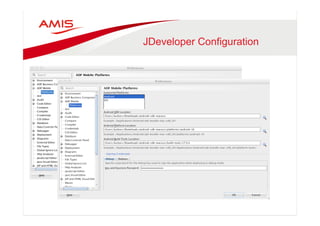
• Configure ADF Mobile extension preferences
JDeveloper Configuration
ADF Mobile Deployment
ADF Mobile Application Config 
• Feature configuration 
– Constraints 
– Content 
– Feature Level Preferences 
– Security 
• Application configuration 
– Configuration (ALCL) 
– Available Features 
– Application Level Preferences 
– Security
ADF Mobile Features 
•
ADF mobile – UI content 
• Local AMX File 
– JSF-like file built visually in JDeveloper 
– Generated into HTML/JS on device at RT 
– Based on HTML5 
• Remote URL 
– ADF Trinidad for Smartphones 
– ADF Faces on Tablets 
– Any third-party site 
• Local HTML File 
– Hand-coded HTML5 pages
AMX View and Controller 
Device 
Native 
Container 
SQLite 
Database 
Java 
VM 
Configuration 
Server 
Business 
Logic 
Model 
JDBC 
Apache 
Cordova 
SQLite 
Web 
View 
Server 
HTML 
HTML5 
and 
Javascript 
Presentation 
AMX 
View 
Local 
HTML 
Controller 
Push 
Handler 
Server 
Generated 
HTML 
APN/GCM 
Push 
Services 
SOAP 
and 
REST 
Services 
Device 
Services 
App 
Config 
Credential 
Management 
SSO 
and 
Access 
Control
Building AMX Pages 
•
Building AMX Pages
Using Layout Components
Swimming-lanes 
• Make all ‘content’ available in a continuously 
scrolling swimlane 
• Use panelGroupLayout 
– Width 100% 
<amx:panelGroupLayout layout="horizontal” 
inlineStyle="width:100%;">"
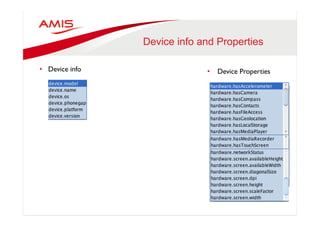
Device info and Properties 
• Device info 
• Device Properties
Work With Form Factors 
• Respond to Form Factors 
• Conditionally Render Different content
Gesture Support 
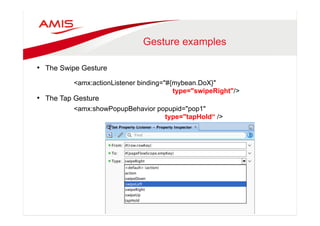
• You can configure Button, Link, and List Item components to react to the 
following gestures: 
• Swipe to the right 
• Swipe to the left 
• Swipe up 
• Swipe down 
• Tap-and-hold
Gesture examples 
• The Swipe Gesture 
<amx:actionListener binding="#{mybean.DoX}" 
• The Tap Gesture 
type="swipeRight"/> 
<amx:showPopupBehavior popupid="pop1" 
type="tapHold“ />
Navigation (Declarative) 
• Declarative Navigation 
– Button/Link/ListItem 
<amx:listItem id="li1" action="detail" showLinkIcon="true">" 
<amx:setPropertyListener id="x" from="#{row.rowKey}” 
to="#{pageFlowScope.myBean.currentStadium}" " 
type="action"/>"
Navigation (Programmatic) 
• Declarative Navigation 
– Button/Link/ListItem 
• Programmatic Navigation 
– JavaCode 
AdfmfContainerUtilities.invokeContainerJavaScriptFunction(" 
AdfmfJavaUtilities.getFeatureName(), " 
"adf.mf.api.amx.doNavigation", " 
new Object[] { ”detail" }); 
} "
Controlling your application 
• Springboard configuration in adfmf-application.xml
The Default Springboard
The Custom SpringBoard
Configuring the springboard
Feature Archives 
• Feature Archives can be reused 
• Deploy ADF Mobile app as FAR 
• Consume features from FAR in other apps
Server HTML (Remote URL) 
Device 
Native 
Container 
SQLite 
Database 
Java 
VM 
Configuration 
Server 
Business 
Logic 
Model 
JDBC 
Apache 
Cordova 
SQLite 
Web 
View 
Server 
HTML 
HTML5 
and 
Javascript 
Presentation 
AMX 
View 
Local 
HTML 
Controller 
Push 
Handler 
Server 
Generated 
HTML 
APN/GCM 
Push 
Services 
SOAP 
and 
REST 
Services 
Device 
Services 
App 
Config 
Credential 
Management 
SSO 
and 
Access 
Control
Remote URLs 
• For embedding existing web pages in your 
ADF Mobile app. 
• For instance: 
– News Website 
– Existing enterprise app Mobile Browser Pages 
• Note: 
– Best use Optimized Mobile Browser Pages 
– Apache Trinidad components 
– Oracle recommends using ADF Mobile browser
Feature as Remote URL 
• Create New Feature as 
Remote URL 
• Create URL Connection
Whitelisting 
• Why do we need to do this ? 
• Mobile device is 
redirected to m.uefa.com
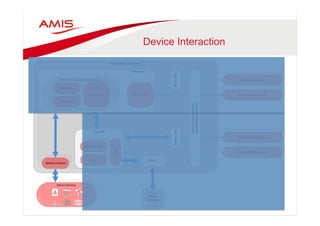
Device Interaction 
Device 
Native 
Container 
SQLite 
Database 
Java 
VM 
Configuration 
Server 
Business 
Logic 
Model 
JDBC 
Apache 
Cordova 
SQLite 
Web 
View 
Server 
HTML 
HTML5 
and 
Javascript 
Presentation 
AMX 
View 
Local 
HTML 
Controller 
Push 
Handler 
Server 
Generated 
HTML 
APN/GCM 
Push 
Services 
SOAP 
and 
REST 
Services 
Device 
Services 
App 
Config 
Credential 
Management 
SSO 
and 
Access 
Control
Device Interaction 
• The Device Datacontrol 
• Drag n Drop support 
• Attributes as fields 
• Operations as buttons 
• Or as a link
Behind the scenes 
• Now where is the catch ?
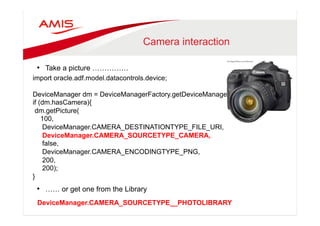
Camera interaction 
• Take a picture …………… 
import oracle.adf.model.datacontrols.device; 
DeviceManager dm = DeviceManagerFactory.getDeviceManager(); 
if (dm.hasCamera){ 
dm.getPicture( 
100, 
DeviceManager.CAMERA_DESTINATIONTYPE_FILE_URI, 
DeviceManager.CAMERA_SOURCETYPE_CAMERA, 
false, 
DeviceManager.CAMERA_ENCODINGTYPE_PNG, 
200, 
200); 
• …… or get one from the Library 
} 
DeviceManager.CAMERA_SOURCETYPE__PHOTOLIBRARY
Data (and) Services 
Device 
Native 
Container 
SQLite 
Database 
Java 
VM 
Configuration 
Server 
Business 
Logic 
Model 
JDBC 
Apache 
Cordova 
SQLite 
Web 
View 
Server 
HTML 
HTML5 
and 
Javascript 
Presentation 
AMX 
View 
Local 
HTML 
Controller 
Push 
Handler 
Server 
Generated 
HTML 
APN/GCM 
Push 
Services 
SOAP 
and 
REST 
Services 
Device 
Services 
App 
Config 
Credential 
Management 
SSO 
and 
Access 
Control
Using Webservices 
• The Webservice Datacontrol for SOAP-XML and REST-XML
Using Webservices directly 
• Just drag & drop the method from the Data Control
Using Webservices from Java 
• Invoke directly from java. 
• Does not use the page Definition 
• Uses Framework utilityMethod 
• AdfmfJavaUtilities.invokeDataControlMethod() 
• Datacontrol must be in available in DataBindings.cpx
Advantages 
• Provides more flexibility to shape model to mobile UI 
• Perform client side validation 
• Minimize the number of round trips 
• Offline caching à Pay attention to Stevens Presentation later today ! 
• Mash-up data from multiple services
Patterns… 
• SOAP/REST XML Webservice 
– Needs WebServiceDataControl and invokeDataControlMethod()
Patterns… 
• REST-JSON Webservice 
– Needs URL Connection and RestServiceAdapter
Patterns…. 
• SQLiteDatabase 
– Needs Plain JDBC
Obviously all the same…… 
• Service Object Data Control Pattern 
– Whatever “back end” data source you use….. 
– It is completely transparent for your UI
Push Notifications 
Device 
Native 
Container 
SQLite 
Database 
Java 
VM 
Configuration 
Server 
Business 
Logic 
Model 
JDBC 
Apache 
Cordova 
SQLite 
Web 
View 
Server 
HTML 
HTML5 
and 
Javascript 
Presentation 
AMX 
View 
Local 
HTML 
Controller 
Push 
Handler 
Server 
Generated 
HTML 
APN/GCM 
Push 
Services 
SOAP 
and 
REST 
Services 
Device 
Services 
App 
Config 
Credential 
Management 
SSO 
and 
Access 
Control
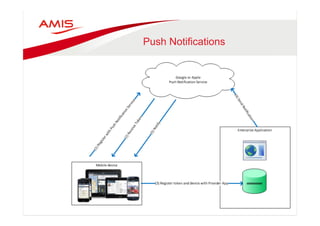
Push Notifications 
•
Push Notifications 
• Subscribe to Messaging Service 
• Receive token 
• Register with Enterprise app 
• Enterprise app Pushes message to 
Messaging Service 
• Messaging Service delegates 
message to device(s)
Start The ADF Mobile App 
• ApplicationLifeCycleListener 
– In the Start() Method create a new PushNotificationListener() 
public void start() { 
// Add code here... 
EventSource evtSource = 
EventSourceFactory.getEventSource( 
NativePushNotificationEventSource. 
NATIVE_PUSH_NOTIFICATION_REMOTE_EVENT_SOURCE_NAME); 
evtSource.addListener(new PushNotificationListener()); 
}
Open the application 
• In the PushNotificationListener 
– OnOpen() // receive token 
– OnMessage() // handle notification 
– OnError() 
public void onOpen(String token) { 
// Invoked during the Push Notification registration process. 
// The parameter "token" contains the token received from APNs or GCMs 
// that uniquely identifies a specific device-application combination. 
ValueExpression ve = AdfmfJavaUtilities.getValueExpression( 
"#{applicationScope.deviceToken}", String.class); 
if (token != null){ 
ve.setValue(AdfmfJavaUtilities.getAdfELContext(), token); 
} 
else{ 
ve.setValue(AdfmfJavaUtilities.getAdfELContext(), "dummy Token"); 
} 
}
Working with the Notification 
public void onMessage(Event event) { 
PayloadServiceResponse serviceResponse = 
(PayloadServiceResponse)jsonHelper.fromJSON( 
PayloadServiceResponse.class, event.getPayload()); 
String message = serviceResponse.getCustomMessage(); 
ValueExpression notificationPayloadBinding = 
AdfmfJavaUtilities.getValueExpression( 
"#{applicationScope.notificationSessionId}", String.class); 
ValueExpression ve = AdfmfJavaUtilities.getValueExpression( 
"#{applicationScope.notified}", Boolean.class); 
ve.setValue(AdfmfJavaUtilities.getAdfELContext(), Boolean.TRUE); 
// also, lets decrease the application icon badge by one 
int currentBadge = 
AdfmfContainerUtilities.getApplicationIconBadgeNumber(); 
if (currentBadge > 0){ 
AdfmfContainerUtilities. 
setApplicationIconBadgeNumber(currentBadge - 1); 
} 
AdfmfContainerUtilities.gotoFeature( 
"com.tamcapp.mobilebook.ses.ConferenceSessions"); 
} 
}
Example 
• Select device 
• Send message 
• Get notified
Nothing more I can say……

amis-adf-enterprise-mobility

  • 1.
    Mobile First Oracle’sADF Mobile Framework AMIS Enterprise to Mobility Oracle ADF Conference, Nieuwegein, May 21st 2014
  • 2.
    Who Am I • Luc Bors • Principal Consultant • AMIS, Netherlands
  • 3.
    Agenda • ADFMobile Overview • Preparing for Development • Creating your ADF Mobile Application • Building the UI • Data (and) Services • Device Interaction • Push Notifications • Stuff I cannot talk about (but Chris can)
  • 4.
    Oracle ADF Mobile • Build Once, Run on Multiple-Platforms – Phones, Tablets, iOS, Android, … • Java for business logic • HTML5/JavaScript user interface • Consistent business logic & data model • Disconnected: SQLite with encryption • Full access to native device features • Modular, reusable application components • JDeveloper and soon Eclipse
  • 5.
    Native Mobile UserExperience • Device native user experience • Spring board and tab bar for feature navigation • Advanced HTML5-based UI • Full animation, gesture, and touch interaction support • Interactive Data Visualization Components • Device Interaction using Cordova
  • 6.
    ADF Mobile Overview Device Native Container SQLite Database Java VM Configuration Server Business Logic Model JDBC Apache Cordova SQLite Web View Server HTML HTML5 and Javascript Presentation AMX View Local HTML Controller Push Handler Server Generated HTML APN/GCM Push Services SOAP and REST Services Device Services App Config Credential Management SSO and Access Control
  • 7.
    Development Environment •Development Machine: – Mac is required if you intend to support iOS devices • Mobile development SDKs and simulators – Used by JDeveloper to compile device native binaries • Mobile developer program membership – Needed to deploy to an actual device • Install JDev and download/install the ADF Mobile extension • Configure ADF Mobile extension preferences
  • 8.
  • 9.
  • 10.
    ADF Mobile ApplicationConfig • Feature configuration – Constraints – Content – Feature Level Preferences – Security • Application configuration – Configuration (ALCL) – Available Features – Application Level Preferences – Security
  • 11.
  • 12.
    ADF mobile –UI content • Local AMX File – JSF-like file built visually in JDeveloper – Generated into HTML/JS on device at RT – Based on HTML5 • Remote URL – ADF Trinidad for Smartphones – ADF Faces on Tablets – Any third-party site • Local HTML File – Hand-coded HTML5 pages
  • 13.
    AMX View andController Device Native Container SQLite Database Java VM Configuration Server Business Logic Model JDBC Apache Cordova SQLite Web View Server HTML HTML5 and Javascript Presentation AMX View Local HTML Controller Push Handler Server Generated HTML APN/GCM Push Services SOAP and REST Services Device Services App Config Credential Management SSO and Access Control
  • 14.
  • 15.
  • 16.
  • 17.
    Swimming-lanes • Makeall ‘content’ available in a continuously scrolling swimlane • Use panelGroupLayout – Width 100% <amx:panelGroupLayout layout="horizontal” inlineStyle="width:100%;">"
  • 18.
    Device info andProperties • Device info • Device Properties
  • 19.
    Work With FormFactors • Respond to Form Factors • Conditionally Render Different content
  • 20.
    Gesture Support •You can configure Button, Link, and List Item components to react to the following gestures: • Swipe to the right • Swipe to the left • Swipe up • Swipe down • Tap-and-hold
  • 21.
    Gesture examples •The Swipe Gesture <amx:actionListener binding="#{mybean.DoX}" • The Tap Gesture type="swipeRight"/> <amx:showPopupBehavior popupid="pop1" type="tapHold“ />
  • 22.
    Navigation (Declarative) •Declarative Navigation – Button/Link/ListItem <amx:listItem id="li1" action="detail" showLinkIcon="true">" <amx:setPropertyListener id="x" from="#{row.rowKey}” to="#{pageFlowScope.myBean.currentStadium}" " type="action"/>"
  • 23.
    Navigation (Programmatic) •Declarative Navigation – Button/Link/ListItem • Programmatic Navigation – JavaCode AdfmfContainerUtilities.invokeContainerJavaScriptFunction(" AdfmfJavaUtilities.getFeatureName(), " "adf.mf.api.amx.doNavigation", " new Object[] { ”detail" }); } "
  • 24.
    Controlling your application • Springboard configuration in adfmf-application.xml
  • 25.
  • 26.
  • 27.
  • 28.
    Feature Archives •Feature Archives can be reused • Deploy ADF Mobile app as FAR • Consume features from FAR in other apps
  • 29.
    Server HTML (RemoteURL) Device Native Container SQLite Database Java VM Configuration Server Business Logic Model JDBC Apache Cordova SQLite Web View Server HTML HTML5 and Javascript Presentation AMX View Local HTML Controller Push Handler Server Generated HTML APN/GCM Push Services SOAP and REST Services Device Services App Config Credential Management SSO and Access Control
  • 30.
    Remote URLs •For embedding existing web pages in your ADF Mobile app. • For instance: – News Website – Existing enterprise app Mobile Browser Pages • Note: – Best use Optimized Mobile Browser Pages – Apache Trinidad components – Oracle recommends using ADF Mobile browser
  • 31.
    Feature as RemoteURL • Create New Feature as Remote URL • Create URL Connection
  • 32.
    Whitelisting • Whydo we need to do this ? • Mobile device is redirected to m.uefa.com
  • 33.
    Device Interaction Device Native Container SQLite Database Java VM Configuration Server Business Logic Model JDBC Apache Cordova SQLite Web View Server HTML HTML5 and Javascript Presentation AMX View Local HTML Controller Push Handler Server Generated HTML APN/GCM Push Services SOAP and REST Services Device Services App Config Credential Management SSO and Access Control
  • 34.
    Device Interaction •The Device Datacontrol • Drag n Drop support • Attributes as fields • Operations as buttons • Or as a link
  • 35.
    Behind the scenes • Now where is the catch ?
  • 36.
    Camera interaction •Take a picture …………… import oracle.adf.model.datacontrols.device; DeviceManager dm = DeviceManagerFactory.getDeviceManager(); if (dm.hasCamera){ dm.getPicture( 100, DeviceManager.CAMERA_DESTINATIONTYPE_FILE_URI, DeviceManager.CAMERA_SOURCETYPE_CAMERA, false, DeviceManager.CAMERA_ENCODINGTYPE_PNG, 200, 200); • …… or get one from the Library } DeviceManager.CAMERA_SOURCETYPE__PHOTOLIBRARY
  • 37.
    Data (and) Services Device Native Container SQLite Database Java VM Configuration Server Business Logic Model JDBC Apache Cordova SQLite Web View Server HTML HTML5 and Javascript Presentation AMX View Local HTML Controller Push Handler Server Generated HTML APN/GCM Push Services SOAP and REST Services Device Services App Config Credential Management SSO and Access Control
  • 38.
    Using Webservices •The Webservice Datacontrol for SOAP-XML and REST-XML
  • 39.
    Using Webservices directly • Just drag & drop the method from the Data Control
  • 40.
    Using Webservices fromJava • Invoke directly from java. • Does not use the page Definition • Uses Framework utilityMethod • AdfmfJavaUtilities.invokeDataControlMethod() • Datacontrol must be in available in DataBindings.cpx
  • 41.
    Advantages • Providesmore flexibility to shape model to mobile UI • Perform client side validation • Minimize the number of round trips • Offline caching à Pay attention to Stevens Presentation later today ! • Mash-up data from multiple services
  • 42.
    Patterns… • SOAP/RESTXML Webservice – Needs WebServiceDataControl and invokeDataControlMethod()
  • 43.
    Patterns… • REST-JSONWebservice – Needs URL Connection and RestServiceAdapter
  • 44.
    Patterns…. • SQLiteDatabase – Needs Plain JDBC
  • 45.
    Obviously all thesame…… • Service Object Data Control Pattern – Whatever “back end” data source you use….. – It is completely transparent for your UI
  • 46.
    Push Notifications Device Native Container SQLite Database Java VM Configuration Server Business Logic Model JDBC Apache Cordova SQLite Web View Server HTML HTML5 and Javascript Presentation AMX View Local HTML Controller Push Handler Server Generated HTML APN/GCM Push Services SOAP and REST Services Device Services App Config Credential Management SSO and Access Control
  • 47.
  • 48.
    Push Notifications •Subscribe to Messaging Service • Receive token • Register with Enterprise app • Enterprise app Pushes message to Messaging Service • Messaging Service delegates message to device(s)
  • 49.
    Start The ADFMobile App • ApplicationLifeCycleListener – In the Start() Method create a new PushNotificationListener() public void start() { // Add code here... EventSource evtSource = EventSourceFactory.getEventSource( NativePushNotificationEventSource. NATIVE_PUSH_NOTIFICATION_REMOTE_EVENT_SOURCE_NAME); evtSource.addListener(new PushNotificationListener()); }
  • 50.
    Open the application • In the PushNotificationListener – OnOpen() // receive token – OnMessage() // handle notification – OnError() public void onOpen(String token) { // Invoked during the Push Notification registration process. // The parameter "token" contains the token received from APNs or GCMs // that uniquely identifies a specific device-application combination. ValueExpression ve = AdfmfJavaUtilities.getValueExpression( "#{applicationScope.deviceToken}", String.class); if (token != null){ ve.setValue(AdfmfJavaUtilities.getAdfELContext(), token); } else{ ve.setValue(AdfmfJavaUtilities.getAdfELContext(), "dummy Token"); } }
  • 51.
    Working with theNotification public void onMessage(Event event) { PayloadServiceResponse serviceResponse = (PayloadServiceResponse)jsonHelper.fromJSON( PayloadServiceResponse.class, event.getPayload()); String message = serviceResponse.getCustomMessage(); ValueExpression notificationPayloadBinding = AdfmfJavaUtilities.getValueExpression( "#{applicationScope.notificationSessionId}", String.class); ValueExpression ve = AdfmfJavaUtilities.getValueExpression( "#{applicationScope.notified}", Boolean.class); ve.setValue(AdfmfJavaUtilities.getAdfELContext(), Boolean.TRUE); // also, lets decrease the application icon badge by one int currentBadge = AdfmfContainerUtilities.getApplicationIconBadgeNumber(); if (currentBadge > 0){ AdfmfContainerUtilities. setApplicationIconBadgeNumber(currentBadge - 1); } AdfmfContainerUtilities.gotoFeature( "com.tamcapp.mobilebook.ses.ConferenceSessions"); } }
  • 52.
    Example • Selectdevice • Send message • Get notified
  • 53.
    Nothing more Ican say……