AFOLABI O. RICHARD
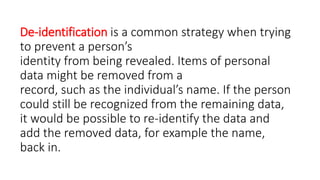
De-identification is a common strategy when trying
to prevent a person’s
identity from being revealed. Items of personal
data might be removed from a
record, such as the individual’s name. If the person
could still be recognized from the remaining data,
it would be possible to re-identify the data and
add the removed data, for example the name,
back in.
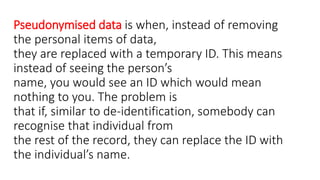
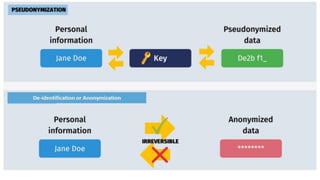
Pseudonymised data is when, instead of removing
the personal items of data,
they are replaced with a temporary ID. This means
instead of seeing the person’s
name, you would see an ID which would mean
nothing to you. The problem is
that if, similar to de-identification, somebody can
recognise that individual from
the rest of the record, they can replace the ID with
the individual’s name.
If, however, the data has been amended to make it
appear anonymous in such a way that it is
impossible to recognise the individual, then it is no
longer classed as personal data. For this to be the
case the anonymisation of the record must
be irreversible.
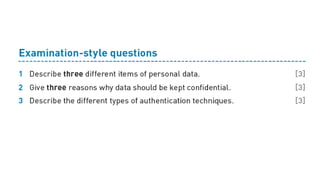
Examples of personal data as outlined by the EU are:
» a name and surname
» a home address
» an email address, such as name.surname@company.com
» an identification card number
» location data (for example from the location data function on a mobile
phone)
» an IP address
» a cookie ID
» the advertising identifier of your phone
» data held by a hospital or doctor, which could be a symbol that uniquely
identifies a person.
KEEPING PERSONAL
DATA CONFIDENTIAL
Computers are used by organisations and companies to store large amounts of
personal information. The question might arise: why do we need to keep data
confidential? The answer is, if it were to fall into the wrong hands, the data
could be used for identity theft or to withdraw huge sums of money from bank
accounts. Identity theft is when a fraudster pretends to be another individual
online by using that individual’s personal information. Fraudsters who have
accessed an individual’s personal data can use their login details to access their
bank accounts or commit other types of fraud, while pretending to be that
individual.
Organisations and businesses can take certain
measures to ensure the confidentiality of data. It is
essential that personal information should only be
seen by those people who are authorised to see it.
Keeping data confidential is an essential part of an
organisation’s responsibilities.
Encryption is the main IT technique used to ensure
the confidentiality of data in online systems.
Anybody illegally accessing this data will not be
able to understand it. They can still perform
malicious actions, like deleting the data, but they
cannot gain any information from it.
Data protection acts, which are the rules
organisations must stick to in order to protect data,
exist in most countries. A number of workers
inorganisations need to look at the personal data
of other individuals as part of their job.
Organisations can encourage workers to be aware
of their responsibilities.
Workers who deal with confidential information
about other individuals have a duty of confidence,
both to the individual and their employer. They
must not tell anybody or use the information for
any reason except with the permission of the
person who gave it. Should they attempt to do so,
the person whose data it is can take out a legal
injunction preventing them.
Organisations must be held responsible for their
decisions to pass on information. Good practice is
to make sure that only the least amount of
information that could identify an individual is
passed on. Online services, particularly online
banking and shopping, allow organisations to have
access to private data such as names, addresses,
phone numbers, financial records and so
on.
Another action a company could take is to
anonymise information. In its simplest form,
anonymised information is simply not mentioning
a person by name. However, we know that other
information could enable the individual concerned
to be identified, so this must be removed as well.
Aggregated information is another way of preventing
individuals from being identified. This is where the
personal details of a number of people are combined to
provide information without individually identifying
anybody. However, this may not always safeguard details adequately. An
example couldbe a hospital which analyses data of its patients (without identifying
individuals)
who have a particular illness or disease. However, there may be only one patient
with a particular disease and so it becomes obvious who that person is.
Individuals can keep their data confidential by not
putting too much personal data on social media. Most
employers do background checks on potential
employees, which nowadays include looking at social
media profiles. Personal information that might
persuade a prospective employer not to employ an
individual should not be posted.
KEEPING PERSONAL DATA SECURE
There are a number of different precautions that can be taken in order to keep personal data secure. Some of these are described below.
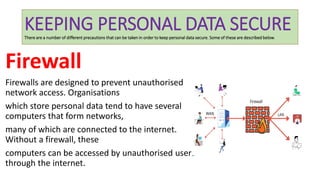
Firewall
Firewalls are designed to prevent unauthorised
network access. Organisations
which store personal data tend to have several
computers that form networks,
many of which are connected to the internet.
Without a firewall, these
computers can be accessed by unauthorised users
through the internet.
Firewalls examine data coming into the network to see if it is
allowable. It examines data packets and breaks them down into
smaller pieces of information such as the IP address they came from.
An IP (internet protocol) address is a combination of numbers that
identifies each computer in a network. If it is an IP address that is not
allowed, the firewall can block that traffic. It can prevent certain
computers from gaining access to the network.
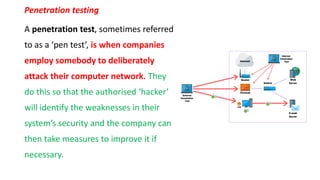
Penetration testing
A penetration test, sometimes referred
to as a ‘pen test’, is when companies
employ somebody to deliberately
attack their computer network. They
do this so that the authorised ‘hacker’
will identify the weaknesses in their
system’s security and the company can
then take measures to improve it if
necessary.
Basically, it is a way to find out how easy it is to access
a computer network and how well the measures
being taken to protect the data are working and, if
necessary, improve them. The purpose of doing this
is to enable the company to secure personal data
from illegal hackers who will attempt to gain
unauthorized access to the system.
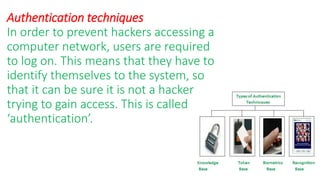
Authentication techniques
In order to prevent hackers accessing a
computer network, users are required
to log on. This means that they have to
identify themselves to the system, so
that it can be sure it is not a hacker
trying to gain access. This is called
‘authentication’.
There are many ways in which a person can prove to a computer
system that they are who they say they are:
» Typing in a user ID and password which only the user knows
» Inserting or swiping a smart card which belongs to the user
» Using biometric data which relates to a unique physical characteristic
of the user.
Biometrics can involve the use of iris or fingerprint
scanning, as these are both felt to be the best at
providing unique data. Although quite expensive,
iris scanners tend to be more effective as the
scanner does not require as much cleaning after
use and it also is more accurate since fingerprints
can be affected by grease and dirt.
If only one of these methods is used, it would
suggest that the system is not totally secure; at
least two should be used when accessing personal
data. For example, when somebody withdraws
money from an ATM, they have to use something
that belongs to them (their bank card) and
something only they know (their PIN).
Although many small transactions can be carried out
with just a contactless card, for any transaction
involving a lot of money a PIN has to be used as well.
This is called twin- or two-factor authentication,
sometimes referred to as multi-factor authentication, as
it involves more than one method.
When using online banking, additional information such
as the user’s date of birth is often required. When a
customer carries out certain transactions using
a smartphone, some banks will send a one-time PIN or
password in a text message for them to enter as part of
the authentication process.
During the login process, keyboard presses can be
detected by spyware and so
drop-down options are often used for dates or PINs to
be entered.
Levels of Access
If hackers do gain access to a network, their ability to retrieve personal data can be
limited by network settings created by a network manager. Different groups of
users can be granted different levels of access to the data on the network.
This is particularly the case with hospitals, for example, where doctors may be able
to see the illnesses and diagnoses of their patients but administration staff may
only be able to find out other, not health-related, information about patients.
Often, the level of access granted to a user is related to their user ID, but some
systems enable all users of the network to log on to the system. They then require
the use of a particular smart card to access certain data.
Another example is the use of online shopping websites
that require a login; customers will only see data that is
relevant to them. However, if programmers employed by
the company access the customer database, they will be
able to view all the accounts. This is because they will
have been given a higher level of access than the
customers.
With social networks, it is the owner of the data
that can grant different levels of access. It is possible for
individuals to amend settings so that only ‘friends’ are
allowed to see their data, or they could allow both
‘friends’ and ‘friends of friends’ to see their data. On
the other hand, if the setting is ‘public’, the data can be
seen by everyone.
Allocating different access levels to different
groups limits the information that the different
groups can see and the actions they are allowed to
take.
Network Policies
Network policies are sets of rules that allow companies to choose who is
allowed to access their computer network and control their use of the
network once they have gained access. Most companies now use the
internet to carry out their business transactions, and as a consequence
their computer networks have become vulnerable to attack.
These attacks can allow competitors to
gain knowledge of their operations; they can result in data being
destroyed or
provide access to any personal data that is stored.
Software updates
As well as being vital for updating a computer’s
operating system, software
updates are often made available for different types
of application software.
Although these updates are useful in eliminating bugs
and making the software easier to use, probably their
most useful function is when they eliminate specific
security weaknesses.
If weaknesses are present in an operating system,
hackers can take advantage of these in order to access
the computer system. As soon as any major software
company is made aware of vulnerabilities (security
weaknesses), they produce updates which eliminate
that risk.
It is important for users to install updates as soon as
possible in order to limit the amount of time hackers
have to find and exploit these weaknesses. If a system or
app is left without updating for a long time, more
hackers may become aware of any vulnerabilities and
use that information to gain access to personal
information stored on the system or app
Operating systems and anti-virus software tend
to be the main types of software that need regular
updating. Certain types of application software will also
need regular updating.
Activity 5a
Write a sentence about each of five different
methods of keeping personal data
secure.
Preventing misuse of personal data
Before considering how to prevent the misuse of personal
data, it is important to consider how personal data can be
gathered by people who are not supposed to have access
to it. Many students think that hacking into a computer in
order to copy, delete or change data is very easy. It is not.
With all the security measures outlined above,
Pharming
Computers connected to the internet
all have a file called the hosts file.
This is a basic text file which contains
the name and the IP address of a
number of URLs. When a user types a
URL into a web browser, the
computer first looks in the hosts file
It then looks up the corresponding IP address and
seeks to connect to the computer with that IP
address. If it cannot find the URL in the hosts file it
connects to the DNS server and looks for it there
and uses the IP address to access the appropriate
computer.
Pharming begins with a user downloading malicious
software (malware) without realising they have done
so. This software then corrupts the hosts file by adding
URLs of banks, for example, to the hosts file and
corresponding IP addresses which will take the user to
a fake website when they enter that URL.
The user then proceeds to type their bank details
into this fake website, giving the fraudster all the
information he or she needs to access that user’s
bank account by logging on to the real bank.
There are a number of ways that users can limit the
chances of pharming, though none of these will
completely prevent it.
•Using up-to-date anti-virus software is one way to
prevent the downloading of software which changes
the hosts file.
•Users need to make sure they install the latest
software updates.
An up-to-date browser can cause an alert to be
raised that a fake website has been loaded. It is
sensible to use a trusted, legitimate internet
service provider (ISP). Digital
• certificates can be checked to make sure that the site is
legitimate. Any site that requires the entry of personal data
should begin with HTTPS. If it does not, it may well be a fake
site, particularly if it has not got a coloured padlock icon next
to it. It may be useful to check that the URL is indeed correct
for that site. The actual fake website may have tell-tale signs
such as poor grammar or spelling and this should alert a user
that it may be a fake site.
Phishing
Phishing is when fraudsters try to obtain personal banking details
such as usernames, passwords, and credit or debit card details using
email. They pretend to be an official of the bank and leave a message
which often directs users to enter personal information into a fake
website which looks just like the legitimate site.
It involves the use of an email in an attempt to get
people to disclose their personal information. The
email often includes a link to the fake website (a
URL) inviting the receiver to go to that site. Some
more primitive emails just ask the recipient to
simply type in their bank details in a reply to the
email.
Others are more subtle than this, with the email
containing something that instantly grabs the
recipient’s attention and requires them to
take immediate action. It can be a message that
tells them they have won the lottery but need to
send personal information in order to claim the
prize.
The message usually contains a link to an email address where
they must send this information. In addition to giving out their
personal information (which could lead to identity theft), the
recipient is then asked to send some money to cover the
sender’s fees and then they will receive their winnings. After
they send the money to cover the fees, either they hear nothing
from the sender ever again or they may even be asked to send
extra sums of money!
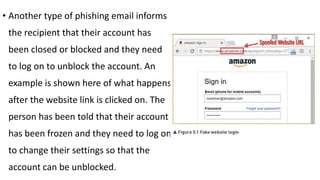
• Another type of phishing email informs
the recipient that their account has
been closed or blocked and they need
to log on to unblock the account. An
example is shown here of what happens
after the website link is clicked on. The
person has been told that their account
has been frozen and they need to log on
to change their settings so that the
account can be unblocked.
Here, the recipient has clicked on the link but for the purposes
of this example, a fake email address has been typed in.
Normally, an individual would be expected to type in their
email address and password, allowing the fraudsters to gain
access to the account. The URL is called a ‘spoofed URL’ as the
hacker has given the site a name which is deliberately spelt in a
way that is close to the name of an authentic site.
In order to avoid falling victim to these phishing scams,
there are several things a computer user can do. It is
important to use anti-phishing software on a computer
connected to the internet. This identifies any content
which could be interpreted as phishing contained in
websites or emails. It can block the content and usually
provides the user with a warning. It is often found within
web browsers or email software.
Not all web browsers provide this facility, however, so it is
important to use one that does. It is a good idea to
always have anti-virus and anti-spyware software running
on a computer, and to update it at regular intervals.
Phishing emails often contain grammatical and/or
spelling mistakes, so it is important for users to look out
for these.
Users should never trust emails that come from people
whose names they do not recognise. If an email looks
suspicious, it is best practice to just delete it. Reputable
companies or organisations will never ask for personal
information, so that is usually a sign that it is a phishing
email and, again, should not be trusted;
the best action to take is probably deletion. If an email
starts ‘Dear customer’ rather than using the receiver’s
name, it should also be treated with caution, as should
emails asking the recipient to confirm their personal or
financial information. Personal and financial information
should never be sent in an email.
If the email contains a message that the receiver has won a large
amount of money or some other reason why they will benefit
financially, it is likely to be a fake. Links placed within the email that
are shorter than normal are used to hide the real URL and the best
way of checking this is for the user to place the mouse cursor over
the shortened link. This reveals the actual URL and the user can see
straight away if it is suspicious. The best policy is never to click on
such links.
Smishing
Smishing is a variation of phishing. The major difference
is that it uses SMS (text messages) rather than email to
send the message. The number of smishing at tempts
has increased since the introduction of smartphones, as
it is so easy to activate a link within a text message. Just
as with phishing, the main intention is to get the
There is a perception among most people that
smartphones are more secure than laptops or PCs.
However, this is not the case when it comes to smishing.
In fact, the reason why there has been an increase in this
type of scam is that people tend to be more vulnerable on
their phones. They think there is less likelihood of being
attacked on a phone than on a computer and so are more
likely to respond to a smishing request.
Some fraudsters are using text messages to get users
to download an attachment which contains malware
which, in turn, feeds personal data from the phone
back to the fraudster. A smishing message is similar to
a phishing message in that it often includes a link to
the fake website, or it can just ask the recipient to
simply type in their bank details in a reply to the text.
Sometimes it contains a phone number asking the
recipient to phone the bank or organisation using
that number. When they phone, they are then
asked for their personal details.
There are plenty of methods of prevention. Many digital
security companies produce mobile protection software
which users should have running in their smartphone.
Users should also look out for all the same signs as in a
phishing attempt, that is, spelling and grammatical errors,
messages requiring immediate action or offering financial
rewards, ‘sign up now’, or other pushy and too good-to-
be-true offers.
They should never reply to such messages. Good practice
is to open the sender’s website itself rather than replying
to a text with personal information included in it. A
sensible action is to check the sender’s phone number
against the phone number of the company they claim to
represent.
They should not click on any links in a text message
since it is far safer to type the URL into a browser.
They should also not phone any number contained
in the text message
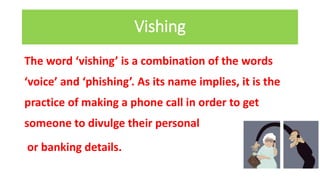
Vishing
The word ‘vishing’ is a combination of the words
‘voice’ and ‘phishing’. As its name implies, it is the
practice of making a phone call in order to get
someone to divulge their personal
or banking details.
Vishing can take several forms;
for example a fraudster, claiming to be from the bank,
phones a customer telling them that their bank account
has been accessed by a hacker and they need to change
their password and that they will help them to do this.
By giving the caller their account number and password,
they have now allowed this fraudster access to their
account.
Even if the customer is not at home, the
fraudster will leave a message requiring them to phone
a particular number, which is actually the fraudster’s.
Often this phone number goes through to an
answerphone message asking the customer to leave
their account number and other personal details.
An alternative is for the phone call to notify the
receiver they have won some money or that they have
won a prize. In both cases, the fraudsters charge a
handling or redemption fee which they invite the
person to pay by using their credit card number over
the phone.
Sometimes the fraudster will ask the customer to hang
up and phone the bank to confirm, in an effort to
convince the customer that the call really is from the
bank. Meanwhile the fraudster has not disconnected the
call so when the customer thinks they are phoning the
bank they are actually still connected to the fraudster.
They talk the customer through the process of logging
on to the bank’s website and the customer then enters
their details in order to transfer money to their new
account which has been set up by the bank. This
account tends to be the fraudster’s own bank account.
In order to avoid being a victim of vishing, it is good
practice to use another phone to call the bank and ask to
speak with the person who has just made the call. The
main thing is not to give out login information over the
phone, as a legitimate bank would never ask for it. The
same goes for account information.
The basic thing for customers to remember is to never
give out any personal information over the phone.
Banks will never ask for PINs or passwords.
Customers should hang up, ignore them and block their
number. These are all physical methods but smartphones have
software included that can perform the blocking of numbers.
There are also a variety of apps available which go beyond
merely blocking the calls and keep a file containing the blocked
numbers for all phone owners using the app.
Users can browse through the file to see which
numbers are blocked. One software solution is
employed by large organisations whereby the
software can filter numbers according to the
likelihood that scams are being attempted.
9626 chapter 5 e security

9626 chapter 5 e security

  • 1.
  • 3.
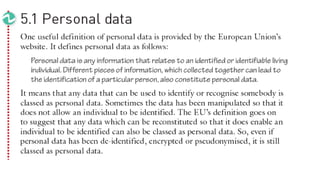
    De-identification is acommon strategy when trying to prevent a person’s identity from being revealed. Items of personal data might be removed from a record, such as the individual’s name. If the person could still be recognized from the remaining data, it would be possible to re-identify the data and add the removed data, for example the name, back in.
  • 4.
    Pseudonymised data iswhen, instead of removing the personal items of data, they are replaced with a temporary ID. This means instead of seeing the person’s name, you would see an ID which would mean nothing to you. The problem is that if, similar to de-identification, somebody can recognise that individual from the rest of the record, they can replace the ID with the individual’s name.
  • 5.
    If, however, thedata has been amended to make it appear anonymous in such a way that it is impossible to recognise the individual, then it is no longer classed as personal data. For this to be the case the anonymisation of the record must be irreversible.
  • 7.
    Examples of personaldata as outlined by the EU are: » a name and surname » a home address » an email address, such as name.surname@company.com » an identification card number » location data (for example from the location data function on a mobile phone) » an IP address » a cookie ID » the advertising identifier of your phone » data held by a hospital or doctor, which could be a symbol that uniquely identifies a person.
  • 8.
    KEEPING PERSONAL DATA CONFIDENTIAL Computersare used by organisations and companies to store large amounts of personal information. The question might arise: why do we need to keep data confidential? The answer is, if it were to fall into the wrong hands, the data could be used for identity theft or to withdraw huge sums of money from bank accounts. Identity theft is when a fraudster pretends to be another individual online by using that individual’s personal information. Fraudsters who have accessed an individual’s personal data can use their login details to access their bank accounts or commit other types of fraud, while pretending to be that individual.
  • 9.
    Organisations and businessescan take certain measures to ensure the confidentiality of data. It is essential that personal information should only be seen by those people who are authorised to see it. Keeping data confidential is an essential part of an organisation’s responsibilities.
  • 10.
    Encryption is themain IT technique used to ensure the confidentiality of data in online systems. Anybody illegally accessing this data will not be able to understand it. They can still perform malicious actions, like deleting the data, but they cannot gain any information from it.
  • 11.
    Data protection acts,which are the rules organisations must stick to in order to protect data, exist in most countries. A number of workers inorganisations need to look at the personal data of other individuals as part of their job.
  • 12.
    Organisations can encourageworkers to be aware of their responsibilities. Workers who deal with confidential information about other individuals have a duty of confidence, both to the individual and their employer. They must not tell anybody or use the information for any reason except with the permission of the person who gave it. Should they attempt to do so, the person whose data it is can take out a legal injunction preventing them.
  • 13.
    Organisations must beheld responsible for their decisions to pass on information. Good practice is to make sure that only the least amount of information that could identify an individual is passed on. Online services, particularly online banking and shopping, allow organisations to have access to private data such as names, addresses, phone numbers, financial records and so on.
  • 14.
    Another action acompany could take is to anonymise information. In its simplest form, anonymised information is simply not mentioning a person by name. However, we know that other information could enable the individual concerned to be identified, so this must be removed as well.
  • 15.
    Aggregated information isanother way of preventing individuals from being identified. This is where the personal details of a number of people are combined to provide information without individually identifying anybody. However, this may not always safeguard details adequately. An example couldbe a hospital which analyses data of its patients (without identifying individuals) who have a particular illness or disease. However, there may be only one patient with a particular disease and so it becomes obvious who that person is.
  • 16.
    Individuals can keeptheir data confidential by not putting too much personal data on social media. Most employers do background checks on potential employees, which nowadays include looking at social media profiles. Personal information that might persuade a prospective employer not to employ an individual should not be posted.
  • 17.
    KEEPING PERSONAL DATASECURE There are a number of different precautions that can be taken in order to keep personal data secure. Some of these are described below. Firewall Firewalls are designed to prevent unauthorised network access. Organisations which store personal data tend to have several computers that form networks, many of which are connected to the internet. Without a firewall, these computers can be accessed by unauthorised users through the internet.
  • 18.
    Firewalls examine datacoming into the network to see if it is allowable. It examines data packets and breaks them down into smaller pieces of information such as the IP address they came from. An IP (internet protocol) address is a combination of numbers that identifies each computer in a network. If it is an IP address that is not allowed, the firewall can block that traffic. It can prevent certain computers from gaining access to the network.
  • 19.
    Penetration testing A penetrationtest, sometimes referred to as a ‘pen test’, is when companies employ somebody to deliberately attack their computer network. They do this so that the authorised ‘hacker’ will identify the weaknesses in their system’s security and the company can then take measures to improve it if necessary.
  • 20.
    Basically, it isa way to find out how easy it is to access a computer network and how well the measures being taken to protect the data are working and, if necessary, improve them. The purpose of doing this is to enable the company to secure personal data from illegal hackers who will attempt to gain unauthorized access to the system.
  • 21.
    Authentication techniques In orderto prevent hackers accessing a computer network, users are required to log on. This means that they have to identify themselves to the system, so that it can be sure it is not a hacker trying to gain access. This is called ‘authentication’.
  • 22.
    There are manyways in which a person can prove to a computer system that they are who they say they are: » Typing in a user ID and password which only the user knows » Inserting or swiping a smart card which belongs to the user » Using biometric data which relates to a unique physical characteristic of the user.
  • 23.
    Biometrics can involvethe use of iris or fingerprint scanning, as these are both felt to be the best at providing unique data. Although quite expensive, iris scanners tend to be more effective as the scanner does not require as much cleaning after use and it also is more accurate since fingerprints can be affected by grease and dirt.
  • 24.
    If only oneof these methods is used, it would suggest that the system is not totally secure; at least two should be used when accessing personal data. For example, when somebody withdraws money from an ATM, they have to use something that belongs to them (their bank card) and something only they know (their PIN).
  • 25.
    Although many smalltransactions can be carried out with just a contactless card, for any transaction involving a lot of money a PIN has to be used as well. This is called twin- or two-factor authentication, sometimes referred to as multi-factor authentication, as it involves more than one method.
  • 26.
    When using onlinebanking, additional information such as the user’s date of birth is often required. When a customer carries out certain transactions using a smartphone, some banks will send a one-time PIN or password in a text message for them to enter as part of the authentication process. During the login process, keyboard presses can be detected by spyware and so drop-down options are often used for dates or PINs to be entered.
  • 27.
    Levels of Access Ifhackers do gain access to a network, their ability to retrieve personal data can be limited by network settings created by a network manager. Different groups of users can be granted different levels of access to the data on the network. This is particularly the case with hospitals, for example, where doctors may be able to see the illnesses and diagnoses of their patients but administration staff may only be able to find out other, not health-related, information about patients. Often, the level of access granted to a user is related to their user ID, but some systems enable all users of the network to log on to the system. They then require the use of a particular smart card to access certain data.
  • 28.
    Another example isthe use of online shopping websites that require a login; customers will only see data that is relevant to them. However, if programmers employed by the company access the customer database, they will be able to view all the accounts. This is because they will have been given a higher level of access than the customers.
  • 29.
    With social networks,it is the owner of the data that can grant different levels of access. It is possible for individuals to amend settings so that only ‘friends’ are allowed to see their data, or they could allow both ‘friends’ and ‘friends of friends’ to see their data. On the other hand, if the setting is ‘public’, the data can be seen by everyone.
  • 30.
    Allocating different accesslevels to different groups limits the information that the different groups can see and the actions they are allowed to take.
  • 31.
    Network Policies Network policiesare sets of rules that allow companies to choose who is allowed to access their computer network and control their use of the network once they have gained access. Most companies now use the internet to carry out their business transactions, and as a consequence their computer networks have become vulnerable to attack. These attacks can allow competitors to gain knowledge of their operations; they can result in data being destroyed or provide access to any personal data that is stored.
  • 32.
    Software updates As wellas being vital for updating a computer’s operating system, software updates are often made available for different types of application software. Although these updates are useful in eliminating bugs and making the software easier to use, probably their most useful function is when they eliminate specific security weaknesses.
  • 33.
    If weaknesses arepresent in an operating system, hackers can take advantage of these in order to access the computer system. As soon as any major software company is made aware of vulnerabilities (security weaknesses), they produce updates which eliminate that risk.
  • 34.
    It is importantfor users to install updates as soon as possible in order to limit the amount of time hackers have to find and exploit these weaknesses. If a system or app is left without updating for a long time, more hackers may become aware of any vulnerabilities and use that information to gain access to personal information stored on the system or app
  • 35.
    Operating systems andanti-virus software tend to be the main types of software that need regular updating. Certain types of application software will also need regular updating.
  • 36.
    Activity 5a Write asentence about each of five different methods of keeping personal data secure.
  • 37.
    Preventing misuse ofpersonal data Before considering how to prevent the misuse of personal data, it is important to consider how personal data can be gathered by people who are not supposed to have access to it. Many students think that hacking into a computer in order to copy, delete or change data is very easy. It is not. With all the security measures outlined above,
  • 38.
    Pharming Computers connected tothe internet all have a file called the hosts file. This is a basic text file which contains the name and the IP address of a number of URLs. When a user types a URL into a web browser, the computer first looks in the hosts file
  • 39.
    It then looksup the corresponding IP address and seeks to connect to the computer with that IP address. If it cannot find the URL in the hosts file it connects to the DNS server and looks for it there and uses the IP address to access the appropriate computer.
  • 40.
    Pharming begins witha user downloading malicious software (malware) without realising they have done so. This software then corrupts the hosts file by adding URLs of banks, for example, to the hosts file and corresponding IP addresses which will take the user to a fake website when they enter that URL.
  • 41.
    The user thenproceeds to type their bank details into this fake website, giving the fraudster all the information he or she needs to access that user’s bank account by logging on to the real bank.
  • 42.
    There are anumber of ways that users can limit the chances of pharming, though none of these will completely prevent it. •Using up-to-date anti-virus software is one way to prevent the downloading of software which changes the hosts file.
  • 43.
    •Users need tomake sure they install the latest software updates. An up-to-date browser can cause an alert to be raised that a fake website has been loaded. It is sensible to use a trusted, legitimate internet service provider (ISP). Digital
  • 44.
    • certificates canbe checked to make sure that the site is legitimate. Any site that requires the entry of personal data should begin with HTTPS. If it does not, it may well be a fake site, particularly if it has not got a coloured padlock icon next to it. It may be useful to check that the URL is indeed correct for that site. The actual fake website may have tell-tale signs such as poor grammar or spelling and this should alert a user that it may be a fake site.
  • 45.
    Phishing Phishing is whenfraudsters try to obtain personal banking details such as usernames, passwords, and credit or debit card details using email. They pretend to be an official of the bank and leave a message which often directs users to enter personal information into a fake website which looks just like the legitimate site.
  • 46.
    It involves theuse of an email in an attempt to get people to disclose their personal information. The email often includes a link to the fake website (a URL) inviting the receiver to go to that site. Some more primitive emails just ask the recipient to simply type in their bank details in a reply to the email.
  • 47.
    Others are moresubtle than this, with the email containing something that instantly grabs the recipient’s attention and requires them to take immediate action. It can be a message that tells them they have won the lottery but need to send personal information in order to claim the prize.
  • 48.
    The message usuallycontains a link to an email address where they must send this information. In addition to giving out their personal information (which could lead to identity theft), the recipient is then asked to send some money to cover the sender’s fees and then they will receive their winnings. After they send the money to cover the fees, either they hear nothing from the sender ever again or they may even be asked to send extra sums of money!
  • 49.
    • Another typeof phishing email informs the recipient that their account has been closed or blocked and they need to log on to unblock the account. An example is shown here of what happens after the website link is clicked on. The person has been told that their account has been frozen and they need to log on to change their settings so that the account can be unblocked.
  • 50.
    Here, the recipienthas clicked on the link but for the purposes of this example, a fake email address has been typed in. Normally, an individual would be expected to type in their email address and password, allowing the fraudsters to gain access to the account. The URL is called a ‘spoofed URL’ as the hacker has given the site a name which is deliberately spelt in a way that is close to the name of an authentic site.
  • 51.
    In order toavoid falling victim to these phishing scams, there are several things a computer user can do. It is important to use anti-phishing software on a computer connected to the internet. This identifies any content which could be interpreted as phishing contained in websites or emails. It can block the content and usually provides the user with a warning. It is often found within web browsers or email software.
  • 52.
    Not all webbrowsers provide this facility, however, so it is important to use one that does. It is a good idea to always have anti-virus and anti-spyware software running on a computer, and to update it at regular intervals. Phishing emails often contain grammatical and/or spelling mistakes, so it is important for users to look out for these.
  • 53.
    Users should nevertrust emails that come from people whose names they do not recognise. If an email looks suspicious, it is best practice to just delete it. Reputable companies or organisations will never ask for personal information, so that is usually a sign that it is a phishing email and, again, should not be trusted;
  • 54.
    the best actionto take is probably deletion. If an email starts ‘Dear customer’ rather than using the receiver’s name, it should also be treated with caution, as should emails asking the recipient to confirm their personal or financial information. Personal and financial information should never be sent in an email.
  • 55.
    If the emailcontains a message that the receiver has won a large amount of money or some other reason why they will benefit financially, it is likely to be a fake. Links placed within the email that are shorter than normal are used to hide the real URL and the best way of checking this is for the user to place the mouse cursor over the shortened link. This reveals the actual URL and the user can see straight away if it is suspicious. The best policy is never to click on such links.
  • 56.
    Smishing Smishing is avariation of phishing. The major difference is that it uses SMS (text messages) rather than email to send the message. The number of smishing at tempts has increased since the introduction of smartphones, as it is so easy to activate a link within a text message. Just as with phishing, the main intention is to get the
  • 57.
    There is aperception among most people that smartphones are more secure than laptops or PCs. However, this is not the case when it comes to smishing. In fact, the reason why there has been an increase in this type of scam is that people tend to be more vulnerable on their phones. They think there is less likelihood of being attacked on a phone than on a computer and so are more likely to respond to a smishing request.
  • 58.
    Some fraudsters areusing text messages to get users to download an attachment which contains malware which, in turn, feeds personal data from the phone back to the fraudster. A smishing message is similar to a phishing message in that it often includes a link to the fake website, or it can just ask the recipient to simply type in their bank details in a reply to the text.
  • 59.
    Sometimes it containsa phone number asking the recipient to phone the bank or organisation using that number. When they phone, they are then asked for their personal details.
  • 60.
    There are plentyof methods of prevention. Many digital security companies produce mobile protection software which users should have running in their smartphone. Users should also look out for all the same signs as in a phishing attempt, that is, spelling and grammatical errors, messages requiring immediate action or offering financial rewards, ‘sign up now’, or other pushy and too good-to- be-true offers.
  • 61.
    They should neverreply to such messages. Good practice is to open the sender’s website itself rather than replying to a text with personal information included in it. A sensible action is to check the sender’s phone number against the phone number of the company they claim to represent.
  • 62.
    They should notclick on any links in a text message since it is far safer to type the URL into a browser. They should also not phone any number contained in the text message
  • 63.
    Vishing The word ‘vishing’is a combination of the words ‘voice’ and ‘phishing’. As its name implies, it is the practice of making a phone call in order to get someone to divulge their personal or banking details.
  • 64.
    Vishing can takeseveral forms; for example a fraudster, claiming to be from the bank, phones a customer telling them that their bank account has been accessed by a hacker and they need to change their password and that they will help them to do this. By giving the caller their account number and password, they have now allowed this fraudster access to their account.
  • 65.
    Even if thecustomer is not at home, the fraudster will leave a message requiring them to phone a particular number, which is actually the fraudster’s. Often this phone number goes through to an answerphone message asking the customer to leave their account number and other personal details.
  • 66.
    An alternative isfor the phone call to notify the receiver they have won some money or that they have won a prize. In both cases, the fraudsters charge a handling or redemption fee which they invite the person to pay by using their credit card number over the phone.
  • 67.
    Sometimes the fraudsterwill ask the customer to hang up and phone the bank to confirm, in an effort to convince the customer that the call really is from the bank. Meanwhile the fraudster has not disconnected the call so when the customer thinks they are phoning the bank they are actually still connected to the fraudster.
  • 68.
    They talk thecustomer through the process of logging on to the bank’s website and the customer then enters their details in order to transfer money to their new account which has been set up by the bank. This account tends to be the fraudster’s own bank account.
  • 69.
    In order toavoid being a victim of vishing, it is good practice to use another phone to call the bank and ask to speak with the person who has just made the call. The main thing is not to give out login information over the phone, as a legitimate bank would never ask for it. The same goes for account information. The basic thing for customers to remember is to never give out any personal information over the phone.
  • 70.
    Banks will neverask for PINs or passwords. Customers should hang up, ignore them and block their number. These are all physical methods but smartphones have software included that can perform the blocking of numbers. There are also a variety of apps available which go beyond merely blocking the calls and keep a file containing the blocked numbers for all phone owners using the app.
  • 71.
    Users can browsethrough the file to see which numbers are blocked. One software solution is employed by large organisations whereby the software can filter numbers according to the likelihood that scams are being attempted.