What is Cybersecurity?
The connected electronic information network has become an integral partof our daily lives.All types of
organizations,such as medical,financial,and education institutions,use this network to operate effectively. They
utilize the network by collecting,processing,storing,and sharing vastamounts ofdigital information.As more digital
information is gathered and shared,the protection of this information is becoming even more vital to our national
security and economic stability.
Cybersecurity is the ongoing effortto protect these networked systems and all ofthe data from unauthorized use or
harm.On a personal level,you need to safeguard your identity, your data, and your computing devices.At the
corporate level, it is everyone’s responsibilityto protect the organization’s reputation,data,and customers.At the
state level, national security,and the safety and well-being ofthe citizens are at stake.
Your Online and Offline Identity
As more time is spentonline,your identity, both online and offline,can affect your life. Your offline identity is the
person who your friends and familyinteract with on a daily basis athome,atschool,or work. They know your
personal information,such as your name,age,or where you live. Your online identity is who you are in cyberspace.
Your online identityis how you presentyourselfto others online.This online identityshould onlyreveal a limited
amountof information aboutyou.
You should take care when choosing a username or alias for your online identity. The username should notinclude
any personal information.It should be something appropriate and respectful.This username should notlead
strangers to think you are an easy target for cybercrimes or unwanted attention.
Your Data
Any information aboutyou can be considered to be your data. This personal information can uniquelyidentifyyou as
an individual.This data includes the pictures and messages thatyou exchange with your family and friends online.
Other information,such as name,social securitynumber,date and place of birth, or mother‘s maiden name,is known
by you and used to identify you. Information such as medical,educational,financial,and employmentinformation,
can also be used to identify you online.
Medical Records
Every time you go to the doctor’s office, more information is added to your electronic health records (EHRs).The
prescription from your family doctor becomes partofyour EHR. Your EHR includes your physical health,mental
health,and other personal information thatmaynot be medically-related.For example,if you had counseling as a
child when there were major changes in the family, this will be somewhere in your medical records.Besides your
medical historyand personal information,the EHR may also include information aboutyour family.
Medical devices,such as fitness bands,use the cloud platform to enable wireless transfer,storage and displayof
clinical data like heart rates,blood pressures and blood sugars.These devices can generate an enormous amountof
clinical data that could become part of your medical records.
Education Records
As you progress through your education,information aboutyour grades and testscores,your attendance,courses
taken, awards and degrees rewarded,and any disciplinaryreports maybe in your education record.This record may
also include contactinformation,health and immunization records,and special education records including
individualized education programs (IEPs).
Employment and Financial Records
Your financial record mayinclude information aboutyour income and expenditures.Tax records could include
paycheck stubs,creditcard statements,your credit rating and other banking information.Your employment
information can include your pastemploymentand your performance.
Where is Your Data?
All of this information is aboutyou. There are differentlaws that protect your privacy and data in your country. But do
you know where your data is?
When you are at the doctor’s office, the conversation you have with the doctor is recorded in your medical chart.For
billing purposes,this information maybe shared with the insurance companyto ensure appropriate billing and quality.
Now, a part of your medical record for the visit is also at the insurance com pany.
The store loyalty cards maybe a convenient way to save moneyfor your purchases.However,the store is compiling a
profile of your purchases and using thatinformation for its own use.The profile shows a buyer purchases a certain
brand and flavor of toothpaste regularly. The store uses this information to targetthe buyer with special offers from
the marketing partner.By using the loyalty card, the store and the marketing partner have a profile for the purchasing
behavior of a customer.
When you share your pictures online with your friends,do you know who may have a copy of the pictures? Copies of
the pictures are on your own devices.Your friends mayhave copies ofthose pictures downloaded onto their devices.
If the pictures are shared publicly,strangers mayhave copies ofthem,too. They could download those pictures or
take screenshots ofthose pictures.Because the pictures were posted online,they are also saved on servers located
in differentparts of the world.Now the pictures are no longer only found on your computing devices.
Your Computing Devices
Your computing devices do notjuststore your data. Now these devices have become the portal to your data and
generate information aboutyou.
Unless you have chosen to receive paper statements for all of your accounts,you use your computing devices to
access the data. If you want a digital copy of the mostrecentcredit card statement,you use your computing devices
to access the website ofthe credit card issuer.If you want to pay your credit card bill online,you access the website
of your bank to transfer the funds using your computing devices.Besides allowing you to access your information,the
computing devices can also generate information aboutyou.
With all this information aboutyou available online,your personal data has become profitable to hackers.
They Want Your Money
If you have anything of value, the criminals wantit.
Your online credentials are valuable.These credentials give the thieves access to your accounts.You may think the
frequentflyer miles you have earned are not valuable to cybercriminals.Think again.After approximately10,000
American Airlines and United accounts were hacked,cybercriminals booked free flights and upgrades using these
stolen credentials.Even though the frequentflyer miles were returned to the customers bythe airlines,this
demonstrates the value of login credentials.A criminal could also take advantage of your relationships.They could
access your online accounts and your reputation to trick you into wiring moneyto your friends or family. The criminal
can send messages stating thatyour family or friends need you to wire them money so they can get home from
abroad after losing their wallets.
The criminals are very imaginative when they are trying to trick you into giving them money.They do not juststeal
your money;they could also steal your identity and ruin your life.
They Want Your Identity
Besides stealing your moneyfor a short-term monetarygain,the criminals wantlong-term profits bystealing your
identity.
As medical costs rise,medical identitytheft is also on the rise.The identity thieves can steal your medical insurance
and use your medical benefits for themselves,and these medical procedures are now in your medical records.
The annual tax filing procedures mayvary from country to country; however, cybercriminals see this time as an
opportunity. For example,the people of the United States need to file their taxes by April 15 of each year. The
Internal Revenue Service (IRS) does not check the tax return againstthe information from the employer until July. An
identity thief can file a fake tax return and collect the refund.The legitimate filers will notice when their returns are
rejected by IRS. With the stolen identity, they can also open creditcard accounts and run up debts in your name.This
will cause damage to your credit rating and make it more difficultfor you to obtain loans.
Personal credentials can also lead to corporate data and governmentdata access.
Types of Organizational Data
Traditional Data
Corporate data includes personnel information,intellectual properties,and financial data.The personnel information
includes application materials,payroll,offer letters,employee agreements,and any information used in m aking
employmentdecisions.Intellectual property,such as patents,trademarks and new productplans,allows a business
to gain economic advantage over its competitors.This intellectual propertycan be considered a trade secret;losing
this information can be disastrous for the future of the company.The financial data, such as income statements,
balance sheets,and cash flow statements ofa companygives insightinto the health of the company.
Internet of Things and Big Data
With the emergence ofthe Internet of Things (IoT), there is a lot more data to manage and secure.IoT is a large
network of physical objects,such as sensors and equipmentthatextend beyond the traditional computer network.All
these connections,plus the fact that we have expanded s torage capacity and storage services through the cloud and
virtualization, lead to the exponential growth of data. This data has created a new area of interestin technologyand
business called “Big Data".With the velocity, volume, and variety of data generated by the IoT and the daily
operations ofbusiness,the confidentiality,integrity and availability of this data is vital to the survival of the
organization
Confidentiality, Integrity, and Availability
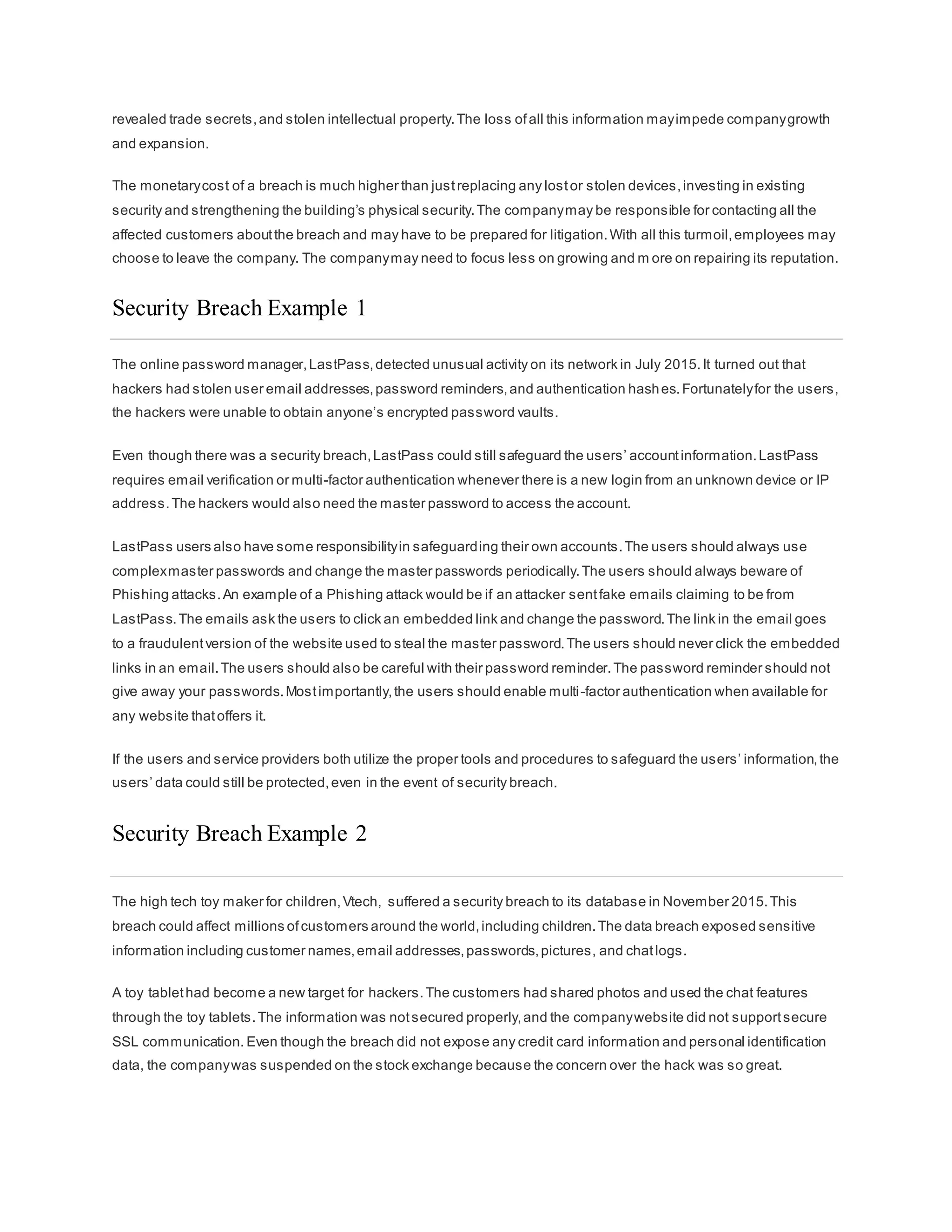
Confidentiality,integrity and availability, known as the CIA triad (Figure 1), is a guideline for information securityfor
an organization.Confidentialityensures the privacy of data by restricting access through authentication encryption.
Integrity assures thatthe information is accurate and trustworthy. Availability ensures thatthe information is
accessible to authorized people.
Confidentiality
Another term for confidentialitywould be privacy. Companypolicies should restrictaccess to the information to
authorized personnel and ensure thatonly those authorized individuals view this data.The data may be
compartmentalized according to the securityor sensitivity level of the information.For example,a Java program
developer should nothave to access to the personal information ofall employees.Furthermore,employees should
receive training to understand the bestpractices in safeguarding sensitive information to protectthemselves and the
companyfrom attacks. Methods to ensure confidentialityinclude data encryption, username ID and password,two
factor authentication,and minimizing exposure ofsensitive information.
Integrity
Integrity is accuracy, consistency,and trustworthiness ofthe data during its entire life cycle. Data mustbe un altered
during transitand not changed by unauthorized entities.File permissions and user access control can prevent
unauthorized access.Version control can be used to prevent accidental changes byauthorized users.Backups must
be available to restore any corrupted data, and checksum hashing can be used to verify integrity of the data during
transfer.
A checksum is used to verify the integrity of files,or strings ofcharacters,after they have been transferred from one
device to another across your local network or the Internet. Checksums are calculated with hash functions.Some of
the common checksums are MD5,SHA-1, SHA-256, and SHA-512. A hash function uses a mathematical algorithm to
transform the data into fixed-length value that represents the data,as shown in Figure 2. The hashed value is simply
there for comparison.From the hashed value,the original data cannotbe retrieved directly. For example,if you forgot
your password,your password cannotbe recovered from the hashed value.The password mustbe reset.
After a file is downloaded,you can verify its integrity by verifying the hash values from the source with the one you
generated using anyhash calculator.By comparing the hash values,you can ensure that the file has notbeen
tampered with or corrupted during the transfer.
Availability
Maintaining equipment,performing hardware repairs,keeping operating systems and software up to date, and
creating backups ensure the availabilityof the network and data to the authorized users.Plans shoul d be in place to
recover quickly from natural or man-made disasters.Securityequipmentor software,such as firewalls,guard against
downtime due to attacks such as denial ofservice (DoS). Denial ofservice occurs when an attacker attempts to
overwhelm resources so the services are not available to the users.
The Consequences of a Security Breach
To protect an organization from every possible cyberattack is not feasible,for a few reasons.The expertise
necessaryto set up and maintain the secure network can be expensive.Attackers will always continue to find new
ways to target networks.Eventually, an advanced and targeted cyberattack will succeed.The priority will then be how
quickly your securityteam can respond to the attack to minimize the loss of data, downtime,and revenue.
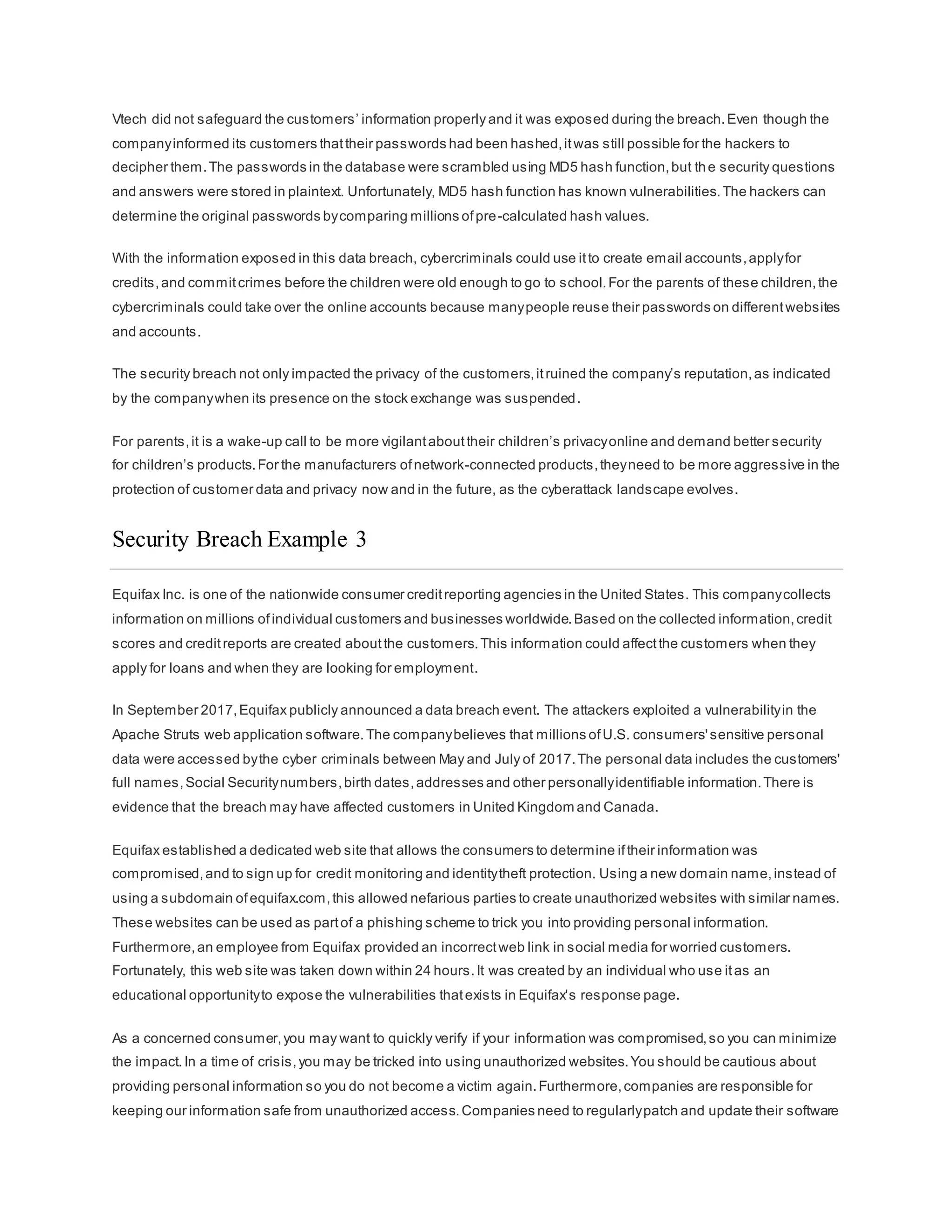
By now you know that anything posted online can live online forever, even if you were able to erase all the copies in
your possession.Ifyour servers were hacked, the confidential personnel information could be made public.A hacker
(or hacking group) may vandalize the companywebsite by posting untrue information and ruin the company’s
reputation that took years to build.The hackers can also take down the companywebsite causing the companyto
lose revenue.If the website is down for longer periods oftime,the companymay appear unreliable and possiblylose
credibility. If the companywebsite or network has been breached,this could lead to leaked confidential documents,
revealed trade secrets,and stolen intellectual property.The loss ofall this information mayimpede companygrowth
and expansion.
The monetarycost of a breach is much higher than justreplacing any lostor stolen devices,investing in existing
security and strengthening the building’s physical security.The companymay be responsible for contacting all the
affected customers aboutthe breach and may have to be prepared for litigation.With all this turmoil,employees may
choose to leave the company. The companymay need to focus less on growing and m ore on repairing its reputation.
Security Breach Example 1
The online password manager,LastPass,detected unusual activity on its network in July 2015.It turned out that
hackers had stolen user email addresses,password reminders,and authentication hashes.Fortunatelyfor the users,
the hackers were unable to obtain anyone’s encrypted password vaults.
Even though there was a security breach,LastPass could still safeguard the users’ accountinformation.LastPass
requires email verification or multi-factor authentication whenever there is a new login from an unknown device or IP
address.The hackers would also need the master password to access the account.
LastPass users also have some responsibilityin safeguarding their own accounts.The users should always use
complexmaster passwords and change the master passwords periodically.The users should always beware of
Phishing attacks.An example of a Phishing attack would be if an attacker sentfake emails claiming to be from
LastPass.The emails ask the users to click an embedded link and change the password.The link in the email goes
to a fraudulentversion of the website used to steal the master password.The users should never click the embedded
links in an email.The users should also be careful with their password reminder.The password reminder should not
give away your passwords.Mostimportantly,the users should enable multi-factor authentication when available for
any website thatoffers it.
If the users and service providers both utilize the proper tools and procedures to safeguard the users’ information,the
users’ data could still be protected,even in the event of security breach.
Security Breach Example 2
The high tech toy maker for children,Vtech, suffered a security breach to its database in November 2015.This
breach could affect millions ofcustomers around the world,including children.The data breach exposed sensitive
information including customer names,email addresses,passwords,pictures, and chatlogs.
A toy tablethad become a new target for hackers.The customers had shared photos and used the chat features
through the toy tablets.The information was notsecured properly,and the companywebsite did not supportsecure
SSL communication. Even though the breach did not expose any credit card information and personal identification
data, the companywas suspended on the stock exchange because the concern over the hack was so great.
Vtech did not safeguard the customers’ information properly and it was exposed during the breach.Even though the
companyinformed its customers thattheir passwords had been hashed,itwas still possible for the hackers to
decipher them.The passwords in the database were scrambled using MD5 hash function,but the security questions
and answers were stored in plaintext. Unfortunately, MD5 hash function has known vulnerabilities.The hackers can
determine the original passwords bycomparing millions ofpre-calculated hash values.
With the information exposed in this data breach, cybercriminals could use itto create email accounts,applyfor
credits,and commitcrimes before the children were old enough to go to school.For the parents of these children,the
cybercriminals could take over the online accounts because manypeople reuse their passwords on differentwebsites
and accounts.
The security breach not only impacted the privacy of the customers,itruined the company’s reputation,as indicated
by the companywhen its presence on the stock exchange was suspended.
For parents,it is a wake-up call to be more vigilantabouttheir children’s privacyonline and demand better security
for children’s products.For the manufacturers ofnetwork-connected products,theyneed to be more aggressive in the
protection of customer data and privacy now and in the future, as the cyberattack landscape evolves.
Security Breach Example 3
Equifax Inc. is one of the nationwide consumer creditreporting agencies in the United States. This companycollects
information on millions ofindividual customers and businesses worldwide.Based on the collected information,credit
scores and creditreports are created aboutthe customers.This information could affectthe customers when they
apply for loans and when they are looking for employment.
In September 2017,Equifax publicly announced a data breach event. The attackers exploited a vulnerabilityin the
Apache Struts web application software.The companybelieves that millions ofU.S. consumers'sensitive personal
data were accessed bythe cyber criminals between May and July of 2017.The personal data includes the customers'
full names,Social Securitynumbers,birth dates,addresses and other personallyidentifiable information.There is
evidence that the breach may have affected customers in United Kingdom and Canada.
Equifax established a dedicated web site that allows the consumers to determine iftheir information was
compromised,and to sign up for credit monitoring and identitytheft protection. Using a new domain name,instead of
using a subdomain ofequifax.com,this allowed nefarious parties to create unauthorized websites with similar names.
These websites can be used as partof a phishing scheme to trick you into providing personal information.
Furthermore,an employee from Equifax provided an incorrectweb link in social media for worried customers.
Fortunately, this web site was taken down within 24 hours.It was created by an individual who use itas an
educational opportunityto expose the vulnerabilities thatexists in Equifax's response page.
As a concerned consumer,you may want to quickly verify if your information was compromised,so you can minimize
the impact.In a time of crisis,you may be tricked into using unauthorized websites.You should be cautious about
providing personal information so you do not become a victim again.Furthermore,companies are responsible for
keeping our information safe from unauthorized access.Companies need to regularlypatch and update their software
to mitigate exploitation of known vulnerabilities.Their employees should be educated and informed aboutthe
procedures to safeguard the information and whatto do in the event of a breach.
Unfortunately, the real victims of this breach are the individuals whose data mayhave been compromised.In this
case,Equifax has the burden of protecting the collected consumer data while conducting creditchecks because the
customers did notchoose to use the services provided by Equifax. The consumer has to trustthe company to
safeguard the collected information.Furthermore,the attackers can use this data to assume your identity, and it is
very difficult to prove otherwise because both the attacker and the victim know the same information.In these
situations,the mostyou can do is be vigilantwhen you are providing personallyidentifiable information over the
Internet. Check your credit reports regularly(once per month or once per quarter). Immediatelyreportany false
information,such as applications for credit that you did not initiate,or purchases on your credit cards that you did not
make.
Types of Attackers
Attackers are individuals or groups who attemptto exploit vulnerabilityfor personal or financial gain.Attackers are
interested in everything, from credit cards to productdesigns and anything with value.
Amateurs – These people are sometimes called ScriptKiddies.They are usuallyattackers with little or no skill,often
using existing tools or instructions found on the Internet to launch attacks. Some of them are just curious,while o thers
are trying to demonstrate their skills and cause harm.They may be using basic tools,butthe results can still be
devastating.
Hackers – This group of attackers break into computers or networks to gain access.Depending on the intent of the
break-in,these attackers are classified as white,gray, or black hats. The white hat attackers break into networks or
computer systems to discover weaknesses so thatthe security of these systems can be improved.These break-ins
are done with prior permission and anyresults are reported back to the owner.On the other hand,black hat attackers
take advantage of any vulnerability for illegal personal,financial or political gain.Gray hat attackers are somewhere
between white and black hat attackers.The gray hat attackers may find a vulnerabilityin a system.Gray hat hackers
may report the vulnerabilityto the owners ofthe system if that action coincides with their agenda.Some gray hat
hackers publish the facts aboutthe vulnerability on the Internet so that other attackers can exploit it.
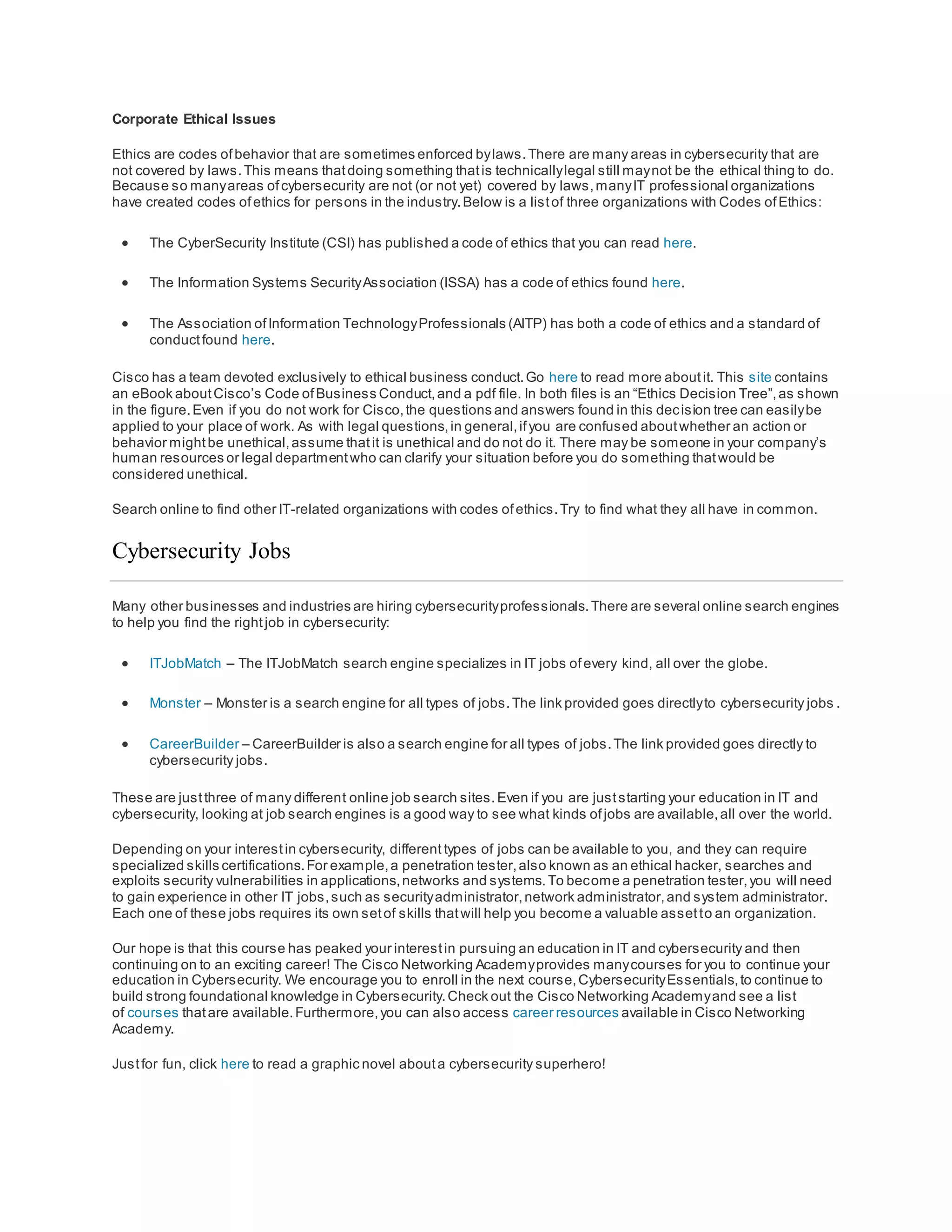
The figure gives details aboutthe terms white hat hacker, black hat hacker, and gray hat hacker.
Organized Hackers – These hackers include organizations ofcyber criminals,hacktivists,terrorists,and state-
sponsored hackers.Cyber criminals are usuallygroups ofprofessional criminals focused on control,power,and
wealth.The criminals are highlysophisticated and organized,and they may even provide cybercrime as a service to
other criminals.Hacktivists make political statements to create awareness to issues thatare importantto them. State-
sponsored attackers gather intelligence or commitsabotage on behalfoftheir government.These attackers are
usuallyhighlytrained and well-funded,and their attacks are focused on specific goals thatare beneficial to their
government.
Internal and External Threats
Internal Security Threats
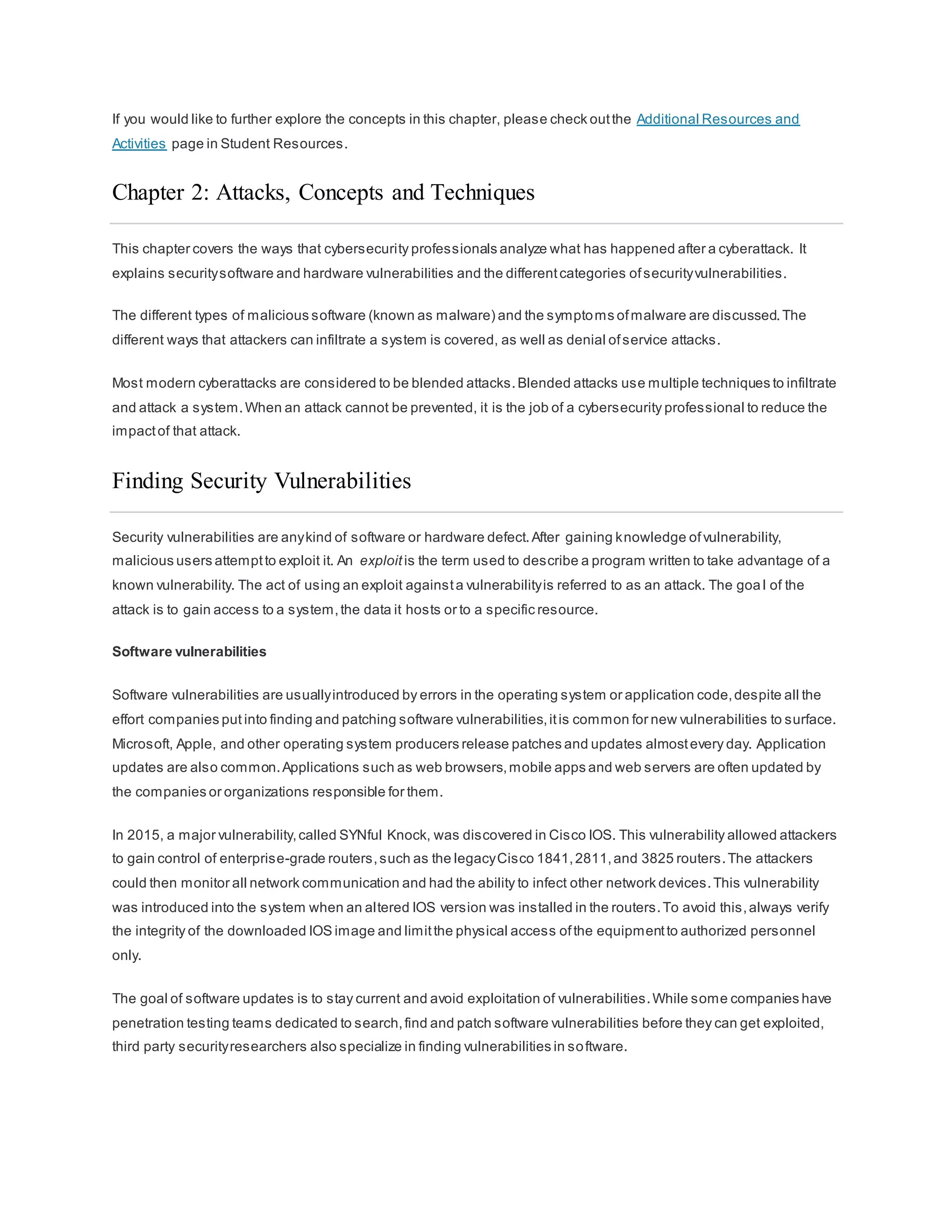
Attacks can be originated from within an organization or from outside of the organization,as shown in the figure.An
internal user,such as an employee or contract partner,can accidently or intentionally:
 Mishandle confidential data
 Threaten the operations ofinternal servers or network infrastructure devices
 Facilitate outside attacks by connecting infected USB media into the corporate computer system
 Accidentally invite malware onto the network through malicious email or websites
Internal threats also have the potential to cause greater damage than external threats, because internal users have
direct access to the building and its infrastructure devices.Employees also have knowledge ofthe corporate network,
its resources,and its confidential data,as well as differentlevels of user or administrative privileges.
External Security Threats
External threats from amateurs or skilled attackers can exploitvulnerabilities in network or computing devices,or use
social engineering to gain access.
What is Cyberwarfare?
Cyberspace has become another importantdimension ofwarfare,where nations can carry out conflicts without the
clashes oftraditional troops and machines.This allows countries with minimal militarypresence to be as strong as
other nations in cyberspace.Cyberwarfare is an Internet-based conflictthatinvolves the penetration of computer
systems and networks ofother nations.These attackers have the resources and expertise to launch massive
Internet-based attacks againstother nations to cause damage or disruptservices,such as shutting down a power
grid.
An example of a state-sponsored attack involved the Stuxnet malware thatwas designed to damage Iran’s nuclear
enrichmentplant.Stuxnet malware did not hijack targeted computers to steal information.Itwas designed to damage
physical equipmentthatwas controlled by computers.Itused modular coding thatwas programmed to perform a
specific task within the malware.It used stolen digital certificates so the attack appeared legitimate to the system.
Click Play to view a video aboutStuxnet.
Click here to read the transcriptof this video.
Click here to view another video to learn more aboutStuxnet.
The Purpose of Cyberwarfare
The main purpose ofcyberwarfare is to gain advantage over adversaries,whether theyare nations or competitors.
A nation can continuouslyinvade other nation’s infrastructure,steal defense secrets,and gather information about
technologyto narrow the gaps in its industries and military.Besides industrial and militaristic espionage,cyberwar
can sabotage the infrastructure ofother nations and costlives in the targeted nations.For example,an attack can
disruptthe power grid of a major city. Traffic would be disrupted.The exchange of goods and services is halted.
Patients cannotget the care needed in emergencysituations.Access to the Internet may also be disrupted.By
affecting the power grid,the attack can affect the everyday life of ordinary citizens.
Furthermore,compromised sensitive data can give the attackers the ability to blackmail personnel within the
government.The information mayallow an attacker to pretend to be an authorized user to access sensitive
information or equipment.
If the governmentcannotdefend againstthe cyberattacks, the citizens may lose confidence in the government’s
ability to protect them. Cyberwarfare can destabilize a nation,disruptcommerce,and affectthe citizens’ faith in their
governmentwithoutever physicallyinvading the targeted nation.
Chapter 1: The Need for Cybersecurity
This chapter explained the features and characteristics of cybersecurity. It explained why the demand for
cybersecurity professionals will onlycontinue to increase.The contentexplains why your personal online identityand
data is vulnerable to cyber criminals.It gives some tips on how you can protect your pers onal online identityand data.
This chapter also discussed organizational data:whatit is,where it is, and why it mustbe protected. It explained who
the cyber attackers are and what they want. Cybersecurityprofessionals musthave the same skills as the cyber
attackers.Cybersecurity professionals mustwork within the bounds ofthe local, national and international law.
Cybersecurity professionals mustalso use their skills ethically.
Finally, this chapter briefly explained cyberwarfare and why nations and governments need cybersecurity
professionals to help protecttheir citizens and infrastructure.
If you would like to further explore the concepts in this chapter, please check outthe Additional Resources and
Activities page in Student Resources.
Chapter 2: Attacks, Concepts and Techniques
This chapter covers the ways that cybersecurity professionals analyze what has happened after a cyberattack. It
explains securitysoftware and hardware vulnerabilities and the differentcategories ofsecurityvulnerabilities.
The different types of malicious software (known as malware) and the symptoms ofmalware are discussed.The
different ways that attackers can infiltrate a system is covered, as well as denial ofservice attacks.
Most modern cyberattacks are considered to be blended attacks.Blended attacks use multiple techniques to infiltrate
and attack a system.When an attack cannot be prevented, it is the job of a cybersecurity professional to reduce the
impactof that attack.
Finding Security Vulnerabilities
Security vulnerabilities are anykind of software or hardware defect.After gaining knowledge ofvulnerability,
malicious users attemptto exploit it. An exploit is the term used to describe a program written to take advantage of a
known vulnerability. The act of using an exploit againsta vulnerabilityis referred to as an attack. The goa l of the
attack is to gain access to a system,the data it hosts or to a specific resource.
Software vulnerabilities
Software vulnerabilities are usuallyintroduced by errors in the operating system or application code,despite all the
effort companies put into finding and patching software vulnerabilities,itis common for new vulnerabilities to surface.
Microsoft, Apple, and other operating system producers release patches and updates almostevery day. Application
updates are also common.Applications such as web browsers,mobile apps and web servers are often updated by
the companies or organizations responsible for them.
In 2015, a major vulnerability,called SYNful Knock, was discovered in Cisco IOS. This vulnerability allowed attackers
to gain control of enterprise-grade routers,such as the legacyCisco 1841,2811,and 3825 routers.The attackers
could then monitor all network communication and had the ability to infect other network devices.This vulnerability
was introduced into the system when an altered IOS version was installed in the routers.To avoid this,always verify
the integrity of the downloaded IOS image and limitthe physical access ofthe equipmentto authorized personnel
only.
The goal of software updates is to stay current and avoid exploitation of vulnerabilities.While some companies have
penetration testing teams dedicated to search,find and patch software vulnerabilities before they can get exploited,
third party securityresearchers also specialize in finding vulnerabilities in software.
Google’s ProjectZero is a great example of such practice. After discovering a number of vulnerabilities in various
software used by end-users,Google formed a permanentteam dedicated to finding software vulnerabilities.Google
Security Research can be found here.
Hardware vulnerabilities
Hardware vulnerabilities are often introduced by hardware design flaws.RAM memoryfor example,is essentially
capacitors installed very close to one another.It was discovered that, due to proximity, constantchanges applied to
one of these capacitors could influence neighbor capacitors.Based on thatdesign flaw,an exploit called Rowhammer
was created.By repeatedlyrewriting memoryin the same addresses,the Rowhammer exploitallows data to be
retrieved from nearby address memorycells,even if the cells are protected.
Hardware vulnerabilities are specific to device models and are notgenerallyexploited through random compromising
attempts.While hardware exploits are more common in highlytargeted attacks, traditional malware protection and a
physical securityare sufficientprotection for the everyday user.
Categorizing Security Vulnerabilities
Most software security vulnerabilities fall into one of the following categories:
Buffer overflow – This vulnerability occurs when data is written beyond the limits ofa buffer. Buffers are memory
areas allocated to an application.By changing data beyond the boundaries ofa buffer, the application accesses
memoryallocated to other processes.This can lead to a system crash,data compromise,or provide escalation of
privileges.
Non-validated input – Programs often work with data input. This data coming into the program could have malicious
content, designed to force the program to behave in an unintended way. Consider a program thatreceives an image
for processing.A malicious user could craftan image file with invalid image dimensions.The maliciouslycrafted
dimensions could force the program to allocate buffers of incorrectand unexpected sizes.
Race conditions – This vulnerability is when the output of an event depends on ordered or timed outputs.A race
condition becomes a source ofvulnerability when the required ordered or timed events do not occur in the correct
order or proper timing.
Weaknesses insecurity practices – Systems and sensitive data can be protected through techniques such as
authentication,authorization,and encryption. Developers should notattem ptto create their own securityalgorithms
because itwill likely introduce vulnerabilities.Itis strongly advised that developers use securitylibraries thathave
already created,tested, and verified.
Access-control problems – Access control is the process ofcontrolling who does whatand ranges from managing
physical access to equipmentto dictating who has access to a resource,such as a file, and what they can do with it,
such as read or change the file. Many securityvulnerabilities are created by the improper use ofaccess controls.
Nearly all access controls and securitypractices can be overcome if the attacker has physical access to target
equipment.For example,no matter what you seta file’s permissions to,the operating system cannotprevent
someone from bypassing the operating system and reading the data directly off the disk.To protect the machine and
the data it contains,physical access mustbe restricted and encryption techniques mustbe used to protect data from
being stolen or corrupted.
Types of Malware
Short for Malicious Software, malware is anycode that can be used to steal data, bypass access controls,or cause
harm to, or compromise a system.Below are a few common types ofmalware:
Spyware – This malware is design to track and spy on the user.Spyware often includes activity trackers, keystroke
collection,and data capture.In an attemptto overcome security measures,spyware often modifies securitysettings.
Spyware often bundles itselfwith legitimate software or with Trojan horses.
Adware – Advertising supported software is designed to automaticallydeliver advertisements.Adware is often
installed with some versions ofsoftware.Some adware is designed to onlydeliver advertisements butitis also
common for adware to come with spyware.
Bot – From the word robot, a bot is malware designed to automaticallyperform action,usuallyonline.While most
bots are harmless,one increasing use ofmalicious bots are botnets.Several computers are infected with bots which
are programmed to quietlywait for commands provided bythe attacker.
Ransomware – This malware is designed to hold a computer system or the data it contains captive until a paymentis
made.Ransomware usuallyworks by encrypting data in the computer with a key unknown to the user.Some other
versions ofransomware can take advantage of specific system vulnerabilities to lock down the system.Ransomware
is spread by a downloaded file or some software vulnerability.
Scareware – This is a type of malware designed to persuade the user to take a specific action based on fear.
Scareware forges pop-up windows thatresemble operating system dialogue windows.These windows conveyforged
messages stating the system is atrisk or needs the execution of a specific program to return to normal operation.In
reality, no problems were assessed or detected and if the user agrees and clears the mentioned program to execute,
his or her system will be infected with malware.
Rootkit – This malware is designed to modify the operating system to create a backdoor.Attackers then use the
backdoor to access the computer remotely.Most rootkits take advantage of software vulnerabilities to perform
privilege escalation and modifysystem files.It is also common for rootkits to modify system forensics and monitoring
tools,making them very hard to detect. Often, a computer infected by a rootkit mustbe wiped and reinstalled.
Virus - A virus is malicious executable code thatis attached to other executable files,often legitimate programs.Most
viruses require end-user activation and can activate at a specific time or date. Viruses can be harmless and simply
displaya picture or they can be destructive, such as those that modify or delete data. Viruses can also be
programmed to mutate to avoid detection. Most viruses are now spread by USB drives, optical disks,network shares,
or email.
Trojan horse - A Trojan horse is malware thatcarries outmalicious operations under the guise ofa desired
operation.This malicious code exploits the privileges ofthe user that runs it. Often, Trojans are found in image files,
audio files or games.A Trojan horse differs from a virus because itbinds itselfto non-executable files.
Worms – Worms are malicious code thatreplicate themselves byindependentlyexploiting vulnerabilities in networks.
Worms usuallyslow down networks.Whereas a virus requires a hostprogram to run, worms can run by themselves.
Other than the initial infection,they no longer require user participation.After a hostis infected, the worm is able to
spread very quickly over the network. Worms share similar patterns.Theyall have an enabling vulnerability,a way to
propagate themselves,and they all contain a payload.
Worms are responsible for some ofthe mostdevastating attacks on the Internet. As shown in Figure 1, in 2001 the
Code Red worm had infected 658 servers.Within 19 hours,the worm had infected over 300,000 servers as shown in
Figure 2.
Man-In-The-Middle (MitM) – MitM allows the attacker to take control over a device withoutthe user’s knowledge.
With that level of access,the attacker can interceptand capture user information before relaying itto its intended
destination.MitM attacks are widely used to steal financial information.Many malware and techniques existto
provide attackers with MitM capabilities.
Man-In-The-Mobile (MitMo) – A variation of man-in-middle,MitMo is a type of attack used to take control over a
mobile device.When infected,the mobile device can be instructed to exfiltrate user-sensitive information and send it
to the attackers. ZeuS, an example of an exploit with MitMo capabilities,allows attackers quietlyto capture 2 -step
verification SMS messages sentto users.
Symptoms of Malware
Regardless ofthe type of malware a system has been infected with,these are common malware symptoms:
 There is an increase in CPU usage.
 There is a decrease in computer speed.
 The computer freezes or crashes often.
 There is a decrease in Web browsing speed.
 There are unexplainable problems with network connections.
 Files are modified.
 Files are deleted.
 There is a presence ofunknown files,programs,or desktop icons.
 There are unknown processes running.
 Programs are turning off or reconfiguring themselves.
 Email is being sentwithoutthe user’s knowledge or consent.
Social Engineering
Social engineering is an access attack that attempts to manipulate individuals into performing actions or divulging
confidential information.Social engineers often rely on people’s willingness to be helpful but also prey on people’s
weaknesses.For example,an attacker could call an authorized employee with an urgentproblem thatrequires
immediate network access.The attacker could appeal to the employee’s vanity, invoke authority using name -
dropping techniques,or appeal to the employee’s greed.
These are some types of social engineering attacks:
 Pretexting - This is when an attacker calls an individual and lies to them in an attemptto gain access to
privileged data. An example involves an attacker who pretends to need personal or financial data in order to
confirm the identity of the recipient.
 Tailgating - This is when an attacker quickly follows an authorized person into a secure location.
 Something for Something (Quid pro quo) - This is when an attacker requests personal information from a
party in exchange for something,like a free gift.
Wi-Fi Password Cracking
Wi-Fi password cracking is the process ofdiscovering the password used to protecta wireless network.These are
some techniques used in password cracking:
Social engineering – The attacker manipulates a person who knows the password into providing it.
Brute-force attacks – The attacker tries several possible passwords in an attemptto guess the password.If the
password is a 4-digitnumber,for example, the attacker would have to try every one of the 10000 combinations.
Brute-force attacks usuallyinvolve a word-listfile. This is a text file containing a listof words taken from a dictionary.
A program then tries each word and common combinations.Because brute-force attacks take time,complex
passwords take much longer to guess.A few password brute-force tools include Ophcrack,L0phtCrack,THC Hydra,
RainbowCrack,and Medusa.
Network sniffing – By listening and capturing packets senton the network,an attacker may be able to discover the
password ifthe password is being sentunencrypted (in plain text). If the password is encrypted,the attacker may still
be able to reveal it by using a password cracking tool.
Phishing
Phishing is when a malicious partysends a fraudulentemail disguised as being from a legitimate,trusted source.The
message intentis to trick the recipientinto installing malware on their device,or into sharing personal or financial
information.An example of phishing is an email forged to look like it was sentby a retail store asking the user to click
a link to claim a prize. The link may go to a fake site asking for personal information,or it may install a virus.
Spear phishing is a highlytargeted phishing attack.While phishing and spear phishing both use emails to reach the
victims,spear phishing emails are customized to a specific person.The attacker researches the target’s interests
before sending the email.For example, an attacker learns the target is interested in cars,and has been looki ng to
buy a specific model ofcar. The attacker joins the same car discussion forum where the targetis a member,forges a
car sale offering and sends email to the target. The email contains a link for pictures of the car. When the target clicks
on the link,malware is installed on the target’s computer.
Vulnerability Exploitation
Exploiting vulnerabilities is another common method ofinfiltration.Attackers will scan computers to gain information
aboutthem. Below is a common method for exploiting vulnerabilities:
Step 1. Gather information aboutthe target system.This could be done in many differentways such as a port
scanner or social engineering.The goal is to learn as much as possible aboutthe targetcomputer.
Step 2.One of the pieces ofrelevant information learned in step 1 mightbe the operating system,its version,and a
listof services running on it.
Step 3. When the target’s operating system and version is known,the attacker looks for any known vulnerabilities
specific to that version of OS or other OS services.
Step 4. When a vulnerability is found, the attacker looks for a previouslywritten exploit to us e.If no exploits have
been written, the attacker may consider writing an exploit.
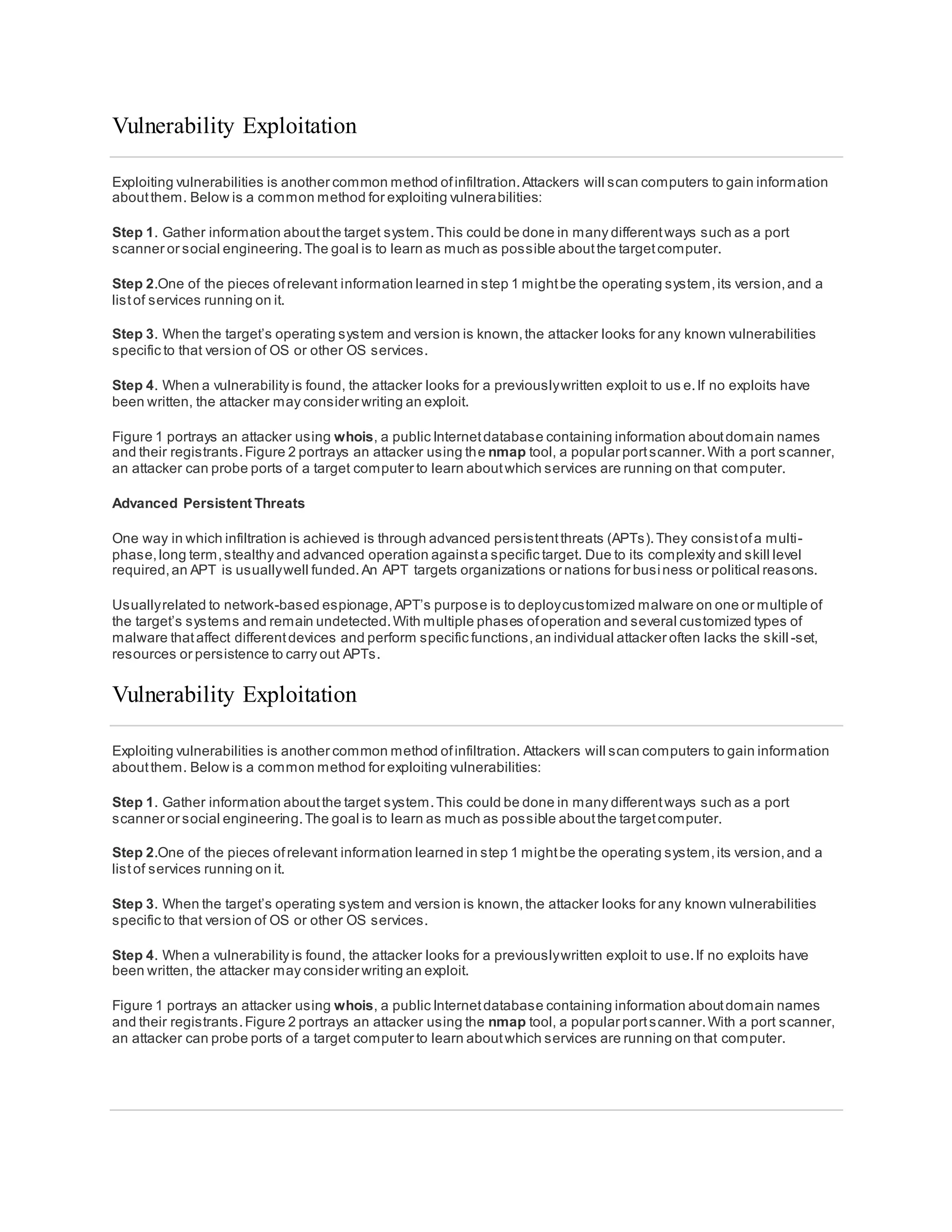
Figure 1 portrays an attacker using whois, a public Internetdatabase containing information aboutdomain names
and their registrants.Figure 2 portrays an attacker using the nmap tool, a popular portscanner.With a port scanner,
an attacker can probe ports of a target computer to learn aboutwhich services are running on that computer.
Advanced Persistent Threats
One way in which infiltration is achieved is through advanced persistentthreats (APTs).They consistofa multi-
phase,long term,stealthy and advanced operation againsta specific target. Due to its complexity and skill level
required,an APT is usuallywell funded.An APT targets organizations or nations for business or political reasons.
Usuallyrelated to network-based espionage,APT’s purpose is to deploycustomized malware on one or multiple of
the target’s systems and remain undetected.With multiple phases ofoperation and several customized types of
malware thataffect differentdevices and perform specific functions,an individual attacker often lacks the skill -set,
resources or persistence to carry out APTs.
Vulnerability Exploitation
Exploiting vulnerabilities is another common method ofinfiltration. Attackers will scan computers to gain information
aboutthem. Below is a common method for exploiting vulnerabilities:
Step 1. Gather information aboutthe target system.This could be done in many differentways such as a port
scanner or social engineering.The goal is to learn as much as possible aboutthe targetcomputer.
Step 2.One of the pieces ofrelevant information learned in step 1 mightbe the operating system,its version,and a
listof services running on it.
Step 3. When the target’s operating system and version is known,the attacker looks for any known vulnerabilities
specific to that version of OS or other OS services.
Step 4. When a vulnerability is found, the attacker looks for a previouslywritten exploit to use.If no exploits have
been written, the attacker may consider writing an exploit.
Figure 1 portrays an attacker using whois, a public Internetdatabase containing information aboutdomain names
and their registrants.Figure 2 portrays an attacker using the nmap tool, a popular portscanner.With a port scanner,
an attacker can probe ports of a target computer to learn aboutwhich services are running on that computer.
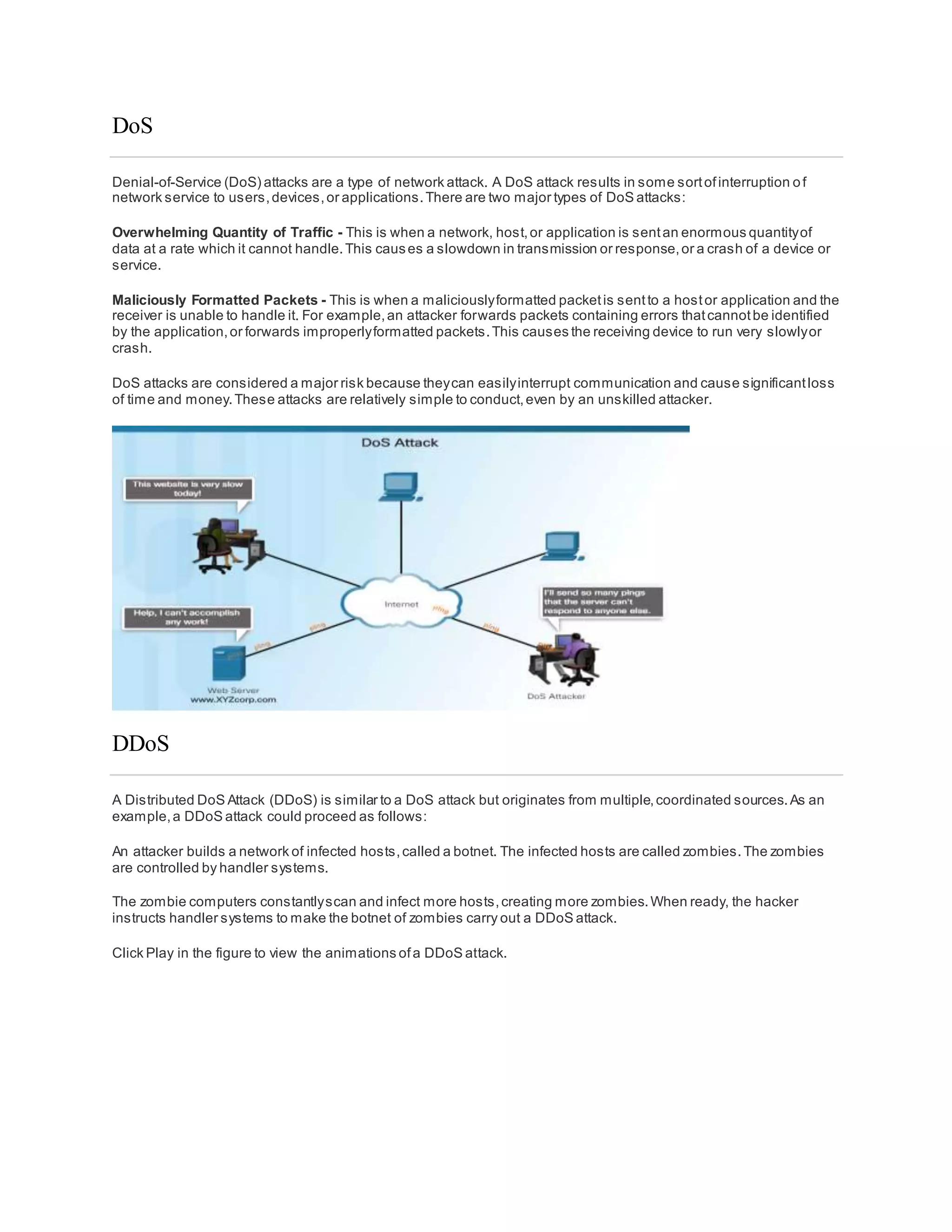
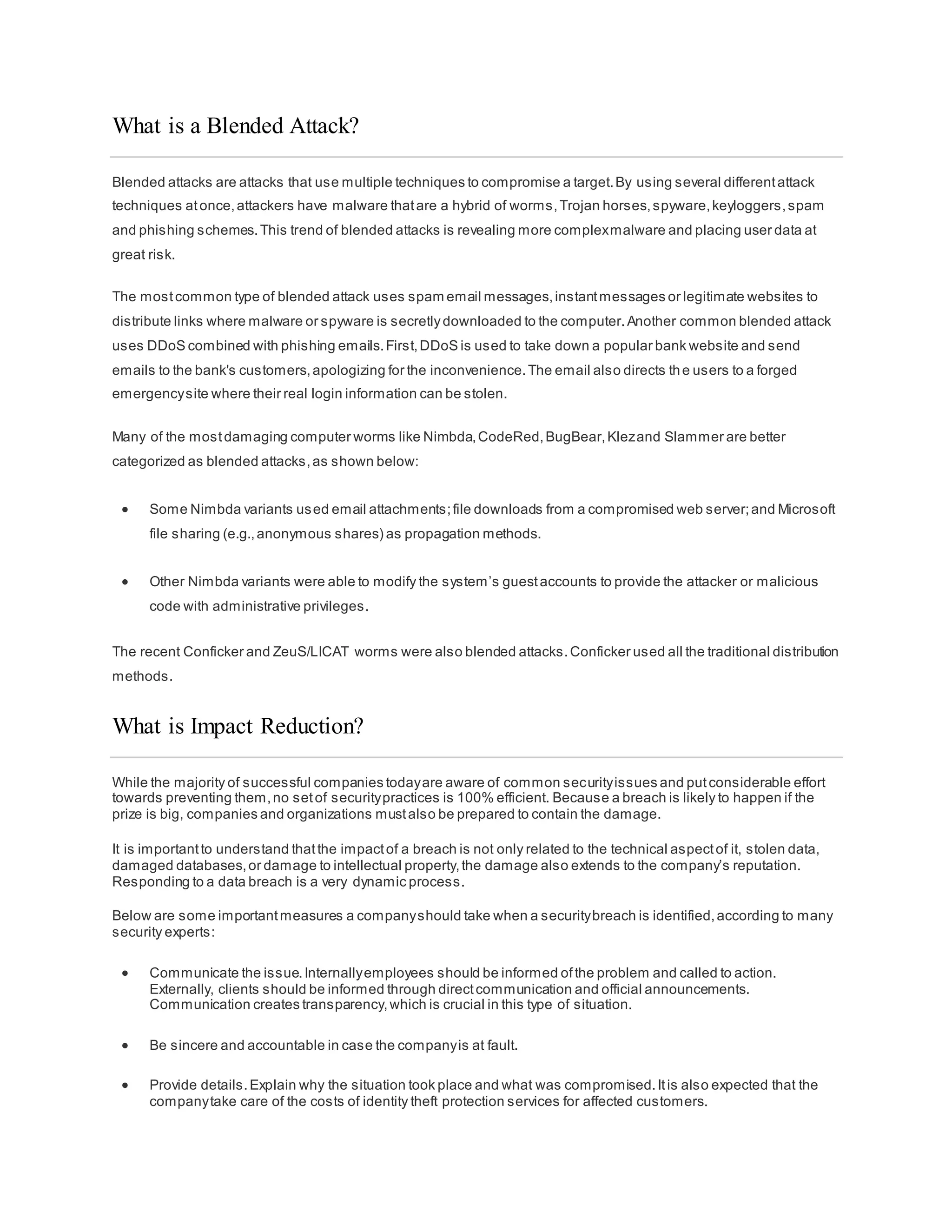
DoS
Denial-of-Service (DoS) attacks are a type of network attack. A DoS attack results in some sortofinterruption of
network service to users,devices,or applications.There are two major types of DoS attacks:
Overwhelming Quantity of Traffic - This is when a network, host,or application is sentan enormous quantityof
data at a rate which it cannot handle.This causes a slowdown in transmission or response,or a crash of a device or
service.
Maliciously Formatted Packets - This is when a maliciouslyformatted packetis sentto a hostor application and the
receiver is unable to handle it. For example,an attacker forwards packets containing errors thatcannotbe identified
by the application,or forwards improperlyformatted packets.This causes the receiving device to run very slowlyor
crash.
DoS attacks are considered a major risk because theycan easilyinterrupt communication and cause significantloss
of time and money.These attacks are relatively simple to conduct,even by an unskilled attacker.
DDoS
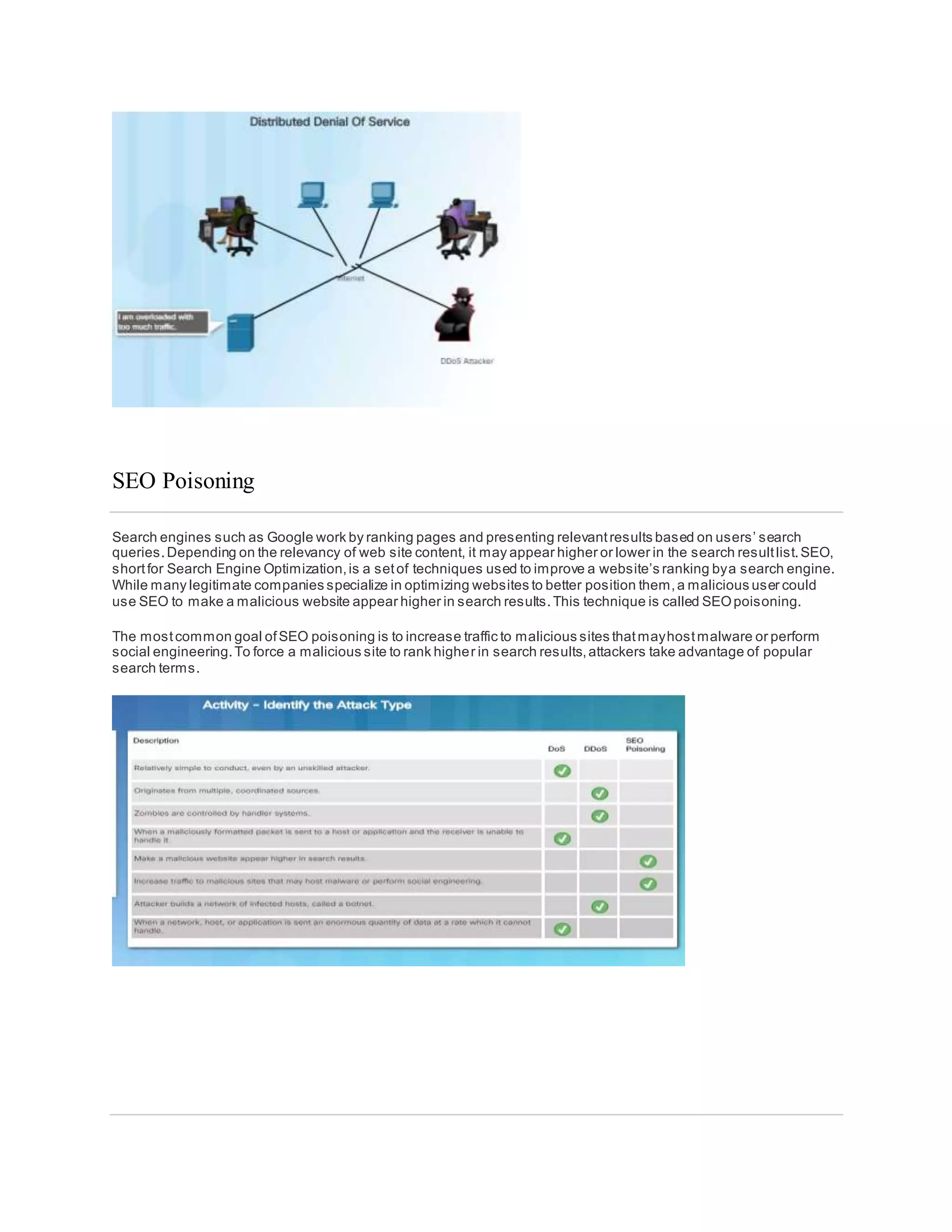
A Distributed DoS Attack (DDoS) is similar to a DoS attack but originates from multiple,coordinated sources.As an
example,a DDoS attack could proceed as follows:
An attacker builds a network of infected hosts,called a botnet. The infected hosts are called zombies.The zombies
are controlled by handler systems.
The zombie computers constantlyscan and infect more hosts,creating more zombies.When ready, the hacker
instructs handler systems to make the botnet of zombies carry out a DDoS attack.
Click Play in the figure to view the animations ofa DDoS attack.
SEO Poisoning
Search engines such as Google work by ranking pages and presenting relevantresults based on users’ search
queries.Depending on the relevancy of web site content, it may appear higher or lower in the search resultlist.SEO,
shortfor Search Engine Optimization,is a setof techniques used to improve a website’s ranking bya search engine.
While many legitimate companies specialize in optimizing websites to better position them,a malicious user could
use SEO to make a malicious website appear higher in search results.This technique is called SEOpoisoning.
The mostcommon goal ofSEO poisoning is to increase traffic to malicious sites thatmayhostmalware or perform
social engineering.To force a malicious site to rank higher in search results,attackers take advantage of popular
search terms.
What is a Blended Attack?
Blended attacks are attacks that use multiple techniques to compromise a target.By using several differentattack
techniques atonce,attackers have malware thatare a hybrid of worms,Trojan horses,spyware,keyloggers,spam
and phishing schemes.This trend of blended attacks is revealing more complexmalware and placing user data at
great risk.
The mostcommon type of blended attack uses spam email messages,instantmessages or legitimate websites to
distribute links where malware or spyware is secretlydownloaded to the computer.Another common blended attack
uses DDoS combined with phishing emails.First,DDoS is used to take down a popular bank website and send
emails to the bank's customers,apologizing for the inconvenience.The email also directs the users to a forged
emergencysite where their real login information can be stolen.
Many of the mostdamaging computer worms like Nimbda,CodeRed,BugBear,Klezand Slammer are better
categorized as blended attacks,as shown below:
 Some Nimbda variants used email attachments;file downloads from a compromised web server;and Microsoft
file sharing (e.g.,anonymous shares) as propagation methods.
 Other Nimbda variants were able to modify the system’s guestaccounts to provide the attacker or malicious
code with administrative privileges.
The recent Conficker and ZeuS/LICAT worms were also blended attacks.Conficker used all the traditional distribution
methods.
What is Impact Reduction?
While the majority of successful companies todayare aware of common securityissues and putconsiderable effort
towards preventing them,no setof securitypractices is 100% efficient. Because a breach is likely to happen if the
prize is big, companies and organizations mustalso be prepared to contain the damage.
It is importantto understand thatthe impactof a breach is not only related to the technical aspectof it, stolen data,
damaged databases,or damage to intellectual property,the damage also extends to the company’s reputation.
Responding to a data breach is a very dynamic process.
Below are some importantmeasures a companyshould take when a securitybreach is identified,according to many
security experts:
 Communicate the issue.Internallyemployees should be informed ofthe problem and called to action.
Externally, clients should be informed through directcommunication and official announcements.
Communication creates transparency,which is crucial in this type of situation.
 Be sincere and accountable in case the companyis at fault.
 Provide details.Explain why the situation took place and what was compromised.Itis also expected that the
companytake care of the costs of identity theft protection services for affected customers.
 Understand whatcaused and facilitated the breach.If necessary,hire forensics experts to research and learn
the details.
 Apply what was learned from the forensics investigation to ensure similar breaches do nothappen in the future.
 Ensure all systems are clean,no backdoors were installed,and nothing else has been compromised.Attackers
will often attemptto leave a backdoor to facilitate future breaches.Make sure this does nothappen.
 Educate employees,partners,and customers on how to prevent future breaches.
Chapter 2: Attacks, Concepts and Techniques
This chapter covered the ways that cyber security professionals analyze whathas happened after a cyberattack. It
explains securitysoftware and hardware vulnerabilities and the differentcategories ofsecurityvulnerabilities.
The different types of malicious software (known as malware) and the symptoms ofmalware explained.Some ofthe
malware thatwas discussed included viruses,worms,Trojan horses,spyware,adware,and others.
The different ways that attackers can infiltrate a system was covered,including social engineering,Wi-Fi Password
Cracking,Phishing,and vulnerabilityexploitation.The different types of denial of service attacks were also explained.
Blended attacks use multiple techniques to infiltrate and attack a system.Many of the mostdamaging computer
worms like Nimbda,CodeRed,BugBear,Klez and slammer are better categorized as blended attacks.When an
attack cannot be prevented, it is the job of a cybersecurity professional is to reduce the impactof that attack.
If you would like to further explore the concepts in this chapter, please check outthe Additional Resources and
Activities page in Student Resources.
Chapter 3: Protecting Your Data and Privacy
This chapter focuses on your personal devices and your personal data.It includes tips for protecting your devices,
creating strong passwords and safelyusing wireless networks.It also discusses maintaining your data securely.
Your online data is worth something to cyber criminals.This chapter brieflycovers authentication techniques to help
you maintain your data securely.It also covers ways to enhance the securityof your online data with tips about what
to do and what not to do online.
Protect Your Computing Devices
Your computing devices store your data and are the portal to your online life. Below is a shortlistof steps you can
take to protect your computing devices from intrusion:
 Keep the Firewall On – Whether it is a software firewall or a hardware firewall on a router, the firewall should
be turned on and updated to prevent hackers from accessing your personal or companydata.Click Windows 7
and 8.1 or Windows 10 to turn on the firewall in the respective version of Windows.Click here to turn on the
firewall for Mac OS X devices.
 Use Antivirus and Antispyware – Malicious software,such as viruses,Trojan horses,worms,ransomware
and spyware, are installed on your computing devices withoutyour permission,in order to gain access to your
computer and your data. Viruses can destroyyour data, slow down your computer,or take over your computer.
One way viruses can take over your computer is by allowing spammers to broadcastemails using your
account. Spyware can monitor your online activities,collectyour personal information,or produce unwanted
pop-up ads on your web browser while you are online.A good rule is to only download s oftware from trusted
websites to avoid getting spyware in the firstplace. Antivirus software is designed to scan your computer and
incoming email for viruses and delete them.Sometimes antivirus software also includes antispyware.Keep
your software up to date to protect your computer from the newestmalicious software.
 Manage Your Operating System and Browser – Hackers are always trying to take advantage of
vulnerabilities in your operating systems and your web browsers.To protect your computer and your data, set
the security settings on your computer and browser atmedium or higher.Update your computer’s operating
system including your web browsers and regularlydownload and install the latestsoftware patches and security
updates from the vendors.
 Protect All Your Devices – Your computing devices,whether they are PCs, laptops,tablets,or smartphones,
should be password protected to prevent unauthorized access.The stored information should be encrypted,
especiallyfor sensitive or confidential data. For mobile devices,onlystore necessaryinformation,in case these
devices are stolen or lostwhen you are away from your home.If any one of your devices is compromised,the
criminals mayhave access to all your data through your cloud-storage service provider,such as iCloud or
Google drive.
IoT devices pose an even greater risk than your other computing devices.While desktop,laptop and mobile platforms
receive frequentsoftware updates,mostofthe IoT devices still have their original firmware.Ifvulnerabilities are found
in the firmware,the IoT device is likely to stay vulnerable.To make the problem worse,IoTdevices are often
designed to call home and require Internetaccess.To reach the Internet, mostIoT devices manufacturers relyon the
customer’s local network.The resultis that IoT devices are very likely to be comprised and when they are, they allow
access to the customer’s local network and data.The bestway to protect yourself from this scenario is to have IoT
devices using an isolated network,sharing itonly with other IoT devices.
Click here to visit Shodan,a web-based IoTdevice scanner.
Use Wireless Networks Safely
Wireless networks allow Wi-Fi enabled devices,such as laptops and tablets,to connectto the network by way of the
network identifier,known as the Service Set Identifier (SSID). To prevent intruders অনুপ্রবেশকারীবের from entering
your home wireless network,the pre-setSSID and defaultpassword for the browser-based administrative interface
should be changed.Hackers will be aware of this kind of default access information.Optionally,the wireless router
can also be configured to not broadcastthe SSID, which adds an additional barrier to discovering the network.
However, this should notbe considered adequate securityfor a wireless network.Furthermore,you should encrypt
wireless communication byenabling wireless securityand the WPA2 encryption feature on the wireless router.Even
with WPA2 encryption enabled,the wireless network can still be vulnerable.
In October 2017, a securityflaw in the WPA2 protocol was discovered.This flaw allows an intruder to break the
encryption between the wireless router and the wireless client,and allow the intruder to access and manipulate the
network traffic. This vulnerability can be exploited using Key Reinstallation Attacks (KRACK). It affects all modern,
protected Wi-Fi networks.To mitigate an attacker, a user should update all affected products:wireless routers and
any wireless capable devices,such as laptops and mobile devices,as soon as securityupdates become avail able.
For laptops or other devices with wired NIC, a wired connection could mitigate this vulnerability.Furthermore,you can
also use a trusted VPN service to prevent the unauthorized access to your data while you are using the wireless
network.
Click here to learn more aboutKRACK.
When you are away from home,a public Wi-Fi hot spotallows you to access your online information and surfthe
Internet. However, it is bestto not access or send any sensitive personal information over a public wireless network.
Verify whether your computer is configured with file and media sharing and thatit requires user authentication with
encryption. To prevent someone from intercepting your information (known as “eavesdropping”) while using a public
wireless network,use encrypted VPN tunnels and services.The VPN service provides you secure access to the
Internet, with an encrypted connection between your computer and the VPN service provider’s VPN server. With an
encrypted VPN tunnel,even if a data transmission is intercepted,itis not decipherable.
Click here to learn more aboutprotecting yourself when using wireless networks.
Many mobile devices,such as smartphones and tablets,come with the Bluetooth wireless protocol.This capability
allows Bluetooth-enabled devices to connectto each other and share information.Unfortunately,Bluetooth can be
exploited by hackers to eavesdrop on some devices,establish remote access controls,distribute malware,and drain
batteries.To avoid these issues,keep Bluetooth turned off when you are not using it.
Use Unique Passwords for Each Online Account
You probablyhave more than one online account,and each accountshould have a unique password.Thatis a lot of
passwords to remember.However,the consequence ofnot using strong and unique passwords leaves you and your
data vulnerable to cyber criminals.Using the same password for all your online accounts is like using the same key
for all your locked doors,if an attacker was to get your key, he would have the ability to access everything you own.If
criminals getyour password through phishing for example,they will try to get into your other online accounts.If you
only use one password for all accounts,they can get into all your accounts,steal or erase all your data, or decide to
impersonate you.
We use so many online accounts thatneed passwords thatis becomes too much to remember.One solution to avoid
reusing passwords or using weak passwords is to use a password manager.A password manager stores and
encrypts all of your different and complexpasswords.The manager can then help you to log into your online
accounts automatically.You only need to remember your master password to access the password manager and
manage all ofyour accounts and passwords.
Tips for choosing a good password:
 Do not use dictionarywords or names in any languages
 Do not use common misspellings ofdictionary words
 Do not use computer names or accountnames
 If possible use special characters,such as !@ # $ % ^ & * ( )
 Use a password with ten or more characters
Use Passphrase Rather Than a Password
To prevent unauthorized physical access to your computing devices,use passphrases,rather than passwords.It is
easier to create a long passphrase than a password,because itis generallyin the form of a sentence rather than a
word. The longer length makes passphrases less vulnerable to dictionaryor brute force attacks.Furthermore,a
passphrase maybe easier to remember,especiallyif you are required to change your password frequently.Here are
some tips in choosing good passwords or passphrases:
Tips in choosing a good passphrase:
 Choose a meaningful statementto you
 Add special characters,such as !@ # $ % ^ & * ( )
 The longer the better
 Avoid common or famous statements,for example,lyrics from a popular song
Recently, United States National Institute for Standards and Technology(NIST) published improved password
requirements.NISTstandards are intended for governmentapplication butcan also serve as a standard for others as
well.The new guidelines aim to provide better user experience and put the burden of user verification on the
providers.
Summary of the new guidelines:
 8 characters minimum in length,butno more than 64 characters
 No common,easilyguessed passwords,such as password,abc123
 No composition rules,such as having to include lowercase and uppercase letters and numbers
 Improve typing accuracy by allowing the user to see the password while typing
 All printing characters and spaces are allowed
 No password hints
 No periodical or arbitrary password expiration
 No knowledge-based authentication,such as information from shared secretquestions,marketing data,
transaction history
Click here to learn more aboutthe improved NIST password requirement.
Even with access to your computers and network devices secured,itis also importantto protect and preserve your
data.
Encrypt Your Data
Your data should always be encrypted. You may think you have no secrets and nothing to hide so why use
encryption? Maybe you think that nobodywants your data. Most likely, this is probably not true.
Are you ready to show all of your photos and documents to strangers? Are you ready to share financial information
stored on your computer to your friends? Do you want to give out your emails and accountpasswords to the general
public?
This can be even more troublesome ifa malicious application infects your computer or mobile device and steals
potentiallyvaluable information,such as accountnumbers and passwords,and other official documents.Thatkind of
information can lead to identity theft, fraud, or ransom.Criminals maydecide to simplyencrypt your data and make it
unusable until you pay the ransom.
What is encryption? Encryption is the process ofconverting the information into a form where an unauthorized party
cannotread it. Only a trusted, authorized person with the secretkey or password can decryptthe data and access it
in its original form.The encryption itself does notprevent someone from intercepting the data.Encryption can only
prevent an unauthorized person from viewing or accessing the content.
Software programs are used to encrypt files,folders,and even entire drives.
Encrypting File System (EFS) is a Windows feature that can encrypt data. EFS is directly linked to a specific user
account. Only the user that encrypted the data will be able to access itafter it has been encrypted using EFS. To
encrypt data using EFS in all Windows versions,follow these steps:
Step 1. Selectone or more files or folders.
Step 2. Right-click the selected data >Properties.
Step 3. Click Advanced…
Step 4. Selectthe Encrypt contents to secure data check box.
Step 5. Files and folders thathave been encrypted with EFS are displayed in green,as shown in the figure.
Back up Your Data
Your hard drive may fail. Your laptop could be lost. Your smartphone stolen.Maybe you erased the original version
of an importantdocument.Having a backup may prevent the loss ofirreplaceable data,such as familyphotos.To
back up data properly, you will need an additional storage location for the data and you mustcopy the data to that
location regularlyand automatically.
The additional location for your backed up files can be on your home network,secondarylocation,or in the cloud. By
storing the backup of the data locally, you have total control of the data. You can decide to copy all of your data to a
network attached storage device (NAS), a simple external hard drive, or maybe selectonly a few importantfolders for
backup on thumb drives,CDs/DVDs,or even tapes.In that scenario,you are the owner and you are totally
responsible for the costand maintenance ofthe storage device equipment.If you subscribe to a cloud storage
service, the costdepends on the amountstorage space needed.With a cloud storage service like Amazon Web
Services (AWS), you have access to your backup data as long as you have access to your account.When you
subscribe to online storage services,you may need to be more selective aboutthe data being backed up due to the
costof the storage and the constantonline data transfers.One of the benefits of storing a backup at an alternate
location is that it is safe in the event of fire, theft or other catastrophes other than storage device failure.
Deleting Your Data Permanently
When you move a file to the recycle bin or trash and delete it permanently,the file is only inaccessible from the
operating system.Anyone with the right forensic tools can still recover the file due to a magnetic trace left on the hard
drive.
In order to erase data so that it is no longer recoverable, the data mustbe overwritten with ones and zeroes multiple
times.To prevent the recovery of deleted files,you may need to use tools specificallydesigned to do justthat. The
program SDelete from Microsoft(for Vista and higher),claims to have the ability to remove sensitive files completely.
Shred for Linux and Secure Empty Trash for Mac OSX are some tools thatclaim to provide a similar service.
The only way to be certain that data or files are not recoverable is to physically destroythe hard drive or storage
device. It has been the folly of many criminals in thinking their files were impenetrable or irrecoverable.
Besides storing data on your local hard drives, your data may also be stored online in the cloud.Those copies will
also need to be deleted.Take a momentto ask yourself,“Where do I save my data? Is it backed up somewhere? Is it
encrypted? When you need to delete your data or get rid of a hard drive or computer,ask yourself,“Have I
safeguarded the data to keep it from falling into the wrong hands?”
Two Factor Authentication
Popular online services,such as Google,Facebook,Twitter, LinkedIn,Apple and Microsoft, use two factor
authentication to add an extra layer of security for account logins.Besides the username and password,or perso nal
identification number (PIN) or pattern, two factor authentication requires a second token,such as a:
 Physical object - credit card, ATM card, phone,or fob
 Biometric scan - fingerprint,palm print,as well as facial or voice recognition
Even with two factor authentication,hackers can still gain access to your online accounts through attacks such as
phishing attacks,malware,and social engineering
Go here to find out if websites you visit use two factor authentication.
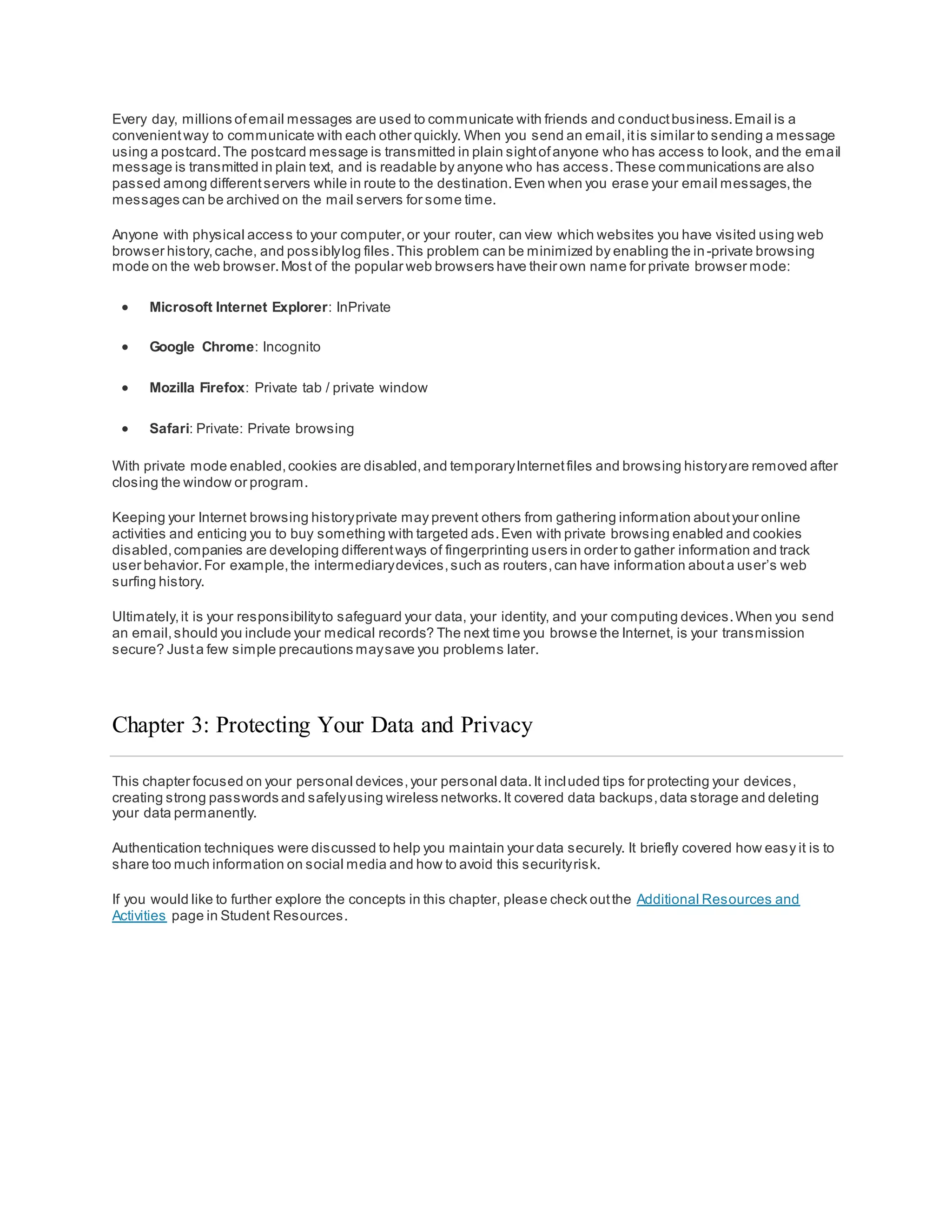
OAuth 2.0
Open Authorization (OAuth) is an open standard protocol that allows an end user’s credentials to access third party
applications withoutexposing the user’s password.OAuth acts as the middle man to decide whether to allow end
users access to third party applications.For example,say you wantto access web application XYZ, and you do not
have a user accountfor accessing this web application.However,XYZ has the option to allow you to log in using the
credentials from a social media website ABC. So you access the website using the social media login.
For this to work, the application ‘XYZ’ is registered with ‘ABC’ and is an approved application.When you access XYZ,
you use your user credentials for ABC. Then XYZ requests an access token from ABC on your behalf. Now you have
access to XYZ. XYZ knows nothing aboutyou and your user credentials,and this interaction is totallyseamless for
the user.Using secrettokens prevents a malicious application from getting your information and your data.
Do Not Share Too Much on Social Media
If you wantto keep your privacy on social media,share as little information as possible.You should notshare
information like your birth date, email address,or your phone number on your profile.The people who need to know
your personal information probablyalreadyknow it. Do not fill out your social media profile completely,only provide
the minimum required information.Furthermore,check your social media settings to allow only people you know to
see your activities or engage in your conversations.
The more personal information you share online,the easier itis for someone to create a profile aboutyou and take
advantage of you offline.
Have you ever forgotten the username and password for an online account? Security questions like “Whatis your
mother’s maiden name?” or “In what city were you born?” are supposed to help keep your accountsafe from
intruders.However,anyone who wants to access your accounts can search for the answers on the Internet. You can
answer these questions with false information,as long as you can remember the false answers.Ifyou have a
problem remembering them,you can use password manager to manage them for you.
Email and Web Browser Privacy
Every day, millions ofemail messages are used to communicate with friends and conductbusiness.Email is a
convenientway to communicate with each other quickly. When you send an email,itis similar to sending a message
using a postcard.The postcard message is transmitted in plain sightofanyone who has access to look, and the email
message is transmitted in plain text, and is readable by anyone who has access.These communications are also
passed among differentservers while in route to the destination.Even when you erase your email messages,the
messages can be archived on the mail servers for some time.
Anyone with physical access to your computer,or your router, can view which websites you have visited using web
browser history,cache, and possiblylog files.This problem can be minimized by enabling the in-private browsing
mode on the web browser.Most of the popular web browsers have their own name for private browser mode:
 Microsoft Internet Explorer: InPrivate
 Google Chrome: Incognito
 Mozilla Firefox: Private tab / private window
 Safari: Private: Private browsing
With private mode enabled,cookies are disabled,and temporaryInternetfiles and browsing historyare removed after
closing the window or program.
Keeping your Internet browsing historyprivate may prevent others from gathering information aboutyour online
activities and enticing you to buy something with targeted ads.Even with private browsing enabled and cookies
disabled,companies are developing differentways of fingerprinting users in order to gather information and track
user behavior.For example,the intermediarydevices,such as routers,can have information abouta user’s web
surfing history.
Ultimately,it is your responsibilityto safeguard your data, your identity, and your computing devices.When you send
an email,should you include your medical records? The next time you browse the Internet, is your transmission
secure? Justa few simple precautions maysave you problems later.
Chapter 3: Protecting Your Data and Privacy
This chapter focused on your personal devices,your personal data.It included tips for protecting your devices,
creating strong passwords and safelyusing wireless networks.It covered data backups,data storage and deleting
your data permanently.
Authentication techniques were discussed to help you maintain your data securely. It briefly covered how easy it is to
share too much information on social media and how to avoid this securityrisk.
If you would like to further explore the concepts in this chapter, please check outthe Additional Resources and
Activities page in Student Resources.
Chapter 4: Protecting the Organization
This chapter covers some ofthe technology and processes used bycybersecurity professionals when protecting an
organization’s network,equipmentand data.First, it briefly covers the many types of firewalls,securityappliances,
and software that are currently used,including bestpractices.
Next, this chapter explains botnets,the kill chain,behavior-based security,and using NetFlow to monitor a network.
The third section discusses Cisco’s approach to cybersecurity,including the CSIRT team and the securityplaybook. It
briefly covers the tools that cybersecurity professionals use to detectand prevent network attacks.
The figure is a hooded figure with numbers in the foreground.
Firewall Types
A firewall is a wall or partition that is designed to prevent fire from spreading from one partof a building to another.In
computer networking,a firewall is designed to control,or filter, which communications are allowed in and which are
allowed outof a device or network, as shown in the figure. A firewall can be installed on a single computer with the
purpose ofprotecting that one computer (host-based firewall),or it can be a stand-alone network device that protects
an entire network of computers and all ofthe hostdevices on that network (network-based firewall).
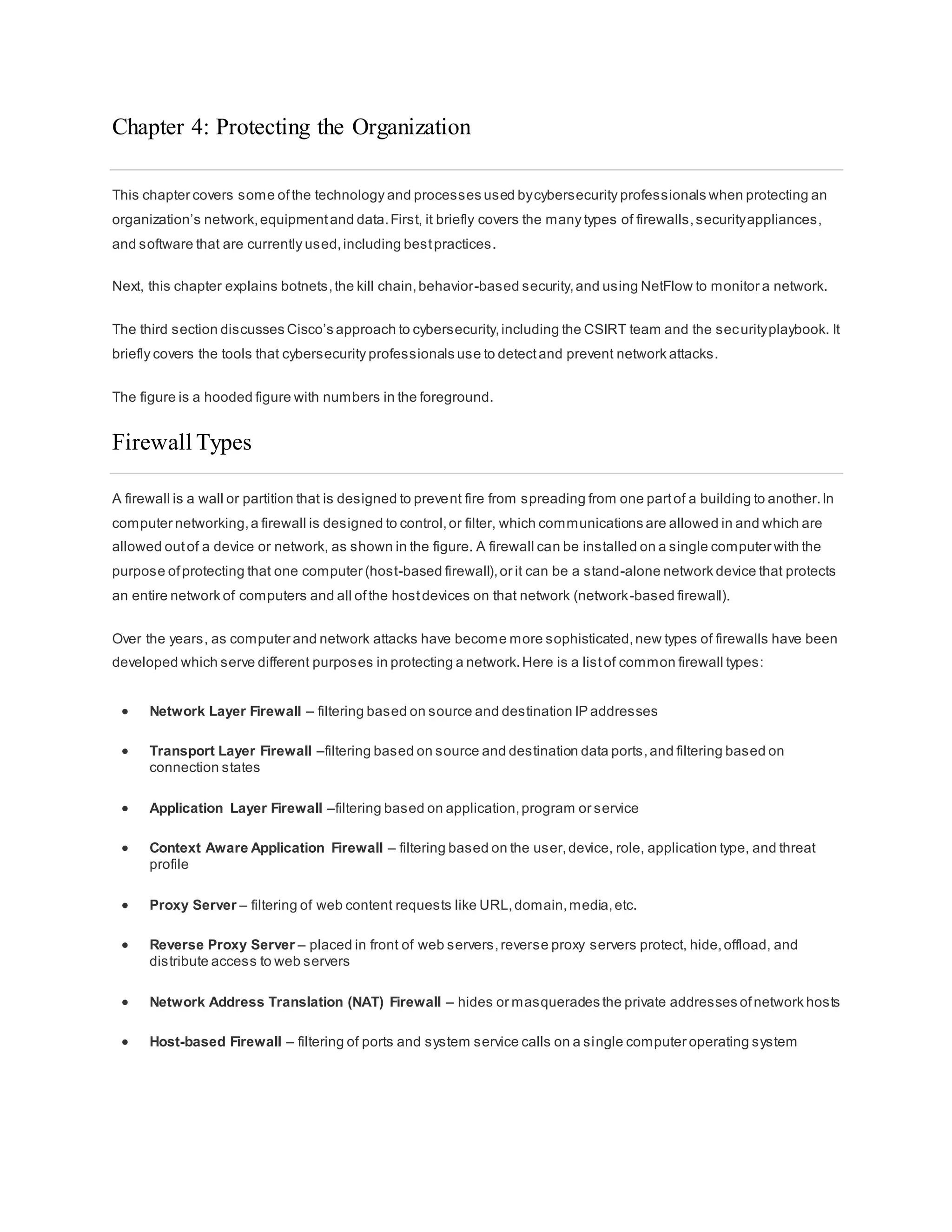
Over the years, as computer and network attacks have become more sophisticated,new types of firewalls have been
developed which serve different purposes in protecting a network.Here is a listof common firewall types:
 Network Layer Firewall – filtering based on source and destination IP addresses
 Transport Layer Firewall –filtering based on source and destination data ports,and filtering based on
connection states
 Application Layer Firewall –filtering based on application,program or service
 Context Aware Application Firewall – filtering based on the user,device, role, application type, and threat
profile
 Proxy Server – filtering of web content requests like URL,domain,media,etc.
 Reverse Proxy Server – placed in front of web servers,reverse proxy servers protect, hide,offload, and
distribute access to web servers
 Network Address Translation (NAT) Firewall – hides or masquerades the private addresses ofnetwork hosts
 Host-based Firewall – filtering of ports and system service calls on a single computer operating system
Port Scanning
Port-scanning is a process ofprobing a computer,server or other network hostfor open ports. In networking,each
application running on a device is assigned an identifier called a portnumber.This port number is used on both ends
of the transmission so thatthe right data is passed to the correct application.Port-scanning can be used maliciously
as a reconnaissance tool to identify the operating system and services running on a computer or host,or it can b e
used harmlesslyby a network administrator to verify network security policies on the network.
For the purposes ofevaluating your own computer network’s firewall and portsecurity,you can use a port-scanning
tool like Nmap to find all the open ports on your network. Port-scanning can be seen as a precursor to a network
attack and therefore should notbe done on public servers on the Internet, or on a company network without
permission.
To execute an Nmap port-scan of a computer on your local home network,download and launch a program such as
Zenmap,provide the target IP address ofthe computer you would like to scan,choose a default scanning profile,and
press scan.The Nmap scan will reportany services that are running (e.g., web services,mail services,etc.) and port
numbers.The scanning ofa port generallyresults in one of three responses:
 Open or Accepted – The hostreplied indicating a service is listening on the port.
 Closed, Denied, or Not Listening – The hostreplied indicating that connections will be denied to the port.
 Filtered, Dropped, or Blocked – There was no reply from the host.
To execute a port-scan ofyour network from outside ofthe network, you will need to initiate the scan from outside of
the network. This will involve running an Nmap port-scan againstyour firewall or router’s public IP address.To
discover your public IP address,use a search engine such as Google with the query “whatis my ip address”.The
search engine will return your public IP address.
To run a port-scan for six common ports againstyour home router or firewall,go to the Nmap Online Port Scanner
at https://hackertarget.com/nmap-online-port-scanner/and enter your public IP address in the inputbox: IP address
to scan… and press Quick Nmap Scan.If the response is open for any of the ports:21, 22, 25, 80, 443, or 3389 then
mostlikely, port forwarding has been enabled on your router or firewall,and you are running servers on your private
network, as shown in the figure.
Security Appliances
Today there is no single securityappliance or piece of technologythat will solve all network security needs.Because
there is a variety of securityappliances and tools thatneed to be implemented,itis importantthat they all work
together. Security appliances are mosteffective when they are part of a system.
Security appliances can be stand-alone devices,like a router or firewall,a card that can be installed into a network
device, or a module with its own processor and cached memory.Security appliances can also be software tools that
are run on a network device. Security appliances fall into these general categories:
Routers - Cisco Integrated Services Router (ISR) routers,shown in Figure 1, have manyfirewall capabilities besides
justrouting functions,including traffic filtering, the ability to run an Intrusion Prevention System (IPS), encryption, and
VPN capabilities for secure encrypted tunneling.
Firewalls - Cisco Next Generation Firewalls have all the capabilities ofan ISR router, as well as,advanced network
managementand analytics.Cisco Adaptive Security Appliance (ASA) with firewall capabilities are shown in Figure 2.
IPS - Cisco Next Generation IPS devices,shown in Figure 3, are dedicated to intrusion prevention.
VPN - Cisco securityappliances are equipped with a Virtual Private Network (VPN) server and clienttechnologies.It
is designed for secure encrypted tunneling.
Malware/Antivirus - Cisco Advanced Malware Protection (AMP) comes in next generation Cisco routers,firewalls,
IPS devices,Web and Email Security Appliances and can also be installed as software in hostcomputers.
Other Security Devices – This category includes web and email securityappliances,decryption devices,client
access control servers,and securitymanagementsystems.
Detecting Attacks in Real Time
Software is not perfect. When a hacker exploits a flaw in a piece of software before the creator can fix it, it is known
as a zero-day attack. Due to the sophistication and enormityof zero-day attacks found today, it is becoming common
that network attacks will succeed and that a successful defense is now measured in how quicklya network can
respond to an attack. The ability to detect attacks as they happen in real-time,as well as stopping the attacks
immediately,or within minutes ofoccurring,is the ideal goal.Unfortunately, manycompanies and organizations today
are unable to detect attacks until days or even months after they have occurred.
 Real Time Scanning from Edge to Endpoint - Detecting attacks in real time requires actively scanning for
attacks using firewall and IDS/IPS network devices.Next generation client/server malware detection with
connections to online global threat centers mustalso be used.Today,active scanning devices and software
mustdetectnetwork anomalies using context-based analysis and behavior detection.
 DDoS Attacks and Real Time Response - DDoS is one of the biggestattack threats requiring real-time
response and detection.DDoS attacks are extremely difficult to defend againstbecause the attacks originate
from hundreds,or thousands ofzombie hosts,and the attacks appear as legitimate traffic, as shown in the
figure. For many companies and organizations,regularlyoccurring DDoS attacks cripple Internetservers and
network availability. The ability to detect and respond to DDoS attacks in real-time is crucial.
Protecting Against Malware
How do you provide defense againstthe constantpresence ofzero-day attacks, as well as advanced persistent
threats (APT) that steal data over long periods oftime? One solution is to use an enterprise-level advanced malware
detection solution thatoffers real-time malware detection.
Network administrators must constantlymonitor the network for signs ofmalware or behaviors thatreveal the
presence ofan APT. Cisco has an Advanced Malware Protection (AMP) Threat Grid that analyzes millions offiles
and correlates them againsthundreds ofmillions ofother analyzed malware artifacts.This provides a global view of
malware attacks,campaigns,and their distribution.AMP is client/server software deployed on hostendpoints,as a
standalone server,or on other network security devices.The figure shows the benefits ofthe AMP Threat Grid.
Security Best Practices
Many national and professional organizations have published lists ofsecuritybestpractices.The following is a listof
some securitybestpractices:
 Perform Risk Assessment – Knowing the value of what you are protecting will help in justifying security
expenditures.
 Create a Security Policy – Create a policy that clearly outlines companyrules,job duties,and expectations.
 Physical Security Measures – Restrictaccess to networking closets,server locations,as well as fire
suppression.
 Human Resource Security Measures – Employees should be properlyresearched with background checks.
 Perform and Test Backups – Perform regular backups and testdata recovery from backups.
 Maintain Security Patches and Updates – Regularlyupdate server, client,and network device operating
systems and programs.
 Employ Access Controls – Configure user roles and privilege levels as well as strong user authentication.
 Regularly Test Incident Response – Employ an incidentresponse team and testemergencyresponse
scenarios.
 Implement a Network Monitoring, Analytics and Management Tool - Choose a securitymonitoring solution
that integrates with other technologies.
 Implement Network Security Devices – Use next generation routers,firewalls,and other securityappliances.
 Implement a Comprehensive Endpoint Security Solution – Use enterprise level antimalware and antivirus
software.
 Educate Users – Educate users and employees in secure procedures.
 Encrypt data – Encrypt all sensitive companydata including email.
Some of the mosthelpful guidelines are found in organizational repositories such as the National Institute of
Standards and Technology(NIST) Computer Security Resource Center,as shown in the figure.
One of the mostwidelyknown and respected organizations for cybersecuritytraining is the SANS Institute.
Go here to learn more aboutSANS and the types of training and certifications they offer.
Botnet
A botnet is a group of bots, connected through the Internet, with the ability to be controlled by a malicious individual
or group.A bot computer is typically infected by visiting a website,opening an email attachment,or opening an
infected media file.
A botnet can have tens of thousands,or even hundreds ofthousands ofbots.These bots can be activated to
distribute malware,launch DDoS attacks,distribute spam email,or execute brute force password attacks.Botnets are
typically controlled through a command and control server.
Cyber criminals will often rentout Botnets, for a fee, to third parties for nefarious purposes.
The figure shows how a botnet traffic filter is used to inform the worldwide securitycommunityof botnet locations.
The Kill Chain in Cyberdefense
In cybersecurity, the Kill Chain is the stages ofan information systems attack.Developed by Lockheed Martin as a
security framework for incidentdetection and response,the Cyber Kill Chain is comprised ofthe following stages:
Stage 1. Reconnaissance - The attacker gathers information aboutthe target.
Stage 2. Weaponization - The attacker creates an exploit and malicious payload to send to the target.
Stage 3. Delivery - The attacker sends the exploitand malicious payload to the target by email or other method.
Stage 4. Exploitation - The exploit is executed.
Stage 5 Installation - Malware and backdoors are installed on the target.
Stage 6. Command and Control - Remote control of the target is gained through a command and control channel or
server.
Stage 7. Action - The attacker performs malicious actions like information theft,or executes additional attacks on
other devices from within the network by working through the Kill Chain stages again.
To defend againstthe Kill Chain,network security defenses are designed around the stages ofthe Kill Chain.These
are some questions abouta company’s securitydefenses,based on the Cyber Kill Chain:
• What are the attack indicators ateach stage of the Kill Chain?
• Which security tools are needed to detect the attack indicators at each of the stages?
• Are there gaps in the company’s abilityto detect an attack?
According to Lockheed Martin, understanding the stages ofKill Chain allowed them to putup defensive obstacles,
slow down the attack, and ultimately prevent the loss ofdata. The figure shows how each stage of the Kill Chain
equates to an increase in the amountofeffort and cost to inhibitand remediate attacks.
Behavior-Based Security
Behavior-based securityis a form of threat detection that does not rely on known malicious signatures,butinstead
uses informational contextto detect anomalies in the network. Behavior-based detection involves capturing and
analyzing the flow of communication between a user on the local network and a local,or remote destination.These
communications,when captured and analyzed, reveal context and patterns of behavior which can be used to detect
anomalies.Behavior-based detection can discover the presence ofan attack by a change from normal behavior.
 Honeypots - A Honeypot is a behavior-based detection tool thatfirst lures the attacker in by appealing to the
attacker’s predicted pattern of malicious behavior,and then,when inside the honeypot, the network
administrator can capture,log, and analyze the attacker’s behavior.This allows an administrator to gain more
knowledge and build a better defense.
 Cisco’s Cyber Threat Defense Solution Architecture - This is a security architecture that uses behavior-
based detection and indicators,to provide greater visibility, context, and control.The goal is to know who, what,
where,when, and how an attack is taking place.This security architecture uses manysecuritytechnologies to
achieve this goal.
NetFlow
NetFlow technology is used to gather information aboutdata flowing through a network. NetFlow information can be
likened to a phone bill for your network traffic. It shows you who and whatdevices are in your network, as well as
when and how users and devices accessed your network.NetFlow is an importantcomponentin behavior-based
detection and analysis.Switches,routers,and firewalls equipped with NetFlow can reportinformation aboutdata
entering,leaving, and travelling through the network.Information is sentto NetFlow Collectors thatcollect, store, and
analyze NetFlow records.
NetFlow is able to collectinformation on usage through manydifferentcharacteristics ofhow data is moved through
the network, as shown in the figure. By collecting information aboutnetwork data flows,NetFlow is able to establish
baseline behaviors on more than 90 different attributes.
CSIRT
Many large organizations have a Computer Security IncidentResponse Team (CSIRT) to receive, review, and
respond to computer securityincidentreports,as shown in Figure 1. The primary mission ofCSIRTis to help ensure
company,system,and data preservation by performing comprehensive investigations into computer security
incidents.To prevent securityincidents,Cisco CSIRTprovides proactive threat assessment,mitigation planning,
incidenttrend analysis,and security architecture review, as shown in Figure 2.
Cisco’s CSIRTcollaborates with Forum ofIncident Response and SecurityTeams (FIRST), the National Safety
Information Exchange (NSIE), the Defense Security Information Exchange (DSIE), and the DNS Operations Ana lysis
and Research Center (DNS-OARC).
There are national and public CSIRT organizations like the CERT Division of the Software Engineering Institute at
Carnegie Mellon University, that are available to help organizations,and national CSIRTs,develop,operate, and
improve their incidentmanagementcapabilities.
Security Playbook
Technologyis constantly changing.That means cyberattacks are evolving too. New vulnerabilities and attack
methods are discovered continuously.Security is becoming a significantbusiness concern because ofthe resulting
reputation and financial impactfrom securitybreaches.Attacks are targeting critical networks and sensitive data.
Organizations should have plans to prepare for, deal with, and recover from a breach.
One of the bestway to prepare for a securitybreach is to prevent one. There should be guidance on identifying the
cybersecurity risk to systems, assets,data,and capabilities,protecting the system by the implementation of
safeguards and personnel training,and detecting cybersecurityevent as soon as possible.When a security breach is
detected, appropriate actions should be taken to minimize its impactand damage.The response plan should be
flexible with multiple action options during the breach.After the breach is contained and the compromised systems
and services are restored,security measures and processes should be updated to include the lessons learned during
the breach.
All this information should be compiled into a security playbook.A securityplaybook is a collection ofrepeatable
queries (reports) againstsecurityevent data sources thatlead to incidentdetection and response.Ideal lythe security
playbook mustaccomplish the following actions:
 Detect malware infected machines.
 Detect suspicious network activity.
 Detect irregular authentication attempts.
 Describe and understand inbound and outbound traffic.
 Provide summaryinformation including trends,statistics,and counts.
 Provide usable and quick access to statistics and metrics.
 Correlate events across all relevantdata sources.
Tools for Incident Prevention and Detection
These are some ofthe tools used to detect and prevent securityincidents:
 SIEM – A Security Information and Event Management(SIEM) system is software thatcollects and analyzes
security alerts,logs and other real time and historical data from securitydevices on the network.
 DLP – Data Loss Prevention Software (DLP) is a software or hardware system designed to stop sensitive data
from being stolen from or escaping a network.A DLP system mayfocus on file access authorization,data
exchange, data copying, user activity monitoring,and more.DLP systems are designed to monitor and protect
data in three different states:data in-use,data in-motion and data at-rest. Data in-use is focused on the client,
data in-motion refers to data as it travels through the network,and data at-rest refers to data storage.
 Cisco ISE and TrustSec – Cisco Identity Services Engine (Cisco ISE) and Cisco TrustSec enforce access to
network resources bycreating role-based access control policies thatsegmentaccess to the network (guests,
mobile users,employees) withoutadded complexity. Traffic classification is based on user or device identity.
Click play in the figure to learn more aboutISE.
 Click here to read the transcriptof this video.
IDS and IPS
An Intrusion Detection System (IDS), shown in the figure, is either a dedicated network device, or one of several tools
in a server or firewall that scans data against a database ofrules or attack signatures,looking for malicious traffic.If a
match is detected, the IDS will log the detection,and create an alertfor a network administrator.The Intrusion
Detection System does not take action when a match is detected so it does notprevent attacks from happening.The
job of the IDS is merelyto detect, log and report.
The scanning performed bythe IDS slows down the network (known as latency). To prevent againstnetwork delay,
an IDS is usuallyplaced offline,separate from regular network traffic. Data is copied or mirrored by a switch and then
forwarded to the IDS for offline detection. There are also IDS tools that can be installed on top of a hostcomputer
operating system,like Linuxor Windows.
An Intrusion Prevention System (IPS) has the ability to block or deny traffic based on a positive rule or signature
match.One of the mostwell-known IPS/IDS systems is Snort.The commercial version ofSnort is Cisco’s Sourcefire.
Sourcefire has the ability to perform real-time traffic and port analysis,logging,contentsearching and matching,and
can detect probes,attacks,and port scans.It also integrates with other third party tools for reporting,performance
and log analysis.
Chapter 4: Protecting the Organization
This chapter began by discussing some ofthe technologyand processes used bycybersecurity professionals when
protecting an organization’s network,equipmentand data.This included types of firewalls,securityappliances,and
software.
Botnets,the kill chain,behavior-based security,and using NetFlow to monitor a network were covered.
Finally, Cisco’s approach to cybersecurity, including the CSIRT team and the security playbook were explained. It
briefly covers the tools that cybersecurity professionals use to detectand prevent network attacks, including SIEM,
DLP, Cisco ISE and TrustSec, as well as IDS and IPS systems.
If you would like to further explore the concepts in this chapter, please check outthe Additional Resources and
Activities page in Student Resources.
Chapter 5: Will Your Future Be in Cybersecurity
This chapter covers the legal and ethical issues thatarise when working in cybersecurity.It also discusses
educational and career paths for cybersecurity. There are educational paths towards certifications thatyou may wish
to pursue with the Cisco Networking Academy. Some of these certifications are prerequisites to Specialization
Certificates in many areas ofnetworking,including cybersecurity.
The Networking Academy TalentBridge page (netacad.com under Resources) provides good information to help you
write a greatrésumé and prepare for a job interview. It also contains listings for Cisco and Cisco Partner jobs.Three
external Internet job search engines are presented for you to explore.
Legal Issues in Cybersecurity
Cybersecurity professionals musthave the same skills as hackers,especiallyblack hat hackers,in order to protect
againstattacks.One difference between a hacker and a cybersecurity professional is thatthe cybersecurity
professional mustwork within legal boundaries.
Personal Legal Issues
You do not even have to be an employee to be subjectto cybersecurity laws.In your private life, you may have the
opportunity and skills to hack another person’s computer or network.There is an old saying,“Just because you can
does notmean you should.” Keep this in mind.Most hackers leave tracks, whether they know it or not, and these
tracks can be followed back to the hacker.
Cybersecurity professionals develop manyskills which can be used for good or evil. Those who use their skills within
the legal system,to protect infrastructure,networks,and privacy are always in high demand.
Corporate Legal Issues
Most countries have some cybersecuritylaws in place.They may have to do with critical infrastructure,networks,and
corporate and individual privacy. Businesses are required to abide by these laws.
In some cases,ifyou break cybersecurity laws while doing your job, it is the companythat may be punished and you
could lose your job. In other cases,you could be prosecuted,fined,and possibly sentenced.
In general,if you are confused aboutwhether an action or behavior mightbe illegal,assume thatit is illegal and do
not do it. Your companymay have a legal departmentor someone in the human resources departmentwho can
answer your questions before you do something illegal.
International Law and Cybersecurity
The area of cybersecurity law is much newer than cybersecurity itself.As mentioned before,mostcountries have
some laws in place,and there will be more laws to come.
Ethical Issues in Cybersecurity
In addition to working within the confines ofthe law, cybersecurity professionals mustalso demonstrate ethical
behavior.
Personal Ethical Issues
A person mayact unethicallyand not be subjectto prosecution,fines or imprisonment.This is because the action
may not have been technically illegal.But that does notmean that the behavior is acceptable.Ethical behavior is
fairly easyto ascertain.It is impossible to listall of the various unethical behaviors thatcan be exhibited by someone
with cybersecurity skills.Below are justtwo. Ask yourself:
 Would I want to discover that someone has hacked into mycomputer and altered images in mysocial n etwork
sites?
 Would I want to discover that an IT technician whom I trusted to fix my network,told colleagues personal
information aboutme thatwas gained while working on my network?
If your answer to any of these questions was ‘no’,then do not do such things to others.
Corporate Ethical Issues
Ethics are codes ofbehavior that are sometimes enforced bylaws.There are many areas in cybersecurity that are
not covered by laws.This means thatdoing something thatis technicallylegal still maynot be the ethical thing to do.
Because so manyareas ofcybersecurity are not (or not yet) covered by laws,manyIT professional organizations
have created codes ofethics for persons in the industry.Below is a listof three organizations with Codes ofEthics:
 The CyberSecurity Institute (CSI) has published a code of ethics that you can read here.
 The Information Systems SecurityAssociation (ISSA) has a code of ethics found here.
 The Association ofInformation TechnologyProfessionals (AITP) has both a code of ethics and a standard of
conductfound here.
Cisco has a team devoted exclusively to ethical business conduct.Go here to read more aboutit. This site contains
an eBook aboutCisco’s Code ofBusiness Conduct,and a pdf file. In both files is an “Ethics Decision Tree”,as shown
in the figure.Even if you do not work for Cisco,the questions and answers found in this decision tree can easilybe
applied to your place of work. As with legal questions,in general,ifyou are confused aboutwhether an action or
behavior mightbe unethical,assume thatit is unethical and do not do it. There may be someone in your company’s
human resources or legal departmentwho can clarify your situation before you do something thatwould be
considered unethical.
Search online to find other IT-related organizations with codes ofethics.Try to find what they all have in common.
Cybersecurity Jobs
Many other businesses and industries are hiring cybersecurityprofessionals.There are several online search engines
to help you find the rightjob in cybersecurity:
 ITJobMatch – The ITJobMatch search engine specializes in IT jobs ofevery kind, all over the globe.
 Monster – Monster is a search engine for all types of jobs.The link provided goes directlyto cybersecurity jobs .
 CareerBuilder – CareerBuilder is also a search engine for all types of jobs.The link provided goes directly to
cybersecurity jobs.
These are justthree of many different online job search sites.Even if you are juststarting your education in IT and
cybersecurity, looking at job search engines is a good way to see what kinds ofjobs are available,all over the world.
Depending on your interestin cybersecurity, different types of jobs can be available to you, and they can require
specialized skills certifications.For example,a penetration tester,also known as an ethical hacker, searches and
exploits security vulnerabilities in applications,networks and systems.To become a penetration tester,you will need
to gain experience in other IT jobs,such as securityadministrator,network administrator,and system administrator.
Each one of these jobs requires its own setof skills thatwill help you become a valuable assetto an organization.
Our hope is that this course has peaked your interestin pursuing an education in IT and cybersecurity and then
continuing on to an exciting career! The Cisco Networking Academyprovides manycourses for you to continue your
education in Cybersecurity. We encourage you to enroll in the next course,CybersecurityEssentials,to continue to
build strong foundational knowledge in Cybersecurity.Check out the Cisco Networking Academyand see a list
of courses thatare available.Furthermore,you can also access career resources available in Cisco Networking
Academy.
Justfor fun, click here to read a graphic novel abouta cybersecurity superhero!
Chapter 5: Will Your Future Be in Cybersecurity?
This chapter began by discussing the legal and ethical issues thatprofessionals in cybersecurity commonlyface. It
also presented educational and career paths for those who wish to become cybersecurityprofessionals.Three
external Internet job search engines are presented for you to explore.
If you would like to further explore the concepts in this chapter, please check outthe Additional Resources and
Activities page in Student Resources.

Introduction of cyber security

  • 1.
    What is Cybersecurity? Theconnected electronic information network has become an integral partof our daily lives.All types of organizations,such as medical,financial,and education institutions,use this network to operate effectively. They utilize the network by collecting,processing,storing,and sharing vastamounts ofdigital information.As more digital information is gathered and shared,the protection of this information is becoming even more vital to our national security and economic stability. Cybersecurity is the ongoing effortto protect these networked systems and all ofthe data from unauthorized use or harm.On a personal level,you need to safeguard your identity, your data, and your computing devices.At the corporate level, it is everyone’s responsibilityto protect the organization’s reputation,data,and customers.At the state level, national security,and the safety and well-being ofthe citizens are at stake. Your Online and Offline Identity As more time is spentonline,your identity, both online and offline,can affect your life. Your offline identity is the person who your friends and familyinteract with on a daily basis athome,atschool,or work. They know your personal information,such as your name,age,or where you live. Your online identity is who you are in cyberspace. Your online identityis how you presentyourselfto others online.This online identityshould onlyreveal a limited amountof information aboutyou. You should take care when choosing a username or alias for your online identity. The username should notinclude any personal information.It should be something appropriate and respectful.This username should notlead strangers to think you are an easy target for cybercrimes or unwanted attention. Your Data Any information aboutyou can be considered to be your data. This personal information can uniquelyidentifyyou as an individual.This data includes the pictures and messages thatyou exchange with your family and friends online. Other information,such as name,social securitynumber,date and place of birth, or mother‘s maiden name,is known by you and used to identify you. Information such as medical,educational,financial,and employmentinformation, can also be used to identify you online. Medical Records Every time you go to the doctor’s office, more information is added to your electronic health records (EHRs).The prescription from your family doctor becomes partofyour EHR. Your EHR includes your physical health,mental health,and other personal information thatmaynot be medically-related.For example,if you had counseling as a child when there were major changes in the family, this will be somewhere in your medical records.Besides your medical historyand personal information,the EHR may also include information aboutyour family.
  • 2.
    Medical devices,such asfitness bands,use the cloud platform to enable wireless transfer,storage and displayof clinical data like heart rates,blood pressures and blood sugars.These devices can generate an enormous amountof clinical data that could become part of your medical records. Education Records As you progress through your education,information aboutyour grades and testscores,your attendance,courses taken, awards and degrees rewarded,and any disciplinaryreports maybe in your education record.This record may also include contactinformation,health and immunization records,and special education records including individualized education programs (IEPs). Employment and Financial Records Your financial record mayinclude information aboutyour income and expenditures.Tax records could include paycheck stubs,creditcard statements,your credit rating and other banking information.Your employment information can include your pastemploymentand your performance. Where is Your Data? All of this information is aboutyou. There are differentlaws that protect your privacy and data in your country. But do you know where your data is? When you are at the doctor’s office, the conversation you have with the doctor is recorded in your medical chart.For billing purposes,this information maybe shared with the insurance companyto ensure appropriate billing and quality. Now, a part of your medical record for the visit is also at the insurance com pany.
  • 3.
    The store loyaltycards maybe a convenient way to save moneyfor your purchases.However,the store is compiling a profile of your purchases and using thatinformation for its own use.The profile shows a buyer purchases a certain brand and flavor of toothpaste regularly. The store uses this information to targetthe buyer with special offers from the marketing partner.By using the loyalty card, the store and the marketing partner have a profile for the purchasing behavior of a customer. When you share your pictures online with your friends,do you know who may have a copy of the pictures? Copies of the pictures are on your own devices.Your friends mayhave copies ofthose pictures downloaded onto their devices. If the pictures are shared publicly,strangers mayhave copies ofthem,too. They could download those pictures or take screenshots ofthose pictures.Because the pictures were posted online,they are also saved on servers located in differentparts of the world.Now the pictures are no longer only found on your computing devices. Your Computing Devices Your computing devices do notjuststore your data. Now these devices have become the portal to your data and generate information aboutyou. Unless you have chosen to receive paper statements for all of your accounts,you use your computing devices to access the data. If you want a digital copy of the mostrecentcredit card statement,you use your computing devices to access the website ofthe credit card issuer.If you want to pay your credit card bill online,you access the website of your bank to transfer the funds using your computing devices.Besides allowing you to access your information,the computing devices can also generate information aboutyou. With all this information aboutyou available online,your personal data has become profitable to hackers. They Want Your Money If you have anything of value, the criminals wantit. Your online credentials are valuable.These credentials give the thieves access to your accounts.You may think the frequentflyer miles you have earned are not valuable to cybercriminals.Think again.After approximately10,000 American Airlines and United accounts were hacked,cybercriminals booked free flights and upgrades using these stolen credentials.Even though the frequentflyer miles were returned to the customers bythe airlines,this demonstrates the value of login credentials.A criminal could also take advantage of your relationships.They could access your online accounts and your reputation to trick you into wiring moneyto your friends or family. The criminal can send messages stating thatyour family or friends need you to wire them money so they can get home from abroad after losing their wallets. The criminals are very imaginative when they are trying to trick you into giving them money.They do not juststeal your money;they could also steal your identity and ruin your life.
  • 4.
    They Want YourIdentity Besides stealing your moneyfor a short-term monetarygain,the criminals wantlong-term profits bystealing your identity. As medical costs rise,medical identitytheft is also on the rise.The identity thieves can steal your medical insurance and use your medical benefits for themselves,and these medical procedures are now in your medical records. The annual tax filing procedures mayvary from country to country; however, cybercriminals see this time as an opportunity. For example,the people of the United States need to file their taxes by April 15 of each year. The Internal Revenue Service (IRS) does not check the tax return againstthe information from the employer until July. An identity thief can file a fake tax return and collect the refund.The legitimate filers will notice when their returns are rejected by IRS. With the stolen identity, they can also open creditcard accounts and run up debts in your name.This will cause damage to your credit rating and make it more difficultfor you to obtain loans. Personal credentials can also lead to corporate data and governmentdata access. Types of Organizational Data Traditional Data Corporate data includes personnel information,intellectual properties,and financial data.The personnel information includes application materials,payroll,offer letters,employee agreements,and any information used in m aking employmentdecisions.Intellectual property,such as patents,trademarks and new productplans,allows a business to gain economic advantage over its competitors.This intellectual propertycan be considered a trade secret;losing this information can be disastrous for the future of the company.The financial data, such as income statements, balance sheets,and cash flow statements ofa companygives insightinto the health of the company. Internet of Things and Big Data With the emergence ofthe Internet of Things (IoT), there is a lot more data to manage and secure.IoT is a large network of physical objects,such as sensors and equipmentthatextend beyond the traditional computer network.All these connections,plus the fact that we have expanded s torage capacity and storage services through the cloud and virtualization, lead to the exponential growth of data. This data has created a new area of interestin technologyand business called “Big Data".With the velocity, volume, and variety of data generated by the IoT and the daily operations ofbusiness,the confidentiality,integrity and availability of this data is vital to the survival of the organization
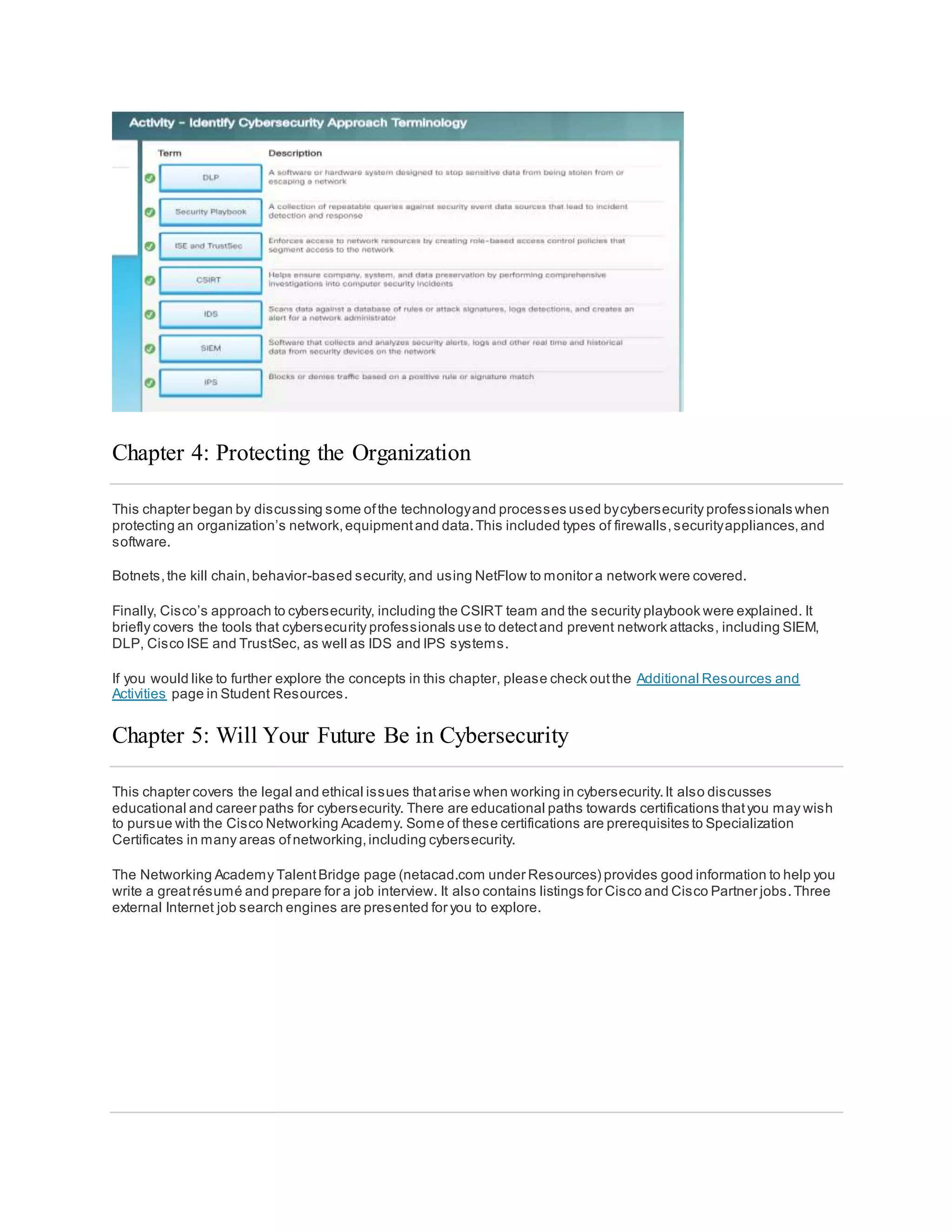
  • 5.
    Confidentiality, Integrity, andAvailability Confidentiality,integrity and availability, known as the CIA triad (Figure 1), is a guideline for information securityfor an organization.Confidentialityensures the privacy of data by restricting access through authentication encryption. Integrity assures thatthe information is accurate and trustworthy. Availability ensures thatthe information is accessible to authorized people. Confidentiality Another term for confidentialitywould be privacy. Companypolicies should restrictaccess to the information to authorized personnel and ensure thatonly those authorized individuals view this data.The data may be compartmentalized according to the securityor sensitivity level of the information.For example,a Java program developer should nothave to access to the personal information ofall employees.Furthermore,employees should receive training to understand the bestpractices in safeguarding sensitive information to protectthemselves and the companyfrom attacks. Methods to ensure confidentialityinclude data encryption, username ID and password,two factor authentication,and minimizing exposure ofsensitive information. Integrity Integrity is accuracy, consistency,and trustworthiness ofthe data during its entire life cycle. Data mustbe un altered during transitand not changed by unauthorized entities.File permissions and user access control can prevent unauthorized access.Version control can be used to prevent accidental changes byauthorized users.Backups must be available to restore any corrupted data, and checksum hashing can be used to verify integrity of the data during transfer. A checksum is used to verify the integrity of files,or strings ofcharacters,after they have been transferred from one device to another across your local network or the Internet. Checksums are calculated with hash functions.Some of the common checksums are MD5,SHA-1, SHA-256, and SHA-512. A hash function uses a mathematical algorithm to
  • 6.
    transform the datainto fixed-length value that represents the data,as shown in Figure 2. The hashed value is simply there for comparison.From the hashed value,the original data cannotbe retrieved directly. For example,if you forgot your password,your password cannotbe recovered from the hashed value.The password mustbe reset. After a file is downloaded,you can verify its integrity by verifying the hash values from the source with the one you generated using anyhash calculator.By comparing the hash values,you can ensure that the file has notbeen tampered with or corrupted during the transfer. Availability Maintaining equipment,performing hardware repairs,keeping operating systems and software up to date, and creating backups ensure the availabilityof the network and data to the authorized users.Plans shoul d be in place to recover quickly from natural or man-made disasters.Securityequipmentor software,such as firewalls,guard against downtime due to attacks such as denial ofservice (DoS). Denial ofservice occurs when an attacker attempts to overwhelm resources so the services are not available to the users. The Consequences of a Security Breach To protect an organization from every possible cyberattack is not feasible,for a few reasons.The expertise necessaryto set up and maintain the secure network can be expensive.Attackers will always continue to find new ways to target networks.Eventually, an advanced and targeted cyberattack will succeed.The priority will then be how quickly your securityteam can respond to the attack to minimize the loss of data, downtime,and revenue. By now you know that anything posted online can live online forever, even if you were able to erase all the copies in your possession.Ifyour servers were hacked, the confidential personnel information could be made public.A hacker (or hacking group) may vandalize the companywebsite by posting untrue information and ruin the company’s reputation that took years to build.The hackers can also take down the companywebsite causing the companyto lose revenue.If the website is down for longer periods oftime,the companymay appear unreliable and possiblylose credibility. If the companywebsite or network has been breached,this could lead to leaked confidential documents,
  • 7.
    revealed trade secrets,andstolen intellectual property.The loss ofall this information mayimpede companygrowth and expansion. The monetarycost of a breach is much higher than justreplacing any lostor stolen devices,investing in existing security and strengthening the building’s physical security.The companymay be responsible for contacting all the affected customers aboutthe breach and may have to be prepared for litigation.With all this turmoil,employees may choose to leave the company. The companymay need to focus less on growing and m ore on repairing its reputation. Security Breach Example 1 The online password manager,LastPass,detected unusual activity on its network in July 2015.It turned out that hackers had stolen user email addresses,password reminders,and authentication hashes.Fortunatelyfor the users, the hackers were unable to obtain anyone’s encrypted password vaults. Even though there was a security breach,LastPass could still safeguard the users’ accountinformation.LastPass requires email verification or multi-factor authentication whenever there is a new login from an unknown device or IP address.The hackers would also need the master password to access the account. LastPass users also have some responsibilityin safeguarding their own accounts.The users should always use complexmaster passwords and change the master passwords periodically.The users should always beware of Phishing attacks.An example of a Phishing attack would be if an attacker sentfake emails claiming to be from LastPass.The emails ask the users to click an embedded link and change the password.The link in the email goes to a fraudulentversion of the website used to steal the master password.The users should never click the embedded links in an email.The users should also be careful with their password reminder.The password reminder should not give away your passwords.Mostimportantly,the users should enable multi-factor authentication when available for any website thatoffers it. If the users and service providers both utilize the proper tools and procedures to safeguard the users’ information,the users’ data could still be protected,even in the event of security breach. Security Breach Example 2 The high tech toy maker for children,Vtech, suffered a security breach to its database in November 2015.This breach could affect millions ofcustomers around the world,including children.The data breach exposed sensitive information including customer names,email addresses,passwords,pictures, and chatlogs. A toy tablethad become a new target for hackers.The customers had shared photos and used the chat features through the toy tablets.The information was notsecured properly,and the companywebsite did not supportsecure SSL communication. Even though the breach did not expose any credit card information and personal identification data, the companywas suspended on the stock exchange because the concern over the hack was so great.
  • 8.
    Vtech did notsafeguard the customers’ information properly and it was exposed during the breach.Even though the companyinformed its customers thattheir passwords had been hashed,itwas still possible for the hackers to decipher them.The passwords in the database were scrambled using MD5 hash function,but the security questions and answers were stored in plaintext. Unfortunately, MD5 hash function has known vulnerabilities.The hackers can determine the original passwords bycomparing millions ofpre-calculated hash values. With the information exposed in this data breach, cybercriminals could use itto create email accounts,applyfor credits,and commitcrimes before the children were old enough to go to school.For the parents of these children,the cybercriminals could take over the online accounts because manypeople reuse their passwords on differentwebsites and accounts. The security breach not only impacted the privacy of the customers,itruined the company’s reputation,as indicated by the companywhen its presence on the stock exchange was suspended. For parents,it is a wake-up call to be more vigilantabouttheir children’s privacyonline and demand better security for children’s products.For the manufacturers ofnetwork-connected products,theyneed to be more aggressive in the protection of customer data and privacy now and in the future, as the cyberattack landscape evolves. Security Breach Example 3 Equifax Inc. is one of the nationwide consumer creditreporting agencies in the United States. This companycollects information on millions ofindividual customers and businesses worldwide.Based on the collected information,credit scores and creditreports are created aboutthe customers.This information could affectthe customers when they apply for loans and when they are looking for employment. In September 2017,Equifax publicly announced a data breach event. The attackers exploited a vulnerabilityin the Apache Struts web application software.The companybelieves that millions ofU.S. consumers'sensitive personal data were accessed bythe cyber criminals between May and July of 2017.The personal data includes the customers' full names,Social Securitynumbers,birth dates,addresses and other personallyidentifiable information.There is evidence that the breach may have affected customers in United Kingdom and Canada. Equifax established a dedicated web site that allows the consumers to determine iftheir information was compromised,and to sign up for credit monitoring and identitytheft protection. Using a new domain name,instead of using a subdomain ofequifax.com,this allowed nefarious parties to create unauthorized websites with similar names. These websites can be used as partof a phishing scheme to trick you into providing personal information. Furthermore,an employee from Equifax provided an incorrectweb link in social media for worried customers. Fortunately, this web site was taken down within 24 hours.It was created by an individual who use itas an educational opportunityto expose the vulnerabilities thatexists in Equifax's response page. As a concerned consumer,you may want to quickly verify if your information was compromised,so you can minimize the impact.In a time of crisis,you may be tricked into using unauthorized websites.You should be cautious about providing personal information so you do not become a victim again.Furthermore,companies are responsible for keeping our information safe from unauthorized access.Companies need to regularlypatch and update their software
  • 9.
    to mitigate exploitationof known vulnerabilities.Their employees should be educated and informed aboutthe procedures to safeguard the information and whatto do in the event of a breach. Unfortunately, the real victims of this breach are the individuals whose data mayhave been compromised.In this case,Equifax has the burden of protecting the collected consumer data while conducting creditchecks because the customers did notchoose to use the services provided by Equifax. The consumer has to trustthe company to safeguard the collected information.Furthermore,the attackers can use this data to assume your identity, and it is very difficult to prove otherwise because both the attacker and the victim know the same information.In these situations,the mostyou can do is be vigilantwhen you are providing personallyidentifiable information over the Internet. Check your credit reports regularly(once per month or once per quarter). Immediatelyreportany false information,such as applications for credit that you did not initiate,or purchases on your credit cards that you did not make. Types of Attackers Attackers are individuals or groups who attemptto exploit vulnerabilityfor personal or financial gain.Attackers are interested in everything, from credit cards to productdesigns and anything with value. Amateurs – These people are sometimes called ScriptKiddies.They are usuallyattackers with little or no skill,often using existing tools or instructions found on the Internet to launch attacks. Some of them are just curious,while o thers are trying to demonstrate their skills and cause harm.They may be using basic tools,butthe results can still be devastating. Hackers – This group of attackers break into computers or networks to gain access.Depending on the intent of the break-in,these attackers are classified as white,gray, or black hats. The white hat attackers break into networks or computer systems to discover weaknesses so thatthe security of these systems can be improved.These break-ins are done with prior permission and anyresults are reported back to the owner.On the other hand,black hat attackers take advantage of any vulnerability for illegal personal,financial or political gain.Gray hat attackers are somewhere between white and black hat attackers.The gray hat attackers may find a vulnerabilityin a system.Gray hat hackers may report the vulnerabilityto the owners ofthe system if that action coincides with their agenda.Some gray hat hackers publish the facts aboutthe vulnerability on the Internet so that other attackers can exploit it. The figure gives details aboutthe terms white hat hacker, black hat hacker, and gray hat hacker. Organized Hackers – These hackers include organizations ofcyber criminals,hacktivists,terrorists,and state- sponsored hackers.Cyber criminals are usuallygroups ofprofessional criminals focused on control,power,and wealth.The criminals are highlysophisticated and organized,and they may even provide cybercrime as a service to other criminals.Hacktivists make political statements to create awareness to issues thatare importantto them. State- sponsored attackers gather intelligence or commitsabotage on behalfoftheir government.These attackers are usuallyhighlytrained and well-funded,and their attacks are focused on specific goals thatare beneficial to their government.
  • 10.
    Internal and ExternalThreats Internal Security Threats Attacks can be originated from within an organization or from outside of the organization,as shown in the figure.An internal user,such as an employee or contract partner,can accidently or intentionally:  Mishandle confidential data  Threaten the operations ofinternal servers or network infrastructure devices  Facilitate outside attacks by connecting infected USB media into the corporate computer system  Accidentally invite malware onto the network through malicious email or websites Internal threats also have the potential to cause greater damage than external threats, because internal users have direct access to the building and its infrastructure devices.Employees also have knowledge ofthe corporate network, its resources,and its confidential data,as well as differentlevels of user or administrative privileges. External Security Threats External threats from amateurs or skilled attackers can exploitvulnerabilities in network or computing devices,or use social engineering to gain access. What is Cyberwarfare? Cyberspace has become another importantdimension ofwarfare,where nations can carry out conflicts without the clashes oftraditional troops and machines.This allows countries with minimal militarypresence to be as strong as other nations in cyberspace.Cyberwarfare is an Internet-based conflictthatinvolves the penetration of computer
  • 11.
    systems and networksofother nations.These attackers have the resources and expertise to launch massive Internet-based attacks againstother nations to cause damage or disruptservices,such as shutting down a power grid. An example of a state-sponsored attack involved the Stuxnet malware thatwas designed to damage Iran’s nuclear enrichmentplant.Stuxnet malware did not hijack targeted computers to steal information.Itwas designed to damage physical equipmentthatwas controlled by computers.Itused modular coding thatwas programmed to perform a specific task within the malware.It used stolen digital certificates so the attack appeared legitimate to the system. Click Play to view a video aboutStuxnet. Click here to read the transcriptof this video. Click here to view another video to learn more aboutStuxnet. The Purpose of Cyberwarfare The main purpose ofcyberwarfare is to gain advantage over adversaries,whether theyare nations or competitors. A nation can continuouslyinvade other nation’s infrastructure,steal defense secrets,and gather information about technologyto narrow the gaps in its industries and military.Besides industrial and militaristic espionage,cyberwar can sabotage the infrastructure ofother nations and costlives in the targeted nations.For example,an attack can disruptthe power grid of a major city. Traffic would be disrupted.The exchange of goods and services is halted. Patients cannotget the care needed in emergencysituations.Access to the Internet may also be disrupted.By affecting the power grid,the attack can affect the everyday life of ordinary citizens. Furthermore,compromised sensitive data can give the attackers the ability to blackmail personnel within the government.The information mayallow an attacker to pretend to be an authorized user to access sensitive information or equipment. If the governmentcannotdefend againstthe cyberattacks, the citizens may lose confidence in the government’s ability to protect them. Cyberwarfare can destabilize a nation,disruptcommerce,and affectthe citizens’ faith in their governmentwithoutever physicallyinvading the targeted nation. Chapter 1: The Need for Cybersecurity This chapter explained the features and characteristics of cybersecurity. It explained why the demand for cybersecurity professionals will onlycontinue to increase.The contentexplains why your personal online identityand data is vulnerable to cyber criminals.It gives some tips on how you can protect your pers onal online identityand data. This chapter also discussed organizational data:whatit is,where it is, and why it mustbe protected. It explained who the cyber attackers are and what they want. Cybersecurityprofessionals musthave the same skills as the cyber attackers.Cybersecurity professionals mustwork within the bounds ofthe local, national and international law. Cybersecurity professionals mustalso use their skills ethically. Finally, this chapter briefly explained cyberwarfare and why nations and governments need cybersecurity professionals to help protecttheir citizens and infrastructure.
  • 12.
    If you wouldlike to further explore the concepts in this chapter, please check outthe Additional Resources and Activities page in Student Resources. Chapter 2: Attacks, Concepts and Techniques This chapter covers the ways that cybersecurity professionals analyze what has happened after a cyberattack. It explains securitysoftware and hardware vulnerabilities and the differentcategories ofsecurityvulnerabilities. The different types of malicious software (known as malware) and the symptoms ofmalware are discussed.The different ways that attackers can infiltrate a system is covered, as well as denial ofservice attacks. Most modern cyberattacks are considered to be blended attacks.Blended attacks use multiple techniques to infiltrate and attack a system.When an attack cannot be prevented, it is the job of a cybersecurity professional to reduce the impactof that attack. Finding Security Vulnerabilities Security vulnerabilities are anykind of software or hardware defect.After gaining knowledge ofvulnerability, malicious users attemptto exploit it. An exploit is the term used to describe a program written to take advantage of a known vulnerability. The act of using an exploit againsta vulnerabilityis referred to as an attack. The goa l of the attack is to gain access to a system,the data it hosts or to a specific resource. Software vulnerabilities Software vulnerabilities are usuallyintroduced by errors in the operating system or application code,despite all the effort companies put into finding and patching software vulnerabilities,itis common for new vulnerabilities to surface. Microsoft, Apple, and other operating system producers release patches and updates almostevery day. Application updates are also common.Applications such as web browsers,mobile apps and web servers are often updated by the companies or organizations responsible for them. In 2015, a major vulnerability,called SYNful Knock, was discovered in Cisco IOS. This vulnerability allowed attackers to gain control of enterprise-grade routers,such as the legacyCisco 1841,2811,and 3825 routers.The attackers could then monitor all network communication and had the ability to infect other network devices.This vulnerability was introduced into the system when an altered IOS version was installed in the routers.To avoid this,always verify the integrity of the downloaded IOS image and limitthe physical access ofthe equipmentto authorized personnel only. The goal of software updates is to stay current and avoid exploitation of vulnerabilities.While some companies have penetration testing teams dedicated to search,find and patch software vulnerabilities before they can get exploited, third party securityresearchers also specialize in finding vulnerabilities in software.
  • 13.
    Google’s ProjectZero isa great example of such practice. After discovering a number of vulnerabilities in various software used by end-users,Google formed a permanentteam dedicated to finding software vulnerabilities.Google Security Research can be found here. Hardware vulnerabilities Hardware vulnerabilities are often introduced by hardware design flaws.RAM memoryfor example,is essentially capacitors installed very close to one another.It was discovered that, due to proximity, constantchanges applied to one of these capacitors could influence neighbor capacitors.Based on thatdesign flaw,an exploit called Rowhammer was created.By repeatedlyrewriting memoryin the same addresses,the Rowhammer exploitallows data to be retrieved from nearby address memorycells,even if the cells are protected. Hardware vulnerabilities are specific to device models and are notgenerallyexploited through random compromising attempts.While hardware exploits are more common in highlytargeted attacks, traditional malware protection and a physical securityare sufficientprotection for the everyday user. Categorizing Security Vulnerabilities Most software security vulnerabilities fall into one of the following categories: Buffer overflow – This vulnerability occurs when data is written beyond the limits ofa buffer. Buffers are memory areas allocated to an application.By changing data beyond the boundaries ofa buffer, the application accesses memoryallocated to other processes.This can lead to a system crash,data compromise,or provide escalation of privileges. Non-validated input – Programs often work with data input. This data coming into the program could have malicious content, designed to force the program to behave in an unintended way. Consider a program thatreceives an image for processing.A malicious user could craftan image file with invalid image dimensions.The maliciouslycrafted dimensions could force the program to allocate buffers of incorrectand unexpected sizes. Race conditions – This vulnerability is when the output of an event depends on ordered or timed outputs.A race condition becomes a source ofvulnerability when the required ordered or timed events do not occur in the correct order or proper timing. Weaknesses insecurity practices – Systems and sensitive data can be protected through techniques such as authentication,authorization,and encryption. Developers should notattem ptto create their own securityalgorithms because itwill likely introduce vulnerabilities.Itis strongly advised that developers use securitylibraries thathave already created,tested, and verified. Access-control problems – Access control is the process ofcontrolling who does whatand ranges from managing physical access to equipmentto dictating who has access to a resource,such as a file, and what they can do with it, such as read or change the file. Many securityvulnerabilities are created by the improper use ofaccess controls. Nearly all access controls and securitypractices can be overcome if the attacker has physical access to target equipment.For example,no matter what you seta file’s permissions to,the operating system cannotprevent someone from bypassing the operating system and reading the data directly off the disk.To protect the machine and the data it contains,physical access mustbe restricted and encryption techniques mustbe used to protect data from being stolen or corrupted.
  • 14.
    Types of Malware Shortfor Malicious Software, malware is anycode that can be used to steal data, bypass access controls,or cause harm to, or compromise a system.Below are a few common types ofmalware: Spyware – This malware is design to track and spy on the user.Spyware often includes activity trackers, keystroke collection,and data capture.In an attemptto overcome security measures,spyware often modifies securitysettings. Spyware often bundles itselfwith legitimate software or with Trojan horses. Adware – Advertising supported software is designed to automaticallydeliver advertisements.Adware is often installed with some versions ofsoftware.Some adware is designed to onlydeliver advertisements butitis also common for adware to come with spyware. Bot – From the word robot, a bot is malware designed to automaticallyperform action,usuallyonline.While most bots are harmless,one increasing use ofmalicious bots are botnets.Several computers are infected with bots which are programmed to quietlywait for commands provided bythe attacker. Ransomware – This malware is designed to hold a computer system or the data it contains captive until a paymentis made.Ransomware usuallyworks by encrypting data in the computer with a key unknown to the user.Some other versions ofransomware can take advantage of specific system vulnerabilities to lock down the system.Ransomware is spread by a downloaded file or some software vulnerability. Scareware – This is a type of malware designed to persuade the user to take a specific action based on fear. Scareware forges pop-up windows thatresemble operating system dialogue windows.These windows conveyforged messages stating the system is atrisk or needs the execution of a specific program to return to normal operation.In reality, no problems were assessed or detected and if the user agrees and clears the mentioned program to execute, his or her system will be infected with malware. Rootkit – This malware is designed to modify the operating system to create a backdoor.Attackers then use the backdoor to access the computer remotely.Most rootkits take advantage of software vulnerabilities to perform privilege escalation and modifysystem files.It is also common for rootkits to modify system forensics and monitoring tools,making them very hard to detect. Often, a computer infected by a rootkit mustbe wiped and reinstalled. Virus - A virus is malicious executable code thatis attached to other executable files,often legitimate programs.Most viruses require end-user activation and can activate at a specific time or date. Viruses can be harmless and simply displaya picture or they can be destructive, such as those that modify or delete data. Viruses can also be programmed to mutate to avoid detection. Most viruses are now spread by USB drives, optical disks,network shares, or email. Trojan horse - A Trojan horse is malware thatcarries outmalicious operations under the guise ofa desired operation.This malicious code exploits the privileges ofthe user that runs it. Often, Trojans are found in image files, audio files or games.A Trojan horse differs from a virus because itbinds itselfto non-executable files. Worms – Worms are malicious code thatreplicate themselves byindependentlyexploiting vulnerabilities in networks. Worms usuallyslow down networks.Whereas a virus requires a hostprogram to run, worms can run by themselves. Other than the initial infection,they no longer require user participation.After a hostis infected, the worm is able to spread very quickly over the network. Worms share similar patterns.Theyall have an enabling vulnerability,a way to propagate themselves,and they all contain a payload. Worms are responsible for some ofthe mostdevastating attacks on the Internet. As shown in Figure 1, in 2001 the Code Red worm had infected 658 servers.Within 19 hours,the worm had infected over 300,000 servers as shown in Figure 2. Man-In-The-Middle (MitM) – MitM allows the attacker to take control over a device withoutthe user’s knowledge. With that level of access,the attacker can interceptand capture user information before relaying itto its intended destination.MitM attacks are widely used to steal financial information.Many malware and techniques existto provide attackers with MitM capabilities.
  • 15.
    Man-In-The-Mobile (MitMo) –A variation of man-in-middle,MitMo is a type of attack used to take control over a mobile device.When infected,the mobile device can be instructed to exfiltrate user-sensitive information and send it to the attackers. ZeuS, an example of an exploit with MitMo capabilities,allows attackers quietlyto capture 2 -step verification SMS messages sentto users. Symptoms of Malware Regardless ofthe type of malware a system has been infected with,these are common malware symptoms:  There is an increase in CPU usage.  There is a decrease in computer speed.  The computer freezes or crashes often.  There is a decrease in Web browsing speed.  There are unexplainable problems with network connections.  Files are modified.  Files are deleted.  There is a presence ofunknown files,programs,or desktop icons.  There are unknown processes running.  Programs are turning off or reconfiguring themselves.  Email is being sentwithoutthe user’s knowledge or consent.
  • 16.
    Social Engineering Social engineeringis an access attack that attempts to manipulate individuals into performing actions or divulging confidential information.Social engineers often rely on people’s willingness to be helpful but also prey on people’s weaknesses.For example,an attacker could call an authorized employee with an urgentproblem thatrequires immediate network access.The attacker could appeal to the employee’s vanity, invoke authority using name - dropping techniques,or appeal to the employee’s greed. These are some types of social engineering attacks:  Pretexting - This is when an attacker calls an individual and lies to them in an attemptto gain access to privileged data. An example involves an attacker who pretends to need personal or financial data in order to confirm the identity of the recipient.  Tailgating - This is when an attacker quickly follows an authorized person into a secure location.  Something for Something (Quid pro quo) - This is when an attacker requests personal information from a party in exchange for something,like a free gift. Wi-Fi Password Cracking Wi-Fi password cracking is the process ofdiscovering the password used to protecta wireless network.These are some techniques used in password cracking: Social engineering – The attacker manipulates a person who knows the password into providing it. Brute-force attacks – The attacker tries several possible passwords in an attemptto guess the password.If the password is a 4-digitnumber,for example, the attacker would have to try every one of the 10000 combinations. Brute-force attacks usuallyinvolve a word-listfile. This is a text file containing a listof words taken from a dictionary. A program then tries each word and common combinations.Because brute-force attacks take time,complex passwords take much longer to guess.A few password brute-force tools include Ophcrack,L0phtCrack,THC Hydra, RainbowCrack,and Medusa. Network sniffing – By listening and capturing packets senton the network,an attacker may be able to discover the password ifthe password is being sentunencrypted (in plain text). If the password is encrypted,the attacker may still be able to reveal it by using a password cracking tool. Phishing Phishing is when a malicious partysends a fraudulentemail disguised as being from a legitimate,trusted source.The message intentis to trick the recipientinto installing malware on their device,or into sharing personal or financial information.An example of phishing is an email forged to look like it was sentby a retail store asking the user to click a link to claim a prize. The link may go to a fake site asking for personal information,or it may install a virus. Spear phishing is a highlytargeted phishing attack.While phishing and spear phishing both use emails to reach the victims,spear phishing emails are customized to a specific person.The attacker researches the target’s interests before sending the email.For example, an attacker learns the target is interested in cars,and has been looki ng to buy a specific model ofcar. The attacker joins the same car discussion forum where the targetis a member,forges a car sale offering and sends email to the target. The email contains a link for pictures of the car. When the target clicks on the link,malware is installed on the target’s computer.
  • 17.
    Vulnerability Exploitation Exploiting vulnerabilitiesis another common method ofinfiltration.Attackers will scan computers to gain information aboutthem. Below is a common method for exploiting vulnerabilities: Step 1. Gather information aboutthe target system.This could be done in many differentways such as a port scanner or social engineering.The goal is to learn as much as possible aboutthe targetcomputer. Step 2.One of the pieces ofrelevant information learned in step 1 mightbe the operating system,its version,and a listof services running on it. Step 3. When the target’s operating system and version is known,the attacker looks for any known vulnerabilities specific to that version of OS or other OS services. Step 4. When a vulnerability is found, the attacker looks for a previouslywritten exploit to us e.If no exploits have been written, the attacker may consider writing an exploit. Figure 1 portrays an attacker using whois, a public Internetdatabase containing information aboutdomain names and their registrants.Figure 2 portrays an attacker using the nmap tool, a popular portscanner.With a port scanner, an attacker can probe ports of a target computer to learn aboutwhich services are running on that computer. Advanced Persistent Threats One way in which infiltration is achieved is through advanced persistentthreats (APTs).They consistofa multi- phase,long term,stealthy and advanced operation againsta specific target. Due to its complexity and skill level required,an APT is usuallywell funded.An APT targets organizations or nations for business or political reasons. Usuallyrelated to network-based espionage,APT’s purpose is to deploycustomized malware on one or multiple of the target’s systems and remain undetected.With multiple phases ofoperation and several customized types of malware thataffect differentdevices and perform specific functions,an individual attacker often lacks the skill -set, resources or persistence to carry out APTs. Vulnerability Exploitation Exploiting vulnerabilities is another common method ofinfiltration. Attackers will scan computers to gain information aboutthem. Below is a common method for exploiting vulnerabilities: Step 1. Gather information aboutthe target system.This could be done in many differentways such as a port scanner or social engineering.The goal is to learn as much as possible aboutthe targetcomputer. Step 2.One of the pieces ofrelevant information learned in step 1 mightbe the operating system,its version,and a listof services running on it. Step 3. When the target’s operating system and version is known,the attacker looks for any known vulnerabilities specific to that version of OS or other OS services. Step 4. When a vulnerability is found, the attacker looks for a previouslywritten exploit to use.If no exploits have been written, the attacker may consider writing an exploit. Figure 1 portrays an attacker using whois, a public Internetdatabase containing information aboutdomain names and their registrants.Figure 2 portrays an attacker using the nmap tool, a popular portscanner.With a port scanner, an attacker can probe ports of a target computer to learn aboutwhich services are running on that computer.
  • 18.
    DoS Denial-of-Service (DoS) attacksare a type of network attack. A DoS attack results in some sortofinterruption of network service to users,devices,or applications.There are two major types of DoS attacks: Overwhelming Quantity of Traffic - This is when a network, host,or application is sentan enormous quantityof data at a rate which it cannot handle.This causes a slowdown in transmission or response,or a crash of a device or service. Maliciously Formatted Packets - This is when a maliciouslyformatted packetis sentto a hostor application and the receiver is unable to handle it. For example,an attacker forwards packets containing errors thatcannotbe identified by the application,or forwards improperlyformatted packets.This causes the receiving device to run very slowlyor crash. DoS attacks are considered a major risk because theycan easilyinterrupt communication and cause significantloss of time and money.These attacks are relatively simple to conduct,even by an unskilled attacker. DDoS A Distributed DoS Attack (DDoS) is similar to a DoS attack but originates from multiple,coordinated sources.As an example,a DDoS attack could proceed as follows: An attacker builds a network of infected hosts,called a botnet. The infected hosts are called zombies.The zombies are controlled by handler systems. The zombie computers constantlyscan and infect more hosts,creating more zombies.When ready, the hacker instructs handler systems to make the botnet of zombies carry out a DDoS attack. Click Play in the figure to view the animations ofa DDoS attack.
  • 19.
    SEO Poisoning Search enginessuch as Google work by ranking pages and presenting relevantresults based on users’ search queries.Depending on the relevancy of web site content, it may appear higher or lower in the search resultlist.SEO, shortfor Search Engine Optimization,is a setof techniques used to improve a website’s ranking bya search engine. While many legitimate companies specialize in optimizing websites to better position them,a malicious user could use SEO to make a malicious website appear higher in search results.This technique is called SEOpoisoning. The mostcommon goal ofSEO poisoning is to increase traffic to malicious sites thatmayhostmalware or perform social engineering.To force a malicious site to rank higher in search results,attackers take advantage of popular search terms.
  • 20.
    What is aBlended Attack? Blended attacks are attacks that use multiple techniques to compromise a target.By using several differentattack techniques atonce,attackers have malware thatare a hybrid of worms,Trojan horses,spyware,keyloggers,spam and phishing schemes.This trend of blended attacks is revealing more complexmalware and placing user data at great risk. The mostcommon type of blended attack uses spam email messages,instantmessages or legitimate websites to distribute links where malware or spyware is secretlydownloaded to the computer.Another common blended attack uses DDoS combined with phishing emails.First,DDoS is used to take down a popular bank website and send emails to the bank's customers,apologizing for the inconvenience.The email also directs the users to a forged emergencysite where their real login information can be stolen. Many of the mostdamaging computer worms like Nimbda,CodeRed,BugBear,Klezand Slammer are better categorized as blended attacks,as shown below:  Some Nimbda variants used email attachments;file downloads from a compromised web server;and Microsoft file sharing (e.g.,anonymous shares) as propagation methods.  Other Nimbda variants were able to modify the system’s guestaccounts to provide the attacker or malicious code with administrative privileges. The recent Conficker and ZeuS/LICAT worms were also blended attacks.Conficker used all the traditional distribution methods. What is Impact Reduction? While the majority of successful companies todayare aware of common securityissues and putconsiderable effort towards preventing them,no setof securitypractices is 100% efficient. Because a breach is likely to happen if the prize is big, companies and organizations mustalso be prepared to contain the damage. It is importantto understand thatthe impactof a breach is not only related to the technical aspectof it, stolen data, damaged databases,or damage to intellectual property,the damage also extends to the company’s reputation. Responding to a data breach is a very dynamic process. Below are some importantmeasures a companyshould take when a securitybreach is identified,according to many security experts:  Communicate the issue.Internallyemployees should be informed ofthe problem and called to action. Externally, clients should be informed through directcommunication and official announcements. Communication creates transparency,which is crucial in this type of situation.  Be sincere and accountable in case the companyis at fault.  Provide details.Explain why the situation took place and what was compromised.Itis also expected that the companytake care of the costs of identity theft protection services for affected customers.
  • 21.
     Understand whatcausedand facilitated the breach.If necessary,hire forensics experts to research and learn the details.  Apply what was learned from the forensics investigation to ensure similar breaches do nothappen in the future.  Ensure all systems are clean,no backdoors were installed,and nothing else has been compromised.Attackers will often attemptto leave a backdoor to facilitate future breaches.Make sure this does nothappen.  Educate employees,partners,and customers on how to prevent future breaches. Chapter 2: Attacks, Concepts and Techniques This chapter covered the ways that cyber security professionals analyze whathas happened after a cyberattack. It explains securitysoftware and hardware vulnerabilities and the differentcategories ofsecurityvulnerabilities. The different types of malicious software (known as malware) and the symptoms ofmalware explained.Some ofthe malware thatwas discussed included viruses,worms,Trojan horses,spyware,adware,and others. The different ways that attackers can infiltrate a system was covered,including social engineering,Wi-Fi Password Cracking,Phishing,and vulnerabilityexploitation.The different types of denial of service attacks were also explained. Blended attacks use multiple techniques to infiltrate and attack a system.Many of the mostdamaging computer worms like Nimbda,CodeRed,BugBear,Klez and slammer are better categorized as blended attacks.When an attack cannot be prevented, it is the job of a cybersecurity professional is to reduce the impactof that attack. If you would like to further explore the concepts in this chapter, please check outthe Additional Resources and Activities page in Student Resources. Chapter 3: Protecting Your Data and Privacy This chapter focuses on your personal devices and your personal data.It includes tips for protecting your devices, creating strong passwords and safelyusing wireless networks.It also discusses maintaining your data securely. Your online data is worth something to cyber criminals.This chapter brieflycovers authentication techniques to help you maintain your data securely.It also covers ways to enhance the securityof your online data with tips about what to do and what not to do online. Protect Your Computing Devices Your computing devices store your data and are the portal to your online life. Below is a shortlistof steps you can take to protect your computing devices from intrusion:  Keep the Firewall On – Whether it is a software firewall or a hardware firewall on a router, the firewall should be turned on and updated to prevent hackers from accessing your personal or companydata.Click Windows 7
  • 22.
    and 8.1 orWindows 10 to turn on the firewall in the respective version of Windows.Click here to turn on the firewall for Mac OS X devices.  Use Antivirus and Antispyware – Malicious software,such as viruses,Trojan horses,worms,ransomware and spyware, are installed on your computing devices withoutyour permission,in order to gain access to your computer and your data. Viruses can destroyyour data, slow down your computer,or take over your computer. One way viruses can take over your computer is by allowing spammers to broadcastemails using your account. Spyware can monitor your online activities,collectyour personal information,or produce unwanted pop-up ads on your web browser while you are online.A good rule is to only download s oftware from trusted websites to avoid getting spyware in the firstplace. Antivirus software is designed to scan your computer and incoming email for viruses and delete them.Sometimes antivirus software also includes antispyware.Keep your software up to date to protect your computer from the newestmalicious software.  Manage Your Operating System and Browser – Hackers are always trying to take advantage of vulnerabilities in your operating systems and your web browsers.To protect your computer and your data, set the security settings on your computer and browser atmedium or higher.Update your computer’s operating system including your web browsers and regularlydownload and install the latestsoftware patches and security updates from the vendors.  Protect All Your Devices – Your computing devices,whether they are PCs, laptops,tablets,or smartphones, should be password protected to prevent unauthorized access.The stored information should be encrypted, especiallyfor sensitive or confidential data. For mobile devices,onlystore necessaryinformation,in case these devices are stolen or lostwhen you are away from your home.If any one of your devices is compromised,the criminals mayhave access to all your data through your cloud-storage service provider,such as iCloud or Google drive. IoT devices pose an even greater risk than your other computing devices.While desktop,laptop and mobile platforms receive frequentsoftware updates,mostofthe IoT devices still have their original firmware.Ifvulnerabilities are found in the firmware,the IoT device is likely to stay vulnerable.To make the problem worse,IoTdevices are often designed to call home and require Internetaccess.To reach the Internet, mostIoT devices manufacturers relyon the customer’s local network.The resultis that IoT devices are very likely to be comprised and when they are, they allow access to the customer’s local network and data.The bestway to protect yourself from this scenario is to have IoT devices using an isolated network,sharing itonly with other IoT devices. Click here to visit Shodan,a web-based IoTdevice scanner. Use Wireless Networks Safely Wireless networks allow Wi-Fi enabled devices,such as laptops and tablets,to connectto the network by way of the network identifier,known as the Service Set Identifier (SSID). To prevent intruders অনুপ্রবেশকারীবের from entering your home wireless network,the pre-setSSID and defaultpassword for the browser-based administrative interface should be changed.Hackers will be aware of this kind of default access information.Optionally,the wireless router can also be configured to not broadcastthe SSID, which adds an additional barrier to discovering the network. However, this should notbe considered adequate securityfor a wireless network.Furthermore,you should encrypt wireless communication byenabling wireless securityand the WPA2 encryption feature on the wireless router.Even with WPA2 encryption enabled,the wireless network can still be vulnerable. In October 2017, a securityflaw in the WPA2 protocol was discovered.This flaw allows an intruder to break the encryption between the wireless router and the wireless client,and allow the intruder to access and manipulate the network traffic. This vulnerability can be exploited using Key Reinstallation Attacks (KRACK). It affects all modern, protected Wi-Fi networks.To mitigate an attacker, a user should update all affected products:wireless routers and any wireless capable devices,such as laptops and mobile devices,as soon as securityupdates become avail able.
  • 23.
    For laptops orother devices with wired NIC, a wired connection could mitigate this vulnerability.Furthermore,you can also use a trusted VPN service to prevent the unauthorized access to your data while you are using the wireless network. Click here to learn more aboutKRACK. When you are away from home,a public Wi-Fi hot spotallows you to access your online information and surfthe Internet. However, it is bestto not access or send any sensitive personal information over a public wireless network. Verify whether your computer is configured with file and media sharing and thatit requires user authentication with encryption. To prevent someone from intercepting your information (known as “eavesdropping”) while using a public wireless network,use encrypted VPN tunnels and services.The VPN service provides you secure access to the Internet, with an encrypted connection between your computer and the VPN service provider’s VPN server. With an encrypted VPN tunnel,even if a data transmission is intercepted,itis not decipherable. Click here to learn more aboutprotecting yourself when using wireless networks. Many mobile devices,such as smartphones and tablets,come with the Bluetooth wireless protocol.This capability allows Bluetooth-enabled devices to connectto each other and share information.Unfortunately,Bluetooth can be exploited by hackers to eavesdrop on some devices,establish remote access controls,distribute malware,and drain batteries.To avoid these issues,keep Bluetooth turned off when you are not using it. Use Unique Passwords for Each Online Account You probablyhave more than one online account,and each accountshould have a unique password.Thatis a lot of passwords to remember.However,the consequence ofnot using strong and unique passwords leaves you and your data vulnerable to cyber criminals.Using the same password for all your online accounts is like using the same key for all your locked doors,if an attacker was to get your key, he would have the ability to access everything you own.If criminals getyour password through phishing for example,they will try to get into your other online accounts.If you only use one password for all accounts,they can get into all your accounts,steal or erase all your data, or decide to impersonate you. We use so many online accounts thatneed passwords thatis becomes too much to remember.One solution to avoid reusing passwords or using weak passwords is to use a password manager.A password manager stores and encrypts all of your different and complexpasswords.The manager can then help you to log into your online accounts automatically.You only need to remember your master password to access the password manager and manage all ofyour accounts and passwords. Tips for choosing a good password:  Do not use dictionarywords or names in any languages  Do not use common misspellings ofdictionary words
  • 24.
     Do notuse computer names or accountnames  If possible use special characters,such as !@ # $ % ^ & * ( )  Use a password with ten or more characters Use Passphrase Rather Than a Password To prevent unauthorized physical access to your computing devices,use passphrases,rather than passwords.It is easier to create a long passphrase than a password,because itis generallyin the form of a sentence rather than a word. The longer length makes passphrases less vulnerable to dictionaryor brute force attacks.Furthermore,a passphrase maybe easier to remember,especiallyif you are required to change your password frequently.Here are some tips in choosing good passwords or passphrases: Tips in choosing a good passphrase:  Choose a meaningful statementto you  Add special characters,such as !@ # $ % ^ & * ( )  The longer the better  Avoid common or famous statements,for example,lyrics from a popular song Recently, United States National Institute for Standards and Technology(NIST) published improved password requirements.NISTstandards are intended for governmentapplication butcan also serve as a standard for others as well.The new guidelines aim to provide better user experience and put the burden of user verification on the providers. Summary of the new guidelines:  8 characters minimum in length,butno more than 64 characters  No common,easilyguessed passwords,such as password,abc123  No composition rules,such as having to include lowercase and uppercase letters and numbers  Improve typing accuracy by allowing the user to see the password while typing  All printing characters and spaces are allowed
  • 25.
     No passwordhints  No periodical or arbitrary password expiration  No knowledge-based authentication,such as information from shared secretquestions,marketing data, transaction history Click here to learn more aboutthe improved NIST password requirement. Even with access to your computers and network devices secured,itis also importantto protect and preserve your data. Encrypt Your Data Your data should always be encrypted. You may think you have no secrets and nothing to hide so why use encryption? Maybe you think that nobodywants your data. Most likely, this is probably not true. Are you ready to show all of your photos and documents to strangers? Are you ready to share financial information stored on your computer to your friends? Do you want to give out your emails and accountpasswords to the general public? This can be even more troublesome ifa malicious application infects your computer or mobile device and steals potentiallyvaluable information,such as accountnumbers and passwords,and other official documents.Thatkind of information can lead to identity theft, fraud, or ransom.Criminals maydecide to simplyencrypt your data and make it unusable until you pay the ransom. What is encryption? Encryption is the process ofconverting the information into a form where an unauthorized party cannotread it. Only a trusted, authorized person with the secretkey or password can decryptthe data and access it in its original form.The encryption itself does notprevent someone from intercepting the data.Encryption can only prevent an unauthorized person from viewing or accessing the content. Software programs are used to encrypt files,folders,and even entire drives. Encrypting File System (EFS) is a Windows feature that can encrypt data. EFS is directly linked to a specific user account. Only the user that encrypted the data will be able to access itafter it has been encrypted using EFS. To encrypt data using EFS in all Windows versions,follow these steps: Step 1. Selectone or more files or folders. Step 2. Right-click the selected data >Properties. Step 3. Click Advanced…
  • 26.
    Step 4. SelecttheEncrypt contents to secure data check box. Step 5. Files and folders thathave been encrypted with EFS are displayed in green,as shown in the figure. Back up Your Data Your hard drive may fail. Your laptop could be lost. Your smartphone stolen.Maybe you erased the original version of an importantdocument.Having a backup may prevent the loss ofirreplaceable data,such as familyphotos.To back up data properly, you will need an additional storage location for the data and you mustcopy the data to that location regularlyand automatically. The additional location for your backed up files can be on your home network,secondarylocation,or in the cloud. By storing the backup of the data locally, you have total control of the data. You can decide to copy all of your data to a network attached storage device (NAS), a simple external hard drive, or maybe selectonly a few importantfolders for backup on thumb drives,CDs/DVDs,or even tapes.In that scenario,you are the owner and you are totally responsible for the costand maintenance ofthe storage device equipment.If you subscribe to a cloud storage service, the costdepends on the amountstorage space needed.With a cloud storage service like Amazon Web Services (AWS), you have access to your backup data as long as you have access to your account.When you subscribe to online storage services,you may need to be more selective aboutthe data being backed up due to the costof the storage and the constantonline data transfers.One of the benefits of storing a backup at an alternate location is that it is safe in the event of fire, theft or other catastrophes other than storage device failure. Deleting Your Data Permanently When you move a file to the recycle bin or trash and delete it permanently,the file is only inaccessible from the operating system.Anyone with the right forensic tools can still recover the file due to a magnetic trace left on the hard drive. In order to erase data so that it is no longer recoverable, the data mustbe overwritten with ones and zeroes multiple times.To prevent the recovery of deleted files,you may need to use tools specificallydesigned to do justthat. The program SDelete from Microsoft(for Vista and higher),claims to have the ability to remove sensitive files completely. Shred for Linux and Secure Empty Trash for Mac OSX are some tools thatclaim to provide a similar service. The only way to be certain that data or files are not recoverable is to physically destroythe hard drive or storage device. It has been the folly of many criminals in thinking their files were impenetrable or irrecoverable. Besides storing data on your local hard drives, your data may also be stored online in the cloud.Those copies will also need to be deleted.Take a momentto ask yourself,“Where do I save my data? Is it backed up somewhere? Is it encrypted? When you need to delete your data or get rid of a hard drive or computer,ask yourself,“Have I safeguarded the data to keep it from falling into the wrong hands?” Two Factor Authentication Popular online services,such as Google,Facebook,Twitter, LinkedIn,Apple and Microsoft, use two factor authentication to add an extra layer of security for account logins.Besides the username and password,or perso nal identification number (PIN) or pattern, two factor authentication requires a second token,such as a:  Physical object - credit card, ATM card, phone,or fob  Biometric scan - fingerprint,palm print,as well as facial or voice recognition Even with two factor authentication,hackers can still gain access to your online accounts through attacks such as phishing attacks,malware,and social engineering
  • 27.
    Go here tofind out if websites you visit use two factor authentication. OAuth 2.0 Open Authorization (OAuth) is an open standard protocol that allows an end user’s credentials to access third party applications withoutexposing the user’s password.OAuth acts as the middle man to decide whether to allow end users access to third party applications.For example,say you wantto access web application XYZ, and you do not have a user accountfor accessing this web application.However,XYZ has the option to allow you to log in using the credentials from a social media website ABC. So you access the website using the social media login. For this to work, the application ‘XYZ’ is registered with ‘ABC’ and is an approved application.When you access XYZ, you use your user credentials for ABC. Then XYZ requests an access token from ABC on your behalf. Now you have access to XYZ. XYZ knows nothing aboutyou and your user credentials,and this interaction is totallyseamless for the user.Using secrettokens prevents a malicious application from getting your information and your data. Do Not Share Too Much on Social Media If you wantto keep your privacy on social media,share as little information as possible.You should notshare information like your birth date, email address,or your phone number on your profile.The people who need to know your personal information probablyalreadyknow it. Do not fill out your social media profile completely,only provide the minimum required information.Furthermore,check your social media settings to allow only people you know to see your activities or engage in your conversations. The more personal information you share online,the easier itis for someone to create a profile aboutyou and take advantage of you offline. Have you ever forgotten the username and password for an online account? Security questions like “Whatis your mother’s maiden name?” or “In what city were you born?” are supposed to help keep your accountsafe from intruders.However,anyone who wants to access your accounts can search for the answers on the Internet. You can answer these questions with false information,as long as you can remember the false answers.Ifyou have a problem remembering them,you can use password manager to manage them for you. Email and Web Browser Privacy
  • 28.
    Every day, millionsofemail messages are used to communicate with friends and conductbusiness.Email is a convenientway to communicate with each other quickly. When you send an email,itis similar to sending a message using a postcard.The postcard message is transmitted in plain sightofanyone who has access to look, and the email message is transmitted in plain text, and is readable by anyone who has access.These communications are also passed among differentservers while in route to the destination.Even when you erase your email messages,the messages can be archived on the mail servers for some time. Anyone with physical access to your computer,or your router, can view which websites you have visited using web browser history,cache, and possiblylog files.This problem can be minimized by enabling the in-private browsing mode on the web browser.Most of the popular web browsers have their own name for private browser mode:  Microsoft Internet Explorer: InPrivate  Google Chrome: Incognito  Mozilla Firefox: Private tab / private window  Safari: Private: Private browsing With private mode enabled,cookies are disabled,and temporaryInternetfiles and browsing historyare removed after closing the window or program. Keeping your Internet browsing historyprivate may prevent others from gathering information aboutyour online activities and enticing you to buy something with targeted ads.Even with private browsing enabled and cookies disabled,companies are developing differentways of fingerprinting users in order to gather information and track user behavior.For example,the intermediarydevices,such as routers,can have information abouta user’s web surfing history. Ultimately,it is your responsibilityto safeguard your data, your identity, and your computing devices.When you send an email,should you include your medical records? The next time you browse the Internet, is your transmission secure? Justa few simple precautions maysave you problems later. Chapter 3: Protecting Your Data and Privacy This chapter focused on your personal devices,your personal data.It included tips for protecting your devices, creating strong passwords and safelyusing wireless networks.It covered data backups,data storage and deleting your data permanently. Authentication techniques were discussed to help you maintain your data securely. It briefly covered how easy it is to share too much information on social media and how to avoid this securityrisk. If you would like to further explore the concepts in this chapter, please check outthe Additional Resources and Activities page in Student Resources.
  • 29.
    Chapter 4: Protectingthe Organization This chapter covers some ofthe technology and processes used bycybersecurity professionals when protecting an organization’s network,equipmentand data.First, it briefly covers the many types of firewalls,securityappliances, and software that are currently used,including bestpractices. Next, this chapter explains botnets,the kill chain,behavior-based security,and using NetFlow to monitor a network. The third section discusses Cisco’s approach to cybersecurity,including the CSIRT team and the securityplaybook. It briefly covers the tools that cybersecurity professionals use to detectand prevent network attacks. The figure is a hooded figure with numbers in the foreground. Firewall Types A firewall is a wall or partition that is designed to prevent fire from spreading from one partof a building to another.In computer networking,a firewall is designed to control,or filter, which communications are allowed in and which are allowed outof a device or network, as shown in the figure. A firewall can be installed on a single computer with the purpose ofprotecting that one computer (host-based firewall),or it can be a stand-alone network device that protects an entire network of computers and all ofthe hostdevices on that network (network-based firewall). Over the years, as computer and network attacks have become more sophisticated,new types of firewalls have been developed which serve different purposes in protecting a network.Here is a listof common firewall types:  Network Layer Firewall – filtering based on source and destination IP addresses  Transport Layer Firewall –filtering based on source and destination data ports,and filtering based on connection states  Application Layer Firewall –filtering based on application,program or service  Context Aware Application Firewall – filtering based on the user,device, role, application type, and threat profile  Proxy Server – filtering of web content requests like URL,domain,media,etc.  Reverse Proxy Server – placed in front of web servers,reverse proxy servers protect, hide,offload, and distribute access to web servers  Network Address Translation (NAT) Firewall – hides or masquerades the private addresses ofnetwork hosts  Host-based Firewall – filtering of ports and system service calls on a single computer operating system
  • 30.
    Port Scanning Port-scanning isa process ofprobing a computer,server or other network hostfor open ports. In networking,each application running on a device is assigned an identifier called a portnumber.This port number is used on both ends of the transmission so thatthe right data is passed to the correct application.Port-scanning can be used maliciously as a reconnaissance tool to identify the operating system and services running on a computer or host,or it can b e used harmlesslyby a network administrator to verify network security policies on the network. For the purposes ofevaluating your own computer network’s firewall and portsecurity,you can use a port-scanning tool like Nmap to find all the open ports on your network. Port-scanning can be seen as a precursor to a network attack and therefore should notbe done on public servers on the Internet, or on a company network without permission. To execute an Nmap port-scan of a computer on your local home network,download and launch a program such as Zenmap,provide the target IP address ofthe computer you would like to scan,choose a default scanning profile,and press scan.The Nmap scan will reportany services that are running (e.g., web services,mail services,etc.) and port numbers.The scanning ofa port generallyresults in one of three responses:  Open or Accepted – The hostreplied indicating a service is listening on the port.  Closed, Denied, or Not Listening – The hostreplied indicating that connections will be denied to the port.  Filtered, Dropped, or Blocked – There was no reply from the host. To execute a port-scan ofyour network from outside ofthe network, you will need to initiate the scan from outside of the network. This will involve running an Nmap port-scan againstyour firewall or router’s public IP address.To discover your public IP address,use a search engine such as Google with the query “whatis my ip address”.The search engine will return your public IP address.
  • 31.
    To run aport-scan for six common ports againstyour home router or firewall,go to the Nmap Online Port Scanner at https://hackertarget.com/nmap-online-port-scanner/and enter your public IP address in the inputbox: IP address to scan… and press Quick Nmap Scan.If the response is open for any of the ports:21, 22, 25, 80, 443, or 3389 then mostlikely, port forwarding has been enabled on your router or firewall,and you are running servers on your private network, as shown in the figure. Security Appliances Today there is no single securityappliance or piece of technologythat will solve all network security needs.Because there is a variety of securityappliances and tools thatneed to be implemented,itis importantthat they all work together. Security appliances are mosteffective when they are part of a system. Security appliances can be stand-alone devices,like a router or firewall,a card that can be installed into a network device, or a module with its own processor and cached memory.Security appliances can also be software tools that are run on a network device. Security appliances fall into these general categories: Routers - Cisco Integrated Services Router (ISR) routers,shown in Figure 1, have manyfirewall capabilities besides justrouting functions,including traffic filtering, the ability to run an Intrusion Prevention System (IPS), encryption, and VPN capabilities for secure encrypted tunneling. Firewalls - Cisco Next Generation Firewalls have all the capabilities ofan ISR router, as well as,advanced network managementand analytics.Cisco Adaptive Security Appliance (ASA) with firewall capabilities are shown in Figure 2. IPS - Cisco Next Generation IPS devices,shown in Figure 3, are dedicated to intrusion prevention. VPN - Cisco securityappliances are equipped with a Virtual Private Network (VPN) server and clienttechnologies.It is designed for secure encrypted tunneling. Malware/Antivirus - Cisco Advanced Malware Protection (AMP) comes in next generation Cisco routers,firewalls, IPS devices,Web and Email Security Appliances and can also be installed as software in hostcomputers. Other Security Devices – This category includes web and email securityappliances,decryption devices,client access control servers,and securitymanagementsystems.
  • 32.
    Detecting Attacks inReal Time Software is not perfect. When a hacker exploits a flaw in a piece of software before the creator can fix it, it is known as a zero-day attack. Due to the sophistication and enormityof zero-day attacks found today, it is becoming common that network attacks will succeed and that a successful defense is now measured in how quicklya network can respond to an attack. The ability to detect attacks as they happen in real-time,as well as stopping the attacks immediately,or within minutes ofoccurring,is the ideal goal.Unfortunately, manycompanies and organizations today are unable to detect attacks until days or even months after they have occurred.  Real Time Scanning from Edge to Endpoint - Detecting attacks in real time requires actively scanning for attacks using firewall and IDS/IPS network devices.Next generation client/server malware detection with connections to online global threat centers mustalso be used.Today,active scanning devices and software mustdetectnetwork anomalies using context-based analysis and behavior detection.  DDoS Attacks and Real Time Response - DDoS is one of the biggestattack threats requiring real-time response and detection.DDoS attacks are extremely difficult to defend againstbecause the attacks originate from hundreds,or thousands ofzombie hosts,and the attacks appear as legitimate traffic, as shown in the figure. For many companies and organizations,regularlyoccurring DDoS attacks cripple Internetservers and network availability. The ability to detect and respond to DDoS attacks in real-time is crucial. Protecting Against Malware How do you provide defense againstthe constantpresence ofzero-day attacks, as well as advanced persistent threats (APT) that steal data over long periods oftime? One solution is to use an enterprise-level advanced malware detection solution thatoffers real-time malware detection. Network administrators must constantlymonitor the network for signs ofmalware or behaviors thatreveal the presence ofan APT. Cisco has an Advanced Malware Protection (AMP) Threat Grid that analyzes millions offiles and correlates them againsthundreds ofmillions ofother analyzed malware artifacts.This provides a global view of malware attacks,campaigns,and their distribution.AMP is client/server software deployed on hostendpoints,as a standalone server,or on other network security devices.The figure shows the benefits ofthe AMP Threat Grid.
  • 33.
    Security Best Practices Manynational and professional organizations have published lists ofsecuritybestpractices.The following is a listof some securitybestpractices:  Perform Risk Assessment – Knowing the value of what you are protecting will help in justifying security expenditures.  Create a Security Policy – Create a policy that clearly outlines companyrules,job duties,and expectations.  Physical Security Measures – Restrictaccess to networking closets,server locations,as well as fire suppression.  Human Resource Security Measures – Employees should be properlyresearched with background checks.  Perform and Test Backups – Perform regular backups and testdata recovery from backups.  Maintain Security Patches and Updates – Regularlyupdate server, client,and network device operating systems and programs.  Employ Access Controls – Configure user roles and privilege levels as well as strong user authentication.  Regularly Test Incident Response – Employ an incidentresponse team and testemergencyresponse scenarios.  Implement a Network Monitoring, Analytics and Management Tool - Choose a securitymonitoring solution that integrates with other technologies.  Implement Network Security Devices – Use next generation routers,firewalls,and other securityappliances.  Implement a Comprehensive Endpoint Security Solution – Use enterprise level antimalware and antivirus software.  Educate Users – Educate users and employees in secure procedures.  Encrypt data – Encrypt all sensitive companydata including email. Some of the mosthelpful guidelines are found in organizational repositories such as the National Institute of Standards and Technology(NIST) Computer Security Resource Center,as shown in the figure. One of the mostwidelyknown and respected organizations for cybersecuritytraining is the SANS Institute. Go here to learn more aboutSANS and the types of training and certifications they offer.
  • 34.
    Botnet A botnet isa group of bots, connected through the Internet, with the ability to be controlled by a malicious individual or group.A bot computer is typically infected by visiting a website,opening an email attachment,or opening an infected media file. A botnet can have tens of thousands,or even hundreds ofthousands ofbots.These bots can be activated to distribute malware,launch DDoS attacks,distribute spam email,or execute brute force password attacks.Botnets are typically controlled through a command and control server. Cyber criminals will often rentout Botnets, for a fee, to third parties for nefarious purposes. The figure shows how a botnet traffic filter is used to inform the worldwide securitycommunityof botnet locations. The Kill Chain in Cyberdefense In cybersecurity, the Kill Chain is the stages ofan information systems attack.Developed by Lockheed Martin as a security framework for incidentdetection and response,the Cyber Kill Chain is comprised ofthe following stages: Stage 1. Reconnaissance - The attacker gathers information aboutthe target. Stage 2. Weaponization - The attacker creates an exploit and malicious payload to send to the target. Stage 3. Delivery - The attacker sends the exploitand malicious payload to the target by email or other method. Stage 4. Exploitation - The exploit is executed. Stage 5 Installation - Malware and backdoors are installed on the target. Stage 6. Command and Control - Remote control of the target is gained through a command and control channel or server. Stage 7. Action - The attacker performs malicious actions like information theft,or executes additional attacks on other devices from within the network by working through the Kill Chain stages again.
  • 35.
    To defend againsttheKill Chain,network security defenses are designed around the stages ofthe Kill Chain.These are some questions abouta company’s securitydefenses,based on the Cyber Kill Chain: • What are the attack indicators ateach stage of the Kill Chain? • Which security tools are needed to detect the attack indicators at each of the stages? • Are there gaps in the company’s abilityto detect an attack? According to Lockheed Martin, understanding the stages ofKill Chain allowed them to putup defensive obstacles, slow down the attack, and ultimately prevent the loss ofdata. The figure shows how each stage of the Kill Chain equates to an increase in the amountofeffort and cost to inhibitand remediate attacks.
  • 36.
    Behavior-Based Security Behavior-based securityisa form of threat detection that does not rely on known malicious signatures,butinstead uses informational contextto detect anomalies in the network. Behavior-based detection involves capturing and analyzing the flow of communication between a user on the local network and a local,or remote destination.These communications,when captured and analyzed, reveal context and patterns of behavior which can be used to detect anomalies.Behavior-based detection can discover the presence ofan attack by a change from normal behavior.  Honeypots - A Honeypot is a behavior-based detection tool thatfirst lures the attacker in by appealing to the attacker’s predicted pattern of malicious behavior,and then,when inside the honeypot, the network administrator can capture,log, and analyze the attacker’s behavior.This allows an administrator to gain more knowledge and build a better defense.  Cisco’s Cyber Threat Defense Solution Architecture - This is a security architecture that uses behavior- based detection and indicators,to provide greater visibility, context, and control.The goal is to know who, what, where,when, and how an attack is taking place.This security architecture uses manysecuritytechnologies to achieve this goal. NetFlow NetFlow technology is used to gather information aboutdata flowing through a network. NetFlow information can be likened to a phone bill for your network traffic. It shows you who and whatdevices are in your network, as well as when and how users and devices accessed your network.NetFlow is an importantcomponentin behavior-based detection and analysis.Switches,routers,and firewalls equipped with NetFlow can reportinformation aboutdata entering,leaving, and travelling through the network.Information is sentto NetFlow Collectors thatcollect, store, and analyze NetFlow records. NetFlow is able to collectinformation on usage through manydifferentcharacteristics ofhow data is moved through the network, as shown in the figure. By collecting information aboutnetwork data flows,NetFlow is able to establish baseline behaviors on more than 90 different attributes.
  • 37.
    CSIRT Many large organizationshave a Computer Security IncidentResponse Team (CSIRT) to receive, review, and respond to computer securityincidentreports,as shown in Figure 1. The primary mission ofCSIRTis to help ensure company,system,and data preservation by performing comprehensive investigations into computer security incidents.To prevent securityincidents,Cisco CSIRTprovides proactive threat assessment,mitigation planning, incidenttrend analysis,and security architecture review, as shown in Figure 2. Cisco’s CSIRTcollaborates with Forum ofIncident Response and SecurityTeams (FIRST), the National Safety Information Exchange (NSIE), the Defense Security Information Exchange (DSIE), and the DNS Operations Ana lysis and Research Center (DNS-OARC). There are national and public CSIRT organizations like the CERT Division of the Software Engineering Institute at Carnegie Mellon University, that are available to help organizations,and national CSIRTs,develop,operate, and improve their incidentmanagementcapabilities. Security Playbook Technologyis constantly changing.That means cyberattacks are evolving too. New vulnerabilities and attack methods are discovered continuously.Security is becoming a significantbusiness concern because ofthe resulting reputation and financial impactfrom securitybreaches.Attacks are targeting critical networks and sensitive data. Organizations should have plans to prepare for, deal with, and recover from a breach. One of the bestway to prepare for a securitybreach is to prevent one. There should be guidance on identifying the cybersecurity risk to systems, assets,data,and capabilities,protecting the system by the implementation of safeguards and personnel training,and detecting cybersecurityevent as soon as possible.When a security breach is detected, appropriate actions should be taken to minimize its impactand damage.The response plan should be flexible with multiple action options during the breach.After the breach is contained and the compromised systems and services are restored,security measures and processes should be updated to include the lessons learned during the breach. All this information should be compiled into a security playbook.A securityplaybook is a collection ofrepeatable queries (reports) againstsecurityevent data sources thatlead to incidentdetection and response.Ideal lythe security playbook mustaccomplish the following actions:  Detect malware infected machines.  Detect suspicious network activity.
  • 38.
     Detect irregularauthentication attempts.  Describe and understand inbound and outbound traffic.  Provide summaryinformation including trends,statistics,and counts.  Provide usable and quick access to statistics and metrics.  Correlate events across all relevantdata sources. Tools for Incident Prevention and Detection These are some ofthe tools used to detect and prevent securityincidents:  SIEM – A Security Information and Event Management(SIEM) system is software thatcollects and analyzes security alerts,logs and other real time and historical data from securitydevices on the network.  DLP – Data Loss Prevention Software (DLP) is a software or hardware system designed to stop sensitive data from being stolen from or escaping a network.A DLP system mayfocus on file access authorization,data exchange, data copying, user activity monitoring,and more.DLP systems are designed to monitor and protect data in three different states:data in-use,data in-motion and data at-rest. Data in-use is focused on the client, data in-motion refers to data as it travels through the network,and data at-rest refers to data storage.  Cisco ISE and TrustSec – Cisco Identity Services Engine (Cisco ISE) and Cisco TrustSec enforce access to network resources bycreating role-based access control policies thatsegmentaccess to the network (guests, mobile users,employees) withoutadded complexity. Traffic classification is based on user or device identity. Click play in the figure to learn more aboutISE.  Click here to read the transcriptof this video. IDS and IPS An Intrusion Detection System (IDS), shown in the figure, is either a dedicated network device, or one of several tools in a server or firewall that scans data against a database ofrules or attack signatures,looking for malicious traffic.If a match is detected, the IDS will log the detection,and create an alertfor a network administrator.The Intrusion Detection System does not take action when a match is detected so it does notprevent attacks from happening.The job of the IDS is merelyto detect, log and report. The scanning performed bythe IDS slows down the network (known as latency). To prevent againstnetwork delay, an IDS is usuallyplaced offline,separate from regular network traffic. Data is copied or mirrored by a switch and then forwarded to the IDS for offline detection. There are also IDS tools that can be installed on top of a hostcomputer operating system,like Linuxor Windows. An Intrusion Prevention System (IPS) has the ability to block or deny traffic based on a positive rule or signature match.One of the mostwell-known IPS/IDS systems is Snort.The commercial version ofSnort is Cisco’s Sourcefire. Sourcefire has the ability to perform real-time traffic and port analysis,logging,contentsearching and matching,and can detect probes,attacks,and port scans.It also integrates with other third party tools for reporting,performance and log analysis.
  • 39.
    Chapter 4: Protectingthe Organization This chapter began by discussing some ofthe technologyand processes used bycybersecurity professionals when protecting an organization’s network,equipmentand data.This included types of firewalls,securityappliances,and software. Botnets,the kill chain,behavior-based security,and using NetFlow to monitor a network were covered. Finally, Cisco’s approach to cybersecurity, including the CSIRT team and the security playbook were explained. It briefly covers the tools that cybersecurity professionals use to detectand prevent network attacks, including SIEM, DLP, Cisco ISE and TrustSec, as well as IDS and IPS systems. If you would like to further explore the concepts in this chapter, please check outthe Additional Resources and Activities page in Student Resources. Chapter 5: Will Your Future Be in Cybersecurity This chapter covers the legal and ethical issues thatarise when working in cybersecurity.It also discusses educational and career paths for cybersecurity. There are educational paths towards certifications thatyou may wish to pursue with the Cisco Networking Academy. Some of these certifications are prerequisites to Specialization Certificates in many areas ofnetworking,including cybersecurity. The Networking Academy TalentBridge page (netacad.com under Resources) provides good information to help you write a greatrésumé and prepare for a job interview. It also contains listings for Cisco and Cisco Partner jobs.Three external Internet job search engines are presented for you to explore.
  • 40.
    Legal Issues inCybersecurity Cybersecurity professionals musthave the same skills as hackers,especiallyblack hat hackers,in order to protect againstattacks.One difference between a hacker and a cybersecurity professional is thatthe cybersecurity professional mustwork within legal boundaries. Personal Legal Issues You do not even have to be an employee to be subjectto cybersecurity laws.In your private life, you may have the opportunity and skills to hack another person’s computer or network.There is an old saying,“Just because you can does notmean you should.” Keep this in mind.Most hackers leave tracks, whether they know it or not, and these tracks can be followed back to the hacker. Cybersecurity professionals develop manyskills which can be used for good or evil. Those who use their skills within the legal system,to protect infrastructure,networks,and privacy are always in high demand. Corporate Legal Issues Most countries have some cybersecuritylaws in place.They may have to do with critical infrastructure,networks,and corporate and individual privacy. Businesses are required to abide by these laws. In some cases,ifyou break cybersecurity laws while doing your job, it is the companythat may be punished and you could lose your job. In other cases,you could be prosecuted,fined,and possibly sentenced. In general,if you are confused aboutwhether an action or behavior mightbe illegal,assume thatit is illegal and do not do it. Your companymay have a legal departmentor someone in the human resources departmentwho can answer your questions before you do something illegal. International Law and Cybersecurity The area of cybersecurity law is much newer than cybersecurity itself.As mentioned before,mostcountries have some laws in place,and there will be more laws to come. Ethical Issues in Cybersecurity In addition to working within the confines ofthe law, cybersecurity professionals mustalso demonstrate ethical behavior. Personal Ethical Issues A person mayact unethicallyand not be subjectto prosecution,fines or imprisonment.This is because the action may not have been technically illegal.But that does notmean that the behavior is acceptable.Ethical behavior is fairly easyto ascertain.It is impossible to listall of the various unethical behaviors thatcan be exhibited by someone with cybersecurity skills.Below are justtwo. Ask yourself:  Would I want to discover that someone has hacked into mycomputer and altered images in mysocial n etwork sites?  Would I want to discover that an IT technician whom I trusted to fix my network,told colleagues personal information aboutme thatwas gained while working on my network? If your answer to any of these questions was ‘no’,then do not do such things to others.
  • 41.
    Corporate Ethical Issues Ethicsare codes ofbehavior that are sometimes enforced bylaws.There are many areas in cybersecurity that are not covered by laws.This means thatdoing something thatis technicallylegal still maynot be the ethical thing to do. Because so manyareas ofcybersecurity are not (or not yet) covered by laws,manyIT professional organizations have created codes ofethics for persons in the industry.Below is a listof three organizations with Codes ofEthics:  The CyberSecurity Institute (CSI) has published a code of ethics that you can read here.  The Information Systems SecurityAssociation (ISSA) has a code of ethics found here.  The Association ofInformation TechnologyProfessionals (AITP) has both a code of ethics and a standard of conductfound here. Cisco has a team devoted exclusively to ethical business conduct.Go here to read more aboutit. This site contains an eBook aboutCisco’s Code ofBusiness Conduct,and a pdf file. In both files is an “Ethics Decision Tree”,as shown in the figure.Even if you do not work for Cisco,the questions and answers found in this decision tree can easilybe applied to your place of work. As with legal questions,in general,ifyou are confused aboutwhether an action or behavior mightbe unethical,assume thatit is unethical and do not do it. There may be someone in your company’s human resources or legal departmentwho can clarify your situation before you do something thatwould be considered unethical. Search online to find other IT-related organizations with codes ofethics.Try to find what they all have in common. Cybersecurity Jobs Many other businesses and industries are hiring cybersecurityprofessionals.There are several online search engines to help you find the rightjob in cybersecurity:  ITJobMatch – The ITJobMatch search engine specializes in IT jobs ofevery kind, all over the globe.  Monster – Monster is a search engine for all types of jobs.The link provided goes directlyto cybersecurity jobs .  CareerBuilder – CareerBuilder is also a search engine for all types of jobs.The link provided goes directly to cybersecurity jobs. These are justthree of many different online job search sites.Even if you are juststarting your education in IT and cybersecurity, looking at job search engines is a good way to see what kinds ofjobs are available,all over the world. Depending on your interestin cybersecurity, different types of jobs can be available to you, and they can require specialized skills certifications.For example,a penetration tester,also known as an ethical hacker, searches and exploits security vulnerabilities in applications,networks and systems.To become a penetration tester,you will need to gain experience in other IT jobs,such as securityadministrator,network administrator,and system administrator. Each one of these jobs requires its own setof skills thatwill help you become a valuable assetto an organization. Our hope is that this course has peaked your interestin pursuing an education in IT and cybersecurity and then continuing on to an exciting career! The Cisco Networking Academyprovides manycourses for you to continue your education in Cybersecurity. We encourage you to enroll in the next course,CybersecurityEssentials,to continue to build strong foundational knowledge in Cybersecurity.Check out the Cisco Networking Academyand see a list of courses thatare available.Furthermore,you can also access career resources available in Cisco Networking Academy. Justfor fun, click here to read a graphic novel abouta cybersecurity superhero!
  • 42.
    Chapter 5: WillYour Future Be in Cybersecurity? This chapter began by discussing the legal and ethical issues thatprofessionals in cybersecurity commonlyface. It also presented educational and career paths for those who wish to become cybersecurityprofessionals.Three external Internet job search engines are presented for you to explore. If you would like to further explore the concepts in this chapter, please check outthe Additional Resources and Activities page in Student Resources.