1info@live)les.nyc										@LiveTilesUI											www.live)les.nyc	
MIGUEL MACHADO
9 Helpful Tips for
Designing A Flipped Classroom
2
Covering Today
While flipped learning may be a trending topic for
education reformists, its practical implementation requires
a lot of work. For teachers who may be considering this
new model, coordinating both in-class and out-of-class
elements in the most efficient manner can be a daunting
task. The digital transition is undeniably difficult for teachers,
but if they adhere to the following tips, they’ll be on their
way to designing an engaging flipped classroom.
info@live)les.nyc										@LiveTilesUI											www.live)les.nyc
3
9 Tips for Designing a
Flipped Classroom:1. Put extra time into your video lectures
In the flipped classroom, classroom priorities shift. Lectures become homework
assignments so that students can use class time to engage in discussion and
group activities. Digital technology has enabled teachers to create and upload
video lectures that students can access on their own time.
With students watching video lectures, it can be tempting to cut corners and
just let YouTube do the work. However, given the tools available to educators,
creating engaging lectures doesn’t have to be a Sisyphean task. Applications
such as PlayPosit, for example, allow educators to insert questions that can be
answered in real-time directly into a video’s timeline.
info@live)les.nyc										@LiveTilesUI											www.live)les.nyc
4info@live)les.nyc										@LiveTilesUI											www.live)les.nyc	
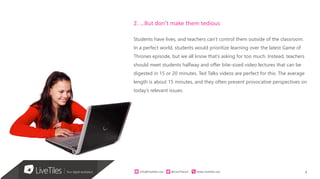
2. …But don’t make them tedious
Students have lives, and teachers can’t control them outside of the classroom.
In a perfect world, students would prioritize learning over the latest Game of
Thrones episode, but we all know that’s asking for too much. Instead, teachers
should meet students halfway and offer bite-sized video lectures that can be
digested in 15 or 20 minutes. Ted Talks videos are perfect for this. The average
length is about 15 minutes, and they often present provocative perspectives on
today’s relevant issues.
5info@live)les.nyc										@LiveTilesUI											www.live)les.nyc	
3. Show, don’t tell
Teachers shouldn’t just talk at students. They have the power of video at
their disposal, and they should use it. This may require teachers to be a little
more digital savvy, but there is significant value in helping students visualize
important classroom concepts.
4. Encourage discourse
Class time is the place for teachers to clear up any confusion about the
video lectures. In the flipped classroom, the teacher is no longer the sage
on the stage; their role is to facilitate class discussion, not dominate it.
One way to encourage discourse is to have students enter any questions
or comments about the video lectures into OneNote and then discuss
them during class time.
6info@live)les.nyc										@LiveTilesUI											www.live)les.nyc	
5. Promote classroom collaboration
Teachers should dedicate a significant portion of each class period for
collaborative exercises. One of the hallmarks of the flipped classroom is group
work, as collaborative projects engage every student in the class
6. Stress formative assessment
To evaluate a student’s understanding of the key concepts covered in video
lectures and in-class discussions, teachers can use quick formative assessment
tools that measure retention of content and concepts. This real-time feedback
enables educators to target individuals who are struggling and give them extra
attention during class time.
7info@live)les.nyc										@LiveTilesUI											www.live)les.nyc	
7. Embrace social media
In order for the flipped classroom to be successful, teachers should let the
conversation continue after class on social media. Teachers can effectively use
social media to extend the boundaries of the classroom and remain accessible
to those students who need extra help.
Teachers can also teach proper social media etiquette so that students learn
the negative consequences of cyber-bullying. By monitoring the social media
discourse, teachers can immediately address any concerning interactions and
explain to the appropriate students why their behavior is unacceptable.
8info@live)les.nyc										@LiveTilesUI											www.live)les.nyc	
8. Establish a policy of openness
Transparency and openness make a successful flipped classroom. Teachers
can let students know what’s expected of them by giving them access to their
grades and the course’s policies and guidelines. When students know the
standards of the class, they’ll be more inclined to meet them.
9. Involve the parents
Education is a team sport, and it is essential for teachers to make connections
with their students’ parents or guardians. For the flipped classroom to succeed,
teachers should know that students need to be supported in the home as well
the school. If teachers give parents access to their course content, parents will
be more willing to invest in their child’s education.
9
Although teachers are no longer center stage, the freedom provided by the
flipped classroom makes their role that much more crucial. With all of these
moving parts in the flipped classroom, teachers and students will need to find
a way to bring all of these digital solutions together in a user-friendly fashion.
LiveTiles Mosaic offers seamless online integration.
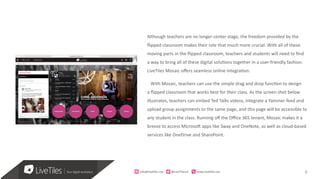
With Mosaic, teachers can use the simple drag and drop function to design
a flipped classroom that works best for their class. As the screen shot below
illustrates, teachers can embed Ted Talks videos, integrate a Yammer feed and
upload group assignments to the same page, and this page will be accessible to
any student in the class. Running off the Office 365 tenant, Mosaic makes it a
breeze to access Microsoft apps like Sway and OneNote, as well as cloud-based
services like OneDrive and SharePoint.
info@live)les.nyc										@LiveTilesUI											www.live)les.nyc
10
The flipped classroom can be difficult to realize. With its intuitive and
accessible no code UI design, Mosaic streamlines the process so that
teachers can concentrate on what matters: their students.
info@live)les.nyc										@LiveTilesUI											www.live)les.nyc
11
Live Tiles is a digital workplace pla3orm that brings all your
organiza;onal content into an engaging common user
experience, and them empowers the every day user to evolve
the experience as the business changes 
MAJOR	BENEFITS	
•  Rapid	delivery	of	business	solu=ons		
•  Users	can	evolve	the	experiences	as	required	
•  Design	experiences	is	drag-and-drop	
•  Content	can	be	pulled	from	essen=ally	anywhere	
•  Mobile,	responsive	and	engaging	
•  Updates	released	every	2	weeks	
•  Custom	=les	can	be	built	
CUSTOMERS	ARE	SAYING		
“You’d	probably	rather	not	spent	your	=me	on	the	phone.	But	when	you	
have	to,	it’s	nice	to	put	a	face	to	a	name	and	voice.	Skype,	the	original	video-
conferencing	soRware,	is	s=ll	the	perfect	u=lity	for	small	and	growing	
businesses.	With	long	roots	in	the	industry,	and	millions	of	users,	Skype	
remains	free	to	call	for	other	users	and	you’re	able	to	buy	credits	to	cheaply	
call	landlines	and	mobiles	(even	interna=onally	!)”.	
13	13	
What Is
Live Tiles?
OTHER EXAMPLES
info@live)les.nyc										@LiveTilesUI											www.live)les.nyc
12
Live Tiles is a digital workplace pla3orm that brings all your
organiza;onal content into an engaging common user
experience, and them empowers the every day user to evolve
the experience as the business changes 
Try Live Tile here www.live;les.nyc/14dayfreetrial
CONTACT	
Chief	Product	Officer	info@live7les.nyc	
@LiveTlesUI	
www.live7les.nyc	
In Summary
IN SUMMARY
info@live)les.nyc										@LiveTilesUI											www.live)les.nyc
13
LiveTiles is a global technology company headquartered in
Times Square, New York, and Melbourne, Australia. We offer
modern, user experience-focused technology soluFons to the
enterprise, educaFon and SMB markets and are an award-
winning MicrosoH Partner. Our soluFons include LiveTiles
Design for SharePoint and Office 365, LiveTiles Build, LiveTiles
Push NoFficaFons App and LiveTiles Mosaic for Office 365
EducaFon.
ABOUT US
Our	customers	represent	a	diverse	range	of	global	sectors	and	are	spread	
throughout	the	United	States,	United	Kingdom,	Asia	Pacific	and	La>n	
America.	Since	being	launched	as	a	standalone	products	company	in	2014,	
LiveTiles	solu>ons	have	been	deployed	for	some	of	the	world’s	most	iconic	
brands	across	the	Retail,	Manufacturing,	Finance	and	Educa>on	industries.	
We	are	also	very	proud	to	have	many	leading	MicrosoM	service	providers	as	
members	of	our	LiveTiles	Partner	Program	globally.	
	
Contact	us	at	info@live>les.nyc	or	for	general	sales	
enquiries	sales@live>les.nyc	
info@live)les.nyc										@LiveTilesUI											www.live)les.nyc
14
HEADQUARTERS	
NEW	YORK	CITY	
UNITED	STATES	
11	Times	Square,	
Level	15	
New	York,	10036	
+1	646	329	6640	
SYDNEY	
AUSTRALIA	
Level	5,	
137-139	Bathurst	Street,	
Sydney	NSW	2000	
	
	
MELBOURNE	
AUSTRALIA	
Level	6,	
60	City	Road,	
Southbank,	VIC	Australia	3006	
	
CONTACT US
info@live=les.nyc	
Stock	Ncker:	LVT	
info@live)les.nyc										@LiveTilesUI											www.live)les.nyc
15
THANK YOU
Organize	sca,ered	business	applica2ons	and	design	beau2ful	
dashboards	and	sites	on	Microso8	SharePoint,	
Office	365	and	Azure.	Give	teams	the	freedom	to	spend	2me	
collabora2ng,	not	coding.	
info@live)les.nyc										@LiveTilesUI											www.live)les.nyc

9 Helpful Tips for Designing a Flipped Classroom

  • 1.
  • 2.
    2 Covering Today While flippedlearning may be a trending topic for education reformists, its practical implementation requires a lot of work. For teachers who may be considering this new model, coordinating both in-class and out-of-class elements in the most efficient manner can be a daunting task. The digital transition is undeniably difficult for teachers, but if they adhere to the following tips, they’ll be on their way to designing an engaging flipped classroom. info@live)les.nyc @LiveTilesUI www.live)les.nyc
  • 3.
    3 9 Tips forDesigning a Flipped Classroom:1. Put extra time into your video lectures In the flipped classroom, classroom priorities shift. Lectures become homework assignments so that students can use class time to engage in discussion and group activities. Digital technology has enabled teachers to create and upload video lectures that students can access on their own time. With students watching video lectures, it can be tempting to cut corners and just let YouTube do the work. However, given the tools available to educators, creating engaging lectures doesn’t have to be a Sisyphean task. Applications such as PlayPosit, for example, allow educators to insert questions that can be answered in real-time directly into a video’s timeline. info@live)les.nyc @LiveTilesUI www.live)les.nyc
  • 4.
    4info@live)les.nyc @LiveTilesUI www.live)les.nyc 2. …But don’tmake them tedious Students have lives, and teachers can’t control them outside of the classroom. In a perfect world, students would prioritize learning over the latest Game of Thrones episode, but we all know that’s asking for too much. Instead, teachers should meet students halfway and offer bite-sized video lectures that can be digested in 15 or 20 minutes. Ted Talks videos are perfect for this. The average length is about 15 minutes, and they often present provocative perspectives on today’s relevant issues.
  • 5.
    5info@live)les.nyc @LiveTilesUI www.live)les.nyc 3. Show, don’ttell Teachers shouldn’t just talk at students. They have the power of video at their disposal, and they should use it. This may require teachers to be a little more digital savvy, but there is significant value in helping students visualize important classroom concepts. 4. Encourage discourse Class time is the place for teachers to clear up any confusion about the video lectures. In the flipped classroom, the teacher is no longer the sage on the stage; their role is to facilitate class discussion, not dominate it. One way to encourage discourse is to have students enter any questions or comments about the video lectures into OneNote and then discuss them during class time.
  • 6.
    6info@live)les.nyc @LiveTilesUI www.live)les.nyc 5. Promote classroomcollaboration Teachers should dedicate a significant portion of each class period for collaborative exercises. One of the hallmarks of the flipped classroom is group work, as collaborative projects engage every student in the class 6. Stress formative assessment To evaluate a student’s understanding of the key concepts covered in video lectures and in-class discussions, teachers can use quick formative assessment tools that measure retention of content and concepts. This real-time feedback enables educators to target individuals who are struggling and give them extra attention during class time.
  • 7.
    7info@live)les.nyc @LiveTilesUI www.live)les.nyc 7. Embrace socialmedia In order for the flipped classroom to be successful, teachers should let the conversation continue after class on social media. Teachers can effectively use social media to extend the boundaries of the classroom and remain accessible to those students who need extra help. Teachers can also teach proper social media etiquette so that students learn the negative consequences of cyber-bullying. By monitoring the social media discourse, teachers can immediately address any concerning interactions and explain to the appropriate students why their behavior is unacceptable.
  • 8.
    8info@live)les.nyc @LiveTilesUI www.live)les.nyc 8. Establish apolicy of openness Transparency and openness make a successful flipped classroom. Teachers can let students know what’s expected of them by giving them access to their grades and the course’s policies and guidelines. When students know the standards of the class, they’ll be more inclined to meet them. 9. Involve the parents Education is a team sport, and it is essential for teachers to make connections with their students’ parents or guardians. For the flipped classroom to succeed, teachers should know that students need to be supported in the home as well the school. If teachers give parents access to their course content, parents will be more willing to invest in their child’s education.
  • 9.
    9 Although teachers areno longer center stage, the freedom provided by the flipped classroom makes their role that much more crucial. With all of these moving parts in the flipped classroom, teachers and students will need to find a way to bring all of these digital solutions together in a user-friendly fashion. LiveTiles Mosaic offers seamless online integration. With Mosaic, teachers can use the simple drag and drop function to design a flipped classroom that works best for their class. As the screen shot below illustrates, teachers can embed Ted Talks videos, integrate a Yammer feed and upload group assignments to the same page, and this page will be accessible to any student in the class. Running off the Office 365 tenant, Mosaic makes it a breeze to access Microsoft apps like Sway and OneNote, as well as cloud-based services like OneDrive and SharePoint. info@live)les.nyc @LiveTilesUI www.live)les.nyc
  • 10.
    10 The flipped classroomcan be difficult to realize. With its intuitive and accessible no code UI design, Mosaic streamlines the process so that teachers can concentrate on what matters: their students. info@live)les.nyc @LiveTilesUI www.live)les.nyc
  • 11.
    11 Live Tiles isa digital workplace pla3orm that brings all your organiza;onal content into an engaging common user experience, and them empowers the every day user to evolve the experience as the business changes MAJOR BENEFITS •  Rapid delivery of business solu=ons •  Users can evolve the experiences as required •  Design experiences is drag-and-drop •  Content can be pulled from essen=ally anywhere •  Mobile, responsive and engaging •  Updates released every 2 weeks •  Custom =les can be built CUSTOMERS ARE SAYING “You’d probably rather not spent your =me on the phone. But when you have to, it’s nice to put a face to a name and voice. Skype, the original video- conferencing soRware, is s=ll the perfect u=lity for small and growing businesses. With long roots in the industry, and millions of users, Skype remains free to call for other users and you’re able to buy credits to cheaply call landlines and mobiles (even interna=onally !)”. 13 13 What Is Live Tiles? OTHER EXAMPLES info@live)les.nyc @LiveTilesUI www.live)les.nyc
  • 12.
    12 Live Tiles isa digital workplace pla3orm that brings all your organiza;onal content into an engaging common user experience, and them empowers the every day user to evolve the experience as the business changes Try Live Tile here www.live;les.nyc/14dayfreetrial CONTACT Chief Product Officer info@live7les.nyc @LiveTlesUI www.live7les.nyc In Summary IN SUMMARY info@live)les.nyc @LiveTilesUI www.live)les.nyc
  • 13.
    13 LiveTiles is aglobal technology company headquartered in Times Square, New York, and Melbourne, Australia. We offer modern, user experience-focused technology soluFons to the enterprise, educaFon and SMB markets and are an award- winning MicrosoH Partner. Our soluFons include LiveTiles Design for SharePoint and Office 365, LiveTiles Build, LiveTiles Push NoFficaFons App and LiveTiles Mosaic for Office 365 EducaFon. ABOUT US Our customers represent a diverse range of global sectors and are spread throughout the United States, United Kingdom, Asia Pacific and La>n America. Since being launched as a standalone products company in 2014, LiveTiles solu>ons have been deployed for some of the world’s most iconic brands across the Retail, Manufacturing, Finance and Educa>on industries. We are also very proud to have many leading MicrosoM service providers as members of our LiveTiles Partner Program globally. Contact us at info@live>les.nyc or for general sales enquiries sales@live>les.nyc info@live)les.nyc @LiveTilesUI www.live)les.nyc
  • 14.
  • 15.