8 Ways Utility Networks
Can Meet Data Demands
Trent Kading Mark Stoakes
Utility
noun, plural u·til·i·ties.
An organization that maintains the infrastructure
for a public service.
The diverse nature of
utility data can lead to
multiple applications,
scattered data, and
inconsistencies.
By using a single tool that is
robust and flexible, you can
integrate data across systems
and maintain data quality.
Our Mission
To help you maximize
the value of data
and of your FME licenses.
Today’s webinar will highlight
some of the ways real customers
are working with utility data and
solving data challenges.
A special thank you to all the customers involved!
We hope you are inspired by them
and see solutions to similar data
challenges.
8 data strategies we
will review:
1. Asset management
2. Risk management
3. Design and planning
4. Data quality
5. Data migration
6. ERP planning
7. Ongoing integration
8. UAVs and AR
Data and Task Diversity
Tasks
● Engineering
● Base Mapping/Land Management
● Network Analysis
● Operations
● Facilities & Asset Management
● Risk & Emergency Management
● Customer Service
● Marketing & Sales
● Regulatory Compliance
Formats
● GE Smallworld
● Esri Geodatabase(+ Schneider ArcFM)
● Bentley Electric
● Intergraph G/Technology
● Oracle Spatial
● CIMXML
● Excel
● BI
● ERP Systems
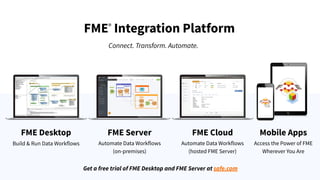
FME®
Integration Platform
Connect. Transform. Automate.
FME Desktop FME Server FME Cloud
Build & Run Data Workflows Automate Data Workflows
(on-premises)
Automate Data Workflows
(hosted FME Server)
Mobile Apps
Access the Power of FME
Wherever You Are
Get a free trial of FME Desktop and FME Server at safe.com
Who Are Utilities?
● Electric
● Gas
● Water
● Telco
● Oil & Gas midstream
● Municipalities
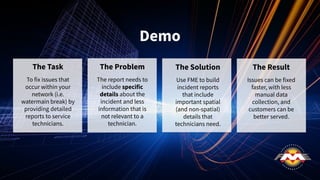
Demo
The Task
To fix issues that
occur within your
network (i.e.
watermain break) by
providing detailed
reports to service
technicians.
The Problem
The report needs to
include specific
details about the
incident and less
information that is
not relevant to a
technician.
The Solution
Use FME to build
incident reports
that include
important spatial
(and non-spatial)
details that
technicians need.
The Result
Issues can be fixed
faster, with less
manual data
collection, and
customers can be
better served.
Asset Management
It’s very important…
… But it also can be tedious.
Each utility has their own set of standards
and their own unique tasks. Management
can often be scattered across programs.
With FME, you can combine asset
information with other systems in a
single environment. Plus, you can
organize your data, and make it easily
accessible to stakeholders or the public.
#1
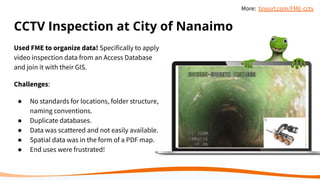
CCTV Inspection at City of Nanaimo
Used FME to organize data! Specifically to apply
video inspection data from an Access Database
and join it with their GIS.
Challenges:
● No standards for locations, folder structure,
naming conventions.
● Duplicate databases.
● Data was scattered and not easily available.
● Spatial data was in the form of a PDF map.
● End uses were frustrated!
More: tinyurl.com/FME-cctv
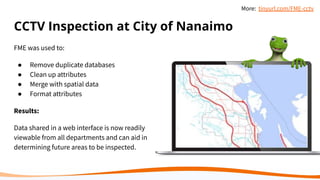
CCTV Inspection at City of Nanaimo
FME was used to:
● Remove duplicate databases
● Clean up attributes
● Merge with spatial data
● Format attributes
Results:
Data shared in a web interface is now readily
viewable from all departments and can aid in
determining future areas to be inspected.
More: tinyurl.com/FME-cctv
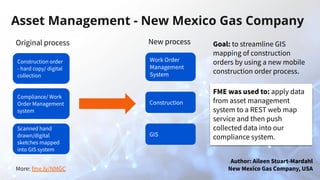
More: fme.ly/NMGC
Asset Management - New Mexico Gas Company
Original process
Construction order
- hard copy/ digital
collection
Compliance/ Work
Order Management
system
Scanned hand
drawn/digital
sketches mapped
into GIS system
New process
Work Order
Management
System
Construction
GIS
Author: Aileen Stuart-Mardahl
New Mexico Gas Company, USA
Goal: to streamline GIS
mapping of construction
orders by using a new mobile
construction order process.
FME was used to: apply data
from asset management
system to a REST web map
service and then push
collected data into our
compliance system.
Risk Management
Tries to mitigate external factors that
could degrade the overall health of the
utility.
This can include:
● Risk assessment
● Weather prediction
● Disaster preparedness
#2
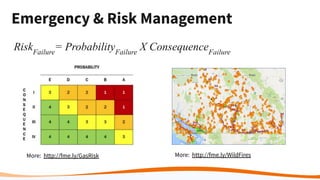
Emergency & Risk Management
RiskFailure
= ProbabilityFailure
X ConsequenceFailure
More: http://fme.ly/GasRisk More: http://fme.ly/WildFires
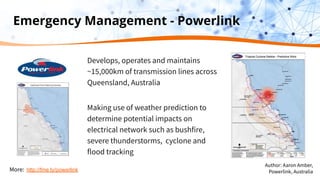
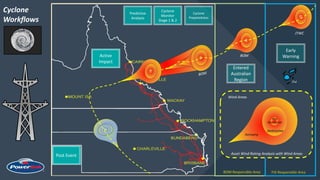
Emergency Management - Powerlink
Develops, operates and maintains
~15,000km of transmission lines across
Queensland, Australia
Making use of weather prediction to
determine potential impacts on
electrical network such as bushfire,
severe thunderstorms, cyclone and
flood tracking
More: http://fme.ly/powerlink
Author: Aaron Amber,
Powerlink, Australia
BOM
JTWC
BOM
Cyclone
Workflows
BOM Responsible Area FIJI Responsible Area
TL
Early
Warning
Entered
Australian
Region
Cyclone
Preparedness
Cyclone
Monitor
Stage 1 & 2
Active
Impact
Post Event
Damaging
Destructive
Very
Destructive
Wind Areas
Asset Wind Rating Analysis with Wind Areas
FIJI
4
Predictive
Analysis
4
4
TL
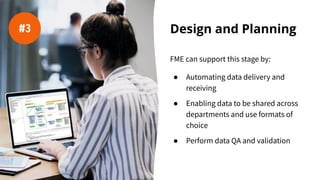
Design and Planning
FME can support this stage by:
● Automating data delivery and
receiving
● Enabling data to be shared across
departments and use formats of
choice
● Perform data QA and validation
#3
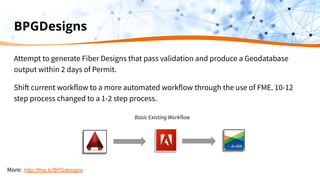
BPGDesigns
Attempt to generate Fiber Designs that pass validation and produce a Geodatabase
output within 2 days of Permit.
Shift current workflow to a more automated workflow through the use of FME. 10-12
step process changed to a 1-2 step process.
Basic Existing Workflow
More: http://fme.ly/BPGdesigns
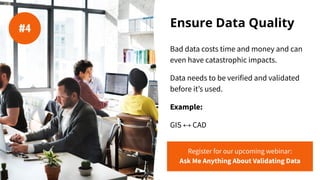
Ensure Data Quality
Bad data costs time and money and can
even have catastrophic impacts.
Data needs to be verified and validated
before it’s used.
Example:
GIS ↔ CAD
#4
Register for our upcoming webinar:
Ask Me Anything About Validating Data
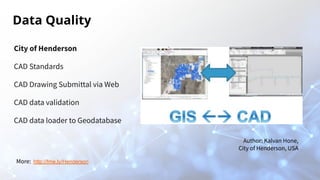
Data Quality
City of Henderson
CAD Standards
CAD Drawing Submittal via Web
CAD data validation
CAD data loader to Geodatabase
Author: Kalvan Hone,
City of Henderson, USA
More: http://fme.ly/Henderson
Data quality is key to
successful decision making.
Consortech
Consortech needed to migrate client
data from various systems.
They used FME to perform the extract,
transform, and load functionality,
migrating sewer lines and points, water
lines, road centerlines, and road
surfaces into the destination GIS.
safe.com/customers/consortech/
“Getting data into the new
system, it’s important to know
the data you’re going to be
working with and have really
good quality data. FME really
helped in managing that.”
Allison Hughes, Consortech
Data Migration
“The process of selecting, preparing,
extracting, and transforming data and
permanently transferring it from one
computer storage system to another.”
Although it’s often a one time
migration, it can take a lot of time and
pose many challenges.
FME can help automate this process
and ensure data quality.
#5
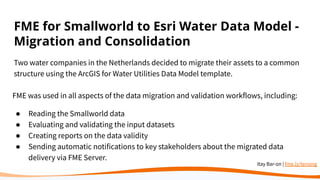
FME for Smallworld to Esri Water Data Model -
Migration and Consolidation
Two water companies in the Netherlands decided to migrate their assets to a common
structure using the ArcGIS for Water Utilities Data Model template.
FME was used in all aspects of the data migration and validation workflows, including:
● Reading the Smallworld data
● Evaluating and validating the input datasets
● Creating reports on the data validity
● Sending automatic notifications to key stakeholders about the migrated data
delivery via FME Server.
Itay Bar-on | fme.ly/tensing
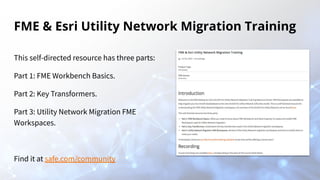
FME & Esri Utility Network Migration Training
This self-directed resource has three parts:
Part 1: FME Workbench Basics.
Part 2: Key Transformers.
Part 3: Utility Network Migration FME
Workspaces.
Find it at safe.com/community
“There is no better tool for
migration than FME.”
Itay Bar-on, Tensing
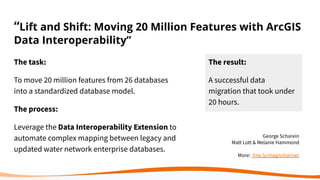
“Lift and Shift: Moving 20 Million Features with ArcGIS
Data Interoperability”
The task:
To move 20 million features from 26 databases
into a standardized database model.
The process:
Leverage the Data Interoperability Extension to
automate complex mapping between legacy and
updated water network enterprise databases.
The result:
A successful data
migration that took under
20 hours.
George Scharein
Matt Lott & Melanie Hammond
More: fme.ly/magnoliariver
Data Migration
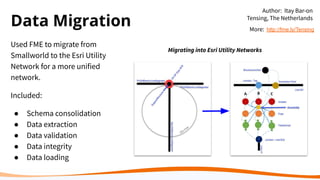
Used FME to migrate from
Smallworld to the Esri Utility
Network for a more unified
network.
Included:
● Schema consolidation
● Data extraction
● Data validation
● Data integrity
● Data loading
Migrating into Esri Utility Networks
Author: Itay Bar-on
Tensing, The Netherlands
More: http://fme.ly/Tensing
Enterprise resource
planning (ERP)
Manage and integrate business
processes.
● Limit the need for manual
processes
● Prioritize truth and data quality
● Maximize technology investments
#6
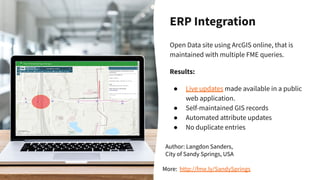
ERP Integration
Open Data site using ArcGIS online, that is
maintained with multiple FME queries.
Results:
● Live updates made available in a public
web application.
● Self-maintained GIS records
● Automated attribute updates
● No duplicate entries
Author: Langdon Sanders,
City of Sandy Springs, USA
More: http://fme.ly/SandySprings
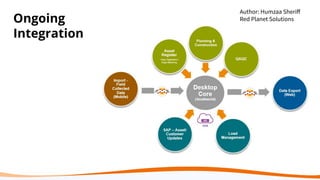
Perform ongoing
data integration.
Migrations don’t have to be a one
time task. They can be automated
and ongoing.
Example:
Red Planet Solutions used FME to
migrate data from a mobile data
collection platform into the Desktop
Core GIS and then onto a web GIS
platform.
#7
Ongoing
Integration
Author: Humzaa Sheriff
Red Planet Solutions
Consider UAVs and
Augmented Reality
Utility networks don’t have to remain
traditional when they use FME.
Some cutting-edge options for utility
companies are utilizing drones and
augmented reality.
Download FME AR
#8
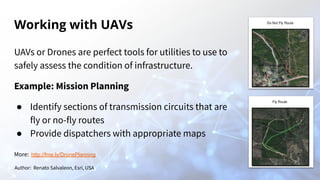
Working with UAVs
UAVs or Drones are perfect tools for utilities to use to
safely assess the condition of infrastructure.
Example: Mission Planning
● Identify sections of transmission circuits that are
fly or no-fly routes
● Provide dispatchers with appropriate maps
Author: Renato Salvaleon, Esri, USA
More: http://fme.ly/DronePlanning
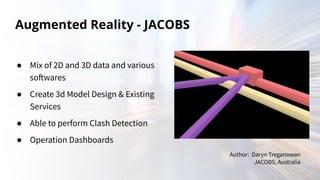
Augmented Reality - JACOBS
● Mix of 2D and 3D data and various
softwares
● Create 3d Model Design & Existing
Services
● Able to perform Clash Detection
● Operation Dashboards
Author: Daryn Treganowan
JACOBS, Australia
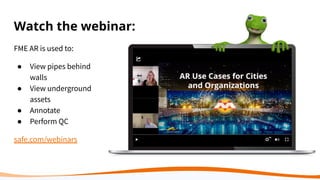
Watch the webinar:
FME AR is used to:
● View pipes behind
walls
● View underground
assets
● Annotate
● Perform QC
safe.com/webinars
Meet the demand for energy
and resources with FME.
Preserve data quality, save time,
and make information access
effortless for everyone.
Which task will you
try next with FME?
1. Asset management
2. Risk management
3. Design and planning
4. Data quality
5. Data migration
6. ERP planning
7. Ongoing integration
8. UAVs or AR
Thank you!
Please type in
your questions.
Try FME for free at safe.com/trial
Connect with us for more FME

8 Ways Utility Networks Can Meet Data Demands

  • 1.
    8 Ways UtilityNetworks Can Meet Data Demands Trent Kading Mark Stoakes
  • 2.
    Utility noun, plural u·til·i·ties. Anorganization that maintains the infrastructure for a public service.
  • 3.
    The diverse natureof utility data can lead to multiple applications, scattered data, and inconsistencies.
  • 4.
    By using asingle tool that is robust and flexible, you can integrate data across systems and maintain data quality.
  • 5.
    Our Mission To helpyou maximize the value of data and of your FME licenses.
  • 6.
    Today’s webinar willhighlight some of the ways real customers are working with utility data and solving data challenges. A special thank you to all the customers involved!
  • 7.
    We hope youare inspired by them and see solutions to similar data challenges.
  • 8.
    8 data strategieswe will review: 1. Asset management 2. Risk management 3. Design and planning 4. Data quality 5. Data migration 6. ERP planning 7. Ongoing integration 8. UAVs and AR
  • 9.
    Data and TaskDiversity Tasks ● Engineering ● Base Mapping/Land Management ● Network Analysis ● Operations ● Facilities & Asset Management ● Risk & Emergency Management ● Customer Service ● Marketing & Sales ● Regulatory Compliance Formats ● GE Smallworld ● Esri Geodatabase(+ Schneider ArcFM) ● Bentley Electric ● Intergraph G/Technology ● Oracle Spatial ● CIMXML ● Excel ● BI ● ERP Systems
  • 10.
    FME® Integration Platform Connect. Transform.Automate. FME Desktop FME Server FME Cloud Build & Run Data Workflows Automate Data Workflows (on-premises) Automate Data Workflows (hosted FME Server) Mobile Apps Access the Power of FME Wherever You Are Get a free trial of FME Desktop and FME Server at safe.com
  • 11.
    Who Are Utilities? ●Electric ● Gas ● Water ● Telco ● Oil & Gas midstream ● Municipalities
  • 12.
    Demo The Task To fixissues that occur within your network (i.e. watermain break) by providing detailed reports to service technicians. The Problem The report needs to include specific details about the incident and less information that is not relevant to a technician. The Solution Use FME to build incident reports that include important spatial (and non-spatial) details that technicians need. The Result Issues can be fixed faster, with less manual data collection, and customers can be better served.
  • 13.
    Asset Management It’s veryimportant… … But it also can be tedious. Each utility has their own set of standards and their own unique tasks. Management can often be scattered across programs. With FME, you can combine asset information with other systems in a single environment. Plus, you can organize your data, and make it easily accessible to stakeholders or the public. #1
  • 14.
    CCTV Inspection atCity of Nanaimo Used FME to organize data! Specifically to apply video inspection data from an Access Database and join it with their GIS. Challenges: ● No standards for locations, folder structure, naming conventions. ● Duplicate databases. ● Data was scattered and not easily available. ● Spatial data was in the form of a PDF map. ● End uses were frustrated! More: tinyurl.com/FME-cctv
  • 15.
    CCTV Inspection atCity of Nanaimo FME was used to: ● Remove duplicate databases ● Clean up attributes ● Merge with spatial data ● Format attributes Results: Data shared in a web interface is now readily viewable from all departments and can aid in determining future areas to be inspected. More: tinyurl.com/FME-cctv
  • 16.
    More: fme.ly/NMGC Asset Management- New Mexico Gas Company Original process Construction order - hard copy/ digital collection Compliance/ Work Order Management system Scanned hand drawn/digital sketches mapped into GIS system New process Work Order Management System Construction GIS Author: Aileen Stuart-Mardahl New Mexico Gas Company, USA Goal: to streamline GIS mapping of construction orders by using a new mobile construction order process. FME was used to: apply data from asset management system to a REST web map service and then push collected data into our compliance system.
  • 17.
    Risk Management Tries tomitigate external factors that could degrade the overall health of the utility. This can include: ● Risk assessment ● Weather prediction ● Disaster preparedness #2
  • 18.
    Emergency & RiskManagement RiskFailure = ProbabilityFailure X ConsequenceFailure More: http://fme.ly/GasRisk More: http://fme.ly/WildFires
  • 19.
    Emergency Management -Powerlink Develops, operates and maintains ~15,000km of transmission lines across Queensland, Australia Making use of weather prediction to determine potential impacts on electrical network such as bushfire, severe thunderstorms, cyclone and flood tracking More: http://fme.ly/powerlink Author: Aaron Amber, Powerlink, Australia
  • 20.
    BOM JTWC BOM Cyclone Workflows BOM Responsible AreaFIJI Responsible Area TL Early Warning Entered Australian Region Cyclone Preparedness Cyclone Monitor Stage 1 & 2 Active Impact Post Event Damaging Destructive Very Destructive Wind Areas Asset Wind Rating Analysis with Wind Areas FIJI 4 Predictive Analysis 4 4 TL
  • 21.
    Design and Planning FMEcan support this stage by: ● Automating data delivery and receiving ● Enabling data to be shared across departments and use formats of choice ● Perform data QA and validation #3
  • 22.
    BPGDesigns Attempt to generateFiber Designs that pass validation and produce a Geodatabase output within 2 days of Permit. Shift current workflow to a more automated workflow through the use of FME. 10-12 step process changed to a 1-2 step process. Basic Existing Workflow More: http://fme.ly/BPGdesigns
  • 23.
    Ensure Data Quality Baddata costs time and money and can even have catastrophic impacts. Data needs to be verified and validated before it’s used. Example: GIS ↔ CAD #4 Register for our upcoming webinar: Ask Me Anything About Validating Data
  • 24.
    Data Quality City ofHenderson CAD Standards CAD Drawing Submittal via Web CAD data validation CAD data loader to Geodatabase Author: Kalvan Hone, City of Henderson, USA More: http://fme.ly/Henderson
  • 25.
    Data quality iskey to successful decision making.
  • 26.
    Consortech Consortech needed tomigrate client data from various systems. They used FME to perform the extract, transform, and load functionality, migrating sewer lines and points, water lines, road centerlines, and road surfaces into the destination GIS. safe.com/customers/consortech/ “Getting data into the new system, it’s important to know the data you’re going to be working with and have really good quality data. FME really helped in managing that.” Allison Hughes, Consortech
  • 27.
    Data Migration “The processof selecting, preparing, extracting, and transforming data and permanently transferring it from one computer storage system to another.” Although it’s often a one time migration, it can take a lot of time and pose many challenges. FME can help automate this process and ensure data quality. #5
  • 28.
    FME for Smallworldto Esri Water Data Model - Migration and Consolidation Two water companies in the Netherlands decided to migrate their assets to a common structure using the ArcGIS for Water Utilities Data Model template. FME was used in all aspects of the data migration and validation workflows, including: ● Reading the Smallworld data ● Evaluating and validating the input datasets ● Creating reports on the data validity ● Sending automatic notifications to key stakeholders about the migrated data delivery via FME Server. Itay Bar-on | fme.ly/tensing
  • 29.
    FME & EsriUtility Network Migration Training This self-directed resource has three parts: Part 1: FME Workbench Basics. Part 2: Key Transformers. Part 3: Utility Network Migration FME Workspaces. Find it at safe.com/community
  • 30.
    “There is nobetter tool for migration than FME.” Itay Bar-on, Tensing
  • 31.
    “Lift and Shift:Moving 20 Million Features with ArcGIS Data Interoperability” The task: To move 20 million features from 26 databases into a standardized database model. The process: Leverage the Data Interoperability Extension to automate complex mapping between legacy and updated water network enterprise databases. The result: A successful data migration that took under 20 hours. George Scharein Matt Lott & Melanie Hammond More: fme.ly/magnoliariver
  • 32.
    Data Migration Used FMEto migrate from Smallworld to the Esri Utility Network for a more unified network. Included: ● Schema consolidation ● Data extraction ● Data validation ● Data integrity ● Data loading Migrating into Esri Utility Networks Author: Itay Bar-on Tensing, The Netherlands More: http://fme.ly/Tensing
  • 33.
    Enterprise resource planning (ERP) Manageand integrate business processes. ● Limit the need for manual processes ● Prioritize truth and data quality ● Maximize technology investments #6
  • 34.
    ERP Integration Open Datasite using ArcGIS online, that is maintained with multiple FME queries. Results: ● Live updates made available in a public web application. ● Self-maintained GIS records ● Automated attribute updates ● No duplicate entries Author: Langdon Sanders, City of Sandy Springs, USA More: http://fme.ly/SandySprings
  • 35.
    Perform ongoing data integration. Migrationsdon’t have to be a one time task. They can be automated and ongoing. Example: Red Planet Solutions used FME to migrate data from a mobile data collection platform into the Desktop Core GIS and then onto a web GIS platform. #7
  • 36.
  • 37.
    Consider UAVs and AugmentedReality Utility networks don’t have to remain traditional when they use FME. Some cutting-edge options for utility companies are utilizing drones and augmented reality. Download FME AR #8
  • 38.
    Working with UAVs UAVsor Drones are perfect tools for utilities to use to safely assess the condition of infrastructure. Example: Mission Planning ● Identify sections of transmission circuits that are fly or no-fly routes ● Provide dispatchers with appropriate maps Author: Renato Salvaleon, Esri, USA More: http://fme.ly/DronePlanning
  • 39.
    Augmented Reality -JACOBS ● Mix of 2D and 3D data and various softwares ● Create 3d Model Design & Existing Services ● Able to perform Clash Detection ● Operation Dashboards Author: Daryn Treganowan JACOBS, Australia
  • 40.
    Watch the webinar: FMEAR is used to: ● View pipes behind walls ● View underground assets ● Annotate ● Perform QC safe.com/webinars
  • 41.
    Meet the demandfor energy and resources with FME. Preserve data quality, save time, and make information access effortless for everyone.
  • 42.
    Which task willyou try next with FME? 1. Asset management 2. Risk management 3. Design and planning 4. Data quality 5. Data migration 6. ERP planning 7. Ongoing integration 8. UAVs or AR
  • 43.
    Thank you! Please typein your questions. Try FME for free at safe.com/trial Connect with us for more FME