FME 2020
Platform Scenarios
Brian Pont, Jen Luther Thomas
Today’s Holistic Data
Stretching
1. Demo: Using FME to Help us Make
Healthy Choices
2. Demo: Automated Parking
Authentication at the FME Data Spa
3. Overview: What’s New in FME 2020.x
Indulge your
senses in the
FME 2020 Platform
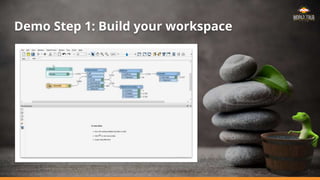
Demo Step 1: Build your workspace
Go through your proof points.
A.
B.
C.
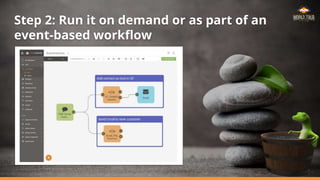
Step 2: Run it on demand or as part of an
event-based workflow
Go through your proof points.
A.
B.
C.
A screenshot can go here.
Or delete this box and use the text box beneath.
Healthy Choices
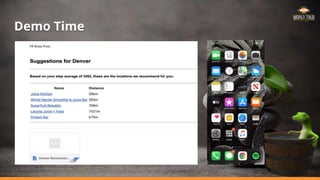
Building a smart workflow that helps us make healthy choices!
FME in Action
Healthy Choices
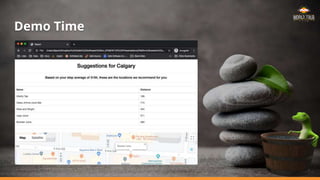
Goal: Use FME to intelligently suggest
where we should go for a snack.
1. Connect to our health data.
2. Analyze our activity.
3. Suggest the best local places to visit.
for example:
OR
Let’s Get Meta for a Moment
We are going to have some fun with this example, but it still
shows the power of FME to:
● Connect to data from many different sources – web, XML
and Geopackage.
● Transform and analyze data – decisions will be made
based on the data.
● Automate the process – information will be delivered
instantly.
What to Watch for in
the Demo: Authoring
● It’s easy to connect to different data sources,
especially Web APIs.
● Best practices when building workspaces:
○ Feature Caching & Visual Preview
○ Transformer Presets
○ Web and Database connections
○ FME Hub and Custom Transformers
Demo Time
Go through your proof points.
A.
B.
C.
A screenshot can go here.
Or delete this box and use the text box beneath.
What to Watch for in
the Demo: Automating
● How easy it can be to automate data
processing.
● Key features:
○ Automation Writer
○ Publishing workspaces (Web UI!)
○ Triggers: e.g. Dropbox watching
○ Automated alerts and notifications
Demo Time
Recap: What’s new with
FME Workspace Authoring
FME Desktop, Engine, and Hub 2020
Additional
Resources
Check out these FME 2020 Unleashed
webinars for a more detailed look at
what’s new:
● FME 2020 Unleashed: Authoring
● FME 2020 Unleashed: Automating
Performance Gains: Everything’s Faster
● Shapefile and Excel reader/writer
upgrade.
● Many transformers are faster, including
StatisticsCalculator and Bufferer.
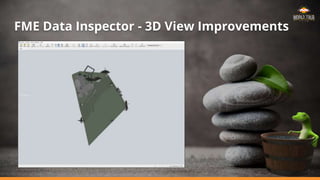
● FME Data Inspector 3D rendering frame
rate increased.
FME Data Inspector - 3D View Improvements
A Luxurious Experience
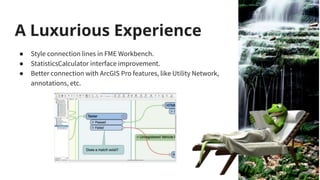
● Style connection lines in FME Workbench.
● StatisticsCalculator interface improvement.
● Better connection with ArcGIS Pro features, like Utility Network,
annotations, etc.
Unrivalled Data Support
● Google BigQuery & BigQuery GIS Writer
● Snowflake Reader/Writer
● Entwine Point Tile (EPT) Reader
● Mapbox Vector Tiles (MVT) Writer
● PROJ transformers
● NifTI Reader/Writer
● Microsoft DirectDraw Surface (DDS) Writer
● CityJSON Reader/Writer (Tech Preview)
● ECW V3 Reader/Writer
Connect to Machine Learning
Connect to services for Natural Language Processing (NLP) and
Computer Vision (CV):
● Google AI connectors
● Amazon AI connectors
● Azure AI connectors
● FOSS AI connectors
More on this topic shortly!
Connect to
XML/JSON Based
Formats
● XSD-Driven XML
● New UK MasterMap Variants
○ Water Network
○ Highway Network
○ Sites Layer
○ Topography Layer
● OGC S-121 GML
Improved Revit Support
● Over 50 enhancements including:
○ Improved Floor Plan support, including Annotations
● Control over Geometry Level of Detail
○ Extraction of:
■ Family Parameters
■ Workset Attributes
■ Project and View Metadata
■ Project or Georeferenced Coordinate System
● Indoor mapping wall simplification
○ Via enhanced CenterLineReplacer
“Doing basic quantity takeoffs. I was showing FME to some project managers and they were
kind of speechless. I managed to automate basic cost estimation, in one afternoon” -
davidrasner5 (FME Community User)
Parking
Authentication App
Building a smart app that helps us validate who is parking in our lot!
Watch the App in Action
Go through your proof points.
A.
B.
C.
http://fme.ly/parking
FME in Action
FME Data Spa Parking Lot App
Goal: Use FME with machine learning to
detect non-authorized cars in the spa parking
lot and take appropriate action.
1. Send images of a parked vehicle to
Amazon’s machine learning tools.
2. Check if the vehicle is authorized.
3. Report results to our facilities team.
Let’s Get Meta for a Moment
Again, we are going to have some fun with this example, but it still
shows the power of FME to:
● Connect data from different sources – field and database.
● Transform and Analyze data – decisions made based on the
data.
● Automate the process – seamless processing via an app.
More Machine Learning demos are coming later!
What to Watch for in
the Demo:
● FME Server Apps & FME Data Express
● HTMLReportGenerator transformer and the
Data Streaming service.
○ Great 1-2 punch for delivering
information.
● Best practices when building workspaces:
○ Annotations & Bookmarks
○ Styled connection lines
Demo Time
Go through your proof points.
A.
B.
C. Let’s add the output App or html here
Recap: What’s new with
FME Workspace Automating
FME Server and Cloud 2020
Additional
Resources
Check out these FME 2020 Unleashed
webinars for a more detailed look at
what’s new:
● FME 2020 Unleashed: Authoring
● FME 2020 Unleashed: Automating
New in Automations
● Use FME Server Automations Writer to
implement enterprise Integration patterns.
● Disallow concurrent jobs in workspace node;
skip a job if another job is in progress.
● Add an Automation and all its dependencies
to an FME Server Project.
● Build Complex Looping workflows.
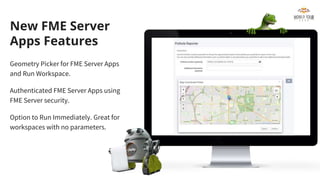
New FME Server
Apps Features
Geometry Picker for FME Server Apps
and Run Workspace.
Authenticated FME Server Apps using
FME Server security.
Option to Run Immediately. Great for
workspaces with no parameters.
New Web UI Features
● Show time zone on Schedules page.
● Look and feel updates.
● Upload workspaces directly.
● Configure services in the web UI.
Enhanced Security
● Set password expiry time.
● Admin password reset on initial logon.
● Prevent multiple user sessions.
● Administrator can broadcast messages.
What’s New with
FME Mobile Apps
Updates on the version of FME living in your phone
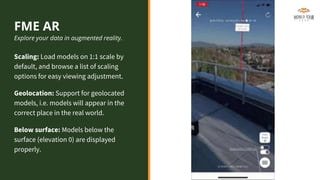
FME AR
Explore your data in augmented reality.
Scaling: Load models on 1:1 scale by
default, and browse a list of scaling
options for easy viewing adjustment.
Geolocation: Support for geolocated
models, i.e. models will appear in the
correct place in the real world.
Below surface: Models below the
surface (elevation 0) are displayed
properly.
FME Data
Express
Launch FME Workspaces
from your phone.
Location selector: new
parameter type allows the user
to select points.
QR codes & barcodes: read a
QR code or barcode and use
that data as a parameter value.
All workspaces shown in this presentation
can be found here:
http://fme.ly/7lz
Thank you!
brian.pont@safe.com
jennifer.lutherthomas@safe.com

FME 2020 Platform Scenarios

  • 1.
    FME 2020 Platform Scenarios BrianPont, Jen Luther Thomas
  • 2.
    Today’s Holistic Data Stretching 1.Demo: Using FME to Help us Make Healthy Choices 2. Demo: Automated Parking Authentication at the FME Data Spa 3. Overview: What’s New in FME 2020.x Indulge your senses in the FME 2020 Platform
  • 3.
    Demo Step 1:Build your workspace Go through your proof points. A. B. C.
  • 4.
    Step 2: Runit on demand or as part of an event-based workflow Go through your proof points. A. B. C. A screenshot can go here. Or delete this box and use the text box beneath.
  • 5.
    Healthy Choices Building asmart workflow that helps us make healthy choices!
  • 6.
    FME in Action HealthyChoices Goal: Use FME to intelligently suggest where we should go for a snack. 1. Connect to our health data. 2. Analyze our activity. 3. Suggest the best local places to visit. for example: OR
  • 7.
    Let’s Get Metafor a Moment We are going to have some fun with this example, but it still shows the power of FME to: ● Connect to data from many different sources – web, XML and Geopackage. ● Transform and analyze data – decisions will be made based on the data. ● Automate the process – information will be delivered instantly.
  • 8.
    What to Watchfor in the Demo: Authoring ● It’s easy to connect to different data sources, especially Web APIs. ● Best practices when building workspaces: ○ Feature Caching & Visual Preview ○ Transformer Presets ○ Web and Database connections ○ FME Hub and Custom Transformers
  • 9.
    Demo Time Go throughyour proof points. A. B. C. A screenshot can go here. Or delete this box and use the text box beneath.
  • 10.
    What to Watchfor in the Demo: Automating ● How easy it can be to automate data processing. ● Key features: ○ Automation Writer ○ Publishing workspaces (Web UI!) ○ Triggers: e.g. Dropbox watching ○ Automated alerts and notifications
  • 11.
  • 12.
    Recap: What’s newwith FME Workspace Authoring FME Desktop, Engine, and Hub 2020
  • 13.
    Additional Resources Check out theseFME 2020 Unleashed webinars for a more detailed look at what’s new: ● FME 2020 Unleashed: Authoring ● FME 2020 Unleashed: Automating
  • 14.
    Performance Gains: Everything’sFaster ● Shapefile and Excel reader/writer upgrade. ● Many transformers are faster, including StatisticsCalculator and Bufferer. ● FME Data Inspector 3D rendering frame rate increased.
  • 15.
    FME Data Inspector- 3D View Improvements
  • 16.
    A Luxurious Experience ●Style connection lines in FME Workbench. ● StatisticsCalculator interface improvement. ● Better connection with ArcGIS Pro features, like Utility Network, annotations, etc.
  • 17.
    Unrivalled Data Support ●Google BigQuery & BigQuery GIS Writer ● Snowflake Reader/Writer ● Entwine Point Tile (EPT) Reader ● Mapbox Vector Tiles (MVT) Writer ● PROJ transformers ● NifTI Reader/Writer ● Microsoft DirectDraw Surface (DDS) Writer ● CityJSON Reader/Writer (Tech Preview) ● ECW V3 Reader/Writer
  • 18.
    Connect to MachineLearning Connect to services for Natural Language Processing (NLP) and Computer Vision (CV): ● Google AI connectors ● Amazon AI connectors ● Azure AI connectors ● FOSS AI connectors More on this topic shortly!
  • 19.
    Connect to XML/JSON Based Formats ●XSD-Driven XML ● New UK MasterMap Variants ○ Water Network ○ Highway Network ○ Sites Layer ○ Topography Layer ● OGC S-121 GML
  • 20.
    Improved Revit Support ●Over 50 enhancements including: ○ Improved Floor Plan support, including Annotations ● Control over Geometry Level of Detail ○ Extraction of: ■ Family Parameters ■ Workset Attributes ■ Project and View Metadata ■ Project or Georeferenced Coordinate System ● Indoor mapping wall simplification ○ Via enhanced CenterLineReplacer “Doing basic quantity takeoffs. I was showing FME to some project managers and they were kind of speechless. I managed to automate basic cost estimation, in one afternoon” - davidrasner5 (FME Community User)
  • 21.
    Parking Authentication App Building asmart app that helps us validate who is parking in our lot!
  • 22.
    Watch the Appin Action Go through your proof points. A. B. C. http://fme.ly/parking
  • 23.
    FME in Action FMEData Spa Parking Lot App Goal: Use FME with machine learning to detect non-authorized cars in the spa parking lot and take appropriate action. 1. Send images of a parked vehicle to Amazon’s machine learning tools. 2. Check if the vehicle is authorized. 3. Report results to our facilities team.
  • 24.
    Let’s Get Metafor a Moment Again, we are going to have some fun with this example, but it still shows the power of FME to: ● Connect data from different sources – field and database. ● Transform and Analyze data – decisions made based on the data. ● Automate the process – seamless processing via an app. More Machine Learning demos are coming later!
  • 25.
    What to Watchfor in the Demo: ● FME Server Apps & FME Data Express ● HTMLReportGenerator transformer and the Data Streaming service. ○ Great 1-2 punch for delivering information. ● Best practices when building workspaces: ○ Annotations & Bookmarks ○ Styled connection lines
  • 26.
    Demo Time Go throughyour proof points. A. B. C. Let’s add the output App or html here
  • 27.
    Recap: What’s newwith FME Workspace Automating FME Server and Cloud 2020
  • 28.
    Additional Resources Check out theseFME 2020 Unleashed webinars for a more detailed look at what’s new: ● FME 2020 Unleashed: Authoring ● FME 2020 Unleashed: Automating
  • 29.
    New in Automations ●Use FME Server Automations Writer to implement enterprise Integration patterns. ● Disallow concurrent jobs in workspace node; skip a job if another job is in progress. ● Add an Automation and all its dependencies to an FME Server Project. ● Build Complex Looping workflows.
  • 30.
    New FME Server AppsFeatures Geometry Picker for FME Server Apps and Run Workspace. Authenticated FME Server Apps using FME Server security. Option to Run Immediately. Great for workspaces with no parameters.
  • 31.
    New Web UIFeatures ● Show time zone on Schedules page. ● Look and feel updates. ● Upload workspaces directly. ● Configure services in the web UI.
  • 32.
    Enhanced Security ● Setpassword expiry time. ● Admin password reset on initial logon. ● Prevent multiple user sessions. ● Administrator can broadcast messages.
  • 33.
    What’s New with FMEMobile Apps Updates on the version of FME living in your phone
  • 34.
    FME AR Explore yourdata in augmented reality. Scaling: Load models on 1:1 scale by default, and browse a list of scaling options for easy viewing adjustment. Geolocation: Support for geolocated models, i.e. models will appear in the correct place in the real world. Below surface: Models below the surface (elevation 0) are displayed properly.
  • 35.
    FME Data Express Launch FMEWorkspaces from your phone. Location selector: new parameter type allows the user to select points. QR codes & barcodes: read a QR code or barcode and use that data as a parameter value.
  • 36.
    All workspaces shownin this presentation can be found here: http://fme.ly/7lz
  • 37.

Editor's Notes

  • #2 [Abstract] Tour the FME Platform with live demos that will showcase the latest and greatest features. First, we’ll build an app that connects to an API and helps us make intelligent choices based on that data. Next, we’ll build an app that uses machine learning tools to analyze images and make decisions based on what the images contain. Finally, we’ll go through what’s new in FME 2020 and which new features we’re most excited about!
  • #4 First, build a workspace in FME Desktop to connect and transform your data. More talking points: This is FME Desktop which is our authoring environment where you build your workflows. You can inspect the data along the way too
  • #5 Then automate it with FME Server!
  • #8 Warwickshire County Council uses FME to automatically retrieve health data from various APIs. Involves massive amounts of text data. We’ll talk about this story more later. Iowa DOT uses FME to connect to sensor data / IoT from various sources, including APIs.
  • #9 Hint at how you are going to prove your message, by telling the audience how your info will flow.
  • #10 *Demo* Video is stored in the scenario1 folder called: SimplifiedDemo.mov Prep: Download your Apple health XML file by following the GIF in slide 11 or simply steal one from someone on the team or tour. (We will add fitbit in the future) Open Scenario1_desktop.fmw and save presets for the AttributeManager and HTMLReportGenerator so you don’t have to type those settings in live. You will need a yelp web connection for this. Either use your own key, or mine: VFmgd5L5tQOmdTNOf3CM3vKIPc8Slpj8XTKgGFG2IyfhCjsfa1ETlc2r64fS9kY2NvanRTNAHGs_As0W73N8GzgP2nhHHt9BkXz29G3wFJpydSd0TsyN-cJdthzCXXYx Note: there is already a web connection defined on the HUB that you can download, then plugin the key. Steps: Start with a blank workspace Add the AppleStepsExtractor and point it at your xml file. Leave the default settings or if you wish, change the number of days to reflect your tour. (run to save the cache) Connect a StatisticsCalulator and set the attribute to ‘Stepsl’ and check “Mean” to get an average step count from all the data (Use the Cache - talk about the power of Feature Caching) Connect a FeatureReader to the Summary Port, use it to read the geopackage contained in the DataPrep folder in Dropbox RS_Venues.GPKG, Set the Where Clause to “City” = “<your city>” and accumulation mode to Merge Initiator and Result. (Test this and run… talk about visual preview) Add a Published Param instead of using a hardcoded city name. - re-run Connect an AttributeManager - use the preset to load the conditional value and rounded step count attributes. Talk about conditional values and make some jokes about what to do with low step counts :) (gym, park, etc...) Connect the YelpConnector. Talk about Web Connections and set the attribute “search terms” to be used for the “Enter Search term…” param and set the radius to 1000 and results to 5. Connect the HTMLReportGenerator to the Place output port. Use presets again to load the HTML Settings. Walk through them talking about each piece Connect the HTML Writer. Run full workflow (use Cache if you wish) and open the output html file in your browser. Celebrate! *** Note *** for Partner events, the venue locations are not known at this time and therefore you can’t use the geopackage/featurereader. Instead at step 4, don’t add the featurereader, instead add the geocoder and use OpenStreetMap (for a free service). You can still demo published Params in step 5 but instead use the street address as a param. An example of this exists in the dropbox folder called Scenario1_simplified_with_geocoding.fmw
  • #11 COMING SOON!! Waiting for a fix to FMESERVER-14316 before sharing updated demo
  • #13 What new and exciting things have we just seen in this demo? Let’s take a look in more detail.
  • #15 Elaborating on these points: Anyone with existing Shapefile R/W in their workspaces will have to upgrade to the new format (shortname SHAPEFILE instead of the old ESRISHAPE). StatisticsCalculator got a total overhaul and is incredibly fast (up to 100x faster!). Other transformers are now using feature tables so are also seeing benefits. The better 3D rendering is great for big data formats like Revit. Stats Calc — in the notes, we can list that “in some cases, 2000x improvement” 12:13 PM Complete port with feature table input took 7153s in v8 and 4s in v9 Runtime decreased by 99.944% OR it runs in 0.00056 th of the time 1788x faster in a pure ratio (old/new) OR as percent 178800% faster 12:14 PM (Above is the actual #s) 12:14 PM It was 40000 features with many many attributes and all attrs getting stats calculated…so an extreme case of attr work but not too much data volume even
  • #16 Frame rate FME 2019.2: 1 - 30 FPS FME 2020.0: 55 - 60 FPS
  • #17 Connection line styling was the 3rd most voted-for idea. It helps with tracing/debugging a workspace.
  • #18 EPT is like raster tiling/zoom levels, but for point clouds. Massive country-sized point cloud datasets (trillion points) stored in Amazon. PROJ transformers give more coordinate system options DDS is a raster writer for Esri i3s
  • #19 - Azure: AzureComputerVisionConnector, AzureTextAnalyticsConnector. - Amazon: RekognitionConnector, ComprehendConnector. - Google: GoogleVisionConnector, GoogleLanguageConnector. - FOSS: RasterObjectDetector (uses OpenCV), NLPTrainer and NLPClassifier (uses NLTK).
  • #21 https://knowledge.safe.com/content/idea/103445/revit-reader-exposing-material-layers-walls-slabs.html Major Improvements Floorplan Occlusion View Level of Detail Control Floorplan Annotations and text Family Parameters and Workset Attributes Project Information and Metadata Smaller Improvements Correctly using fme_type instead of revitnative_type Reader Parameter GUI Cleanup Added support for RTE files Improved Schema Memory Leaks and Improved Stability
  • #23 Proof/Point 1: A: B: C: Main point (and sub-points)
  • #24 The FME workspace uses the RekognitionConnector to read a license plate number, then check if that license plate exists in the database. Generate a report/email depending on whether this car is authorized to park at the spa. License plate data from open data portal: https://catalog.data.gov/dataset/towed-cars-for-the-past-30-days/resource/fa8c962c-9ad4-4013-b5cc-68fd4121a62e
  • #25 NOTE TO THE PRESENTER: Computer Vision is being covered later in the “Data Transformations” talk, so there’s no need to get into the details of Machine Learning here! Focus on the Automations aspect for this demo.

  • #26 Hint at how you are going to prove your message, by telling the audience how your info will flow.
  • #27 Part 1: Show the Workspace Open Scenario 2 and walk through the transformers quickly. You can run this workspaces but note the output is being sent to $(FME_DATA_REPOSITORY)/ParkingReport.html which won’t exist and will fail. So change that to test. To Run: Choose the image to send to Recognition: Carpic.jpg is registered in the DB, FMELUV is not. Look at the output.html to highlight the information being sent to the user. Highlight a few things: Annotations and bookmarks RecognitionConnector is new and powerful Databasejoiner can connect to a database in line without needing a reader Aggregator is traditionally used for Geometry but in this case, purely for attributes and it handles them well.. Even doing some statistics! (Sum) Styled connection lines show the flow between a car registered vs one that is not Part 2: Server @Jen to make notes.
  • #28 What new and exciting things have we just seen in this demo? Let’s take a look in more detail.
  • #30 Don has included a supplementary demo video that shows you how to build looping workflows in FME Server 2020 using the Process Manager pattern. Dropbox: https://www.dropbox.com/home/FMEWT2020%20Demos/2%20-%20Platform%20Session/Platform/Z.%20Supplementary%20Demo%20(Slide%2030) Google Drive: https://drive.google.com/drive/folders/1gddJ8ZpkpSHjC74Ie1KL_2kAO--S1DMC
  • #34 Note the release timeline for apps is independent of FME Platform releases. These are new features in the last several months.
  • #35 More on FME AR later today.