DATA REPRESENTATION
LECTURE # 05 (COMPUTER)
INTRODUCTION
• The data stored in the computer may be of different kinds, as
follows:
• Numeric data (0, 1, 2, …, 9)
• Alphabetic data (A, B, C, …, Z)
• Alphanumeric data—Combination of any of the symbols—(A, B,
C… Z), (0, 1… 9), or special characters (+,−, Blank), etc.
• All kinds of data, be it alphabets, numbers, symbols, sound
data or video data, is represented in terms of 0s and 1s, in the
computer. Each symbol is represented as a unique
combination of 0s and 1s.
NUMBER SYSTEM
• A number system in base r or radix r uses unique symbols for r
digits.
• One or more digits are combined to get a number. The base of the
number decides the valid digits that are used to make a number.
• In a number, the position of digit starts from the right-hand side
of the number. The rightmost digit has position 0, the next digit
on its left has position 1, and so on.
• The digits of a number have two kinds of values:
1. The face value of a digit is the digit located at that position. For
example, in decimal number 52, face value at position 0 is 2 and face
value at position 1 is 5.
2. The position value of a digit is (baseposition). For example, in decimal
number 52, the position value of digit 2 is 100 and the position value of
digit 5 is 101. Decimal numbers have a base of 10.
NUMBER SYSTEM
• The number is calculated as the sum of, face value *
baseposition, of each of the digits.
• For decimal number 52, the number is 5*101 + 2*100 = 50 +
2 = 52
• In computers, we are concerned with four kinds of number
systems, as follows:
1. Decimal Number System —Base 10
2. Binary Number System —Base 2
3. Octal Number System —Base 8
4. Hexadecimal Number System—Base 16
NUMBER SYSTEM
• The numbers given as input to computer and the numbers
given as output from the computer, are generally in decimal
number system, and are most easily understood by humans.
• However, computer understands the binary number system,
i.e., numbers in terms of 0s and 1s.
• The binary data is also represented, internally, as octal
numbers and hexadecimal numbers due to their ease of use.
• A number in a particular base is written as (number)base of
number
• For example, (23)10 means that the number 23 is a decimal
number, and (345)8 shows that 345 is an octal number.
DECIMAL NUMBER SYSTEM
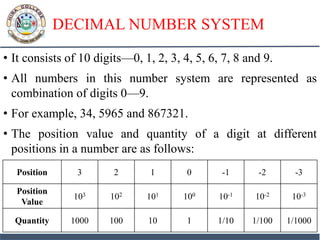
• It consists of 10 digits—0, 1, 2, 3, 4, 5, 6, 7, 8 and 9.
• All numbers in this number system are represented as
combination of digits 0—9.
• For example, 34, 5965 and 867321.
• The position value and quantity of a digit at different
positions in a number are as follows:
Position 3 2 1 0 -1 -2 -3
Position
Value
103 102 101 100 10-1 10-2 10-3
Quantity 1000 100 10 1 1/10 1/100 1/1000
BINARY NUMBER SYSTEM
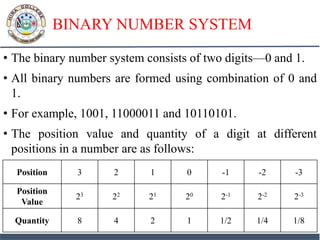
• The binary number system consists of two digits—0 and 1.
• All binary numbers are formed using combination of 0 and
1.
• For example, 1001, 11000011 and 10110101.
• The position value and quantity of a digit at different
positions in a number are as follows:
Position 3 2 1 0 -1 -2 -3
Position
Value
23 22 21 20 2-1 2-2 2-3
Quantity 8 4 2 1 1/2 1/4 1/8
OCTAL NUMBER SYSTEM
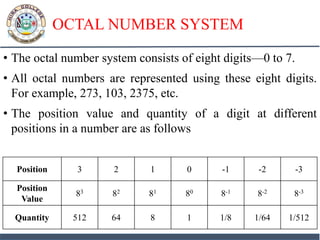
• The octal number system consists of eight digits—0 to 7.
• All octal numbers are represented using these eight digits.
For example, 273, 103, 2375, etc.
• The position value and quantity of a digit at different
positions in a number are as follows
Position 3 2 1 0 -1 -2 -3
Position
Value
83 82 81 80 8-1 8-2 8-3
Quantity 512 64 8 1 1/8 1/64 1/512
HEXADECIMAL NUMBER SYSTEM
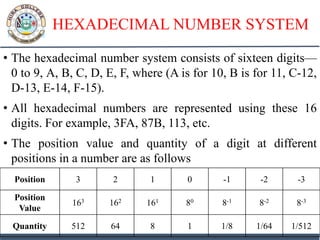
• The hexadecimal number system consists of sixteen digits—
0 to 9, A, B, C, D, E, F, where (A is for 10, B is for 11, C-12,
D-13, E-14, F-15).
• All hexadecimal numbers are represented using these 16
digits. For example, 3FA, 87B, 113, etc.
• The position value and quantity of a digit at different
positions in a number are as follows
Position 3 2 1 0 -1 -2 -3
Position
Value
163 162 161 80 8-1 8-2 8-3
Quantity 512 64 8 1 1/8 1/64 1/512
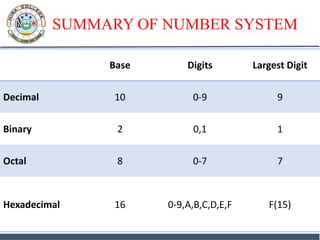
SUMMARY OF NUMBER SYSTEM
Base Digits Largest Digit
Decimal 10 0-9 9
Binary 2 0,1 1
Octal 8 0-7 7
Hexadecimal 16 0-9,A,B,C,D,E,F F(15)
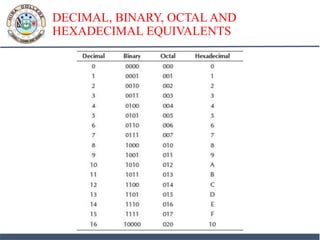
DECIMAL, BINARY, OCTAL AND
HEXADECIMAL EQUIVALENTS
CONVERSION FROM DECIMAL TO
BINARY, OCTAL, HEXADECIMAL
• A decimal number has two parts—integer part and fraction
part.
• For example, in the decimal number 23.0786, 23 is the
integer part and .0786 is the fraction part.
• The method used for the conversion of the integer part of a
decimal number is different from the one used for the
fraction part.
• In the following subsections, we shall discuss the conversion
of decimal integer, decimal fraction and decimal integer
fraction number into binary, octal and hexadecimal number.
CONVERTING DECIMAL INTEGER TO
BINARY, OCTAL, HEXADECIMAL
• A decimal integer is converted to any other base, by using
the division operation.
• To convert a decimal integer to:
• binary-divide by 2,
• octal-divide by 8, and,
• hexadecimal-divide by 16
Example 1: Convert 25 from Base 10 to Base 2
Example 2: Convert 23 from Base 10 to Base 2, 8, 16
Example 3: Convert 147 from Base 10 to Base 2, 8 and 16
Example 4: Convert 94 from Base 10 to Base 2, 8 and 16
CONVERTING DECIMAL FRACTION TO
BINARY, OCTAL, HEXADECIMAL
• A fractional number is a number less than 1. It may be .5, .00453,
.564, etc.
• We use the multiplication operation to convert decimal fraction to
any other base.
• To convert a decimal fraction to
• binary-multiply by 2,
• octal-multiply by 8, and,
• hexadecimal-multiply by 16.
• Steps for conversion of a decimal fraction to any other base are:
1. Multiply the fractional number with the to Base, to get a resulting
number.
CONVERTING DECIMAL FRACTION TO
BINARY, OCTAL, HEXADECIMAL
2. The resulting number has two parts, non-fractional part and
fractional part.
3. Record the non-fractional part of the resulting number.
4. Repeat the above steps at least four times.
5. Write the digits in the non-fractional part starting from upwards to
downwards.
Example 5: Convert 0.2345 from Base 10 to Base 2
Example 5a: Convert 0.865 from Base 10 to Base 2,8 and 16
CONVERTING DECIMAL INTEGER.FRACTION
TO BINARY, OCTAL, HEXADECIMAL
• A decimal integer.fraction number has both integer part and
fraction part.
• The steps for conversion of a decimal integer.fraction to any
other base are:
1. Convert decimal integer part to the desired base following
the steps discussed before.
2. Convert decimal fraction part to the desired base following
the steps discussed before.
3. The integer and fraction part in the desired base is combined
to get integer.fraction.
CONVERTING DECIMAL INTEGER.FRACTION
TO BINARY, OCTAL, HEXADECIMAL
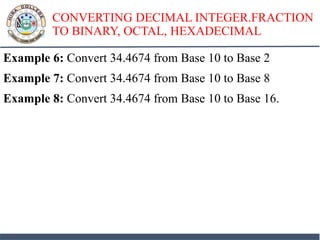
Example 6: Convert 34.4674 from Base 10 to Base 2
Example 7: Convert 34.4674 from Base 10 to Base 8
Example 8: Convert 34.4674 from Base 10 to Base 16.
CONVERSION OF BINARY, OCTAL,
HEXADECIMAL TO DECIMAL
• A binary, octal or hexadecimal number has two parts—
integer part and fraction part.
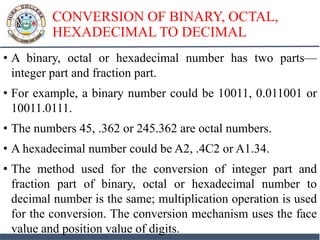
• For example, a binary number could be 10011, 0.011001 or
10011.0111.
• The numbers 45, .362 or 245.362 are octal numbers.
• A hexadecimal number could be A2, .4C2 or A1.34.
• The method used for the conversion of integer part and
fraction part of binary, octal or hexadecimal number to
decimal number is the same; multiplication operation is used
for the conversion. The conversion mechanism uses the face
value and position value of digits.
CONVERSION OF BINARY, OCTAL,
HEXADECIMAL TO DECIMAL
• The steps for conversion are as follows:
• 1. Find the sum of the Face Value * (fromBase)position for each
digit in the number.
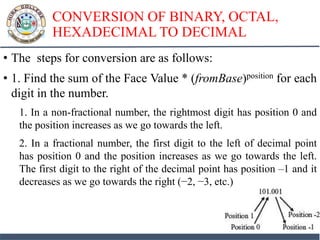
1. In a non-fractional number, the rightmost digit has position 0 and
the position increases as we go towards the left.
2. In a fractional number, the first digit to the left of decimal point
has position 0 and the position increases as we go towards the left.
The first digit to the right of the decimal point has position –1 and it
decreases as we go towards the right (−2, −3, etc.)
CONVERSION OF BINARY, OCTAL,
HEXADECIMAL TO DECIMAL
Example 9:
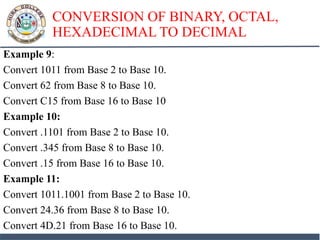
Convert 1011 from Base 2 to Base 10.
Convert 62 from Base 8 to Base 10.
Convert C15 from Base 16 to Base 10
Example 10:
Convert .1101 from Base 2 to Base 10.
Convert .345 from Base 8 to Base 10.
Convert .15 from Base 16 to Base 10.
Example 11:
Convert 1011.1001 from Base 2 to Base 10.
Convert 24.36 from Base 8 to Base 10.
Convert 4D.21 from Base 16 to Base 10.
CONVERSION OF BINARY TO OCTAL,
HEXADECIMAL
• A binary number can be converted into octal or hexadecimal
number using a shortcut method.
• The shortcut method is based on the following information:
• An octal digit from 0 to 7 can be represented as a combination of 3 bits,
since 23 = 8.
• A hexadecimal digit from 0 to 15 can be represented as a combination of
4 bits, since 24 = 16.
• The Steps for Binary to Octal Conversion are:
1. Partition the binary number in groups of three bits, starting from the
right-most side.
2. For each group of three bits, find its octal number.
3. The result is the number formed by the combination of the octal
numbers.
• .
CONVERSION OF BINARY TO OCTAL,
HEXADECIMAL
• The Steps for Binary to Hexadecimal Conversion are:
1. Partition the binary number in groups of four bits, starting from the
right-most side.
2. For each group of four bits, find its hexadecimal number.
3. The result is the number formed by the combination of the
hexadecimal numbers
Example 12: Convert the binary number 1110101100110 to
octal.
Example 13: Convert the binary number 1110101100110 to
hexadecimal
CONVERSION OF OCTAL,
HEXADECIMAL TO BINARY
• The conversion of a number from octal and hexadecimal to
binary uses the inverse of the steps defined for the conversion of
binary to octal and hexadecimal.
• The Steps for Octal to Binary Conversion are:
1. Convert each octal number into a three-digit binary number.
2. The result is the number formed by the combination of all the bits.
• The Steps for Hexadecimal to Binary Conversion are:
1. Convert each hexadecimal number into a four-digit binary number.
2. The result is the number formed by the combination of all the bits
Example 14: Convert the hexadecimal number 2BA3 to binary
Example 15: Convert the octal number 473 to binary
BINARY ARITHMETIC
Binary Addition
Example 5: Add 10111, 11100 and 11. Verify theanswer with
the help of decimal addition.
Binary Subtraction
Example 4: Subtract 100110 from 110001. Verify the answer
with the help of decimal subtraction
SIGNED AND UNSIGNED NUMBERS
• A binary number may be positive or negative. Generally, we use
the symbol “+” and “−” to represent positive and negative
numbers, respectively.
• The sign of a binary number has to be represented using 0 and 1,
in the computer.
• An n-bit signed binary number consists of two parts—sign bit and
magnitude. The left most bit, also called the Most Significant Bit
(MSB) is the sign bit. The remaining n-1 bits denote the
magnitude of the number.
• In signed binary numbers, the sign bit is 0 for a positive number
and 1 for a negative number.
• For example, 01100011 is a positive number since its sign bit is 0,
and, 11001011 is a negative number since its sign bit is 1

5a data representation

  • 1.
  • 2.
    INTRODUCTION • The datastored in the computer may be of different kinds, as follows: • Numeric data (0, 1, 2, …, 9) • Alphabetic data (A, B, C, …, Z) • Alphanumeric data—Combination of any of the symbols—(A, B, C… Z), (0, 1… 9), or special characters (+,−, Blank), etc. • All kinds of data, be it alphabets, numbers, symbols, sound data or video data, is represented in terms of 0s and 1s, in the computer. Each symbol is represented as a unique combination of 0s and 1s.
  • 3.
    NUMBER SYSTEM • Anumber system in base r or radix r uses unique symbols for r digits. • One or more digits are combined to get a number. The base of the number decides the valid digits that are used to make a number. • In a number, the position of digit starts from the right-hand side of the number. The rightmost digit has position 0, the next digit on its left has position 1, and so on. • The digits of a number have two kinds of values: 1. The face value of a digit is the digit located at that position. For example, in decimal number 52, face value at position 0 is 2 and face value at position 1 is 5. 2. The position value of a digit is (baseposition). For example, in decimal number 52, the position value of digit 2 is 100 and the position value of digit 5 is 101. Decimal numbers have a base of 10.
  • 4.
    NUMBER SYSTEM • Thenumber is calculated as the sum of, face value * baseposition, of each of the digits. • For decimal number 52, the number is 5*101 + 2*100 = 50 + 2 = 52 • In computers, we are concerned with four kinds of number systems, as follows: 1. Decimal Number System —Base 10 2. Binary Number System —Base 2 3. Octal Number System —Base 8 4. Hexadecimal Number System—Base 16
  • 5.
    NUMBER SYSTEM • Thenumbers given as input to computer and the numbers given as output from the computer, are generally in decimal number system, and are most easily understood by humans. • However, computer understands the binary number system, i.e., numbers in terms of 0s and 1s. • The binary data is also represented, internally, as octal numbers and hexadecimal numbers due to their ease of use. • A number in a particular base is written as (number)base of number • For example, (23)10 means that the number 23 is a decimal number, and (345)8 shows that 345 is an octal number.
  • 6.
    DECIMAL NUMBER SYSTEM •It consists of 10 digits—0, 1, 2, 3, 4, 5, 6, 7, 8 and 9. • All numbers in this number system are represented as combination of digits 0—9. • For example, 34, 5965 and 867321. • The position value and quantity of a digit at different positions in a number are as follows: Position 3 2 1 0 -1 -2 -3 Position Value 103 102 101 100 10-1 10-2 10-3 Quantity 1000 100 10 1 1/10 1/100 1/1000
  • 7.
    BINARY NUMBER SYSTEM •The binary number system consists of two digits—0 and 1. • All binary numbers are formed using combination of 0 and 1. • For example, 1001, 11000011 and 10110101. • The position value and quantity of a digit at different positions in a number are as follows: Position 3 2 1 0 -1 -2 -3 Position Value 23 22 21 20 2-1 2-2 2-3 Quantity 8 4 2 1 1/2 1/4 1/8
  • 8.
    OCTAL NUMBER SYSTEM •The octal number system consists of eight digits—0 to 7. • All octal numbers are represented using these eight digits. For example, 273, 103, 2375, etc. • The position value and quantity of a digit at different positions in a number are as follows Position 3 2 1 0 -1 -2 -3 Position Value 83 82 81 80 8-1 8-2 8-3 Quantity 512 64 8 1 1/8 1/64 1/512
  • 9.
    HEXADECIMAL NUMBER SYSTEM •The hexadecimal number system consists of sixteen digits— 0 to 9, A, B, C, D, E, F, where (A is for 10, B is for 11, C-12, D-13, E-14, F-15). • All hexadecimal numbers are represented using these 16 digits. For example, 3FA, 87B, 113, etc. • The position value and quantity of a digit at different positions in a number are as follows Position 3 2 1 0 -1 -2 -3 Position Value 163 162 161 80 8-1 8-2 8-3 Quantity 512 64 8 1 1/8 1/64 1/512
  • 10.
    SUMMARY OF NUMBERSYSTEM Base Digits Largest Digit Decimal 10 0-9 9 Binary 2 0,1 1 Octal 8 0-7 7 Hexadecimal 16 0-9,A,B,C,D,E,F F(15)
  • 11.
    DECIMAL, BINARY, OCTALAND HEXADECIMAL EQUIVALENTS
  • 12.
    CONVERSION FROM DECIMALTO BINARY, OCTAL, HEXADECIMAL • A decimal number has two parts—integer part and fraction part. • For example, in the decimal number 23.0786, 23 is the integer part and .0786 is the fraction part. • The method used for the conversion of the integer part of a decimal number is different from the one used for the fraction part. • In the following subsections, we shall discuss the conversion of decimal integer, decimal fraction and decimal integer fraction number into binary, octal and hexadecimal number.
  • 13.
    CONVERTING DECIMAL INTEGERTO BINARY, OCTAL, HEXADECIMAL • A decimal integer is converted to any other base, by using the division operation. • To convert a decimal integer to: • binary-divide by 2, • octal-divide by 8, and, • hexadecimal-divide by 16 Example 1: Convert 25 from Base 10 to Base 2 Example 2: Convert 23 from Base 10 to Base 2, 8, 16 Example 3: Convert 147 from Base 10 to Base 2, 8 and 16 Example 4: Convert 94 from Base 10 to Base 2, 8 and 16
  • 14.
    CONVERTING DECIMAL FRACTIONTO BINARY, OCTAL, HEXADECIMAL • A fractional number is a number less than 1. It may be .5, .00453, .564, etc. • We use the multiplication operation to convert decimal fraction to any other base. • To convert a decimal fraction to • binary-multiply by 2, • octal-multiply by 8, and, • hexadecimal-multiply by 16. • Steps for conversion of a decimal fraction to any other base are: 1. Multiply the fractional number with the to Base, to get a resulting number.
  • 15.
    CONVERTING DECIMAL FRACTIONTO BINARY, OCTAL, HEXADECIMAL 2. The resulting number has two parts, non-fractional part and fractional part. 3. Record the non-fractional part of the resulting number. 4. Repeat the above steps at least four times. 5. Write the digits in the non-fractional part starting from upwards to downwards. Example 5: Convert 0.2345 from Base 10 to Base 2 Example 5a: Convert 0.865 from Base 10 to Base 2,8 and 16
  • 16.
    CONVERTING DECIMAL INTEGER.FRACTION TOBINARY, OCTAL, HEXADECIMAL • A decimal integer.fraction number has both integer part and fraction part. • The steps for conversion of a decimal integer.fraction to any other base are: 1. Convert decimal integer part to the desired base following the steps discussed before. 2. Convert decimal fraction part to the desired base following the steps discussed before. 3. The integer and fraction part in the desired base is combined to get integer.fraction.
  • 17.
    CONVERTING DECIMAL INTEGER.FRACTION TOBINARY, OCTAL, HEXADECIMAL Example 6: Convert 34.4674 from Base 10 to Base 2 Example 7: Convert 34.4674 from Base 10 to Base 8 Example 8: Convert 34.4674 from Base 10 to Base 16.
  • 18.
    CONVERSION OF BINARY,OCTAL, HEXADECIMAL TO DECIMAL • A binary, octal or hexadecimal number has two parts— integer part and fraction part. • For example, a binary number could be 10011, 0.011001 or 10011.0111. • The numbers 45, .362 or 245.362 are octal numbers. • A hexadecimal number could be A2, .4C2 or A1.34. • The method used for the conversion of integer part and fraction part of binary, octal or hexadecimal number to decimal number is the same; multiplication operation is used for the conversion. The conversion mechanism uses the face value and position value of digits.
  • 19.
    CONVERSION OF BINARY,OCTAL, HEXADECIMAL TO DECIMAL • The steps for conversion are as follows: • 1. Find the sum of the Face Value * (fromBase)position for each digit in the number. 1. In a non-fractional number, the rightmost digit has position 0 and the position increases as we go towards the left. 2. In a fractional number, the first digit to the left of decimal point has position 0 and the position increases as we go towards the left. The first digit to the right of the decimal point has position –1 and it decreases as we go towards the right (−2, −3, etc.)
  • 20.
    CONVERSION OF BINARY,OCTAL, HEXADECIMAL TO DECIMAL Example 9: Convert 1011 from Base 2 to Base 10. Convert 62 from Base 8 to Base 10. Convert C15 from Base 16 to Base 10 Example 10: Convert .1101 from Base 2 to Base 10. Convert .345 from Base 8 to Base 10. Convert .15 from Base 16 to Base 10. Example 11: Convert 1011.1001 from Base 2 to Base 10. Convert 24.36 from Base 8 to Base 10. Convert 4D.21 from Base 16 to Base 10.
  • 21.
    CONVERSION OF BINARYTO OCTAL, HEXADECIMAL • A binary number can be converted into octal or hexadecimal number using a shortcut method. • The shortcut method is based on the following information: • An octal digit from 0 to 7 can be represented as a combination of 3 bits, since 23 = 8. • A hexadecimal digit from 0 to 15 can be represented as a combination of 4 bits, since 24 = 16. • The Steps for Binary to Octal Conversion are: 1. Partition the binary number in groups of three bits, starting from the right-most side. 2. For each group of three bits, find its octal number. 3. The result is the number formed by the combination of the octal numbers. • .
  • 22.
    CONVERSION OF BINARYTO OCTAL, HEXADECIMAL • The Steps for Binary to Hexadecimal Conversion are: 1. Partition the binary number in groups of four bits, starting from the right-most side. 2. For each group of four bits, find its hexadecimal number. 3. The result is the number formed by the combination of the hexadecimal numbers Example 12: Convert the binary number 1110101100110 to octal. Example 13: Convert the binary number 1110101100110 to hexadecimal
  • 23.
    CONVERSION OF OCTAL, HEXADECIMALTO BINARY • The conversion of a number from octal and hexadecimal to binary uses the inverse of the steps defined for the conversion of binary to octal and hexadecimal. • The Steps for Octal to Binary Conversion are: 1. Convert each octal number into a three-digit binary number. 2. The result is the number formed by the combination of all the bits. • The Steps for Hexadecimal to Binary Conversion are: 1. Convert each hexadecimal number into a four-digit binary number. 2. The result is the number formed by the combination of all the bits Example 14: Convert the hexadecimal number 2BA3 to binary Example 15: Convert the octal number 473 to binary
  • 24.
    BINARY ARITHMETIC Binary Addition Example5: Add 10111, 11100 and 11. Verify theanswer with the help of decimal addition. Binary Subtraction Example 4: Subtract 100110 from 110001. Verify the answer with the help of decimal subtraction
  • 25.
    SIGNED AND UNSIGNEDNUMBERS • A binary number may be positive or negative. Generally, we use the symbol “+” and “−” to represent positive and negative numbers, respectively. • The sign of a binary number has to be represented using 0 and 1, in the computer. • An n-bit signed binary number consists of two parts—sign bit and magnitude. The left most bit, also called the Most Significant Bit (MSB) is the sign bit. The remaining n-1 bits denote the magnitude of the number. • In signed binary numbers, the sign bit is 0 for a positive number and 1 for a negative number. • For example, 01100011 is a positive number since its sign bit is 0, and, 11001011 is a negative number since its sign bit is 1