Pre-Production
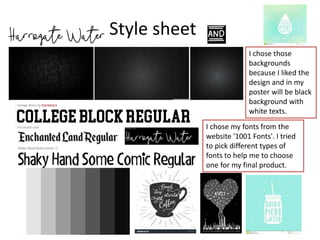
Style sheet
I chose those
backgrounds
because I liked the
design and in my
poster will be black
background with
white texts.
I chose my fonts from the
website '1001 Fonts'. I tried
to pick different types of
fonts to help me to choose
one for my final product.
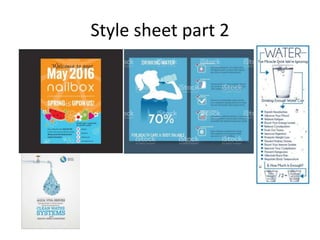
Style sheet part 2
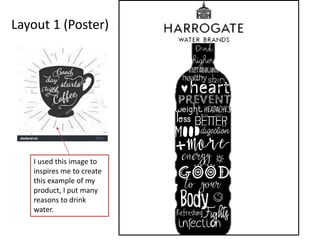
Layout 1 (Poster)
I used this image to
inspires me to create
this example of my
product, I put many
reasons to drink
water.
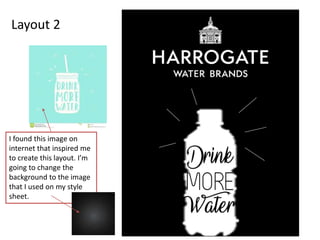
Layout 2
I found this image on
internet that inspired me
to create this layout. I’m
going to change the
background to the image
that I used on my style
sheet.
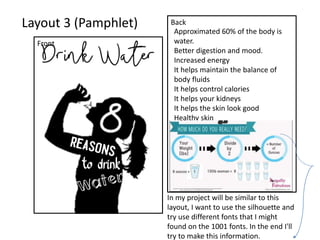
Layout 3 (Pamphlet)
Front
Back
Approximated 60% of the body is
water.
Better digestion and mood.
Increased energy
It helps maintain the balance of
body fluids
It helps control calories
It helps your kidneys
It helps the skin look good
Healthy skin
In my project will be similar to this
layout, I want to use the silhouette and
try use different fonts that I might
found on the 1001 fonts. In the end I'll
try to make this information.
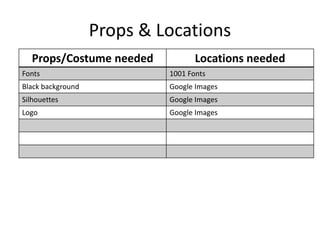
Props & Locations
Props/Costume needed Locations needed
Fonts 1001 Fonts
Black background Google Images
Silhouettes Google Images
Logo Google Images
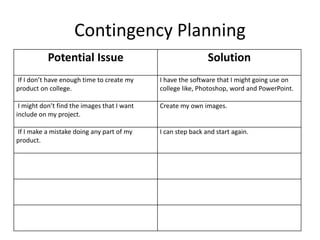
Contingency Planning
Potential Issue Solution
If I don’t have enough time to create my
product on college.
I have the software that I might going use on
college like, Photoshop, word and PowerPoint.
I might don’t find the images that I want
include on my project.
Create my own images.
If I make a mistake doing any part of my
product.
I can step back and start again.
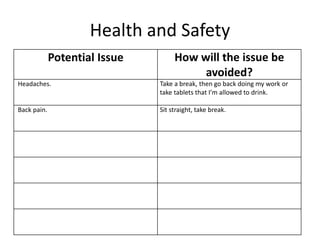
Health and Safety
Potential Issue How will the issue be
avoided?
Headaches. Take a break, then go back doing my work or
take tablets that I’m allowed to drink.
Back pain. Sit straight, take break.
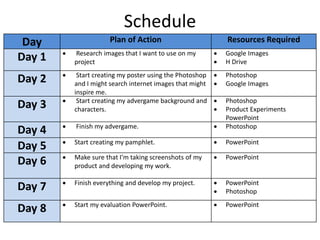
Schedule
Day Plan of Action Resources Required
Day 1  Research images that I want to use on my
project
 Google Images
 H Drive
Day 2  Start creating my poster using the Photoshop
and I might search internet images that might
inspire me.
 Photoshop
 Google Images
Day 3  Start creating my advergame background and
characters.
 Photoshop
 Product Experiments
PowerPoint
Day 4  Finish my advergame.  Photoshop
Day 5  Start creating my pamphlet.  PowerPoint
Day 6  Make sure that I’m taking screenshots of my
product and developing my work.
 PowerPoint
Day 7  Finish everything and develop my project.  PowerPoint
 Photoshop
Day 8  Start my evaluation PowerPoint.  PowerPoint

5. Pre Production

  • 1.
  • 2.
    Style sheet I chosethose backgrounds because I liked the design and in my poster will be black background with white texts. I chose my fonts from the website '1001 Fonts'. I tried to pick different types of fonts to help me to choose one for my final product.
  • 3.
  • 4.
    Layout 1 (Poster) Iused this image to inspires me to create this example of my product, I put many reasons to drink water.
  • 5.
    Layout 2 I foundthis image on internet that inspired me to create this layout. I’m going to change the background to the image that I used on my style sheet.
  • 6.
    Layout 3 (Pamphlet) Front Back Approximated60% of the body is water. Better digestion and mood. Increased energy It helps maintain the balance of body fluids It helps control calories It helps your kidneys It helps the skin look good Healthy skin In my project will be similar to this layout, I want to use the silhouette and try use different fonts that I might found on the 1001 fonts. In the end I'll try to make this information.
  • 7.
    Props & Locations Props/Costumeneeded Locations needed Fonts 1001 Fonts Black background Google Images Silhouettes Google Images Logo Google Images
  • 8.
    Contingency Planning Potential IssueSolution If I don’t have enough time to create my product on college. I have the software that I might going use on college like, Photoshop, word and PowerPoint. I might don’t find the images that I want include on my project. Create my own images. If I make a mistake doing any part of my product. I can step back and start again.
  • 9.
    Health and Safety PotentialIssue How will the issue be avoided? Headaches. Take a break, then go back doing my work or take tablets that I’m allowed to drink. Back pain. Sit straight, take break.
  • 10.
    Schedule Day Plan ofAction Resources Required Day 1  Research images that I want to use on my project  Google Images  H Drive Day 2  Start creating my poster using the Photoshop and I might search internet images that might inspire me.  Photoshop  Google Images Day 3  Start creating my advergame background and characters.  Photoshop  Product Experiments PowerPoint Day 4  Finish my advergame.  Photoshop Day 5  Start creating my pamphlet.  PowerPoint Day 6  Make sure that I’m taking screenshots of my product and developing my work.  PowerPoint Day 7  Finish everything and develop my project.  PowerPoint  Photoshop Day 8  Start my evaluation PowerPoint.  PowerPoint

Editor's Notes

  • #3 Explore colours, fonts and image styles similar to what you want to produce. Discuss all three elements in relation to why you chose them and where you may use them in your project. Go over as many pages as you need to
  • #5 Mock up of a potential design using the colours and fonts established in your style sheet and sourced images
  • #6 Mock up of a potential design using the colours and fonts established in your style sheet and sourced images
  • #7 Mock up of a potential design using the colours and fonts established in your style sheet and sourced images