Pre-Production
Georgina Martin
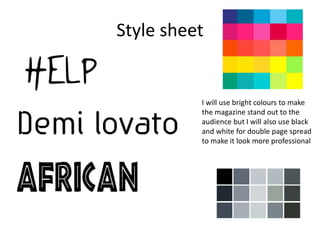
Style sheet
I will use bright colours to make
the magazine stand out to the
audience but I will also use black
and white for double page spread
to make it look more professional
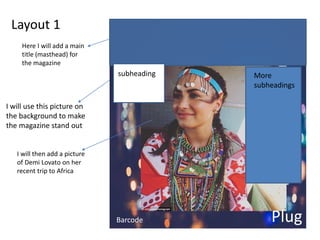
Layout 1
I will use this picture on
the background to make
the magazine stand out
I will then add a picture
of Demi Lovato on her
recent trip to Africa
Here I will add a main
title (masthead) for
the magazine
subheading
Barcode Plug
More
subheadings
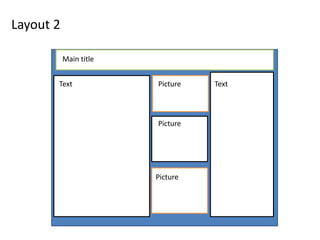
Layout 2
Main title
Text Picture
Picture
Text
Picture
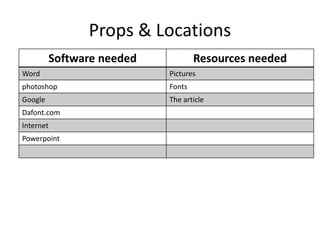
Props & Locations
Software needed Resources needed
Word Pictures
photoshop Fonts
Google The article
Dafont.com
Internet
Powerpoint
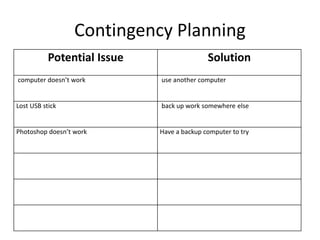
Contingency Planning
Potential Issue Solution
computer doesn’t work use another computer
Lost USB stick back up work somewhere else
Photoshop doesn’t work Have a backup computer to try
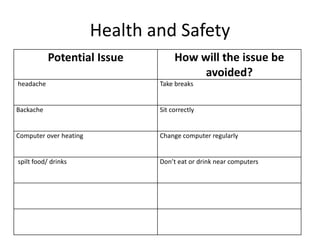
Health and Safety
Potential Issue How will the issue be
avoided?
headache Take breaks
Backache Sit correctly
Computer over heating Change computer regularly
spilt food/ drinks Don’t eat or drink near computers
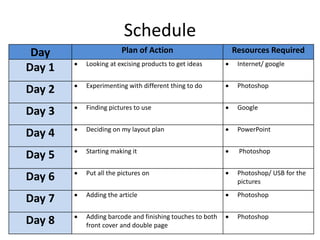
Schedule
Day Plan of Action Resources Required
Day 1  Looking at excising products to get ideas  Internet/ google
Day 2  Experimenting with different thing to do  Photoshop
Day 3  Finding pictures to use  Google
Day 4  Deciding on my layout plan  PowerPoint
Day 5  Starting making it  Photoshop
Day 6  Put all the pictures on  Photoshop/ USB for the
pictures
Day 7  Adding the article  Photoshop
Day 8  Adding barcode and finishing touches to both
front cover and double page
 Photoshop

5. pre production(3)visual

  • 1.
  • 2.
    Style sheet I willuse bright colours to make the magazine stand out to the audience but I will also use black and white for double page spread to make it look more professional
  • 3.
    Layout 1 I willuse this picture on the background to make the magazine stand out I will then add a picture of Demi Lovato on her recent trip to Africa Here I will add a main title (masthead) for the magazine subheading Barcode Plug More subheadings
  • 4.
    Layout 2 Main title TextPicture Picture Text Picture
  • 5.
    Props & Locations Softwareneeded Resources needed Word Pictures photoshop Fonts Google The article Dafont.com Internet Powerpoint
  • 6.
    Contingency Planning Potential IssueSolution computer doesn’t work use another computer Lost USB stick back up work somewhere else Photoshop doesn’t work Have a backup computer to try
  • 7.
    Health and Safety PotentialIssue How will the issue be avoided? headache Take breaks Backache Sit correctly Computer over heating Change computer regularly spilt food/ drinks Don’t eat or drink near computers
  • 8.
    Schedule Day Plan ofAction Resources Required Day 1  Looking at excising products to get ideas  Internet/ google Day 2  Experimenting with different thing to do  Photoshop Day 3  Finding pictures to use  Google Day 4  Deciding on my layout plan  PowerPoint Day 5  Starting making it  Photoshop Day 6  Put all the pictures on  Photoshop/ USB for the pictures Day 7  Adding the article  Photoshop Day 8  Adding barcode and finishing touches to both front cover and double page  Photoshop

Editor's Notes

  • #3 Explore colours, fonts and image styles similar to what you want to produce. Discuss all three elements in relation to why you chose them and where you may use them in your project. Go over as many pages as you need to
  • #4 Mock up of a potential design using the colours and fonts established in your style sheet and sourced images
  • #5 Mock up of a potential design using the colours and fonts established in your style sheet and sourced images