6th – Programming LEGO Mindstorms
EV3 (loops and conditionals)
Nestor Benavides
Wait, loops and conditionals
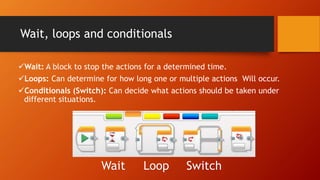
Wait: A block to stop the actions for a determined time.
Loops: Can determine for how long one or multiple actions Will occur.
Conditionals (Switch): Can decide what actions should be taken under
different situations.
Wait Loop Switch
Wait block
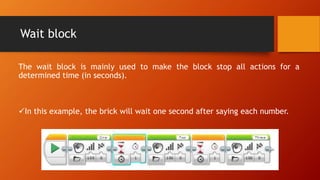
The wait block is mainly used to make the block stop all actions for a
determined time (in seconds).
In this example, the brick will wait one second after saying each number.
Loops
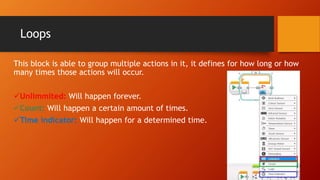
This block is able to group multiple actions in it, it defines for how long or how
many times those actions will occur.
Unlimmited: Will happen forever.
Count: Will happen a certain amount of times.
Time indicator: Will happen for a determined time.
Loops
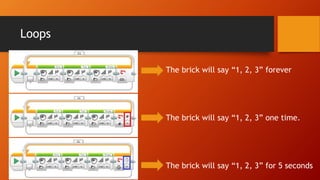
The brick will say “1, 2, 3” forever
The brick will say “1, 2, 3” one time.
The brick will say “1, 2, 3” for 5 seconds
Conditionals
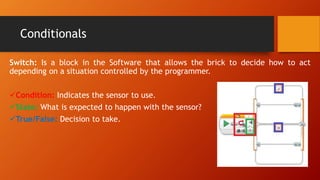
Switch: Is a block in the Software that allows the brick to decide how to act
depending on a situation controlled by the programmer.
Condition: Indicates the sensor to use.
State: What is expected to happen with the sensor?
True/False: Decision to take.
Conditionals
From the image we can say that:
1. We are using a touch sensor connected to port #1.
2. We want to see if the button is being pressed.
3. - If it is pressed, the brick says “START”.
- If it is not pressed, the brick says “STOP”.
Read as:
If button is pressed, say “start”.
Else, say “stop”.
In action (line follower)
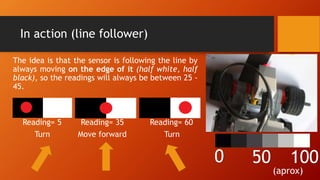
The idea is that the sensor is following the line by
always moving on the edge of it (half white, half
black), so the readings will always be between 25 -
45.
Reading= 5 Reading= 35 Reading= 60
Turn Move forward Turn
0 50 100
(aprox)
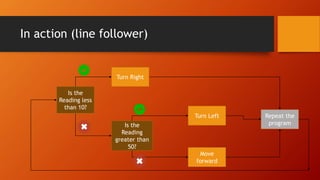
In action (line follower)
Is the
Reading less
than 10?
Turn Right
Is the
Reading
greater than
50?
Turn Left
Move
forward
Repeat the
program

5. conditionals

  • 1.
    6th – ProgrammingLEGO Mindstorms EV3 (loops and conditionals) Nestor Benavides
  • 2.
    Wait, loops andconditionals Wait: A block to stop the actions for a determined time. Loops: Can determine for how long one or multiple actions Will occur. Conditionals (Switch): Can decide what actions should be taken under different situations. Wait Loop Switch
  • 3.
    Wait block The waitblock is mainly used to make the block stop all actions for a determined time (in seconds). In this example, the brick will wait one second after saying each number.
  • 4.
    Loops This block isable to group multiple actions in it, it defines for how long or how many times those actions will occur. Unlimmited: Will happen forever. Count: Will happen a certain amount of times. Time indicator: Will happen for a determined time.
  • 5.
    Loops The brick willsay “1, 2, 3” forever The brick will say “1, 2, 3” one time. The brick will say “1, 2, 3” for 5 seconds
  • 6.
    Conditionals Switch: Is ablock in the Software that allows the brick to decide how to act depending on a situation controlled by the programmer. Condition: Indicates the sensor to use. State: What is expected to happen with the sensor? True/False: Decision to take.
  • 7.
    Conditionals From the imagewe can say that: 1. We are using a touch sensor connected to port #1. 2. We want to see if the button is being pressed. 3. - If it is pressed, the brick says “START”. - If it is not pressed, the brick says “STOP”. Read as: If button is pressed, say “start”. Else, say “stop”.
  • 8.
    In action (linefollower) The idea is that the sensor is following the line by always moving on the edge of it (half white, half black), so the readings will always be between 25 - 45. Reading= 5 Reading= 35 Reading= 60 Turn Move forward Turn 0 50 100 (aprox)
  • 9.
    In action (linefollower) Is the Reading less than 10? Turn Right Is the Reading greater than 50? Turn Left Move forward Repeat the program