SWITCHES
BEGINNER
PROGRAMMING
LESSON
Lesson Objectives
1. Learn how to make your robot decide what to do out of different
choices
2. Learn how to use a Switch Block
© EV3LESSONS.COM, 2016, (LAST EDIT: 7/04/2016) 2
Switch Blocks
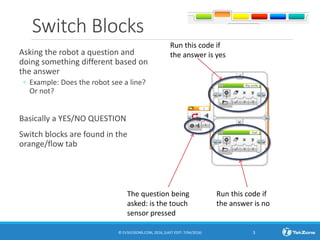
Asking the robot a question and
doing something different based on
the answer
◦ Example: Does the robot see a line?
Or not?
Basically a YES/NO QUESTION
Switch blocks are found in the
orange/flow tab
© EV3LESSONS.COM, 2016, (LAST EDIT: 7/04/2016) 3
The question being
asked: is the touch
sensor pressed
Run this code if
the answer is no
Run this code if
the answer is yes
Switch Block CHALLENGE 1
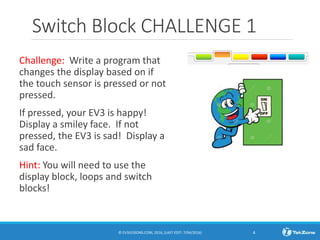
Challenge: Write a program that
changes the display based on if
the touch sensor is pressed or not
pressed.
If pressed, your EV3 is happy!
Display a smiley face. If not
pressed, the EV3 is sad! Display a
sad face.
Hint: You will need to use the
display block, loops and switch
blocks!
© EV3LESSONS.COM, 2016, (LAST EDIT: 7/04/2016) 4
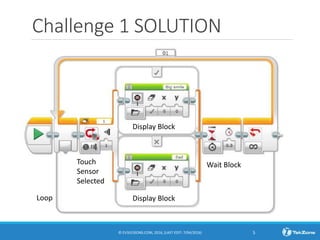
Challenge 1 SOLUTION
© EV3LESSONS.COM, 2016, (LAST EDIT: 7/04/2016) 5
Display Block
Display Block
Wait Block
Loop
Touch
Sensor
Selected
Switch Block Challenge 2
Can you write a program that display big eyeballs
if you touch it once and a sad face if you touch it
a second time and toggles back and forth.
© EV3LESSONS.COM, 2016, (LAST EDIT: 7/04/2016) 6
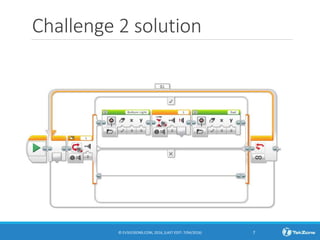
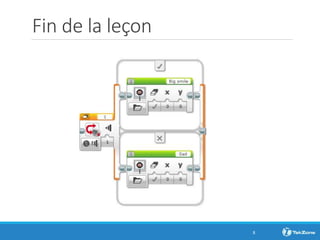
Challenge 2 solution
© EV3LESSONS.COM, 2016, (LAST EDIT: 7/04/2016) 7
Fin de la leçon
8

Aq switches2 - Beginner

  • 1.
  • 2.
    Lesson Objectives 1. Learnhow to make your robot decide what to do out of different choices 2. Learn how to use a Switch Block © EV3LESSONS.COM, 2016, (LAST EDIT: 7/04/2016) 2
  • 3.
    Switch Blocks Asking therobot a question and doing something different based on the answer ◦ Example: Does the robot see a line? Or not? Basically a YES/NO QUESTION Switch blocks are found in the orange/flow tab © EV3LESSONS.COM, 2016, (LAST EDIT: 7/04/2016) 3 The question being asked: is the touch sensor pressed Run this code if the answer is no Run this code if the answer is yes
  • 4.
    Switch Block CHALLENGE1 Challenge: Write a program that changes the display based on if the touch sensor is pressed or not pressed. If pressed, your EV3 is happy! Display a smiley face. If not pressed, the EV3 is sad! Display a sad face. Hint: You will need to use the display block, loops and switch blocks! © EV3LESSONS.COM, 2016, (LAST EDIT: 7/04/2016) 4
  • 5.
    Challenge 1 SOLUTION ©EV3LESSONS.COM, 2016, (LAST EDIT: 7/04/2016) 5 Display Block Display Block Wait Block Loop Touch Sensor Selected
  • 6.
    Switch Block Challenge2 Can you write a program that display big eyeballs if you touch it once and a sad face if you touch it a second time and toggles back and forth. © EV3LESSONS.COM, 2016, (LAST EDIT: 7/04/2016) 6
  • 7.
    Challenge 2 solution ©EV3LESSONS.COM, 2016, (LAST EDIT: 7/04/2016) 7
  • 8.
    Fin de laleçon 8