












C Programming Language
Mo’meN Ali
C Control Statements: Looping
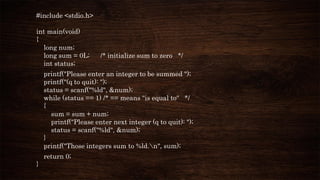
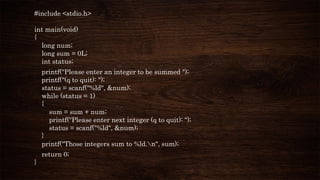
#include <stdio.h>
int main(void)
{
long num;
long sum = 0L; /* initialize sum to zero */
int status;
printf("Please enter an integer to be summed ");
printf("(q to quit): ");
status = scanf("%ld", &num);
while (status == 1) /* == means "is equal to" */
{
sum = sum + num;
printf("Please enter next integer (q to quit): ");
status = scanf("%ld", &num);
}
printf("Those integers sum to %ld.n", sum);
return 0;
}
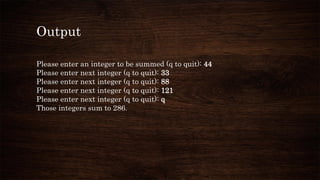
Output
Please enter an integer to be summed (q to quit): 44
Please enter next integer (q to quit): 33
Please enter next integer (q to quit): 88
Please enter next integer (q to quit): 121
Please enter next integer (q to quit): q
Those integers sum to 286.
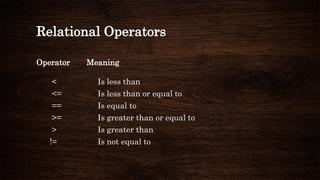
Relational Operators
Operator Meaning
< Is less than
<= Is less than or equal to
== Is equal to
>= Is greater than or equal to
> Is greater than
!= Is not equal to
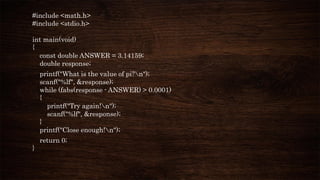
#include <math.h>
#include <stdio.h>
int main(void)
{
const double ANSWER = 3.14159;
double response;
printf("What is the value of pi?n");
scanf("%lf", &response);
while (fabs(response - ANSWER) > 0.0001)
{
printf("Try again!n");
scanf("%lf", &response);
}
printf("Close enough!n");
return 0;
}
Output
What is the value of pi?
3.14
Try again!
3.1416
Close enough!
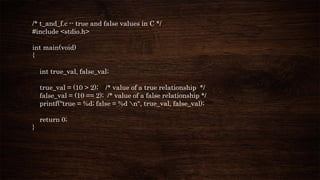
/* t_and_f.c -- true and false values in C */
#include <stdio.h>
int main(void)
{
int true_val, false_val;
true_val = (10 > 2); /* value of a true relationship */
false_val = (10 == 2); /* value of a false relationship */
printf("true = %d; false = %d n", true_val, false_val);
return 0;
}
Output
true = 1; false = 0
#include <stdio.h>
int main(void)
{
int n = 3;
while (n)
{
printf("%2d is truen", n--);
}
printf("%2d is falsen", n);
n = -3;
while (n)
{
printf("%2d is truen", n++);
}
printf("%2d is falsen", n);
return 0;
}
Output
3 is true
2 is true
1 is true
0 is false
-3 is true
-2 is true
-1 is true
0 is false
#include <stdio.h>
int main(void)
{
long num;
long sum = 0L;
int status;
printf("Please enter an integer to be summed ");
printf("(q to quit): ");
status = scanf("%ld", &num);
while (status = 1)
{
sum = sum + num;
printf("Please enter next integer (q to quit): ");
status = scanf("%ld", &num);
}
printf("Those integers sum to %ld.n", sum);
return 0;
}
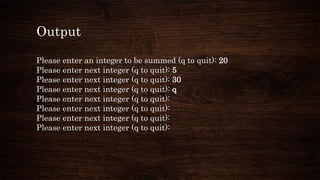
Output
Please enter an integer to be summed (q to quit): 20
Please enter next integer (q to quit): 5
Please enter next integer (q to quit): 30
Please enter next integer (q to quit): q
Please enter next integer (q to quit):
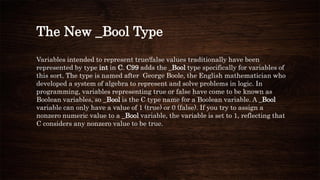
The New _Bool Type
Variables intended to represent true/false values traditionally have been
represented by type int in C. C99 adds the _Bool type specifically for variables of
this sort. The type is named after George Boole, the English mathematician who
developed a system of algebra to represent and solve problems in logic. In
programming, variables representing true or false have come to be known as
Boolean variables, so _Bool is the C type name for a Boolean variable. A _Bool
variable can only have a value of 1 (true) or 0 (false). If you try to assign a
nonzero numeric value to a _Bool variable, the variable is set to 1, reflecting that
C considers any nonzero value to be true.
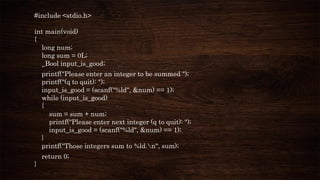
#include <stdio.h>
int main(void)
{
long num;
long sum = 0L;
_Bool input_is_good;
printf("Please enter an integer to be summed ");
printf("(q to quit): ");
input_is_good = (scanf("%ld", &num) == 1);
while (input_is_good)
{
sum = sum + num;
printf("Please enter next integer (q to quit): ");
input_is_good = (scanf("%ld", &num) == 1);
}
printf("Those integers sum to %ld.n", sum);
return 0;
}
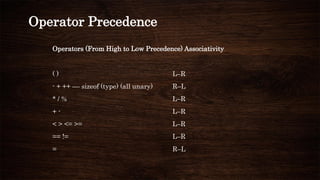
Precedence of Relational Operators
The precedence of the relational operators is less than that of the arithmetic
operators, including + and -, and greater than that of assignment operators.
Operator Precedence
Operators (From High to Low Precedence) Associativity
( ) L–R
- + ++ –– sizeof (type) (all unary) R–L
* / % L–R
+ - L–R
< > <= >= L–R
== != L–R
= R–L
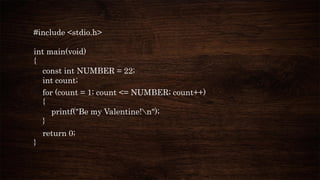
The for Loop
The for loop gathers all three actions (initializing, testing, and updating)
into one place.
#include <stdio.h>
int main(void)
{
const int NUMBER = 22;
int count;
for (count = 1; count <= NUMBER; count++)
{
printf("Be my Valentine!n");
}
return 0;
}
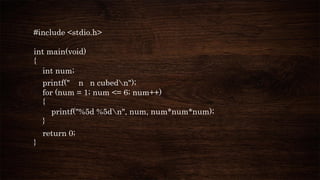
#include <stdio.h>
int main(void)
{
int num;
printf(" n n cubedn");
for (num = 1; num <= 6; num++)
{
printf("%5d %5dn", num, num*num*num);
}
return 0;
}
Output
n n cubed
1 1
2 8
3 27
4 64
5 125
6 216
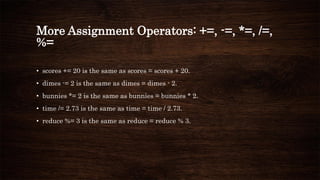
More Assignment Operators: +=, -=, *=, /=,
%=
• scores += 20 is the same as scores = scores + 20.
• dimes -= 2 is the same as dimes = dimes - 2.
• bunnies *= 2 is the same as bunnies = bunnies * 2.
• time /= 2.73 is the same as time = time / 2.73.
• reduce %= 3 is the same as reduce = reduce % 3.
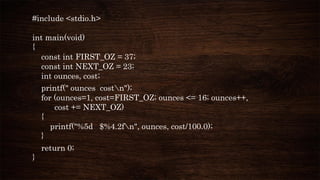
The Comma Operator
The comma operator extends the flexibility of the for loop by enabling you to include
more than one initialization or update expression in a single for loop specification.
#include <stdio.h>
int main(void)
{
const int FIRST_OZ = 37;
const int NEXT_OZ = 23;
int ounces, cost;
printf(" ounces costn");
for (ounces=1, cost=FIRST_OZ; ounces <= 16; ounces++,
cost += NEXT_OZ)
{
printf("%5d $%4.2fn", ounces, cost/100.0);
}
return 0;
}
Output
ounces cost
1 $0.37
2 $0.60
3 $0.83
4 $1.06
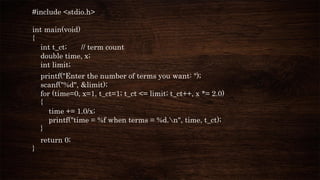
#include <stdio.h>
int main(void)
{
int t_ct; // term count
double time, x;
int limit;
printf("Enter the number of terms you want: ");
scanf("%d", &limit);
for (time=0, x=1, t_ct=1; t_ct <= limit; t_ct++, x *= 2.0)
{
time += 1.0/x;
printf("time = %f when terms = %d.n", time, t_ct);
}
return 0;
}
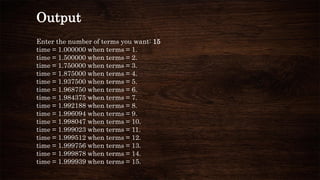
Output
Enter the number of terms you want: 15
time = 1.000000 when terms = 1.
time = 1.500000 when terms = 2.
time = 1.750000 when terms = 3.
time = 1.875000 when terms = 4.
time = 1.937500 when terms = 5.
time = 1.968750 when terms = 6.
time = 1.984375 when terms = 7.
time = 1.992188 when terms = 8.
time = 1.996094 when terms = 9.
time = 1.998047 when terms = 10.
time = 1.999023 when terms = 11.
time = 1.999512 when terms = 12.
time = 1.999756 when terms = 13.
time = 1.999878 when terms = 14.
time = 1.999939 when terms = 15.
An Exit-Condition Loop: do while
The while loop and the for loop are both entry-condition loops. The
test condition is checked before each iteration of the loop, so it is
possible for the statements in the loop to never execute. C also has an
exit-condition loop, in which the condition is checked after each
iteration of the loop, guaranteeing that statements are executed at
least once. This variety is called a do while loop.
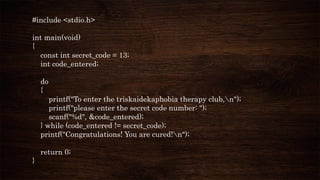
#include <stdio.h>
int main(void)
{
const int secret_code = 13;
int code_entered;
do
{
printf("To enter the triskaidekaphobia therapy club,n");
printf("please enter the secret code number: ");
scanf("%d", &code_entered);
} while (code_entered != secret_code);
printf("Congratulations! You are cured!n");
return 0;
}
Output
To enter the triskaidekaphobia therapy club,
please enter the secret code number: 12
To enter the triskaidekaphobia therapy club,
please enter the secret code number: 14
To enter the triskaidekaphobia therapy club,
please enter the secret code number: 13
Congratulations! You are cured!
Which Loop?
When you decide you need a loop, which one should you use? First, decide
whether you need an entry-condition loop or an exit-condition loop. Your
answer should usually be an entry-condition loop. There are several
reasons computer scientists consider an entry-condition loop to be superior.
One is the general principle that it is better to look before you leap (or loop)
than after. A second is that a program is easier to read if the loop test is
found at the beginning of the loop. Finally, in many uses, it is important
that the loop be skipped entirely if the test is not initially met.
Nested Loops
A nested loop is one loop inside another loop. A common use
for nested loops is to display data in rows and columns. One
loop can handle, say, all the columns in a row, and the second
loop handles the rows
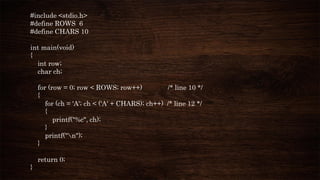
#include <stdio.h>
#define ROWS 6
#define CHARS 10
int main(void)
{
int row;
char ch;
for (row = 0; row < ROWS; row++) /* line 10 */
{
for (ch = 'A'; ch < ('A' + CHARS); ch++) /* line 12 */
{
printf("%c", ch);
}
printf("n");
}
return 0;
}
Output
ABCDEFGHIJ
ABCDEFGHIJ
ABCDEFGHIJ
ABCDEFGHIJ
ABCDEFGHIJ
ABCDEFGHIJ
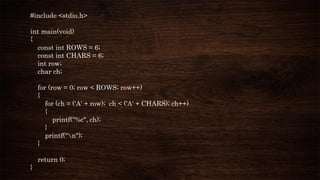
#include <stdio.h>
int main(void)
{
const int ROWS = 6;
const int CHARS = 6;
int row;
char ch;
for (row = 0; row < ROWS; row++)
{
for (ch = ('A' + row); ch < ('A' + CHARS); ch++)
{
printf("%c", ch);
}
printf("n");
}
return 0;
}
Output
ABCDEF
BCDEF
CDEF
DEF
EF
F
Introducing Arrays
An array is a series of values of the same type, such as 10 chars or 15 ints, stored
sequentially. The whole array bears a single name, and the individual items, or
elements, are accessed by using an integer index.
Example:
float debts[20]; -- debts[5] = 32.54; -- debts[6] = 1.2e+21;
Using scanf() with arrays:
scanf("%f", &debts[4]); // read a value into the 5th element
#include <stdio.h>
#define SIZE 10
#define PAR 72
int main(void)
{
int index, score[SIZE];
int sum = 0;
float average;
printf("Enter %d golf scores:n", SIZE);
for (index = 0; index < SIZE; index++)
scanf("%d", &score[index]); // read in the ten scores
printf("The scores read in are as follows:n");
for (index = 0; index < SIZE; index++)
printf("%5d", score[index]); // verify input
printf("n");
for (index = 0; index < SIZE; index++)
{
sum += score[index]; // add them up
}
average = (float) sum / SIZE; // time-honored method
printf("Sum of scores = %d, average = %.2fn", sum, average);
printf("That's a handicap of %.0f.n", average - PAR);
return 0;
}
Output
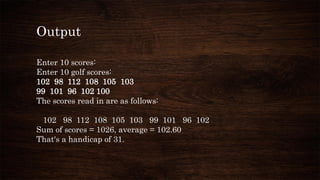
Enter 10 scores:
Enter 10 golf scores:
102 98 112 108 105 103
99 101 96 102 100
The scores read in are as follows:
102 98 112 108 105 103 99 101 96 102
Sum of scores = 1026, average = 102.60
That's a handicap of 31.
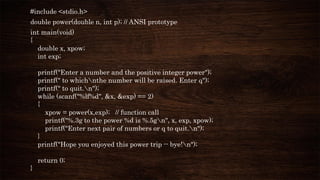
#include <stdio.h>
double power(double n, int p); // ANSI prototype
int main(void)
{
double x, xpow;
int exp;
printf("Enter a number and the positive integer power");
printf(" to whichnthe number will be raised. Enter q");
printf(" to quit.n");
while (scanf("%lf%d", &x, &exp) == 2)
{
xpow = power(x,exp); // function call
printf("%.3g to the power %d is %.5gn", x, exp, xpow);
printf("Enter next pair of numbers or q to quit.n");
}
printf("Hope you enjoyed this power trip -- bye!n");
return 0;
}
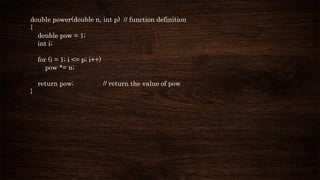
double power(double n, int p) // function definition
{
double pow = 1;
int i;
for (i = 1; i <= p; i++)
pow *= n;
return pow; // return the value of pow
}
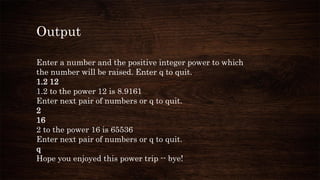
Output
Enter a number and the positive integer power to which
the number will be raised. Enter q to quit.
1.2 12
1.2 to the power 12 is 8.9161
Enter next pair of numbers or q to quit.
2
16
2 to the power 16 is 65536
Enter next pair of numbers or q to quit.
q
Hope you enjoyed this power trip -- bye!

5 c control statements looping

  • 1.
  • 2.
  • 3.
    #include <stdio.h> int main(void) { longnum; long sum = 0L; /* initialize sum to zero */ int status; printf("Please enter an integer to be summed "); printf("(q to quit): "); status = scanf("%ld", &num); while (status == 1) /* == means "is equal to" */ { sum = sum + num; printf("Please enter next integer (q to quit): "); status = scanf("%ld", &num); } printf("Those integers sum to %ld.n", sum); return 0; }
  • 4.
    Output Please enter aninteger to be summed (q to quit): 44 Please enter next integer (q to quit): 33 Please enter next integer (q to quit): 88 Please enter next integer (q to quit): 121 Please enter next integer (q to quit): q Those integers sum to 286.
  • 5.
    Relational Operators Operator Meaning <Is less than <= Is less than or equal to == Is equal to >= Is greater than or equal to > Is greater than != Is not equal to
  • 6.
    #include <math.h> #include <stdio.h> intmain(void) { const double ANSWER = 3.14159; double response; printf("What is the value of pi?n"); scanf("%lf", &response); while (fabs(response - ANSWER) > 0.0001) { printf("Try again!n"); scanf("%lf", &response); } printf("Close enough!n"); return 0; }
  • 7.
    Output What is thevalue of pi? 3.14 Try again! 3.1416 Close enough!
  • 8.
    /* t_and_f.c --true and false values in C */ #include <stdio.h> int main(void) { int true_val, false_val; true_val = (10 > 2); /* value of a true relationship */ false_val = (10 == 2); /* value of a false relationship */ printf("true = %d; false = %d n", true_val, false_val); return 0; }
  • 9.
  • 10.
    #include <stdio.h> int main(void) { intn = 3; while (n) { printf("%2d is truen", n--); } printf("%2d is falsen", n); n = -3; while (n) { printf("%2d is truen", n++); } printf("%2d is falsen", n); return 0; }
  • 11.
    Output 3 is true 2is true 1 is true 0 is false -3 is true -2 is true -1 is true 0 is false
  • 12.
    #include <stdio.h> int main(void) { longnum; long sum = 0L; int status; printf("Please enter an integer to be summed "); printf("(q to quit): "); status = scanf("%ld", &num); while (status = 1) { sum = sum + num; printf("Please enter next integer (q to quit): "); status = scanf("%ld", &num); } printf("Those integers sum to %ld.n", sum); return 0; }
  • 13.
    Output Please enter aninteger to be summed (q to quit): 20 Please enter next integer (q to quit): 5 Please enter next integer (q to quit): 30 Please enter next integer (q to quit): q Please enter next integer (q to quit): Please enter next integer (q to quit): Please enter next integer (q to quit): Please enter next integer (q to quit):
  • 14.
    The New _BoolType Variables intended to represent true/false values traditionally have been represented by type int in C. C99 adds the _Bool type specifically for variables of this sort. The type is named after George Boole, the English mathematician who developed a system of algebra to represent and solve problems in logic. In programming, variables representing true or false have come to be known as Boolean variables, so _Bool is the C type name for a Boolean variable. A _Bool variable can only have a value of 1 (true) or 0 (false). If you try to assign a nonzero numeric value to a _Bool variable, the variable is set to 1, reflecting that C considers any nonzero value to be true.
  • 15.
    #include <stdio.h> int main(void) { longnum; long sum = 0L; _Bool input_is_good; printf("Please enter an integer to be summed "); printf("(q to quit): "); input_is_good = (scanf("%ld", &num) == 1); while (input_is_good) { sum = sum + num; printf("Please enter next integer (q to quit): "); input_is_good = (scanf("%ld", &num) == 1); } printf("Those integers sum to %ld.n", sum); return 0; }
  • 16.
    Precedence of RelationalOperators The precedence of the relational operators is less than that of the arithmetic operators, including + and -, and greater than that of assignment operators.
  • 17.
    Operator Precedence Operators (FromHigh to Low Precedence) Associativity ( ) L–R - + ++ –– sizeof (type) (all unary) R–L * / % L–R + - L–R < > <= >= L–R == != L–R = R–L
  • 18.
    The for Loop Thefor loop gathers all three actions (initializing, testing, and updating) into one place.
  • 19.
    #include <stdio.h> int main(void) { constint NUMBER = 22; int count; for (count = 1; count <= NUMBER; count++) { printf("Be my Valentine!n"); } return 0; }
  • 20.
    #include <stdio.h> int main(void) { intnum; printf(" n n cubedn"); for (num = 1; num <= 6; num++) { printf("%5d %5dn", num, num*num*num); } return 0; }
  • 21.
    Output n n cubed 11 2 8 3 27 4 64 5 125 6 216
  • 22.
    More Assignment Operators:+=, -=, *=, /=, %= • scores += 20 is the same as scores = scores + 20. • dimes -= 2 is the same as dimes = dimes - 2. • bunnies *= 2 is the same as bunnies = bunnies * 2. • time /= 2.73 is the same as time = time / 2.73. • reduce %= 3 is the same as reduce = reduce % 3.
  • 23.
    The Comma Operator Thecomma operator extends the flexibility of the for loop by enabling you to include more than one initialization or update expression in a single for loop specification.
  • 24.
    #include <stdio.h> int main(void) { constint FIRST_OZ = 37; const int NEXT_OZ = 23; int ounces, cost; printf(" ounces costn"); for (ounces=1, cost=FIRST_OZ; ounces <= 16; ounces++, cost += NEXT_OZ) { printf("%5d $%4.2fn", ounces, cost/100.0); } return 0; }
  • 25.
    Output ounces cost 1 $0.37 2$0.60 3 $0.83 4 $1.06
  • 26.
    #include <stdio.h> int main(void) { intt_ct; // term count double time, x; int limit; printf("Enter the number of terms you want: "); scanf("%d", &limit); for (time=0, x=1, t_ct=1; t_ct <= limit; t_ct++, x *= 2.0) { time += 1.0/x; printf("time = %f when terms = %d.n", time, t_ct); } return 0; }
  • 27.
    Output Enter the numberof terms you want: 15 time = 1.000000 when terms = 1. time = 1.500000 when terms = 2. time = 1.750000 when terms = 3. time = 1.875000 when terms = 4. time = 1.937500 when terms = 5. time = 1.968750 when terms = 6. time = 1.984375 when terms = 7. time = 1.992188 when terms = 8. time = 1.996094 when terms = 9. time = 1.998047 when terms = 10. time = 1.999023 when terms = 11. time = 1.999512 when terms = 12. time = 1.999756 when terms = 13. time = 1.999878 when terms = 14. time = 1.999939 when terms = 15.
  • 28.
    An Exit-Condition Loop:do while The while loop and the for loop are both entry-condition loops. The test condition is checked before each iteration of the loop, so it is possible for the statements in the loop to never execute. C also has an exit-condition loop, in which the condition is checked after each iteration of the loop, guaranteeing that statements are executed at least once. This variety is called a do while loop.
  • 29.
    #include <stdio.h> int main(void) { constint secret_code = 13; int code_entered; do { printf("To enter the triskaidekaphobia therapy club,n"); printf("please enter the secret code number: "); scanf("%d", &code_entered); } while (code_entered != secret_code); printf("Congratulations! You are cured!n"); return 0; }
  • 30.
    Output To enter thetriskaidekaphobia therapy club, please enter the secret code number: 12 To enter the triskaidekaphobia therapy club, please enter the secret code number: 14 To enter the triskaidekaphobia therapy club, please enter the secret code number: 13 Congratulations! You are cured!
  • 31.
    Which Loop? When youdecide you need a loop, which one should you use? First, decide whether you need an entry-condition loop or an exit-condition loop. Your answer should usually be an entry-condition loop. There are several reasons computer scientists consider an entry-condition loop to be superior. One is the general principle that it is better to look before you leap (or loop) than after. A second is that a program is easier to read if the loop test is found at the beginning of the loop. Finally, in many uses, it is important that the loop be skipped entirely if the test is not initially met.
  • 32.
    Nested Loops A nestedloop is one loop inside another loop. A common use for nested loops is to display data in rows and columns. One loop can handle, say, all the columns in a row, and the second loop handles the rows
  • 33.
    #include <stdio.h> #define ROWS6 #define CHARS 10 int main(void) { int row; char ch; for (row = 0; row < ROWS; row++) /* line 10 */ { for (ch = 'A'; ch < ('A' + CHARS); ch++) /* line 12 */ { printf("%c", ch); } printf("n"); } return 0; }
  • 34.
  • 35.
    #include <stdio.h> int main(void) { constint ROWS = 6; const int CHARS = 6; int row; char ch; for (row = 0; row < ROWS; row++) { for (ch = ('A' + row); ch < ('A' + CHARS); ch++) { printf("%c", ch); } printf("n"); } return 0; }
  • 36.
  • 37.
    Introducing Arrays An arrayis a series of values of the same type, such as 10 chars or 15 ints, stored sequentially. The whole array bears a single name, and the individual items, or elements, are accessed by using an integer index. Example: float debts[20]; -- debts[5] = 32.54; -- debts[6] = 1.2e+21; Using scanf() with arrays: scanf("%f", &debts[4]); // read a value into the 5th element
  • 38.
    #include <stdio.h> #define SIZE10 #define PAR 72 int main(void) { int index, score[SIZE]; int sum = 0; float average; printf("Enter %d golf scores:n", SIZE); for (index = 0; index < SIZE; index++) scanf("%d", &score[index]); // read in the ten scores printf("The scores read in are as follows:n"); for (index = 0; index < SIZE; index++) printf("%5d", score[index]); // verify input printf("n"); for (index = 0; index < SIZE; index++) { sum += score[index]; // add them up }
  • 39.
    average = (float)sum / SIZE; // time-honored method printf("Sum of scores = %d, average = %.2fn", sum, average); printf("That's a handicap of %.0f.n", average - PAR); return 0; }
  • 40.
    Output Enter 10 scores: Enter10 golf scores: 102 98 112 108 105 103 99 101 96 102 100 The scores read in are as follows: 102 98 112 108 105 103 99 101 96 102 Sum of scores = 1026, average = 102.60 That's a handicap of 31.
  • 41.
    #include <stdio.h> double power(doublen, int p); // ANSI prototype int main(void) { double x, xpow; int exp; printf("Enter a number and the positive integer power"); printf(" to whichnthe number will be raised. Enter q"); printf(" to quit.n"); while (scanf("%lf%d", &x, &exp) == 2) { xpow = power(x,exp); // function call printf("%.3g to the power %d is %.5gn", x, exp, xpow); printf("Enter next pair of numbers or q to quit.n"); } printf("Hope you enjoyed this power trip -- bye!n"); return 0; }
  • 42.
    double power(double n,int p) // function definition { double pow = 1; int i; for (i = 1; i <= p; i++) pow *= n; return pow; // return the value of pow }
  • 43.
    Output Enter a numberand the positive integer power to which the number will be raised. Enter q to quit. 1.2 12 1.2 to the power 12 is 8.9161 Enter next pair of numbers or q to quit. 2 16 2 to the power 16 is 65536 Enter next pair of numbers or q to quit. q Hope you enjoyed this power trip -- bye!