
Uploaded byMedia4math
3 coin toss
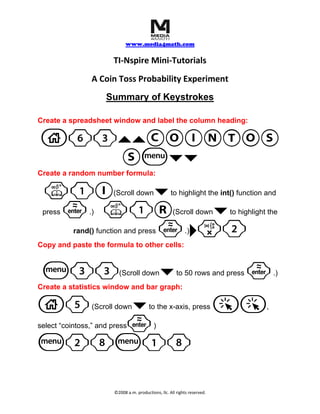
This document provides instructions for conducting a coin toss probability experiment using a TI-Nspire calculator. It outlines the steps to create a spreadsheet with a random number formula to simulate coin tosses, copy the formula down 50 rows, and then create a statistics window and bar graph to analyze the results. The experiment allows students to visualize probabilities of heads or tails from repeated random coin tosses.
More Related Content


3 coin toss
- 1. www.media4math.com TI‐Nspire Mini‐Tutorials A Coin Toss Probability Experiment Summary of Keystrokes Create a spreadsheet window and label the column heading: c63``COINTOS Sb¤¤ Create a random number formula: k1I ¤ (Scroll down to highlight the int() function and · k1R press ¤ .) (Scroll down to highlight the · ¢r2rand() function and press .) Copy and paste the formula to other cells: b33 (Scroll down ¤ to 50 rows and press · .) Create a statistics window and bar graph: c5 ¤ (Scroll down to the x-axis, press aa , · select “cointoss,” and press ) b28b18 ©2008 a.m. productions, llc. All rights reserved.