
Uploaded byMedia4math
2 exploring cosineswithsliders
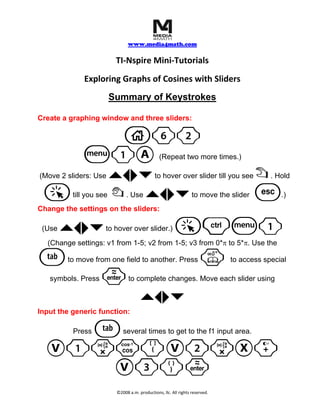
This document provides keystroke-by-keystroke instructions for creating a graph of cosine functions with sliders in TI-Nspire. It describes how to create a graphing window and three sliders, set the slider ranges from 1-5 and 0*π to 5*π, and input the generic function V1*cos(V2*x + V3) to link the sliders to the graph.
More Related Content


Similar to 2 exploring cosineswithsliders


2 exploring cosineswithsliders
- 1. www.media4math.com TI‐Nspire Mini‐Tutorials Exploring Graphs of Cosines with Sliders Summary of Keystrokes Create a graphing window and three sliders: c62 b1A (Repeat two more times.) `¡¢¤ (Move 2 sliders: Use to hover over slider till you see ÷ . Hold a { `¡¢¤till you see . Use to move the slider d .) Change the settings on the sliders: (Use `¡¢¤ to hover over slider.) a/b1 (Change settings: v1 from 1-5; v2 from 1-5; v3 from 0*π to 5*π. Use the e to move from one field to another. Press k to access special symbols. Press · to complete changes. Move each slider using `¡¢¤ Input the generic function: e Press several times to get to the f1 input area. V1rn(V2rX+ V3)· ©2008 a.m. productions, llc. All rights reserved.